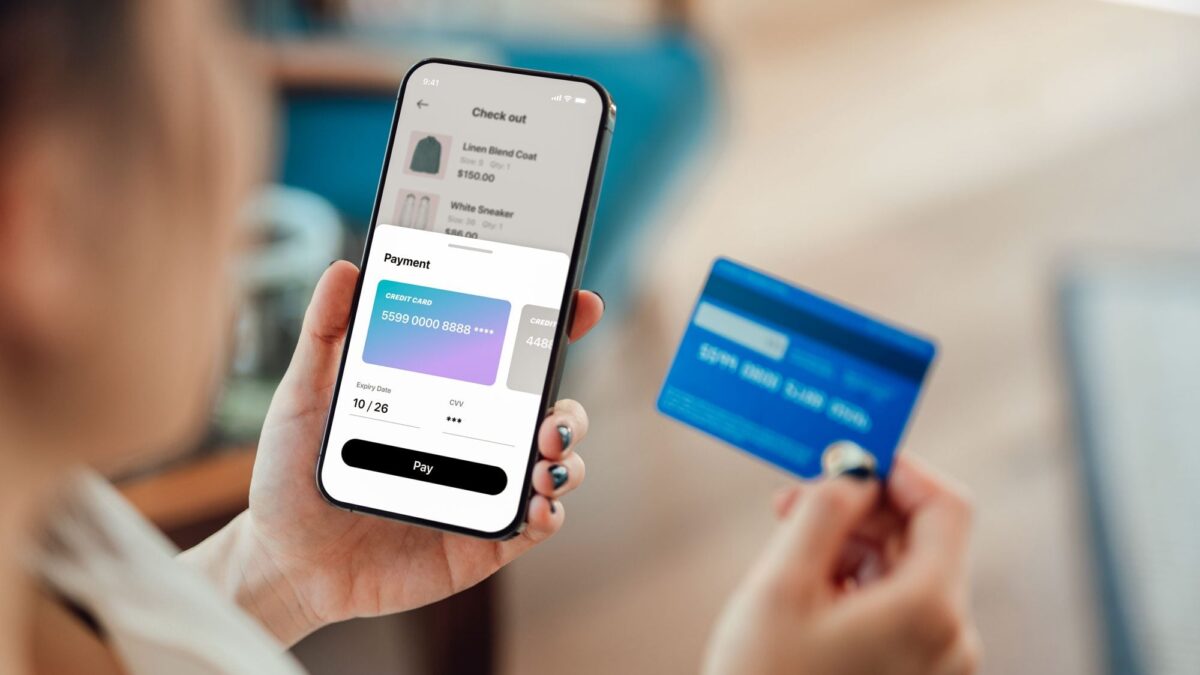
Picture this. It’s a Tuesday morning, your phone buzzes, and a customer just bought your product. You didn’t run an ad. Nobody clicked a link. Nobody even visited your site.
An AI agent did the shopping.
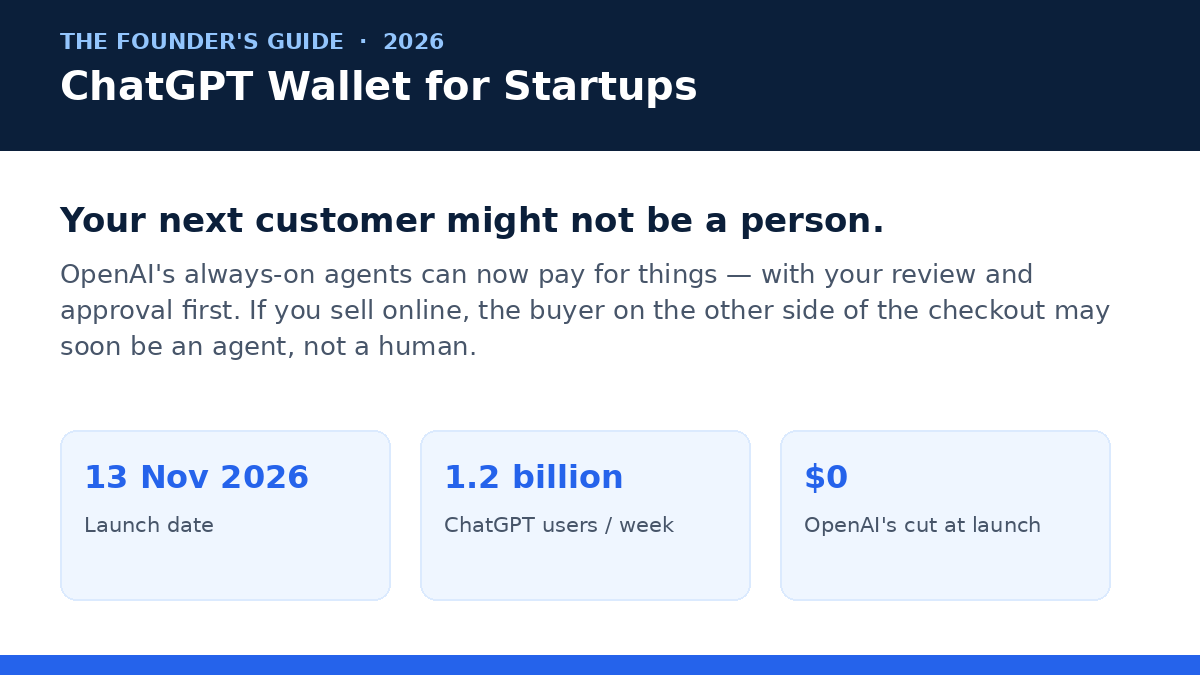
That’s the world OpenAI stepped into on November 13, 2026, when it launched ChatGPT Wallet. The short version: OpenAI’s always-on agents, called dots, can now complete purchases on a user’s behalf — and the payment part, the bit everyone said would take years to solve, is handled by a one-time token from the card networks. No real card number changes hands. You still review and approve every purchase. But the buyer on the other side of the checkout might not be a person anymore.
Look, I’ve covered a lot of OpenAI launches. Most of them matter to developers or to people who love demos. This one matters to founders, because it changes who your customer is — and it changes it quietly, one approved purchase at a time. And here’s the thing: whether or not you can use Wallet yourself today (most of you can’t yet, and I’ll be straight about that), the merchant side of this story starts now. The stores that are ready for agent buyers will get the orders. The ones that aren’t will get blocked, skipped, or misquoted.
So this is the honest founder’s guide. What Wallet is, how a purchase actually works, who can use it, what it means if you sell things online, what it means if you buy things with agents, where the limits are, and the four things to do this week if you sell anything on the internet.
What ChatGPT Wallet actually is
ChatGPT Wallet is a way for an AI agent to pay for something without ever holding your card. That’s the whole idea, and it’s worth saying plainly, because the first question everyone asks is the security one: wait, you’re giving your credit card to a chatbot?
No. You’re not. Here’s how OpenAI built it.
Wallet works with dots, OpenAI’s always-on agents that launched on September 29, 2026. Each dot gets its own cloud computer and its own browser, and it keeps working on tasks in the background while you do other things. Wallet is the payment layer on top of that. When a dot needs to buy something for you, it doesn’t get your card number. Instead, the payment network — American Express, Chase, Mastercard, or Visa, the four partners OpenAI built this with — issues a one-time payment token. That’s a substitute card number, a substitute security code, and a substitute expiry date, good for that purchase. The agent never sees your real details. The merchant never sees them either. The token goes through the merchant’s normal checkout, and the merchant’s normal payment processor handles it like any other card payment.
That’s the clever part, and it’s also the part that makes this launch different from OpenAI’s last attempt. In September 2025, OpenAI tried Instant Checkout with Stripe and Etsy sellers — buying inside the chat. It shut the whole thing down in March 2026. The lesson from that experiment, if you read between the lines, is that people (and merchants) still trust the merchant’s own checkout more than a payment flow inside a chatbot. Wallet respects that. Nothing about the checkout changes for the merchant. The only thing that changes is who fills in the form.
And one more detail that matters for founders: OpenAI takes no cut of Wallet transactions at launch, according to CNBC’s reporting. The money flows the same way it always did — customer to merchant, through the card network. OpenAI’s play here isn’t a payments fee. It’s keeping people inside ChatGPT for the whole journey, from “I need a new espresso machine” to the order confirmation. If you want the announcement in OpenAI’s own words, the launch post is the primary source — and Unite.AI and CIOL both published early rundowns of the launch that are worth a skim.
How a purchase actually works, step by step
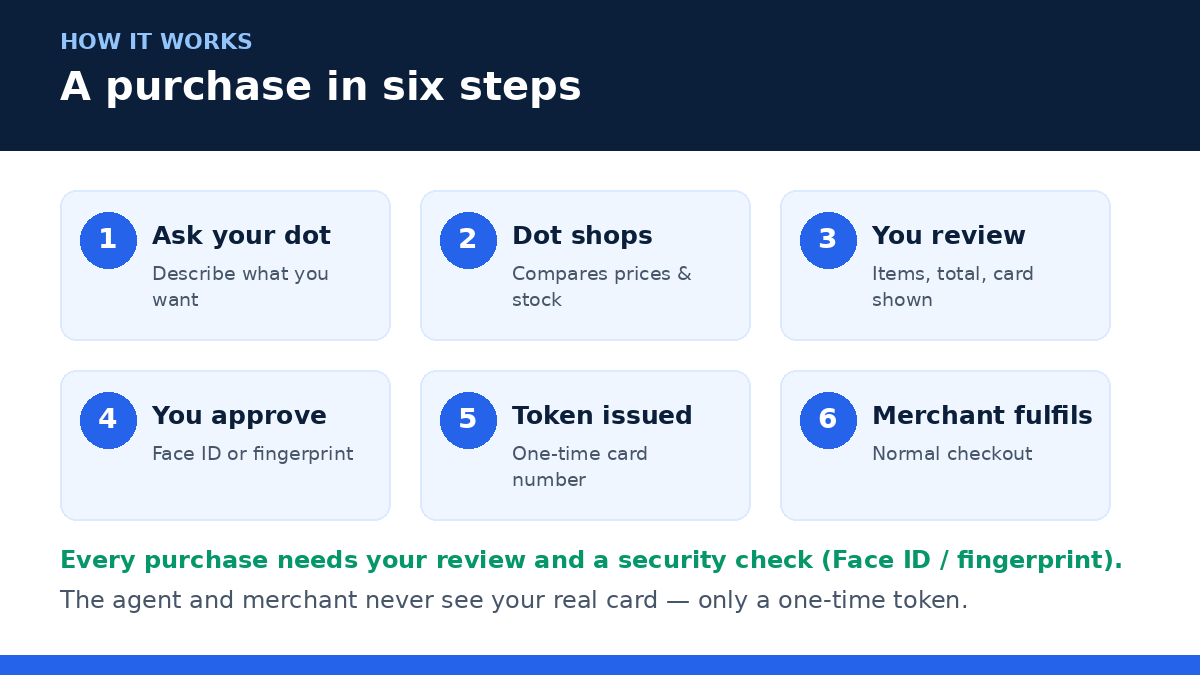
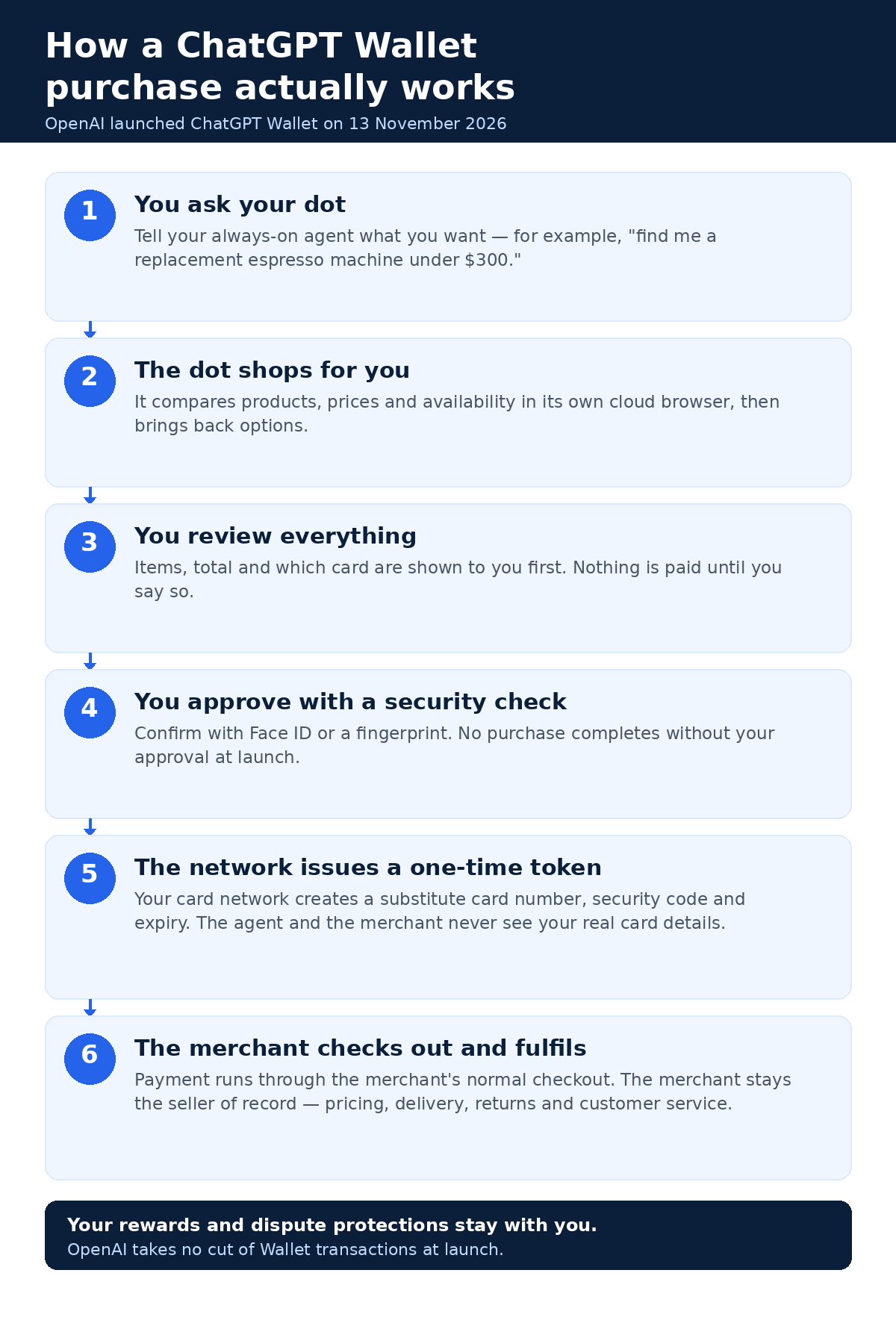
Real talk: the flow is simpler than the press coverage makes it sound. Six steps, and you stay in control of the only one that matters.
Step 1: You ask your dot
You tell your dot what you want, the way you’d tell a good assistant. “Find me a replacement espresso machine under $300, and don’t pick one with terrible reviews.” The dot already knows your preferences from your past conversations, which is the whole point of an always-on agent — it has context a search box doesn’t.
Step 2: The dot shops
The dot goes off in its own cloud browser, compares products, checks prices and availability, and comes back with options. This is the part where your product feed matters, by the way — I’ll come back to that, because it’s the single biggest lever a merchant has in this whole system.
Step 3: You review everything
Before anything is paid for, you see the items, the total, and which card will be charged. This is the step the whole design hangs on. Nothing moves forward until you’ve looked at it. If the dot picked the wrong size, the wrong model, or a price that crept up since the listing was written, this is where you catch it.
Step 4: You approve with a security check
You confirm with a biometric check — Face ID or a fingerprint. No purchase completes without your approval at launch. Full stop. There’s no “the agent just bought it” mode yet, though OpenAI says that’s coming (more on that in a minute).
Step 5: The network issues a one-time token
Once you approve, your card network generates the single-use token — substitute number, security code, expiry — and that’s what gets sent to the merchant. Your real card details stay with the network. This is the same tokenization idea that already powers Apple Pay and Google Pay, just applied to an agent instead of a phone. That’s a reassuring thing, honestly. It’s not a new security model invented for AI. It’s the existing one, extended.
Step 6: The merchant checks out and fulfils
The token runs through the merchant’s existing checkout. The merchant stays the seller of record — pricing, delivery, returns, and customer service are all theirs, exactly as before. And you keep your card rewards and your dispute protections for eligible disputes. If something goes wrong with the order, you deal with the merchant, same as any other purchase.
Who can actually use it right now
Okay. Deep breath, because this is the part where most of you will find out you can’t use it yet. And I’d rather tell you that in a clear list than let you hunt through settings for an hour.
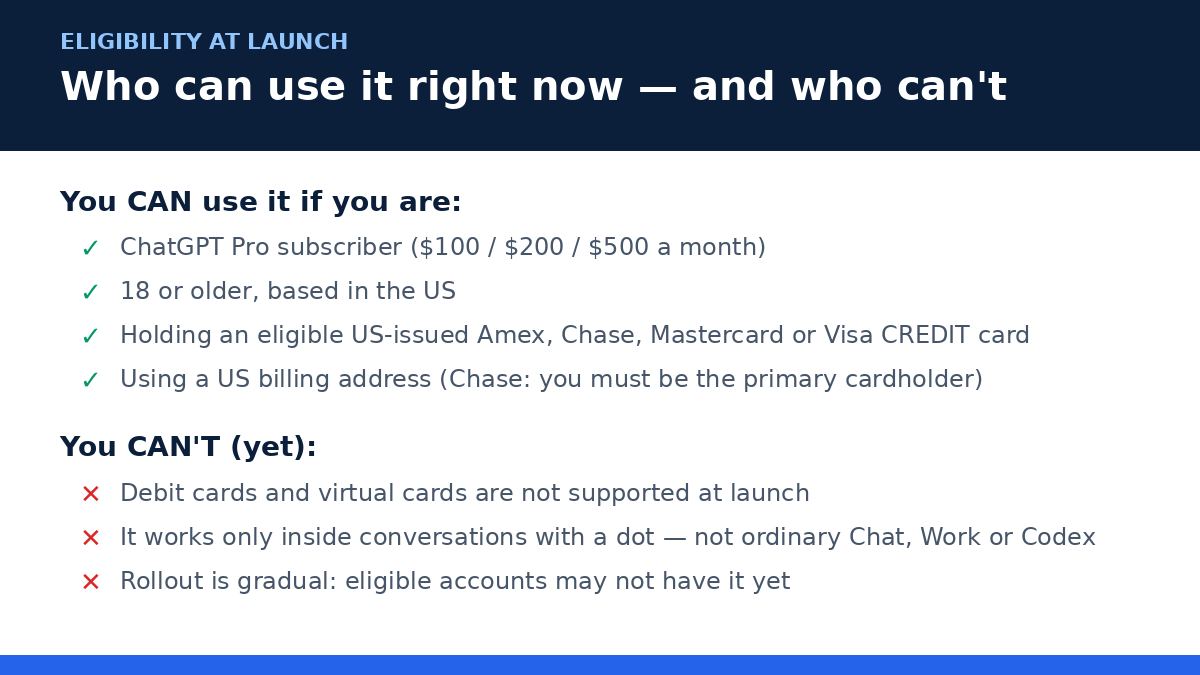
At launch, ChatGPT Wallet is available only to people who check every box on this list:
- ChatGPT Pro subscribers. That’s the $100, $200, or $500 per month Pro plans — not Plus, not Free, not Go. This is a Pro-only feature at launch.
- Aged 18 or older.
- Based in the US, with a US billing address.
- Holding an eligible US-issued credit card from American Express, Chase, Mastercard, or Visa. Credit only. Debit cards are not supported, and virtual cards aren’t either, at least not at launch. If your card is from Chase, you also need to be the primary cardholder — authorized users don’t count.
And even if you tick every box, you might not see it yet. The rollout is gradual, and OpenAI says eligible accounts may not have Wallet right away. There’s no waitlist button to press, no form to fill in — it just appears when your account is included.
One more limit that trips people up: Wallet only works inside conversations with a dot. Not in ordinary Chat, not in Work, not in standalone Codex threads. The agent that does the buying has to be a dot, in a dot conversation. If you’re chatting in the regular ChatGPT window and ask it to buy something, nothing happens — that’s by design.
So, realistically? If you’re a founder outside the US — and a lot of you reading this are — or you’re on Plus, or you pay with a debit card, Wallet isn’t something you can try this week. That doesn’t make this article useless, though. Honestly, it makes the merchant side more important, because the buyers who can use it are exactly the high-spending US Pro subscribers. And the merchant work you do now is the same work whether Wallet reaches you in three months or next year.
What it means if you SELL things online
This is the bigger angle, and it’s the reason I wrote this guide. Forget, for a minute, whether you can personally use Wallet. Ask the other question: what happens when the person shopping for your product sends an agent instead?
Three days after Wallet launched, OpenAI also published its Commerce Partner Playbook — six guides for merchants, covering product feeds, cloud browser access, accepting payments, building a plugin, Sign in with ChatGPT, and claiming your business. The playbook is the real document here. The Wallet announcement is the news; the playbook is the instruction manual for the people who sell things.
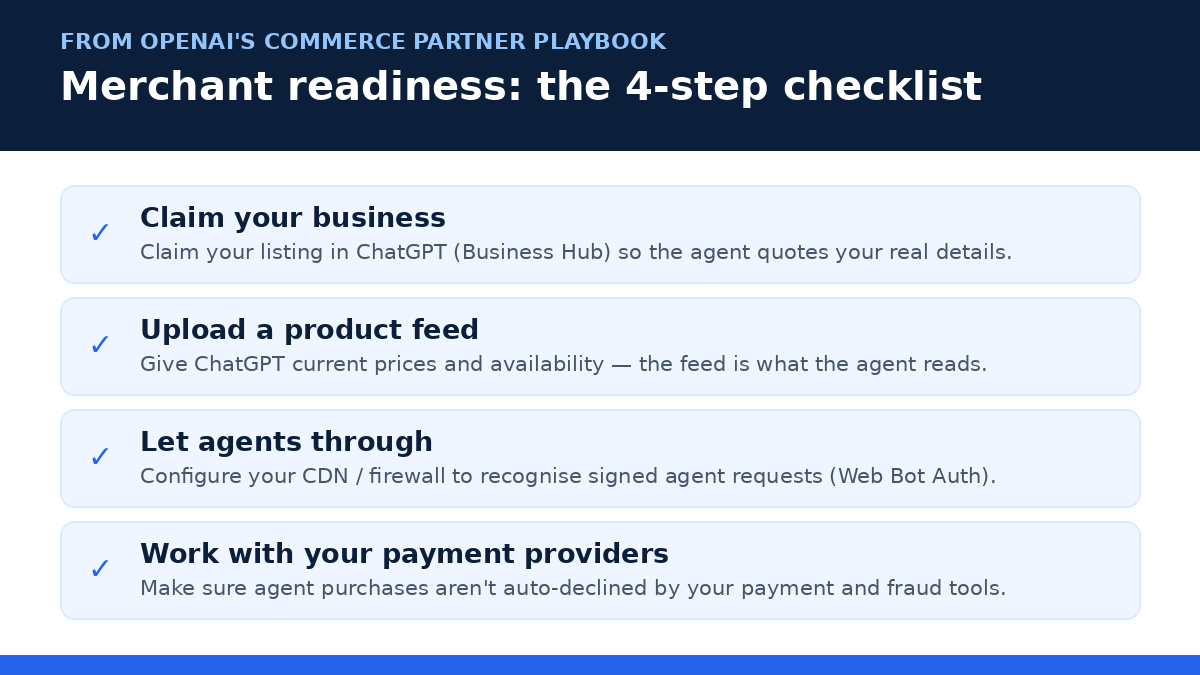
Here’s the part founders keep missing: you don’t need any Wallet-specific checkout integration. The token works with your existing checkout flow. Nobody is asking you to rebuild your store. What OpenAI is asking for is four things, and they’re all things a well-run store should be doing anyway.
1. Claim your business in ChatGPT
OpenAI launched Businesses in ChatGPT on November 10, 2026 — three days before Wallet. Claim your listing in Business Hub, get verified, and fix your details, because the agent quotes what ChatGPT knows about you. An unclaimed listing with wrong prices or a stale description is now a listing that loses sales to an agent that read the wrong numbers. I wrote a full guide to claiming yours — go do it this week if you haven’t already.
2. Upload a product feed with real prices and availability
This is the big one. The dot doesn’t browse your site like a person, admiring your hero image and reading your brand story. It reads your feed. If your prices are out of date, if your stock levels are wrong, if a product is listed that you discontinued months ago — the agent will recommend it, the customer will approve it, and then the order will fail at checkout, or worse, go through for the wrong thing. A feed with current pricing and availability is the difference between being the answer and being an error message. Shopify merchants can connect their store directly; everyone else uploads a file to OpenAI’s specification.
3. Let agents through your front door
Here’s a trap a lot of stores are walking into without knowing it. Some merchants are already blocking agent purchases outright, and other sites are blocking them by accident — their bot protection sees a cloud browser, decides it’s a scraper, and slams the door. OpenAI’s answer is Web Bot Auth: your CDN or firewall should be configured to recognise signed requests from agents, so the dot’s browser gets through while actual bad bots still don’t. If your site has aggressive bot protection (and many do, for good reason), check with whoever manages it. An agent that can’t load your checkout can’t buy from you, and it won’t tell you it tried — it’ll just buy from your competitor.
4. Make sure your payment stack doesn’t decline the sale
Agent purchases look slightly different from human ones — different browser, different session patterns — and fraud systems are trained to be suspicious of exactly that. OpenAI lists fraud-prevention partners Forter, Riskified, Sardine, and Signifyd, and payment service providers Adyen, Checkout.com, and Stripe, as the companies working on this. The practical move: talk to your payment provider and your fraud tool, and ask them how they treat agent-initiated checkouts. A declined transaction that would have been a sale is the quietest way to lose money in this new setup, because nobody complains — the agent just moves on.
And if your store itself needs work before it can carry this weight — clean product pages, accurate prices, a checkout that doesn’t fight people, a feed that actually matches your inventory — that’s exactly the kind of job a web development studio like AISquadX handles every day. Get the foundation right first, then worry about the agents.
“The buyer on the other side of the checkout might not be a person anymore. The stores that are ready for agent buyers will get the orders. The ones that aren’t will get blocked, skipped, or misquoted.”
What it means if you BUY things with agents
The seller angle gets all the attention, but there’s a second story here, and it’s the one that affects your own spending. Founders buy a lot of stuff: software, hardware, office supplies, gifts for clients, the occasional emergency replacement for something that broke the day before a launch. (My own breaking point was a dead laptop charger at 11pm before a demo. The dot version of that story ends with a new charger ordered while I was still on the call.)
If you’re a US Pro subscriber, Wallet turns your dot into a genuine procurement helper. The honest version of that is less glamorous than the demos: it’s not about the agent finding you a magical deal. It’s about the boring purchases — the repeat orders, the restocking, the “we’re out of printer paper again” stuff — happening without you spending twenty minutes on them. You ask, it finds the options, you review, you approve, done.
A few things worth thinking about before you hand your dot a shopping list:
- Set the budget in the ask. “Under $300” isn’t a suggestion — it’s the guardrail. Agents follow the constraints you give them, and vague asks get vague results. Be specific about price, brand, and what “good enough” means.
- Review like it matters, because it does. The review screen is your last checkpoint. Check the model number, the quantity, and the total. Agents are good at the broad strokes and occasionally sloppy on the details — the wrong size, the renewed instead of new listing, the subscription instead of the one-off. Thirty seconds of review saves a return.
- Keep receipts organized. Agent purchases still generate the same order confirmations and invoices, but they arrive while you’re doing something else. If you’re buying for a business, decide upfront where those receipts go — a dedicated inbox folder, an expense tool, whatever — or you’ll be hunting for them at tax time.
- Watch the subscription trap. The most expensive agent mistake isn’t a wrong item, it’s a free trial that becomes a paid plan because nobody checked the billing terms on the review screen. If the dot suggests a subscription, read the terms yourself.
And the direction of travel is clear. OpenAI says that in future, users will be able to delegate purchases entirely — setting spending limits, purchase categories, or time periods, pre-approved, with enhanced safeguards. That’s the “set it and forget it” version: your dot can buy office supplies up to $200 a month without asking you each time. It’s not here yet, and the safeguards matter more than the convenience, but that’s where this is heading. Founders who set up good habits now — clear budgets, careful review, tidy receipts — will be the ones who can safely switch that on when it arrives.
The risks and honest limits
I like this launch. I also think the honest thing is to put the limits in one place, because the coverage so far has been heavy on the wow and light on the “well, actually.”
Most people can’t use it. US-only, Pro-only, credit-card-only, gradual rollout, dots-only. That’s a small slice of ChatGPT’s 1.2 billion weekly users, per OpenAI’s own figure. If you’re outside the US, this is a spectator sport for now, and OpenAI hasn’t given a timeline for expanding it.
Agents make mistakes. They pick the wrong variant, misread a price, or miss that the item is out of stock. The review step exists precisely because of this — but the review step only works if you actually read it. The more you trust the agent, the less you check, and the more the occasional error slips through. That’s human nature, and it’s the real risk of the future “delegate everything” mode.
Some merchants are saying no. A few stores are already blocking agent purchases, and some are doing it by accident through bot protection that can’t tell a dot from a scraper. If you sell online, check your own store — you might be blocking agents without knowing it. If you buy with an agent, expect the occasional site that just won’t work, and don’t be surprised when the agent routes around it to a competitor.
The fraud question isn’t settled. Tokenization solves the “don’t share my card number” problem, and that’s real progress. It doesn’t solve disputes about what was ordered, or a merchant who ships the wrong item, or an agent that got socially engineered by a misleading product page. The dispute protections you keep are the card network’s, and they’re the same ones you’d have for any online purchase — no better, no worse.
Your rewards stay, but so does your liability. You keep your card rewards and your dispute protections for eligible disputes, and the merchant stays the seller of record. But the purchase is still yours. If your dot buys the wrong thing because your instructions were vague, that’s your return to file, not OpenAI’s.
Setup walkthrough: if you’re eligible
If you tick every eligibility box — US, 18+, Pro subscriber, eligible credit card — here’s how to get Wallet running. If you don’t tick them all, skip to the FAQ; nothing here will work for you yet, and that’s fine.
- Open a conversation with a dot. Wallet lives inside dot conversations only. Start or open a dot thread — not a regular Chat window, not Work, not Codex. If you haven’t set up ChatGPT for your business yet, here’s the founder’s playbook for signing in with ChatGPT.
- Ask the dot to buy something. The Wallet setup appears when a purchase is involved. Describe what you want and let the dot find options.
- Add your card when prompted. You’ll be asked to add an eligible US-issued American Express, Chase, Mastercard, or Visa credit card, with a US billing address. For Chase cards, make sure you’re the primary cardholder.
- Review the first purchase carefully. Your first few orders are the time to be picky. Check the items, the total, and the card. Confirm with Face ID or a fingerprint.
- Check your card statement. The charge should appear like any other card purchase, from the merchant, with your rewards intact. If anything looks off, dispute it the same way you would any card charge.
And if Wallet doesn’t appear for you even though you’re eligible? That’s the gradual rollout. There’s nothing to apply for and no switch to flip. It arrives when your account is included, and OpenAI hasn’t published a schedule. Check back in a few weeks rather than refreshing daily.
Frequently asked questions
Is ChatGPT Wallet free?
There’s no separate fee for Wallet itself, and OpenAI takes no cut of Wallet transactions at launch. But you need a ChatGPT Pro subscription to use it — $100, $200, or $500 a month — so the real cost is the plan. The purchases themselves are charged to your card by the merchant, exactly like any other online order.
Can an agent buy something without my approval?
No — not at launch. Every purchase requires you to review the items, the total, and the card, then confirm with a security check like Face ID or a fingerprint. OpenAI says future versions will let you pre-approve certain kinds of purchases — spending limits, categories, or time periods — with enhanced safeguards. That mode isn’t live yet.
Does the agent or the merchant see my real card number?
No. Your card network issues a one-time payment token — a substitute card number, security code, and expiry — for each purchase. The agent and the merchant only ever see the token. Your real details stay with the network. This is the same tokenization approach that already powers Apple Pay and Google Pay.
Do I keep my card rewards and dispute protections?
Yes. OpenAI says users keep their card rewards and their dispute protections for eligible disputes, and the merchant remains the seller of record — so pricing, fulfilment, returns, and customer service are the merchant’s responsibility, same as any other purchase. If something goes wrong, you deal with the merchant first, and your card’s dispute process is still there as a backstop.
I’m outside the US, or I’m not on Pro. What can I do?
On the buying side, not much yet — Wallet is US-only and Pro-only at launch, with no published timeline for expansion. On the selling side, plenty. If you run an online store, the merchant work in this guide applies to you right now: claim your business in ChatGPT, upload a product feed with current prices and availability, and make sure your site and payment stack don’t block agent checkouts. The buyers who can use Wallet today are high-spending US Pro subscribers — exactly the customers worth being ready for. And if you want to understand the dots themselves, which are the agents doing the buying, here’s our full guide to OpenAI Dots. If your store’s pricing page needs a rethink before agents start reading it, our guide to pricing an AI SaaS product is a good place to start.
The Bottom Line
Here’s the thing about ChatGPT Wallet. It’s not the moment AI takes over shopping. It’s the moment shopping gets a new kind of buyer — one that reads your feed instead of your homepage, checks your prices instead of your ads, and buys at 3am because its owner asked it to.
For most founders reading this, the buying side is out of reach today. US-only, Pro-only, credit-card-only — that’s a narrow door, and it’s honest to say so. But the selling side is open to everyone, and it’s open now. Claim your business. Feed ChatGPT your real prices. Let the agents through your firewall. Talk to your payment provider. That’s an afternoon of work, and it’s the same work that makes your store better for human shoppers too.
Will agent buyers be a big share of your sales tomorrow? Probably not. Will they quietly become a share worth having while your competitors’ stores block them, misquote them, or decline their cards? That’s the bet — and it’s a cheap one. The cost is an afternoon. The risk of skipping it is that the next customer who finds you in ChatGPT isn’t a person at all, and your store isn’t ready for them.
So go check your store. Ask your dot to find your own product and see what happens. That’s the fastest way to learn what your agent customers will see — and honestly, it’s the most useful test in this whole guide.