
Here’s a weird thought. Right now, somewhere, a person is asking ChatGPT what to buy — and your business might be part of the answer. Not your website. Not your ads. ChatGPT’s version of your business, built from whatever it scraped, guessed, or remembered.
Until this week, you had no say in any of that.
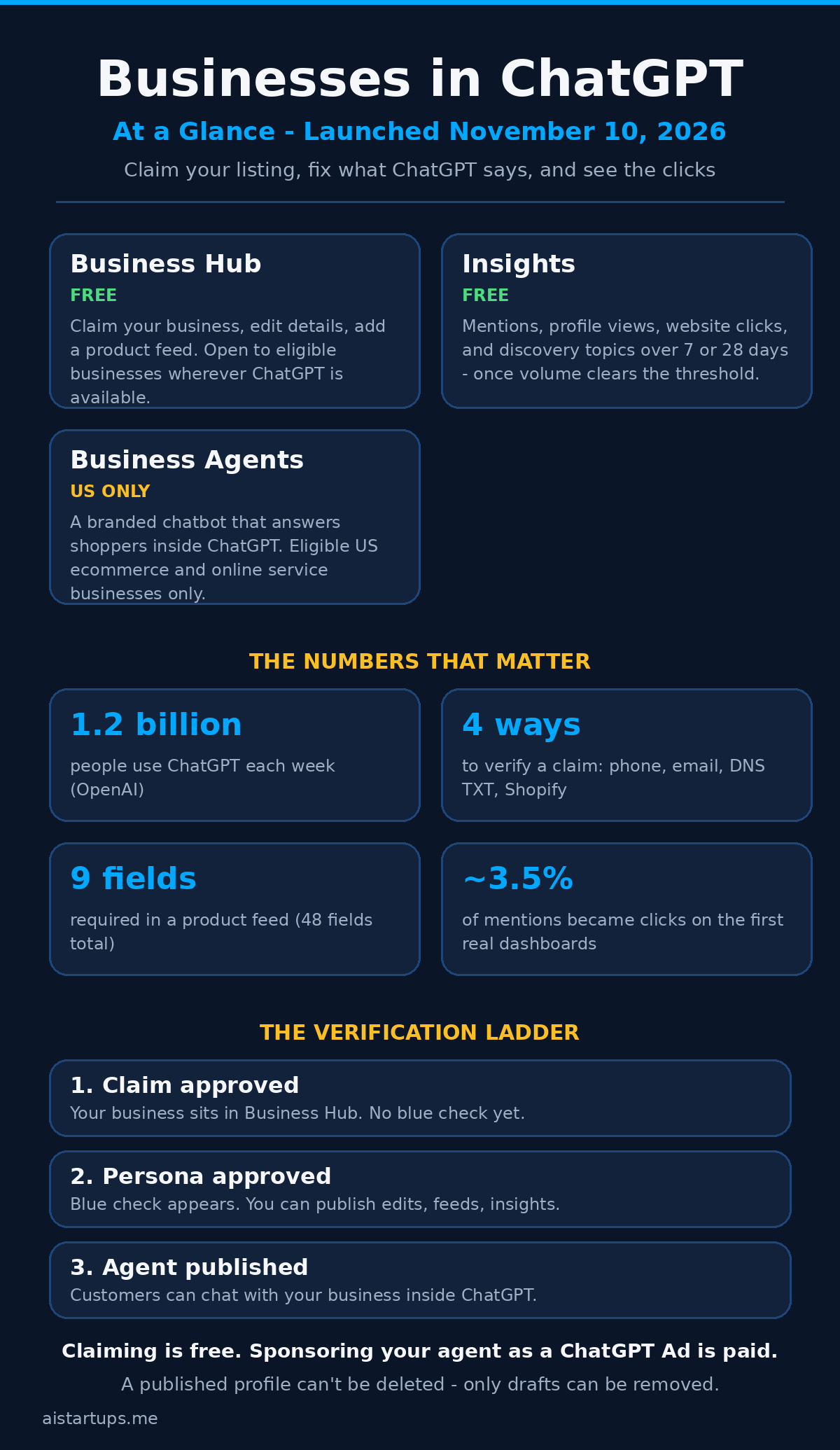
On November 10, 2026, OpenAI changed that. It launched Businesses in ChatGPT in beta — a way for companies to claim their listing inside ChatGPT, fix the details, upload their real products and prices, and see how often ChatGPT mentions them. Eligible US ecommerce and online service businesses can go one step further and publish a Business Agent: a branded chatbot that answers shoppers’ questions inside ChatGPT, in a conversation clearly separated from ChatGPT’s own answers.
Look, I’ve covered a lot of OpenAI launches. Most of them are aimed at developers or enterprises. This one is aimed at you — the founder of a small shop, a SaaS product, a service business. And the timing matters, because ChatGPT now reaches 1.2 billion people a week, according to OpenAI. A huge share of those conversations are about what to buy and who to buy it from.
So the real question isn’t whether this is cool. It’s whether claiming your listing is worth an afternoon of your time, what it actually gets you, and where the traps are. I’ve read the announcement, the setup guide, the policies, and the first hands-on reports from people who claimed their businesses on launch day. Here’s the honest version.
What OpenAI actually launched
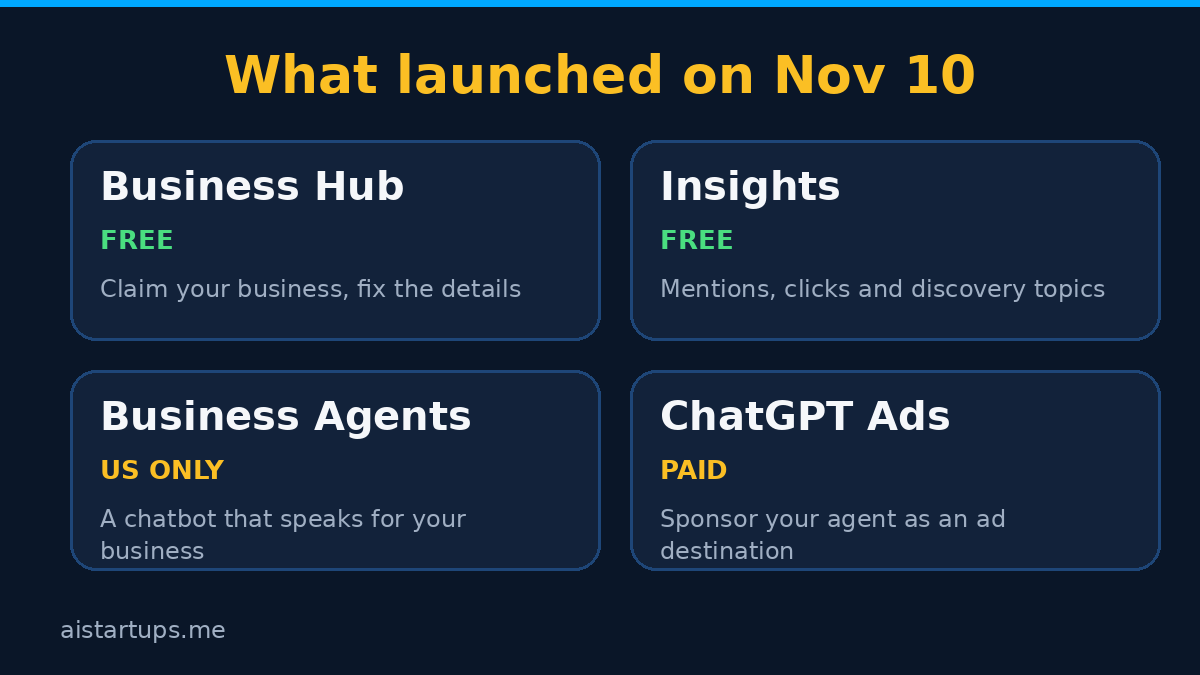
Three pieces, and you can use the first two without the third. That’s worth knowing upfront, because the headlines all led with the agents, and the agents are the part most businesses can’t touch yet.
Business Hub is the dashboard. It’s a new section in the ChatGPT sidebar, also reachable at chatgpt.com/business-hub. You search for your business, claim it, and once you’re verified you can edit the profile and add a product feed. Think of it as a Google Business Profile, but for the chatbot era — and yes, that comparison will keep coming up.
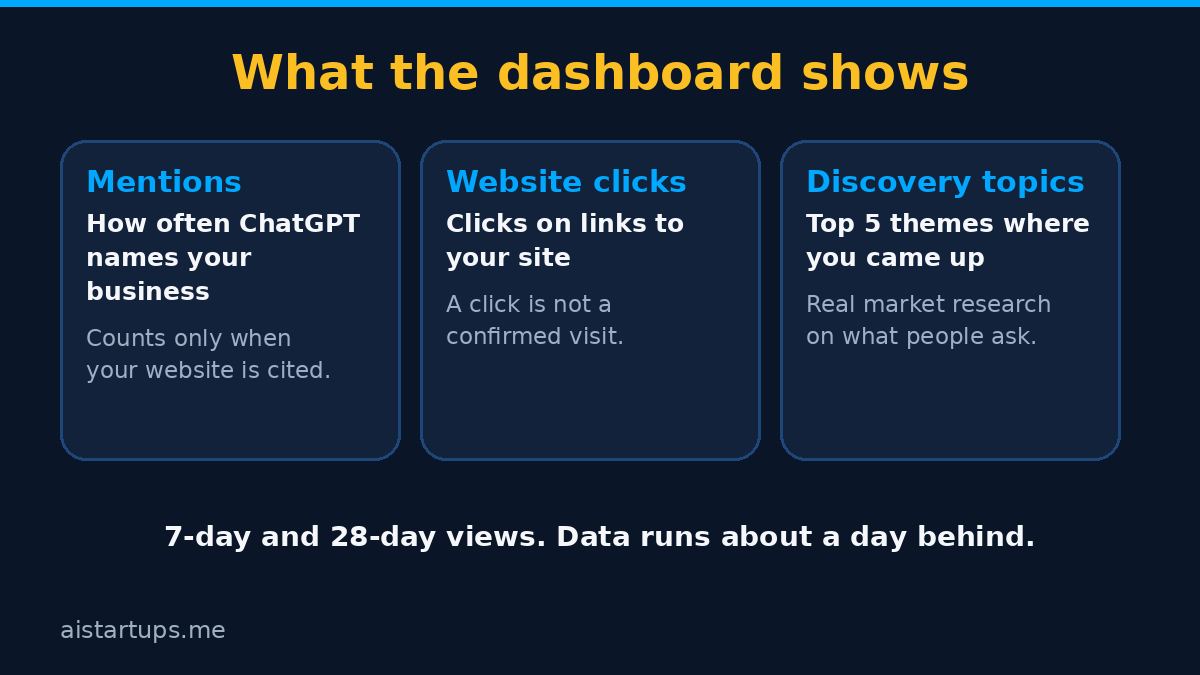
Insights are the numbers. Once you’re verified, Business Hub shows aggregated figures on how people meet your business in ChatGPT: how many times it was mentioned, how many clicks went to your website, and the themes of the conversations where it came up. These are the first first-party numbers any business has ever had on ChatGPT’s unpaid answers. Before this, you were guessing.
Business Agents are the conversational part. When your business appears in an answer, a shopper can open your profile and start a chat with your agent, which answers from the product and policy information you gave it. The conversation is clearly labeled and separate from ChatGPT’s own answers. OpenAI has been shipping agent features all year — its always-on agent system, Dots, runs agents in the background for business tasks — and Business Agents are the customer-facing side of the same push.
The scale is the thing that makes this hard to ignore. OpenAI says 1.2 billion people use ChatGPT each week. Even if only a small fraction of those conversations are shopping-related, that’s still a bigger storefront than any search engine result page you’ve ever fought for. And unlike a search result, you don’t bid for the mention — ChatGPT decides who to name. Which is exactly why having a say in what it says about you matters.
What ChatGPT already says about you (and why it stings)
Before you decide whether to claim anything, it helps to see what the unclaimed version looks like. On launch day, Flavio Copes ran a simple test: he opened ChatGPT without logging in, from Italy, and asked for a good pair of wool running socks — which brands to look at, and where to buy them online.
ChatGPT recommended five brands, each with a product photo, a price range in euros, and links to stores. Reasonable answer. But look closer and the cracks show. Two of the brands it named — Bridgedale and Injinji — got zero links to their own websites. ChatGPT recommended them by name, then sent the shopper to a retailer instead. The retailers, meanwhile, got linked four and three times in a single answer without even being one of the “5 brands I’d recommend.”
That’s the unclaimed experience in a nutshell. Your brand can be the answer and still lose the click. Your prices can be wrong. Your description can be something ChatGPT wrote itself, based on who-knows-what. And until November 10, there was no door to knock on.
Clicking a brand name opened a panel ChatGPT wrote itself: a description, flagship products, what makes the brand distinctive, and a single “Follow up” button that just continued the chat with ChatGPT. No blue check. No way to talk to the business. That panel is the page OpenAI wants businesses to take over — a claimed, verified profile gets the blue check, shows the details the business provided, and can offer a chat with the business’s agent.
Honestly? This is the part that sold me on the whole thing. You don’t have to care about AI agents or ad formats to care about this. If ChatGPT is already talking about your business — and for most ecommerce brands, it is — then the question is just whether you want a say in what it says.
Who can claim, and who gets an agent
Not everyone gets everything, and the eligibility rules are the first thing to check before you get excited. Here’s the breakdown, based on OpenAI’s announcement and setup guide:
- Claim a profile, edit details, see insights: any eligible business located where ChatGPT is available, once verification checks out. You must own the business or be authorized to represent it. You don’t need an ads account or an enterprise contract.
- Add a business that has no listing: eligible online businesses can create a new profile if ChatGPT doesn’t already have one for them.
- Local stores and restaurants: you can only claim a listing that already exists, and only in the US for now. If you sell services to local businesses, claiming listings for clients is a new service to add to your menu — here are 11 AI services you can sell to local businesses this month.
- Product feed: businesses that sell products. A standard feed upload targets the US.
- Business Agent: eligible ecommerce and online service businesses in the US, with a website. That’s the narrowest door in the whole program.
- Enterprise customers and advertisers: claim through their OpenAI representative instead of the self-serve flow.
One gap worth flagging, because it affects a lot of founders reading this site: when you add a business, Business Hub asks how customers usually interact with you — at a physical location, through an online store, or through a service. That third option, the one for freelancers, agencies, and consultants, is marked “coming soon.” If you sell services rather than products, you can watch this space, but you can’t complete the flow yet.
OpenAI can also say no. The Businesses in ChatGPT policy says it may decline a business whose products or practices raise safety or integrity concerns, and some categories are on hold until it has safeguards for them. Being verified doesn’t make you eligible for an agent either — the separate Business Agents policy reviews the category and the intended use on its own.
How to claim your business, step by step
The flow itself is straightforward. The verification is where it gets serious — in a good way, mostly. Here’s how it works, based on OpenAI’s setup guide and the first people through it on launch day.
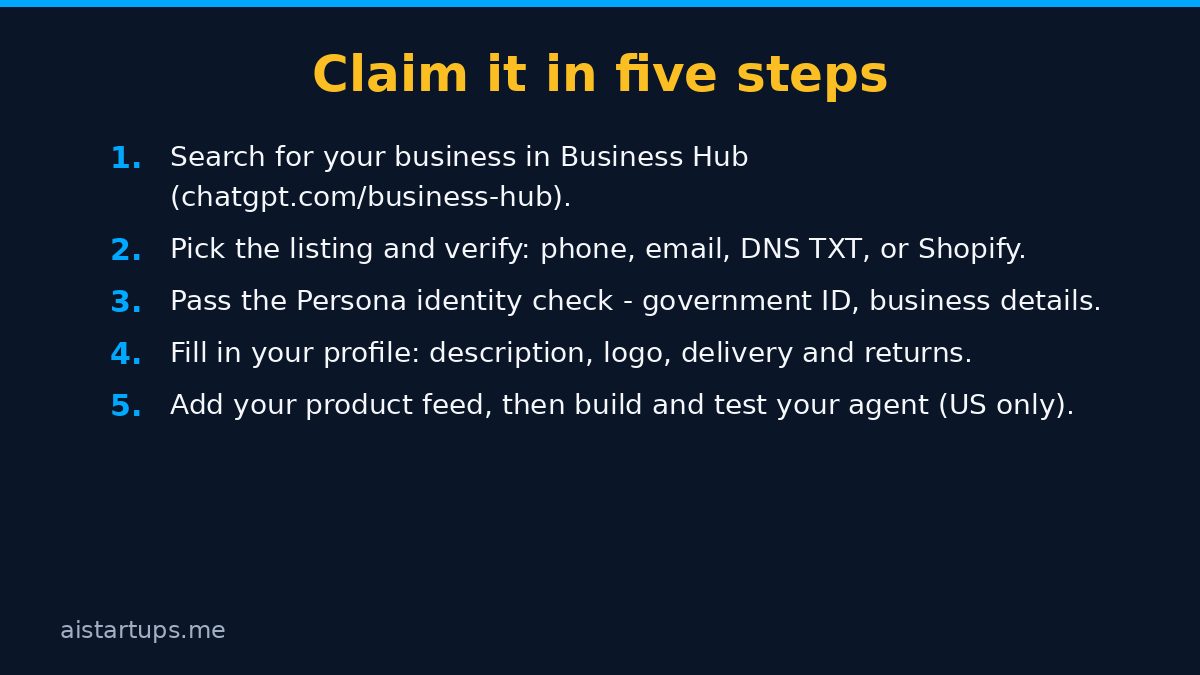
Step 1: Find your business in Business Hub
Sign in to ChatGPT — if you haven’t set it up for your business yet, here’s the founder’s playbook for signing in with ChatGPT — and open Business Hub from the sidebar, or go straight to chatgpt.com/business-hub. Search for your business by name, pick the listing that matches, and confirm which ChatGPT account will manage it. If you can’t find your business and it’s an eligible online business, you may get an option to add it. If the listing shows “Contact support,” it’s locked and you have to ask OpenAI for access.
If you’re adding a business that has no listing, the first screen sums up what you get — see how your business shows up, show customers what you offer, help customers make decisions — then asks how customers interact with you and for your website. A preview of the profile fills in on the right as you type, which is a nice touch: you can see the shape of what you’re building before you commit to anything.
Step 2: Prove you own it
Verification runs through one of four methods, and you only see the ones that apply to your business:
- Business phone — a code by SMS or automated call to the number in the listing.
- Business email — a code sent to the email address associated with the business.
- Website domain — add a TXT record to your domain’s DNS, then hit Verify domain. Same proof Google Search Console asks for, and it can take a while to show up.
- Shopify store — connect your store and log in. Shopify merchants get a streamlined route here, and eligible products from Shopify merchants are already integrated into ChatGPT through Shopify Catalog.
After you submit, there’s a review stage — “Claim received,” then “Review in progress” — and the decision arrives by email. You can withdraw the claim during the review if you change your mind.
Step 3: Verify your identity with Persona
Here’s the part people miss. An approved claim puts the business in your Business Hub, and that’s all it does. To publish changes, connect a feed, view insights, or create an agent, you also have to complete identity verification with Persona, OpenAI’s verification partner. Persona may ask for a government-issued ID, your business registration details, and proof that you’re authorized to represent the business. The name, address, and registration or tax number you enter must match your official records.
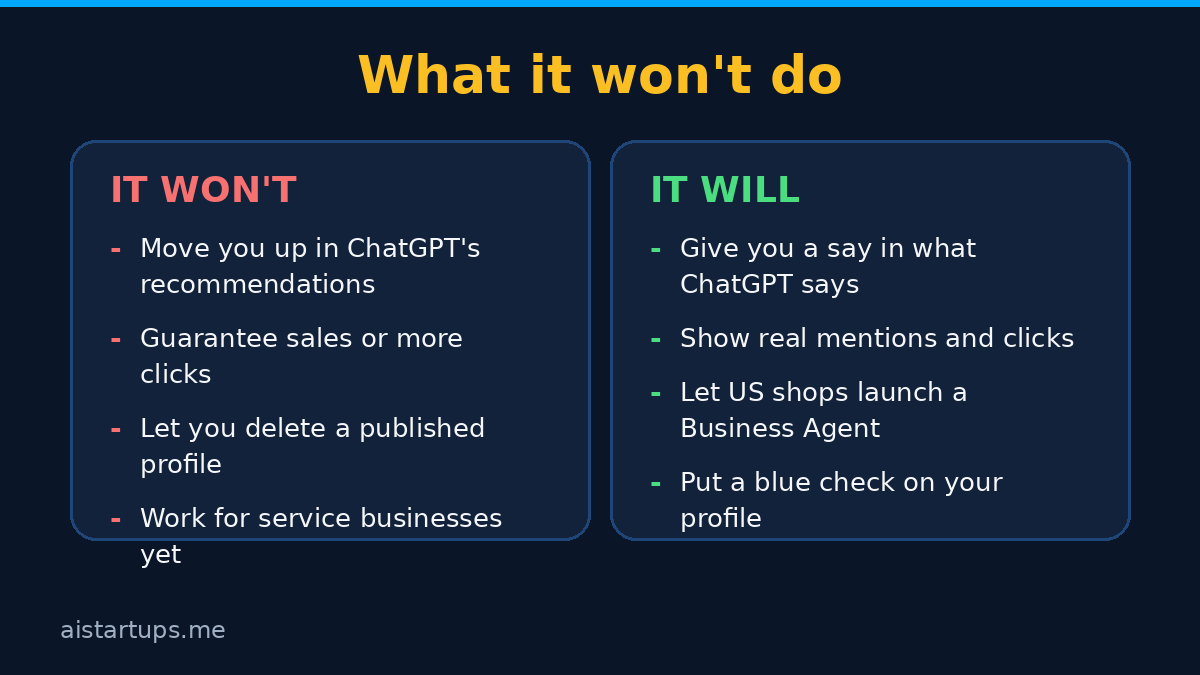
The blue check appears when the Persona verification is approved — not when the claim is. And there’s a sharp edge to know before you start: if you’re creating a new profile, OpenAI’s approval publishes it automatically, with no separate publish step. OpenAI Support can’t delete, unpublish, or hide a published profile — only drafts can be removed. So don’t rush the details. Get your description, category, and policies right before you hit submit, because there’s no undo button on the live listing.
On the plus side, this layered verification is a real answer to a problem local search has lived with for years. Google’s 2025 Trust and Safety Report counted more than 13 million fake Business Profiles removed. A system that requires both a claim check and a government ID makes hijacking somebody else’s listing much harder — which matters, because the first thing a lot of people said on launch day was that they were nervous about exactly that.
Step 4: Fill in your profile
Once both approvals are in, you can update the website, the business description, the product or service category, the logo, and the delivery and return policies. You can also add a cover photo. OpenAI reviews every change before publishing it, so an edit you save doesn’t go live right away — and ChatGPT keeps using other sources when it answers questions about you. Your profile is one input among several, not the whole story. Keep that in mind when you write the description: it’s your voice in the mix, not the only voice.
Real talk: this is the step most founders will rush, and it’s the one that matters most. A vague description gets you vague answers. Write it the way you’d describe the business to a customer standing in front of you — what you sell, who it’s for, what makes you different, and what your policies actually are. If your product pages are thin or your delivery and returns info lives in a PDF somewhere, fixing that on your own site first is time well spent. And if your site itself needs work before it can carry that weight — clean product pages, clear policies, a checkout that doesn’t fight people — that’s exactly the kind of job a web development studio like AISquadX handles every day.
Step 5: Add a product feed
If you sell products, a feed is how ChatGPT learns what you actually sell, at what price, and whether it’s in stock. Shopify merchants connect their store and the catalog syncs. Everyone else uploads a file following OpenAI’s product feed specification — CSV or JSONL, 48 fields in total, nine of them required.
The nine required fields are: a stable item ID, title (150 characters max), description (5,000 characters max), product URL, brand, seller name, image URL, price, and availability. Price is written as an amount, a space, and a currency code — “20.00 USD” means twenty dollars, two decimals, no thousands separator. Availability has to be one of five exact values: in_stock, out_of_stock, pre_order, backorder, or unknown. A row with an empty or misspelled availability value gets rejected, and “unknown” has to be written out in full.
Small thing, big consequence: if your feed is sloppy, ChatGPT either ignores the bad rows or shows wrong prices. Either way you lose. If your catalog lives in a spreadsheet already, generating this file is an afternoon’s work. If it lives in five different places and nobody’s sure which price is current — well, that’s a data problem worth fixing anyway, because the same mess is probably costing you sales on your own site too.
Step 6: Build, test, and publish your Business Agent (US only)
If you’re an eligible US ecommerce or online service business, the Agent builder is the third section of Business Hub, next to Overview and Products. You build the agent from your profile and feed, set the guidelines it follows, test it, and publish it. The agent answers with your product and policy information, following the guidelines you set.
The rules are strict, and they’re worth reading before you write a single guideline. The Business Agents policy says an agent must be clear that it is AI, must not pose as a human or an independent adviser, and must not create false urgency or keep pushing a sale after someone says no. That’s a good rule for your own sales copy too, honestly.
When a shopper sees your business in an answer, they can open your profile — delivery and returns terms, a short description, product cards with prices, and two buttons: “Start chat” and “View website.” Start chat opens a conversation with your agent. OpenAI’s example is simple: someone comparing products asks about the differences between two options and which features fit their needs. The agent answers from what you provided. No payment happens inside the chat, by the way — the agent helps people explore and take the next step, but checkout still happens on your site.
“Businesses can also sponsor their Business Agent and use it as the destination for ChatGPT Ads to reach more potential customers.” — OpenAI, “Introducing Businesses in ChatGPT,” November 10, 2026
What the insights actually tell you
Let’s talk about the dashboard, because it’s the part that will either become a weekly habit or a tab you never open again. The honest answer is: it depends on your volume.
Business Hub splits insights into two tabs, Brand insights and Agent insights, with seven-day and 28-day views. Brand insights shows tiles for mentions, profile views, and website clicks, a mentions trend chart, and a panel of the top five discovery topics — the common themes across conversations where your website is cited. One help note is blunt: “Number of recorded clicks on links to your website in ChatGPT. Clicks don’t confirm website visits or conversions.” Good. At least nobody’s pretending a click is a sale.
Two things limit what you’ll see. First, privacy: OpenAI doesn’t share users’ conversations or Business Agent chats with businesses, and insights are aggregated and only shown once there are enough conversations to clear certain thresholds. The thresholds aren’t quantified, and small businesses will hit them slowly — an empty dashboard just shows dashes and a blank chart until there’s enough volume. Second, timing: the first live dashboards shared on launch day carried the label “Data through Nov 9 (UTC),” a day before the launch, which points to a reporting delay of at least a day.
And keep your expectations in check on the click rate. OpenAI’s launch materials use a fictional toy shop, Colorful Clatter, with 15,356 mentions and 5,432 website clicks over seven days — a 35% click-through that was never presented as typical. The first real dashboards looked very different: one business showed 690 mentions and 24 website clicks over 28 days; another showed 28 mentions and a single click. Both work out to roughly 3.5% of mentions producing a click. Two dashboards are anecdotes, not a benchmark — but they’re a much better guide to reality than the illustration.
So here’s how I’d actually use it. Check it weekly, not daily. Watch the discovery topics more than the raw mention count — they tell you what people are asking about when your business comes up, which is genuinely useful market research. And treat a mention as the start of the funnel, not the end of it. The click is the thing that matters, and the click rate will tell you whether ChatGPT’s version of your business is actually sending people your way.
The ads angle: your agent as a landing page
Now the part that explains why OpenAI built all of this. The free listing and the ad business are connected by design.
Businesses can sponsor their Business Agent and use it as the destination for ChatGPT Ads. The sponsored placements are clearly labeled and separate from ChatGPT responses. This connects to the ad format OpenAI has been testing since February — Sponsored Agents, which open a separate, labeled conversation with a business’s agent after a click. The same agent can now serve as the organic chat a user opens from your profile and as the landing point of a paid campaign. A dashboard card labeled “Reach more people” already promotes the agent across ChatGPT.
Some context on the scale of that ad business: OpenAI said on October 21 that ChatGPT ads were available in 89 countries and that over 100,000 advertisers had run campaigns since launch. Ads appear only on the Free and Go plans. And the value of those visits is still contested — a working paper covered in early November found that a paid ChatGPT ad visit generated $0.89 in revenue for US shops, against $2.45 for a visit from a paid Google search ad. That’s one study, and it’s early, but it tells you the honest shape of things: ChatGPT traffic is real, it’s growing, and it’s not yet as valuable per visit as Google search traffic.
What does that mean for a founder? Don’t buy ads on day one. Claim the profile, get verified, fix your details, and watch the organic insights for a few weeks. If ChatGPT is already mentioning you and sending clicks, then — and only then — test a sponsored agent with a small budget and compare the revenue per visit against your other channels. The free listing is the foundation; the ads are the amplifier. Get the foundation right first.
What it won’t do (the honest limits)
I like this launch. I also think the hype will outrun the reality for a few months, so let me put the limits in one place.
Claiming won’t move you up in ChatGPT’s recommendations. OpenAI says so plainly, and the setup guide repeats it: claiming a business does not guarantee higher placement or more sales. Your profile is one input among several. If your products aren’t a good fit for what someone asked, you still won’t be named.
Business Agents are US-only for now. If you’re outside the US, you can claim and verify and watch your insights — but the agent, the most interesting part, has no timeline for expansion. OpenAI declined to give one when asked.
Service businesses are still waiting. The “through a service” interaction type is marked coming soon, which leaves freelancers, agencies, and consultants in a holding pattern.
The insights are thin until you have volume. Small businesses will stare at dashes for a while. That’s not a bug, it’s the privacy threshold doing its job — but it means the dashboard won’t feel rewarding in week one.
OpenAI already tried in-chat checkout and killed it. Instant Checkout launched in September 2025 with US Etsy sellers, and by March 2026 Walmart said its in-chat checkout converted three times lower than click-out links. OpenAI ended Instant Checkout that same month. The lesson: people still prefer to finish buying on the merchant’s site. Business Agents respect that — they help people explore, then send them to you.
Google and Meta already have their own versions
OpenAI is the third large platform to offer merchants a “Business Agent.” Google introduced its Business Agent on January 11, letting US retailers activate branded assistants in Search through Merchant Center, with Lowe’s, Michael’s, Poshmark, and Reebok at launch. Meta unveiled its own Business Agent on June 3 for WhatsApp, Messenger, and Instagram, with a free entry tier and paid tiers to follow — and Meta has been pushing the same small-business audience with Muse, its AI for small business. Amazon opened a free Shop Direct Merchant Workspace on November 4, letting outside stores submit feeds so their products appear in Amazon search and Alexa for Shopping.
The three products share a name and an idea — a branded assistant answering product questions inside someone else’s platform — but each runs on different data, rules, and ad systems. The common currency is the same everywhere: structured prices and availability go in, and mention counts come back.
For a founder, the practical takeaway is simple. Don’t pick a winner. The feed you build for OpenAI is close to the feed Google Merchant Center already wants, and the discipline of keeping prices and stock current pays off on every channel at once. If you sell through Shopify, you’re in the best position of all — Shopify told investors on November 3 that orders originating from AI searches were up 3.3 times year over year, and that searches powered by Shopify Catalog converted at twice the rate of general AI search. The catalog is becoming the product page for the AI era.
What to do this week
If you’re a founder with a product to sell, here’s the order I’d do it in. None of this needs a developer, and most of it fits in one afternoon.
- Check what ChatGPT says about you today. Ask it about your product category the way a customer would. Note what it gets right, what it gets wrong, and whether it links to you or to a retailer.
- Claim your business in Business Hub. Search, pick the listing, and start verification. DNS TXT is the cleanest method if you control your domain.
- Complete the Persona identity check. Have your government ID and business registration details ready, and make sure the name and address match your official records exactly.
- Write a real description. What you sell, who it’s for, what makes you different, and your delivery and returns policies. No jargon, no keyword stuffing — write it for a person.
- Build your product feed. Start with your best sellers, not the whole catalog. Nine required fields, prices in “20.00 USD” format, availability spelled out exactly. Shopify stores can connect directly and skip the file.
- If you’re a US ecommerce business, build and test your agent. Set the guidelines, try the conversations a real shopper would have, and check that it stays honest about being AI and doesn’t push after a “no.”
- Watch the insights weekly. Mentions are nice; clicks and discovery topics are the useful numbers. Give it a month before you judge it.
And one more thing. If you search for your business and find a listing you didn’t create, with details that are wrong — claim it. If someone else already claimed it, open the profile, use the menu, and choose “Dispute ownership.” You’ll go through Persona to show you’re the one authorized to represent it. Don’t leave a wrong listing sitting there while ChatGPT quotes it to your customers.
Frequently asked questions
Is Businesses in ChatGPT free?
Claiming your business, verifying it, and viewing insights are free — OpenAI lists no fee for claiming. The paid part is optional: you can sponsor your Business Agent and use it as the destination for ChatGPT Ads. OpenAI hasn’t announced pricing for that beyond the ads themselves, and the company hasn’t ruled out charging for parts of the program later.
Do I need a ChatGPT subscription to claim my business?
No. You need a ChatGPT account to sign in to Business Hub, but there’s no requirement for a paid plan, an ads account, or an enterprise contract. Enterprise customers and existing advertisers claim through their OpenAI representative instead of the self-serve flow.
How long does verification take?
There’s no published timeline. The claim itself goes through a review stage — “Claim received,” then “Review in progress” — with the decision sent by email. The Persona identity check is a separate step after that, and your blue check only appears once Persona approves you. Budget a few days, and don’t start the process the morning you need the listing live.
Can a Business Agent sell my products directly?
No. The agent answers questions, compares products, and helps people explore what you offer, using the information you provided. When someone is ready to buy, the agent sends them to your website — there’s no payment inside the chat. OpenAI tried in-chat checkout with Instant Checkout in 2025 and ended it in March 2026 after it converted worse than click-out links.
I’m outside the US. What can I actually do?
You can claim your business, verify it, edit your profile, add a product feed, and see your insights — claiming is open to eligible businesses wherever ChatGPT is available. What you can’t do yet is publish a Business Agent; that’s limited to eligible ecommerce and online service businesses in the US, and OpenAI hasn’t given a timeline for expanding it. Claim now anyway, because the profile and the insights are worth having while you wait.
The Bottom Line
Here’s the thing about this launch. It’s not a revolution, and it’s not a gimmick either. It’s plumbing — the unglamorous kind that matters. For the first time, a business gets a say in what the world’s most-used chatbot tells people about it, and gets numbers back on whether anyone is listening.
The agent is the flashy part, and most of the world can’t use it yet. The profile is the boring part, and it’s the one that matters today. Claim it, verify it, fix the details, feed it real prices. That’s an afternoon of work for a listing that sits in front of 1.2 billion weekly users.
Will it bring you sales tomorrow? Probably not. Will it quietly send you clicks for years while your competitors’ listings sit there with wrong prices and no blue check? That’s the bet — and it’s a cheap one. The cost is an afternoon. The risk of skipping it is that ChatGPT keeps describing your business without you.
So go claim it. Then check back in a month and see what the numbers say. That’s the whole playbook, and honestly, it’s one of the better free moves in marketing right now.