
Look, I’ve watched a lot of AI keynotes. Most of them blur together — a demo that works suspiciously well on stage, a benchmark chart, applause. But yesterday’s OpenAI DevDay was different, and not just because one of the live demos froze in front of 2,500 people (we’ll get to that).
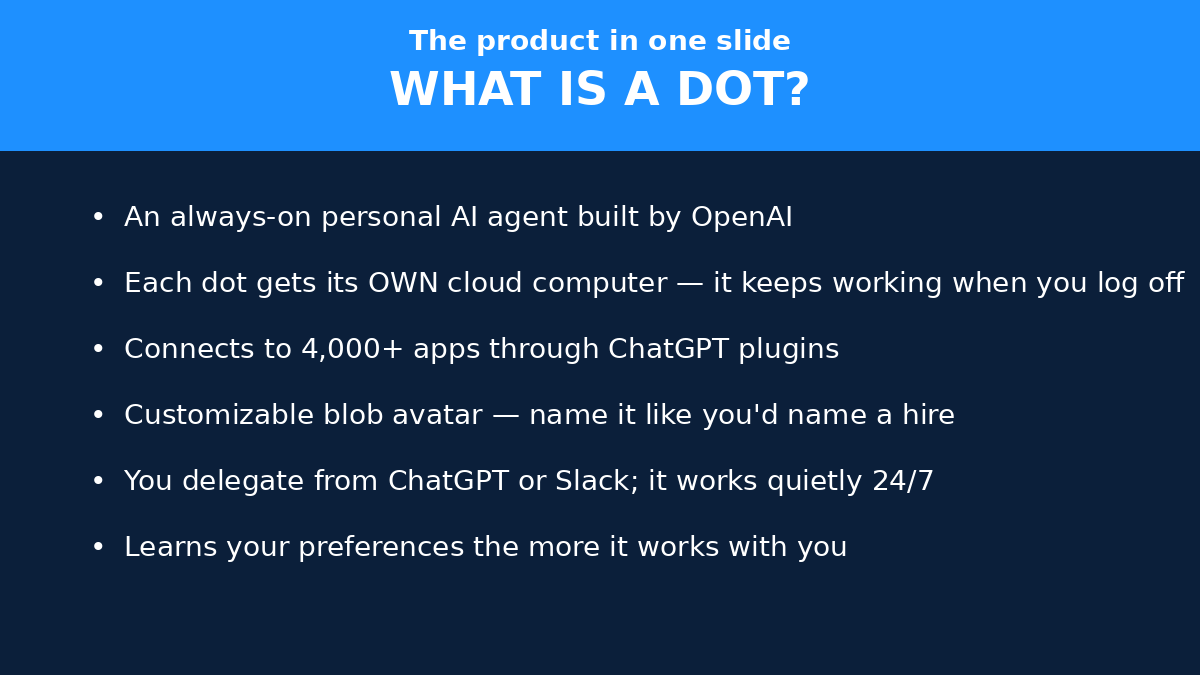
OpenAI announced dots: always-on AI agents that keep working after you close your laptop. Each one gets its own cloud computer. Its own browser. Access to 4,000+ apps. And it works toward your goals around the clock, checking back in like a very diligent intern who never sleeps.
This isn’t a research preview. It’s rolling out now to ChatGPT Pro and Business Premium users, and your first dot is included at no extra cost. For a startup founder, that’s not a toy — that’s potentially the cheapest hire you’ll ever make.
So I spent the morning reading the actual launch posts, the safety documentation, and the pricing pages (not just the hype threads) to figure out what this really means for people running small companies. Here’s the honest version.
What dots actually are (and what they aren’t)
Strip away the keynote language and a dot is this: a persistent AI agent powered by GPT-6 Astra that lives in its own sandboxed cloud workspace. You give it goals, connect your apps, and it goes off and does the work — researching, drafting, analyzing, even writing code — then reports back. It learns your preferences over time. You talk to it from ChatGPT on desktop, web, or mobile, or straight from Slack and Microsoft Teams, where it gets its own identity.
OpenAI’s own line: “Dots are remarkably capable, always-on agents built to handle everything.” Sure. But here’s what makes them different from the chatbot you’re used to: continuity. A chat session forgets you the moment you close the tab. A dot has memory, scheduled tasks, and an Activity view showing what’s in progress, what’s scheduled, and what’s done. It keeps going in the background. That shift — from “ask and answer” to “assign and review” — is the whole story.
What dots aren’t: they aren’t magic. The live “Dottie” demo on stage stalled (the presenter called it a “slow morning,” which is the most relatable thing anyone said all day). They’re also not unsupervised — OpenAI is blunt about this, and I’ll come back to why that bluntness actually matters for your business.
And yes, this space is getting crowded fast. Meta launched its own agent, Muse, on September 10 — Simon Willison, who live-blogged DevDay, called dots “very Muse-like.” The day before DevDay, Anthropic dropped Claude Sonnet 5.5, which is 30%+ faster and cheaper to run than its predecessor. Everybody’s racing to own the “agent that does your work” slot. Dots are OpenAI’s bid, and it’s a serious one.
Setting up your first dot: the 5-step framework
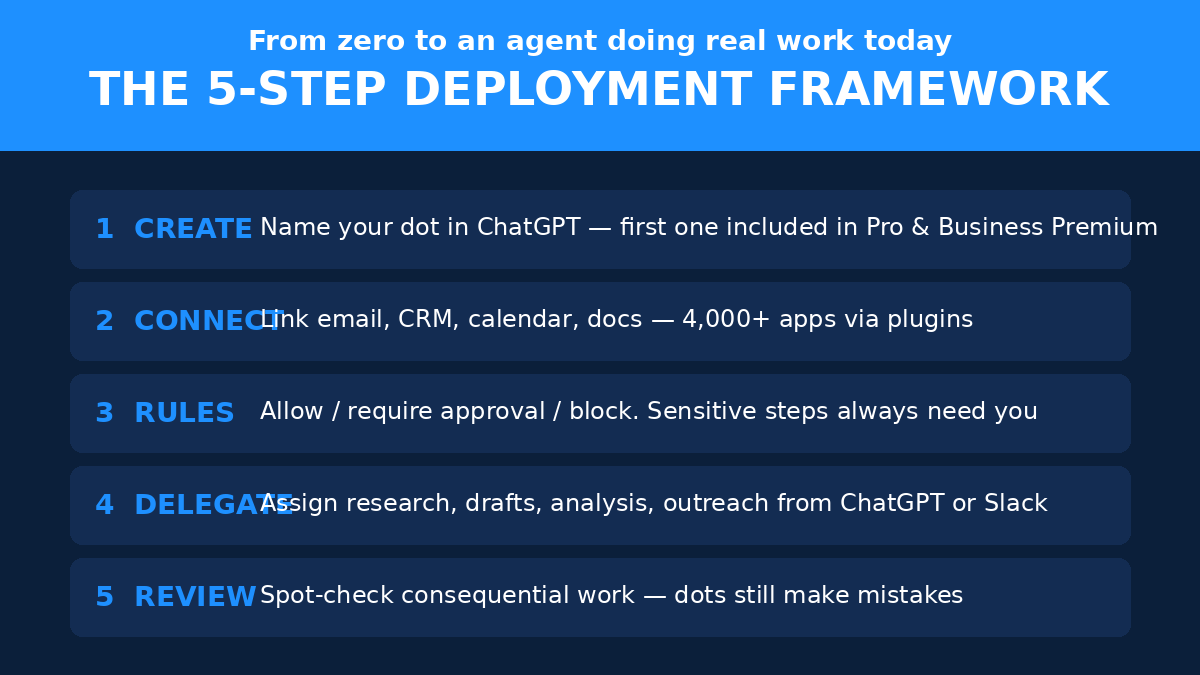
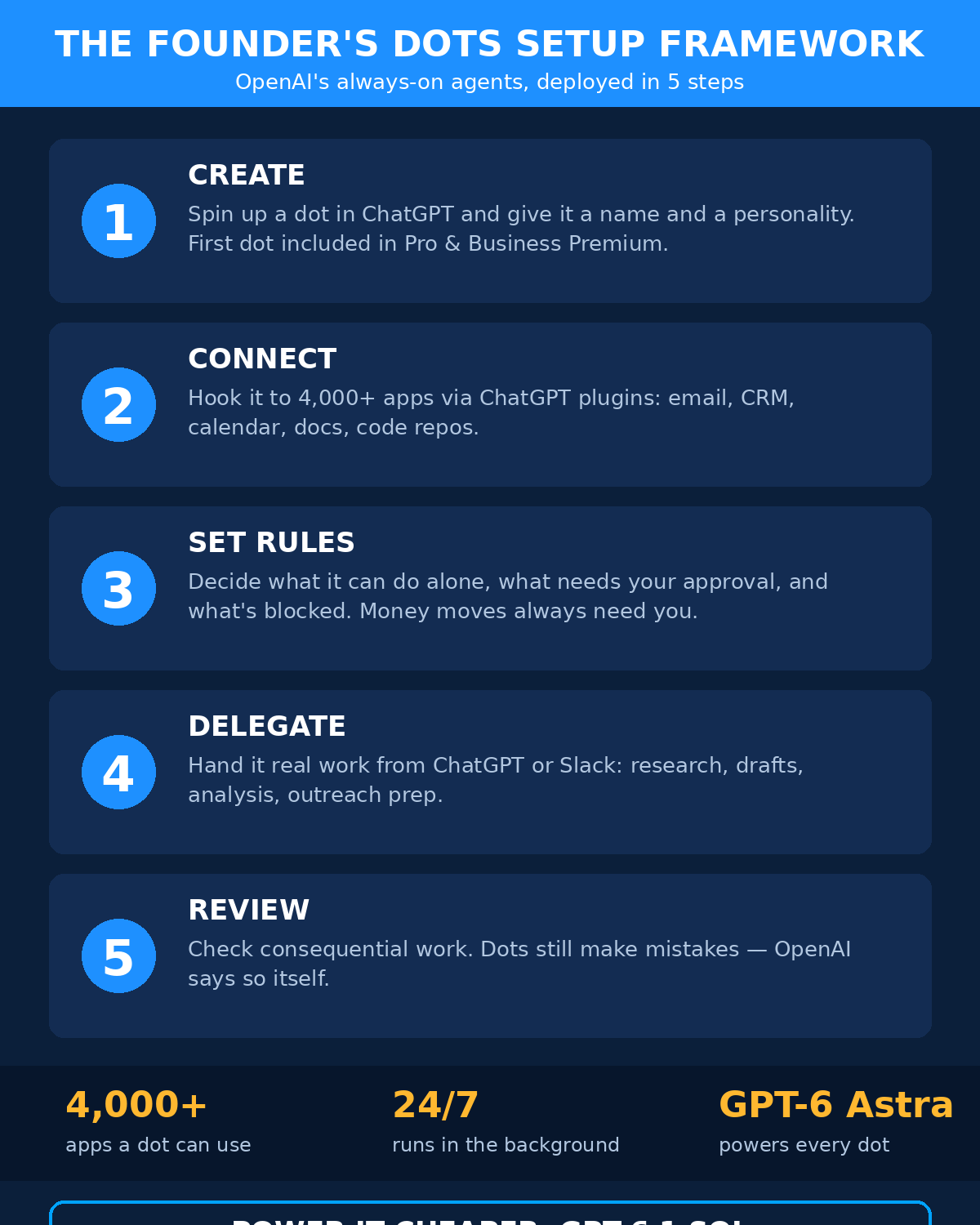
Good news: you don’t need to be technical. The official onboarding is one sentence — create your dot in the ChatGPT desktop app or desktop browser, connect your apps, and let it introduce itself. But a sentence isn’t a strategy, so here’s how I’d actually do it as a founder.
Step 1: Create and name it
Setup happens on desktop only — the ChatGPT desktop app or your desktop browser (Windows included). You can’t create a dot on mobile or mobile web; that’s by design, since setup involves connecting apps and configuring permissions. Once it’s set up, though, you can message it from the mobile app just fine.
Give it a name and a personality. Each dot gets a handle (it starts as something like @yourname-dot and becomes @yourname-agentname once you name it) and a blob avatar you can customize — characters, pets, or one the dot generates itself. This sounds frivolous. It’s not. You’re going to interact with this thing daily; naming it makes delegation feel natural instead of weird. Mine would be named something boring and functional. Okay, maybe not boring.
Step 2: Connect your apps
This is where the 4,000+ number comes in — dots reach your tools through ChatGPT’s plugin ecosystem: email, calendar, CRM, docs, code repos. Connect the apps where your actual work lives. Be deliberate here: a dot with access to everything is powerful, but a dot connected to the three tools you actually live in is useful.
One practical note from the docs: you can connect a personal email, but there’s no standalone dot email address at launch, and a dot can’t initiate phone calls yet. Texting exists but only as a limited US-only beta for Pro users. Manage expectations accordingly.
Step 3: Set the rules before anything else
This is the step most people will skip, and it’s the most important one. Dots support four custom rule behaviors:
- Take action without asking — full autonomy for low-stakes work
- Take action if pre-approved — autonomy within boundaries you set
- Ask before taking action — it proposes, you approve
- Hand off to you — it stops and waits for a human
My suggestion? Start everything at “ask before taking action” for the first two weeks. Let the dot earn its autonomy. You can see everything it’s doing in the Activity view anyway — in progress, scheduled, completed. And if it ever goes sideways, the dot’s profile menu has Pause and Reset. Reset is the nuclear option: it wipes the dot’s conversations, memories, and scheduled tasks. Good to know it exists; hopefully you’ll never need it.
Step 4: Delegate real work, not toy tasks
Here’s where founders mess up with every new AI tool: they test it with “write me a haiku about my startup” and conclude it’s a gimmick. Don’t. Hand your dot something with stakes but bounded blast radius — a weekly competitor briefing, first drafts of your investor update emails, meeting prep one-pagers. Real work, real feedback, real learning.
Step 5: Review like a manager, not a micromanager
OpenAI’s own guidance: “Dots can still make mistakes, so always review consequential work.” Treat it like a talented junior hire. Spot-check the important stuff, let the small stuff flow, and give feedback when it gets things wrong — it learns from that. The goal is a working relationship, not a leash.
What it’ll actually cost you
Let’s talk money, because this is where it gets interesting for startups.
The dot itself: your first one is free with ChatGPT Pro or Business Premium — included at no extra cost, with what OpenAI calls “extended limits for the first month after launch.” Rollout started September 29 and it’s gradual (days, not hours), so if you don’t see it yet, wait a bit. A few caveats from the fine print: Pro users in the EEA, Switzerland, and the UK are excluded for now; Enterprise, Edu, and Healthcare workspaces get a beta their admin has to enable; and it’s 18+ only.
Here’s a detail I like: chats with your dot don’t count toward your ChatGPT usage limits. But — and this matters — when your dot starts or manages tasks in Codex or ChatGPT Work, those count as usual. So the conversation is free; the heavy compute isn’t. Fair.
OpenAI says you’ll eventually be able to add more dots and scale each one’s speed and monthly workload. Pricing for that isn’t announced yet. For now: one free dot, learn the ropes, see if it earns its keep.
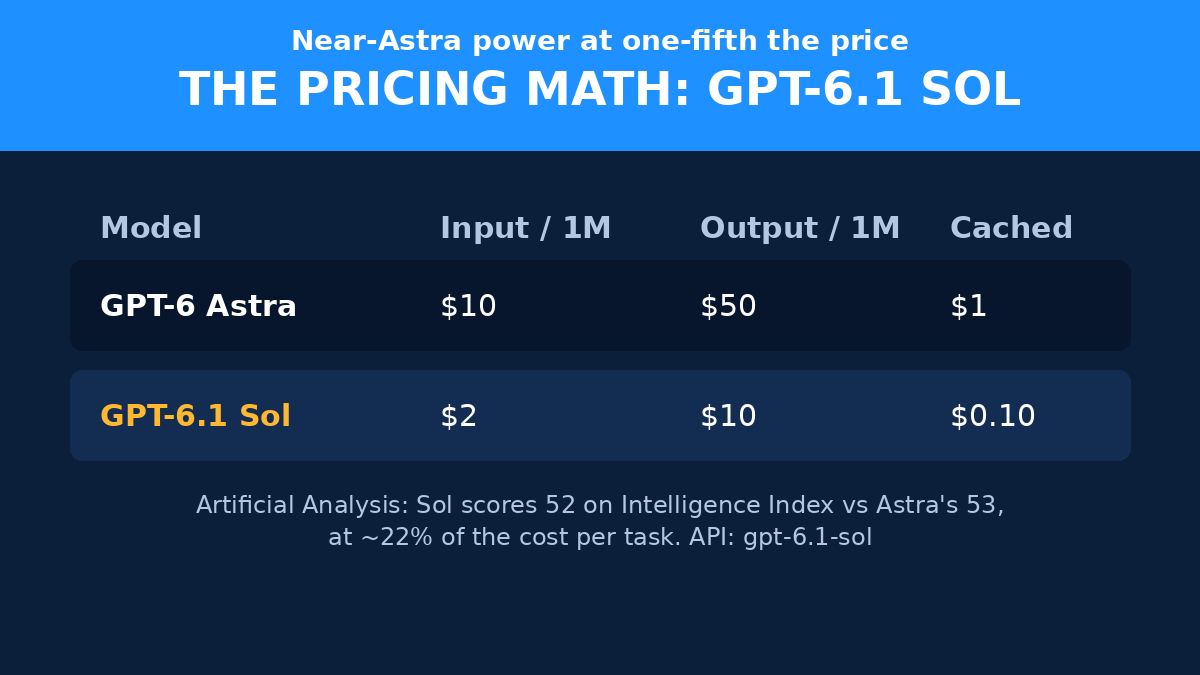
The model behind the curtain got cheaper too. The same keynote launched GPT-6.1 Sol at $2 per million input tokens and $10 per million output — one-fifth of GPT-6 Astra’s standard prices — with cached input at just $0.10 per million (95% cheaper than standard input). OpenAI claims it nearly matches Astra on agentic coding, computer use, and professional work. Independent numbers back up the value story: Artificial Analysis puts Sol at 52 on its Intelligence Index versus Astra’s 53 and Claude Opus 5.5’s 58 — but at $0.72 per index task versus $3.26 and $5.98. That’s the price/performance winner by a mile.
If you’re building anything with the API, this continues the AI price war we’ve been tracking — and it’s genuinely good news for founders. When the model powering your agent costs a fifth of the flagship, the economics of delegating real work start to make sense. For the full picture on what running an AI business costs in 2026, our cost breakdown is worth a read alongside this.
The safety playbook (why this might actually survive contact with your business)
Real talk: the reason most founders haven’t handed real work to AI agents isn’t capability — it’s trust. Last week alone brought reports of AI agents breaching an Australian Medicare portal and US government sites, and OpenAI shelved its GPT-6.1 Astra model the day before DevDay after it failed safety tests. So the question isn’t “can it do the work,” it’s “can I let it near my business without something terrible happening.”
Credit where it’s due: OpenAI published an unusually detailed safety post alongside dots, and some of it is genuinely well thought out:
- Each dot runs in an isolated, sandboxed Linux workspace with its own Chrome browser — it’s not rummaging around your actual machine.
- Proactive research is read-only. Your dot can go investigate things on its own, but it can’t change anything out there without you.
- Sending, sharing, and purchases require your authorization. Permanent deletions, new installs, and security-sensitive access need per-instance confirmation.
- Certain sensitive tasks always stay with you — password changes and money transfers get handed back to the human. Always.
- A separate auto-review system checks the dot’s planned steps against your instructions and safety requirements — and dots can’t disable it.
- Your business data isn’t used for training on Business, Enterprise, and Edu plans. Proactive-research threads and a dot’s private notes are never used for training either.
- Credentials live in an encrypted credential service, not in the model’s context, and the model is paused during secure sign-in.
Is it perfect? Of course not. Disconnecting an app stops new sharing, but anything the dot already learned stays in its context — wiping that requires a full dot reset. And “read-only until authorized” is only as good as the authorization design. But compare this to the Wild West of early agent tools, and it’s night and day. This is the first always-on agent I’d actually consider connecting to a real business.
“Dots can still make mistakes, so always review consequential work.” — OpenAI, in its own launch materials. When the company selling you the agent tells you to double-check it, listen. That’s not a disclaimer; it’s the operating manual.
Dots vs. the alternatives
Should you care about dots specifically, or is this just one more agent in a crowded field? Honest answer: the field is real, and you have options.
Meta’s Muse (September 10) does the email-searching, internet-browsing, online-purchasing thing. Anthropic’s angle is models, not agents — though Sonnet 5.5 landing the day before DevDay was clearly no coincidence. And if you’ve already built automations with tools like Zapier or n8n, deterministic workflows still beat agents for anything that must work exactly the same way every time.
What dots have that the others don’t, right now: the combination of a real cloud computer per agent, 4,000+ app connections on day one, and distribution to 1.2 billion weekly ChatGPT users. If your team already lives in ChatGPT, Slack, or Teams, the friction to try a dot is basically zero. That’s the moat — not the model, the distribution.
One more thing worth knowing: OpenAI also launched Space (a shared home for your pages and files in ChatGPT, replacing Library) and a Marketplace with 32 launch partners including Adobe, Canva, Figma, Notion, Salesforce, Vercel, and Zendesk. The ecosystem play is clear: ChatGPT becomes the place where work happens, dots do the work, and third-party apps plug in. Whether that excites you or worries you probably depends on how much of your business already runs through OpenAI.
5 things I’d hand a dot on day one
Enough theory. If I were setting up a dot for a startup this week, here’s my actual delegation list:
- The morning briefing. Overnight news in your market, competitor moves, relevant launches — summarized before your coffee. This is the canonical “works while you sleep” task.
- Inbox triage with drafts. Not auto-replies (too risky on day one) — drafted replies for sales inquiries and investor emails, waiting in your drafts folder for approval.
- Competitor watch. A weekly changelog on your five closest rivals: pricing changes, feature launches, hiring signals. Boring to do manually, perfect for an agent.
- Meeting prep. One-pagers on everyone you’re meeting that week — background, recent news, likely talking points. Ten minutes of your dot’s time saves you an hour.
- Content pipeline. Ten draft posts from your latest notes and calls. You edit, it drafts. That’s the correct division of labor while trust builds.
Notice what’s not on the list: anything involving money, anything customer-facing without review, and anything where a mistake would be embarrassing rather than merely annoying. Start in the shallow end. The deep end will still be there next month.
And if you want dots wired into something bigger — a custom dashboard, your own product’s AI features, an agent that lives inside your website rather than inside ChatGPT — that’s the kind of AI integration work AISquadX, our web agency, does for startups. Sometimes the right move isn’t adopting someone else’s agent; it’s building the workflow around your own business.
Frequently asked questions
Are OpenAI dots available now?
Rolling out since September 29, 2026, to ChatGPT Pro and Business Premium users — gradually, over days. Enterprise, Edu, and Healthcare workspaces can try a beta once their admin enables it. Pro users in the EEA, Switzerland, and the UK are excluded for now, and you must be 18 or older.
How much does a dot cost?
Your first dot is included in ChatGPT Pro or Business Premium at no extra cost, with extended limits for the first month. Chatting with your dot doesn’t count toward ChatGPT usage limits, but tasks it runs in Codex or ChatGPT Work do. Pricing for additional dots hasn’t been announced.
What can a dot actually do for a startup?
Research, drafting, data analysis, inbox triage, meeting prep, competitor monitoring, and long-running coding tasks (it can delegate to Codex). It connects to 4,000+ apps via ChatGPT’s plugin ecosystem and can be reached from ChatGPT, Slack, and Microsoft Teams. Think of it as a tireless junior operator, not a strategist.
Is it safe to connect a dot to my business tools?
Safer than any agent before it, but not risk-free. Each dot runs sandboxed, proactive research is read-only, and sending/sharing/purchases need your authorization — password changes and money transfers always come back to you. Still: start with “ask before taking action” rules, review consequential work, and don’t connect anything you couldn’t afford to have misread.
What’s GPT-6.1 Sol and why does it matter here?
It’s the new budget model launched at the same DevDay: $2/1M input and $10/1M output tokens (one-fifth of GPT-6 Astra), with cached input at $0.10/1M. It scores 52 vs Astra’s 53 on Artificial Analysis’ Intelligence Index at roughly a fifth of the cost per task. For founders, it means the model economics behind agent-heavy workflows just got dramatically cheaper. Available via the API as gpt-6.1-sol and in ChatGPT Work and Codex.
The Bottom Line
Dots are the first AI agent I’d take seriously as business infrastructure rather than a demo. The combination — a persistent agent with its own computer, real guardrails, a free first dot, and a model that costs a fifth of the flagship — is genuinely new. Not “press release new.” Actually new.
But go in clear-eyed. The stage demo stalled. The safety incidents last week were real. OpenAI itself tells you to review consequential work. Start with one dot, start with the rules locked down, hand it the boring-but-real work first, and let it earn more autonomy over time.
The founders who win with this won’t be the ones who delegate everything on day one. They’ll be the ones who figure out, faster than everyone else, exactly which work an always-on agent does better than a human — and build their week around that answer. For more on structuring that kind of leverage, our AI agent business ideas guide pairs well with everything above.
Your move: if you’re on Pro or Business Premium, your dot is either waiting or days away. Name it something good.