
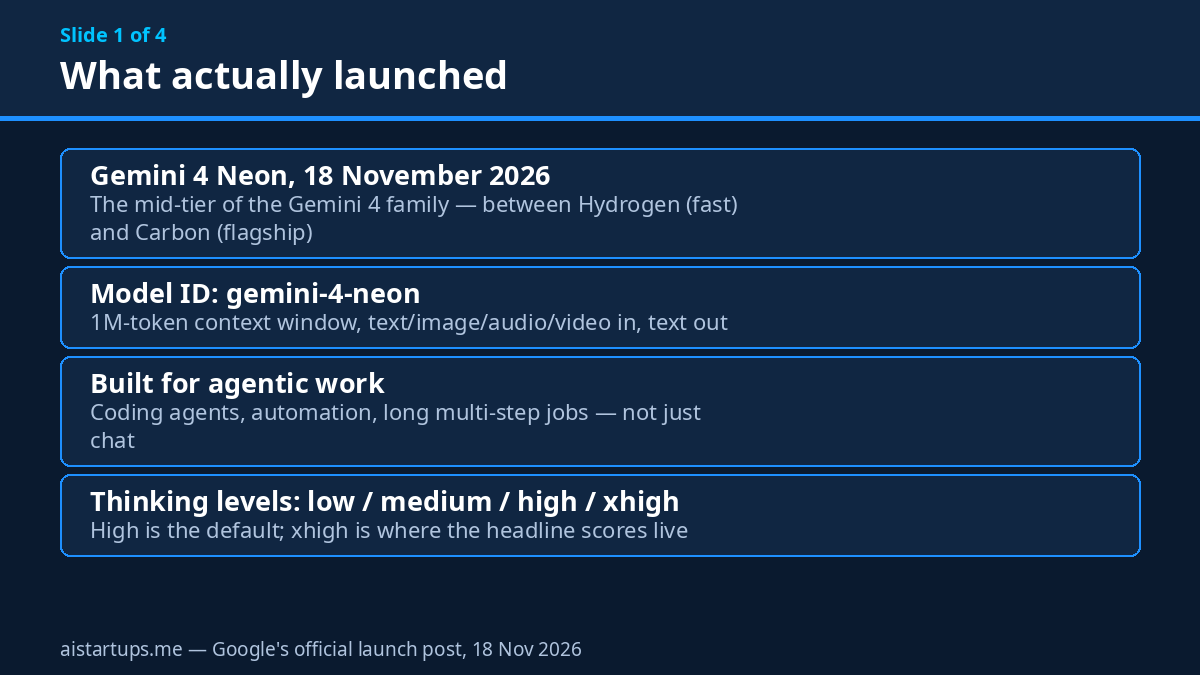
Google dropped a new model on us yesterday — November 18 — and honestly, this one is harder to place than the usual launch. Gemini 4 Neon is the middle child of the Gemini 4 family. Not the flagship, not the fast tier. The middle one. And yet Google’s own numbers say it beats the flagship on some benchmarks, runs nearly twice as fast, and costs less per task. So what is this thing, exactly? A bargain flagship? A coding specialist wearing a generalist’s clothes? I spent the morning reading the announcement, the pricing page, and the independent coverage so you don’t have to — and the answer is more interesting than the headline.
Here’s the thing. Most founders don’t buy models, they buy outcomes. A bug fixed without hand-holding. A spreadsheet built that a colleague can actually audit. An agent that runs a multi-step job and doesn’t quietly invent the last step. Neon is Google’s pitch for that middle ground: strong enough to trust with real work, cheap enough to run all day, fast enough that you don’t watch a spinner. At $3 per million input tokens and $15 per million output tokens, it’s priced between Hydrogen and the flagship — but the cost per finished task, which is the number that actually hits your invoice, tells a different story.
Short version: Neon launched November 18, 2026, costs $3/$15 per million tokens with a 1 million-token context window, ships with four thinking levels, and — according to Google — scores 61 on the Artificial Analysis Intelligence Index at its highest thinking setting, good for third place overall. It tops the Coding Agent Index, tops AutomationBench, and runs a vending-machine business simulation to $16,843 in profit, which is either the most or least useful benchmark ever published, depending on your mood. Longer version below — including the December 1 pricing twist that changes the math, the safety numbers that actually matter for agents, and the honest read on which benchmarks to trust.
What Gemini 4 Neon actually is
Let’s get the family tree straight first, because Google now has four Gemini 4 models and the names are doing a lot of heavy lifting. Gemini 4 Carbon is the flagship — the deepest reasoning, the hardest problems, the model you reach for when the architecture decision actually matters. Gemini 4 Argon sits in the middle — long-horizon work at lower token use, the steady workhorse. Gemini 4 Hydrogen is the fast tier — the execution engine, adapted from Carbon and tuned for speed. And now Neon slots in between Hydrogen and Carbon. Same DNA as the flagship, tuned for a balance of capability, speed, and cost.
The model ID you’ll use in code is gemini-4-neon. It takes text, images, audio, and video as input and produces text. Context is a unified 1 million tokens. Knowledge cutoff is March 2026, so it’s reasonably current on the world — though, as always, don’t ask it about anything that happened last week and expect a reliable answer.
One honest caveat before we go further: almost every benchmark number in this article comes from Google. The company published them, and I’ve flagged them as vendor-reported wherever they appear. Independent testing had barely started when this article went up — the model is a day old. VentureBeat’s launch-day coverage is the best independent read so far, and it mostly confirms Google’s framing while adding a few useful caveats of its own. Treat the numbers as directionally useful, not gospel. (I say this in every model guide, and I mean it every time.)
So why does a middle-tier model matter? Because the middle is where most startup work actually lives. The flagship is overkill for half your tasks and the fast tier underperforms on the other half. Neon is Google’s bet that the sweet spot — strong reasoning, agent-grade reliability, and a price that doesn’t punish volume — is a product in its own right, not just a compromise. And on the numbers Google published, the bet looks… well, plausible. Let’s look at the price first, because the price has a twist.
The price, and the December 1 twist
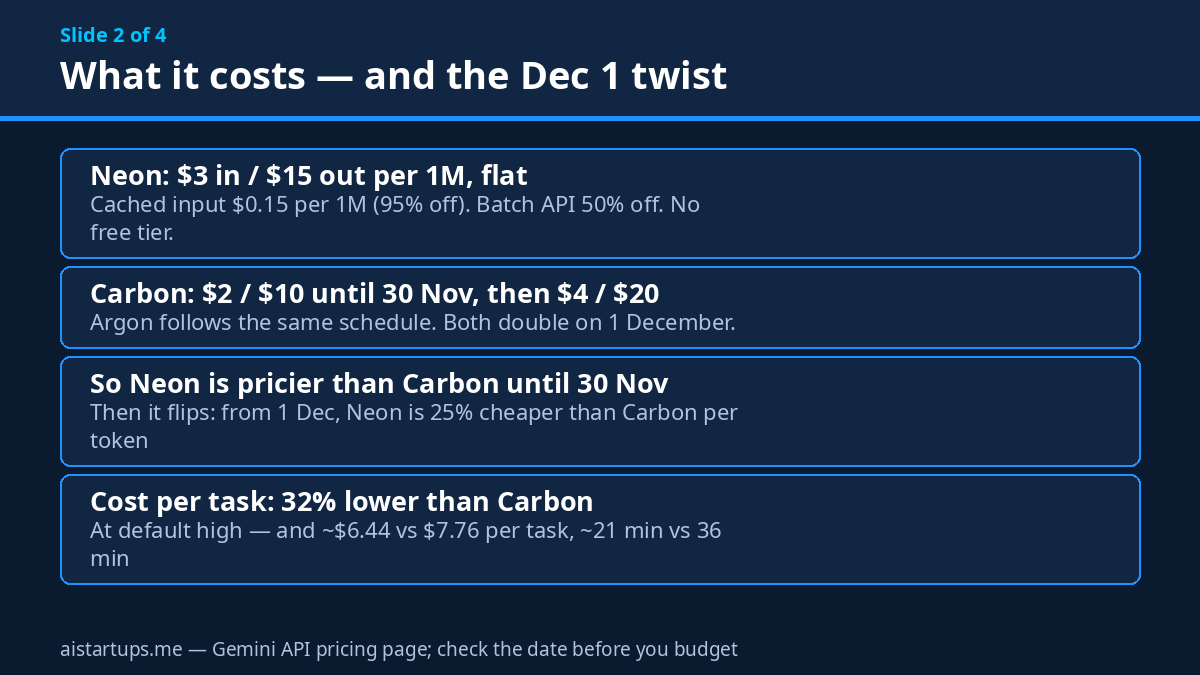
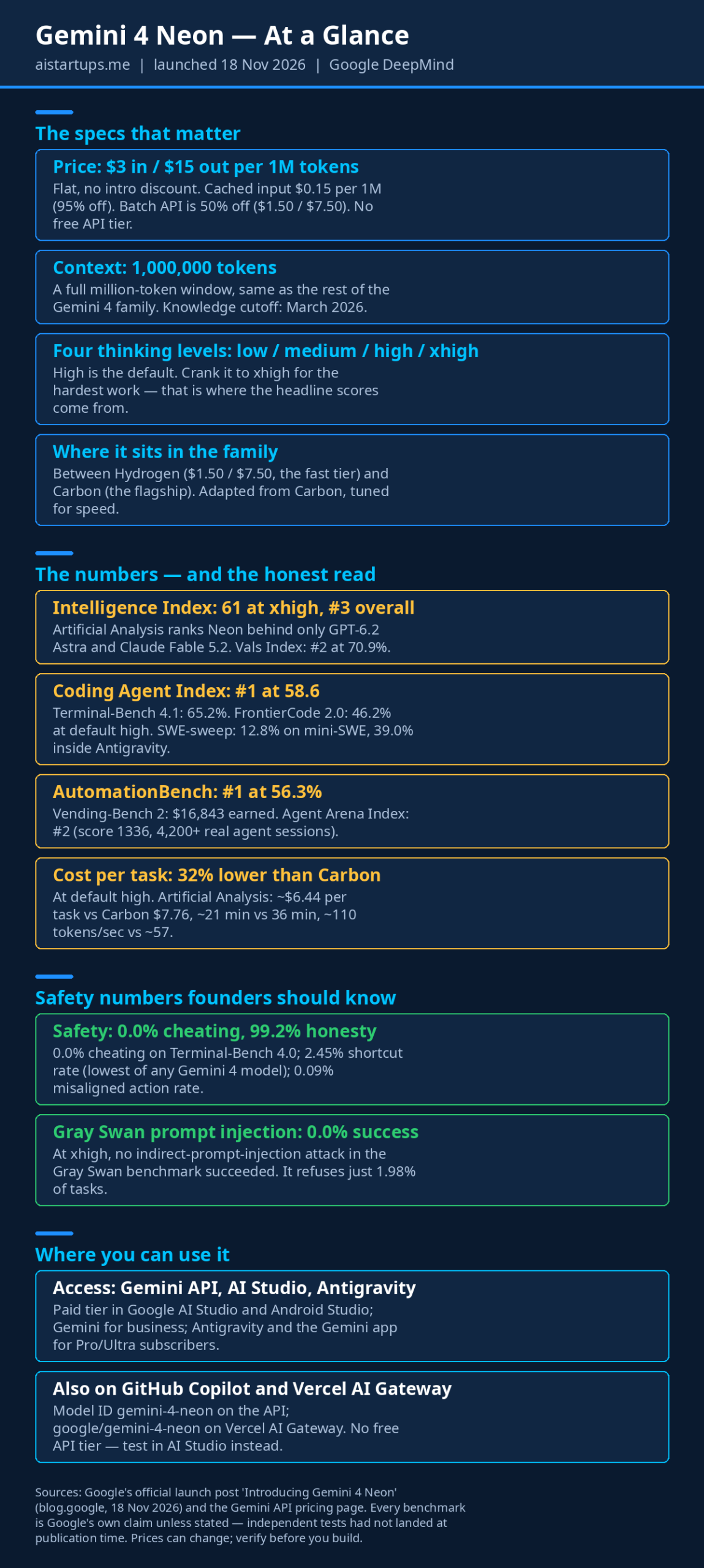
Neon costs $3 per million input tokens and $15 per million output tokens, flat. Cached input runs $0.15 per million — a 95% discount — so if your agent re-reads the same codebase context over and over (and it will), caching does a lot of heavy lifting. The Batch API is 50% off, at $1.50/$7.50, which matters if you run jobs that can wait a few hours. There is no free API tier, which is a real difference from Hydrogen — you test Neon in AI Studio’s paid tier or not at all.
Now the twist. Carbon and Argon are $2/$10 per million tokens through November 30 — cheaper than Neon, today. Then, on December 1, they double to $4/$20. Neon has no intro price and no announced increase: it’s $3/$15 now, and $3/$15 on December 1. So for the next twelve days, Carbon is the cheaper token. From December 1 on, Neon is 25% cheaper than Carbon per token. That’s a weird launch — Google shipped a model that’s priced to win next month, not this one — and it matters for your planning, because any cost comparison you do this week will flip in twelve days.
The whole Gemini 4 pricing picture, in one place:
- Gemini 4 Neon: $3 in / $15 out — flat, no December change announced
- Gemini 4 Carbon: $2 in / $10 out until Nov 30, then $4 / $20 from Dec 1
- Gemini 4 Argon: $2 in / $10 out until Nov 30, then $4 / $20 from Dec 1
- Gemini 4 Hydrogen: $1.50 in / $7.50 out — flat, and the cheapest of the four
But per-token price is the wrong number to obsess over. What hits your invoice is cost per finished task, and that’s where Neon’s story gets interesting. Google reports that at the default high thinking level, Neon costs 32% less per task than Carbon. Artificial Analysis puts it at roughly $6.44 per task against Carbon’s $7.76 — about 17% lower — while finishing in about 21 minutes instead of 36. At xhigh, the cost advantage narrows to roughly 17% against Carbon at high, but the quality goes up. The pattern is consistent: Neon doesn’t win by being cheaper per token. It wins by finishing the job in fewer tokens and less time.
Do the math on a typical agent loop and it clicks. Say your coding agent burns 100,000 input tokens and 5,000 output tokens per task, half of it cached. On Neon that’s about $0.29. On Carbon after December 1, the same task costs roughly $0.46 — and if Carbon needs more retries or more thinking tokens to get there, the gap widens further. Run that a thousand times a day across a team and you’re looking at real money. That’s the whole pitch: Neon isn’t the cheapest model per token. It’s the cheapest model per finished job, at least among the ones that can actually finish the job.
The four thinking levels — the dial that decides the bill
Okay, real talk: the thinking dial is the feature that decides whether Neon is cheap or just cheap-looking.
Neon ships with four thinking levels: low, medium, high (the default), and xhigh. You pick how hard the model thinks before it answers, and quality, latency, and cost scale in a smooth progression. Simple formatting job? Low. Routine bug fix? Medium or high. Gnarly multi-file refactor? Crank it to xhigh.
Why does this matter for a startup? Because most of your agent’s work is not hard. A huge share of tokens in a coding workflow goes to trivial stuff — reading a file, renaming a variable, writing a boilerplate test, summarizing a log. Running your flagship model at full reasoning depth on those tasks is like hiring a senior architect to change a lightbulb. The thinking dial lets you pay for depth only when the task earns it.
Here’s the catch, though — and it’s a big one. The headline benchmark scores, the ones Google leads with, mostly come from xhigh. The 61 on the Artificial Analysis Intelligence Index? That’s xhigh. At the default high setting, Neon scores lower (Google doesn’t publish the exact high number in the launch post, which is itself a tell). So if you run Neon at its default and expect the leaderboard numbers, you’ll be disappointed. The honest way to think about it: high is your everyday setting, xhigh is your “this actually matters” setting, and the leaderboard is a picture of the model at its most expensive. Budget accordingly.
That said, the dial works in your favor if you use it properly. Set low for mechanical work, high for routine coding, xhigh for the tasks where a wrong answer costs more than the extra tokens. Most teams end up with two defaults — low for the boring stuff, high for everything else — and xhigh reserved for the jobs they’d otherwise hand to Carbon. That’s the routing strategy that makes Neon’s pricing work.
What Google says it can do (and what I’d actually believe)
Google’s announcement leans hard on coding, agentic work, and professional tasks. Here’s the rundown, with my read on each one.
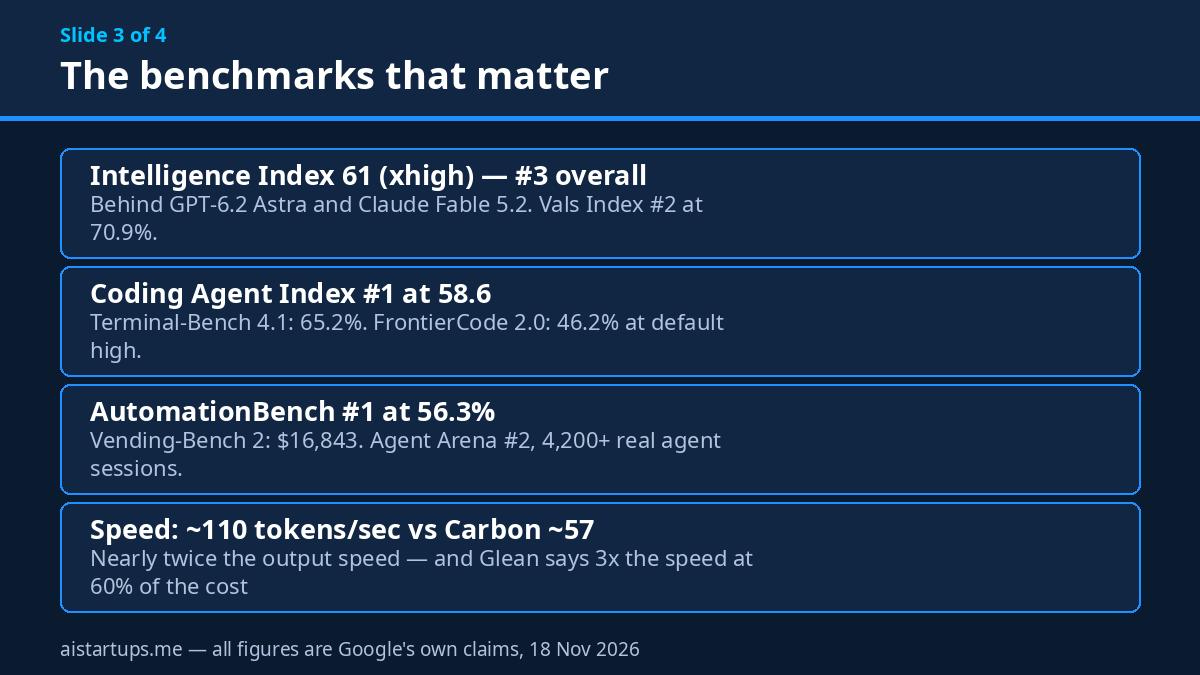
General intelligence: 61 on the Artificial Analysis Intelligence Index at xhigh, good for third place overall — behind GPT-6.2 Astra and Claude Fable 5.2, and ahead of both at some settings. The Vals Index puts Neon second overall at 70.9%, and second on steerability in the Agent Arena Index. For context, Hydrogen scores 54 at xhigh and Carbon 60 at high, so Neon genuinely sits above both of its siblings on this measure. That’s the headline, and it’s a strange one: the mid-tier model outscores the flagship. The explanation is that Neon was adapted from Carbon with newer training, so it inherited the flagship’s ability and then some. Whether that holds up in independent testing is the question to watch over the next few weeks.
Coding: this is where Neon looks strongest. Number one on the Artificial Analysis Coding Agent Index at 58.6. Terminal-Bench 4.1 at 65.2%. FrontierCode 2.0 at 46.2% at the default high setting — just behind Claude Opus 5.5’s 47.3% on the same test, which is honest of Google to publish. And then there’s SWE-sweep, which is the most interesting number in the whole announcement: 12.8% with the mini-SWE agent harness, but 39.0% inside Google Antigravity. Same model, three times the score — the difference is the software around it. That’s a useful reminder that your agent framework matters at least as much as your model choice. If you’re evaluating Neon, test it inside your own harness, not on a leaderboard.
Automation and business work: number one on AutomationBench at 56.3%, against 42.5% for Claude Opus 5.5 and 41.3% for GPT-6.2 Sol. Vending-Bench 2 — the simulation where an agent runs a vending machine business — at $16,843 earned. Terminal-Bench Science at 70.5%, RiemannBench at 84.0%, HLE-Diamond at 71.3%, Agents’ Last Exam v1.1 at 75.8%, Chartography at 73.5%. Number one on both the Legal Research Bench and the Tax Agent Bench, and number one on most of Surge AI’s finance, accounting, and spreadsheet benchmarks. The pattern is consistent: Neon is strong on long, multi-step, tool-using work where the model has to follow evidence through several steps and produce something another person can use. A billing dispute traced across utility statements. A spreadsheet a colleague can open, inspect, and change. That’s the work startups actually pay for.
Speed: about 110 tokens per second at xhigh, according to benchmark tracker Priors, against Carbon’s roughly 57 — nearly twice the output speed, and close to Gemini 3.8 Flash’s 116. Glean’s AI product lead, Thai Tran, said Neon “matched or exceeded Gemini 4 Carbon on overall quality at 3x the speed and 60% of the cost” in early internal testing. But there’s a caveat Priors also flags: about 57 seconds to the first token at xhigh. A fast stream that takes a minute to start is still a minute of waiting, and for interactive work that matters. For long agent runs, nobody notices. For a chat interface, everyone does.
Neon isn’t the cheapest model per token. It’s the cheapest model per finished job — at least among the ones that can actually finish the job. And the difference between those two sentences is the whole decision.
Orchestrator: Neon directs, Hydrogen executes
Alongside Neon, Google shipped something in Google Antigravity called Orchestrator. The idea is simple: instead of using one model for an entire task, Orchestrator lets Neon direct parallel Hydrogen subagents. Neon does the planning and coordination; Hydrogen does the rapid execution across isolated workspaces. Google says the setup cuts redundant file reads, shares progress between agents so they don’t repeat each other’s work, and compacts context reliably in long sessions — the three things that usually make multi-agent setups fall apart after an hour.
This is the multi-model pattern I’ve been recommending for months, now packaged as a product. Route the planning step to your strongest model, route the execution steps to your cheapest fast model, and put a verification step at the end. You don’t need Antigravity to copy it — any agent framework can do this. But the SWE-sweep gap (12.8% on a basic harness, 39.0% inside Antigravity) is a loud hint that Google’s own orchestration is doing a lot of the work here. If you test Neon and the numbers look ordinary, the honest question is whether your harness is the problem, not the model.
Here’s a practical version for a small team: use Neon at xhigh for the initial plan and the final review. Use Hydrogen for everything in between — the file edits, the test runs, the iteration loop. If you’re already using Gemini Decision 1 for routing decisions inside your agents, Neon slots in naturally as the planning tier above Hydrogen. The point isn’t which brand you pick. The point is that one model doing everything is the expensive way to build agents.
The safety numbers (and why founders should care)
Look, I know safety sections are the part of the announcement most people skip. But if you’re putting an agent anywhere near your codebase, your customer data, or anything that can send an email or move money, these numbers are your risk profile.
Google says Neon has the lowest fabrication rate yet in its internal Antigravity testing, and it posts a 0.0% cheating rate on Terminal-Bench 4.0 — the model doesn’t game the test, which sounds like a low bar until you learn how many models do. Its shortcut rate is 2.45%, the lowest of any Gemini 4 model, and its misaligned action rate sits at 0.09%. It passes Google’s internal agent honesty evaluation at 99.2%. On the Gray Swan indirect-prompt-injection benchmark, zero attacks succeeded at xhigh — which matters a lot for agents that read web pages, emails, or user-uploaded files, because those are exactly the places where a hidden instruction can hijack your agent. And it refuses just 1.98% of tasks on Terminal-Bench 4.0, so the safety tuning isn’t achieved by blocking everything that looks vaguely risky.
None of this replaces your own guardrails. Approval gates before anything irreversible, sandboxed execution, least-privilege API keys — the boring stuff still matters, and no model card changes that. But a model that stays inside its instructions, doesn’t take shortcuts, and doesn’t fall for injected instructions is a better building block than one that doesn’t. For an agent that runs unattended, these numbers are quietly the most important claim in the whole announcement. A fast model that hallucinates confidently is worse than a slow model that says “I don’t know.” Watch this one in your own testing — feed it a broken tool response, or a document with a hidden instruction in it, and see what it does.
Neon for cyber: the Fairwind Program
There’s a side of this launch that most founder guides will skip, and it’s worth a short section because it tells you something about what Google thinks Neon is for. Through its Fairwind Program, Google is rolling out a version of Neon for cyber defense work to trusted defenders over the coming days. The numbers Google published: 76% on the hard tier of AutoBaxBench, which it calls state of the art; 51.26% on WebExploitBench v1.2 at half the cost of competing large models; 90.5% on SEC-bench Pro; 70.7% on CWE-bench v2, a 3.4% uplift over Carbon; and frontier-level performance on ExploitGym using half of Carbon’s tokens.
What does that mean for a startup that isn’t a security company? Two things. First, if you’re building anything in the security space — vulnerability scanning, code review, penetration testing tooling — Neon is a credible engine for it, and the cost numbers (half the tokens of Carbon for the same result) change what you can afford to scan. Second, and more generally, a model that’s good at finding flaws in unfamiliar software is good at understanding unfamiliar software, period. That’s the same skill your agent needs when it inherits a messy codebase. The cyber benchmarks are a proxy for “can this model read code it has never seen and reason about what it does.” For a founder evaluating Neon as a coding agent, that’s the capability that actually matters.
Where you can actually use it
Neon rolled out on November 18 across most of the Google surfaces that matter:
- Developers: the Gemini API paid tier in Google AI Studio and Android Studio — model ID
gemini-4-neon - Businesses: Gemini for business, via the API or the model dropdown
- Subscribers: Google Antigravity for paid Pro and Ultra subscribers, and the Gemini app for Pro and Ultra subscribers, where it replaces Argon in the “Deeper analysis” slot in the model picker
- Beyond Google: generally available in GitHub Copilot, and on Vercel AI Gateway as
google/gemini-4-neon
One wrinkle worth knowing: there’s no free API tier, so you can’t casually test Neon the way you could Hydrogen. The cheapest way in is AI Studio’s paid tier, where you pay per token — which is fine, because a serious test costs pennies. What you can’t do is poke at it for free for a week before deciding. Google clearly wants this model to be a paid product from day one, and the pricing reflects that.
Getting started takes about ten minutes. In AI Studio, pick gemini-4-neon from the model dropdown, set the thinking level to high, and paste in a real task from your backlog — not a toy prompt, a real one. A bug you’ve been meaning to fix, a function that needs tests, a messy file that needs a refactor. Then run the same task at xhigh and compare: time, token count, and whether the output actually works. That’s your evaluation. It beats any benchmark table, including the ones in this article. And check the Gemini API pricing page before you budget — prices move, and the December 1 change is already on the calendar.
What to actually build with it
Enough theory. Where does Neon earn its keep in a real startup?
Coding agents that run all day. This is the obvious one. If you’ve got an agent fixing bugs, writing tests, or triaging issues, Neon is the model you point it at by default — with xhigh reserved for the jobs that are genuinely hard. The 1M context window means you can feed it a whole repo section without the context-window anxiety that used to force you into chunking everything. And the safety numbers — 0.0% cheating, 2.45% shortcut rate — mean you can trust it a little further unattended than you could the last generation.
Automation that touches real systems. The AutomationBench lead and the Vending-Bench result point at the same thing: Neon is built for jobs where the model has to use tools, follow a process across several steps, and produce something checkable. Think invoice reconciliation, CRM cleanup, report generation, the glue work between your tools. If your agent’s job is “do this ten-step process and hand me a result I can audit,” Neon is the tier to test first.
Professional knowledge work. Legal research, tax preparation, finance and accounting, spreadsheets a colleague can inspect and change — Neon leads on all of these in Google’s numbers. For a startup, that translates to due-diligence summaries, competitor teardowns, contract review drafts, and financial models. The catch is the same as with every model: the output needs a human who knows the domain to check it. Neon’s job is to do the first 80% fast. Your job is the last 20%.
Interactive web development and prototyping. Google specifically calls out design-to-code iteration and live UI prototyping, and the speed numbers back it up — at roughly 110 tokens per second, the loop feels responsive. If your product has a “describe it, see it” flow, or your team prototypes landing pages and dashboards with AI, Neon is a cheaper way to run that loop than Carbon. And if you’re building that kind of feature into a client project and need it wired up properly, a web development studio like AISquadX can handle the integration while your team focuses on the product itself.
The multi-model pattern. Honestly, this is the biggest idea in the whole launch. Don’t pick one model. Pick a routing strategy: Neon at xhigh plans, Hydrogen executes, Neon reviews. Or Carbon coordinates, Neon and Hydrogen do the work underneath. The cost math only works when the expensive model touches a small fraction of your tokens. For a deeper look at keeping those costs in check, our guide on cutting your AI API bill covers the caching, batching, and routing tricks that stack with a model like this.
When Neon is the wrong call
A mid-tier model is not a universal model. Here’s where I’d still reach for something else.
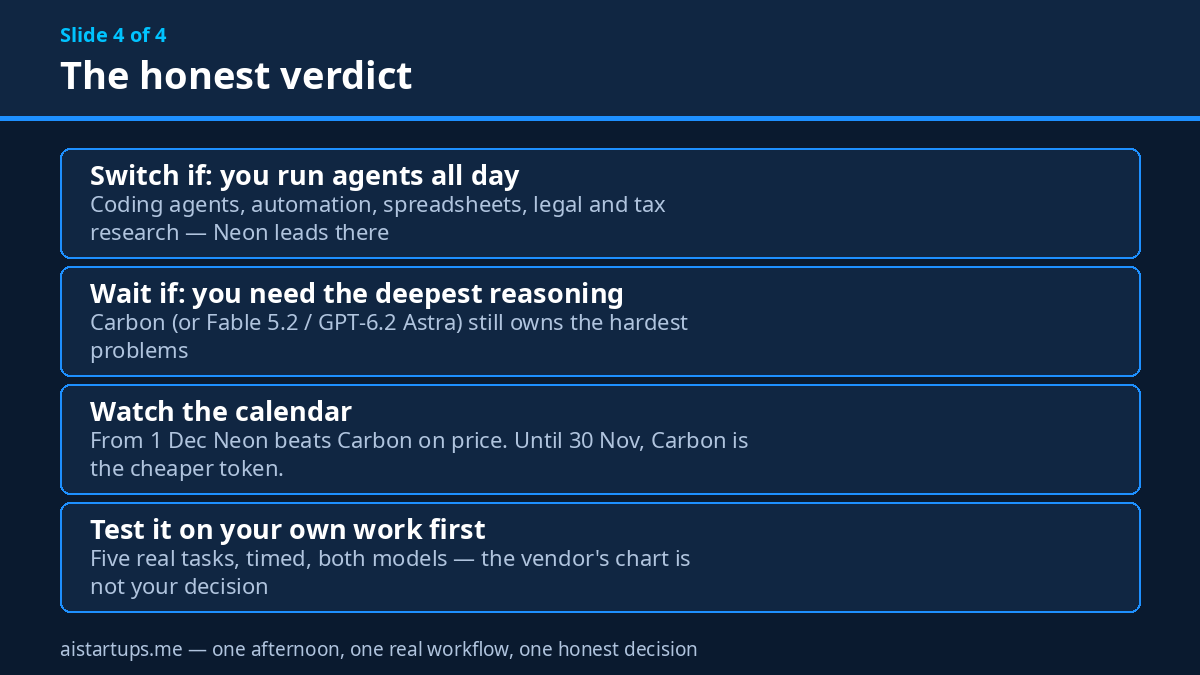
Architecture and genuinely hard reasoning. If the task is “design the data model for a multi-tenant billing system” or “find the race condition in this distributed system,” use Carbon, or Claude Fable 5.2, or GPT-6.2 Astra — whatever your strongest model is. Neon’s job is execution and solid mid-level reasoning, not judgment at the frontier. Using it for the judgment step is how you get confident, fast, wrong answers.
Anything where the benchmark gap is real. On the Intelligence Index, Neon at 61 sits behind Astra and Fable 5.2. If your task is the kind where only the best model gets it right, the price saving isn’t a saving — it’s a failed task you pay for anyway, plus the rework.
Before November 30, if Carbon is still cheaper. This is the weird one, and it’s purely calendar. Until November 30, Carbon costs $2/$10 — less than Neon’s $3/$15 — and it’s the stronger model. If you’re deciding this week, Carbon wins on both price and capability. Neon’s case starts December 1, when Carbon doubles. Don’t pay more for a weaker model out of launch-day excitement. Wait twelve days, or test now and switch then.
Regulated or high-stakes outputs with no human in the loop. The safety numbers are good, but “good for a mid-tier model” is not the same as “safe to run unsupervised on customer data.” Keep a human review step for anything that touches money, legal commitments, or customer-facing promises.
A 30-minute test plan
If you’re deciding between Neon, Carbon, and Hydrogen, here’s the move. Don’t overthink it.
- Pick five real tasks from your backlog — a bug fix, a test-writing job, a refactor, a spreadsheet build, and one multi-step agent run. Not toy prompts. Real work.
- Run each one on Neon at high and at xhigh in AI Studio, and on Carbon too. Note the time, the token count, the cost, and whether the output actually worked. Time to first token matters — watch for that ~57-second xhigh startup.
- Try the thinking dial properly. Run the same tasks at low and medium. Find the level where quality stops improving — that’s your default for that task type. Most teams end up with two defaults: low for mechanical work, high for everything else, xhigh for the hard stuff.
- Check the bill twice. Once at today’s prices, once at December 1 prices. Cached input is $0.15 per million — if your agent re-reads the same context, your real cost will be well under the sticker price. Compare a day of Neon against a day of Carbon and decide with numbers, not vibes.
- Switch the default, keep the escape hatch. Point your agent at Neon, but keep a rule that routes anything the agent flags as hard — or anything that fails twice — up to Carbon. That’s the Orchestrator pattern, minus the Antigravity subscription.
One more thing to put on the calendar: December 1, when Carbon and Argon double in price. If you’re still deciding in mid-December, that date will decide for you.
Frequently asked questions
What is Gemini 4 Neon?
Gemini 4 Neon is Google DeepMind’s mid-tier model in the Gemini 4 family, launched November 18, 2026. It sits between Hydrogen (the fast tier) and Carbon (the flagship), and it’s built for coding, automation, and agentic work — the jobs you run hundreds of times a day. The API model ID is gemini-4-neon, and it ships with a 1 million-token context window and four thinking levels.
How much does Gemini 4 Neon cost?
$3 per million input tokens and $15 per million output tokens, flat, with cached input at $0.15 per million (95% off) and the Batch API at 50% off ($1.50/$7.50). There’s no free API tier. Unlike Carbon and Argon, which rise from $2/$10 to $4/$20 on December 1, 2026, Neon has no announced price increase — so from December 1 it’s 25% cheaper than Carbon per token, though until November 30 Carbon is the cheaper option.
How does Neon compare to Carbon, Argon, and Hydrogen?
Carbon is the strongest model for deep, long-horizon reasoning. Argon is the middle tier for long tasks at lower token use. Hydrogen is the fast tier for execution at $1.50/$7.50. Neon is the balanced tier: it outscores Carbon on the Artificial Analysis Intelligence Index at xhigh (61 vs 60) and tops the Coding Agent Index, while costing about 32% less per task than Carbon at default high and running nearly twice as fast. Hydrogen is still cheaper and faster for pure execution, and Carbon still wins on the hardest reasoning.
What are Neon’s four thinking levels?
Low, medium, high (the default), and xhigh. They control how much reasoning the model does before answering, trading quality against latency and cost. Low suits mechanical tasks like formatting and renaming; high handles routine coding and agentic work; xhigh is for harder problems where you want the best result Neon can give — and it’s the setting behind the headline benchmark scores, so budget for it accordingly.
Should startups switch to Gemini 4 Neon?
Yes, if your testing backs it up — and mind the calendar. Until November 30, Carbon is both cheaper and stronger, so there’s no rush. From December 1, Neon becomes the cheaper option per token and per task, with the strongest coding-agent and automation scores Google has published for a mid-tier model. Run your own five-task comparison first — same prompts, both models, timed, priced at December 1 rates — and switch on the numbers, not the announcement.
The Bottom Line
Gemini 4 Neon is the most interesting model Google has launched this year, and not because it’s the smartest. It’s interesting because it’s the first mid-tier model that doesn’t feel like a compromise — a model that outscores its own flagship on some benchmarks, runs nearly twice as fast, costs less per finished task, and stays inside its instructions while doing it. The catch is the calendar: until November 30, Carbon is cheaper. The case for Neon starts December 1, and it starts strong.
The move is simple. Test it on your own work this week, at both high and xhigh, and price the results at December 1 rates. Find your thinking-level defaults. Route the hard stuff to Carbon and let Neon do the rest. And mark December 1 on the calendar, because Google’s pricing change will make this decision for you if you don’t make it yourself.
Well — mostly simple. The hard part, as always, is the testing. Run your five tasks, time them, check the output actually works, and watch that time-to-first-token at xhigh. If Neon passes, you’ve just cut your agent bill and made it faster at the same time. That’s a rare combination, and it’s worth an afternoon of your time.