On November 10, 2026, Anthropic did something I didn’t expect. It turned Claude into an office suite.
Not a chatbot with a few extra tricks. A real, working set of tools: spreadsheets, whiteboards, meeting notes, and a data layer that talks to your warehouse. All inside claude.ai. All powered by the same model that was already writing your emails and drafting your investor updates.
Look, I’ve watched every AI company try to become “the place where work happens.” OpenAI shipped workplace tools for ChatGPT a few weeks earlier. Google has been stuffing Gemini into Workspace for years. Microsoft has Copilot everywhere. And now Anthropic — the company that built its name on being the careful, thoughtful one — has walked straight into the same fight, but with a very different approach.
Instead of bolting AI onto an existing spreadsheet app, Anthropic built the spreadsheet around the AI. Instead of adding a note-taker to your calls, it put Claude in the call, as a visible participant, doing work while people talk. It’s a small difference in wording and a big difference in practice.
Here’s the thing, though. Three of the four new products are in beta. One of them needs a Team or Enterprise plan. And the spreadsheet tool is, by Anthropic’s own admission, deliberately simple right now. So the real question for a founder isn’t “is this cool?” — it’s “what can I actually use on Monday morning, and what should I wait on?”
That’s what this guide is for. I’ve gone through the announcement, the docs, and the pricing line by line. What follows is the honest version: what each tool does, what it costs, how to set it up in about thirty minutes, and where the rough edges are.

What Anthropic actually launched on November 10
Four products, one announcement, and a pile of plumbing underneath. Let me lay them out plainly, because the names alone don’t tell you much.
Claude Sheets (beta) is a spreadsheet tool that lives inside Claude. You describe what you need in a sentence — “build me a hiring budget with salary bands, start dates, and a monthly burn column” — and it builds the sheet: tabs, formulas, formatting, dropdowns. Then you keep talking to it and it edits the cells directly, telling you what it changed as it goes.
Claude Whiteboards (beta) is a shared, real-time board. You talk through a messy plan out loud and Claude turns it into something structured: a timeline, owners, dates. It works in retros too — dump in a pile of notes and it groups them by theme and drafts action items per person.
Claude Data (generally available) is the new name for what was Claude Dashboards, which had been in beta since October 8. Connect it to your data warehouse or CRM and ask questions in plain language. You get dashboards, data stories, and even narrated videos. The certified-queries and live-sharing pieces are still in beta, which matters — more on that below.
Claude Meetings (beta) puts Claude in your video call as a visible participant. It follows the conversation, works on tasks in real time, and hands you notes and action items when the call ends. Google Meet at launch, Team and Enterprise plans only.
Underneath all of that, two more things shipped. Interactive connectors let you open full apps — Adobe, Atlassian, Box, Notion, HubSpot — inside Claude, and Claude can make approved changes while you watch. And the marketplace now lists more than 9,000 plugin options. That’s a lot of surface area for a single launch day.
Some context helps here. This didn’t come out of nowhere. Claude Docs and Slides went into beta on September 16, 2026, and Cowork — Anthropic’s agentic workspace — got merged into chat around the same time. Then the Claude for Google Workspace add-on launched on October 6. November 10 is the next step in the same direction: Claude stops being a chat window you visit and starts being the place the work lives.
Claude Sheets, hands-on: what it actually does
The demo that stuck with me is the simple one. You type one prompt — say, a campaign tracker with channels, spend, and a cost-per-lead column — and Sheets builds the whole thing. Tabs, formulas, formatting, dropdowns. Not a template you have to fill in. A finished, working sheet.
Then the part that makes it different from a template generator: you keep talking. “Add a column for projected ROI.” “Flag any channel spending more than $2,000 without a lead.” Claude edits the cells directly and outlines each change, so you can see what it did and why. It’s the same pattern as chatting with Claude about a document, except the document is a spreadsheet and the edits land in real cells.
Sharing works the way you’d expect. You can share a sheet with your team, and everyone sees the same live version. If your team already lives in other tools, Sheets hands off to Airtable, Asana, monday.com, and Smartsheet. And when you need to leave the Claude world entirely, you can export to .xlsx or CSV. If you need the full Excel feature set, Anthropic points you at Claude for Excel instead.
Now the honest part. Anthropic calls the current functionality “simple,” and they’re not being modest — they’re being accurate. This is not a replacement for a finance team’s forty-tab model. It’s a tool for the sheets a founder actually builds on a Tuesday afternoon: a hiring budget, a launch tracker, a content calendar, a vendor comparison. The kind of sheet that takes you forty-five minutes in Google Sheets and about ninety seconds here.
That’s a real win, by the way. I don’t think founders appreciate how much of their week disappears into spreadsheet setup. The formatting, the formulas, the dropdowns — none of it is hard, all of it is fiddly. Getting that back is worth something. Just don’t try to run your cap table through it yet.
What to build in Sheets first
- A hiring budget. Roles, salary bands, start dates, monthly burn. This is the sheet every founder rebuilds every quarter, and it’s exactly the kind of thing Sheets is good at.
- A launch tracker. Channels, owners, dates, status. One prompt, one sheet, and you can ask Claude to update it after every standup.
- A vendor comparison. Prices, features, contract dates, renewal reminders. Dropdowns for status, formulas for totals.
- A content calendar. Topics, owners, publish dates, channels. Simple, repeatable, and easy to hand off.
Claude Whiteboards, hands-on: the messy-plan machine
If Sheets is the most practical of the four launches, Whiteboards is the most fun. And I mean that as a compliment — it’s the one that solves a problem every founder has felt but never had a name for.
You know the feeling. You’re in a planning session, the idea is half-formed, and someone says “okay, but what’s the actual timeline?” And then twenty minutes disappear while someone draws boxes on a whiteboard and everyone argues about whether the boxes are in the right order.
Whiteboards short-circuits that. You talk through the messy plan out loud — in the chat, in your own words, half-finished sentences and all — and Claude turns it into a board: a timeline, owners, dates. It’s shared and real-time, so your co-founder sees the same board and can drag things around while you talk.
The retro use case is just as good. Dump in a pile of notes from a launch retrospective and Claude groups them by theme, then drafts action items per person. Anyone who has ever stared at a wall of sticky notes and thought “there’s something in here but I can’t see it” will know why that matters.
There’s a smaller feature I like a lot: you can drag a box around part of a board to focus your questions on just that selection. So instead of asking Claude about the whole plan, you circle the launch week and ask “what’s the risk here?” That’s a small interaction, but it shows Anthropic is thinking about how people actually use whiteboards — you point at the thing, you ask about the thing.
And when the board is done, it doesn’t die on the wall. Claude turns it into a doc or a deck, or moves it into Lucid, Miro, or Vani by Zoho if that’s where your team already works. That last part matters more than it sounds. The worst thing a new whiteboard tool can do is trap your work inside itself. Anthropic clearly decided not to do that.
Whiteboards also works inside Claude Meetings, which means the board builds itself while people are talking. More on that in a minute — but if you’ve ever been the person frantically typing notes during a call while also trying to participate in it, you already understand the appeal.
Claude Meetings, hands-on: an AI in the room
Okay. This is the one people are going to argue about.
Claude Meetings adds Claude to your video call as a visible participant. Not a silent bot in the corner. A named participant that follows the conversation and works on tasks in real time. Someone says “let’s map out the launch timeline” and Claude drafts the plan on a whiteboard while the discussion is still happening. Someone asks a question in the meeting chat and Claude answers it. Someone references last year’s figures and Claude pulls them from your connected work apps.
After the call, the notes, action items, and materials are waiting for you in claude.ai. No more “who was supposed to send the follow-up?” No more reconstructing decisions from a recording nobody will ever watch.
Anthropic has clearly thought about the trust question, because the guardrails are specific. Claude identifies itself in the call and posts a notice in the meeting chat, so nobody is surprised by its presence. It will not join calls with external guests unless an admin authorizes it, and it automatically leaves if an external guest joins mid-call. That’s a sensible default, and it’s the kind of detail that tells you this was designed for real companies, not demos.
Honestly? I think Meetings is the most useful of the four for a small team — and also the one with the narrowest availability. It’s beta, it’s Google Meet only at launch, and it needs a Team or Enterprise plan. If your startup runs on Zoom, you’re waiting. If you’re a solo founder on Pro, you’re waiting too. That’s frustrating, but it’s also honest. Anthropic is shipping to the customers who asked for it first and widening from there.
The comparison that matters here is with the note-taker apps founders already use — Otter, Fireflies, and the rest. Those transcribe and summarize. Claude Meetings does that, but it also works during the call: drafting, mapping, answering, pulling data. A transcript tells you what happened. A participant changes what happens. Whether that difference is worth $25 a seat is a question only your team can answer, but it’s the right question to ask.
A quick note on the Fable 5.2 connection
All of this runs on Claude’s latest models, and the one doing the heavy lifting right now is Fable 5.2, which Anthropic shipped the same week. I covered it in detail in my Claude Fable 5.2 founder’s guide — the short version is that it’s the model behind the agentic work in Sheets, Whiteboards, and Meetings, and its API pricing sits at $8 per million input tokens and $40 per million output tokens. You don’t need to know that to use the tools. But if you’re wondering why the new features feel faster and more capable than the Claude you used six months ago, that’s a big part of the answer.
Claude Data, hands-on: ask your warehouse a question
Claude Data is the one product in this launch that’s already generally available, and it shows. It was Claude Dashboards in beta since October 8, and the GA release adds the polish you’d expect from something that’s been through a month of real use.
Here’s how it works. You connect Claude Data to your data warehouse or CRM — Amazon Redshift, BigQuery, ClickHouse, Databricks, Snowflake, Salesforce — and then you ask questions in plain language. “Which channel brought in the most paying customers last quarter?” “Why did churn spike in September?” You get dashboards, data stories, and even narrated videos back. Not a SQL query. An answer, with the chart attached.
For a startup, the interesting part isn’t the charts. It’s who gets to ask the questions. In most early-stage companies, the person who can answer a data question is the person who can write SQL, and that person is usually one engineer who is already behind on three other things. Data breaks that bottleneck. Your growth lead can ask the question herself. Your co-founder can check the number in the meeting instead of waiting for a Slack reply the next day.
Two features are still in beta, and they’re the two that matter most for a team: certified queries and live sharing. Certified queries let your data team certify metric definitions, so a chart carries a “certified” badge when the number behind it has been checked. Live sharing lets colleagues see current numbers without access to the underlying connectors — viewers see approved query results only, not your warehouse credentials. If you’re the founder who worries about who can see what, that’s the design you want.
There’s also design-system support, dashboard caching with a per-dashboard refresh cadence, and tracked changes with rollback. Those sound boring. They’re not. They’re the difference between a dashboard you trust and a dashboard someone edited at 2 a.m. and nobody can explain. Anthropic also lists Amplitude, Mixpanel, Omni, PostHog, and Sigma as partners, which tells you where the integrations are heading.
One date to put in your calendar: for Enterprise plans, Claude Data turns on by default on November 19, 2026. Team plans get all three new tools on by default already. Enterprise admins have Whiteboards and Sheets off by default and can change any of it in Organization settings, under Artifacts. If you’re on Enterprise, check your settings before the 19th so there are no surprises.
Interactive connectors: your apps, inside Claude
This is the quietest part of the launch and possibly the most important one over time.
Interactive connectors let you open full apps beside a conversation — or full screen — and work in them with Claude. Not a summary of the app. Not a link to the app. The actual app, running inside Claude, with Claude able to make approved changes while you watch. Edits in Confluence. Side-by-side revisions in Box. Doc and database creation in Notion. The launch partners are Adobe, Atlassian, Box, Notion, and HubSpot, and the whole thing is built on MCP Apps.
Why does this matter? Because the biggest friction in AI tools isn’t the AI — it’s the switching. You ask Claude to draft a doc, then you copy it into Notion. You ask it to update a page, then you open Confluence and do it yourself. Every handoff is a chance for the work to stall or drift. Interactive connectors remove the handoff. The work happens where the app is.
They’re available on web and desktop, on all plans, as accounts get the new Claude experience. Which means if you’re on Pro, this is yours too — no upgrade needed.
Real talk: the connectors will only cover the apps Anthropic has built for. If your workflow runs through something custom — say, wiring your CRM into a client portal, or building an AI feature into your own product — that’s the kind of custom build a team like AISquadX handles. Claude is great at working inside the tools it knows. The gaps between those tools are still a job for people.
Pricing: which plan for which founder
Here’s the part everyone actually wants. I re-checked the pricing against claude.com/pricing on November 9, so these numbers are current as of this launch.
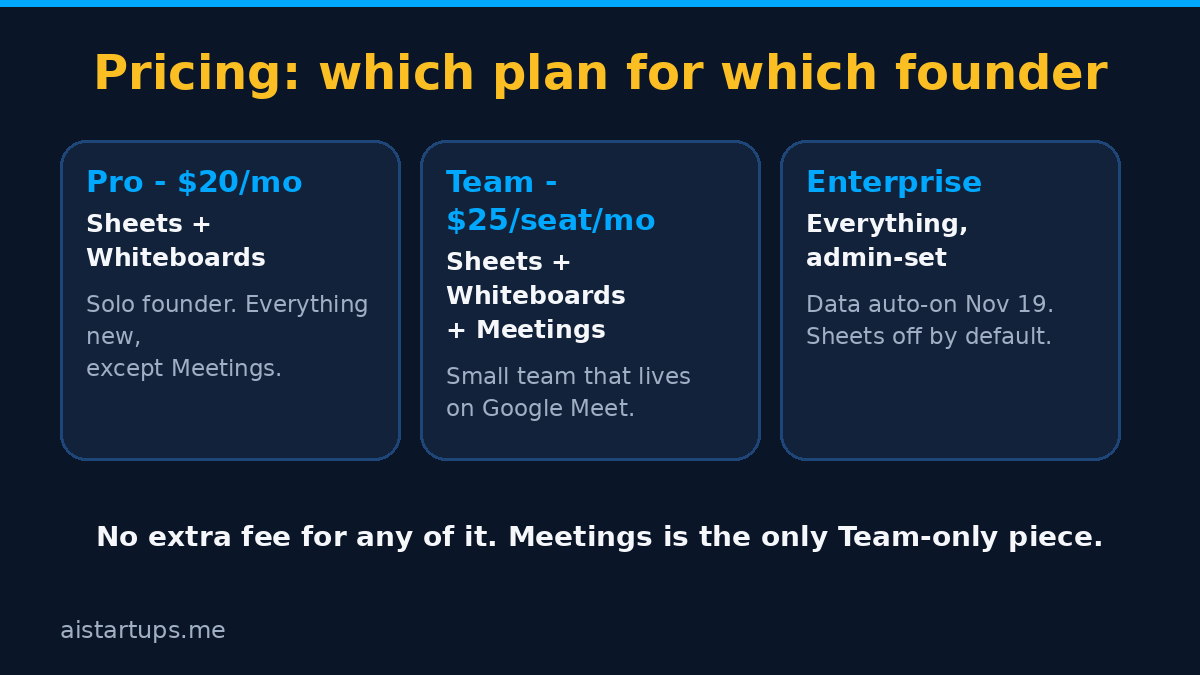
- Free — $0. You get Claude, but none of the new tools. Sheets, Whiteboards, Data, and Meetings all need a paid plan. If you’re testing the waters, fine. If you want the office suite, you need to pay.
- Pro — $20 a month, or $17 a month billed annually ($200 a year). This is where Sheets and Whiteboards start. For a solo founder, this is the plan. You get both beta tools, the interactive connectors, and the full Claude experience. What you don’t get is Meetings.
- Max — $100 a month (5x Pro usage). Same features as Pro, more usage. If you’re hitting Pro’s limits every week, this is your plan. If you’re not, don’t pay for it.
- Ultra — $200 a month (10x Pro usage). Same logic, higher ceiling. Power users and heavy agentic workflows only.
- Team — $25 per seat per month, or $20 per seat billed annually. Premium seats $125 or $100. Two to 150 seats. This is the only plan below Enterprise that gets Meetings, and it’s the plan where all three new tools are on by default. If you have even two people and you run your meetings on Google Meet, this is the plan that makes the suite make sense.
- Enterprise — $20 per seat per month billed annually, plus usage at API rates, 20-seat minimum self-serve. Admin controls, Sheets and Whiteboards off by default, Data auto-on November 19. If you’re at this scale, you already have someone thinking about this.
One thing worth saying clearly: there’s no extra charge for Sheets, Whiteboards, Data, or Meetings beyond the plan itself. Anthropic isn’t selling these as add-ons. You’re paying for the plan; the tools come with it. That’s a good sign. It means the company wants adoption, not a new line item on your invoice.
So which plan, really? If you’re a solo founder, Pro at $20. If you’re a team of two or more that meets on Google Meet, Team at $25 a seat — Meetings alone is worth the difference if it saves one person an hour of note-taking a week. If you’re a team that doesn’t use Google Meet, stay on Pro and wait for the other meeting platforms. And if you’re on the free plan, none of this applies yet — which is Anthropic’s way of telling you the office suite is a paid product.
A 30-minute setup playbook
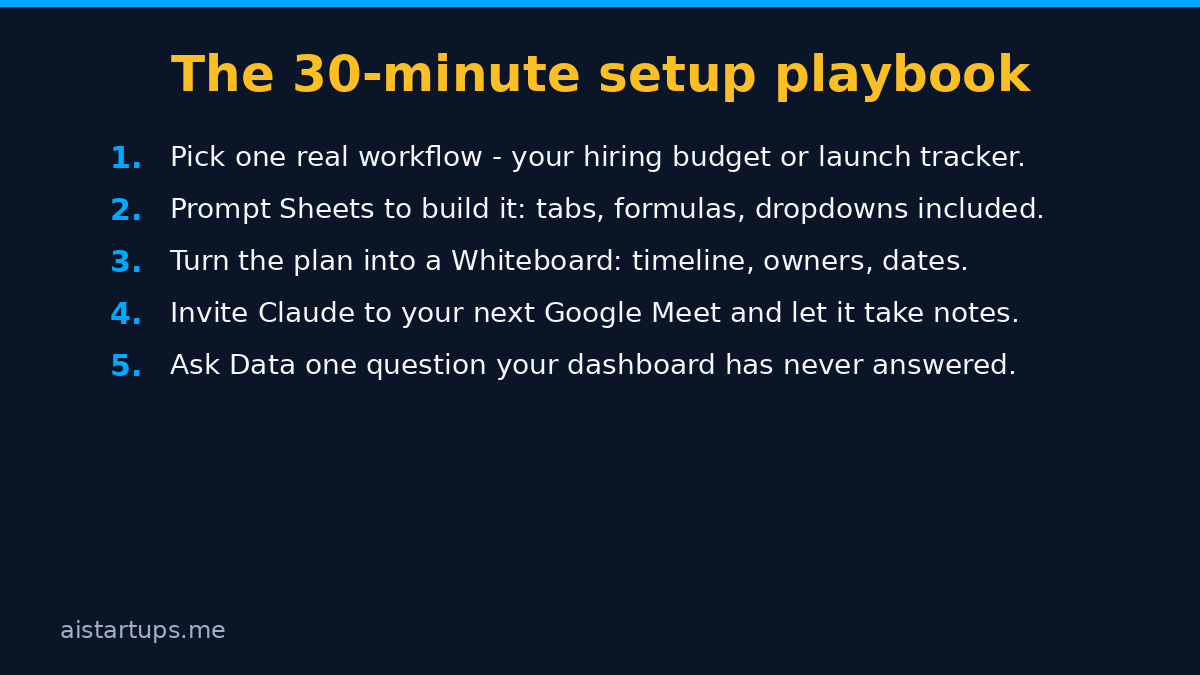
Theory is nice. Here’s the half hour that actually gets you using this stuff. Do it on a Friday afternoon, when the stakes are low and the coffee is strong.
Minutes 0–5: pick one real workflow
Don’t try to set up everything. Pick the one workflow that eats your time every week. For most founders, that’s either the hiring budget or the launch tracker. Write down what it is, in one sentence, before you open Claude. If you can’t name it in one sentence, it’s too big — pick something smaller.
Minutes 5–12: build it in Sheets
Open Claude Sheets and describe the sheet in plain language. “Build a hiring budget: roles, salary bands, start dates, monthly burn, and a total row.” Let it build the tabs, formulas, and dropdowns. Then ask it to change one thing — add a column, flag a threshold — so you can see how the editing works. Export it to .xlsx once, just to prove to yourself that you’re not locked in.
Minutes 12–20: turn the plan into a Whiteboard
Take the same project and talk it through as a Whiteboard. “Here’s our launch plan, it’s messy, here are the pieces.” Let Claude build the timeline with owners and dates. Drag a box around the riskiest week and ask Claude what’s fragile about it. If the board looks right, have Claude turn it into a doc you can share with the team.
Minutes 20–27: invite Claude to a meeting (Team plans)
If you’re on Team or Enterprise, add Claude to your next real Google Meet — a planning call, not a client call. Let it take notes and draft the plan while you talk. After the call, open claude.ai and read what it produced. Check the action items against what you remember. This is the moment where you decide whether Meetings earns its keep.
Minutes 27–30: ask Data one question
Connect Data to whatever you have — even if it’s just Salesforce or a warehouse with a few months of history — and ask it the question your dashboard has never answered. “Which channel brought in the most paying customers?” If the answer is useful, you’ve just found your new morning habit. If it’s not, you’ve spent three minutes finding out.
That’s it. Thirty minutes, four tools, one real workflow each. You’re not an expert at the end of it. You’re a founder who has actually used the thing, which puts you ahead of most people writing about it.

Claude vs. ChatGPT vs. Google Workspace vs. Microsoft 365 — an honest comparison
So how does this stack up against what you’re already using? Short answer: it depends on what you already pay for, and how much you like the tools you have. Longer answer below.
Against ChatGPT’s workplace tools
OpenAI shipped its own workplace tools for ChatGPT a few weeks before this launch, and the two companies are clearly chasing the same idea: the chatbot becomes the workspace. The difference is in the approach. OpenAI has been building outward from a massive user base, adding tools fast. Anthropic has been building inward from the model, and the new features feel more considered — the whiteboard that builds itself while you talk, the meeting participant that drafts plans live, the data tool with certified queries and rollback.
If your team already lives in ChatGPT, there’s no urgent reason to switch today. If you’re choosing fresh, or if your team has been frustrated by ChatGPT’s workplace tools feeling bolted on, Claude’s suite is worth a serious look. The official announcement is worth reading in full — it’s unusually specific about what’s beta and what isn’t, which is the kind of honesty that helps a founder make a real decision.
Against Google Workspace
Here’s the awkward one. Claude for Google Workspace already exists — I wrote a founder’s guide to it when the add-on launched on October 6 — and now Claude has its own Sheets and its own Meetings. So which Sheets do you use? Google’s, or Claude’s?
For now, the answer is both, for different jobs. Google Sheets is the mature tool: heavy formulas, big datasets, the whole ecosystem. Claude Sheets is the fast tool: describe what you need, get a working sheet in seconds, iterate by talking. Use Claude Sheets to build and think. Use Google Sheets when the model gets serious. And use the Google Workspace add-on to keep Claude close to your Gmail and Drive while you do it.
The same logic applies to meetings. Google Meet is the platform; Claude Meetings is the participant. They aren’t competing — Claude Meetings runs inside Google Meet. That’s a smart move by Anthropic, and it’s why the Google relationship matters more than the rivalry.
Against Microsoft 365
If your startup runs on Microsoft 365, Copilot is already in your tools, and switching costs are real. Excel is still the deepest spreadsheet on earth, and Teams is still where your meetings happen. Claude’s suite doesn’t beat Microsoft on depth or on integration with the Microsoft stack. What it offers is a different way of working: you talk, it builds. For a small team that finds Copilot’s setup heavy and its results uneven, Claude’s lighter touch might be a better fit. For a team already deep in Microsoft, there’s no reason to move — and Anthropic knows it. That’s why the handoffs to other tools matter so much: Sheets exports to .xlsx, Whiteboards move to Lucid and Miro. Claude isn’t asking you to leave your stack. It’s asking to sit next to it.
Against the note-takers and the whiteboard apps
This is where the comparison gets interesting for a founder’s budget. If you’re paying separately for a meeting note-taker, a whiteboard app, and a dashboard tool, Claude’s suite starts to look like a consolidation play. One $20 Pro seat or one $25 Team seat replaces three subscriptions — if the tools are good enough. That’s a real “if,” and the beta labels are the reason. But run the math on your own subscriptions. If you’re spending $60 a month across three tools that Claude now covers, the case for trying it is strong.
“The best AI tool for a startup isn’t the one with the longest feature list. It’s the one your team actually opens on Monday morning. Everything else is a demo.”
That sounds obvious, and it is. But it’s also the test that kills most new tools. Features don’t matter if the team doesn’t use them. So when you try Claude’s suite, watch what your team does in week two, not week one. Week one is curiosity. Week two is the truth.
What it’s not (yet): the beta caveats
Real talk now. This launch is exciting, and I mean that. But it’s also a beta launch wearing a general-availability coat, and a founder who plans around the marketing instead of the fine print is going to get burned.
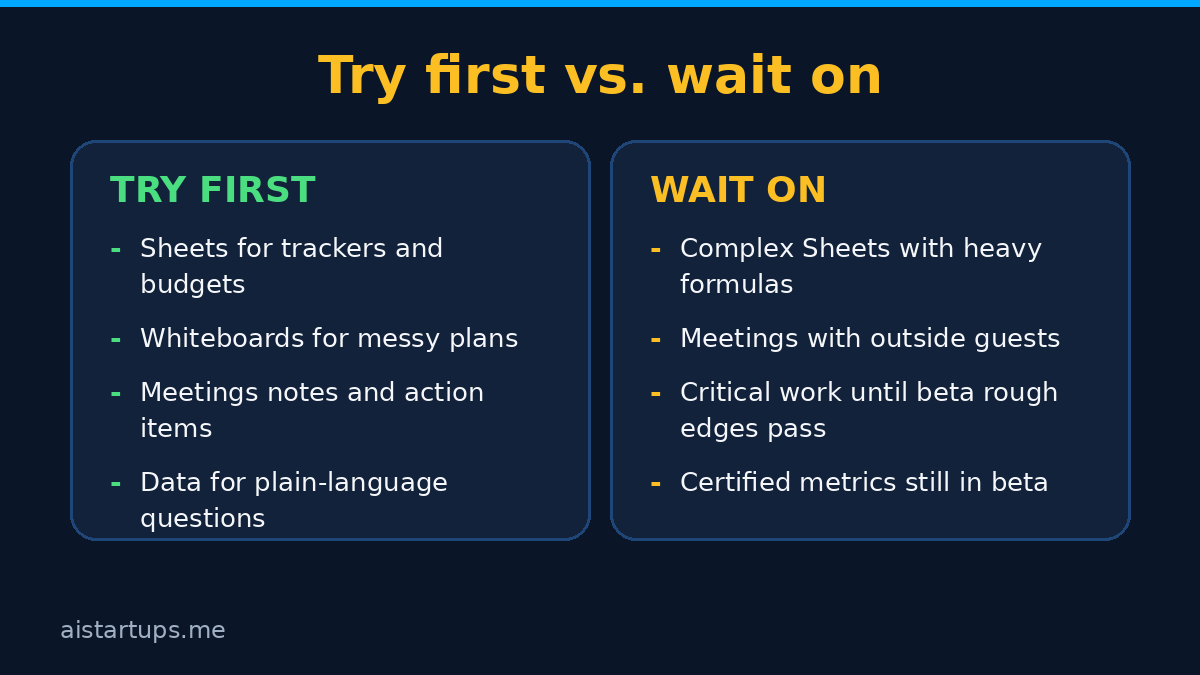
Sheets is deliberately simple. Anthropic said so itself, and the deep dive on the launch backs it up. If your financial model has forty tabs and nested formulas, Claude Sheets is not your tool yet. Use it for the sheets you build and throw away, not the ones your accountant signs off on.
Meetings is Google Meet only, and Team or Enterprise only. Zoom users wait. Solo founders on Pro wait. And even on Team, the external-guest rules mean you can’t just add Claude to a client call — it won’t join unless an admin authorizes it, and it leaves automatically if an outside guest shows up. That’s the right design, but it limits where you can use it.
No free-plan access to any of this. Every one of the four tools needs a paid plan. That’s fair — Anthropic is a business — but it means you can’t trial the suite without paying. The cheapest way in is Pro at $20 a month.
Beta means rough edges. That’s not a warning label, it’s a fact of life. Things will break. A formula will be wrong. A whiteboard will misread a messy plan. A meeting note will miss a decision. Test all of this on non-critical work first. Run your real launch tracker in parallel for a week before you trust the new one. Your future self will thank you.
The admin defaults need attention. On Team, everything is on by default. On Enterprise, Whiteboards and Sheets are off by default, and Data turns on by default on November 19, 2026. If you’re an admin, check Organization settings under Artifacts before that date. The last thing you want is a tool switching on for your whole company before you’ve decided whether you want it.
And one more thing worth knowing, since it shapes where Anthropic is heading: the company filed an amended IPO registration on November 10, the same day as this launch, with reports pointing to a Nasdaq ticker of “ANT.” Make of that what you will. A company heading for the public markets has every reason to ship big, visible product launches. That doesn’t make the tools bad — it makes the timing worth understanding.
FAQ
Do I need a paid Claude plan to use Sheets, Whiteboards, Meetings, or Data?
Yes. None of the four tools are available on the free plan. Sheets and Whiteboards start at Pro, which is $20 a month or $17 a month billed annually. Meetings needs a Team plan at $25 per seat per month, or Enterprise. Data is generally available on paid plans too, with Enterprise auto-on coming November 19, 2026.
Can Claude Meetings join a Zoom call?
Not at launch. Claude Meetings works with Google Meet only, and it’s in beta on Team and Enterprise plans. Anthropic hasn’t announced a date for other meeting platforms, so if your team runs on Zoom, you’ll need to wait — or run your internal planning calls on Meet to try it out.
Is Claude Sheets a real replacement for Google Sheets or Excel?
Not yet, and Anthropic doesn’t pretend otherwise. Claude Sheets is deliberately simple right now: great for trackers, budgets, and comparisons you build in a few minutes. For heavy formulas, large datasets, and financial models, stick with Google Sheets or Excel. The good news is that Sheets exports to .xlsx and CSV, so you’re never locked in. If you want the full picture on what Claude costs across plans, this pricing breakdown was re-checked against claude.com/pricing on November 9 and matches what Anthropic charges today.
How does Claude Meetings handle privacy in calls?
Claude identifies itself as a participant and posts a notice in the meeting chat, so everyone in the call knows it’s there. It won’t join calls with external guests unless an admin authorizes it, and it leaves automatically if an external guest joins mid-call. After the call, notes and action items are stored in claude.ai. If your team discusses sensitive material, the external-guest rules are the feature to understand first — the TechCrunch coverage of the Meetings launch walks through how those guardrails work in practice.
What should a small startup try first?
Start with Sheets for one real tracker — a hiring budget or launch plan — and Whiteboards for your next messy planning session. Both are on Pro at $20 a month, both are useful on day one, and neither requires changing how your team works. If you’re on Team, add Claude to one internal Google Meet and see whether the notes and live drafting earn their keep. Save Data for when you have a warehouse or CRM connected and a question your dashboard can’t answer. And if you’re still weighing which AI tools deserve a seat in your stack, my roundup of 19 AI tools for startup founders puts Claude in context with everything else worth trying — including Claude Duet, the collaborative mode that pairs well with the new suite.
The Bottom Line
Anthropic turned Claude into an office suite on November 10, 2026, and the honest summary is this: two of the tools are genuinely useful today, one is promising but limited, and one is the future of how small teams will ask questions about their own data.
Sheets and Whiteboards are the ones to try now. They’re on Pro at $20 a month, they solve real problems — the fiddly spreadsheet, the messy plan — and they work on day one. Meetings is the one to watch if you’re on Team and live on Google Meet; it’s the most impressive of the four and the most restricted. Data is the one to set up carefully, because once your team can ask the warehouse a question in plain language, they won’t want to go back.
The beta labels are real, and you should respect them. Don’t move your cap table into Sheets. Don’t put Claude in a client call. Don’t trust a dashboard you haven’t checked. But do try the tools on real work, this week, with a real workflow — because the founders who figure out in November what their competitors figure out in February are the ones who keep the edge.
And if you do try it, do the thirty-minute playbook. One workflow, one sheet, one whiteboard, one meeting, one question. That’s all it takes to know whether Claude’s office suite belongs in your startup — or whether you’re better off waiting for the betas to grow up. Either answer is fine. Guessing isn’t.