Last year I promised a client something on a sales call. Something specific — a revised quote, a deadline, I don’t even remember what exactly. A week later they followed up, and I had that cold feeling in my stomach. I knew I’d said something. I just couldn’t prove what.
I dug through my notebook. I had scribbled “send quote??” next to a coffee stain. That was the entire record. Real talk: this is the founder tax. You’re in back-to-back calls all day, you’re half-listening while thinking about payroll, and the one commitment that mattered evaporates before the call even ends.
That’s why I finally gave in and let an AI sit in on my meetings. Best decision I made that quarter. But — and this is the part nobody tells you — picking the wrong meeting assistant is almost as bad as having none. One capped my meetings at 30 minutes. Another filled its storage in four days. A third joined a client call as a bot named after me and immediately made the whole thing weird.
So here’s my honest rundown of the seven tools worth your time in 2026: the big four dedicated apps (Fathom, Otter, Fireflies, Granola) and the three built-in AIs living inside Zoom, Google Meet, and Microsoft Teams. Real prices, real free-plan limits, and the catch each one hides on the pricing page.
The short version (for people with a meeting in 5 minutes)
You’re busy. Here’s the cheat sheet:
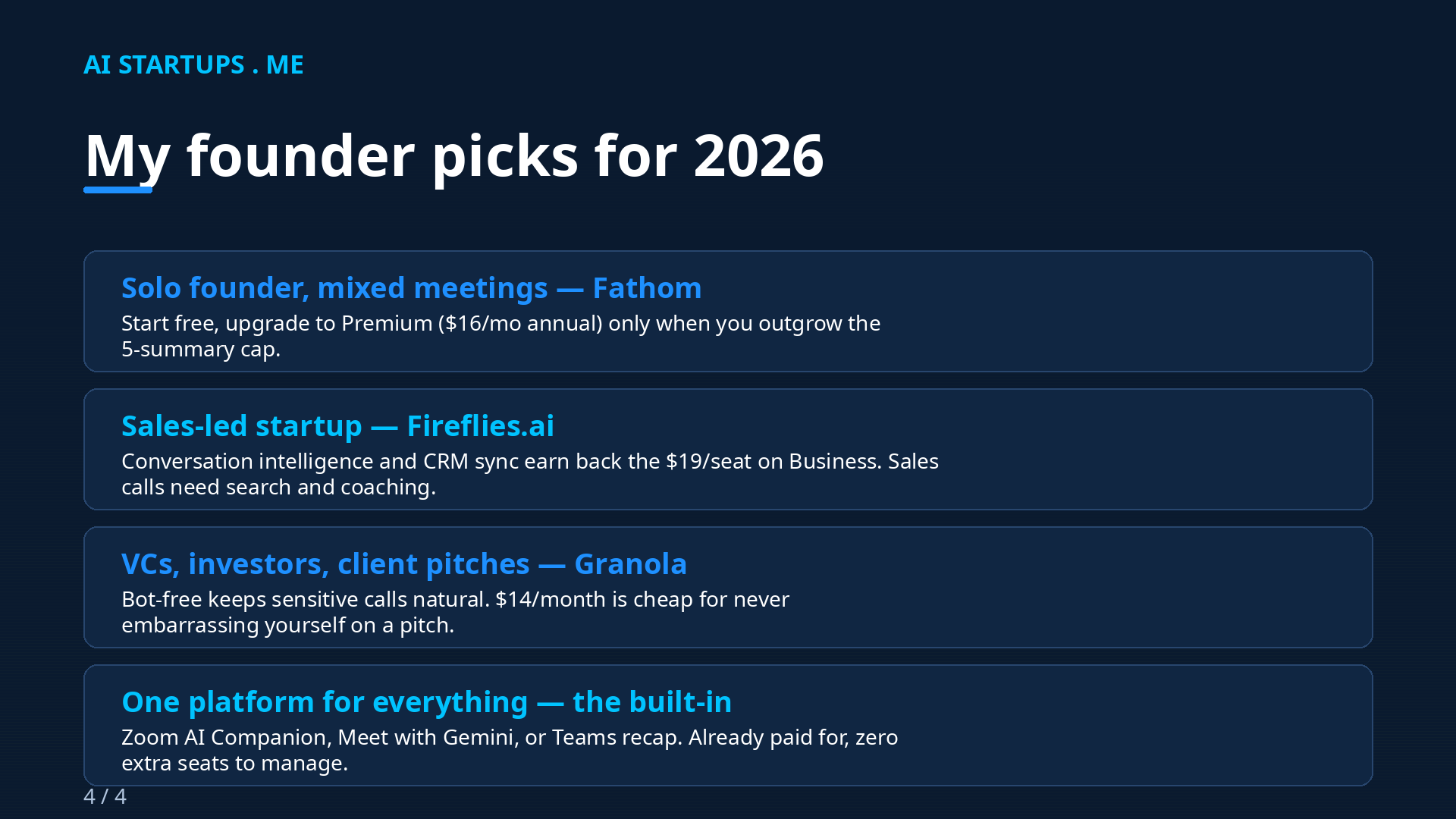
- Start with Fathom’s free plan. It’s the most generous free tier in the category — unlimited recordings and transcription, with only the fancy AI summaries capped (5 calls a month).
- Sales-heavy startup? Fireflies.ai. The CRM sync and conversation intelligence on the Business plan ($19/seat/month annual) pay for themselves if your team lives on discovery calls.
- Pitching investors or big clients? Granola. No bot joins the call, so nothing weird appears on anyone’s screen. $14/month is cheap insurance against an awkward first impression.
- All your meetings on one platform? Just use the built-in AI. Zoom AI Companion, Google Meet’s “Take notes for me,” or Teams’ intelligent recap — you’re probably already paying for one of these.
- Need to search years of meeting history? Otter.ai. Its workspace search across old transcripts is still the best archive tool of the bunch.
If you want the full reasoning — the pricing traps, the platform quirks, the consent stuff — keep reading. I dug into all of this so you don’t have to.
1. Fathom — the best free plan, full stop
Fathom is the tool I recommend to other founders most often, and it comes down to one thing: the free plan is genuinely useful. Unlimited recordings, unlimited transcription, instant AI summaries on your first 5 calls a month, clips you can share, and search across your own calls. No credit card, no trial clock ticking.
Here’s the thing, though. Fathom changed its free plan in 2026 — the advanced AI summaries are now capped at 5 calls a month (it used to be unlimited everything). After that you get a basic chronological template, which is… fine. Serviceable. But the magic is in those first 5.
Pricing
(Pricing below verified against 2026 reviews — see MeetGeek’s Fathom pricing breakdown and TechRepublic’s 2026 comparison.)
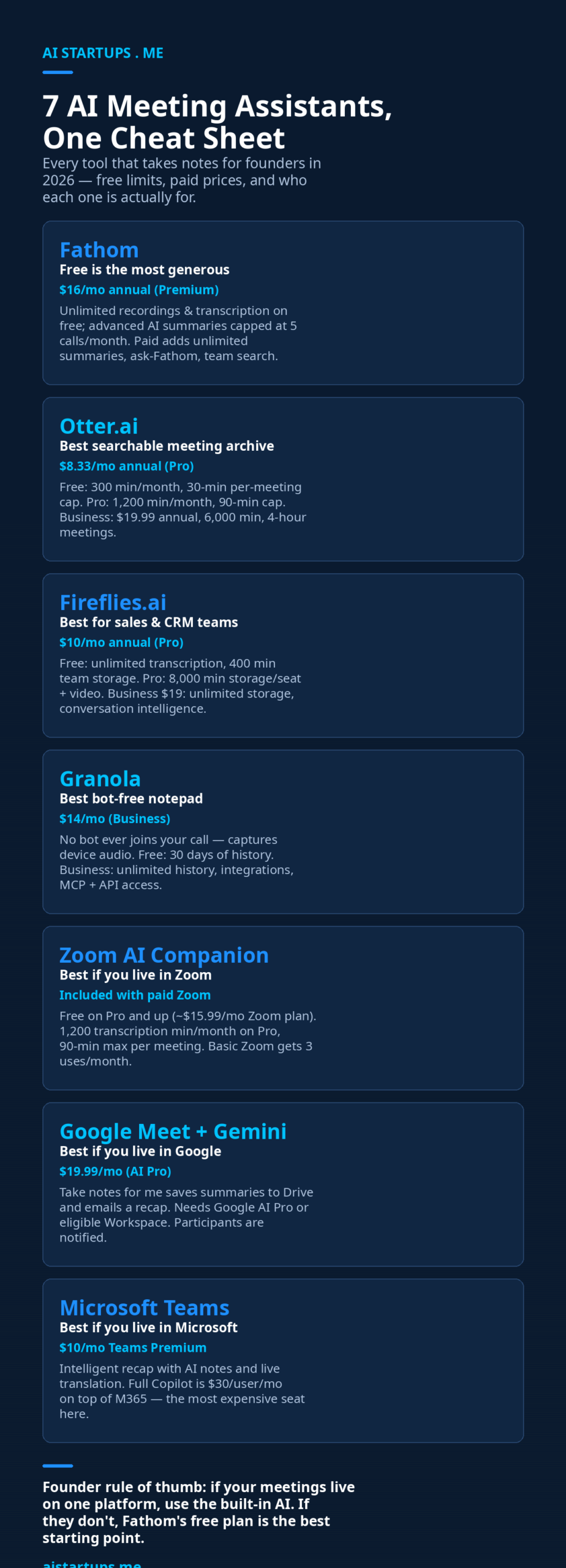
- Free: $0 — unlimited recordings and transcription, advanced AI summaries on 5 calls/month
- Premium: $16/user/month billed annually ($20 month-to-month) — unlimited advanced summaries, unlimited “Ask Fathom” on your calls, AI follow-up email drafts
- Team: $15/user/month billed annually ($19 monthly, 2-user minimum) — global search across shared calls, team folders, keyword alerts
- Business: $25/user/month billed annually ($34 monthly, 2-user minimum) — CRM field sync, Deal View, AI coaching scorecards
Where it shines
Summaries land within about 30 seconds of the meeting ending, and every line of the transcript links to the video timestamp — one click and you’re watching the exact moment. You can also highlight key moments live during the call without breaking focus, which I love for long investor calls. Works with Zoom, Google Meet, and Microsoft Teams. It’s SOC 2 Type II, HIPAA, and GDPR compliant, which matters the moment you touch regulated clients.
Where it falls short
Three platforms, that’s it. If your team uses Webex, GoToMeeting, or anything exotic, Fathom isn’t your tool. There’s no file-upload option — you can’t drop in a recorded audio file and get it transcribed, which Otter and Fireflies both do. And there’s no mobile app for in-person recording yet. The bot joins as “[Your Name]’s Fathom Notetaker,” which — well, we’ll talk about the bot awkwardness problem below.
Best for: solo founders and small teams on Zoom, Meet, or Teams who want a great free starting point that grows with them.
2. Otter.ai — the searchable meeting archive
Otter is the old-timer of this space — founded in 2016 — and it shows in the best way and the worst way. The best way: OtterPilot joins your scheduled calls automatically from your calendar sync, no button-pressing, and its workspace search across months of old meetings is genuinely excellent. I once found a pricing commitment from a call eight months earlier by searching two keywords. That’s the feature that keeps people on Otter.
The worst way: the free plan is thin. 300 minutes a month sounds okay until you realize the per-conversation cap is 30 minutes. One 45-minute call and the recording just… stops. In the middle. (Ask me how I know.)
Pricing
(Verified via MeetGeek’s Otter pricing guide, updated September 2026.)
- Basic (Free): $0 — 300 minutes/month, 30 minutes per conversation, 3 lifetime file imports, 20 AI chat queries/month
- Pro: $8.33/user/month billed annually ($16.99 month-to-month) — 1,200 minutes/month, 90 minutes per conversation
- Business: $19.99/user/month billed annually ($30 month-to-month) — unlimited meetings, 6,000 minutes/month, 4 hours per conversation, joins up to 3 concurrent meetings
- Enterprise: custom — SSO/SCIM, HIPAA add-on, API and webhooks, sales notetaker with CRM integrations
Where it shines
Live transcription during the call is Otter’s original superpower and it’s still excellent, with solid speaker identification. The AI chat lets you interrogate a meeting afterward — “what did we decide about the refund policy?” — which beats re-reading a transcript. Sales teams on Enterprise get call coaching insights and HubSpot/Salesforce sync.
Where it falls short
The per-meeting cap is the real pricing lever here, not the monthly minutes. On Pro, anything over 90 minutes gets cut. Reviewers also grumble about “shrinkflation” — fewer minutes for the same price than earlier versions. And at $30/seat/monthly for Business, it’s the priciest dedicated tool on this list. If you’re comparing AI voice tools for startups more broadly, Otter sits at the premium end of the transcription category.
Best for: founders who want a searchable archive of everything ever said in their company, and teams already paying for the Business tier’s concurrent-meeting bot.
3. Fireflies.ai — the sales team’s favorite
Fireflies is what you buy when meetings are your revenue engine. The free plan gives you unlimited transcription (the generous part) with 400 minutes of team storage (the stingy part). A team of any real size burns through that in days, so treat Free as a quality test, not a plan.
What makes Fireflies different is everything around the transcript: AskFred (an AI you can query across meetings, email, Slack, and CRM data), AI Skills that run 200+ post-meeting automations, voice agents, and deep CRM integrations. It holds a 4.7/5 on G2 from 749 reviews and 4.9/5 on Capterra from 735 — the best ratings in this roundup, and the reviews consistently praise the sales workflows.
Pricing
(Verified via Fireflies’ own 2026 transcription software guide.)
- Free: $0 — unlimited transcription, 400 minutes of team storage, limited AI summaries, audio recording only
- Pro: $10/seat/month billed annually ($18 month-to-month) — 8,000 minutes of storage per seat, video recording, AI Skills, 20 AI credits/month
- Business: $19/seat/month billed annually ($29 month-to-month) — unlimited storage, conversation intelligence, team analytics, 30 AI credits/month
- Enterprise: $39/seat/month (annual only) — SSO/SCIM, HIPAA, audit logs, dedicated account manager, 50 AI credits/month
Where it shines
Conversation intelligence is the killer feature: talk ratios, sentiment, topic tracking, and coaching insights across your whole sales team. It works on Zoom, Meet, Teams, and more, with a Chrome extension and desktop apps. GDPR, SOC 2 Type II, HIPAA (Enterprise), FERPA compliant. If your reps live on discovery calls, the search-and-coaching loop genuinely changes how a sales org learns.
Where it falls short
The advanced AI features run on separately metered AI credits — heavy users need to budget for top-ups. Reviewers report speaker-labeling errors when people talk over each other, and summaries can be hit-or-miss on casual, unstructured conversations. The feature set is also just… a lot. New users find it overwhelming compared to Fathom’s clean simplicity.
Best for: sales-led and recruiting-heavy startups where call recordings feed coaching, CRM updates, and pipeline reviews.
4. Granola — the bot-free notepad for high-stakes calls
Granola is the breakout story of 2026: a $125M Series C in March at a $1.5B valuation, and the default note-taker among VCs and founders I know (Fireflies’ Granola comparison has a good side-by-side if you want the details). The pitch is simple — no bot ever joins your meeting. It captures your computer’s system audio on your own device, so it works with Zoom, Meet, Teams, Slack Huddles, Webex, literally anything. Nobody sees an extra participant. Nothing announces itself.
But here’s the part that divides people: Granola is a notepad, not a passive recorder. You type your own rough notes during the call, and the AI expands them afterward into clean structured summaries. If you’re the type who sits back and just listens, this adds nothing over Fathom. If you’re already scribbling — and most founders I know are — it turns that habit into a superpower.
Pricing
- Basic (Free): $0 — AI-enhanced notes, templates, shared folders, but only the last 30 days of history are visible
- Business: $14/user/month — unlimited history, Notion/Slack/HubSpot integrations, MCP server and API access (billed monthly only — no annual discount, which is unusual)
- Enterprise: $35/user/month — SSO, admin controls, org-wide AI training opt-out
Where it shines
It’s the only tool here that feels invisible, which matters enormously on investor pitches and cold outreach where a visible bot reads as… amateurish, honestly. Desktop, iOS, Android, and even Apple Watch apps. The MCP server added in early 2026 pulls your notes straight into Claude and ChatGPT, which is slick if those are already in your workflow. Audio gets deleted after transcription.
Where it falls short
No real-time coaching, no speaker identification by default, narrower language support than competitors. The free plan’s 30-day history cap means your archive disappears unless you pay — which is the opposite of Otter’s whole value proposition. And at $14/month with zero annual discount, it’s oddly priced next to Fathom’s $16 annual Premium. If you want the broader picture on AI tools every founder should use, Granola is the niche pick, not the all-rounder.
Best for: founders in back-to-back external meetings — VCs, enterprise sales, consulting — where a visible bot would be a liability.
5. Zoom AI Companion — the one you’re already paying for
Here’s a sentence that saves you $20 a month: if you pay for Zoom, you probably already own an AI meeting assistant. AI Companion (the name got folded into “Zoom Workplace” in mid-2026, but it’s the same thing) is included free on all paid Zoom plans — meeting summaries, action items, in-meeting Q&A, the works.
The catch is the caps. On Zoom Pro (~$15.99/month or ~$149.90/year), AI transcription is capped at 1,200 minutes a month with a 90-minute max per meeting. On Business (~$21.99/month) it’s 6,000 minutes with a 4-hour max. Hit the cap and the AI features just stop until next month — no overage, no warning, just silence. Free Zoom Basic users get a grand total of 3 AI uses a month, and there’s a standalone “My Notes” add-on at $10/month for people without a paid plan.
Best for: teams that live entirely in Zoom. It’s native, it’s included, and the summaries are decent. If your meetings span platforms, look elsewhere — the “My Notes” feature does cover Meet and Teams now, but it’s a separate thing from the core companion (Fireflies’ Zoom Companion comparison covers the trade-offs well).
6. Google Meet + Gemini — “Take notes for me”
Google’s entry is the “Take notes for me” feature in Meet, powered by Gemini. Turn it on (pencil icon, top of the Meet window, or enable it for all calls in settings) and Gemini transcribes in the background, writes a summary with action items, saves it as a Google Doc in your Drive, and emails you a recap after the call. All participants get notified when note-taking is on, which is good manners built into the product.
The catch is the entry ticket: $19.99/month for Google AI Pro, or an eligible Workspace business plan. There’s no free tier here at all. And unlike Fathom or Fireflies, the notes live and die inside Google’s ecosystem — great if you’re a Google shop, a dead end if you ever migrate.
Best for: teams already paying for Google Workspace or Google AI Pro, where Drive-native meeting docs slot straight into existing workflows.
7. Microsoft Teams — intelligent recap (and the $30 Copilot question)
Teams takes the “built-in” idea furthest and charges the most for it. The meeting-specific AI — intelligent recap, automated notetaking, live translation — comes with Teams Premium at $10/user/month. The full Microsoft 365 Copilot, which does meeting recaps plus everything across Word, Excel, Outlook and Teams, is a $30/user/month add-on on top of your M365 license. All-in, a Copilot seat runs $69–90/month. For a five-person startup, that’s real money before you’ve proven anyone uses it for more than email drafts.
To be fair, if you’re already deep in the Microsoft ecosystem, the cross-app reach is unmatched — ask Copilot to summarize a week of Teams chats and draft the follow-up email, all in one license. But for meeting notes alone? It’s the most expensive seat on this list by a mile.
Best for: Microsoft-standardized companies where Copilot’s value spans the whole Office suite, not just meetings. Startups choosing fresh should run the math twice.
How to actually choose (the 4-question version)
Forget the feature matrices. I’ve watched founders agonize over these for weeks, and it always comes down to four questions:
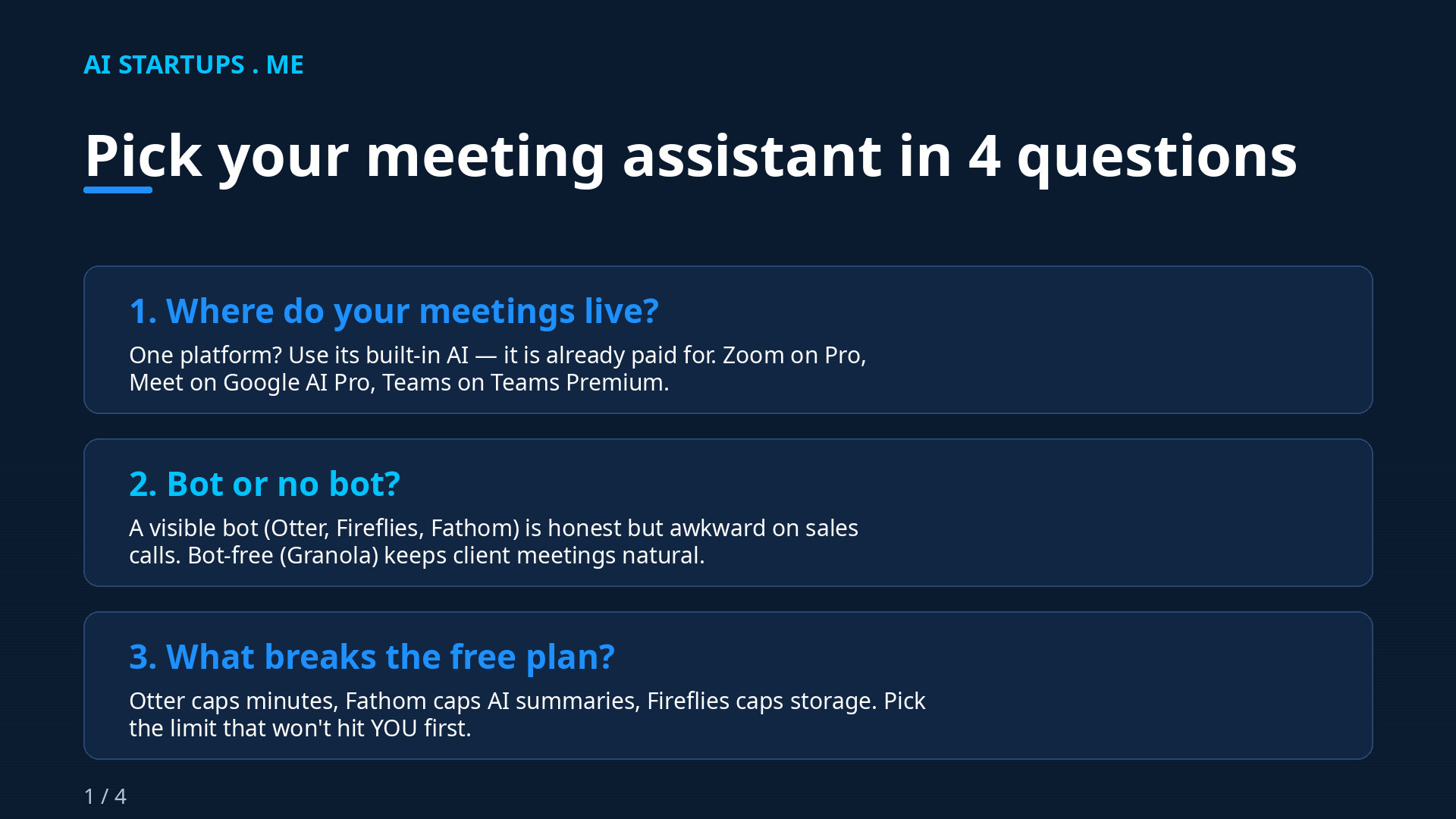
1. Where do your meetings live? One platform, always? Use its built-in AI and stop shopping. You’re already paying for it. The standalone apps earn their keep only when your calls span Zoom, Meet, Teams, and the occasional Webex from that one enterprise client.
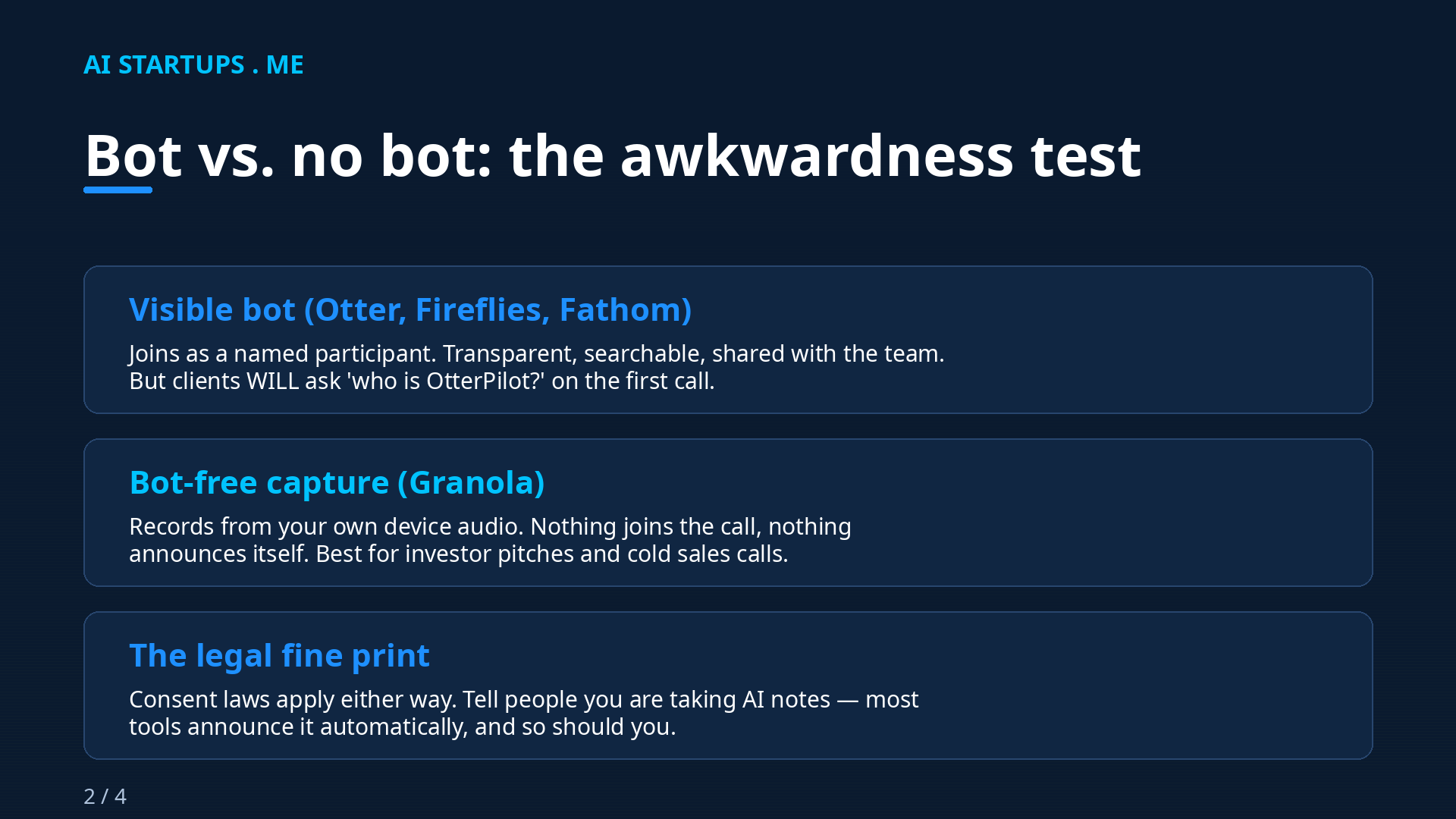
2. Bot or no bot? A visible bot is transparent and honest — and the first time a prospect asks “uh, who’s OtterPilot?” on a sales call, you’ll feel it. For internal standups and team syncs, bots are fine. For pitches, investor calls, and cold outreach, Granola’s invisibility is worth $14.
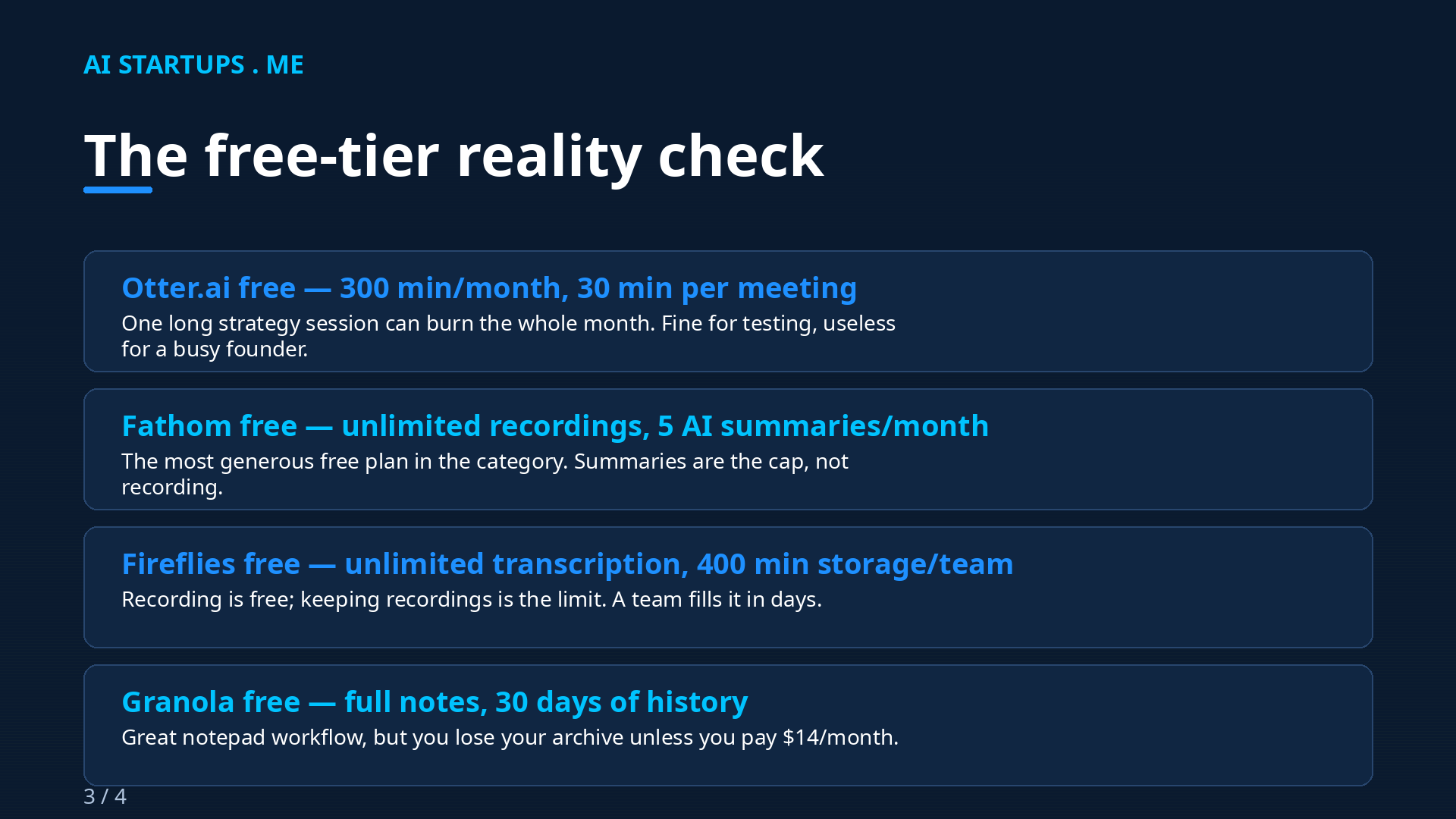
3. Which free-plan limit hits you first? This is the real pricing page. Otter limits your minutes (300/mo) and meeting length (30 min). Fathom limits your AI summaries (5/mo) but not your recording. Fireflies limits your storage (400 min per team). Granola limits your history (30 days). Pick the tool whose limit you’ll never touch, and the free plan stays free.
4. Do your notes need to go somewhere? If meeting notes die in the app, any tool works. But if you want transcripts flowing into your CRM, your project board, or a custom internal dashboard, the integration story decides it: Fireflies for sales pipelines, Otter’s API for custom builds, Zapier/Make glue for everything else. And if you want meeting intelligence wired directly into your own product or internal tools — searchable archives, custom summaries, automated follow-ups — that’s exactly the kind of thing an AI integration studio like AISquadX builds. I’ve seen founders waste months duct-taping this together when a small dev engagement would have shipped it in weeks.
One more thing on cost: meeting tools are one of those subscriptions that quietly multiply. Five seats here, ten there. If your AI tooling bill is creeping up in general, I wrote a whole guide on cutting your AI API bill by 70% without hurting quality — the same discipline applies to SaaS seats.
The consent thing nobody reads
Recording laws apply whether a bot joins your call or not. A visible bot announces itself; a bot-free tool doesn’t — but your legal obligation to tell people is identical either way.
Quick, unglamorous, necessary: in many places (including parts of the US, the EU under GDPR, and plenty of other jurisdictions), recording a conversation requires consent from all parties. Most of these tools announce themselves automatically — the bot literally joins the call, or Meet pops a notification. Granola doesn’t announce anything, which means the responsibility is entirely on you to say “hey, I’m taking AI notes” at the start.
Make it a habit, not a legal memo. One sentence at the top of the call. Nobody has ever objected in my experience — and the one time someone did, we just took manual notes. If you handle health, legal, or financial data, check the compliance story too: Fathom and Fireflies both list HIPAA compliance on the right tiers; Otter needs its Enterprise add-on; Granola keeps org-wide training opt-outs on Enterprise.
FAQ
Which AI meeting assistant has the best free plan?
Fathom, and it’s not close. Unlimited recordings and transcription with advanced AI summaries on 5 calls a month. Fireflies gives you unlimited transcription but only 400 minutes of team storage. Otter’s free plan caps you at 300 minutes a month and 30 minutes per meeting — one long call can kill it.
Do I need a separate tool if I use Zoom, Google Meet, or Teams?
Probably not, if you live on one platform. Zoom AI Companion is included with paid Zoom plans, Meet’s “Take notes for me” comes with Google AI Pro ($19.99/month) or eligible Workspace plans, and Teams’ intelligent recap is in Teams Premium ($10/user/month). You need a standalone tool when your meetings span platforms, when you want a searchable cross-platform archive, or when you need sales-specific features like conversation intelligence.
Is it weird to have an AI bot join client calls?
A little, the first time. The bot shows up as a named participant (“OtterPilot,” “Fireflies.ai Notetaker”), and clients do ask about it. My rule: bots for internal meetings, bot-free capture (Granola) for pitches and cold sales calls. And always mention it at the start of the call — it’s legally required in many places anyway.
Can these tools replace a human note-taker?
For capturing what was said and agreed? Yes, easily — and they’re better at it than a distracted human. For judgment calls — reading the room, knowing which offhand comment was actually the decision — no. I still skim every summary before it goes anywhere. The AI captures; you decide what it meant.
What’s the cheapest way to get AI meeting notes as a solo founder?
Start with Fathom’s free plan — $0 for unlimited recording and transcription. If you hit the 5-summary cap, Premium is $16/month billed annually. If all your calls are on Zoom and you already pay for Pro, the built-in AI Companion costs you nothing extra. Don’t pay for anything until a free limit actually bites you.
The Bottom Line
Here’s my honest take after running these side by side: most founders are overthinking this. Start with Fathom’s free plan this week — it takes ten minutes to set up and you’ll know by Friday whether AI meeting notes change your life. (They will. The first time you search “what did we agree on pricing” and get an answer in three seconds, you’ll wonder why you waited.)
Then upgrade only when a limit bites: Granola when a bot embarrasses you on a pitch, Fireflies when your sales team needs coaching data, Otter when you want a searchable archive of everything, and the built-in AI the moment you realize all your meetings happen in one place anyway.
The tool doesn’t matter nearly as much as the habit. The founders who get value from these aren’t the ones with the fanciest plan — they’re the ones who actually read the summary after the call. Be that founder. Your future self, the one who never again has to say “wait, what did we decide?”, will thank you.