
A year ago, an AI voice on a phone call gave itself away in the first sentence. The stilted cadence. The half-second pause before every reply. The way it talked over you like an overeager intern.
That tell is mostly gone now. A well-built voice agent in 2026 answers in under a second, hears you interrupt, and books the meeting without ever sounding like it’s reading a script. Text-to-speech voices narrate audiobooks people actually finish. Meeting bots take better notes than most humans.
And founders have noticed. The three jobs AI voice does for a startup right now are: answering the phone (AI voice agents), speaking your content (TTS, voiceovers, cloning), and remembering your meetings (transcription and notes). This guide covers all three — 11 tools, real 2026 pricing, and my honest take on who each one is actually for.
Real talk: the pricing pages in this industry are designed to confuse you. Per-minute rates that exclude the model, the voice, and the phone line. “Credits” that mean different things on different features. I’ve done the math below so you don’t have to learn it from your first invoice.
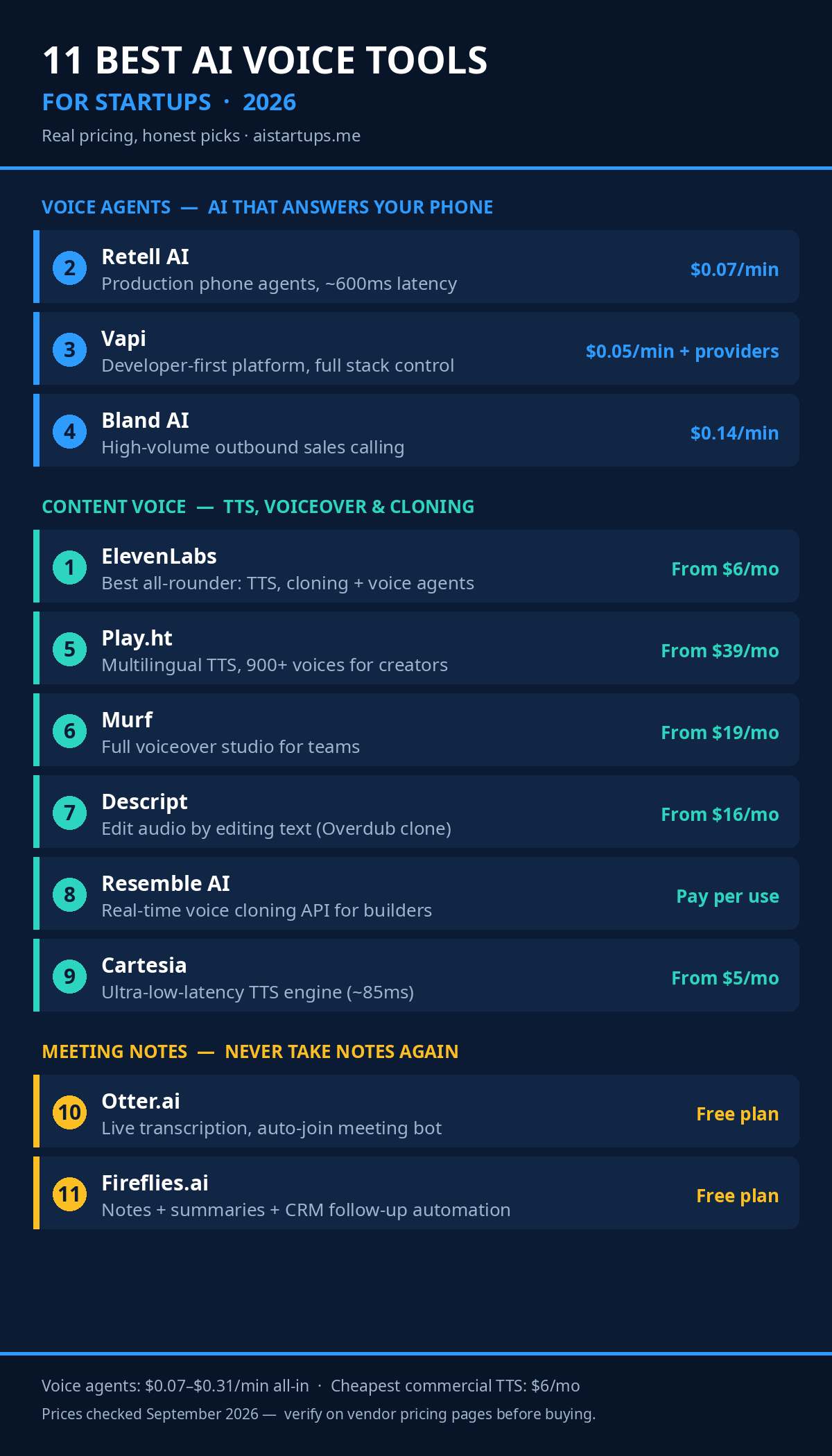
First: know which of the three buckets you actually need
Before the list, a quick sort. These tools solve different problems, and buying the wrong category is the most common mistake I see.
Voice agents make and take phone calls. Inbound support, outbound sales qualification, appointment booking, lead follow-up. You build a prompt, connect a phone number, and the AI talks to real humans in real time. Pricing is per minute, and the honest all-in cost in 2026 runs roughly $0.07 to $0.31 per minute depending on the platform and the voice model you pick.
Voiceover and cloning tools turn text into audio files. Podcast intros, course narration, ad voiceovers, YouTube narration, product demos. Some clone your own voice so you can “record” new lines by typing. Pricing is usually a monthly subscription or per character/second of audio generated.
Meeting tools listen to your calls and hand you notes, summaries, and action items. A bot joins your Zoom or Meet, transcribes everything, and increasingly acts on it — logging to your CRM, drafting follow-ups. Pricing is per user per month, with free tiers that are genuinely usable for light use.
Got it? Here’s the list. I’ve ordered it by how much leverage each tool gives a typical startup, not by who has the biggest marketing budget.
The voices that pick up your phone
This is the category that changed the most in the last year. Voice agents went from demo toys to something you’d trust with actual customers — and the price fell while the quality rose. If you run any business where the phone rings (or should be ringing), start here.
1. ElevenLabs — the best all-rounder in voice, period
If you only try one voice company, make it this one. ElevenLabs started as the text-to-speech quality leader and has quietly become a full voice platform: studio TTS, voice cloning, dubbing, sound effects, and Conversational AI agents that run about $0.08 per minute.
The pricing is credit-based, which takes a minute to wrap your head around: Free ($0, 10,000 credits/month, no commercial use), Starter ($6/month, 30,000 credits — and this is the cheapest plan that includes a commercial license), Creator ($22/month, 121,000 credits, with the first month half off at $11), Pro ($99/month), Scale ($299/month), and Business ($990/month). Roughly speaking, 1,000 credits buys you about a minute of speech, so Starter covers ~30 minutes and Creator ~2 hours a month.
What I actually think: the Starter plan at $6/month is the cheapest “am I legally covered” answer in the entire industry if you’re putting AI voice in anything that earns money. The free tier is fine for testing, but the moment a video is monetized, you’re in violation without a paid plan. Voice quality is still the benchmark everyone else gets compared against — especially the emotional range in longer narration. Where it stops being the economical choice is high-volume voice agents; at scale, the metered minutes add up and a purpose-built agent platform can win on unit economics.
2. Retell AI — the voice agent platform I’d start with
Retell is infrastructure for building AI phone agents: inbound support, outbound sales, appointment setting. You get a visual agent builder plus API, ~600ms response latency (among the lowest measured in the category), and bundled pricing that’s refreshingly close to honest.
The numbers, checked September 2026: $0.07 to $0.31 per minute blended depending on voice and model, $10 in free credits on every new account, and 20 free concurrent calls. The cheapest working call — once you add the LLM and telephony — lands around $0.087 per minute. Retell holds a 4.9/5 rating across 814 Trustpilot reviews, which is unusually high for this space, though the one-star reviews cluster around support after payment — there’s no real ticket queue, so know that going in.
Who it’s for: teams shipping a real product who want usage-based pricing without assembling the whole stack themselves. HIPAA-ready compliance ships on standard plans rather than behind a six-figure contract, which matters if you’re anywhere near healthcare. And if voice agents are interesting to you as a business rather than just a tool, our list of AI agent business ideas you can start solo has a few voice-flavored ones worth stealing.
3. Vapi — the developer’s voice agent platform
Vapi is the most developer-first option on this list: API-first, LLM-agnostic (swap Claude, GPT, Gemini freely), pick your own STT/TTS providers, function calling built in so the agent can hit your APIs mid-conversation. Latency runs roughly 300–500ms with a good stack.
Pricing is where you need to pay attention: $0.05 per minute platform fee, plus every provider billed at their list price with no markup. A typical fully-loaded call lands between $0.08 and $0.15 per minute; heavy setups with premium voices and big prompts can push past $0.30. Vapi’s own calculator is honest about this, which I respect. There’s a Core plan at $29/month that gets you 10 concurrent calls. Check the live numbers on Vapi’s pricing page before you commit, because your prompt design genuinely changes your per-minute cost — every tool definition you add gets sent on every request.
My take: Vapi is the best path to an agent that actually qualifies, logs, and routes intelligently — not a demo, a revenue tool. It’s not the fastest path to a first call, though. The prompt engineering investment is real. If you have engineers and want full control, start here. If you don’t, Retell or Bland will get you live faster. And if you’d rather have someone else wire a voice agent into your website, booking flow, and CRM instead of spending three weekends on webhooks, a web development and AI integration studio like AISquadX does exactly that kind of build.
4. Bland AI — built for outbound sales at scale
Bland is the outbound specialist: large-scale parallel calling, batch campaigns, lead qualification, appointment setting. No-code builder plus API, built-in CRM integrations, strong human handoff when the agent hits something it can’t handle.
Heads up on pricing — it changed. Since December 2025, Bland’s connected-minute rates are plan-based: Start (free platform fee, $0.14/min), Build ($299/month, $0.12/min, up to 2,000 calls a day), Scale ($499/month, $0.11/min). Only connected time is billed — ringing, voicemail detection, and failed connections don’t count. The old flat “$0.09/min” you’ll see in older reviews is stale; the plan-based rates are what’s live now.
Honest assessment: Bland is the most predictable bill in the voice-agent category, and at volume it’s also among the most expensive. It’s the right pick when your use case is literally “call 10,000 leads this week” and you want one throat to choke. It’s the wrong pick if you need a deeply custom conversational agent — it’s more opinionated and less flexible on the underlying stack than Vapi or Retell.
The voices for your content
Not everything needs a live phone call. Sometimes you need a voiceover for a product demo, a cloned version of your own voice for a course update, or narration for the YouTube channel that’s quietly becoming your best marketing channel. These are the tools for that.
5. Play.ht — the creator’s TTS workhorse
Play.ht is built for people who make audio content: podcasters, course creators, YouTubers, marketers. 900+ stock voices, 142+ languages, voice cloning, multi-voice conversations (great for dialogue-style podcasts), and batch processing when you need to generate a lot at once.
Pricing: a free plan for testing, Creator from $39/month (annual billing brings it down to roughly $31/month), Unlimited at $99/month, and a separate usage-based structure for their real-time voice API. The free tier includes one voice clone, which is generous — most competitors gate cloning behind paid plans.
Where it shines: multilingual content. If your audience spans languages, the 142-language coverage plus cloning that carries across languages is genuinely useful — record once in English, ship in Spanish and French with your own voice. Where it doesn’t: generation latency runs 3–8 seconds, so it’s a batch tool, not a real-time one. Don’t try to build a live agent on it.
6. Murf — the voiceover studio, not just a voice
Here’s what makes Murf different: it’s not “type text, get audio file, figure out the rest yourself.” It’s a full browser-based studio — paste your script, pick from 200+ curated voices, adjust pronunciation and pacing, drop in background music, sync to video, export the finished production.
The meter is hours of voice generation, not characters: Free (10 minutes lifetime, no downloads), Creator at $19/month billed annually for 24 hours of generation a year, Business at $66/month annually for 96 hours a year, Enterprise custom. One catch that matters: voice cloning is Enterprise-only. If cloning your own voice is the requirement, Murf’s entry price for that feature is much higher than ElevenLabs or Play.ht — know before you buy.
My honest read: Murf is the pick for corporate content — training videos, explainer videos, product demos, e-learning. The Canva integration (Creator) and PowerPoint/Google Slides plugins (Business) tell you exactly who this is for. It’s not the cheapest per minute, and the generation caps are tighter than they look (regenerating while you tweak pacing burns your allotment fast), but the workflow integration saves real hours.
7. Descript — fix your recordings by editing text
Descript is the only tool on this list that starts from your actual voice. You record, it transcribes, and then you edit the audio by editing the transcript like a Google Doc. Delete a sentence from the text — it’s gone from the audio. Its Overdub feature clones your voice so you can type corrections instead of re-recording: flubbed a word in a 40-minute podcast? Type the fix, and it’s your voice saying it.
Pricing: Free (1 hour of transcription a month, watermarked exports), Hobbyist at $16/month billed annually, Creator at $24/month annually with Studio Sound and fuller AI features, Business at $50/month annually. Overdub needs a 10–30 minute voice sample and takes a day or two to train; the lower tiers cap your Overdub vocabulary at 1,000 words, which gets restrictive fast with jargon or names.
Who should care: any founder making video or podcast content regularly. The filler-word removal and Studio Sound (which makes a $60 mic sound like a $300 one) alone justify the Creator plan for a lot of people. It’s English-focused and it’s an editor, not an API — developers building voice into products should look at Cartesia or ElevenLabs instead.
8. Resemble AI — real-time cloning for builders
Resemble is the developer-facing cloning platform, and its wedge is real-time: streaming voice conversion with sub-second latency, speech-to-speech (your speech in, someone else’s voice out, prosody preserved), and emotion controls via API. Founded 2019, YC-backed, Toronto-based.
Pricing went fully pay-per-use in 2026 after they retired the old consumer tiers: Flex plan starts at $0 with credits that never expire — TTS at $0.0005/second of audio, voice agents at $0.001/second, rapid voice clones at $2/month per voice, professional clones at $5/month per voice. Enterprise is quote-based with volume discounts up to 80%. One pricing trap to know: their deepfake detection product costs roughly 80x the TTS rate, so don’t run detection on every call without doing the math first.
The honest framing: Resemble rewards bursty creator workloads (pay only for what you generate) and punishes always-on production traffic (that’s what the Enterprise discounts are for). If you’re building voice personalization into an app — game characters, live dubbing, real-time agent voices — this is purpose-built for you. If you just need a monthly voiceover subscription, the flat-tier tools above are simpler.
9. Cartesia — when milliseconds are the product
Cartesia is the latency nerd’s TTS API. Their Sonic models post time-to-first-byte around 85ms in independent benchmarks — the fastest streaming TTS engine measured in 2026 — which is what makes natural turn-taking and interruption handling possible in live voice agents. When a 200ms delay breaks the illusion of conversation, this is the infrastructure underneath the tools that don’t break it.
Pricing is developer-friendly: a free tier for testing, Pro at $5/month, Startup at $49/month, Scale at $299/month, working out to roughly $0.05 per 1,000 characters of generated speech. Instant voice cloning from short samples is included, with fine-grained controls for emotion, pacing, and pitch.
Real talk: most founders will never touch Cartesia directly — you’ll use it through Vapi, Retell, or LiveKit as the voice engine inside your agent. But if you’re building the agent yourself and the voice feels sluggish, the TTS engine is usually the culprit, and this is the fix. It’s a component, not a product. Buy it like one.
The meetings you never have to take notes in again
The least glamorous category and possibly the highest ROI. A founder in back-to-back calls loses hours a week to note-taking and follow-up amnesia (“wait, what did we agree on pricing?”). These two fix that.
10. Otter.ai — the meeting transcription veteran
Otter has been doing this since 2016, and it shows in the polish. Its OtterPilot bot auto-joins your scheduled Zoom, Google Meet, or Teams calls from your calendar — no record button, no “is someone taking notes?” It transcribes live, identifies speakers, and sends a summary with action items when the call ends. It’s since grown into what they call a “conversational knowledge engine” — you can chat with your meeting history and ask what was decided three weeks ago.
Pricing: Free (300 transcription minutes/month, 30 minutes max per conversation), Pro at $16.99/month ($8.33/month billed annually, 1,200 minutes/month), Business at $30/user/month ($20/user annually, 6,000 minutes), Enterprise custom. Check the current numbers on Otter’s pricing page — the free tier’s 30-minute per-conversation cap is the thing that pushes most daily-meeting users to Pro within a month.
Where it wins: accuracy on live transcription and the integrations (Slack, Salesforce, HubSpot on higher tiers). Supplier calls, client calls, onboarding sessions — anywhere “what exactly did they promise?” matters, having a searchable record pays for itself the first time it settles a disagreement. Where it loses to Fireflies below: narrower platform coverage and a stingier free tier.
11. Fireflies.ai — the meeting assistant that does the follow-up
Fireflies starts where transcription ends. Yes, it records and transcribes across Zoom, Meet, Teams, Webex, and more — but the product is really the automation layer on top: 200+ AI Skills that draft follow-up emails, log CRM entries, score candidates, and flag deal risks after the call. AskFred lets you query across all your meetings, email, Slack, and CRM in natural language.
Pricing is aggressive: Free (unlimited transcription, 800 minutes of storage per seat, limited AI summaries), Pro at $10/seat/month billed annually, Business at $19/seat/month annually with unlimited storage and video recording, Enterprise at $39/seat/month. The free plan is genuinely usable — unlimited transcription is rare at this price point — and 100+ integrations including HubSpot, Salesforce, Asana, and Notion mean the notes actually go where your work lives. Their own meeting software guide is a decent deep-dive if you’re comparison shopping.
My take: if Otter is the better pure transcriptionist, Fireflies is the better employee. For a startup where every meeting should produce a CRM update, a follow-up email, and a task list, the post-meeting automation is the whole game. The 20 million users across a million organizations claim is marketing, sure — but the product underneath it is solid.
The cost math nobody puts on their pricing page
Let’s make the voice-agent pricing concrete, because this is where founders get surprised. Say you want an AI receptionist handling inbound calls, 1,000 minutes a month (about 33 minutes a day — a busy small business, not a call center).
- Retell AI: ~$0.087–0.11/min all-in on a sensible setup → roughly $90–110/month.
- Vapi: $0.05 platform + ~$0.03–0.10 in providers → roughly $80–150/month, depending on your voice and prompt.
- Bland AI: $0.14/min on Start → $140/month, or $299 + $0.12/min on Build → $419/month (but with 10x the call capacity).
- ElevenLabs agents: $0.08/min past your plan allowance → roughly $80/month plus the plan.
Compare that to a part-time human receptionist at $15/hour for the same coverage and you’re looking at a 5–10x cost difference — before you factor in that the AI never sleeps, never quits, and answers on the first ring at 2 AM. The math gets even better at volume, which is exactly why outbound sales teams were the first big adopters.
The traps, since I promised honesty:
- The headline rate is never the bill. Voice-agent per-minute prices routinely exclude the LLM tokens, the premium voice, and telephony. Budget 1.5–2x the advertised number until you’ve run a real month.
- Prompts are a cost center. On platforms that bill LLM usage through, a 4,000-token system prompt gets sent on every turn. Shorten it and your per-minute cost drops measurably.
- Credits ≠ minutes. ElevenLabs, Murf, and Descript all meter differently (characters, generation hours, media hours). Map the meter to your actual usage before picking a tier — the “Creator” plan that looks generous can be the wrong one for your workload.
In 2026, voice quality is table stakes — every serious tool sounds human now. The real differentiators are latency (can it handle interruptions?), the true all-in cost per minute, and whether the output lands in your CRM or dies in a dashboard nobody opens.
How I’d actually pick (the 60-second version)
If you’re drowning in options, here’s the decision tree I’d hand a founder friend:
- “I need someone to answer the phones” → Retell AI if you want the best balance of price, latency, and ease; Vapi if you have engineers and want full control; Bland if you’re doing high-volume outbound.
- “I need voiceovers for content” → ElevenLabs for the best voices and cheapest commercial entry ($6/mo); Play.ht if you’re multilingual; Murf if you want the whole studio workflow.
- “I want my own voice, cloned” → ElevenLabs Creator ($22/mo) for quality and simplicity; Descript Overdub if you’re already editing podcasts/video there; Resemble if you need real-time cloning in a product you’re building.
- “I’m building a voice feature into my product” → Cartesia for the TTS engine (fastest), Vapi or Retell for the full agent stack.
- “I just want my meetings handled” → Fireflies free tier to start (it’s genuinely good); Otter Pro if live transcription accuracy is the priority.
And one more thing: if you’re budgeting any of this into a launch plan, our breakdown of what it actually costs to start an AI business in 2026 puts these numbers in context — voice tooling is one of the cheaper line items you’ll have. For the broader toolkit every founder ends up assembling, our 19 AI tools for startup founders roundup covers the rest of the stack. And if you’re a local business owner reading this and thinking “I just want the phone answered” — our guide to AI services you can sell to local businesses works in reverse, too: plenty of agencies now sell exactly this setup as a service.
FAQ
How much does an AI voice agent cost per month in 2026?
For a small business running ~1,000 minutes a month, expect $80–150/month all-in on Retell AI or Vapi, $140/month on Bland’s Start plan. The advertised per-minute rate ($0.05–0.14) excludes LLM tokens, premium voices, and telephony, so budget 1.5–2x the headline number until you’ve run a real month.
What’s the best AI voice tool for startups overall?
ElevenLabs, for most founders. It’s the quality benchmark for text-to-speech and voice cloning, the $6/month Starter plan is the cheapest way to get a commercial license anywhere, and its Conversational AI agents ($0.08/min) mean one vendor can cover both your content voice and your phone agent. Specialists beat it in their niches — Retell for phone agents, Descript for podcast editing — but as a starting point it’s the safest bet.
Can AI voice agents really handle real customer calls?
Yes — with caveats. The best platforms now respond in ~600ms, handle interruptions, and book appointments reliably. They excel at bounded tasks: FAQs, scheduling, lead qualification, order status. They still struggle with genuinely novel complaints and emotional situations, which is why every serious deployment keeps a human handoff path. Start with one bounded workflow, measure containment rate, then expand.
Is it legal to clone someone’s voice with AI?
Cloning your own voice with your consent is fine on every platform here. Cloning someone else’s voice without consent is where you enter legal trouble — most platforms require consent verification for custom clones, and several US states now have specific voice-likeness protections. For business use, get written consent from anyone whose voice you clone, and disclose AI voice usage to callers where required by law.
Which is better for meetings: Otter.ai or Fireflies.ai?
Otter.ai wins on live transcription polish and accuracy; Fireflies.ai wins on everything that happens after the call — CRM logging, follow-up drafts, and querying across meetings. Fireflies’ free tier (unlimited transcription, 800 min storage) is more generous. If you just need great notes, pick Otter. If you want meetings to produce follow-up work automatically, pick Fireflies.
The Bottom Line
Voice AI crossed the uncanny valley sometime in the last year, and the pricing crossed into no-brainer territory right behind it. A hundred bucks a month now buys you a receptionist that never sleeps, a narrator that never needs a retake, and a note-taker that never forgets.
My advice hasn’t changed since I started testing these: start with the free tiers (ElevenLabs, Fireflies, and Play.ht all have genuinely usable ones), prove the workflow on one bounded job, then pay for the tier that matches your actual usage — not the one the pricing page makes you feel like you need. The tools are commodities now. The leverage is in how you deploy them.