
Here’s a number that still makes me wince: I once watched a startup lose 73% of the people who clicked “Get started” — not because the product was bad, but because the form they landed on asked for their company size, their budget, their phone number, and their grandmother’s maiden name (okay, not that last one, but it felt like it). They fixed the form. Signups doubled in a week. Same traffic. Same product. Different form.
That’s the thing nobody tells you when you’re building a startup. Your form isn’t paperwork. It’s the front door of your funnel. And most founders treat it like an afterthought — a quick Typeform slapped on a landing page, or worse, a Google Form that looks like a tax return.
So I spent the last couple of weeks properly comparing seven AI form builders, the ones that actually matter for lead capture in 2026. Not a skim of their marketing pages — I read the pricing pages, checked the free tiers, worked out what each one costs when you hit a thousand leads a month (because that’s when the bill starts to hurt), and thought hard about which one fits which kind of founder.
The short version? There’s no single winner. There’s a best one for a broke solo founder, a best one for a team living in Notion, and a best one for a founder who needs a quiz that qualifies leads while they sleep. The trick is matching the tool to your actual situation, not the one with the prettiest homepage.
One quick note before we get into it: every price below is the annual-billed monthly price, and prices were checked on 9 November 2026. Paying month-to-month costs more on almost every tool here, sometimes a lot more. If a price looks different when you click through, the pricing page wins — these companies change their plans more often than I change my coffee order.
The short answer
Don’t have twenty minutes? Fair enough. Here’s the whole article in one table.
| Tool | Best for | Free plan | Paid from |
|---|---|---|---|
| Typeform | Conversational, one-question-at-a-time forms | 10 responses/mo | $28/mo |
| Tally | Free-first startups on a tight budget | Unlimited forms and submissions | $24/mo |
| Fillout | Teams living in Notion or Airtable | 1,000 responses/mo | $15/mo |
| Jotform | Feature depth, payments, regulated use | 100 submissions/mo | $34/mo |
| involve.me | Interactive quizzes that qualify leads | Limited free plan | $29/mo |
| Paperform | Beautiful payment, booking and application forms | 30 submissions/mo | $49/mo |
| Google Forms | The $0 baseline and internal forms | Unlimited, free forever | $0 |
If you want my one-sentence take: start with Tally if money is tight, Fillout if you live in Notion, Typeform if the experience matters more than the bill, and involve.me if you need a quiz that does the qualifying for you. The rest of this article is the reasoning — and the traps — behind that sentence.
What actually makes a form convert
Before we talk tools, let’s talk about what the tools are supposed to do. Because a form builder is just a means to an end, and the end is simple: a stranger types their email into a box and hits submit. Everything else is decoration.
After years of watching forms succeed and fail, I’ve boiled it down to five things that actually move the needle.
Fewer fields, more leads. This one is almost boringly well proven. Every extra field you add costs you completions. Name and email will beat name, email, company, role, budget, phone number, and “how did you hear about us” every single time. Ask for what you need to start a conversation, not what you need to close a deal. You can always ask the rest later, once they’ve already said yes to you.
One question at a time beats a wall of boxes. This is the whole insight Typeform built a company on, and honestly, they were right. A long form with twenty fields staring at you feels like homework. The same twenty questions, asked one at a time with a friendly tone, feels like a chat. Same information. Wildly different completion rates. If your form has more than a handful of fields, the conversational format isn’t a luxury — it’s the difference between a lead and a bounce.
Speed and mobile matter more than design. I know, I know — the pretty form is tempting. But most of your visitors are on a phone, probably on a patchy connection, probably half-distracted. If your form takes three seconds to load or the buttons are too small to tap, it doesn’t matter how beautiful it is. Nobody converts on a form they abandoned at the loading spinner.
Follow-up is part of the form. A form that collects an email and does nothing with it is a leaky bucket. The best setups pipe new leads straight into a CRM, fire off a welcome email, or at least drop the lead into a spreadsheet someone actually checks. When you’re comparing tools, look at the integrations, not just the builder. A gorgeous form that strands your leads in a dashboard nobody opens is worse than an ugly form wired into a CRM that follows up automatically.
Trust signals close the deal. A line about what happens next (“We’ll reply within one business day”), a privacy note (“We never sell your data”), a bit of social proof — these tiny things calm the part of a visitor’s brain that’s wondering whether giving you their email was a mistake. The best form builders make it easy to add these. The worst ones make you fight the template.
How I picked these 7
There are dozens of form builders out there. I narrowed it to seven using four rules, and I think it’s worth stating them plainly so you can judge the list for yourself.
- It has to be genuinely useful for lead capture, not just surveys. A tool built for employee feedback didn’t make the cut, even if it has a nice builder.
- It has to have a real AI feature — an AI form builder, AI-generated questions, AI analysis, or at minimum AI-assisted setup. Except Google Forms, which is here as the free baseline every other tool has to beat. If a tool costs money and doesn’t offer something Google gives away for free, it has to earn that price.
- It has to be something a startup can actually afford, at least at the entry level. Enterprise-only tools with “contact sales” pricing were out.
- It has to be actively maintained in 2026, with a pricing page I could check this week. No abandoned tools, no ghost products.
That’s the list. Seven tools, seven different answers to the same question: how do you turn a visitor into a lead without annoying them or bankrupting yourself?
A form is a conversation, not an interrogation. Every field you add is a question you’re asking a stranger who owes you nothing — so you’d better have a good reason for each one.
1. Typeform — the conversational original
Typeform pioneered the conversational form. One question at a time, full-screen, friendly tone, a little animation between steps. It made forms feel human back when every other form looked like a spreadsheet, and honestly, the experience still holds up. If you’ve ever filled in a Typeform and thought “that was almost pleasant,” you know exactly what I mean.
For lead capture, the conversational format is Typeform’s real weapon. A visitor who might bounce off a ten-field wall will often happily tap through ten single questions, because each step feels small and the progress bar keeps whispering “you’re almost done.” That matters most for high-intent forms — demo requests, quote requests, onboarding questionnaires — where you need real information and can’t get away with just an email field.
What it costs
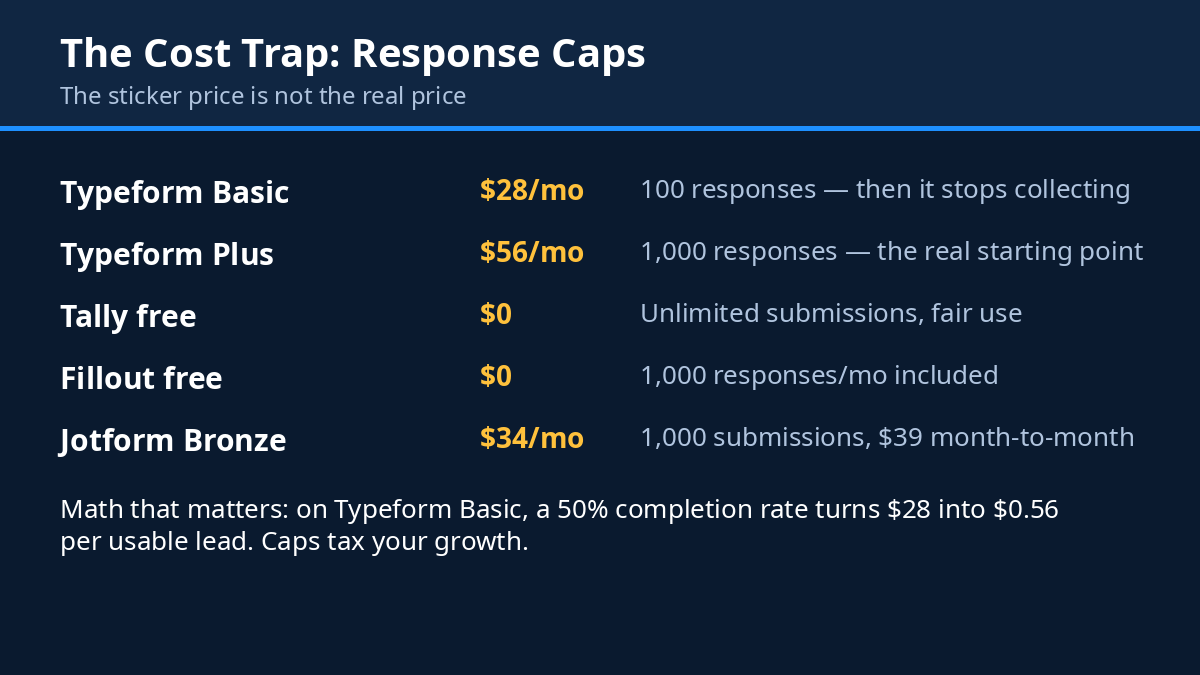
Here’s where it gets painful. The free plan gives you 10 responses a month. Ten. That’s not a free tier, that’s a demo. Basic is $28 a month billed annually ($39 if you pay month-to-month), and it caps you at 100 responses a month for one user, with AI form creation included. Plus is $56 a month annually ($79 monthly) for 1,000 responses and 3 users, and it removes Typeform branding. Business is $91 a month annually ($129 monthly) for 10,000 responses, plus drop-off rates and conversion tracking — the analytics you actually need to improve a form, which tells you something about where the value sits. There’s also a Growth Flow tier at $266 a month annually, which is where things like CAPTCHA live.
Do the cost math with me, because it matters. On the Basic plan, a 50% completion rate means you’re paying $28 for 50 usable leads — that’s $0.56 per usable lead, before you’ve spent a cent on traffic. At real volume, the response caps are brutal. Typeform charges you for the privilege of people answering your questions, and the meter runs fast.
Best for
Conversational, one-question-at-a-time forms where the experience itself is part of the pitch. Premium brands, agencies, anyone whose form is a first impression. If your form needs to feel like a conversation rather than a chore, Typeform is still the standard everything else gets compared to.
Watch out for
The response caps, obviously — check the pricing page before you commit, because Typeform’s pricing is where most founders get their first surprise. And CAPTCHA needing the Growth tier is genuinely strange in 2026; spam protection shouldn’t be a premium feature. If you’re a small startup, you may love the forms and hate the bill, and that tension never really goes away.
2. Tally — the free-first rebel
Tally was built specifically to fix Typeform’s pricing, and you can feel that mission in every part of the product. Where Typeform meters everything, Tally gives it away. Where Typeform charges for the basics, Tally shrugs. It’s the tool I recommend most often to founders who are pre-revenue, and the reason is simple: it removes the pricing anxiety entirely.
Here’s the part that still surprises people when I say it out loud. The free plan includes unlimited forms and unlimited submissions. Not a hundred a month. Not a thousand. Unlimited, under a fair-use policy. Plus conditional logic, payments, file uploads, signatures, and integrations with Notion and Google Sheets. Things other tools charge $30 or $50 a month for, Tally hands you for free. I keep waiting for the catch. There isn’t one — the paid plans exist for branding removal and power features, not for the core product.
The forms themselves are clean and modern, closer to Notion’s aesthetic than Typeform’s chatty full-screen style. You can build them like a document, which feels natural if you already live in Notion (and a lot of founders do). There’s an AI form builder in there too, so you can describe the form you want and get a working draft in seconds.
What it costs
Free, genuinely free, for unlimited forms and submissions. Pro is $24 a month on annual billing ($29 month-to-month, according to some sources — the annual figure is the one to plan around), and it adds branding removal, a custom domain, partial submissions, and drop-off analytics. Business is $74 a month for teams that need more. For context, Tally holds a 4.9 out of 5 rating on G2, which is about as high as form software gets.
Best for
Free-first startups. Solo founders, bootstrappers, anyone validating an idea who needs a real form without a real bill. If you’re not sure your funnel works yet, Tally lets you test it for $0, and that’s worth more than any feature list.
Watch out for
Tally’s forms are beautiful in a minimal way, but they don’t have Typeform’s theatrical conversational flow — if you want the full-screen, one-question-at-a-time experience, Tally feels more like a document and less like a chat. And while the free plan is generous, some founders outgrow the simplicity once they need heavy branching logic or deep CRM workflows. Check Tally’s pricing to confirm the current Pro rate before you budget around it.
3. Fillout — the Notion and Airtable native
Fillout is the quiet achiever on this list. It doesn’t have Typeform’s fame or Tally’s “free everything” headline, but it has something arguably more useful for a certain kind of team: it speaks Notion and Airtable fluently. If your whole operation runs in one of those tools, Fillout doesn’t feel like an add-on. It feels like a missing feature that finally showed up.
The pitch is straightforward. Build a form with AI, connect it to your Notion database or Airtable base, and watch responses land exactly where your team already works — no Zapier duct tape, no CSV exports, no copy-paste. It was even named Zapier’s pick for building a form with AI, which is a telling endorsement from a company that sees every form tool on the market. Add Stripe payments, scheduling, and a clean modern builder, and you’ve got a tool that punches well above its price.
What it costs
The free plan gives you 1,000 responses a month, with unlimited forms and unlimited seats — that seat count matters, because most competitors charge per user. Starter is $15 a month billed annually. Pro is $40 a month annually. Business is $75 a month annually and includes unlimited responses. At $15 a month, Starter is the cheapest paid entry point on this entire list, and the free tier alone covers a lot of early-stage startups completely.
Best for
Teams living in Notion or Airtable. If your leads need to land in a database your whole team already uses, Fillout saves you the integration tax every other tool charges in time or money. It’s also a strong pick for founders who want a generous free tier with a cheap upgrade path.
Watch out for
Fillout’s brand recognition is lower than Typeform’s or Jotform’s, which only matters if your respondents care about the logo on the form (most don’t). The AI builder is good but not magic — you’ll still want to edit the questions it generates. And if you don’t use Notion or Airtable, some of Fillout’s best magic simply doesn’t apply to you, so weigh that honestly. See Fillout’s pricing for the current tier breakdown.
4. Jotform — the feature monster
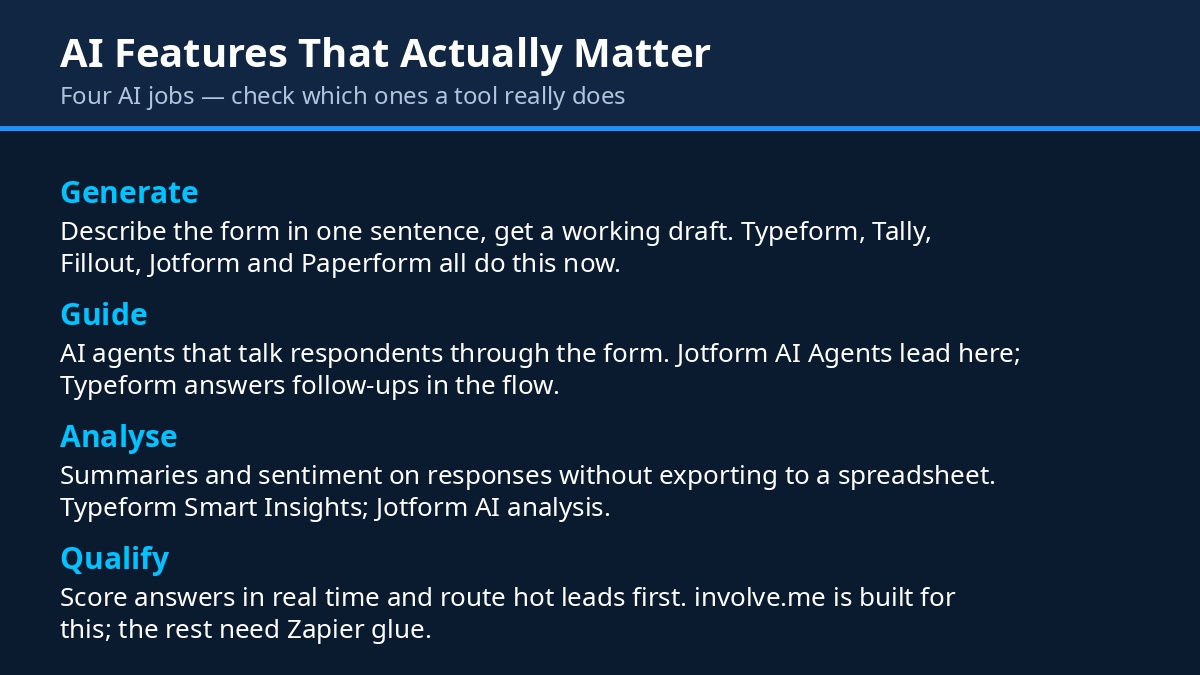
Jotform has been around longer than most of the tools on this list, and it shows in the best possible way: there is almost nothing it can’t do. Over 20,000 templates. More than 40 payment integrations. E-signatures. AI Agents that guide respondents through a form like a helpful assistant. And more than 40 million users, which means whatever edge case you’re worried about, someone has already hit it and Jotform has probably built for it.
For lead capture, the depth is the point. Need a form that takes a payment, collects a signature, books an appointment, and routes the lead to the right salesperson based on their answers? Jotform does all of that in one form, without a stack of third-party tools. For regulated industries it’s the obvious pick too — the Gold plan includes HIPAA compliance, which is rare air in form-builder pricing and genuinely hard to find elsewhere at this price.
What it costs
The free Starter plan gives you 5 forms and 100 submissions a month. Bronze is $34 a month billed annually for 1,000 submissions. Silver is $39 a month annually for 2,500 submissions. Gold is $99 a month annually for 10,000 submissions, with HIPAA compliance included. One quirk to know: only paid plans are single-user except Enterprise, so if your whole team needs access, factor that in.
Best for
Feature depth, payments, and regulated use. If your form needs to do five jobs at once — capture, qualify, charge, sign, schedule — Jotform is the one that does it without a workaround. It’s also the safest pick if you work in healthcare or any field where compliance isn’t optional.
Watch out for
With great depth comes a learning curve. Jotform’s builder has more buttons, menus, and settings than the others here, and the first time you open it you might feel like you’ve walked into a cockpit. The free plan is also genuinely small — 5 forms and 100 submissions a month runs out fast. But if you need the power, the price is fair for what you get. Confirm the tiers on Jotform’s pricing page before you decide.
5. involve.me — the quiz that qualifies while you sleep
involve.me is a different animal from everything else on this list, and that’s exactly why it’s here. It’s not really a form builder. It’s an AI quiz and funnel builder — quizzes, calculators, and lead funnels that score visitors in real time and segment them before a human ever gets involved.
Think about what that means for a second. A normal form asks a visitor for their email and hopes they’re a good fit. An involve.me funnel asks three or four smart questions, works out what the visitor actually needs, shows them a personalised result, and only then asks for the email — with the lead already tagged, scored, and routed. The visitor feels like they got something (a recommendation, a score, a quote). You get a lead that arrives pre-qualified. That’s a fundamentally better deal for both sides, and it’s why quizzes convert so well.
It also comes with a built-in CRM and email sequences, so the follow-up can start without you wiring anything together. For a small team, that’s a whole funnel in one subscription.
What it costs
Start is $29 a month billed annually ($49 month-to-month), with 3 live funnels and 50 AI credits a month. Grow is $69 a month annually. Scale is $139 a month annually and adds A/B testing, webhooks, and Salesforce integration. The free plan exists but is limited — treat it as a trial, not a home. If the form is only one piece of a bigger launch and you need the landing page, the funnel and the integrations built properly, a web development studio like AISquadX can take the whole thing off your plate.
Best for
Interactive lead qualification — the quiz-to-segmented-lead flow. Coaches, agencies, SaaS founders, anyone whose leads aren’t all the same and who wastes time on calls with people who were never a fit. If your sales process starts with “let me ask you a few questions,” involve.me automates that first conversation.
Watch out for
Three live funnels on the Start plan is a real constraint — if you want a quiz for every product, every campaign, and every landing page, you’ll hit the ceiling fast and need to upgrade. The AI credits are metered too, so a busy month of AI-generated quizzes can burn through them. And if you just need a plain contact form, this is overkill — a quiz funnel is a strategy, not a widget. Check involve.me’s pricing for the current funnel limits.
6. Paperform — the form that looks like a landing page
Paperform makes the prettiest forms on this list, and I don’t say that lightly. These are document-style forms that look like designed landing pages — proper typography, images, video, colour, layout. A Paperform doesn’t feel like a form at all. It feels like a page someone designed for you personally. If your brand is visual — design, photography, coaching, premium services — that first impression is worth real money.
But it’s not just a pretty face. Paperform handles payments, bookings, and applications with real depth, and every plan includes Papersign e-signatures and Stepper workflows, which is generous. Paid plans come with unlimited submissions and unlimited seats, so the meter never runs on your volume — a refreshing change after Typeform’s response caps.
One thing worth flagging clearly: Paperform recently simplified its plans, and the old Essentials tier at $24 a month is gone from its pricing page (I checked on 9 November 2026). Pro is now the entry paid tier. If you read an older review that quotes the $24 price, it’s out of date — and that’s exactly the kind of stale pricing that costs founders real money when they budget around it.
What it costs
The free plan allows 30 submissions a month — enough to test, not enough to run on. Pro is $49 a month billed annually ($59 month-to-month). Business is $124 a month annually ($149 monthly). Both paid tiers include unlimited submissions and seats, plus the e-signatures and workflows mentioned above.
Best for
Beautiful payment, booking, and application forms where the form is part of the brand experience. If you’re selling a premium service and the form is the first thing a high-value client touches, Paperform makes that touch feel expensive in the right way.
Watch out for
Paperform is not HIPAA compliant, so healthcare founders should look at Jotform instead. The $49 entry price is also the joint-highest starting price on this list, and the free plan’s 30 submissions a month is tight — you’ll be paying before you’ve really validated anything. Verify the current tiers on Paperform’s pricing page, since the recent plan simplification means older articles (including some you might find on Google) quote prices that no longer exist.
7. Google Forms — the free baseline everything else has to beat
Let’s be honest about Google Forms. It’s free forever. Unlimited forms, unlimited responses, zero cost, zero setup, and everyone already knows how to use it. For an internal form, a quick poll, or validating an idea before you’ve spent a dollar, it’s genuinely hard to argue with.
But for lead capture, “free” comes with real costs that don’t show up on a bill. There’s no AI builder. No AI analysis. The design is plain to the point of looking unfinished — your form will look like every school survey and office poll your visitor has ever filled in, which is not the impression a premium product wants to make. There’s no payment collection, no conditional logic worth the name, no branding control, and no conversion analytics. It’s a clipboard, not a funnel.
So why is it on this list? Because it’s the baseline. Every paid tool here has to answer one question: what do I get for my money that Google Forms doesn’t give me for free? Typeform’s answer is the experience. Tally’s answer is… honestly, not much on price, which is why Tally’s free tier is so disruptive — it matches Google’s price and beats it on design. Fillout’s answer is the Notion sync. involve.me’s answer is qualification. If a paid tool can’t answer that question clearly, don’t pay for it.
What it costs
$0. Free forever. Unlimited forms and responses.
Best for
The $0 baseline, internal forms, and validating an idea before paying for polish. If you’re testing whether anyone even wants what you’re building, start here. Spend money on the form after you’ve proved someone wants the thing behind it.
Watch out for
Everything above, really. No AI features, no payments, no branding, plain design, no analytics. It’s a fine clipboard and a poor growth tool. The moment your form starts mattering — the moment leads from it are worth real money — the free price stops being a good deal and starts being a bottleneck.
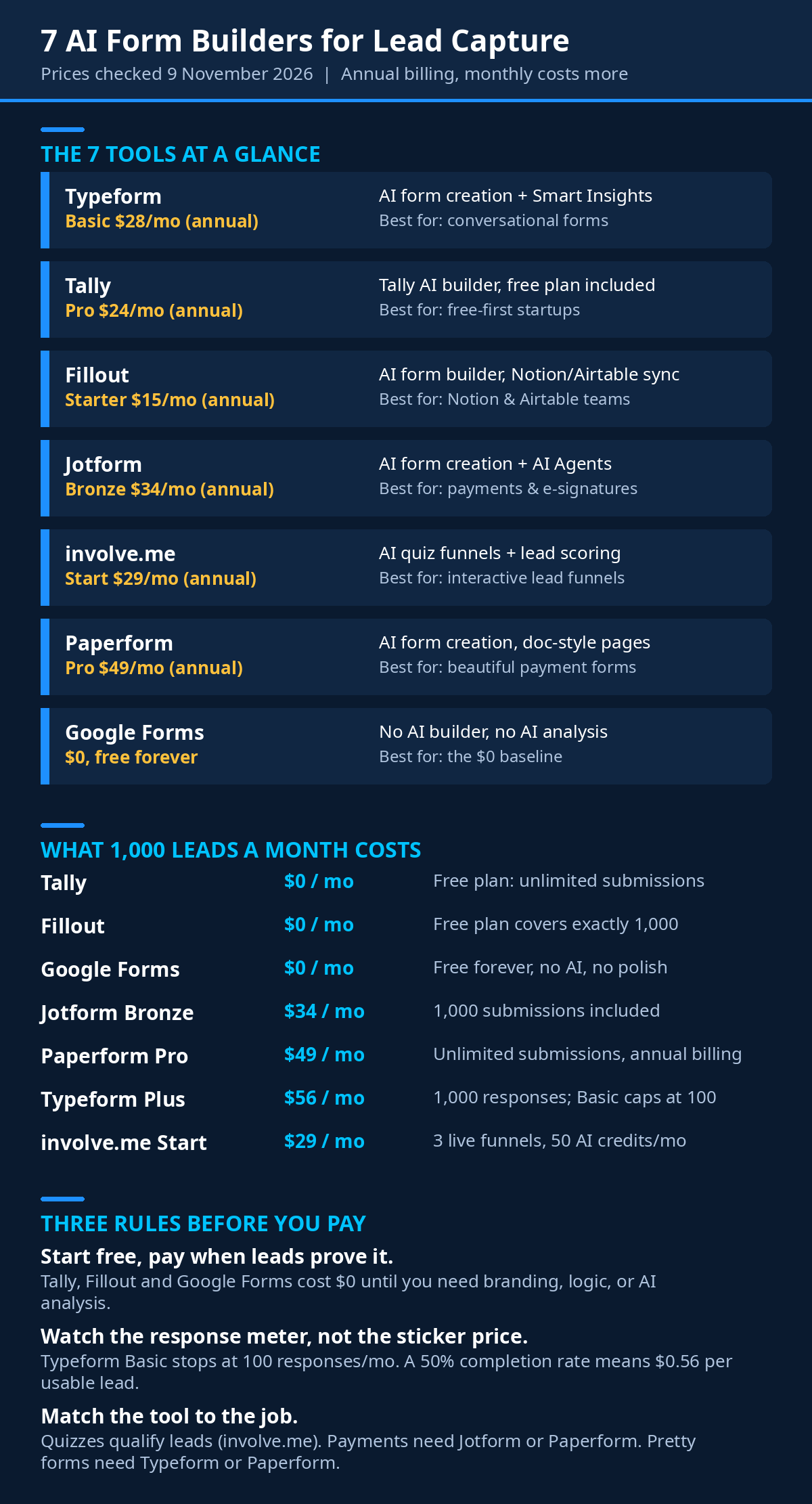
The 1,000-leads-a-month cost test
Here’s the comparison that actually matters, because headline prices lie. A tool that costs $15 a month but caps you at 100 responses isn’t cheap — it’s a trap with a friendly price tag. So let’s run every tool through the same scenario: your startup is doing well, and you’re getting 1,000 form responses a month. What do you actually pay?
| Tool | Plan needed for 1,000 responses/mo | Monthly cost (annual billing) |
|---|---|---|
| Tally | Free | $0 |
| Fillout | Free (exactly 1,000) | $0 |
| Jotform | Bronze | $34/mo |
| Paperform | Pro | $49/mo |
| Typeform | Plus | $56/mo |
| Google Forms | Free | $0 |
| involve.me | Depends on funnels (priced per funnel, not per response) | From $29/mo |
Read that table twice, because it reorders the whole list. The cheapest tools at 1,000 responses a month are Tally and Fillout — both free at that volume. Then Jotform at $34, Paperform at $49, and Typeform at $56. Typeform, the most famous name here, is the most expensive at real volume. That’s not a criticism, exactly — you’re paying for the experience — but it’s a fact your budget needs to know before your heart picks the pretty one.
There’s a second lesson hiding in the table too. involve.me doesn’t fit the comparison, because it doesn’t charge per response. It charges per funnel. If your quiz converts well, your cost per lead can be tiny — or if your quiz flops, you’re paying $29 a month for nothing. Volume-based pricing and funnel-based pricing reward different things, so compare them on cost per qualified lead, not on the monthly sticker price.
And remember: these are annual-billing prices. Pay month-to-month and the numbers climb — Typeform’s Plus jumps from $56 to $79, Paperform’s Pro from $49 to $59, involve.me’s Start from $29 to $49. If you can commit annually, do it. If you can’t, budget for the monthly figure, not the annual one, or you’ll get a nasty surprise on the first invoice.
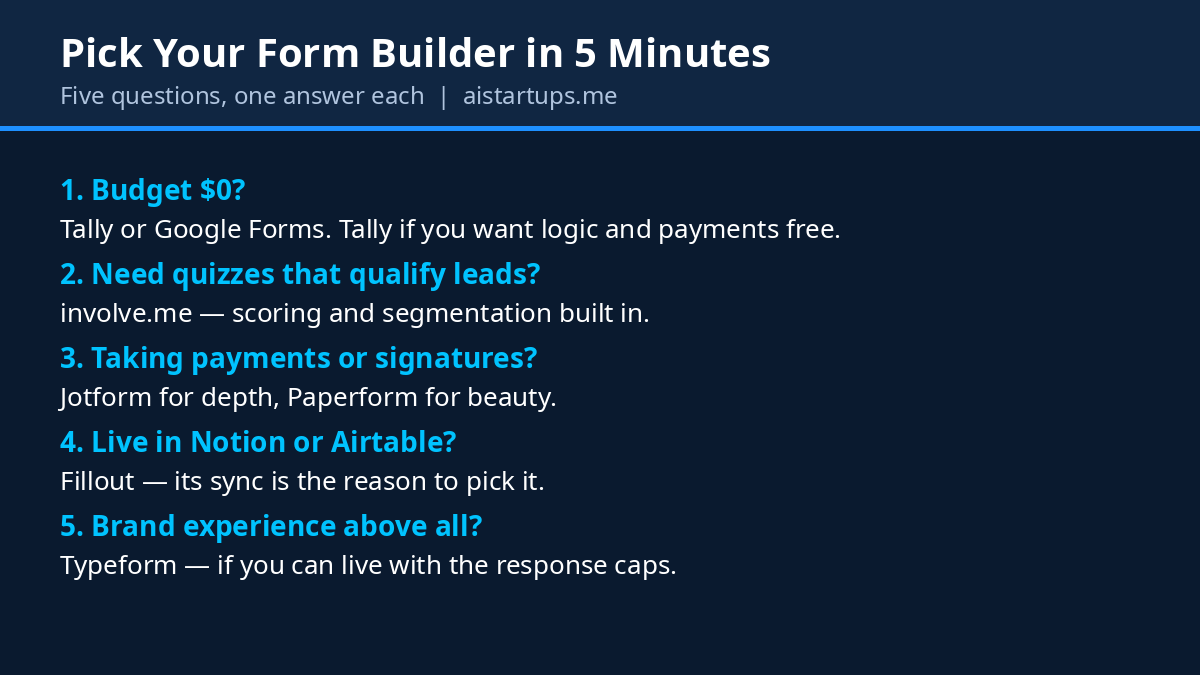
How to pick in 5 minutes
Still torn? Here’s the decision flow I actually use when a founder asks me this question. Answer each one in order, and stop at the first one that fits — don’t keep shopping after you’ve found your answer.
- Are you pre-revenue or validating? Yes? Use Tally or Google Forms. Spend $0. Prove the idea first, then buy the polish. Your form isn’t the bottleneck yet — your offer is.
- Does your whole team live in Notion or Airtable? Yes? Use Fillout. The native sync will save you more hours in a month than any other feature on this list.
- Do you need to qualify leads, not just collect them? Yes? Use involve.me and build a quiz. A scored, segmented lead is worth five raw email addresses.
- Does your form take payments, signatures, or bookings? Yes? Use Jotform for depth and compliance, or Paperform if the design matters as much as the function.
- Is the form itself your brand’s first impression? Yes, and you can afford it? Use Typeform. The conversational experience is still the best in the business — just go in with your eyes open about the response caps.
If you answered no to all five, you’re probably overthinking it. Pick Tally, build the form in an afternoon, and get back to the product. The best form builder is the one that’s live on your site today, collecting real leads, while your competitors are still comparing feature tables.
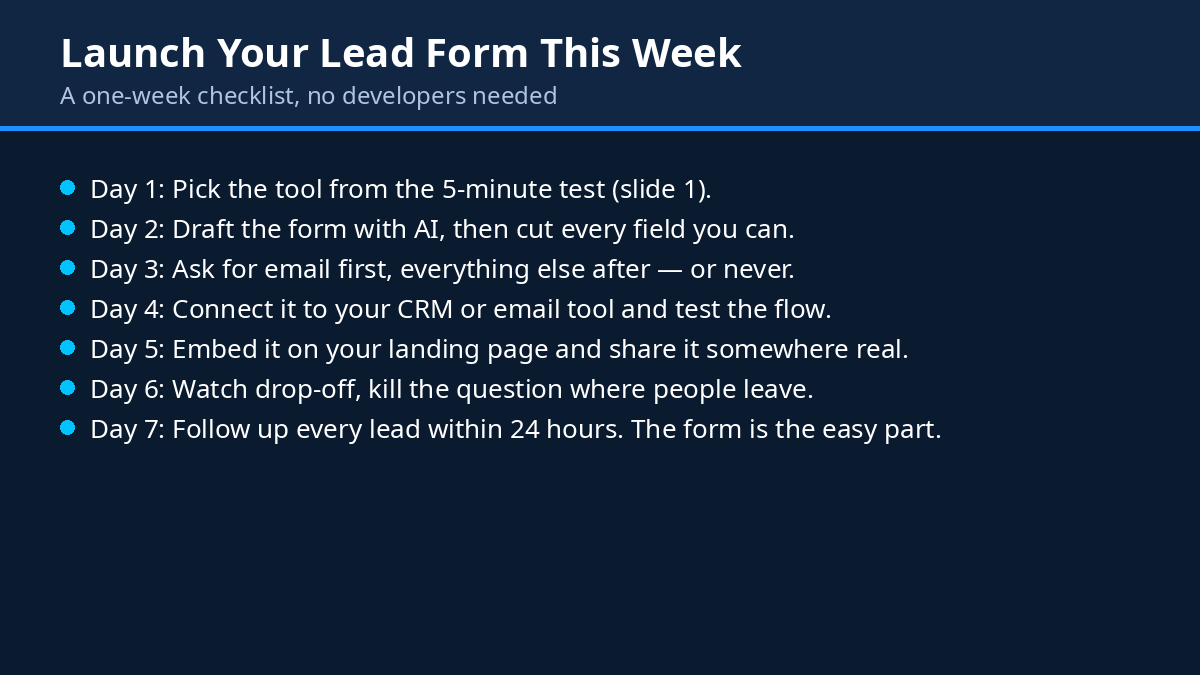
And one more thing that founders forget: the form is only the front door. What happens after someone submits matters just as much — the follow-up email, the welcome sequence, the waitlist that actually converts into paying customers. A beautiful form with no follow-up is a bucket with a hole in it. Wire the form into something that responds, whether that’s a CRM, an email tool, or even a simple spreadsheet you check every morning. The tool matters less than the habit.
It’s also worth thinking about what the form is for, beyond the lead itself. A good form is a listening device. The questions people abandon tell you where your pitch is confusing. The answers people give tell you what they actually want, which is often different from what you assumed. That feedback is gold — and it’s why the same thinking behind choosing form tools applies to choosing survey and feedback tools too. Same principle, different moment in the relationship.
Finally, if forms are part of a bigger play — say you’re starting an AI agency and every client needs funnels, quizzes, and booking flows — don’t evaluate these tools one form at a time. Pick the one your whole client base can live on, learn it deeply, and standardise. Your future self, juggling ten clients, will thank you.
FAQ
What’s the best free AI form builder for lead capture?
Tally, and it’s not particularly close. Unlimited forms and unlimited submissions on the free plan, plus conditional logic, payments, and file uploads — things other tools charge for. Fillout is a strong second with 1,000 free responses a month and unlimited seats. Google Forms is free too, but it has no AI features at all, so if the AI part matters to you, Tally is the pick.
Is Typeform worth the price in 2026?
It depends on what you’re buying. If you’re buying completion rates on a high-value form — a demo request, an application, a quote — then yes, the conversational format genuinely converts better and the price can pay for itself. If you’re buying a basic contact form, no — you’re paying premium prices for a job Tally or Fillout would do for free. Check your response volume against the caps before you commit, because the caps are where the bill bites.
How many fields should a lead capture form have?
As few as you can get away with. Name and email is the honest answer for most top-of-funnel forms. Add one qualifying question if you need to segment leads — company size, budget range, or what they’re looking for. Every field after that costs you completions. You can always ask for more detail later, once the person has already said yes to hearing from you.
Can AI form builders really build a good form on their own?
They can build a good first draft, and that’s the honest way to describe it. Typeform, Tally, Fillout, and the others can all generate a sensible form from a one-sentence description, and the draft is usually 80% right. But the last 20% — the wording of the questions, the order they appear in, the tone — is where conversions live, and that’s still a human job. Use the AI to skip the blank page, then edit like your revenue depends on it. Because it does.
Do I need a quiz funnel, or is a normal form enough?
A normal form is enough for most startups, most of the time. You need a quiz funnel when your leads aren’t all the same — when some are a great fit and some will waste your time, and you need to tell them apart before the first call. If you’re selling one thing to one kind of customer, a clean form with a good follow-up will beat a quiz every time. If you’re selling different things to different people, involve.me’s quiz flow earns its price by doing the sorting for you.
The Bottom Line
Here’s the thing I keep coming back to. The best form builder isn’t the one with the longest feature list or the prettiest templates. It’s the one that matches where your startup actually is right now — your budget, your volume, your workflow — and gets out of the way so the visitor can say yes.
Pre-revenue? Tally, free, today. Living in Notion? Fillout. Need qualification? involve.me. Need payments and compliance? Jotform. Need beauty? Paperform. Need the conversational experience and can afford it? Typeform. Need something free and familiar right now? Google Forms, no shame in it.
But whatever you pick, remember the real lesson from the top of this article. The form is the front door. Keep it short, keep it fast, ask only what you need, and follow up like you mean it. Get those four things right and the tool almost doesn’t matter. Get them wrong and no tool on earth will save you.
Now go build the form. Your next hundred leads are waiting on the other side of it.