
Here’s a number that should make every founder pause: most startups never ask their users a single question before they churn. Not one. They watch the signup graph, they watch the churn graph, and they guess what happened in between. I’ve done it myself — shipped a feature, watched adoption flatline, and spent a week arguing with my co-founder about why, when the answer was sitting in the heads of about forty users who would have told us in thirty seconds if anyone had asked.
That’s what survey and feedback tools are for. Not the boring enterprise kind with 80-question questionnaires. The modern kind: short, smart, AI-assisted surveys that build themselves, read the answers for you, and tell you what your users actually mean. This stuff got a lot better in the last two years, and the prices — well, some of them got better too. Some got worse. Let’s sort it out.
I compared eight tools head to head: Typeform, SurveyMonkey, Tally, Jotform, Survicate, Qualtrics, Hotjar, and Google Forms. For each one I checked the real pricing page in November 2026, what the free tier actually lets you do, and — the part that matters most — what the AI really does versus what the marketing page claims it does. One of the eight, by the way, doesn’t exist anymore. More on that in a minute.
How to pick: three questions before you look at any price
Real talk: most founders pick a survey tool the way they pick a restaurant — they go with the name they’ve heard of. That’s how you end up paying $39 a month for a tool that stops collecting responses on day nine of the month. Ask these three questions first and the choice mostly makes itself.
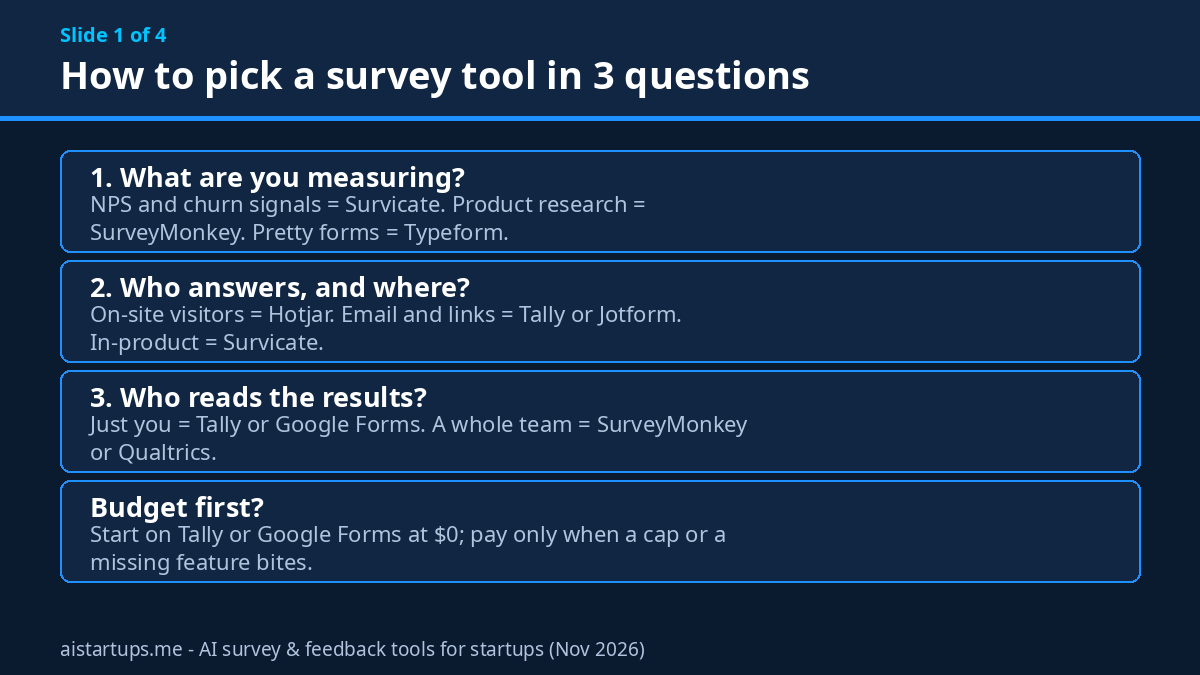
1. What are you actually measuring?
NPS and churn signals? That’s a different tool than deep product research. A quick “how likely are you to recommend us” ping after onboarding wants a lightweight in-product tool like Survicate. A 20-question study on why trial users never convert wants SurveyMonkey’s analysis muscle. A beautiful brand survey for your launch wants Typeform. The question shapes the tool, not the other way round.
2. Who answers, and where?
Website visitors who’ll never open an email? Hotjar’s on-site surveys. Customers you already have an email list for? Tally or Jotform and a link. People already inside your product? Survicate’s in-product widgets. If the survey lives in the wrong place, nobody answers it — and a survey nobody answers is just a form you paid for.
3. Who reads the results?
If it’s just you, the founder, reading 40 answers over coffee, you don’t need AI sentiment analysis — you need a free tool and a spreadsheet. If it’s a team of five trying to make sense of 2,000 open-text answers a month, AI summaries and auto-tagging stop being a nice-to-have and start being the whole point. Be honest about which one you are. Most early-stage startups are the first one, and that’s fine.
The 8 best AI survey & feedback tools for startups
One quick note on prices before we start: every price below is in US dollars, checked against the vendor’s own pricing page in November 2026, and annual billing is shown unless I say otherwise. Prices move — sometimes without warning — so treat these as the picture today, not a promise. And if a number in this article ever disagrees with the vendor’s page, the vendor’s page wins.
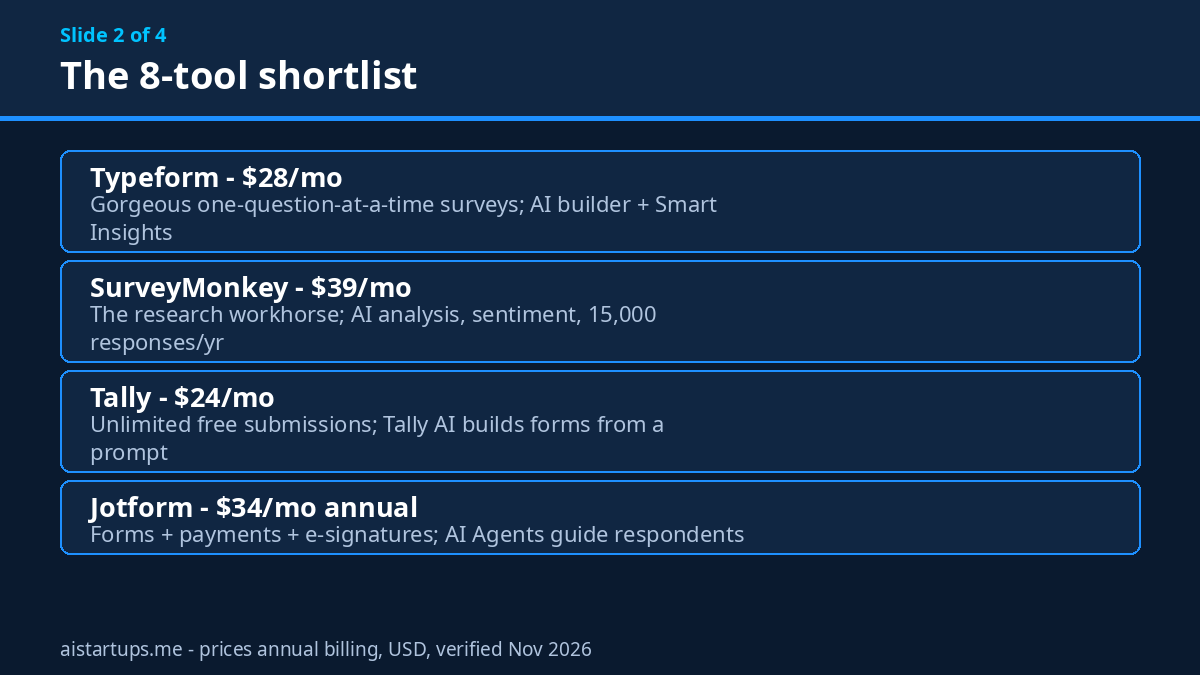
1. Typeform — the pretty one
Typeform is the tool everyone pictures when they think “modern survey.” One question at a time, gorgeous design, the kind of form people actually finish. And the completion rates are the reason to pay for it: a form that feels like a conversation gets answered, and a form that looks like a tax return doesn’t. That’s the whole pitch, and honestly, it’s a good one.
Pricing: Basic starts at $28 a month on annual billing ($39 month-to-month). Plus is $56 a month annual ($79 monthly) and adds 1,000 responses a month plus three seats. Business is $91 a month annual. The free plan exists but caps you at 10 responses a month across all your forms — and when you hit the cap, your forms flip to private and stop collecting entirely until the next month or an upgrade. That’s brutal if a survey goes even mildly viral.
AI features: AI form building is on every plan, including Basic — describe what you want in plain language and it drafts the form. Smart Insights, the feature that summarises and interprets your responses for you, sits on the higher tiers. Topic and sentiment analysis live in the research-focused add-ons. So the AI that builds is cheap; the AI that reads costs more.
Best for: brand-conscious startups where the survey itself is part of the experience — onboarding flows, launch waitlists, customer stories. Watch out for: removing Typeform branding needs Plus ($56 a month annual), not Basic, and that 10-response free cap is the stingiest on this list.
2. SurveyMonkey — the research workhorse
SurveyMonkey has been around forever, and it shows — in the good way. This is the tool you reach for when the question actually matters and you need to trust the answer: pricing research, market sizing, churn interviews at scale. It’s not the prettiest tool here. It’s the most serious one.
Pricing: Advantage is $39 a month on annual billing ($468 a year) with 15,000 responses a year. Premier is $139 a month annual with 40,000 responses a year. There’s also a month-to-month Standard plan at $149 a month, which only makes sense if you need one survey once. Team plans start at $30 per user a month on annual billing — but they need a three-seat minimum, so the cheapest team entry is really $1,080 a year, not “$30 a month.” The free Basic plan caps you at 10 questions per survey and only lets you view a limited number of responses per survey, even if you collect more.
AI features: This is where SurveyMonkey earns its keep. Build with AI is on all plans, including free. Analyze with AI lets you ask questions about your results in plain language and get charts and summaries back. Thematic Analysis and Sentiment Analysis — the features that read a thousand open-text answers and tell you the themes — are on Advantage and up. One honest caveat from their own help docs: the AI features send your survey data to OpenAI and Anthropic for processing. Fine for most startups, worth knowing if you handle sensitive data.
Best for: founders doing real research — pricing tests, churn analysis, market validation. If you want to pair surveys with proper customer discovery interviews, this is the analysis engine for the survey half of that work. Watch out for: go over your response cap and you pay $0.15 per extra response, which adds up fast on a big survey.
3. Tally — the free-first favourite
Tally is the tool I recommend most often to founders who are pre-revenue, and it’s not close. Here’s why: the free plan gives you unlimited forms and unlimited submissions. Not “unlimited until we quietly cap you.” Unlimited, within fair-use guidelines. For a startup sending its first hundred surveys, that means the tool costs exactly zero while you’re figuring out what to ask.
Pricing: Pro is $24 a month on annual billing ($29 month-to-month, $290 a year). Business is $74 a month annual. What do you actually get for paying? Branding removal, a custom domain, team seats, and higher file-upload limits (free caps uploads at 10 MB per file). That’s mostly it — the free plan already has conditional logic, payments, signatures, and integrations.
AI features: Tally AI is free on every plan, including the free one. Describe a form in plain language and it builds it — logic, formulas, translations and all. But here’s the honest split: Tally’s AI builds forms, it doesn’t analyse answers. There’s no AI summary, no sentiment tagging. You export to Sheets or Notion and do the reading yourself.
Best for: early-stage startups that need a survey live this afternoon for $0. If your survey volume is small and you’re happy reading the answers yourself, you may never need to pay. Watch out for: no native analytics worth speaking of — the moment you want AI to read the responses, you need a different tool or a spreadsheet habit.
4. Jotform — the everything form
Jotform is the Swiss Army knife of this list. Surveys, yes — but also payment forms, registration forms, e-signatures, approvals, and about ten thousand templates for all of it. If your startup needs forms for more than just feedback, Jotform is the one tool that covers the lot, and that’s a real argument for it.
Pricing: Bronze is $39 a month month-to-month or $34 a month on annual billing ($408 a year). Silver is $49/$39, Gold is $129/$99, and Enterprise is quote-only. The free Starter plan gives you 5 forms, 100 submissions a month, 10,000 form views a month, and 100 MB of upload space. Every plan includes every feature — the tiers are really just bigger limits. And all plans except Enterprise are single-user, which matters the moment a teammate needs their own login.
AI features: Jotform AI (built around an assistant called Podo, plus a Form Copilot) builds and edits forms from a prompt or even from a PDF. The more interesting bit is AI Agents: conversational agents that guide a respondent through a form, answer their questions, and collect the answers. Starter gets 5 agents, Bronze 25, Silver 50, Gold 100. What I couldn’t verify: any sentiment analysis or AI summary of survey results. Jotform’s AI is about building and conversing, not about reading the answers back to you.
Best for: startups that need forms for everything — feedback plus payments, signups, and signatures in one place. Watch out for: the binding limit is submissions a month, not features, so a popular survey can eat your whole quota; and if you exceed your storage, Jotform deletes your oldest responses to make room. Download your data. Also, HIPAA features only start at Gold ($99 a month annual).
5. Survicate — the NPS specialist
Survicate is the most focused tool on this list, and focus is a feature. It does one thing — collect feedback where your users already are, inside your product or website — and it does it with the best NPS tooling here. If your main question is “are our users happy, and who’s about to leave,” start here.
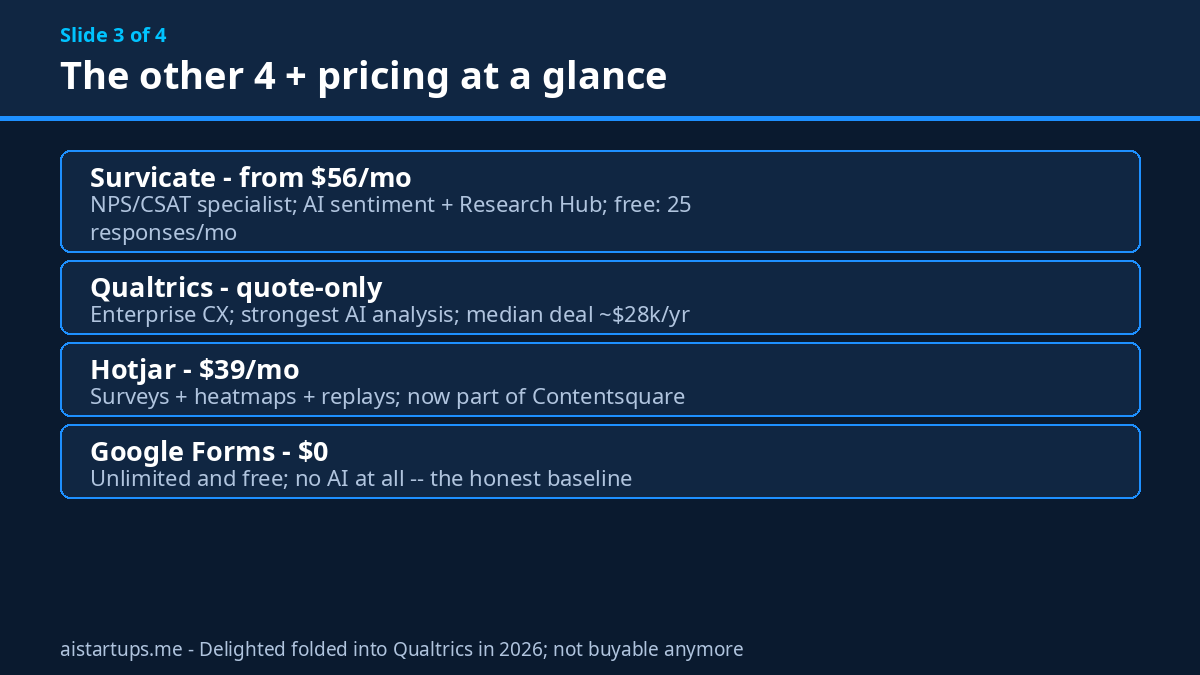
Pricing: Growth starts from $56 a month on annual billing at the lowest tier (100 responses a month), though the default card on their pricing page shows $114 a month annual for 250 responses — so quote the range, not one number. Pro starts at $349 a month, Enterprise at $569. The free plan gives you 25 responses a month, one active survey, three team members, and 30 days of data retention. And a hard truth: when you hit your response cap on a paid plan, surveys stop collecting.
AI features: AI-assisted survey creation from a one-line description, then the good stuff: AI categorisation and sentiment analysis that groups open-text answers into themes and tags how people feel about each one. Research Hub pulls feedback from surveys, tickets, reviews, and calls into one searchable place, and a Research Assistant lets you chat with that data. NPS, CSAT, and CES are core — automatic −100 to +100 scoring, detractor alerts routed to Slack, Teams, or email.
Best for: product teams running continuous NPS and in-product feedback loops. If you’re also thinking about AI customer support tools, Survicate pairs naturally — support tickets and survey answers feeding the same picture of what users want. Watch out for: two separate meters — survey responses and Research Hub data points are capped independently — and the Salesforce integration only starts at Pro ($349 a month).
6. Qualtrics — the enterprise outlier
Qualtrics is the best feedback platform on this list and the least relevant to most startups reading this article. Both things are true at once. It’s the tool big companies use to run experience management across thousands of employees and millions of customers. The AI is genuinely the strongest here. The price is genuinely enterprise-only.
Pricing: quote-only — there are no prices on the official pricing page at all, just “planned usage / interactions.” There is a limited free account, but it’s a taster, not a tool you build on. Third-party contract data puts the typical enterprise deal somewhere around $28,000–$30,000 a year, with a range from roughly $7,000 to $140,000. That’s not a typo. That’s the market.
AI features: sentiment analysis, automated recommendations, dynamic segmentation, Text iQ for deep text analysis, StatsIQ for regression and clustering, and AI-moderated conversational surveys. If you ever need to analyse 50,000 open-text responses and have the computer tell you what changed since last quarter, this is the tool. You just won’t need it until you’re much, much bigger.
Best for: the day your startup stops being a startup — post-Series B, thousands of customers, a CX team with a budget. Watch out for: everything about the buying process. No self-serve checkout, no transparent pricing, and a sales cycle. File this one under “when you outgrow everything else.”
And a quick word on Delighted, since you’ll still see it on older “best survey tools” lists: Delighted no longer exists as a standalone product. Its site now says Delighted is Qualtrics, and its NPS features live inside Qualtrics at enterprise prices. If a blog tells you to buy Delighted in 2026, that blog is out of date. Don’t.
7. Hotjar — surveys with the full behaviour picture
Hotjar is a different animal from the rest of this list, and you should buy it for a different reason. It’s a behaviour-analytics tool — heatmaps, session replays, rage-click detection — with surveys bolted on. The surveys alone wouldn’t win this comparison. The surveys plus watching what the same visitor actually did on your site? That’s a combination none of the pure survey tools can match.
Pricing: Hotjar is now part of Contentsquare, and the pricing page has been rebranded to match. Growth is $39 a month (shown struck through from $49), and the Voice of Customer builder — the bit with the surveys — starts from $79 a month (was $99). Experience Analytics starts from $35 a month. Annual billing gets you a 20% discount. The free plan covers up to 200,000 monthly sessions, though the exact free survey-response allowance isn’t published on the new page, so I’m not going to invent a number for it.
AI features: AI features are listed on the Free and Growth plans, including AI survey insights and summaries of session replays. Whether sentiment analysis sits in the $39 Growth plan or only in the Voice of Customer tier wasn’t clear from the new pricing page, so treat that as unverified before you buy on that basis.
Best for: founders who keep asking “but what did they actually do?” — a survey answer next to a replay of the same session is worth ten survey answers on their own. Watch out for: old Hotjar “Ask” plan prices floating around in search results ($32–$128 a month) are outdated since the Contentsquare rebrand — don’t use them. And surveys aren’t standalone here; you’re buying into the whole behaviour platform.
8. Google Forms — the honest $0 baseline
Google Forms is the tool everyone forgets to include and the one most startups should probably start with. It’s free. Unlimited forms, unlimited responses, no caps, no branding to remove, no seat limits. It plugs straight into Sheets, where your answers land in real time and you can chart them in about four clicks.
What it doesn’t have: any AI at all. No AI builder, no AI summaries, no sentiment analysis, no NPS automation. You write the questions, you read the answers. The logic is basic section jumps, the design is… Google. Functional. Plain. It will never win a beauty contest against Typeform, and it will never send you a bill either.
Best for: the first survey. The internal poll. The “do you want feature A or feature B” question you need answered by Friday. If your feedback loop is you reading 60 answers, Google Forms is all you need, and the $28–$39 a month you’d spend elsewhere buys something your startup actually needs. Watch out for: nothing, really — except the moment you want AI to read the answers for you, or the survey itself to look like part of your brand. That’s when you graduate to one of the tools above.
The pricing trap nobody warns you about
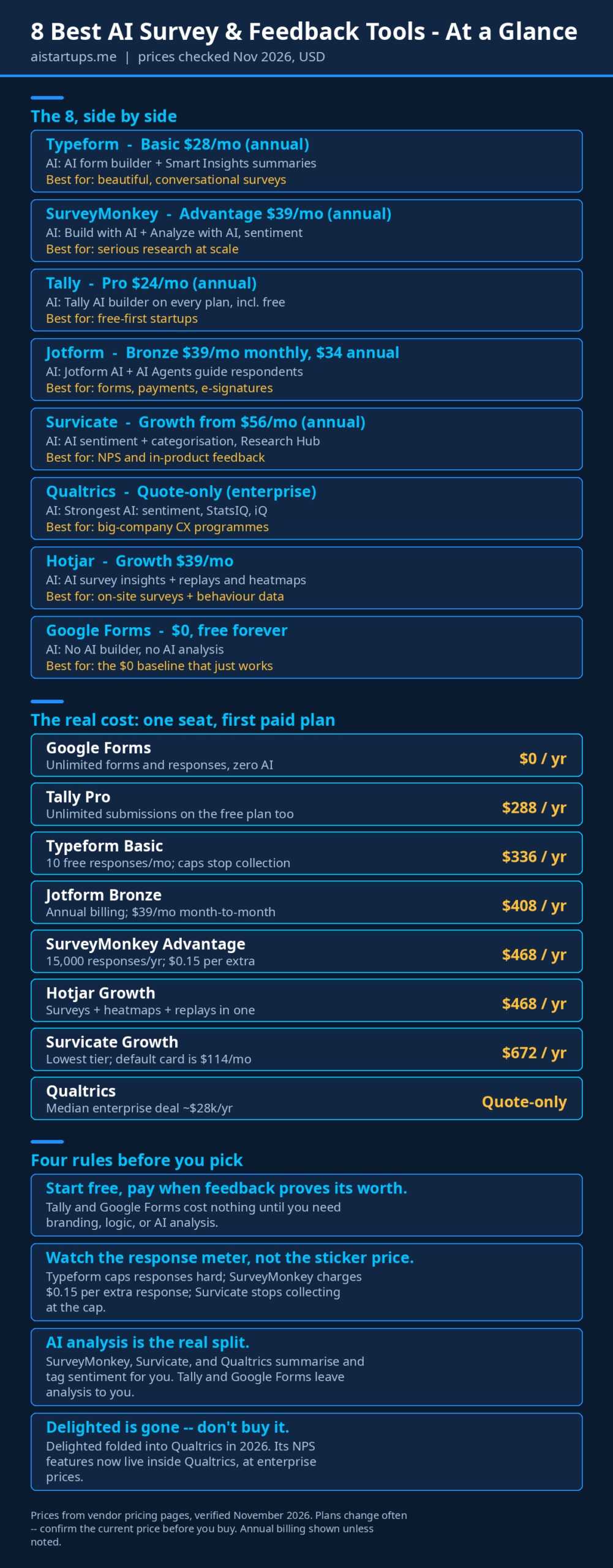
Look at the infographic above and you’ll spot the pattern: the sticker price is never the real price. Every tool on this list meters something — responses, seats, AI credits, data points — and the meter is where the money goes. A few rules that would have saved me real cash over the years:
- Price the renewal, not the signup. First-year discounts expire. Typeform’s Plus at $56 a month annual is $672 a year, every year. Budget for year two.
- Count your responses before you pick. If you send a survey to 2,000 users and 400 reply, Typeform’s free plan is done in one send. Tally’s free plan wouldn’t blink.
- Ask what happens at the cap. Typeform and Survicate stop collecting. SurveyMonkey charges $0.15 per extra response. Jotform deletes your oldest data. These are very different failure modes, and only one of them is acceptable.
- Seats multiply everything. SurveyMonkey’s team plans need three seats minimum. A “$30 a month” plan that needs three seats is a $1,080-a-year plan. Do the multiplication before you fall in love.
And one more thing — the feedback itself. A survey tool is only half the job. The other half is what happens after someone answers, and that’s where most startups quietly fail. They collect the feedback, nod at it in a meeting, and nothing changes. The users notice. Next time, they don’t answer.
“A survey nobody hears back from is a survey they’ll ignore next time. The tool collects the feedback — closing the loop is your job.”
The 3-step feedback loop that actually works
Tools don’t fix feedback. Loops do. Here’s the one I run, and it takes about an afternoon a week once it’s set up:
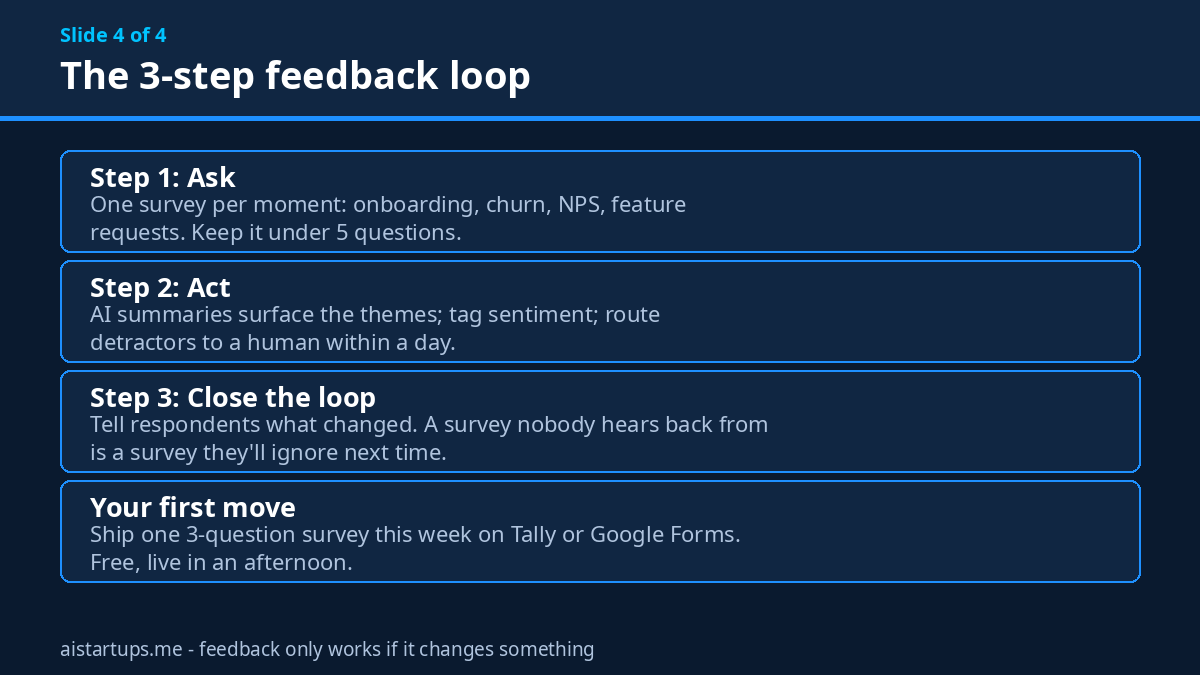
Step 1: Ask — one survey per moment
Don’t build a mega-survey. Build small ones tied to moments: a two-question check after onboarding, an NPS ping 30 days in, a churn survey the moment someone cancels, a feature-request form that’s always open. Five questions max, and every question has to earn its place — if you wouldn’t act on the answer, cut the question. This pairs well with the AI CRM tools most startups already run: the CRM knows who the user is, the survey finds out what they think.
Step 2: Act — let the AI do the reading
This is where the AI features on this list earn their money. Let SurveyMonkey or Survicate summarise a thousand open-text answers into themes, tag the sentiment, and surface the three things users keep repeating. Route the detractors to a human within a day — a fast, personal reply to an unhappy user is worth more than any feature you could ship that week. If you’re on Tally or Google Forms, do the same job with an hour and a spreadsheet. The tool changes; the habit doesn’t.
Step 3: Close the loop — tell people what changed
This is the step everyone skips, and it’s the step that makes the next survey work. When feedback changes something, say so — in the changelog, in an email, in the product itself. “You asked for X, we shipped it.” Users who see their feedback matter answer the next survey. Users who don’t, stop. And if the feedback keeps pointing at your website itself — a signup flow people bounce from, a landing page that confuses more than it converts — that’s a build problem, not a survey problem, and it’s worth getting a specialist eye on it; a studio like AISquadX handles exactly that kind of web development and AI integration work. Either way, the loop only works if it goes all the way round.
If you want a broader view of the tooling around this, our roundup of the best AI social media management tools for founders covers the other half of listening to your users — what they say about you in public, not just in your surveys.
Frequently asked questions
What is the best free AI survey tool for startups?
Tally. Its free plan includes unlimited forms and unlimited submissions, and Tally AI — the prompt-to-form builder — is free on every plan. Google Forms is the other honest free option, but it has no AI at all. If you want AI analysis on a free plan, there isn’t a good one yet — SurveyMonkey’s free plan includes the AI builder but not the analysis features.
Which survey tool has the best AI analysis?
Qualtrics, by a clear margin — sentiment analysis, Text iQ, StatsIQ, and automated recommendations — but it’s quote-only enterprise software with typical deals around $28,000–$30,000 a year. Among tools a startup can actually buy, SurveyMonkey’s Analyze with AI plus sentiment analysis on Advantage ($39 a month annual) and Survicate’s AI categorisation and sentiment are the strongest. Typeform’s Smart Insights is good but sits on higher tiers.
How much should a startup pay for a survey tool?
Most early-stage startups should pay $0 — Tally or Google Forms covers the first few hundred responses. When you outgrow free, expect $24–$39 a month: Tally Pro at $24, Typeform Basic at $28, or SurveyMonkey Advantage at $39, all on annual billing. The jump that hurts is the one to $56-plus for NPS tooling (Survicate Growth) or $99-plus for HIPAA (Jotform Gold) — only pay those when a specific feature forces you to.
Is Delighted still available?
No. Delighted has been folded into Qualtrics and is no longer available as a standalone product — its own pricing page now redirects to Qualtrics. Its NPS features live on inside Qualtrics at enterprise prices. If you’re choosing an NPS tool in 2026, look at Survicate instead.
Can AI write my survey questions for me?
Yes — and it’s genuinely good at it now. Typeform, SurveyMonkey, Tally, Jotform, and Survicate all have AI builders that draft a survey from a one-line description. But read every question before you send it. AI writes generic questions by default (“How satisfied are you with our service?”), and generic questions get generic answers. Edit them to ask about the specific thing you need to decide, and cut any question you wouldn’t act on.
The Bottom Line
Here’s the short version. If you’re pre-revenue, start with Tally — free, unlimited, and the AI builder is included. If you need your surveys to look beautiful and convert, Typeform Basic at $28 a month is the pick. If you’re doing serious research and need AI to read a thousand answers for you, SurveyMonkey Advantage at $39 a month is the workhorse. If NPS is the metric your team lives by, Survicate from $56 a month is the specialist. And if you’re not sure yet, Google Forms costs nothing and will tell you whether anyone answers at all.
But the tool is the easy part. The hard part is the loop: ask a short question, act on the answer fast, and tell people what changed. Do that every week and your users will keep talking to you. Skip it, and no amount of AI sentiment analysis will save you — because there won’t be any sentiment left to analyse.