
Here’s a number that should ruin your afternoon: the average B2B SaaS product activates just 37.5% of its new users. That means roughly two out of three people who sign up for your product never reach the moment where it actually helps them. They signed up. They poked around. They left. And most of them never told you why.
I know what that feels like, because I’ve watched it happen. You ship something you’re proud of, signups trickle in, and then… silence. No angry emails. No complaints. Just a dashboard full of accounts that went quiet after day one. It’s tempting to blame the marketing. Or the pricing. Or the model. But honestly? Most of the time, the product never got its one fair shot. The user never reached the win.
That’s what this guide is about. Not enterprise customer success — you don’t have a CS team, and you won’t for a while. This is customer success for the founder who is also support, sales, onboarding, and the person who fixes the bug at 11pm. It’s about getting a new user to their first real result fast, keeping them through the first week, and spotting the wobble before it turns into a cancellation.
Real talk: onboarding is the product. Your model can be brilliant and your landing page can convert like crazy, but if the first session ends in confusion, none of it matters. The good news? This is the most fixable problem a small AI startup has. You don’t need a bigger team or a bigger budget. You need a shorter path to the first win — and a habit of watching what happens after it.
What customer success means when you’re the whole team
Forget the job title. In a big company, customer success is a department with playbooks and quarterly business reviews. In your startup, it’s a mindset: your job isn’t done when someone signs up, or even when they pay. Your job is done when they get the result they signed up for — and then come back for it again.
That sounds obvious. It isn’t, because most founders measure the wrong thing. Signups feel great. Paying customers feel even better. But a signup who never activates is just a row in your database, and a paying customer who never gets value is a refund waiting to happen. I’ve seen founders celebrate a launch spike while their activation rate sat under 20%. The spike was real. The business wasn’t.
So let’s get precise about the three words that run this whole guide:
- Activation is the moment a new user first gets real value — their first real output, not their first click. For a writing tool, it’s a finished draft they actually use. For an API product, it’s the first successful call that returns something useful. Pick one moment. Just one.
- Time to value is how long it takes a new user to reach that moment. Shorter is better, and the gap between good and bad products here is brutal.
- Retention is whether they come back after the first win. One win is a demo. Two wins is a habit. Three wins is a customer.
Everything in this guide serves those three things. If a feature, email, or onboarding step doesn’t move one of them, it can wait. You’ve got limited hours and a product to build — spend them where they count.
The numbers nobody wants to look at
Look, I get why founders avoid their onboarding numbers. They’re humbling. But you can’t fix what you won’t measure, and the public benchmarks are honest enough to hurt in a useful way.
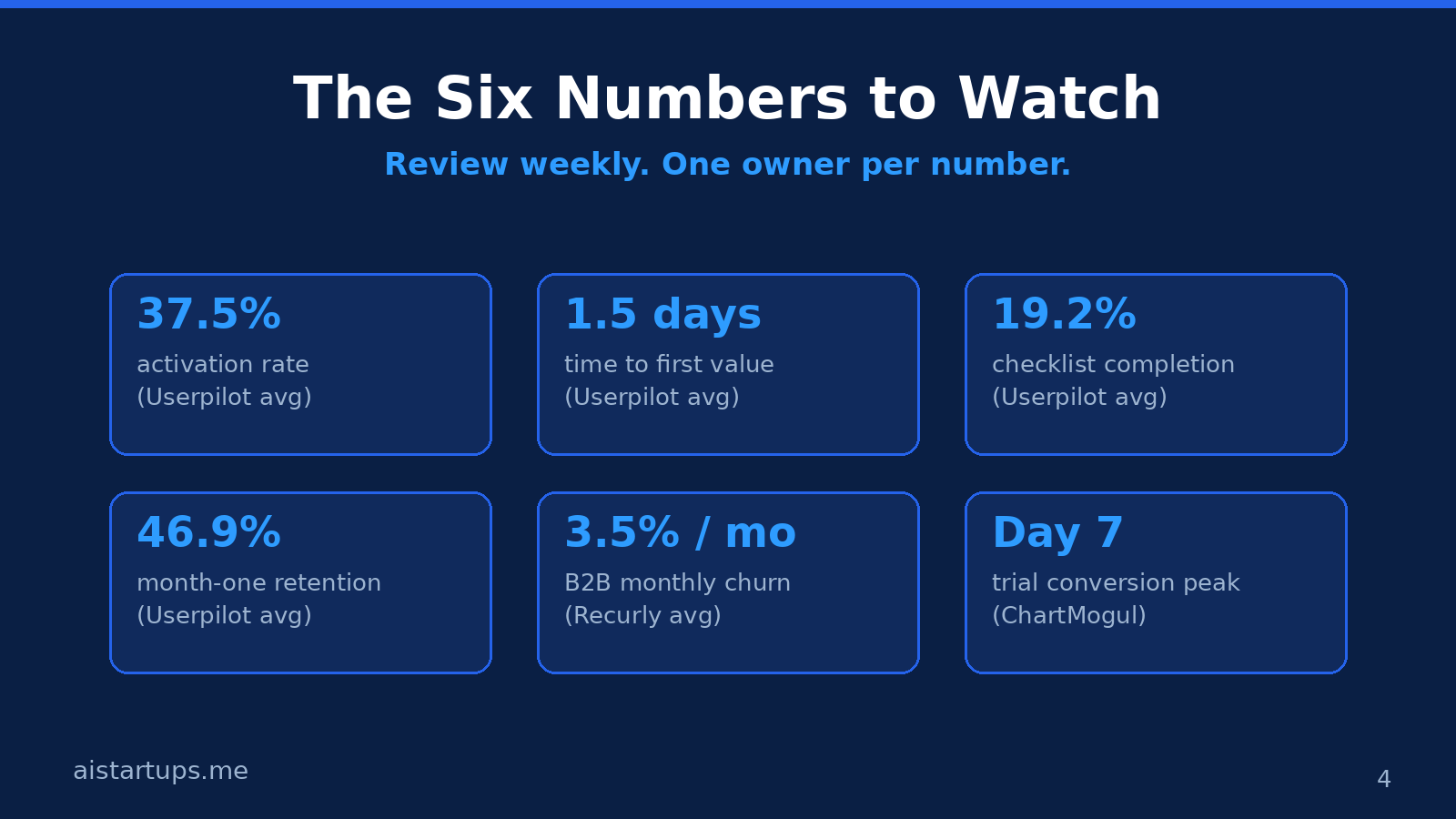
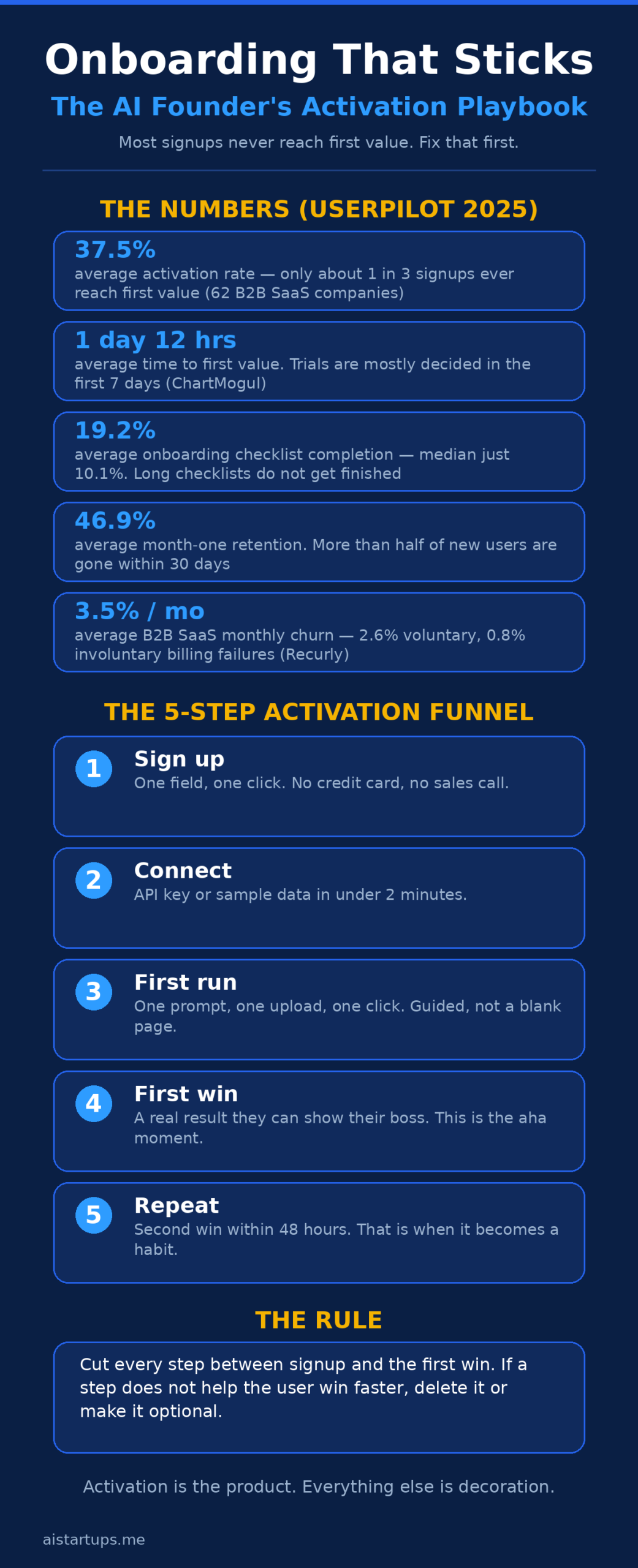
Userpilot’s 2025 benchmark, drawn from 62 B2B SaaS companies, puts the average activation rate at 37.5% and the average time to value at 1 day, 12 hours, and 23 minutes. Read that again: the average product takes a day and a half to show a new user its value. And the average onboarding checklist? Only 19.2% of users finish it — the median is just 10.1%. Most people don’t complete your checklist. They never will. Design like that’s true, because it is.
Then there’s month-one retention: 46.9% on average across 83 B2B companies in the same benchmark. More than half of new users are gone within 30 days. And on the churn side, B2B SaaS averages about 3.5% monthly churn — 2.6% voluntary, 0.8% involuntary — which means even a healthy-looking product replaces a big chunk of its base every year. ChurnTools’ 2026 benchmarks put the B2B median at 3.9% a month, with best-in-class teams under 1%. If you’re a small AI startup sitting at 5% or 6%, that’s not a disaster — it’s a flashing light that your first week needs work.
One more number worth knowing: ChartMogul’s data on roughly 2,500 SaaS companies shows trial conversions cluster around day 7, with the median daily conversion rate sitting near zero until the trial’s final day. Translation: the first week decides the trial, and most of the deciding happens in the last 48 hours. Your onboarding has seven days to make its case. Use them.
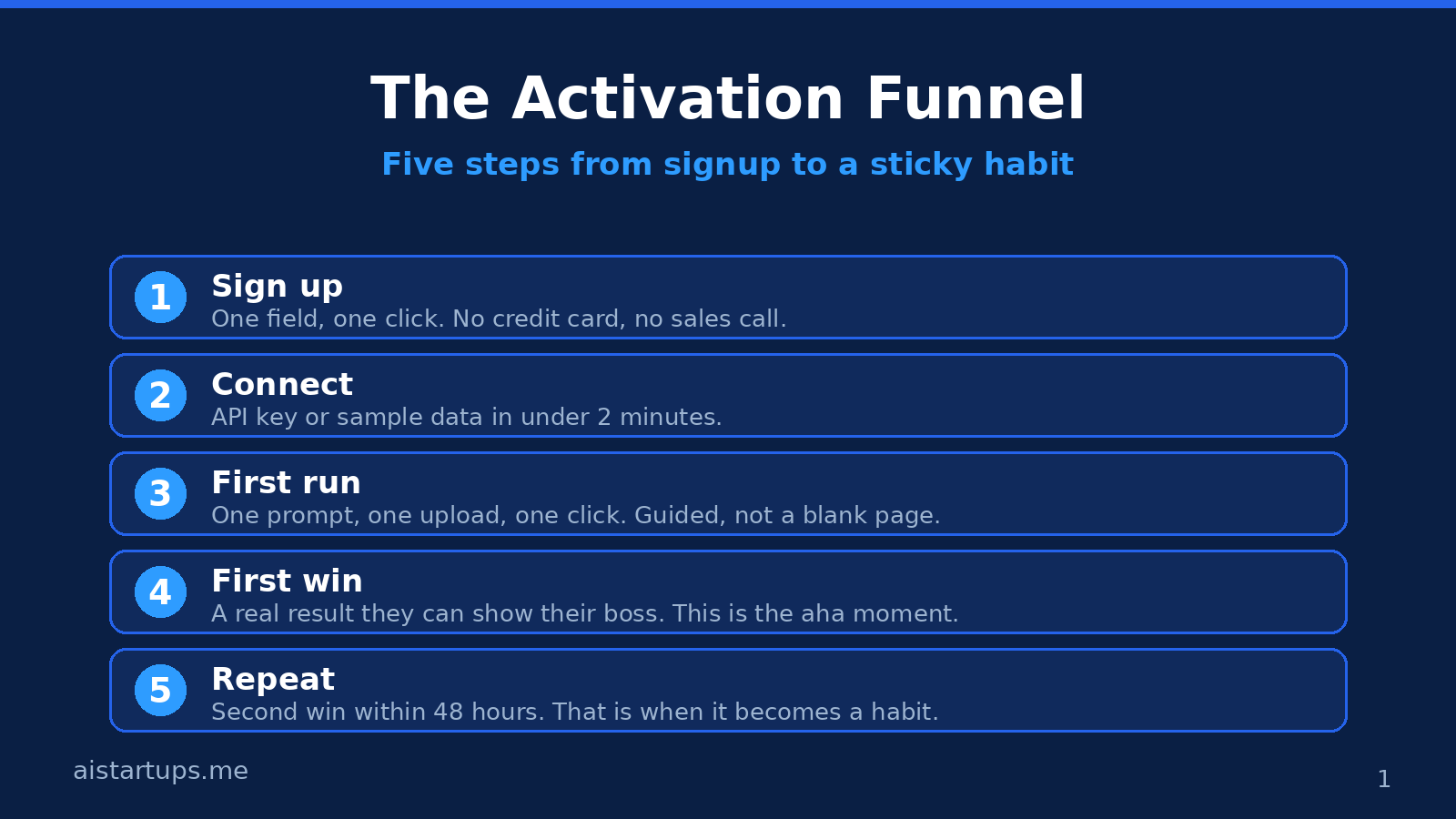
Step 1: Pick one activation moment (and defend it)
Every product has a dozen things a user could do first. Your job is to choose one — the single action that predicts they’ll stick around — and build the whole first session around it. This is the hardest decision in this guide, and it’s worth a real afternoon of thought.
How do you pick it? Look at your retained users. What did they all do in their first session that the churned ones didn’t? If you don’t have enough data yet, guess — then check the guess in two weeks. Common activation moments for AI products:
- A writing tool: the user exports or copies a finished piece they actually use.
- A data tool: the user gets their first chart or insight from their own data, not the demo set.
- An API product: the first successful call with the user’s own key, returning a real result.
- A chatbot builder: the bot answers its first real customer question correctly.
Notice what’s not on that list: creating an account, completing a profile, watching a tutorial, reading the docs. Those are chores. Activation is a result. If your “activation” is finishing a setup wizard, you’ve defined it wrong — you’ve measured compliance, not value.
And keep it to one moment. I know, your product does five cool things. The user doesn’t care yet. They care about the one problem that made them sign up. Get them that win, and they’ll discover the other four on their own. Try to show them all five in the first session and you’ll show them nothing.
This is also where customer discovery pays off twice. The interviews you did before building told you what problem people actually have. Your activation moment should be the smallest possible version of solving that problem. If your discovery work said “I spend two hours a week writing status reports,” your activation moment is a finished status report, not a tour of your template gallery.
Step 2: Design the first session like a demo, not a setup wizard
Here’s the thing about first sessions: nobody signed up to configure your product. They signed up to get something done. So the first session should feel like a guided demo where the user is the one clicking — not a form-filling exercise.
The pattern that works: pre-fill everything you can. Give them sample data that looks like their data, not lorem ipsum. Offer one template that matches the job they came for. Let them press one big button and see a real result in under two minutes. Then — and only then — ask them to connect their own data or key.
That order matters. If you ask for an API key before they’ve seen a single result, you’re asking for trust you haven’t earned. If you show them a result first, the key feels like a small step toward more of the same. Same ask, totally different psychology.
A few practical rules I’ve learned the hard way:
- Kill the blank page. A blinking cursor is the scariest thing in software. Templates, examples, and one-click sample runs beat a blank canvas every time.
- Three steps, max. If your onboarding has more than three steps before the first win, cut something. Make the rest optional or move it to later.
- Show progress honestly. A progress bar that says “Step 1 of 3” is fine. A fake checklist with eight items nobody finishes is worse than no checklist at all — remember that 10.1% median completion rate.
- Let people skip. Power users hate hand-holding. A visible “skip the tour” link costs you nothing and saves you the users who would have rage-quit your tooltip parade.
And please, record yourself going through your own onboarding once a month. Not a screen share for the team — just you, a fresh account, a timer running. You’ll be shocked at what you’ve stopped noticing. The extra click. The confusing label. The step that made sense when you built it and makes no sense now. I do this the way you’d proofread an article: fresh eyes, no excuses.
Step 3: The AI-specific traps (API keys, credits, and the blank prompt)
AI products have onboarding problems other SaaS products don’t. If you sell a normal tool, the user opens it and starts clicking. If you sell an AI product, the user has to figure out what to ask it, feed it the right inputs, and trust an output they didn’t write. That’s a much bigger ask — and it’s where most AI onboarding quietly dies.
The API key wall. If your product needs the user’s own key, that’s the first thing that will kill activation. Some users don’t have a key. Some don’t know where to get one. Some paste it wrong and get a cryptic error. Fix this with a guided key flow: a link straight to the right page, a screenshot of where the key lives, and an error message that says what actually went wrong in plain words. Better yet, give every new account a small free credit balance so they can get their first win before they ever touch a key. Yes, it costs you a little in API spend. It costs you a lot more in lost users if you don’t.
The credit meter panic. Usage-based pricing is the norm for AI products, and it terrifies new users. They don’t know what a “credit” buys. They don’t know if one click costs them a dollar or a cent. So they do nothing — the safest choice. Fix it by showing the price of the action before they take it (“This run uses about 4 credits — you have 96 left”) and by sending a friendly usage email after day one that shows what they got for their credits. Stripe’s usage-based pricing docs are worth reading here: metered billing, flat fees with overages, and prepaid credit models each create different user psychology, and the model you pick shapes how safe people feel experimenting.
The blank prompt problem. “What would you like to do?” is a terrible first question. Users don’t know what’s possible yet, so they type something vague, get a mediocre result, and conclude your product is mediocre. Give them five starter prompts matched to their job. Show example inputs and example outputs side by side. Let them click one, see a great result, then edit it into their own version. Prompt libraries aren’t a nice extra — for an AI product, they’re the onboarding.
The trust gap. AI output needs checking, and new users don’t know how much to trust yours. Show your work: sources, confidence, or a short explanation of what the model did. One clear citation does more for trust than a whole page of marketing copy. And when the output is wrong — it will be, sometimes — make it easy to fix. An edit button next to every result teaches users that they’re in control, which is exactly what a nervous first-timer needs to feel.
One more thing: if your product’s real value needs the user’s own data, say so early and say why. “Connect your inbox and I’ll draft your replies” is a big ask from a stranger. “Try it on three sample emails first — then connect your inbox when you’re ready” is the same product with a much smaller first step. That’s the whole game: smaller first steps, same destination.
Step 4: The first week, day by day
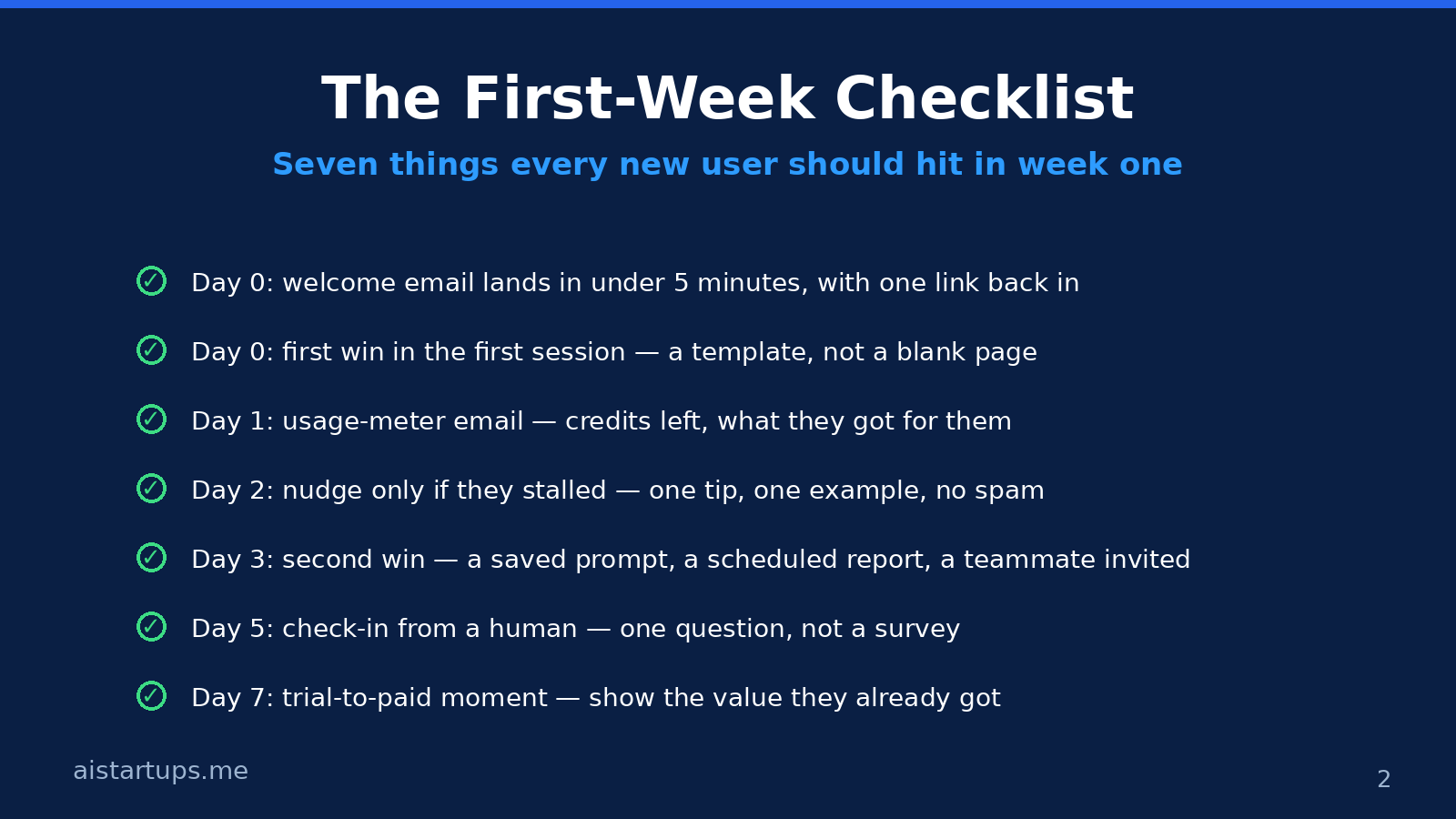
Activation gets them the first win. The first week turns it into a habit. And here’s where most small founders go wrong: they either send nothing, or they send a firehose of “helpful tips” that reads like spam. The middle path is a short, timed sequence that reacts to what the user actually did — not a drip campaign you set and forget.
Day 0 — the welcome email. It should land within five minutes of signup and do exactly one thing: get them back into the product with one link. Not five links. Not a feature list. One link, to the first win. If they already activated, the email can just say nice work and point at the second thing to try. Keep it short enough to read on a phone while waiting for coffee.
Day 0, again — the first session. This is the one that counts most, so I’ll say it plainly: if a user hasn’t reached the activation moment by the end of their first session, your onboarding has already failed them once. Don’t blame the user. Shorten the path. That’s the fix, and it’s almost always the fix.
Day 1 — the usage email. For AI products, this one is gold: “You used 12 credits and got 3 drafts, 1 summary, and 1 report. You have 88 left.” People love seeing what they got for their money (or their free trial). It also quietly teaches them what a credit is worth, which kills the meter panic I talked about earlier. If they used zero credits, that’s your signal — they stalled, and they need a nudge, not a newsletter.
Day 2 — the stall nudge. Only send this to people who stalled. One tip, one example, one link. “Here’s a 2-minute video of someone turning a messy meeting transcript into clean action items.” That’s it. No “we miss you,” no guilt trip, no five-paragraph essay about your roadmap. If they didn’t stall, don’t send it. Sending onboarding emails to people who are already succeeding is how you train them to ignore you.
Day 3 — the second win. The second win is the one that makes it a habit: a saved prompt, a scheduled report, a teammate invited, a workflow automated. Your day-3 message should point at whichever second win fits that user’s first win. This is the moment to introduce one more feature — not ten. The product tour is over. Now you’re a guide, not a salesperson.
Day 5 — the human check-in. A short email from you, the founder, with one question: “What’s the one thing you wish it did?” Not a survey. Not a form. A real question, from a real person, that you actually read and answer. I know this doesn’t scale. That’s the point — it doesn’t need to scale yet, and the answers are worth more than any analytics dashboard. Half the best features in small products come from these emails.
Day 7 — the trial-to-paid moment. Remember, trial conversions peak around day 7. Your day-7 message should show them the value they already got: “You created 14 outputs this week and saved about 3 hours.” Then the ask: keep it going. If your pricing is usage-based, show them which tier fits their actual usage — that’s a much easier yes than a generic upgrade button.
Step 5: Spot the wobble before it becomes a cancellation
Churn doesn’t usually arrive as a surprise. It arrives as a slow fade: sessions get shorter, then rarer, then they stop. If you’re watching, you can see it weeks before the cancellation email. If you’re not, the cancellation feels like it came out of nowhere. It didn’t.
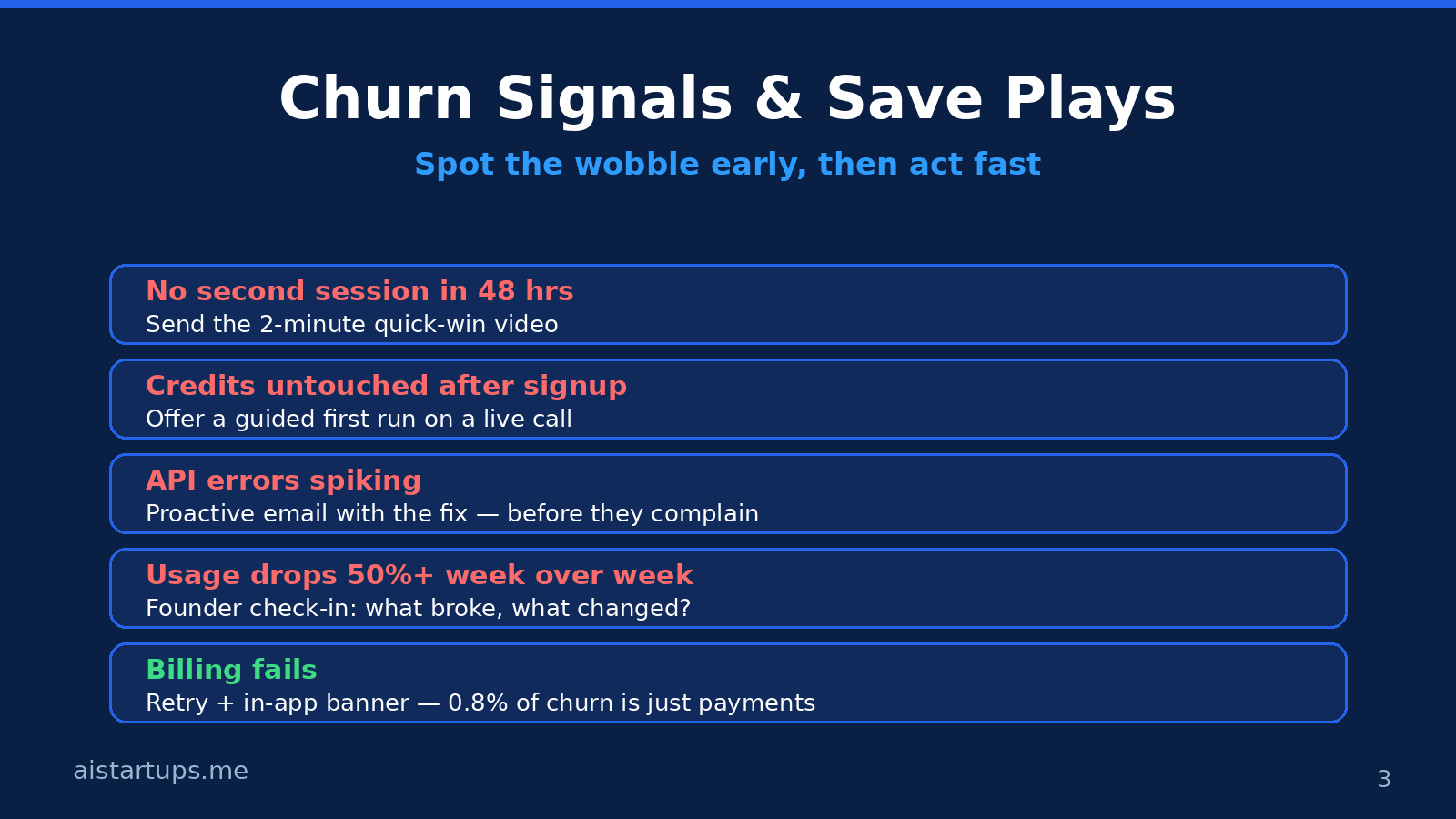
The signals I watch, in order of how much they worry me:
- No second session within 48 hours. They signed up, poked around, and never came back. This is the biggest leak in most funnels — fix the first session before you fix anything else.
- Credits untouched after signup. They never ran anything. Usually a key problem, a confusing first screen, or credit-meter fear. A guided first run on a live call can save these people.
- API errors spiking. If a user’s error rate jumps, they are having a bad day with your product and probably blaming themselves. A proactive email with the fix — sent before they complain — turns a churn risk into a loyalist.
- Usage drops by half or more week over week. Something changed: their project ended, a teammate left, or they found a workaround. A founder check-in (“what changed?”) beats a discount offer here, because you need the reason, not the retention trick.
- Billing fails. This is the least dramatic signal and the easiest to fix — 0.8% of B2B churn is just failed payments. Dunning emails, card-update links, and a retry schedule are boring infrastructure, and they pay for themselves many times over.
Now the save plays. When you spot one of these signals, you have a short window — days, not weeks. What works:
First, reach out like a human, not a workflow. “Hey, I noticed your last few runs errored out — I think it’s the file format, here’s the fix” will save more customers than any discount code. People stay with products whose founders notice them.
Second, offer a live call. I know, calls don’t scale. But a 15-minute call with a wobbling customer is the highest-ROI thing a solo founder can do. You fix their problem, you learn what confused them, and half the time they become your loudest fan. One call a week is enough to change your retention curve.
Third, make the save easy. If someone’s stuck on credits, give them a small top-up — not as a bribe, but so they can finish the job they started. If they’re stuck on a feature, send a 90-second screen recording, not a docs link. The goal is to remove the obstacle in front of them, right now, not to educate them about your product philosophy.
Most churn isn’t a verdict on your product. It’s a verdict on the user’s first week. They didn’t leave because you’re bad — they left because they never got the win. That’s fixable, and it’s fixable by you, this week, without hiring anyone.
The billing stuff that quietly kills retention
Let’s talk about the part founders love to ignore: money mechanics. For AI products, billing is part of onboarding, whether you like it or not. Confusing billing creates the same fear as a confusing product — and fear makes people leave.
Free trials that feel like traps. If your trial needs a credit card upfront, say so loudly, and say when the first charge lands. Nothing poisons trust faster than a surprise charge on day 14. If you can afford a no-card trial, do it — your activation rate will thank you. The users who convert after a no-card trial are the ones who actually wanted the product, and they churn less.
Credit systems people can’t understand. “1 credit = 1,000 tokens” means nothing to a normal human. Translate it: “about 4 credits per report, about 40 reports a month on this plan.” Show the running cost of the action before they take it. And always show the balance somewhere they can’t miss it — a user who runs out of credits mid-task and finds out from an error message is a user who feels ambushed.
Failed payments. Cards expire. Banks flag the charge. It happens to everyone, and it’s the dumbest way to lose a customer who actually liked you. Set up automatic retries, send a clear “your payment failed, here’s the link to fix it” email, and keep the account working for a few days while they sort it out. Cutting someone off the hour their card declines is how you turn a billing hiccup into a lost customer.
Price changes. AI costs move fast, and sometimes you have to raise prices. When you do, grandfather existing users for a while, explain the reason in plain words, and give them a real choice — a cheaper tier, an annual lock-in, something. People accept price rises from companies they trust. They don’t accept surprises. If you want a deeper treatment of how to think about all this, my guide on how to price an AI SaaS product covers tiers, trials, and the token problem in detail.
What to measure (and what to ignore)
You don’t need a wall of dashboards. You need six numbers, reviewed once a week, with one owner per number — and the owner is you, at least for now. This onboarding statistics roundup is a good reference for the benchmarks behind them.
- Activation rate: the share of new signups who hit your one activation moment within 7 days. Benchmark: 37.5% average. Your goal: beat your own number every month.
- Time to value: median time from signup to the activation moment. Benchmark: about a day and a half. Your goal: under an hour for self-serve, under a day for anything with setup.
- Checklist completion: only if you use a checklist — and honestly, if it’s under 20%, the checklist is the problem, not the users.
- Week-one retention: the share of activated users who come back in week two. This is the number that tells you whether the first win stuck.
- Month-one retention: benchmark 46.9%. If yours is much lower, the problem is in the first week, not the product.
- Monthly churn, split three ways: voluntary, involuntary (billing), and new-cohort vs. old-cohort. The split tells you where to work — billing fixes are cheap, value fixes take longer.
What should you ignore? Vanity metrics. Total signups without activation. Page views on your docs. NPS from people who never activated. And please ignore any benchmark that doesn’t tell you its sample — “good products retain 80%” means nothing without knowing who was measured. The Userpilot numbers I quoted in this guide are useful precisely because they say who they measured: 62 B2B companies for activation, 188 for checklists, 83 for month-one retention. Hold every other stat you read to that standard.
One more thing about measurement: talk to churned users. Not a survey — a short email: “Saw you left. Mind telling me what didn’t work?” About one in five will answer, and their answers will be more useful than any dashboard. I keep a running doc of every reply. Patterns show up fast. Three people saying “I couldn’t figure out the credits” is a roadmap, not a complaint.
When you need help (and when you don’t)
Look — most of this you can do yourself with a spreadsheet, your email, and an hour a week. You don’t need a customer success platform at 50 users. You need to look at the numbers, talk to the people, and fix the sharpest edge you find. That’s it. That’s the job.
But there is a point where the work outgrows the founder. If your onboarding needs a proper product tour, in-app guides, or a self-serve help center that actually answers questions, that’s real build work — and if your roadmap is already full, it’s worth getting outside help to ship it properly. If the product itself needs a rebuild of its signup flow, dashboard, or billing screens, that’s design and dev work, and a team that does AI integration studio work day in and day out will ship it faster than you will between support tickets. The rule is simple: do the parts only you can do — the customer conversations, the judgment calls — and get help with the parts that are just hours of build.
And if you’re not there yet, that’s fine too. A founder with a notebook and a weekly habit of emailing five new users will beat a startup with a fancy CS platform and nobody reading the replies. Tools amplify attention; they don’t replace it.
For the day-to-day support load that grows alongside onboarding, it’s also worth having proper tooling in place before the tickets pile up — my comparison of the best AI customer support tools covers the options that work for small teams. And none of this matters if nobody signs up in the first place, so if your top of funnel is thin, the lean marketing playbook for getting to your first 1,000 users is the companion read to this one.
Frequently asked questions
What is customer success for a small AI startup?
It’s the work of getting new users to their first real result fast, and keeping them coming back. No team required — just a clear activation moment, a short path to it, and a weekly habit of checking who stalled and why. For a solo founder, customer success is mostly attention: noticing the wobble early and reaching out like a human.
What is a good activation rate for a SaaS product?
Userpilot’s 2025 benchmark puts the B2B SaaS average at 37.5%, with AI and machine learning tools averaging higher at 54.8% in the same data. Don’t chase someone else’s number — measure your own, define activation as one specific valuable action, and improve it month over month. A rate under 20% usually means the first session is too long or too confusing, not that the product is bad.
How long should onboarding take?
As short as you can make it. The average time to first value is about a day and a half across B2B SaaS, but the best self-serve products get users to a first win in minutes. Aim for a first win inside the first session, a second win within 48 hours, and the trial decision made by day 7 — that’s when ChartMogul’s data shows conversions peak.
How do I reduce churn in an AI product specifically?
Fix the three AI-specific traps first: the API key wall, credit-meter fear, and the blank prompt. Give free credits before asking for a key, show the cost of each action before users take it, and offer starter prompts with example outputs. Then watch the early signals — no second session in 48 hours, untouched credits, error spikes — and reach out personally while there’s still time to save the account.
Should I offer a free trial or a free tier for my AI startup?
It depends on your costs, but for most AI products a time-limited free trial with a small credit balance works better than a permanent free tier — it creates a decision point around day 7, when trials actually convert, and it avoids the support load of users who never intend to pay. Whatever you choose, make the billing clear from day one: no surprise charges, visible credit balances, and a graceful path when a payment fails.
The Bottom Line
Your AI startup doesn’t have a churn problem. It has a first-week problem. Two out of three signups never reach their first win, half of new users are gone in a month, and most of them leave quietly — not because your product is bad, but because the path to the win was too long, too confusing, or too scary.
So here’s your homework for this week. One, pick your activation moment and write it on a sticky note. Two, time yourself going through your own signup with a fresh account — and cut every step that doesn’t serve the first win. Three, email five users who signed up this week and stalled, and ask them what got in the way. Four, write down your six numbers and look at them every Monday.
That’s the whole playbook. No platform to buy, no team to hire, no jargon required. Just a shorter path to the win, a habit of paying attention, and the willingness to reach out before the cancellation email arrives. Do that, and your onboarding stops being the leak in your bucket — and starts being the reason people stay.