
Meta dropped a new model on November 9, 2026, and honestly, it might matter more to your startup than the flagship that launched the same day.
I’m talking about Muse Ember. Not Wonder — the big brain that grabs headlines. Ember is the small one. The cheap one. The one built for the work your AI agents do a hundred times a day and never get thanked for: tool calls, coding subtasks, routing, pulling facts out of long documents, parsing the same kind of file for the hundredth time.
Here’s the thing. Most founders don’t have a model-quality problem. They have a volume problem. Your agent loops through the same steps over and over, burning tokens on work a smart intern could do in their sleep, and by the end of the month your API bill looks like a second payroll. That’s the gap Ember is aimed at.
So is it actually good? Or is it just another “efficient” model that turns out to be cheap because it can’t do much? I dug through Meta’s announcement, the benchmark tables, and the independent scores from Artificial Analysis to find out. No hands-on testing here — nobody outside Meta’s early partners had access before November 9, and I’m not going to pretend otherwise. But the numbers tell a pretty clear story, and it’s a good one. With one real catch.
Let’s get into it.
What Is Muse Ember, Really?
Muse Ember is Meta’s smallest and most efficient Muse model. It launched on November 9, 2026, alongside Claude Fable 5.2, which took the number one spot on the Artificial Analysis Intelligence Index the same day. Fable is the flagship. Ember is the workhorse. They’re not rivals — they’re built for opposite ends of the same job.
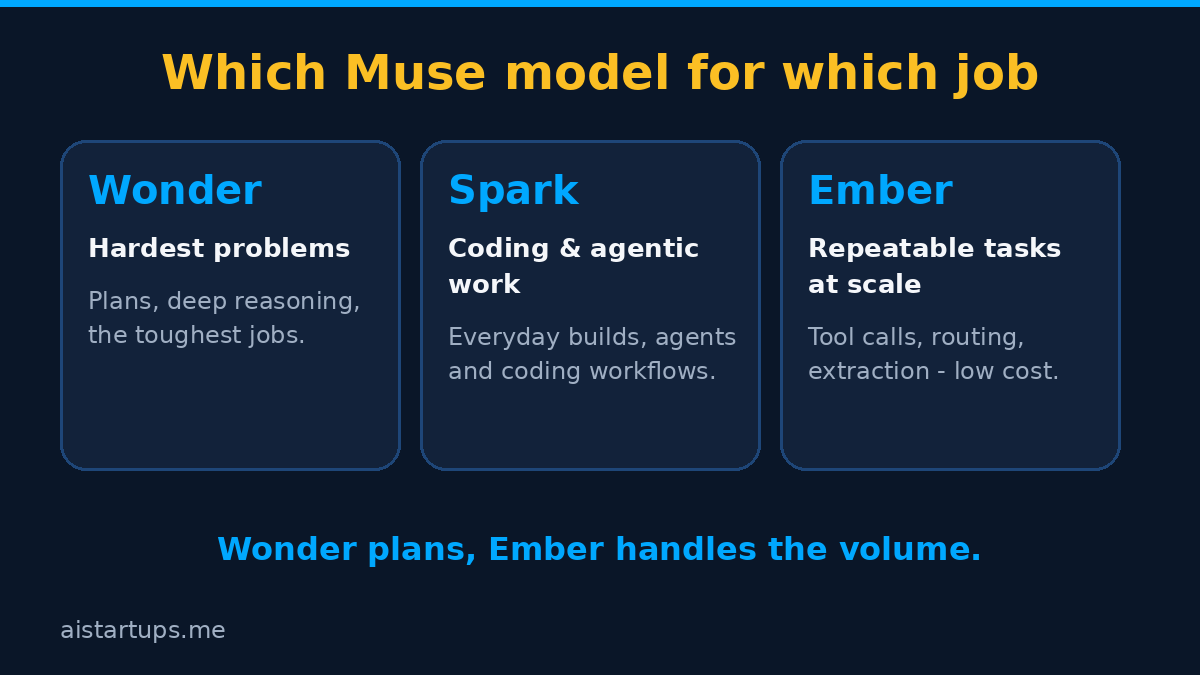
Meta’s pitch is simple enough to fit on a napkin: “Muse Wonder plans, Muse Ember handles the volume.” Wonder does the hard thinking. Ember does the repeatable stuff, at scale, all day, without complaining.
What does “repeatable stuff” actually mean in practice? Think about what your agents spend their time on. Calling tools. Breaking a coding task into subtasks and doing the easy ones. Routing a request to the right place. Pulling structured data out of a messy document. Reading a 200-page PDF and finding the three clauses that matter. That’s Ember’s home turf.
It’s also the first model trained using Muse Wonder Full, which is Meta’s way of saying the big model helped teach the small one. Make of that what you will — it sounds like marketing, but the benchmark numbers suggest something real happened in training, because Ember punches well above what you’d expect from a model this cheap.
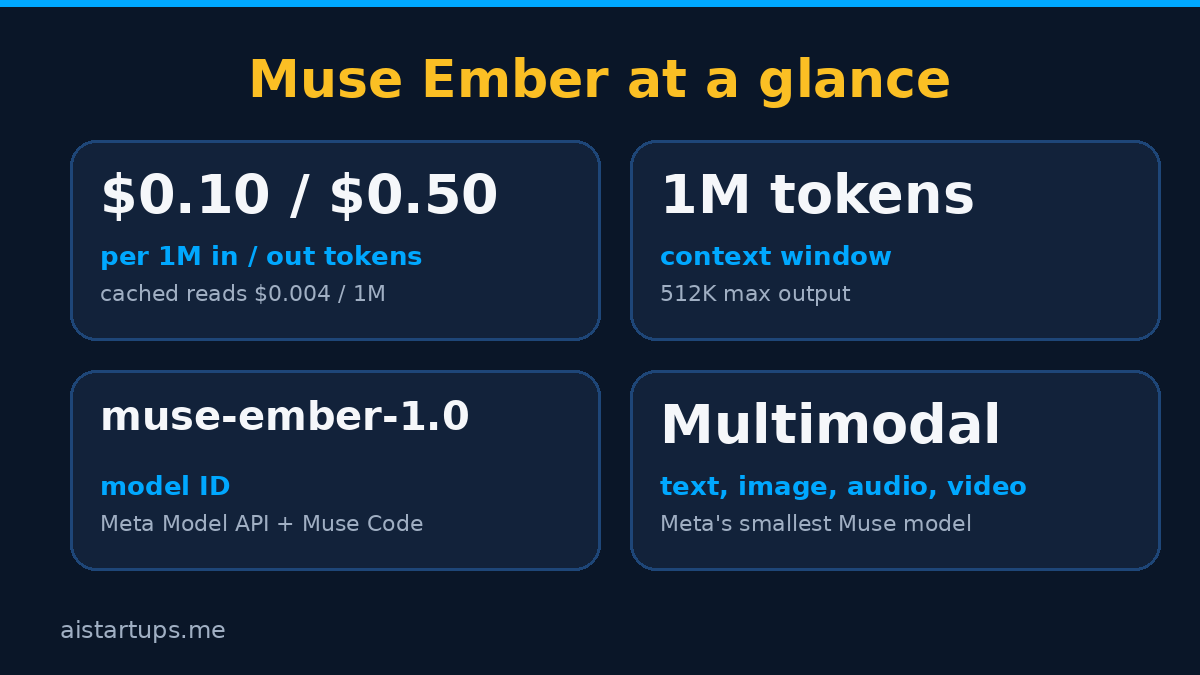
A few facts to get out of the way first. Ember is natively multimodal: text, images, audio, and video. It has a 1M-token context window, with up to 512K output tokens. The model ID is muse-ember-1.0, and it’s available on Muse Code and the Meta Model API, where it supports the Responses API. It’s also on Google Cloud, Oracle Cloud, and listed on OpenRouter.
What you can’t do: download it. Meta hasn’t disclosed a parameter count, and the weights are not released. Ember is API-only, which means no self-hosting, no fine-tuning on your own hardware, and no running it on a laptop in a cabin somewhere. If your product needs an on-prem model, this isn’t it. That’s a real limitation, and I don’t want to bury it.
The Price Tag (and Why It’s Not the Whole Story)
Let’s talk money, because that’s the whole point of this model.
On the Meta Model API, Muse Ember costs:
- $0.10 per 1M input tokens
- $0.004 per 1M cached input tokens
- $0.50 per 1M output tokens
Cheap, right? Well — yes and no. Here’s the part most coverage skips: that rate card is identical to Claude Haiku 5.5’s standard short-context price, and identical to GPT-6 Luna’s too ($0.10 in, $0.50 out). Ember is not cheaper per token than its rivals. Not by a cent.
So where’s the saving? It comes from fewer tokens burned per finished task, not a cheaper rate. That’s the whole game. If Ember finishes a job in 2,000 tokens that takes Haiku 6,000, your bill drops by two-thirds even though the price per token is the same. And on agent work — the stuff Ember is built for — that’s exactly what the benchmarks show happening.
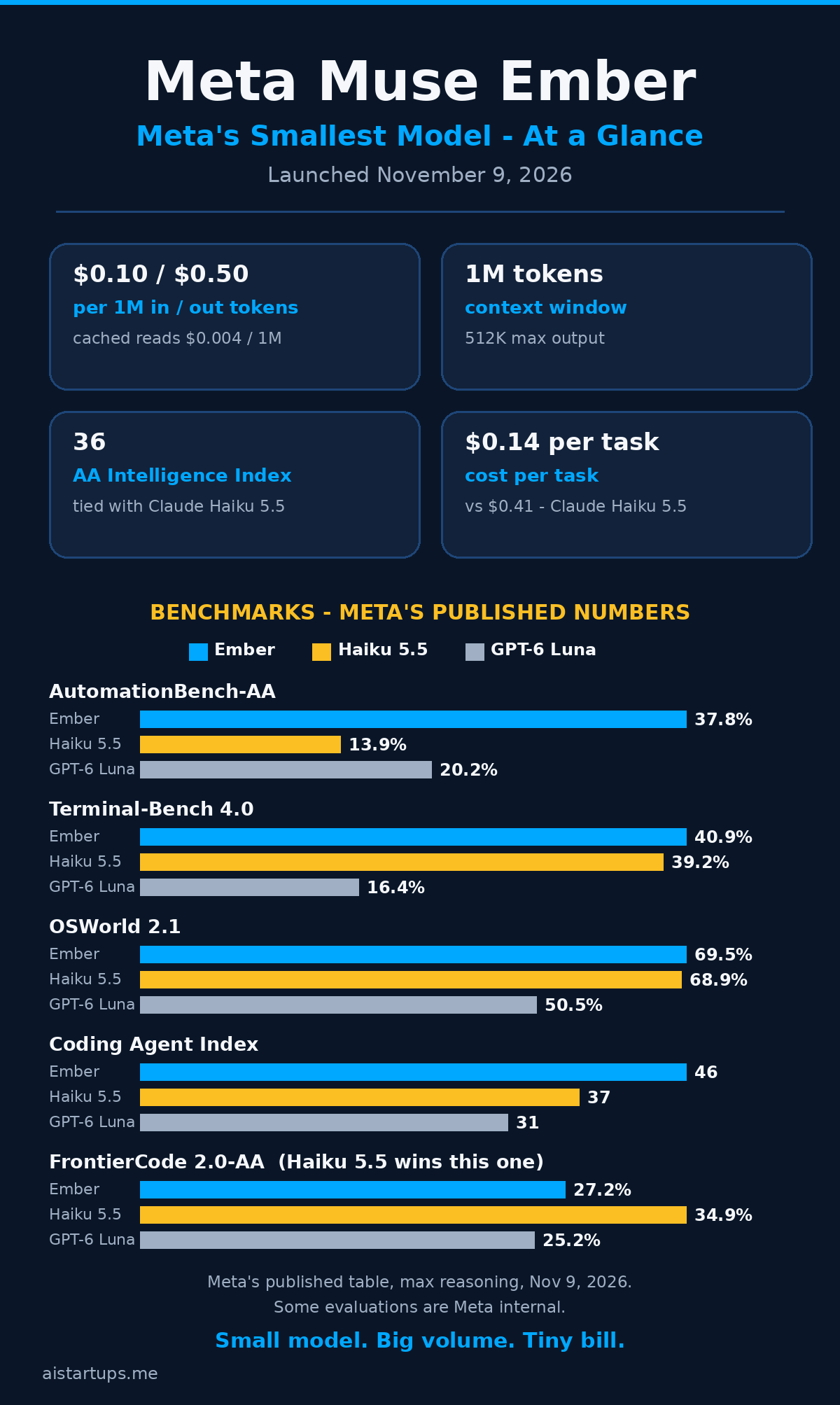
Artificial Analysis puts a number on it. Their cost per task on the Intelligence Index: Ember runs about $0.14 per task, Haiku 5.5 runs $0.41, and Muse Spark 1.3 runs $2.39. Same intelligence score, roughly — Ember and Haiku both score 36 on the Artificial Analysis Intelligence Index v5 at max reasoning, while GPT-6 Luna scores 28 and Spark scores 37. So you’re getting Haiku-level smarts at about a third of Haiku’s cost per finished task, and Spark-level capability at roughly a seventeenth of the price. That’s not a rounding error. That’s a different cost structure for your product.
Look, I know cost-per-task figures depend on the task. Your mileage will vary. But the direction is clear, and it’s the direction that matters when you’re running agents at volume.
Let’s Do the Math: What Does Ember Actually Cost You?
Numbers on a pricing page are abstract. Let’s make them concrete.
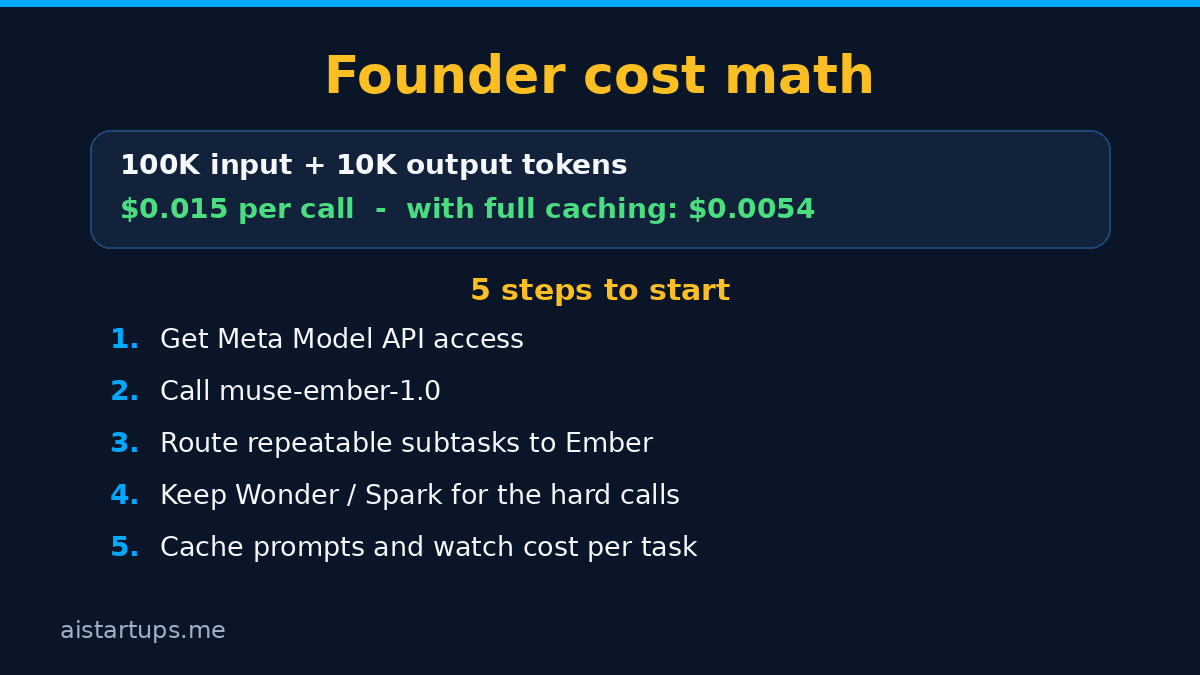
Start small. One agent call: 100,000 input tokens and 10,000 output tokens. The math is simple:
- Input: 100,000 ÷ 1,000,000 × $0.10 = $0.01
- Output: 10,000 ÷ 1,000,000 × $0.50 = $0.005
- Total: $0.015 per call
A cent and a half. That’s a rounding error on a single call, which is exactly the point — at this price, you stop rationing agent calls and start designing products that assume agents are cheap.
Now scale it up to something that looks like a real startup workload. Say your product runs an agent that handles a customer request: it reads some context, calls a few tools, and writes a short answer. Each task uses about 50,000 input tokens and 5,000 output tokens. You run 1,000 of those a day.
- Input: 50,000 × 1,000 = 50M tokens per day × $0.10 per million = $5.00 per day
- Output: 5,000 × 1,000 = 5M tokens per day × $0.50 per million = $2.50 per day
- Total: $7.50 per day, or about $225 per month
Two hundred and twenty-five dollars a month for thirty thousand agent tasks. A year ago, that workload would have cost you multiples of that on a flagship model — and honestly, most founders would have just not built the feature, because the math didn’t work. That’s the real story of Ember. It’s not that it saves you a few bucks on a bill you already pay. It’s that it makes an entire category of product features affordable for the first time.
And there’s a quieter saving hiding in the price list: cached input tokens cost $0.004 per million. That’s 25 times cheaper than fresh input. Agents re-read the same context constantly — system prompts, conversation history, the same document across a multi-step workflow. If your setup caches aggressively (and it should), a big chunk of your input bill nearly vanishes. At $0.004 per million, a million cached tokens cost less than half a cent. Real talk: if you’re building agents and you’re not using prompt caching, you’re leaving money on the table no matter which model you use.
For more on keeping API spend under control, my guide on how to cut your AI API bill by 70 percent covers the caching and routing tricks that pair well with a cheap model like this one.
The Benchmarks: Where Ember Wins (and Where It Doesn’t)
Okay. The part you’ve been waiting for. Does this thing actually work, or is it just cheap?
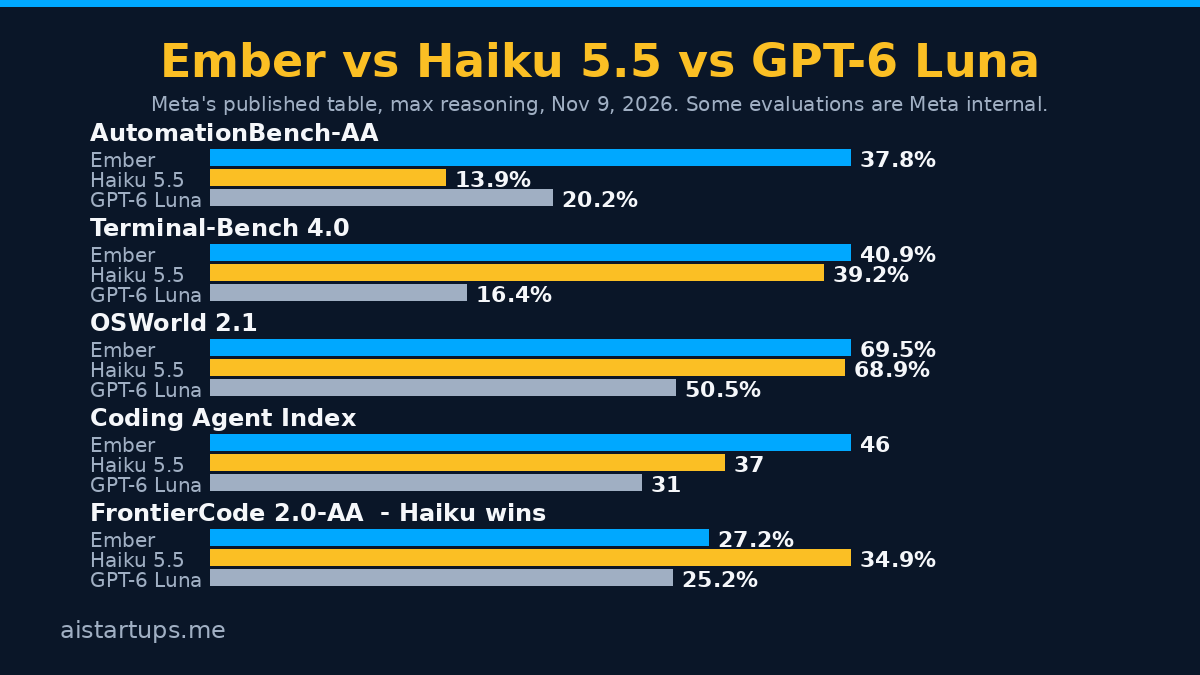
Short answer: on agent work, it works. On trivia, it doesn’t. Let’s look at the numbers Meta published, with a couple of honest caveats up front. Some of these figures come from Artificial Analysis, which is independent. Several others are Meta internal benchmarks, and I’ve flagged that where it applies. Also, the Terminal-Bench numbers below put each model in its best published harness, so those are not like-for-like comparisons — keep that in mind before you quote them to anyone.
Where Ember wins
On AutomationBench-AA, which tests business workflows — the kind of multi-step office work agents actually do — Ember scores 37.8%, against Haiku 5.5’s 13.9% and GPT-6 Luna’s 20.2%. That’s not a small gap. That’s nearly triple Haiku’s score. If your product automates business processes, that number should make you sit up.
On Agents’ Last Exam, Ember hits 61.6%, ahead of Haiku’s 57.0% and Luna’s 57.1%. On Terminal-Bench 4.0, Ember scores 40.9% versus Haiku’s 39.2% and Luna’s 16.4% — though remember, each model is in its best published harness here, so treat that one as directional rather than exact.
The Coding Agent Index-AA has Ember at 46, Haiku at 37, and Luna at 31. For a small, cheap model to beat Haiku on coding-agent work by that margin is genuinely surprising, and it’s the number I’d watch most closely if you’re building dev tools. The computer-use score tells a similar story: OSWorld 2.1 gives Ember 69.5% partial credit, against Haiku’s 68.9% and Luna’s 50.5%.
Long documents? Ember handles them. On GDP.pdf-AA, which tests parsing and reasoning over long documents, Ember scores 22.8%, Haiku 20.8%, Luna 22.8% — a tie with Luna and a small lead over Haiku. On PerceptionBench with tools, Ember scores 80.6% versus Haiku’s 78.6% and Luna’s 62.8%. And on Meta’s own Personal Superintelligence Index, a composite score, Ember lands at 46.8 against Haiku’s 36.1 and Luna’s 37.0 — though that one is a Meta internal composite, so take it with the appropriate pinch of salt.
Where Ember loses — and it’s not close
Now the catch. And it’s a big one.
Ember is bad at general knowledge. Not “slightly worse.” Bad. Artificial Analysis’s AA-Omniscience accuracy test puts Ember at 21.1%, against Haiku 5.5’s 34.7%. And it declines 64% of trivia-style questions — it just refuses to answer them.
Think about what that means. If your agent needs to know things — facts about the world, history, science, who did what and when — Ember is the wrong tool. It’s not a general-knowledge model, and Meta isn’t pretending otherwise. The model is built for work where the knowledge is in the documents and tools you give it, not in its own head.
There’s one more loss worth naming. On FrontierCode 2.0-AA, Haiku clearly wins: 34.9% against Ember’s 27.2% and Luna’s 25.2%. So the coding story isn’t a clean sweep. On some kinds of hard coding problems, Haiku is still the better model. If your agent writes genuinely difficult code rather than routine subtasks, test both before you commit.
Put it together and the picture is clear. Ember is a specialist. Give it a task with the context attached — documents, tools, a clear procedure — and it performs like a model three times its price. Ask it to reach into its own memory for facts, and it shrugs. That’s not a flaw in the design, exactly. It’s the design. But you need to know it before you build on it, because routing a knowledge-heavy task to Ember is how you end up with a confident-sounding agent that declines two-thirds of the questions.
The Family: Wonder, Spark, and Ember
Meta now has three Muse models, and the family roles are worth understanding because picking the wrong one is the easiest way to waste money — or ship a worse product.
Wonder is the flagship. The hardest problems, the deepest reasoning, the work where quality matters more than cost. If you haven’t read it yet, my Meta Muse Wonder founder’s guide covers what it does and when it’s worth the price.
Spark sits in the middle: coding and agentic workflows where you need real capability but not flagship reasoning. It scores 37 on the Artificial Analysis Index — a point above Ember and Haiku — but costs $2.39 per task against Ember’s $0.14. That’s the trade-off in one line: a little more capability, a lot more money.
Ember is the volume worker. Repeatable tasks at scale. Tool calls, subtasks, routing, extraction, document parsing. The stuff that happens a thousand times a day.
Most real products will use more than one of these. That’s the pattern I keep coming back to: Wonder plans, Spark handles the tricky middle, Ember does the volume. A smart routing setup sends each subtask to the cheapest model that can handle it, and the expensive model only touches the work that actually needs it. If you’re building agents with a single model for everything, you’re almost certainly overspending — on the easy tasks with a flagship, or underperforming on the hard ones with a small model.
What Early Partners Are Actually Doing With It
Meta named five early partners in the announcement: Box, Cline, Oracle, Cloudflare, and You.com. That’s a useful list because it shows where Ember is landing first — developer tools, cloud infrastructure, enterprise document work. Not chatbots. Not consumer apps. The boring, high-volume, business-critical stuff.
The Box example is the one worth quoting, because it’s specific in a way most launch quotes aren’t:
“[Ember] can score a contract against a company’s negotiation playbook clause by clause and land on the right overall risk rating.” — Yashodha Bhavnani, VP of AI Products at Box
Read that again. Clause by clause. Against a playbook. Landing on a risk rating. That’s exactly the Ember use case in one sentence: long document, clear procedure, repeatable judgment, done at scale. Box isn’t asking Ember to write poetry or explain quantum physics. It’s asking it to read contracts the same way, hundreds of times a day, and get the answer right. That’s the job.
Cline, the coding assistant, is the other partner I’d watch. Coding subtasks are Ember’s other home turf, and if a tool developers actually use every day is routing work to Ember, that tells you something about where the model is reliable enough for production.
How to Start Using Muse Ember
Getting started is straightforward, and you don’t need to wait for anything. Ember is available now on the Meta Model API and in Muse Code.
Here’s the short version:
- Get access to the Meta Model API. That’s the main route in. Sign up, grab your API key, and you’re in. If you already use Meta’s API for other Muse models, Ember is just another model ID.
- Use the model ID
muse-ember-1.0. That’s the identifier for API calls. Double-check it in your requests — a typo here is the most boring possible way to waste an afternoon. - Call it through the Responses API. Ember supports the Responses API on the Meta Model API, which is the route Meta recommends for agentic work — it handles tool calls and multi-step flows cleanly.
- Start with one agent workflow. Don’t migrate everything at once. Pick a single repeatable workflow — document extraction, a coding subtask, a routing step — run it on Ember alongside your current model for a week, and compare the outputs and the bill. Then decide.
- Turn on prompt caching. Seriously. At $0.004 per million cached input tokens, caching is nearly free, and agents re-read the same context constantly. This is the easiest money you’ll ever save.
One more thing. If you’re wiring agents into your product and the integration work is more than your team can take on right now, getting help from an AI integration studio like AISquadX can get you from prototype to production faster than hiring for it. That’s not the interesting part, though — the interesting part is what you build once the per-task cost stops being the thing that decides your roadmap.
And a quick note on safety, since founders ask about it: Meta evaluated Ember under its Superintelligence Scaling Framework — covering chemical and biological risks, cybersecurity, and loss of control — and the model stayed below the high-risk thresholds. It gets the same core safety training as the larger Muse models. That’s reassuring as far as it goes, but it doesn’t replace your own testing on your own use case. Run your own evals. Always.
When Ember Is the Right Call (and When It Isn’t)
So, decision time. Here’s how I’d think about it.
Reach for Ember when: your agent does the same kind of task over and over; the knowledge it needs is in the documents, tools, or context you provide; you’re running at volume and the per-task cost is what limits your roadmap; the work is tool calls, coding subtasks, routing, extraction, or document parsing.
Don’t reach for Ember when: the task depends on broad general knowledge; you need the deepest reasoning on a hard, novel problem (that’s Wonder); you’re writing genuinely difficult code where Haiku still leads; you need to self-host or fine-tune on your own infrastructure, because Ember is API-only and the weights aren’t available.
The mistake to avoid is treating Ember as a cheap replacement for everything. It’s not. It’s a cheap replacement for the specific, repeatable, high-volume slice of your workload — which, for most agent products, turns out to be most of the workload. That’s why it matters. Not because it’s the best model, but because it’s the best model for the work you do most often.
FAQ
What is Muse Ember?
Muse Ember is Meta’s smallest and most efficient Muse model, launched on November 9, 2026. It’s built for the repeatable work AI agents do all day — tool calls, coding subtasks, routing, extraction, and long document parsing — at a low cost per finished task. The model ID is muse-ember-1.0, and it’s available on Muse Code and the Meta Model API.
How much does Muse Ember cost?
On the Meta Model API, Ember costs $0.10 per 1M input tokens, $0.004 per 1M cached input tokens, and $0.50 per 1M output tokens. That rate card is identical to Claude Haiku 5.5 and GPT-6 Luna — the saving comes from Ember burning fewer tokens per finished task. Artificial Analysis estimates about $0.14 per task for Ember, versus $0.41 for Haiku 5.5 and $2.39 for Muse Spark 1.3.
Is Muse Ember better than Claude Haiku 5.5?
It depends on the job. On agent and business-workflow benchmarks, Ember leads: AutomationBench-AA business workflows 37.8% versus Haiku’s 13.9%, and the Coding Agent Index-AA 46 versus 37. But Haiku wins clearly on FrontierCode 2.0-AA (34.9% versus Ember’s 27.2%) and on general knowledge — Haiku scores 34.7% on AA-Omniscience accuracy against Ember’s 21.1%. Both score 36 on the Artificial Analysis Intelligence Index v5. Pick Ember for high-volume agent work and Haiku for knowledge-heavy or hard coding tasks. My Claude Haiku 5.5 founder’s guide covers Haiku in detail.
Can I download or self-host Muse Ember?
No. Meta has not disclosed a parameter count, and the weights are not released. Ember is API-only, available through the Meta Model API, Muse Code, Google Cloud, Oracle Cloud, and listed on OpenRouter. If you need a model you can run on your own infrastructure, you’ll need to look elsewhere.
Should my startup switch to Muse Ember?
If your product runs agents at volume — document processing, coding subtasks, routing, extraction — Ember is worth testing right away, because the cost per finished task is roughly a third of Haiku’s at the same intelligence score. Start with one workflow, compare outputs and cost against your current model for a week, and expand from there. Don’t switch knowledge-heavy or flagship-reasoning work to Ember; that’s not what it’s built for, and the benchmarks say so plainly.
The Bottom Line
Muse Ember isn’t the model that wins headlines. Fable took that prize the same day. But Ember might be the model that changes what you can afford to build — and for a founder, that’s the more important thing.
Same intelligence score as Haiku 5.5. A third of the cost per task. Genuinely strong on the agent benchmarks that map to real business work. Weak on general knowledge, API-only, and not the right pick for the hardest problems — but honest about all of that, and priced for volume.
Here’s my take. If you’re building agents, test Ember on your most repetitive workflow this week. Not next quarter. This week. The cost of finding out is a few dollars, and the answer might change your roadmap. And if the test goes well, start thinking about what else becomes possible when the per-task cost stops being the constraint. That’s the question Ember really asks. What would you build if agents were cheap?
Sources: Meta’s Muse Ember announcement, Unite.AI’s coverage of the launch, CellCog’s Muse Ember breakdown, AlphaSignal on Ember’s cost advantage, and SWArchitect’s AI launches roundup for November 2026.