Here’s a confession: my first pitch deck was 42 slides of pure suffering. I built it in PowerPoint at 2 a.m., nudging text boxes one pixel at a time, convinced that if the slides looked expensive enough, nobody would notice the business model was held together with hope and a spreadsheet.
It didn’t work. And honestly, the deck wasn’t the problem — the story was. But that’s a different article.
What I wish I’d had back then was one of the tools below. Not because AI writes a better pitch than you do (it doesn’t), but because it kills the blank-page phase. You go from an idea to a real, presentable deck in under an hour, and then you spend your energy on the part that actually matters: the story, the numbers, and the ask.
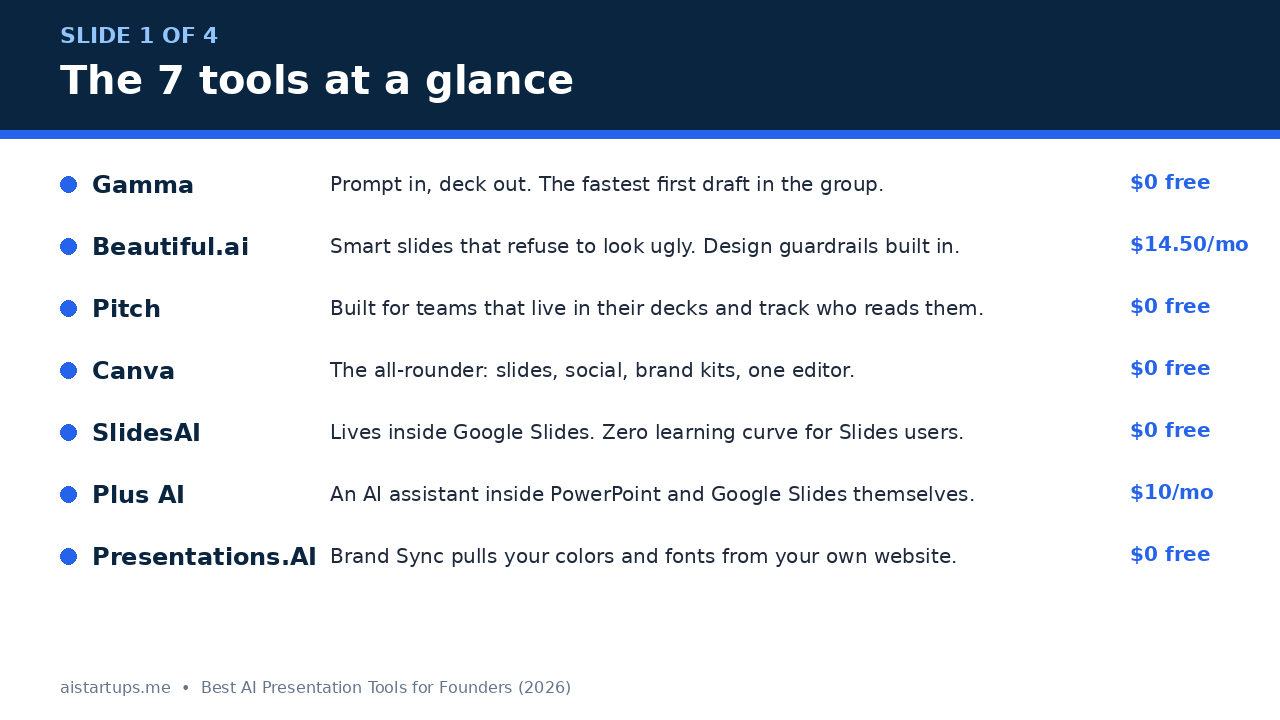
So I did what I always do before recommending anything on this site: I checked every price on the official pricing pages on November 7, 2026, read the free-plan fine print, and compared what each tool actually gives you before it asks for your card. Seven tools made the cut. One famous name didn’t — Tome shut down its presentation product in April 2025, so if you still see it on old “best of” lists, ignore those lists.
How I picked these seven (and what “free” really means)
Two rules shaped this list. First, the tool has to be alive and actively developed in 2026 — no dead products, no zombie apps with a pricing page from 2023. Second, it has to be useful for a founder specifically, not just anyone who needs slides. That means investor decks, sales decks, and partner updates — not classroom lectures.
And a warning about the word “free,” because it does a lot of heavy lifting in this market. Three of these tools have a genuine free plan. Two have no free plan at all — just a trial that asks for your card and charges you if you forget to cancel. And the free plans that do exist mostly run on credits: a one-time pot that never refills. That’s not a scam, exactly, but it’s very different from “free forever,” and you should know which one you’re getting before you invest an afternoon learning the tool.
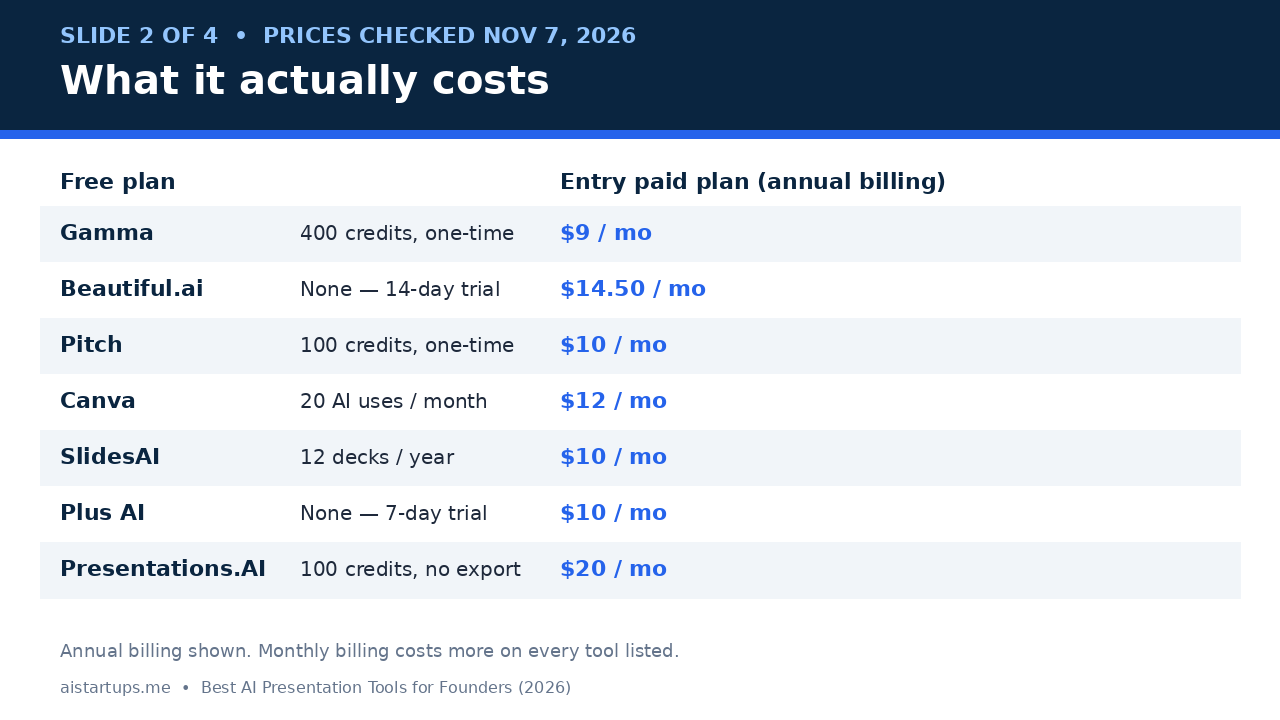
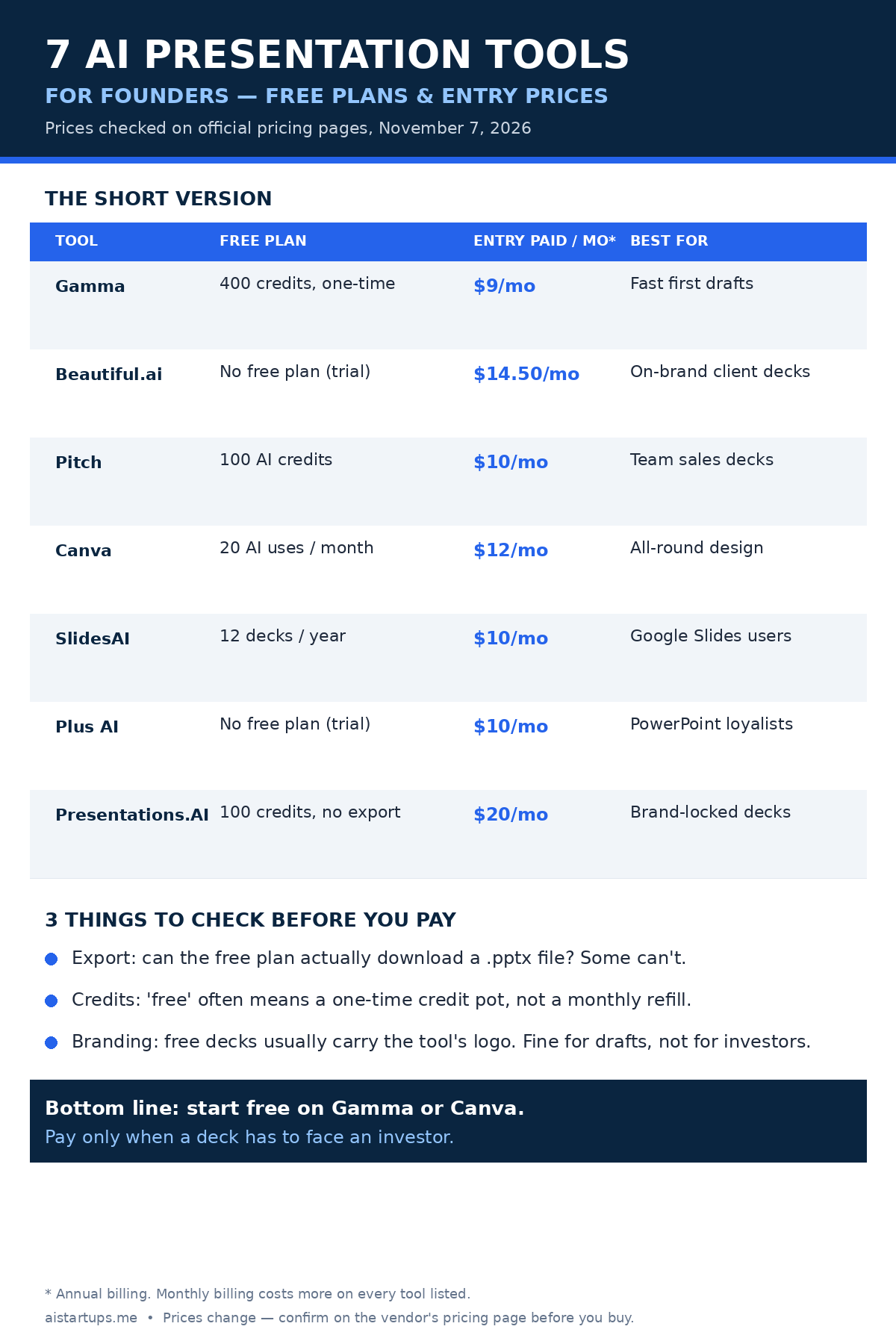
All prices below are in US dollars, taken from each vendor’s own pricing page on November 7, 2026. Prices move — Beautiful.ai’s Pro plan, for example, was $12 a month on annual billing earlier this year and now lists at $14.50 — so treat these as a snapshot and confirm at checkout.
1. Gamma — the fastest first draft you’ll ever make
If you’ve never used an AI presentation tool before, start here. Gamma is the one I’d hand to a founder friend who needs a deck by Thursday and has never touched a design tool in their life.
You type a prompt — “seed-stage pitch deck for a B2B invoicing startup, 12 slides” — and Gamma hands back a full deck: structure, copy, images, the lot. Gamma 5, which launched in October 2026, starts with a conversation instead of a form, so you can talk through the deck like you’re briefing a designer. The results are genuinely good for a first draft. Not perfect — the copy will sound a bit generic, and you’ll want to rewrite the traction slide yourself (you always should) — but the bones are right, and that’s the hard part.
Where Gamma really earns its place is the range. The same account makes documents, simple websites, and social posts, so if you’re building a whole launch kit, you can do it in one place. I know founders who draft their deck in Gamma, then spin the same content into a landing page without leaving the app. That matters when you’re a team of one.
What it costs
The free plan is $0 and needs no credit card. You get 400 credits at signup and up to 10 slides per prompt, plus PDF, PPTX, PNG, and Google Slides export — which is generous for a free tier. Here’s the catch, and it’s a big one: those 400 credits never refill. Once they’re gone, they’re gone (unless you refer friends, 200 credits each). So treat Gamma Free as a generous trial, not a permanent home.
Paid plans start at Plus, $12 a month or $9 a month billed annually ($108 a year), which removes the Gamma branding, raises the limit to 100 slides per prompt, and gives you 1,000 monthly credits. Pro is $25 a month or $18 billed annually, with premium image models, custom branding, analytics, and API access. There’s also an Ultra tier at $100 a month for heavy users, and Team/Business plans from $20 to $40 a seat. Check the current numbers on Gamma’s pricing page.
Where it falls short
Two things. First, the credit system means your costs scale with how much you generate, not how many decks you make — and heavy image generation burns credits fast. Second, Gamma decks have a look. A polished, modern, slightly samey look. If your deck goes to investors who’ve seen fifty Gamma decks this month, they’ll spot it. Rewrite the copy hard and swap in your own screenshots, and that problem mostly goes away.
My take: the best starting point for most founders. Free to try properly, cheap to keep, and the fastest path from zero to a deck you can send.
2. Beautiful.ai — the one that won’t let you make an ugly deck
Beautiful.ai is the opposite of Gamma in one important way: it cares more about how the deck looks than how fast you can make it. Its Smart Slides use layout rules that keep everything aligned, spaced, and on-brand — you literally can’t drag a text box into a weird place, because the tool won’t let you. For a founder with zero design sense (no shame, that’s most of us), that’s a feature, not a limitation.
The AI side is strong too. You describe the deck, it drafts the content, and the slides adapt as you edit — add a bullet point and the layout reflows itself instead of overflowing off the edge. That sounds small until you’ve spent twenty minutes fixing a slide that broke because you added one sentence.
This is the tool I’d pick if the deck is going to a client or a partner and it has to look like a design agency made it. Consultants love it for exactly that reason.
What it costs
Here’s the honest bit: there is no free plan. None. You get a 14-day free trial of Pro or Team, but it requires a credit card and charges in full if you don’t cancel. That’s the worst free-tier deal on this list, and it’s the main reason Beautiful.ai isn’t my top pick despite the quality.
Pro costs $14.50 a month billed annually ($144 a year charged up front), or $45 if you pay month to month — a steep premium for flexibility. Team is $40 per user per month billed annually ($50 monthly) for 2 to 20 seats, and Enterprise is custom. All paid plans include unlimited AI content generation, 300+ Smart Slide layouts, custom branding, and PowerPoint import and export. Verify the current prices on Beautiful.ai’s pricing page.
Where it falls short
Besides the missing free plan, the guardrails can feel tight. If you want a wild, creative, off-template deck, Beautiful.ai will fight you. It’s built for clean and corporate, not experimental. And the $45 month-to-month price is punishing if you only need it for one deck — at that point, the annual plan only makes sense if you’ll use it all year.
My take: the best-looking decks on this list, and the priciest way to get them. Worth it if you make client-facing decks every week. Overkill if you need one investor deck a year.
3. Pitch — the team deck with a memory
Pitch is the only tool on this list that was built for teams first and solo founders second — and you can feel it in every feature. Real-time collaboration, shared workspaces, template locking so nobody on your team can go off-brand, and (my favorite) analytics that show you who opened your deck, which slides they lingered on, and where they dropped off.
That last one is genuinely useful for fundraising. Send your deck to ten investors, and Pitch tells you which ones actually read past slide three. It’s not a CRM, but for a founder running a raise, knowing who engaged is worth real money.
The AI side arrived in force with Pitch Agent, released in May 2026, which builds brand-aligned decks from prompts and templates. It’s solid rather than spectacular — the real draw here is the workflow around it, not the generation itself.
What it costs
The free plan is real and usable: $0, no credit card, unlimited presentations in a workspace of up to 5 members, with 100 one-time AI credits. You can export PDFs and share web links for free, but PowerPoint export needs a paid plan — that’s the catch to know about.
Plus is $10 a month billed annually ($12 month to month) for a single seat, with 500 monthly AI credits and PowerPoint export. Team is $15 a seat a month billed annually, with advanced link analytics, and Business is $20 a seat a month with unlimited advanced links. Prices are shown in euros or dollars depending on your region, so check Pitch’s pricing page for your local numbers.
Where it falls short
The free plan’s 100 AI credits don’t refill, so the AI features run out fast — after that, you’re using Pitch as a (very good) regular slide tool. And the analytics that make Pitch special mostly live on the Team plan and up, which means a solo founder pays $10 a month for a tool whose best trick is locked one tier higher. A little annoying, that.
My take: the best pick for a founding team of two to five people who pitch together. Solo founders can start free, but the value really shows up once there’s a team in the workspace.
4. Canva — the all-rounder you probably already have
Look, Canva isn’t really a presentation tool. It’s a design tool that happens to make presentations — and that’s exactly why it’s on this list. Most founders already have a Canva account. They’ve made their logo there, their social posts, maybe their first landing page mockup. Adding pitch decks to that same account costs nothing extra, and the deck inherits your brand kit automatically.
Canva AI (the current name for what used to be called Magic Design) builds a draft deck from a typed or spoken prompt. It’s not the smartest generator on this list — Gamma writes better first-draft copy, in my experience — but Canva wins on everything after generation. The template library is enormous, the editor is the easiest here, presenter mode is solid, and when you need a one-pager, a social post, and a deck for the same launch, you do it all in one tab.
There’s also a practical point nobody talks about: your co-founder, your designer, your intern — they all already know Canva. Zero training, zero onboarding. That counts for a lot at a two-person startup.
What it costs
Canva Free is $0 and genuinely useful: 250,000+ templates, 5GB of storage, and up to 20 AI uses a month. Each AI presentation generation counts as one use, so you can build a real deck or two every month without paying. The limits are premium assets (watermarked until you pay for them) and the AI allowance — 20 uses sounds like plenty until you’re iterating on a deck at midnight.
Pro costs $144 a year for one person — that’s $12 a month billed annually, or $18 month to month — with 1TB of storage, the full Brand Kit, and a much bigger AI allowance. Business (which replaced Teams for new sign-ups) is $250 a year per person, adding team brand controls and approval workflows. There’s a 30-day free trial for Pro. Check the latest figures on Canva’s pricing page.
Where it falls short
Two honest complaints. First, the AI generation is the weakest of the dedicated tools here — expect to do more manual fixing. Second, PowerPoint export exists but the fidelity isn’t perfect; complex animations and fonts can shift when you open the file in PowerPoint. If your investor insists on a .pptx file, test the export before you send it.
My take: if you already live in Canva, don’t overthink this — use it. If you don’t, it’s still the best value on this list, because Pro covers your entire design life, not just slides.
5. SlidesAI — for founders who live in Google Slides
Some founders will never leave Google Slides. Their whole company runs on it. Their investors expect a Slides link. Their co-founder comments in the margins at 1 a.m. If that’s you, SlidesAI is the obvious pick, because it doesn’t ask you to change anything.
It’s an add-on that lives inside Google Slides (plus a PowerPoint add-in, a web app, and a ChatGPT GPT). You open your deck, type a topic or paste your notes, and it generates editable slides right there in the file. No exporting, no importing, no “now open this in another app.” The slides it makes are native Google Slides objects, so you can edit every word and move every box like normal.
In October 2026 SlidesAI added a chat-based Agent that asks about your audience and tone before it writes anything — a small change that makes the output noticeably less generic, because the tool actually knows who the deck is for.
What it costs
Basic is $0 with no credit card required, but read the limits: 12 presentations a year, 2,500 characters of input per presentation, up to 10 slides per deck, and 200 AI credits a month. That’s roughly one deck a month. Enough to try it properly, not enough to run a fundraise on.
Pro is $10 a month billed annually ($120 a year), raising the allowance to 120 presentations a year with document upload, custom fonts, and up to 20 slides per deck. Premium is $20.83 a month billed annually ($250 a year) with unlimited presentations and the full model range. Check SlidesAI’s pricing page before you buy — the credit allowances have shifted more than once this year.
Where it falls short
The design quality lags behind Gamma and Beautiful.ai. SlidesAI decks look clean but plain, and you’ll do more visual polishing yourself. The free plan’s character limit also stings: 2,500 characters of input isn’t much when your business model takes a page to explain. Paste a long brief and you’ll hit the wall fast.
My take: the right tool if Google Slides is non-negotiable. For everyone else, Gamma’s free plan gives you more room to work.
6. Plus AI — the AI assistant that lives inside PowerPoint
Plus AI takes a different approach from everything else on this list: it doesn’t want you to leave PowerPoint or Google Slides at all. It’s an add-in that sits inside the apps you already use, generating slides, rewriting bullet points, remixing layouts, and inserting single slides into an existing deck. Your deck never leaves PowerPoint. Your company’s template stays intact. Your IT department stays happy.
That matters more than it sounds. A lot of founders work at companies — or pitch to companies — where PowerPoint is the house format and anything else is a hassle. If your investor’s associate is going to open your deck in PowerPoint anyway, building it there in the first place removes a whole category of formatting surprises.
The Pro plan adds document uploads (turn a PDF or Word doc into a deck), prompts up to 100,000 characters, and AI image generation. The Agent mode in PowerPoint, which works through a chat panel, is the closest thing here to briefing a real presentation designer.
What it costs
There is no free plan — just a 7-day trial with 1,000 AI credits, and it requires a credit card. The trial charges automatically after 7 days unless you cancel, so set a reminder the moment you sign up. I mean it. Put it in your calendar now.
Basic is $10 per user per month billed annually ($15 month to month) with 1,500 AI credits a month. Pro is $20 billed annually ($25 monthly) with 3,000 credits, document uploads, and AI images. Team is $30 billed annually with shared branding and templates, and Max is $200 a month for unlimited credits. See the full breakdown on Plus AI’s pricing page.
Where it falls short
The credit math needs attention. Plus AI says a typical task uses 40 to 170 credits, so the Basic plan’s 1,500 credits cover roughly 9 to 37 tasks a month — fine for one deck, tight for a team iterating daily. And because there’s no free plan, you can’t casually test it for a month the way you can with Gamma or Pitch. The 7-day trial is your only window, and a week goes fast when you’re fundraising.
My take: the best choice if your deliverable must end up in PowerPoint or Google Slides. For a founder starting from scratch, Gamma’s free plan is the cheaper way to learn what you like.
7. Presentations.AI — the brand-obsessed specialist
Presentations.AI is the most single-minded tool on this list: it does presentations and nothing else, and it’s been doing them since 2019. Its headline feature is Brand Sync, which pulls your company’s colors, fonts, and logo from your website and applies them across every deck automatically. If you’ve ever received a deck from a teammate in six different shades of blue, you know why that matters.
The AI assistant, Clip-E, is built around persuasion structure rather than just content generation — it thinks about how a business argument should flow, not just what the slides should say. That shows in the output: the decks it produces have a logical spine (problem, stakes, solution, proof, ask) that a lot of AI decks lack. It also generates from more inputs than most rivals: prompts, PDFs, Word docs, and URLs.
It’s SOC 2 Type II certified with full audit trails, which is why it shows up at larger companies and regulated industries. For a solo founder, that’s overkill. For a startup selling into enterprise or healthcare, it’s a genuine selling point.
What it costs
Starter is $0 with no credit card required, and it allows unlimited users — but here’s the catch that defines this tool: the free plan does not include PowerPoint export at all. You can build a deck and share it by link, but you can’t download it as a .pptx file. Free accounts get 100 credits (the FAQ mentions 200 at signup — check your own account) and decks of up to 20 slides. So the free plan is really a demo, not a working tier.
Pro is $240 a year for one user (equivalent to $20 a month), which opens up high-quality PowerPoint export, custom brand colors and fonts, analytics, and collaboration with up to 10 guests. Gold is $1,200 a year ($100 a month) with frontier AI models and advanced brand controls. There’s no monthly billing option — annual or quarterly only — and prices can vary by country. Confirm on the company’s pricing page before you commit.
Where it falls short
The price jump from free to Pro is the steepest on this list — $0 to $240 a year with nothing in between — and the no-export free plan means you can’t honestly evaluate the tool’s most important feature until you pay. At $20 a month, Pro undercuts Gamma’s equivalent Pro tier on an annualized basis, but only if you actually need the brand features. For a pre-seed founder with no brand guidelines yet, Brand Sync is solving a problem you don’t have.
My take: the strongest pick for a funded startup with a real brand and a sales team making decks every week. For a solo founder’s first raise, the free plan is too limited and Pro is more than you need.
The free-plan trap: credits, not subscriptions
Here’s the thing nobody puts in the headline: most of these “free plans” aren’t subscriptions. They’re allowances. Gamma gives you 400 credits once. Pitch gives you 100. SlidesAI gives you 12 decks a year. Only Canva’s free plan refills monthly, and even that’s capped at 20 AI uses.
Why does that matter? Because a founder’s deck habit is spiky. You might make nothing for three months, then need four decks in a week during a fundraise. A monthly-refill plan handles that fine. A one-time credit pot runs dry at exactly the worst moment — the night before your partner meeting.
My rule is simple: use the free plan to learn the tool and draft your first deck. The moment a deck has to face an investor, a client, or a hiring candidate, pay for one month of the cheapest plan that removes branding and switches on export. It’s $9 to $15. That’s the cheapest professional polish you’ll ever buy. Cancel when the raise is over if you need to — but don’t send a deck with someone else’s logo on it to a person you’re asking for money.
“Investors don’t fund slides. They fund clarity. The tool just buys you the time to find it — use that time on the story, not the fonts.”
Which tool should you actually pick?
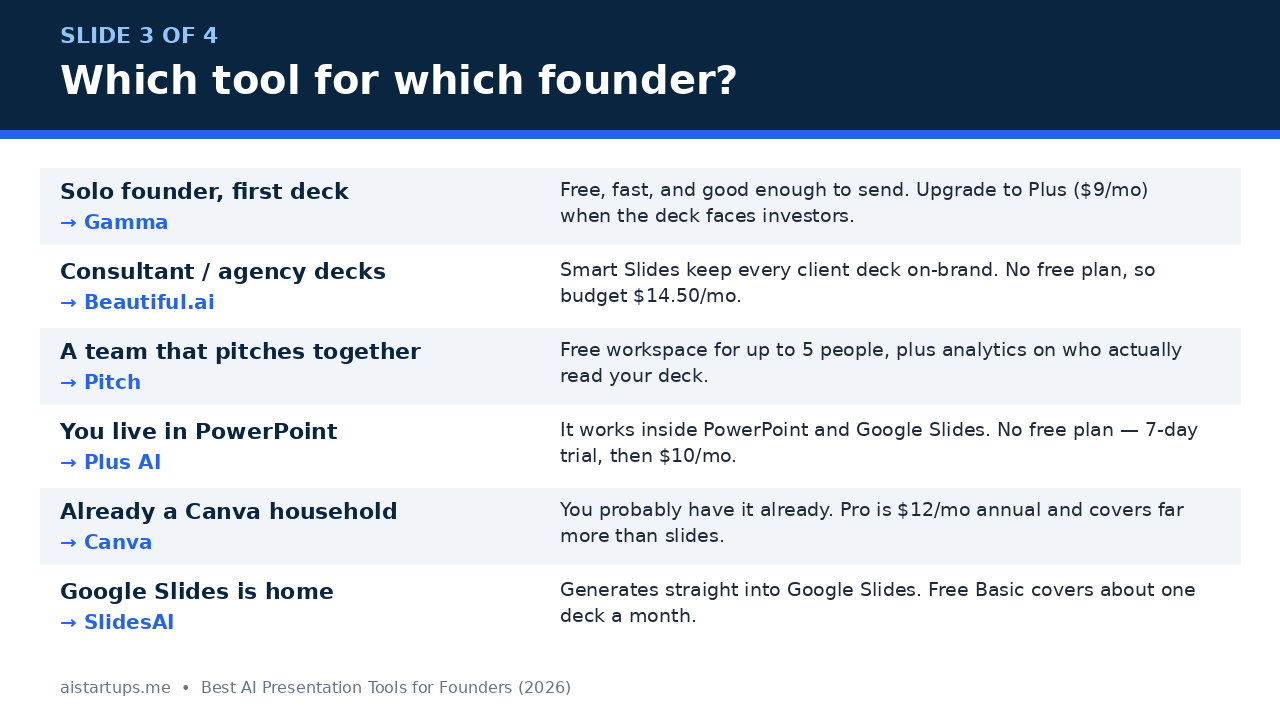
Stop comparing feature tables and answer one question: where does your deck have to live?
- If you’re starting from zero and need a deck this week: Gamma. Free to try, fastest to a real draft, and the $9-a-month Plus plan is the cheapest honest upgrade on this list.
- If the deck goes to clients and has to look expensive: Beautiful.ai. Budget $14.50 a month and accept there’s no free tier — the design quality is the point.
- If you’re a team of two to five pitching together: Pitch. The free workspace covers your whole founding team, and the read analytics are genuinely useful during a raise.
- If you already live in Canva: stay there. Pro at $12 a month covers your slides, your social posts, and your brand kit in one subscription.
- If Google Slides is your home: SlidesAI. It generates inside the app you already use, and the free plan covers about a deck a month.
- If the deck must end up in PowerPoint: Plus AI. It works inside PowerPoint itself, so nothing gets lost in export. Just remember the trial needs a card and auto-charges after 7 days.
- If you have a real brand and a sales team: Presentations.AI Pro. Brand Sync alone will save your team hours of fixing off-brand decks.
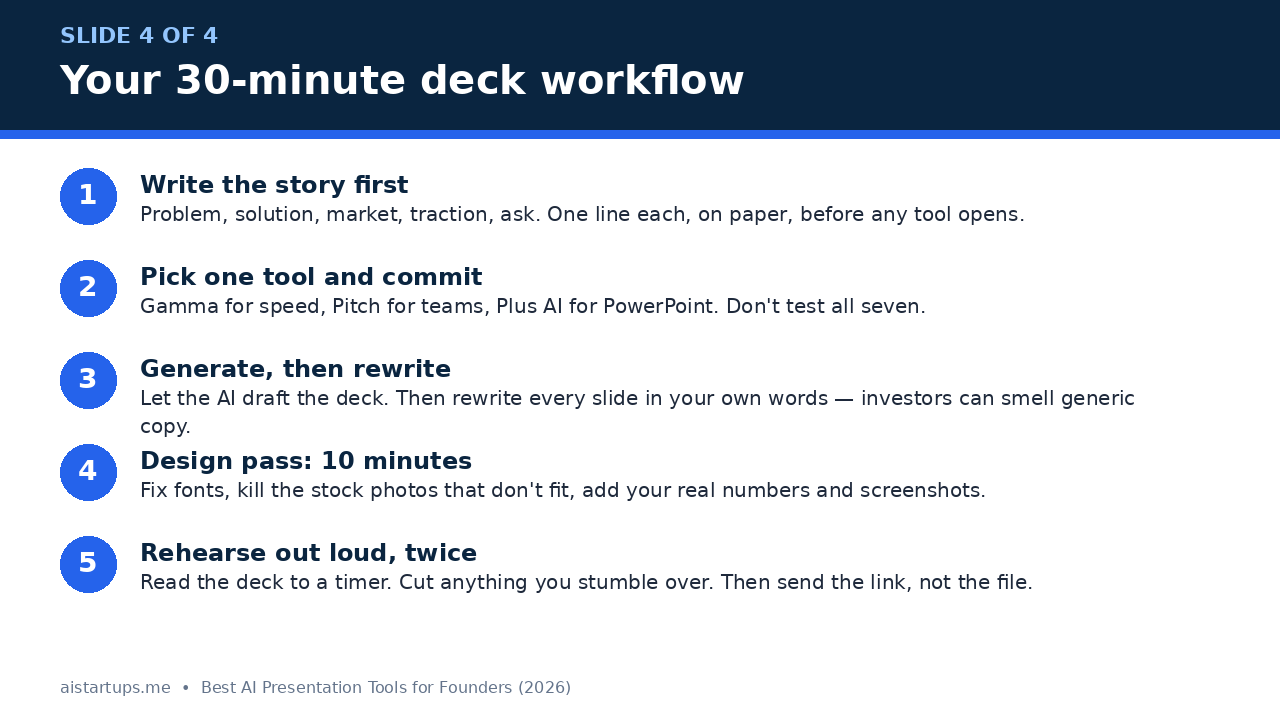
And one more piece of advice that has nothing to do with software: write the story before you open any tool. Problem, solution, market, traction, ask — one line each, on paper. If you can’t explain your startup in five lines, no AI is going to do it for you. The tool drafts the deck. You write the pitch. That’s the deal, and it’s a good one.
How to turn any of these into a deck in 30 minutes
Here’s the workflow I use, and it works with any tool on this list:
- Write the story first (10 minutes). Five lines on paper: problem, solution, market, traction, ask. If you’re stuck on structure, our 30-day launch sprint plan has a solid outline for sequencing the story.
- Pick one tool and commit (2 minutes). Gamma for speed, Pitch for teams, Plus AI for PowerPoint. Don’t test all seven — you’ll burn the afternoon comparing and build nothing.
- Generate, then rewrite (10 minutes). Let the AI draft the deck, then rewrite every slide in your own words. Investors can smell generic copy from the first slide, and “AI wrote this” is not the impression you want.
- Design pass (5 minutes). Fix the fonts, kill the stock photos that don’t fit, and add your real numbers, real screenshots, and real customer quotes. Real beats polished every single time.
- Rehearse out loud, twice (3 minutes). Read the deck to a timer. Cut anything you stumble over. Then send the link, not the file — and track who opens it if your tool allows it.
One more thing: a pitch deck is rarely the only thing you’re launching. If the deck is part of a bigger push — a new website, a waitlist, a rebrand — that’s the moment to get help rather than doing it all yourself. A good AISquadX team can ship the site and the deck assets together, which beats juggling five tools alone the week before launch. And if you’re building the launch around a waitlist, our guide on how to build a waitlist that converts pairs well with everything above — the deck gets the meeting, the waitlist captures the people who aren’t ready to invest yet.
Finally, don’t forget the rest of your toolkit. The deck is one artifact; the business around it needs the same treatment. If you’re weighing up AI website builders for the landing page your deck links to, or thinking about starting an AI agency off the back of the work, those guides will save you the same kind of research time this one just did.
Frequently asked questions
What is the best free AI presentation tool for founders?
Gamma has the strongest free plan for most founders: 400 starter credits, up to 10 slides per prompt, and full export to PDF, PPTX, and Google Slides with no credit card required. The catch is that the credits never refill, so treat it as a generous trial. Pitch’s free plan is the best alternative for teams, since it covers up to 5 members, and Canva Free is the only one here with a monthly-refilling AI allowance (20 uses a month).
Can AI presentation tools really make an investor-ready pitch deck?
They can make a strong first draft — structure, copy, and design — in under an hour. But no tool on this list produces an investor-ready deck on its own. You still need to rewrite the copy in your own voice, add your real numbers and traction, and rehearse it out loud. Think of the AI as a junior designer who works fast, not as a co-founder who understands your business.
Which AI presentation tool is best for PowerPoint users?
Plus AI, without much debate. It works as an add-in inside PowerPoint and Google Slides, so your deck stays native and your company’s template survives. Basic starts at $10 per user per month billed annually. SlidesAI is the runner-up if you work in Google Slides rather than PowerPoint, and Gamma’s PPTX export is a decent fallback if you just need the file at the end.
Do free plans let you export to PowerPoint?
Mostly, but not always — and this is the detail that catches people. Gamma, Pitch, and Canva all allow some form of export on their free plans (Pitch needs Plus for .pptx, though PDF is free). Presentations.AI’s free Starter plan blocks PowerPoint export entirely, so you can’t download your deck until you pay $240 a year for Pro. Always check the export rules before you build a deck in a tool.
How much should a founder budget for an AI presentation tool?
For most founders, $0 to $15 a month covers it. Start free on Gamma, Pitch, or Canva, and pay $9 to $15 a month only when a deck has to face an investor or a client — that’s Gamma Plus at $9, Pitch Plus at $10, or Canva Pro at $12 a month on annual billing. Beautiful.ai at $14.50 and Presentations.AI Pro at $20 a month are worth it only if you make decks weekly or need strict brand control.
The Bottom Line
Real talk: the tool matters less than the story. A brilliant founder with a mediocre deck still gets the meeting. A mediocre founder with a beautiful deck still doesn’t. But a good founder with a good deck gets the meeting faster, and that’s what these tools buy you — speed.
If I had to pick one for a founder starting today, it’s Gamma: free to try properly, $9 a month when it counts, and fast enough that you’ll actually finish the deck instead of polishing it forever. If you’re a team, take Pitch. If you live in PowerPoint, take Plus AI. And if you already pay for Canva, stop shopping and use what you have.
Pick one. Write the five lines. Build the deck. Then go have the conversations that actually raise the money — because no slide, however pretty, has ever closed a round on its own.