
Real talk: your startup doesn’t need a website. It needs a website that doesn’t embarrass you.
There’s a difference. And in 2026, there’s no excuse for the embarrassing kind — because AI website builders have gotten genuinely good. Not “good for a robot” good. Actually good. The kind of good where a founder with zero design skills can ship a site on Tuesday that looks like they hired an agency on Friday.
But here’s the thing nobody tells you: they’re not all good at the same things. Some generate gorgeous pages that load like they’re swimming through mud. Some are blazing fast but produce sites that all look like cousins. And the pricing? Don’t get me started. The number on the homepage is almost never the number on your credit card statement.
So I did the boring work. I ran ten AI website builders through the same three tests — how fast the sites actually are, how well they handle SEO basics, and whether the AI output is something you’d proudly show an investor. Prices verified, September 2026. Let’s get into it.
If you’re still at the idea stage, start with our guide on how to start an AI startup in 2026 — then come back here when you need the site to match the ambition.
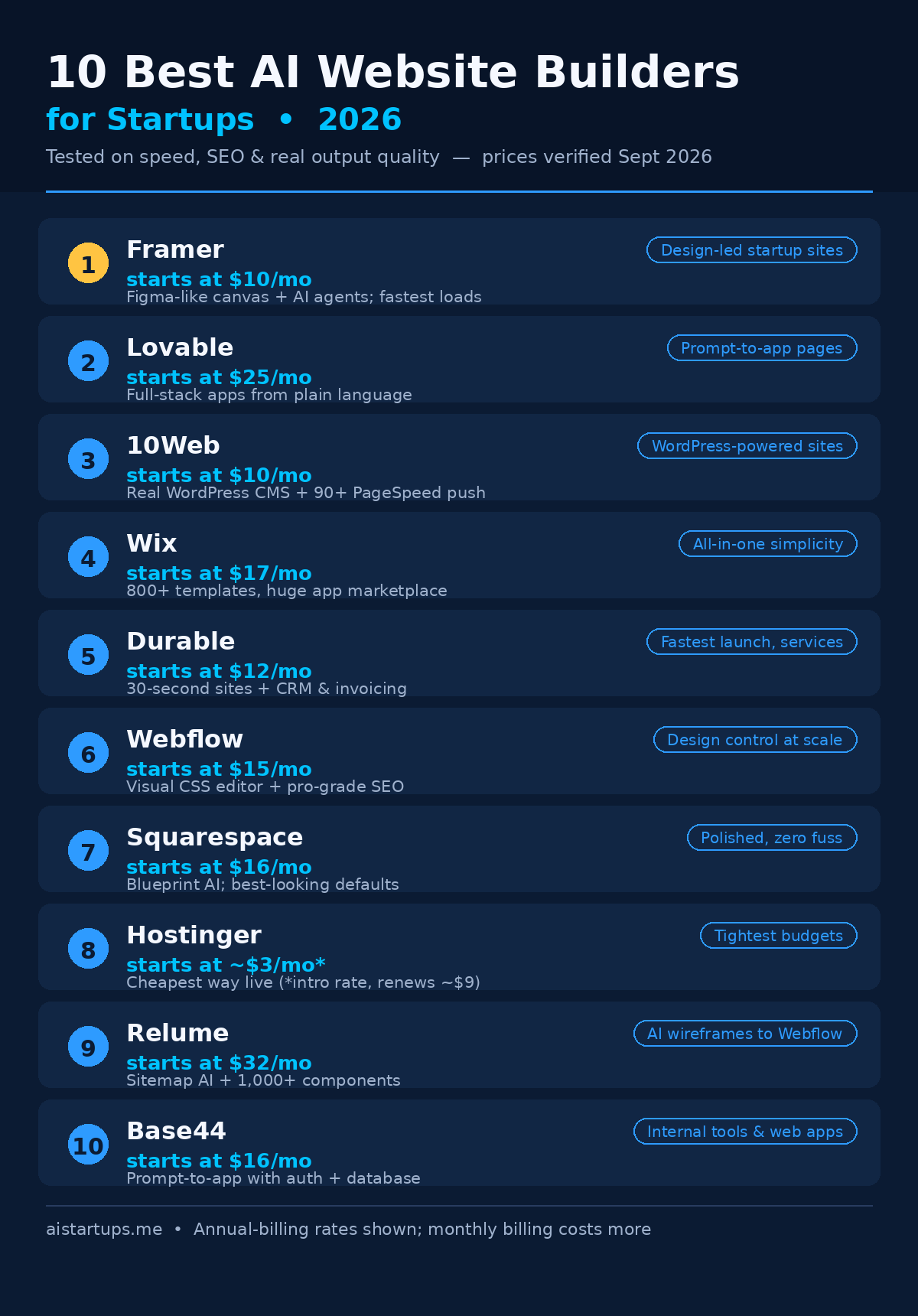
The 10 Best AI Website Builders: Quick Comparison
Short on time? Here’s the whole field in one table. (All prices are the cheapest annual-billing rate — more on that pricing trap later.)
| Builder | Starts at | Free plan? | Best for |
|---|---|---|---|
| Framer | $10/mo | Yes | Design-led startup sites |
| Lovable | $25/mo | Yes | Prompt-to-app landing pages |
| 10Web | $10/mo | 7-day trial | WordPress-powered sites |
| Wix | $17/mo | Yes | All-in-one simplicity |
| Durable | $12/mo | Yes | Fastest launch for services |
| Webflow | $15/mo | Yes | Design control at scale |
| Squarespace | $16/mo | 14-day trial | Polished templates, zero fuss |
| Hostinger | ~$3/mo | No | Tightest budgets |
| Relume | $32/mo | Yes | AI wireframes → Webflow/Figma |
| Base44 | $16/mo | Yes | Internal tools and web apps |
How I Tested Them
Three criteria. Same brief for every builder: a fictional AI startup landing page with a hero, features, pricing, and a blog section. Here’s what I scored:
1. Speed. How fast does the generated site actually load? I looked at the hosting stack, whether there’s a real performance story (CDN, image optimization, code quality) — and I docked points for builders that generate bloated pages full of unused scripts. Your visitors bounce after three seconds. Google notices too.
2. SEO. Can you edit meta titles and descriptions? Is there a sitemap? Redirects? Clean URLs? The AI can write your copy, but if the platform fights you on SEO basics, you’re building on sand.
3. Real output quality. This is the subjective one, and honestly the most important. Does the AI-generated site look like something a human designer touched? Or does it scream “template #4 with the colors changed”? I generated, I squinted, I judged.
One more thing I checked on every single one: the real price. Not the headline. The actual number you’d pay, including the annual-vs-monthly games and the renewal jumps. That part alone would justify this article.
The 10 Best AI Website Builders for Startups in 2026
1. Framer — Best Overall for Startups
If I had to pick one builder for a startup and delete the rest of this article, it’d be Framer. It’s the rare tool that makes both designers and non-designers happy — the canvas works like Figma, so anything you can imagine you can build, but the AI draft generator means you never start from a blank page.
The AI side got serious in 2026. Framer 3.0 added in-canvas AI agents that edit pages, components, CMS content, and SEO inside your live project — plus branching, so the agent works on a branch and you review the diff before publishing. You can even connect Claude Code or Cursor to your Framer project. That’s not a website builder anymore. That’s a workflow.
Pricing: Free plan for prototyping (no custom domain). Basic is $10/mo and Pro is $30/mo on annual billing, with monthly AI credits included (1,000 on Basic, 3,000 on Pro). Watch out for seat costs — extra editors are $20/mo each, which adds up fast on a team. Full pricing breakdown in this Framer 2026 review.
Speed: Excellent. Framer sites are statically generated and served on a global CDN. Some of the fastest-loading sites in this roundup.
SEO: Strong — meta controls, redirects, sitemaps, and clean URLs all included on paid plans.
The catch: No native ecommerce. If you’re selling products, you’ll bolt on Shopify or pick something else. And the learning curve is real — it’s easier than Webflow, but it’s not “answer three questions and done.”
2. Lovable — Best for Prompt-to-App Landing Pages
Lovable is what happens when you ask an AI to build you a website and it actually builds you a product. You describe what you want in plain language, and it generates a full-stack app — frontend, backend logic, database wiring — with GitHub sync and custom domains.
For startups, the use case is obvious: your marketing site and your MVP can live in the same place. I watched a non-technical founder ship a working AI tool’s landing page and its waitlist backend in an afternoon. That’s the dream this thing sells, and it mostly delivers.
Pricing: $25–$50/mo, credit-based AI usage, free plan available for tinkering. It’s pricier than the template crowd, but you’re buying generation power, not just hosting.
Speed: Good. Generated apps are modern React; you may need to optimize images yourself for a perfect score.
SEO: Decent but not its superpower — it’s built for apps first, content sites second. If organic search is your whole strategy, pair it with a proper CMS or look at 10Web.
The catch: Credit-based pricing means heavy iteration burns through your allowance. Prototype thoughtfully, not compulsively.
3. 10Web — Best for WordPress-Powered Startups
Here’s a sentence I never thought I’d write: the best AI website builder for WordPress users isn’t a WordPress plugin. It’s 10Web — a platform that generates a complete WordPress site from a prompt, then hands you the actual WordPress admin to run it.
Why does that matter? Because WordPress still powers an absurd share of the web, and its SEO plugin ecosystem (Rank Math, Yoast) is unmatched. 10Web gives you the AI speed plus the grown-up CMS. The generated sites run on Google Cloud hosting, and the company promises 90+ PageSpeed scores out of the box — a bold claim, but their automated optimization (image compression, caching, code cleanup) is genuinely aggressive.
Pricing: AI Starter $10/mo, AI Premium $15/mo, AI Ultimate $23/mo on annual billing, with a 7-day free trial that doesn’t ask for your credit card. AI credits are metered (100–300/mo depending on plan), so the AI co-pilot isn’t unlimited. Details in this 10Web pricing walkthrough.
Speed: The best story in this roundup on paper — managed Google Cloud hosting plus automated PageSpeed optimization.
SEO: Excellent. It’s WordPress. Full meta control, sitemaps, schema plugins, the works.
The catch: You’re in the WordPress universe, for better and worse — plugin updates and the occasional weirdness come with the territory. And if you’ve never touched WordPress, the admin can feel like a cockpit.
4. Wix — Best All-in-One Simplicity
Wix is the incumbent, and incumbents usually lose these comparisons. Wix doesn’t. Its AI website builder — answer a few questions in a chat interface, get a complete editable site — is the smoothest onboarding in the business, and the app marketplace (bookings, CRM, email marketing, live chat) means you rarely hit a wall where the platform just can’t do the thing.
For a startup that needs a site plus bookings plus a store plus email capture without duct-taping five tools together, Wix is still hard to beat. It’s the minivan of website builders. Not sexy. Fits everything.
Pricing: Free plan exists (with Wix ads). Light is $17/mo, Core $29/mo, Business around $36–39/mo, and Business Elite $159/mo — all annual billing. Core is the sweet spot for most startups. Heads up: you cannot switch templates after publishing without rebuilding, so choose carefully on day one.
Speed: Solid, not spectacular. Wix has improved a lot, but heavy app-marketplace add-ons can slow pages down. Keep your plugin count lean.
SEO: Good — meta controls, sitemaps, and a genuinely helpful SEO setup wizard. Fine for most startup needs.
The catch: Template lock-in (mentioned above — it’s the big one) and renewal pricing that creeps up. Set a calendar reminder before your plan auto-renews.
5. Durable — Fastest Launch for Service Businesses
Durable’s pitch is absurd: a complete website in 30 seconds. And the absurd part is that it works. You answer a few questions about your business, and thirty seconds later there’s a real site with copy, images, and a contact form.
But the website is only half the product. Durable bundles a CRM, invoicing, and AI marketing tools — it’s really a business-in-a-box that happens to include a website. If you’re selling services (consulting, agencies, local businesses), that bundle is worth more than any design award.
Pricing: $12–$80/mo with a free plan to start. The entry tier is one of the cheapest ways to get a real business site live.
Speed: Good. Simple generated sites with clean code tend to load fast — there’s just less to break.
SEO: Basic but functional. You’ll get the essentials; you won’t get the granular control that Webflow or WordPress offers.
The catch: The 30-second sites can feel generic until you customize them — budget an hour to make it yours. And it’s built for service businesses; don’t try to run a content empire or a store on it.
6. Webflow — Best Design Control at Scale
Webflow is the power tool. A visual CSS editor with a real CMS, real ecommerce add-ons, and SEO controls that don’t make you want to cry. When your startup’s site needs to be exactly right — custom interactions, CMS-driven content, localization — this is where the serious teams end up.
The AI story here is more “AI-assisted professional workflow” than “chatbot builds your site.” AI credits are included, and the platform keeps adding AI features, but Webflow’s pitch was never “zero effort.” It’s “total control without writing code.” In May 2026 they simplified the site plans, folding the old CMS and Business tiers into a single Premium plan — which actually made the pricing saner.
Pricing: Free Starter plan for learning. Basic is $15/mo annual ($25 if you pay monthly), Premium is $25/mo annual ($39 monthly). Ecommerce starts at $29/mo annual. See the full Webflow vs Squarespace pricing breakdown for the fine print.
Speed: Excellent — clean generated code on a fast CDN. Webflow sites routinely post great Core Web Vitals.
SEO: Among the best here. Full meta control, redirects, sitemaps, schema, localization SEO — the works.
The catch: The learning curve is the steepest on this list. Budget a weekend to get comfortable, or budget for someone who’s already comfortable. Also: watch the add-ons. Advanced AI and analytics features can stack hundreds onto the base price.
7. Squarespace — Best Polished Templates, Zero Fuss
Squarespace has one trick and it’s a great trick: everything looks good. The templates are consistently the most polished in the industry, and Blueprint AI — their guided AI setup — assembles a layout from your answers without any design decisions on your part.
For founders who break out in hives at the sight of a blank canvas, this is the answer. Pick your industry, answer the questions, get a site that looks like you hired someone. The built-in ecommerce and email marketing mean you can sell and follow up without leaving the platform.
Pricing: No free plan — 14-day trial only. Basic is $16/mo annual, Core $23/mo, scaling to $99/mo for Advanced commerce. Simple, but the annual-vs-monthly gap is real (Core jumps to $39/mo on monthly billing).
Speed: Good. Not the fastest here, but consistently solid — Squarespace controls the whole stack, which keeps things predictable.
SEO: Good enough for most startups. The essentials are all there; power users will miss Webflow-level control.
The catch: Customization has guardrails. If you want pixel-level control, you’ll fight the platform. And there’s no free tier, so you’re paying from day one (after the trial).
8. Hostinger — Best for the Tightest Budgets
Look, I’ll be honest: Hostinger isn’t the best website builder on this list. It’s the cheapest by a mile, and sometimes that’s the whole decision. At around $3/mo intro pricing, you get an AI site generator, a drag-and-drop editor, an AI writer for your copy, and even heatmaps to see where visitors click.
For a pre-revenue startup validating an idea — the “does anyone even want this” phase — spending $36 for a year of website beats spending $360. Pair it with our guide to what it actually costs to start an AI business and you’ll see why keeping the site cheap matters early.
Pricing: ~$2.99–$4/mo introductory, but — and this is important — it renews around $8.99/mo. The intro price requires a long prepay (up to 48 months). Always price out year two.
Speed: Decent. Hostinger’s infrastructure is respectable for the price; don’t expect Framer-level performance.
SEO: Basic. The essentials exist, but this isn’t the platform you pick for an SEO-led content strategy.
The catch: The renewal jump (that $3 becomes $9) and ecommerce is limited. It’s a starter home, not a forever home.
9. Relume — Best AI Wireframes for Design Teams
Relume is the odd one out — and I mean that as a compliment. It doesn’t host your finished site. It generates sitemaps and wireframes from AI, gives you 1,000+ components to work with, and exports cleanly to Figma or Webflow.
Why is it on a startup list? Because if you’re working with a designer (or you are the designer), Relume compresses the most painful part of web design — the blank-page wireframing phase — into minutes. Generate the structure with AI, refine in Figma, ship in Webflow. Agencies live on this workflow now.
Pricing: $32–$40/mo with a free plan to try. It’s the priciest entry point here, but you’re paying for a professional design tool, not hosting.
Speed: N/A in the traditional sense — your site’s speed depends on where you export to (Webflow, usually, which is fast).
SEO: Depends on your export target. The wireframes are SEO-aware in structure; the rest is up to your build platform.
The catch: It’s a step in a workflow, not a complete solution. Solo founders who just want a live site should pick something else on this list.
10. Base44 — Best for Internal Tools and Web Apps
Base44 started as the “prompt-to-app” builder for people who needed more than a website — internal dashboards, client portals, tools with real databases and user logins. Then Wix acquired it, which tells you how seriously the big players take this category.
For startups, the line between “website” and “web app” keeps blurring. Your marketing site needs a customer portal. Your landing page needs a working demo. Base44 handles the app side: describe it, get auto-generated auth, database tools, and GitHub integration.
Pricing: $16–$160/mo with a free plan. The range is wide because the use cases are wide — a simple internal tool sits at the bottom, a real customer-facing app at the top.
Speed: Good for apps; as a pure marketing site builder it’s overkill.
SEO: Not its focus. Apps behind logins don’t need SEO; marketing pages built here are fine but basic.
The catch: If you just need a marketing site, this is the wrong tool — it’s built for functional apps. Pick Framer or Wix instead and save the money.
The best AI website builder isn’t the one with the most features. It’s the one you’ll actually finish your site on. A “perfect” platform you abandon in week two loses to a “good enough” one that’s live by Friday — every single time.
The Price Traps Nobody Warns You About
Can we talk about website builder pricing for a second? Because it’s a masterclass in how not to be transparent.
Trap #1: The headline is the annual price. Nearly every builder advertises the annual-prepay rate as if it’s the monthly price. Webflow Basic is “$15/mo” — unless you pay monthly, when it’s $25. That’s a 67% jump hiding in the fine print. Squarespace Core: $29 annual, $39 monthly. Always check both numbers before you commit. This no-code builder comparison has the best side-by-side I’ve seen of advertised vs. actual monthly rates.
Trap #2: Intro pricing isn’t renewal pricing. Hostinger’s famous $2.99/mo becomes ~$8.99/mo when you renew — and the intro rate requires prepaying up to 48 months upfront. That’s $143 charged at once for the privilege of the headline number. Wix, Squarespace, all of them play some version of this game. Price out year two, not month one.
Trap #3: Seats and add-ons. Framer’s $30/mo Pro plan looks reasonable until your team needs three editor seats at $20/mo each. Webflow’s advanced AI and analytics add-ons can add hundreds. The base price is the cover charge; the seats are the drinks.
Trap #4: AI credits. Several builders meter AI usage — Framer includes 1,000–3,000 credits/mo, 10Web gives you 100–300. That’s plenty for normal use, but if you’re regenerating your hero section forty times (we’ve all been there), you’ll hit the ceiling. Credits reset monthly with no rollover, so use them or lose them.
Which One Should You Actually Pick?
Forget the feature matrices. Answer these honestly:
- You’re a design-obsessed founder and the site IS the brand? Framer. Nothing else on this list gives you that level of visual control with AI doing the grunt work.
- You need the site live this week and you sell services? Durable. Thirty seconds to a real site, invoicing included. Done is better than perfect.
- SEO and content are your growth strategy? 10Web. Real WordPress, real plugins, real rankings. (Our no-code AI MVP stack guide pairs well here — same philosophy, bigger toolbox.)
- You want one subscription that does everything? Wix. Site, store, bookings, email — the minivan.
- You’re technical-ish and want an app, not just pages? Lovable or Base44, depending on whether it’s customer-facing (Lovable) or internal (Base44).
- Budget is the entire conversation? Hostinger. Just remember the renewal.
- You’re working with a designer or agency? Relume for the wireframes, Webflow for the build.
And one more scenario worth naming: sometimes the right answer isn’t a builder at all. If you need custom functionality, complex integrations, or a site that has to do things no template anticipated, that’s when founders hire a team. AISquadX, our web development studio, builds exactly those kinds of custom sites and AI integrations — the stuff that lives beyond what any drag-and-drop tool can reach.
Frequently Asked Questions
What is the best AI website builder for startups in 2026?
Framer is the best overall pick for most startups — it combines AI generation with genuine design control, fast hosting, and solid SEO, starting at $10/mo. That said, the “best” depends on your situation: Durable for the fastest launch, 10Web for SEO-driven WordPress sites, and Hostinger for the tightest budgets.
Can AI website builders really make a professional site?
Yes — with a caveat. The AI gets you 80% of the way: layout, copy draft, images, structure. The last 20% is yours: rewriting the copy in your voice, swapping in real photos, tightening the design. Every site on this list that looked great had a human spend an hour or two on that final pass. Skip it and visitors can tell.
How much does an AI website builder cost per month?
Real-world pricing in 2026 runs from ~$3/mo (Hostinger’s intro rate) to $30/mo (Framer Pro, Webflow Premium) for typical startup needs. Most founders land in the $10–$25/mo range. But watch the traps: headline prices assume annual prepay, intro rates jump at renewal, and team seats add up fast.
Are AI-generated websites good for SEO?
The builder matters more than the AI. Platforms with real SEO controls — meta editing, sitemaps, redirects, clean URLs, schema support — rank fine. WordPress-based 10Web and Webflow are the strongest here. The AI-generated copy itself usually needs a human rewrite for quality and originality, which Google rewards regardless of who drafted it.
Should I use an AI website builder or hire a developer?
Use a builder if your site is primarily marketing: landing pages, blog, pricing, contact. Hire a developer (or a studio) when you need custom functionality, complex integrations, or performance requirements no template can meet. Many startups do both — builder for the marketing site now, custom build when revenue justifies it. If you’re weighing the bigger picture, our 21 profitable AI startup ideas breakdown covers which business models actually fund that second phase.
The Bottom Line
Here’s what I’d tell a founder friend over coffee: pick Framer if design matters, Durable if speed matters, 10Web if Google matters, and Hostinger if money matters. Don’t overthink it. The builder is not the business — the business is the business, and every week you spend agonizing over platforms is a week you’re not talking to customers.
The AI does the first draft. You do the part that matters: the positioning, the copy in your actual voice, the offer that makes someone pull out a credit card. No builder generates that. That’s still — thankfully — a human job.
Now go ship the thing.