
I once watched a founder run a beta for three months, collect 412 signups, fix 90 bugs, and launch to exactly four paying customers. Four. He’d done everything the beta playbooks told him to do — except the one thing that mattered. Nobody had ever asked a tester to pay.
Here’s the thing most founders get wrong about betas: they treat them like a QA phase with better PR. The beta becomes a bug hunt. Testers file tickets, you fix them, everyone feels productive, and then launch day arrives and the room is empty. Because a beta that only measures bugs can’t tell you whether anyone will pay. And paying is the only question that counts.
I’ve run betas both ways now — the polite-applause kind and the kind that ends with a Stripe dashboard that actually moves. This is the playbook for the second kind. It’s built for solo founders and tiny teams, not for companies with a beta program manager and a six-figure testing budget. And it works for AI products especially well, because AI products have a nasty habit of looking magical in a demo and falling apart the second a real user tries to do real work with them.
Why most betas end with applause and no sales
Think about what a typical beta rewards. Testers get free access to something new. You get bug reports and a warm feeling. Nobody on either side has any skin in the game, so the feedback you get is the polite kind — “looks great!”, “loved the onboarding!”, “can’t wait for launch!” — and then those same people vanish the day you ask for a credit card.
Real talk: a tester who never had to pay you anything has never actually validated your product. They’ve validated that free software is nice to have. That’s a very different thing, and confusing the two is how founders spend six months building for an audience that doesn’t exist.
The fix isn’t to charge everyone from day one. It’s to design the beta so that paying is the natural end of the story, not a surprise twist in the last chapter. Every decision below — who you invite, what you measure, how you close — points at that one outcome.
First, decide what your beta is actually measuring
Before you invite a single tester, write down the one question your beta has to answer. Not three questions. One. A beta with no question and no end date is just a slow launch with worse feedback — that’s the sharpest line I’ve read on this, from a solo-founder beta plan that gets the whole discipline right in one page.
For most AI products, the question is one of these three:
- Can a stranger reach the first result unaided? If your AI tool needs you in the room explaining it, it’s not ready — no matter how good the model is.
- Do they come back a second time? One session proves curiosity. A second session proves the product fits into their actual workflow.
- Will they pay, or switch from what they use today? This is the question that matters most, and it’s the one founders dodge by calling their beta “free while we learn.”
Pick the question that scares you most. Then write it down, along with the number that counts as a pass. Something like: “8 of 12 testers finish setup unaided, and at least 4 of them pay when we offer founding-member pricing.” That’s a beta with a spine. Without that sentence, you’ll keep extending the beta forever because there’s no moment where you can say it’s done.
This is the same discipline as validating your AI startup idea before you build — except now you’re validating with real usage instead of interviews. The beta doesn’t reopen the question of whether the idea is good. It confirms or kills it with behaviour, which is worth roughly a hundred opinion surveys.
The numbers: what “converts” actually looks like
Founders love asking “what’s a good conversion rate?” and the honest answer is: it depends on what you count. The benchmarks are all over the place because the models are all over the place — a card-upfront trial and a free plan don’t measure the same decision at all.
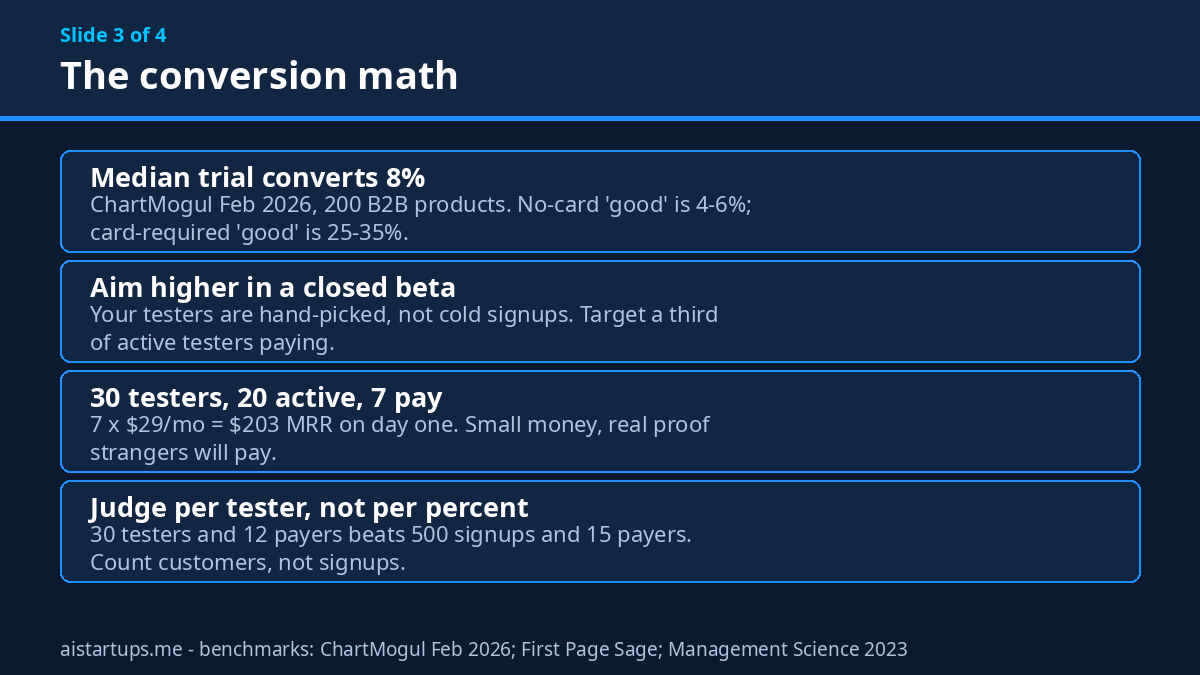
ChartMogul’s SaaS Conversion Report from February 2026 surveyed 200 B2B software products, and it’s the cleanest public dataset we have. The median free-to-paid rate across all of them is 8%. But the split is where it gets useful: a no-card trial counts as “good” at 4% to 6% and “great” at 10% to 15%, while a card-required trial counts as “good” at 25% to 35% and “great” at 50% to 60%. Same product, same market — wildly different numbers, because asking for a card filters out the tourists before they’re ever counted.
First Page Sage’s dataset of 86 SaaS companies tells a similar story from a different angle: opt-in trials (no card) convert at 18.2% on average, opt-out trials (card required) at 48.8%. And there’s a neat piece of arithmetic hiding in those numbers — the card requirement roughly triples the conversion rate but cuts trial volume by about two-thirds, so the two models produce roughly the same number of paying customers per hundred visitors. The card doesn’t create demand. It just sorts it earlier.
One more number worth knowing before you pick your beta length. A randomized study of 337,724 new users, published in Management Science in 2023, tested 7-day, 14-day, and 30-day trials head to head. The 7-day trial converted 15.36% of users, the 14-day 14.96%, and the 30-day 14.67%. Shorter trials didn’t hurt — urgency helped, slightly. Match your beta length to how long it takes a tester to reach their first real result, not to some round number that feels generous.
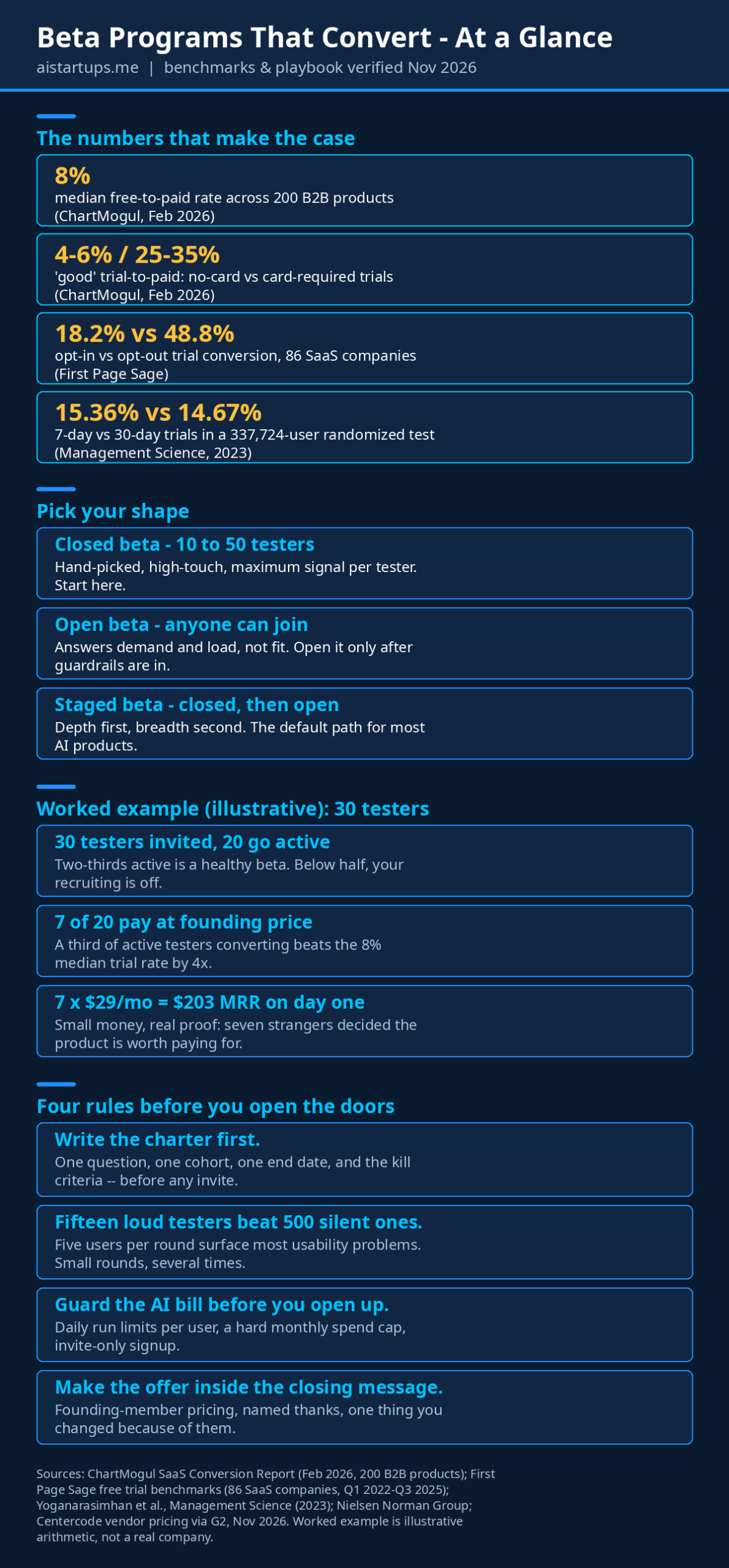
So what should you aim for? For a closed beta of real, hand-picked testers, I’d set the bar higher than the public trial benchmarks — these aren’t cold signups, they’re people you chose. Aim for at least a third of active testers converting to paid, and judge the beta on paying customers per tester, not on the conversion percentage alone. A beta with 30 testers and 12 paying customers beats a beta with 500 signups and 15 paying customers, every single time. For the full benchmark breakdown by trial model, the SaaS conversion benchmarks page lays out the opt-in, opt-out, and freemium rows side by side with the sources dated.
Closed, open, or staged? Pick the shape that fits
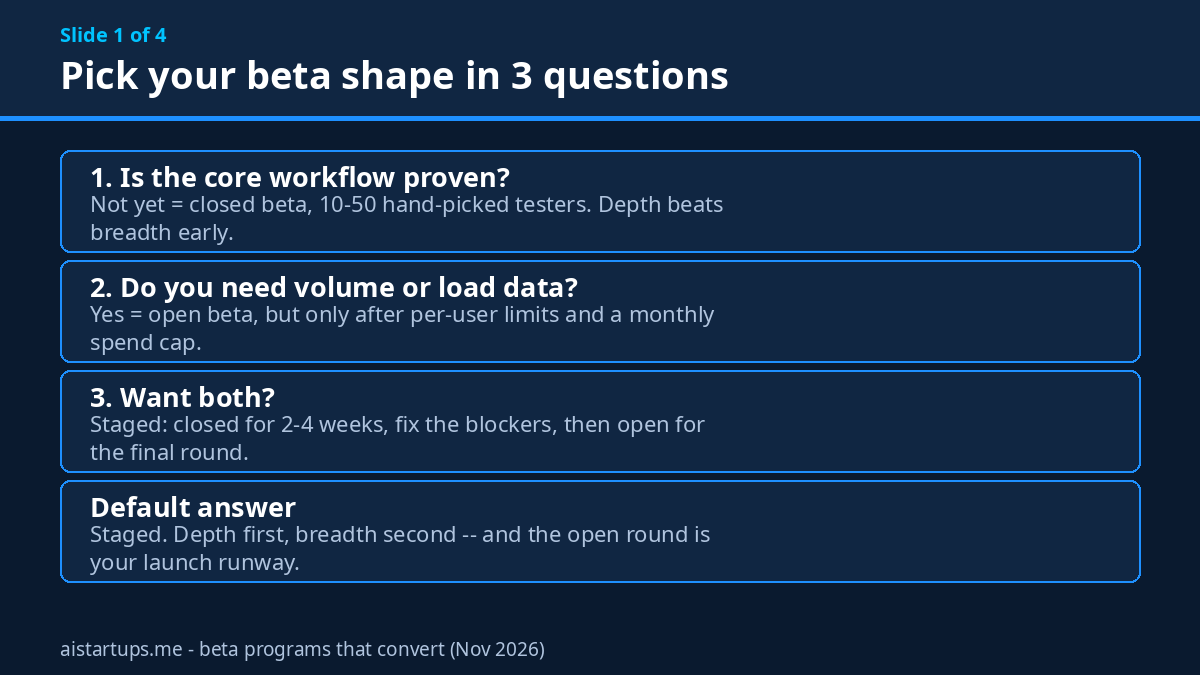
There are three shapes, and the right one depends on what your one question is.
Closed beta: 10 to 50 hand-picked testers
This is where almost every early-stage AI product should start. A dozen to a few dozen testers, invited by name, with a waitlist or an application behind the invite. You can talk to every single one of them. You can watch their sessions, message them the day they go quiet, and ask why they stopped using a feature while the memory is still fresh. The signal per tester is enormous — and signal per tester is the whole game when you’re small.
Fifteen people who open the product weekly and send you unprompted feedback are worth more than five hundred signups who never log in twice. I know that sounds like one of those sayings people repeat because it sounds wise. It’s not. It’s arithmetic: five hundred silent users give you zero decisions. Fifteen loud ones give you a roadmap.
Open beta: anyone can join
Open betas answer a different question — demand and load, not fit. They’re useful when the core workflow is already proven and you need to find out whether the product survives real volume, real data, and real edge cases. For an AI product, an open beta without spend guardrails is you handing strangers your API bill, so don’t open the doors until per-user limits and a monthly spend cap are in place. That’s not paranoia; it’s the first lesson every solo founder learns the expensive way.
Staged beta: closed first, then open
The most common path in practice, and the one I’d recommend by default. Start closed for two to four weeks, fix the things that block the core workflow, then open up for a final round before launch. You get the depth first and the breadth second, and the open round doubles as your launch runway — the people who join late see a product that’s already been through the wringer.
The six-week beta playbook
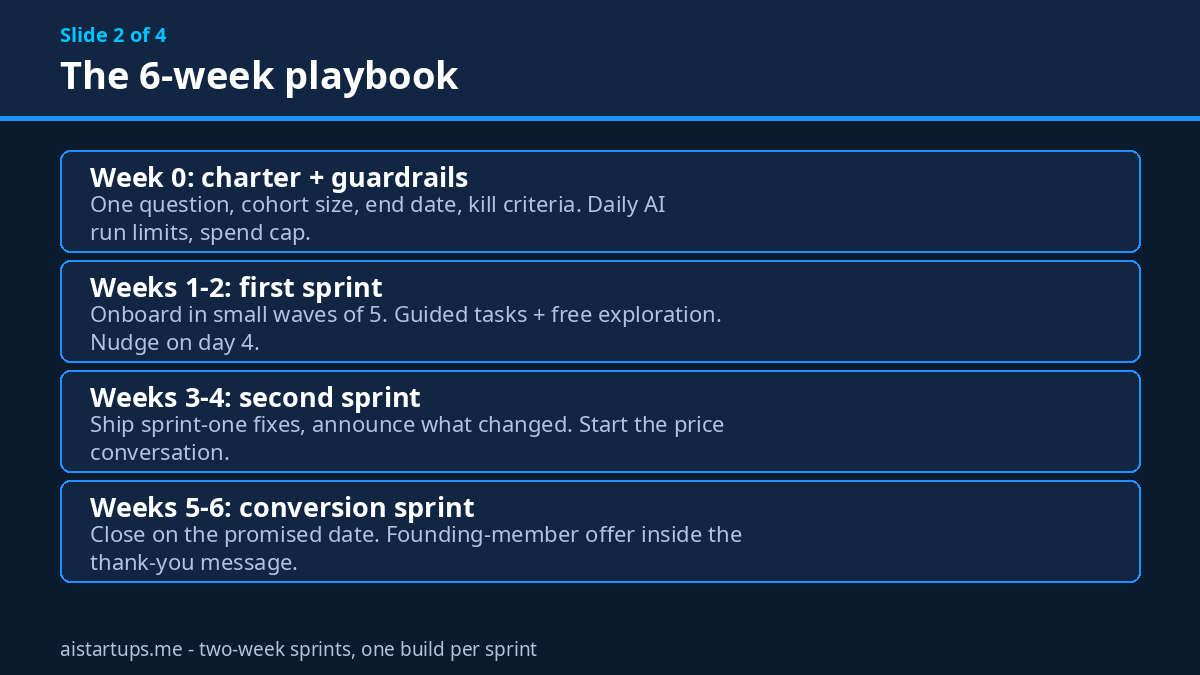
Most closed or staged betas run four to eight weeks — long enough to see a week-four retention curve, short enough that testers don’t drift away. Here’s the shape I’d run for an AI product, in two-week sprints with a build per sprint.
Week 0: the charter and the guardrails
Write a one-page beta charter before anyone gets an invite: the question you’re testing, the cohort size and profile, the duration, and the kill criteria — the numbers that would tell you to pull back rather than push forward. Then lock the doors. If your product calls a paid AI model on every click, set a daily run limit per user, a hard monthly spend cap across all users, and invite-only signup with throwaway-email blocking. Log every AI call’s cost to your own database so you know what each tester actually costs you.
You also need instrumentation before the first tester arrives. If you can’t measure activation — the moment a tester reaches their first real result — don’t start. A beta you can’t measure is just a group chat with extra steps.
Weeks 1–2: the first sprint
Onboard in small waves, not all at once. Five testers in week one, five more in week two. Give each wave a short brief: what to test, how long it takes, where to report, and when the beta ends. Mix in 5 to 10 realistic guided tasks plus free exploration — the tasks tell you whether the core workflow works, the free exploration tells you what people actually try to do with it.
Check in on a fixed cadence: a welcome on day one, a nudge around day four, a direct reply or a short call around the midpoint. And watch for silence. A tester who goes quiet in week one is giving you the most important feedback you’ll get — they just aren’t using words.
Weeks 3–4: the second sprint
Ship the fixes from sprint one, announce what changed, and ask testers to re-check the things that were broken. This is where the beta earns its keep: testers who see their feedback turn into a shipped fix in days become your loudest advocates. Testers who report the same bug twice and hear nothing become your loudest critics. Same bug, same week — completely different outcome.
This is also the week to start the money conversation. Not the hard sell — a casual question, in a call or a survey: “When this goes paid, what would you expect it to cost?” The answers are almost always wrong as prices, but they’re gold as positioning. If everyone says $5 and you planned $49, you’ve learned something important about who you’re actually serving.
Weeks 5–6: the conversion sprint
Now the beta becomes a launch. Announce the end date — the one you promised in the invitation — and make the conversion offer in the same message where you thank them. Name one thing you changed because of their feedback. Thank them by name. Then offer founding-member pricing: a locked-in discount, ideally for life, in exchange for paying now.
Close on the date you promised. A beta that drifts past its end date teaches testers that your deadlines are fiction, and that’s a bad lesson to teach the people you’re about to ask for money.
Finding testers who actually show up
The hardest part of a beta isn’t the product. It’s the people. And the channels that reliably produce qualified testers are boring ones: your waitlist, your existing users, the communities where your target buyers already complain about the problem in their own words, and direct outreach to people who’ve posted about the pain recently.
A few things that work better than a “we’re in beta!” tweet:
- Recruit from pain, not from hype. Someone who posted yesterday about wasting two hours on the exact task your product automates is worth ten people who clicked a launch announcement.
- Ask for a small commitment upfront. A 15-minute onboarding call, or a short application form. The people who won’t spend 15 minutes won’t spend $29 a month either — the filter saves you both time.
- Mix power users with typical users. Power users will stress-test the edges; typical users will show you where the mainstream gets stuck. A cohort of only power users builds a product for people who don’t need you.
- Cap the cohort and say so. “We’re taking 25 testers” creates urgency and, more importantly, makes the beta feel like something worth showing up for. Scarcity isn’t a trick here — it’s honest, because you genuinely can’t support 500 people well.
Your beta needs a home on the web, too — a simple landing page that explains what the product does, who it’s for, and what testers get in return. If you don’t have the dev bandwidth to build that page and the product at the same time, that’s exactly the kind of thing a small studio handles well; our web agency AISquadX builds launch pages and AI product integrations for founders in exactly this spot. Either way, don’t let the landing page eat a week. A clear page that ships Tuesday beats a beautiful page that ships next month.
And if you’re starting from zero audience, the waitlist is the engine that feeds the beta. The playbook I wrote on how to build a waitlist that converts covers the mechanics — the short version is that a waitlist with a reason to join today beats a waitlist with a prettier design.
The feedback loop that won’t drown you
Here’s the failure mode nobody warns you about: the beta works, testers love it, and suddenly you’re getting forty messages a day across email, Discord, Twitter DMs, and a form you forgot you made. You spend your days triaging feedback instead of building, and by week three you’re answering messages about messages.
Fix it before it starts. One channel for feedback — not email, not five channels, one. A structured form for bug reports: what they tried, what happened, what they expected, severity. A separate, lighter channel for feature ideas and “wouldn’t it be cool if” messages, because those need a different kind of attention. Review submissions daily, triage them the same day, and reply to every single one, even if the reply is “thanks, we’ve logged it and it’s third on the list.” Silence is the fastest way to turn an engaged tester into a ghost.
Then separate two kinds of feedback that founders constantly confuse. Feedback on execution — bugs, friction, confusing copy — is gold, act on it fast. Feedback on strategy — feature requests, scope changes, “you should pivot to X” — is a suggestion, not an instruction. Log it, look for patterns across testers, and only act when the same request shows up from people who actually use the product weekly.
For the conversations themselves, borrow from customer discovery. The 25 customer discovery questions that actually work apply almost word for word to beta interviews — especially the rule to ask about what people did, not what they think. “What did you do when the summary was wrong?” beats “Did you like the summaries?” every time.
The conversion moment: turning testers into paying customers
Alright, the part the whole article is about. You’ve got 30 testers, maybe 20 of them active, and the beta ends Friday. How do you turn them into revenue without feeling like a timeshare salesman?
Make the offer before the beta ends, not after
The most common mistake is treating launch and conversion as two separate events: beta ends, product launches, and then, someday, you email testers a discount code. By then the moment is gone. The conversion offer belongs inside the closing message, while the product is still warm in their hands and the fixes you shipped for them are still fresh.
Founding-member pricing works — if it’s real
Offer testers a locked-in rate for being early: 30% to 50% off for life, or a year at the early price, in exchange for paying now. The key word is locked in. A discount that expires next month is a coupon. A price that never goes up is a reward for trusting you early, and it costs you almost nothing — your earliest customers are also your cheapest to keep.
Some founders go further and run a paid beta: testers pay a small amount — $10 or $20 a month — from the start. Paid beta users are more engaged, and their behaviour predicts real customer behaviour far better than free users’ does. Even a discounted rate qualifies commitment. If your product has real per-use AI costs, a paid beta also stops the free tier from eating your margin while you learn.
Let the price conversation happen in the beta
Don’t guess your price in a spreadsheet and reveal it at launch. Test it during the beta, the same way you’d test anything else — the guide to running a pricing experiment for your AI product walks through the methods, from a four-question Van Westendorp survey to a live A/B test. A beta cohort is the perfect audience for the survey version: small, engaged, and already using the product, so their answers mean something.
Give them a reason to pay today
Urgency isn’t a dark pattern when it’s honest. The beta ends Friday. The founding price ends Friday. The data they created during the beta stays available if they convert, and gets archived if they don’t. None of that is manipulation — it’s the truth about what happens next, stated plainly. What kills conversion is the opposite: a beta that never ends, a price that never appears, and a founder who never asks.
Tools worth paying for (and the free ones that do the job)
You don’t need a dedicated beta platform to run a good beta. A form, a spreadsheet, and a group chat got thousands of products through their first beta. But once you’re past about 30 testers, the admin starts eating your week, and that’s when a tool earns its keep.
Centercode is the dedicated option most teams land on — it handles recruiting, screening, feedback collection, and reporting in one place. Its free Beta tier covers up to 50 testers with one project, which is honestly enough for most first betas, and the paid Delta tier starts at $39 a month. The higher Pro and Team tiers jump to custom pricing (G2 lists Pro at $2,000 a month), so check the current Centercode pricing before you assume the paid tier fits a solo budget.
Cheaper paths that work fine: a Typeform or Google Form for applications, a Notion board or a simple spreadsheet for triage, a private Slack or Discord channel for the conversation, and a changelog tool — or just a weekly email — for the “here’s what we shipped because of you” update. The tool matters far less than the cadence. A founder who replies daily in a Discord channel beats a founder with a $2,000 platform who replies weekly.
For the full playbooks behind this section, two are worth bookmarking: the SaaS beta testing playbook for the five-phase structure with sprint cadence, and the demand-measurement beta playbook for the reframe that a beta measures demand, not bugs. The solo-founder version is the one-page beta plan — three decisions, a fixed cadence, and a close date.
Seven mistakes that quietly kill betas
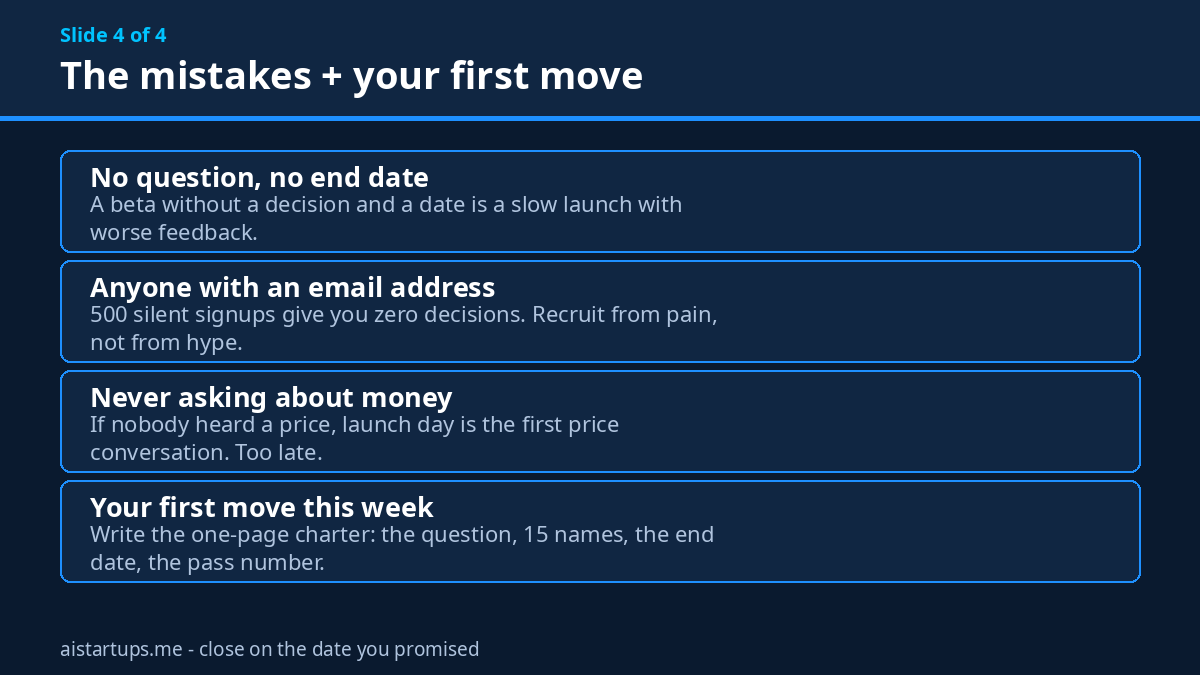
- No question, no end date. A beta without a decision to make and a date to make it is a slow launch with worse feedback. Write the charter first.
- Recruiting anyone with an email address. Five hundred signups who never log in twice give you zero decisions. Fifteen people who feel the problem give you a roadmap.
- Opening the doors before the guardrails exist. For AI products, an open beta without per-user limits and a spend cap is a credit card handed to strangers.
- Treating all feedback as equal. A bug report from a weekly user and a feature request from someone who logged in once are not the same signal. Weight by usage.
- Going silent after the first week. The fastest way to lose a tester is to stop replying. Daily triage, even a one-line reply, keeps the loop alive.
- Never asking about money. If nobody in the beta has heard a price, launch day is the first time anyone has to decide whether the product is worth paying for. That’s a terrible time for the first price conversation.
- Letting the beta drift past its end date. Every extension teaches testers that your deadlines don’t matter. Close on the date you promised, then launch.
“A beta is not a softer launch. It is an experiment with a closing date.” The founders who internalize that one sentence run betas that end with paying customers. Everyone else runs a free trial with a nicer name.
Frequently asked questions
How many beta testers do I need?
For a closed beta, 10 to 50 hand-picked testers is the sweet spot — enough to cover your core use cases and see the same issue reported more than once, small enough that you can talk to every one of them. The Nielsen Norman Group’s long-running finding is that about five users per round surface most of the usability problems worth fixing, so run several small rounds rather than one giant one. Fifteen engaged testers beat 500 silent signups.
How long should a beta program run?
Four to eight weeks for most SaaS products, in two-week sprints with one build per sprint. Shorter betas miss edge cases; longer ones lose testers to drift and delay your launch. The trial-length research backs up keeping things tight: in a randomized test of 337,724 users, a 7-day trial converted 15.36%, a 14-day 14.96%, and a 30-day 14.67% — shorter didn’t hurt. Announce the end date in the invitation and close on it.
Should beta testers pay?
It depends on your costs and your question. A free beta is fine when you’re measuring whether strangers can reach the first result. A paid beta — even $10 a month — is better when you need to know whether people will actually pay, because paid users’ behaviour predicts real customers far better than free users’ does. If your AI product has real per-use costs, a paid or limited free beta also protects your margin while you learn.
What’s a good beta-to-paid conversion rate?
Judge it against the trial benchmarks, then aim higher because your testers are hand-picked, not cold signups. ChartMogul’s February 2026 survey of 200 B2B products puts the median free-to-paid rate at 8%, with 4% to 6% “good” and 10% to 15% “great” for no-card trials, and 25% to 35% “good” and 50% to 60% “great” for card-required trials. For a closed beta, I’d aim for at least a third of active testers converting — and measure paying customers per tester, not the percentage alone.
Closed beta or open beta — which one first?
Closed first, almost always. A closed beta gives you depth: you can talk to every tester, watch their sessions, and fix the core workflow before anyone else sees it. Open it up for a final round once the serious defects are gone and you need volume, load testing, and launch momentum. The staged path — closed, then open — is the default for a reason.
The Bottom Line
A beta is the cheapest honest test a founder can run. Not because it’s free — it isn’t, not when you count your time and your AI bill — but because it answers the only question that matters with real behaviour instead of opinions. Will strangers use this, come back, and pay?
So write the charter. Pick the one question. Invite fifteen people who actually feel the problem, give them a build that does the core job end to end, reply to them every single day, and close on the date you promised with a founding-member offer in the same message as the thank-you. That’s the whole playbook, really. Everything else is logistics.
And if your last beta ended with applause and four paying customers — well, now you know why. The next one doesn’t have to.