
Here’s the thing about most AI startup advice: it’s written for people with a team of twelve and a seed round. “Hire an ML engineer.” “Build a platform.” Cool. Very helpful for the rest of us.
I don’t have a team of twelve. Maybe you don’t either. And honestly? That’s fine. Some of the most profitable software businesses on the internet were built by one person with a laptop and a stubborn streak. Carrd — the one-page website builder — passed $1M in annual revenue as essentially a solo operation, charging as little as $19 a year. Bannerbear, an API that auto-generates social images, documented its climb past roughly $40K in monthly recurring revenue with one founder doing the building and the marketing. Plausible Analytics crossed $1M ARR fully bootstrapped, as the founders describe in their own write-up, by doing one narrow job well.
The pattern is always the same: one painful problem, one specific buyer, recurring revenue, no venture capital. That’s micro-SaaS. And AI just made the economics dramatically better for solo builders, because the “intelligence” part of your product is now an API call that costs fractions of a cent.
This isn’t another list of profitable AI startup ideas copied from somewhere else. Every idea below is original — twelve products I haven’t seen anyone build well yet, each scoped so one person can ship the MVP in weeks, not quarters. Let’s get into it.
Why micro-SaaS Is a Solo Founder’s Game
A micro-SaaS product is just software that does one thing, charges a subscription for it, and stays small on purpose. No platform ambitions. No “we’ll add that later.” One job, done well, for people who’ll pay monthly to never think about it again.
Why does this fit solo founders so well? Three reasons.
First, support stays survivable. When your product does one thing, the support queue is one kind of question. You can answer every ticket yourself over morning coffee. The moment you build a platform, you need a support team — and you’re not a solo founder anymore.
Second, marketing is targetable. “AI writing tool” is a marketing nightmare. “AI lease-renewal letters for landlords with 5-50 units” is a Facebook group, three subreddits, and a list of property-management podcasts. You can literally name where your buyers hang out. That’s the whole game.
Third, AI collapsed the build cost. Five years ago, “software that writes good first drafts” meant hiring NLP engineers. Now it’s a prompt, a form, and a PDF export. The moat was never the model — it’s knowing the buyer’s workflow better than anyone else does.
The 12 Ideas
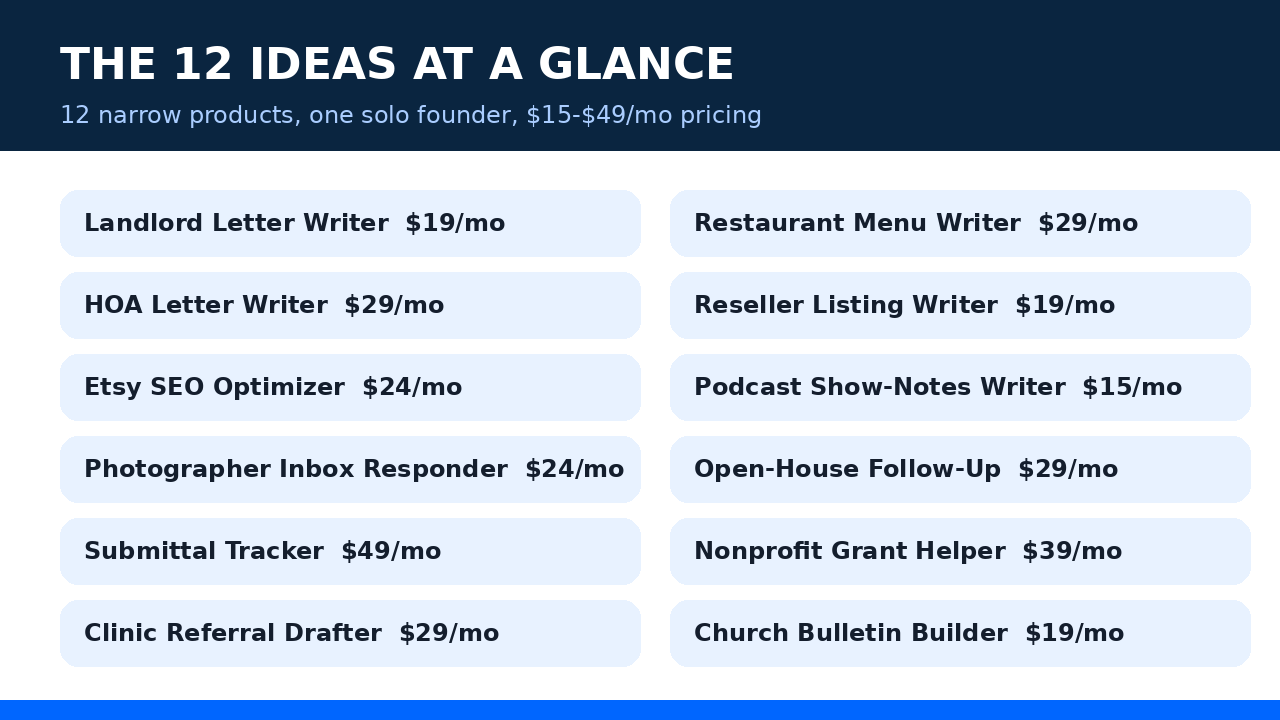
Each one follows the same format: the problem, the buyer, the price, the MVP, why it works, and the cost math. Steal whichever one makes your heart beat faster.
1. Landlord Letter Writer — $19/mo
The problem: Small landlords (5–50 units) dread paperwork. Lease renewals, rent-increase notices, late-payment reminders, move-out instructions — every one of them is a blank page and a legal worry.
The buyer: Independent landlords and tiny property-management outfits. They live in Facebook groups like “Landlords” and BiggerPockets forums, and they happily pay for anything that makes them look professional.
The MVP: A form (tenant name, unit, dates, rent amount) → AI drafts the letter in proper business tone → export as PDF or print-ready doc. Ten letter templates cover 90% of needs. Add a “save tenant profiles” feature and you’re done for v1.
Why it works: The job repeats constantly — leases renew every year like clockwork. Landlords are price-insensitive about looking professional because one bad notice can cost them thousands. And the templates barely change, so your support load is near zero.
Cost math: A letter draft is maybe 800 output tokens. On a cheap model like GPT-6 Luna ($0.50 per million output tokens), 500 letters a month costs you about twenty cents. Twenty cents.
2. Restaurant Menu Writer — $29/mo
The problem: Independent restaurants rewrite menus seasonally, launch specials weekly, and post daily on Instagram. The chef can cook; the chef cannot write “pan-seared duck breast with cherry gastrique” fifty different ways without losing their mind.
The buyer: Indie restaurants, cafes, and food trucks. One decision-maker (the owner), allergic to agencies, already paying for a dozen small subscriptions.
The MVP: Enter the dish, three ingredients, cuisine style, and vibe (casual / fine dining / playful). Get five description options, pick one, done. Add a “specials of the week” generator and an Instagram caption add-on.
Why it works: Menus change constantly, so usage is recurring by nature. Restaurant owners talk to other restaurant owners — one happy customer in a city’s food scene can turn into ten. And $29 is invisible next to a food-cost spreadsheet.
Cost math: Five descriptions at ~120 tokens each is trivial. Even 2,000 generations a month stays under a dollar in model costs. Your real cost is the landing page.
3. HOA Letter Writer — $29/mo
The problem: Self-managed HOAs are run by volunteers — usually one exhausted treasurer or board president — who must send violation notices, meeting announcements, dues reminders, and newsletters. They hate writing them, they send them late, and the tone is always wrong (either too angry or too apologetic).
The buyer: HOA board members of small communities (20–200 homes). Find them in HOA forums, Nextdoor, and property-law attorney referral networks.
The MVP: Pick a letter type, fill in the facts (address, violation, date), get a firm-but-fair draft that follows standard HOA conventions. Include a homeowner address book and a send-log so the board has records.
Why it works: HOAs send these letters forever — dues are quarterly, violations are constant. Boards turn over, but the HOA itself doesn’t churn. One subscription can survive three different treasurers.
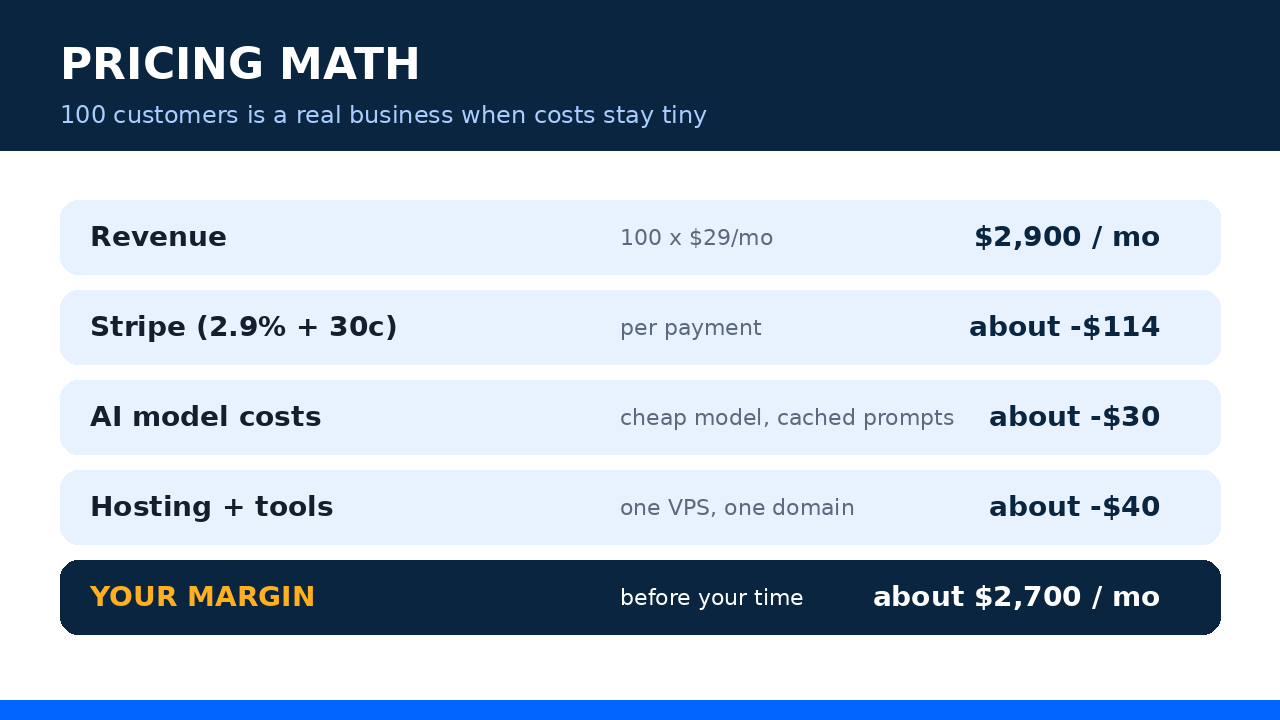
Cost math: Same story as the landlord tool — letters are short, models are cheap. At $29/mo per HOA, even 30 customers is a $870 MRR business that costs you lunch money to run.
4. Reseller Listing Writer — $19/mo
The problem: eBay, Depop, and Poshmark resellers photograph 30 items and then face the real work: titles, descriptions, measurements, condition notes, keywords. Listing is the bottleneck between inventory and money.
The buyer: Part-time and full-time resellers, vintage sellers, sneaker flippers. They congregate on YouTube, TikTok, and reseller Discords, and they measure everything in “dollars per hour.”
The MVP: Upload a photo → AI identifies the item, suggests a title packed with search terms, writes the description, and fills in item specifics. One-click copy into the marketplace of choice.
Why it works: This is a speed tool with a direct money link: faster listings = more listings = more sales. Resellers will happily pay $19 if it saves them an hour a week — that’s the easiest ROI pitch in this entire list.
Cost math: Image understanding costs a bit more than text, so route photo analysis through the cheapest capable vision model and keep text generation on the budget tier. Even at 1,000 listings a month, you’re looking at a few dollars in API spend.
5. Etsy SEO Optimizer — $24/mo
The problem: Etsy gives sellers 13 tags and 140 title characters, and most shops waste both. “Cute necklace” doesn’t rank. “Dainty gold initial necklace, personalized bridesmaid gift” does. Sellers know SEO matters and have no idea how to do it.
The buyer: Etsy shop owners doing $500–$10K/month who’ve plateaued. They’re in Etsy seller Facebook groups by the hundreds of thousands, actively asking for this exact help.
The MVP: Paste your current title and tags (or your Etsy shop URL) → get rewritten titles, all 13 tags, and a plain-English explanation of what changed and why. Track which listings got optimized.
Why it works: Search traffic compounds — an optimized listing keeps earning for months, which makes the subscription feel like a bargain. Sellers also run multiple shops, so one happy customer often becomes two or three subscriptions.
Cost math: Short text in, short text out. Thousands of optimizations per month still cost less than your coffee budget. The expensive part is building trust, not the tokens.
6. Podcast Show-Notes Writer — $15/mo
The problem: Indie podcasters finish recording and then face the unglamorous part: show notes, chapter markers, episode titles, and social posts. Most skip it, which tanks their discoverability — or they pay a VA $50 an episode.
The buyer: Independent podcasters publishing weekly. They hang out on Twitter/X, in podcasting subreddits, and at the bottom of every “how to grow your podcast” comment section.
The MVP: Upload the audio or paste a transcript → get structured show notes, timestamped chapters, three title options, and a week’s worth of promo posts. Export to the formats podcast hosts expect.
Why it works: Weekly publishing means weekly usage — the habit loop is built in. And podcasters are natural promoters: put a small “made with” credit option in the export and your users market you.
Cost math: Transcription is the priciest step, but per-minute rates are fractions of a cent. A weekly podcaster generating notes for 4 episodes costs you well under a dollar a month. Price it at $15 and the margin is silly.
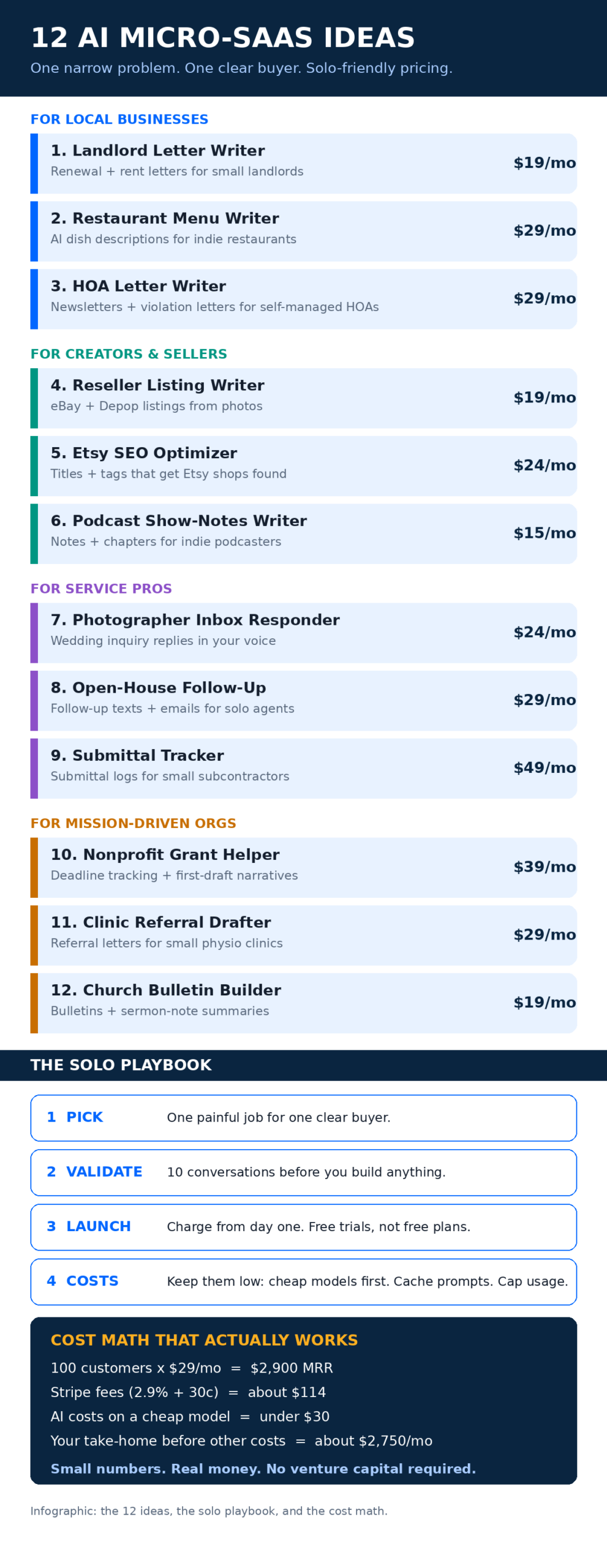
7. Photographer Inbox Responder — $24/mo
The problem: Wedding photographers get inquiry emails that all sound the same (“What’s your pricing? Are you available June 14th?”), and answering each one personally takes 20 minutes they don’t have during wedding season. Slow replies lose bookings — everyone in the industry knows the fastest responder usually wins.
The buyer: Wedding and portrait photographers, mostly solo operators themselves. They live on Instagram, in Facebook groups like “Wedding Photographers,” and they obsess over client experience.
The MVP: Connect the inbox (or forward inquiries) → AI drafts replies in the photographer’s own voice, trained on their past emails and pricing guide. The photographer approves with one tap before anything sends. Nothing goes out unreviewed — that’s the trust feature.
Why it works: One saved booking pays for years of subscription, which makes $24/mo a laughably easy yes. Photographers also have brutal seasonality — they’d rather pay a small subscription than hire seasonal help.
Cost math: Email drafts are short. Even a busy photographer generating 200 drafts a month costs you pennies in tokens. The approval-queue UX is the product here, not the model.
8. Open-House Follow-Up — $29/mo
The problem: Solo real-estate agents collect 15–40 visitor sign-ins at an open house and then… do nothing with them. They’re driving to the next showing. Within 48 hours the lead is cold, and the listing goes to whoever followed up first.
The buyer: Solo agents and two-person teams. They buy tools constantly (CRMs, lead gen, postcards), which tells you two things: they spend money, and they’re desperate for anything that actually gets used.
The MVP: Snap a photo of the sign-in sheet (or import the CSV) → AI writes personalized follow-up texts and emails referencing the actual property → agent approves and sends. Automatic reminders for the 3-day and 7-day follow-ups most agents never do.
Why it works: Real estate is a follow-up business wearing a property costume. Agents know this and feel guilty about it — you’re selling relief from guilt plus actual commissions. And agents switch brokerages, not tools; they take your subscription with them.
Cost math: A follow-up sequence per lead is maybe 300 tokens. An agent working 10 open houses a month with 25 visitors each is 250 leads — still under a dollar in model costs. Compliance note: keep it to emails and opt-in texts, and say so on your landing page.
9. Submittal Tracker — $49/mo
The problem: Small subcontractors (HVAC, electrical, plumbing) must submit product data, shop drawings, and samples for approval before they can install anything — and general contractors reject incomplete submittals constantly. Tracking all of this happens in spreadsheets, group texts, and memory. Things slip. Jobs stall.
The buyer: Owners of subcontracting firms with 5–50 employees. Not tech people. They find tools through trade associations, supply-house counters, and other subs.
The MVP: A dead-simple log: project → required submittals → status → AI-generated cover letters and transmittals for each submission. Email reminders before due dates. That’s it. Resist every urge to build “project management.”
Why it works: This is the highest price on the list because the pain is the sharpest — a rejected submittal can delay a $200K job. Blue-collar buyers are loyal; once your tool is in their workflow, they don’t shop around. They also pay annually without blinking if you offer a discount.
Cost math: Mostly a CRUD app with occasional AI-generated cover letters. Your model bill is negligible; your moat is speaking their language on the landing page.
10. Nonprofit Grant Helper — $39/mo
The problem: Small nonprofits live and die by grants, and grant applications are brutal: narrative sections, budgets, logic models, deadlines scattered across funders. The executive director writes them at midnight because there’s no grant writer on staff.
The buyer: Nonprofits with 2–15 staff. They cluster in nonprofit Facebook groups, Chronicle of Philanthropy comment sections, and local foundation workshops.
The MVP: A deadline calendar for target grants → AI first-drafts the narrative sections from the org’s mission, programs, and past applications → a checklist that maps each draft to the funder’s actual requirements. The human always edits — the product sells “first draft in an hour, not a week.”
Why it works: One won grant can be $25K+. At $39/mo, the ROI story writes itself. Grant cycles repeat yearly, so the calendar feature keeps them subscribed between applications.
Cost math: Grant narratives are longer outputs — maybe 2,000–3,000 tokens per draft. On a mid-tier model that’s still under ten cents per draft. Ten drafts a month per org is a dollar. Fine.
11. Clinic Referral Drafter — $29/mo
The problem: Small physio, chiro, and dental clinics write referral letters constantly — to specialists, to GPs, to insurers. The clinician dictates notes; someone (usually an admin) turns them into a proper letter. It’s slow, inconsistent, and it piles up.
The buyer: Practice managers at clinics with 3–20 staff. Reach them through practice-management forums, dental/physio associations, and the software consultants who already sell to them.
The MVP: Paste or dictate rough clinical notes → get a clean, professional referral letter in the clinic’s template → admin reviews and sends. Keep a sent-letter log for records. Explicitly: the tool drafts, the clinician signs off. That framing matters for trust.
Why it works: Clinics are process machines — once your letter template is “the way we do referrals,” you’re embedded. Healthcare-adjacent buyers also churn less than almost anyone. Just be careful with data: keep everything client-side or in their region, and say so loudly.
Cost math: Short, structured documents. Pennies per letter. The $29 price is anchored against the admin hours it replaces, not against your costs.
12. Church Bulletin Builder — $19/mo
The problem: Small churches (under 300 members) produce a weekly bulletin with announcements, scripture readings, hymn numbers, and volunteer schedules. It’s assembled by a volunteer secretary on a Thursday night in Microsoft Word, and it looks like it.
The buyer: Church administrators and pastors of small congregations. They’re in church-admin Facebook groups and denominational networks, and they share tool recommendations like family recipes.
The MVP: Fill in this week’s details (or paste last week’s bulletin) → get a clean, printable bulletin layout plus a summarized version of the sermon notes for the church website or email list. One-click print and PDF.
Why it works: Weekly cadence means weekly usage and near-zero churn — bulletins don’t stop. Churches are also the most referral-dense buyers on this list: pastors talk to pastors constantly. Land three churches in one town and you’ll get the fourth for free.
Cost math: One bulletin a week is four generations a month. Your costs round to zero. At $19/mo, this is pure margin after the first month.
Real Talk: What Most Micro-SaaS Actually Earn
Okay, deep breath. Time for the part most idea lists skip.
Most micro-SaaS products do not make $40K a month. The honest industry picture — SaaSRanger’s roundup of real founder-reported numbers puts it well — is that many micro-SaaS products earn a few hundred to a few thousand dollars a month. That’s the normal outcome, not the failure outcome. A product doing $800 MRR with $60 in costs is a profitable business that pays a real bill. It just isn’t a headline.
The products you hear about — Carrd past $1M ARR, Bannerbear’s climb, Plausible’s bootstrapped $1M ARR — are the survivors of a brutal filter. Behind each one is usually a founder who shipped two or three things that went nowhere first. Bannerbear itself was one idea in a long run of experiments before it caught.
The realistic goal for your first micro-SaaS isn’t life-changing money. It’s proof: ten strangers paying you monthly for something you built. Everything after that is optimization.
So calibrate. If your landlord letter tool hits $500 MRR in six months, that’s not a disappointment — that’s validation with revenue attached, and it’s more than most side projects ever see. The founders who win at this game are the ones who treat product #1 as tuition and keep shipping.
And here’s the part nobody warns you about: the first $1K MRR is the hardest $1K you’ll ever earn. The second $1K comes from doing what already worked, twice. Momentum is real in micro-SaaS because every customer teaches you the exact words the next customer needs to hear.
How to Pick One (and Validate It This Weekend)
Twelve ideas is eleven too many. Here’s how to choose.
Pick the buyer you can already reach. This is the whole secret. If you’re a photographer, build #7. If your cousin runs a restaurant, build #2. If you grew up around churches, build #12. Distribution beats product quality at this stage — the best idea you can’t reach is worse than an okay idea you can put in front of fifty buyers tomorrow. This is the same principle behind the best AI agent business ideas for solo founders: start where you already have trust.
Pick the pain you’ve felt. Second-best filter. If you’ve watched someone struggle with the exact workflow, you already understand the edge cases no competitor’s landing page mentions. That lived detail is your moat.
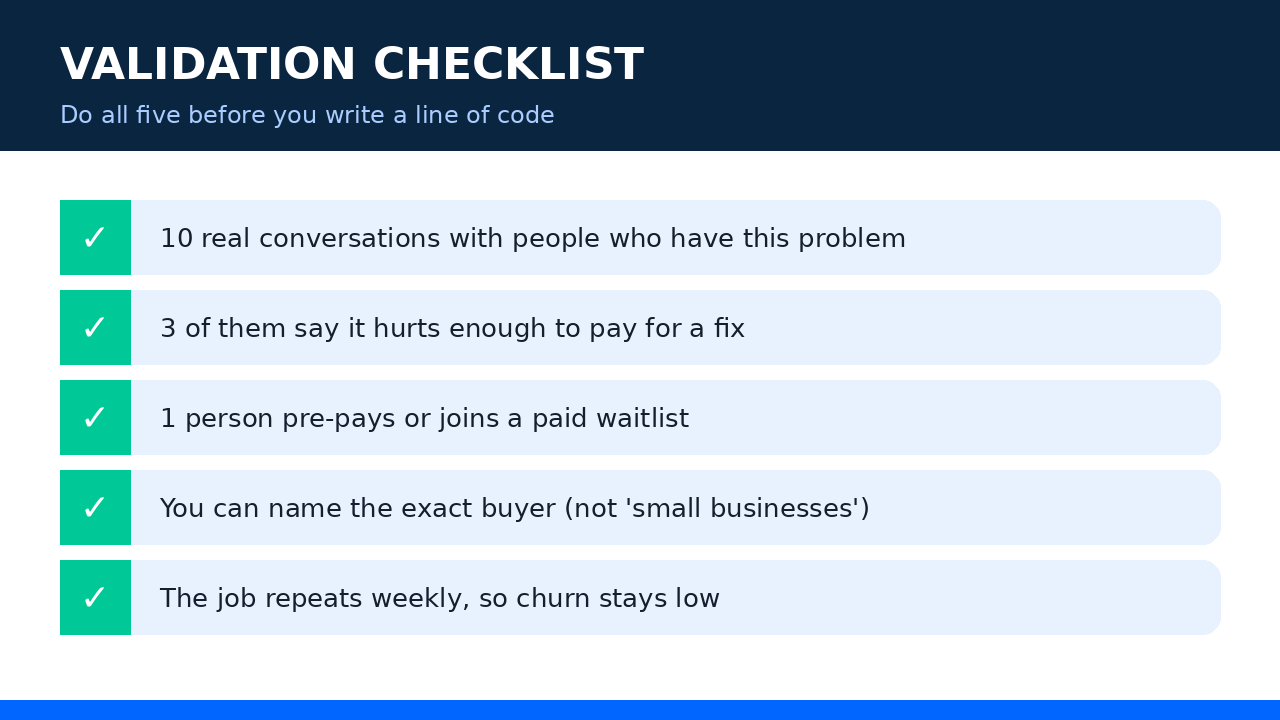
Then validate before you build. Not with a survey — with conversations. Here’s the weekend version:
- Find 10 people with the problem. Facebook groups, subreddits, DMs, your phone contacts. Ten conversations, 15 minutes each.
- Ask about the last time it hurt. Not “would you use this” — “tell me about the last time you dealt with this.” Specific stories beat hypothetical enthusiasm every time.
- Ask for money, not opinions. “I’m building this, it’s $19/mo, want in at a founding-member rate?” Three yeses is a signal. Zero yeses is also a signal — a cheaper one.
- Build the concierge version first. Before writing code, do the job manually for two users with the AI in a chat window. If they keep coming back, you have a product. If they don’t, you saved yourself a month.
Now, about the building part. If you can code, an MVP for any of these ideas is genuinely a few weekends of work — a form, an API call, a PDF export, and Stripe’s standard pricing (2.9% + 30¢ per successful card payment) handling the money. If you’re not technical, building an AI MVP with no-code tools is a realistic path for most of these — they’re forms and documents, not rocket science. And if you’d rather have someone experienced handle the build while you focus on buyers, a small product studio like AISquadX can take an idea like these from spec to launched product without the agency overhead.
One more thing: charge from day one. Not “free until we have users.” A free trial with a card on file, or a founding-member lifetime deal — anything that forces the value question early. Free users give you feedback that feels good and means nothing. Paying users tell you the truth.
Keeping Your AI Costs Down
This is where solo founders quietly win or lose. The model bill is the one cost that scales with success, so design it right from the start.
Start with the cheapest model that does the job. Drafting a lease-renewal letter doesn’t need the flagship model. To put numbers on it: OpenAI’s GPT-6.1 Sol lists at $2 per million input tokens and $10 per million output tokens, while the smaller GPT-6 Luna sits at $0.10 and $0.50 — current GPT-6 pricing makes Luna roughly twenty times cheaper for everyday drafting work. Use the cheap model by default; escalate to the expensive one only when quality actually demands it. Most of these twelve ideas never need to escalate.
Cache your prompts. Your system prompt — the instructions, the tone guide, the template — is identical on every call. Cached input is priced at a fraction of fresh input (often around 10%), so a well-structured prompt can cut your input bill dramatically. This is free money; take it.
Cap usage per plan. Every tier gets a monthly generation limit, with overage priced to protect your margin. This isn’t stinginess — it’s survival. One power user generating 10,000 drafts on your $19 plan will eat the profit of twenty normal customers. Set the cap, show the meter, sell the upgrade.
Batch what you can. Anything that doesn’t need an instant answer — weekly digests, bulk listing rewrites, monthly reports — can run on batch APIs at roughly half price. Your users won’t notice a 6-hour delay on a Sunday-night job, but your margins will.
If you want the full playbook on this, I wrote a deeper guide on how to cut your AI API bill without hurting quality — the caching and routing tricks alone are worth implementing on day one.
Run the numbers for your own idea before you launch: monthly generations × tokens per generation × model price. If the result is more than 10% of your expected revenue, your pricing or your model choice is wrong. Fix it now, not at 500 customers.
Frequently Asked Questions
How much does it cost to launch an AI micro-SaaS?
Less than you think. A domain ($12/year), basic hosting or a serverless setup ($5–$40/month), and API credits (often under $20/month until you have real traction). Most solo founders launch their first micro-SaaS for under $200 all-in. The expensive input is your time — budget 4–8 weekends for the MVP.
Do I need to know how to code?
It helps, but it’s not required for most of these ideas. They’re fundamentally forms-in, documents-out — the exact shape no-code tools handle well. What you can’t skip is understanding the buyer’s workflow deeply enough to design the right form. That’s a research skill, not a coding skill.
How long until a micro-SaaS makes money?
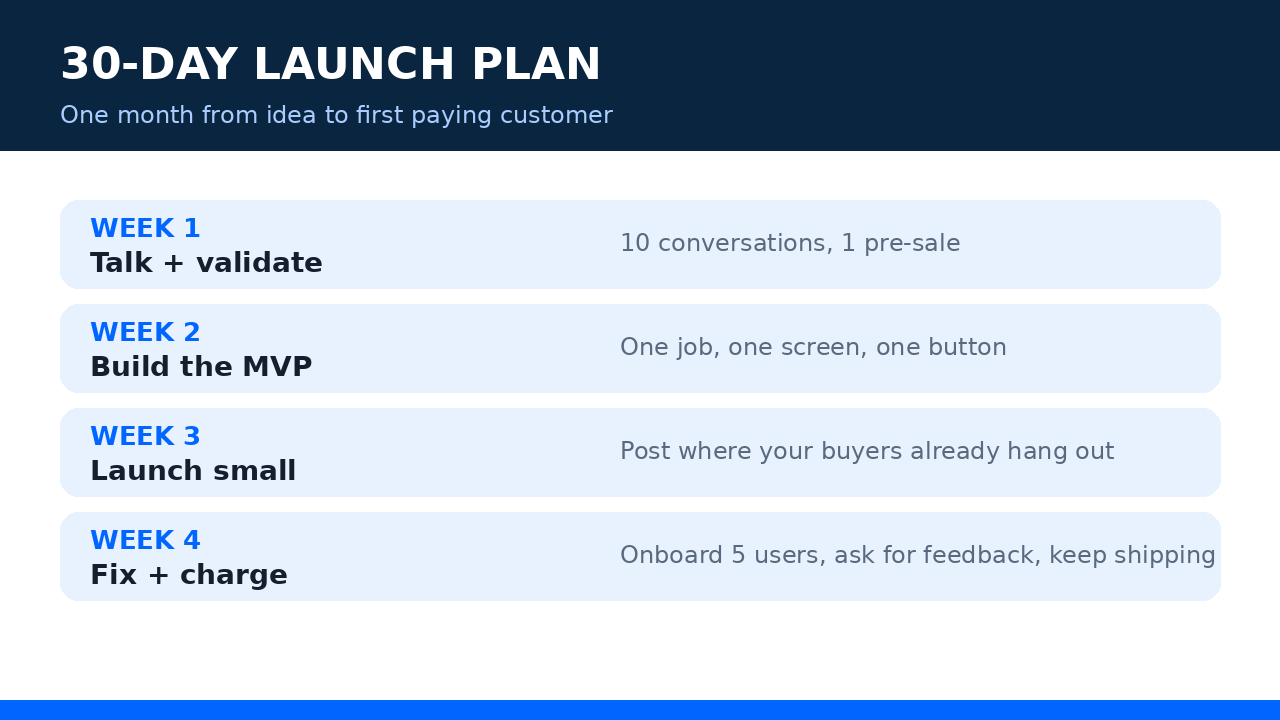
If you validate first and charge from day one, the first paying customer often arrives within 30 days of launch. Meaningful revenue — say $1K MRR — typically takes 6–18 months of consistent marketing and iteration. Anyone promising faster is selling a course, not a business.
What if a big company copies my idea?
They won’t, and that’s the beauty of narrowness. Big companies don’t build $19/mo church bulletin tools — the market is too small to matter to them and too specific for their generalist products to serve well. Your moat is caring about 200 churches more than a billion-dollar company ever will.
Should I build multiple micro-SaaS products at once?
No. Build one. Market it for at least six months. The graveyard of indie hackers is full of people running five products at $100 MRR each instead of one at $2K. Portfolio comes later — Bannerbear’s founder ran a whole series of experiments, but he focused on one at a time until something caught.
The Bottom Line
You don’t need a team, a raise, or permission. You need one painful problem, one reachable buyer, and the discipline to ship something small and charge for it.
Pick the idea on this list that you could put in front of ten buyers this week. Not the cleverest one — the one where you already know where the buyers are. Validate it over the weekend. Build the smallest version that works. Charge from day one.
Most of these won’t make you rich. One of them might pay your rent. And the founder who ships all twelve — well, they won’t be a solo founder reading idea lists anymore. They’ll be too busy answering support tickets over morning coffee. The good kind of busy.