Look, I’ve spent the last two years watching AI image tools promise to kill the photoshoot. Most of them didn’t. They made pretty pictures that looked nothing like your actual product, and you still ended up hiring a photographer.
So when OpenAI dropped GPT-Image-2.6 on November 4, 2026, my first reaction was a shrug. Another model. Another changelog. But then I read what it actually does — animated GIFs from a single prompt, reference images you save once and reuse forever, SVG output, and two models tuned for different jobs — and honestly? This one feels different. Not because the pictures are prettier (they are, a bit), but because it finally solves the boring problems that made AI images useless for real businesses: consistency, cost control, and formats you can actually ship.
Here’s the thing, though. There’s a catch in the pricing that most of the launch-day coverage skipped. I’ll get to it — it’s the part that changes the math. But first, let’s walk through what’s new, what I’d actually use as a founder, and where the honest limits are.
What actually launched on November 4
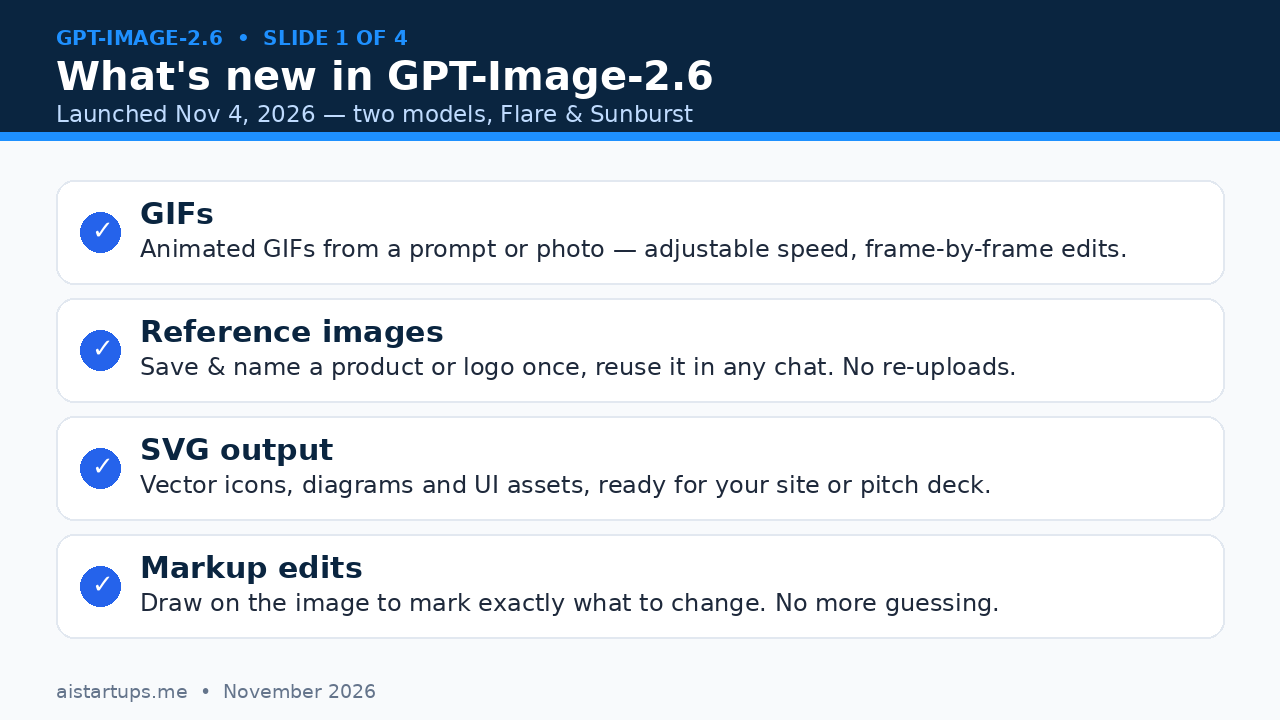
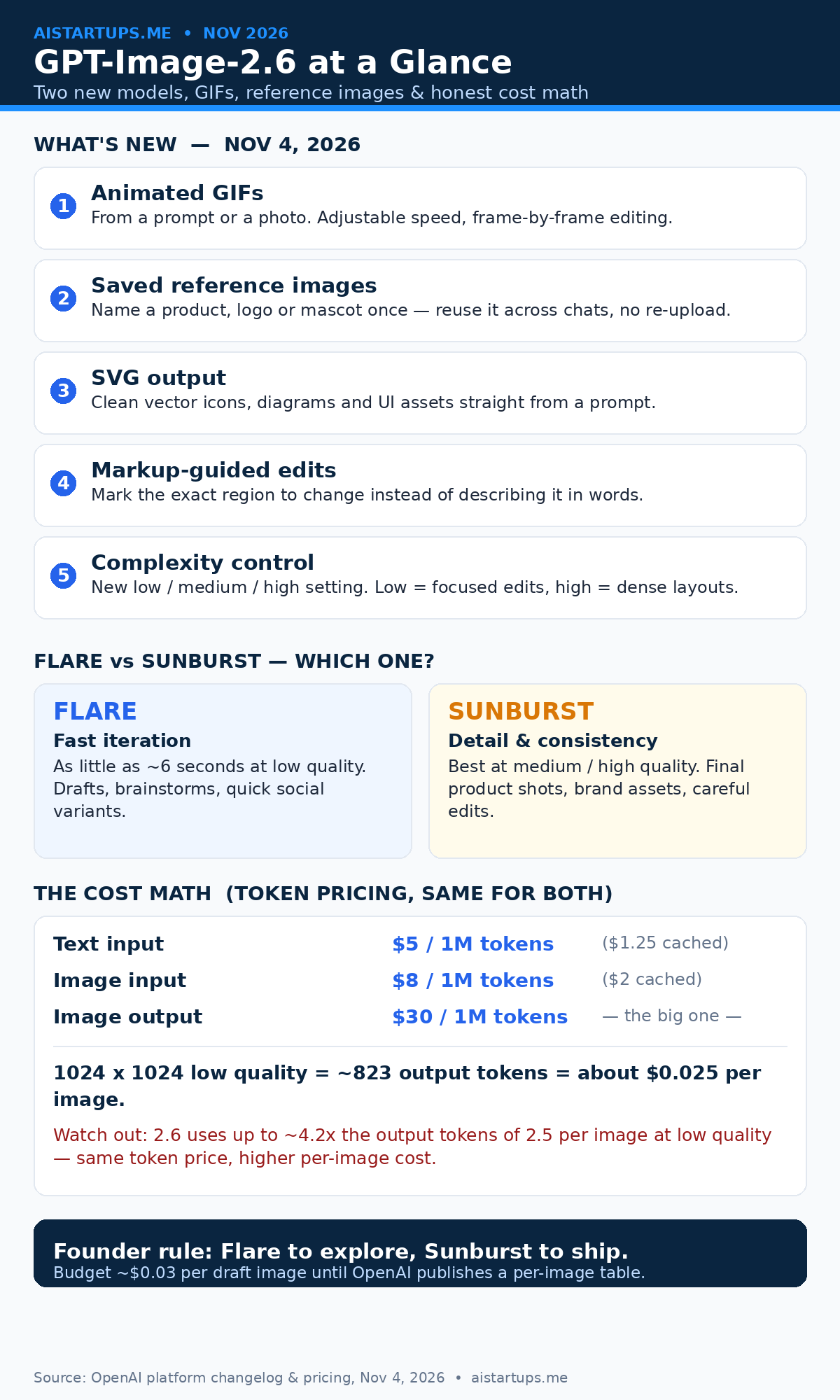
OpenAI shipped two models under one name: GPT-Image-2.6 Flare and GPT-Image-2.6 Sunburst. They’re both in ChatGPT and in the API, and they replace GPT-Image-2.5, which only launched on September 8, 2026 — barely two months earlier. That pace tells you something about how fast this space is moving. The official OpenAI changelog lists the release plainly: both models for image generation and editing, with adjustable complexity, SVG generation, animated GIF generation, and markup-guided editing.
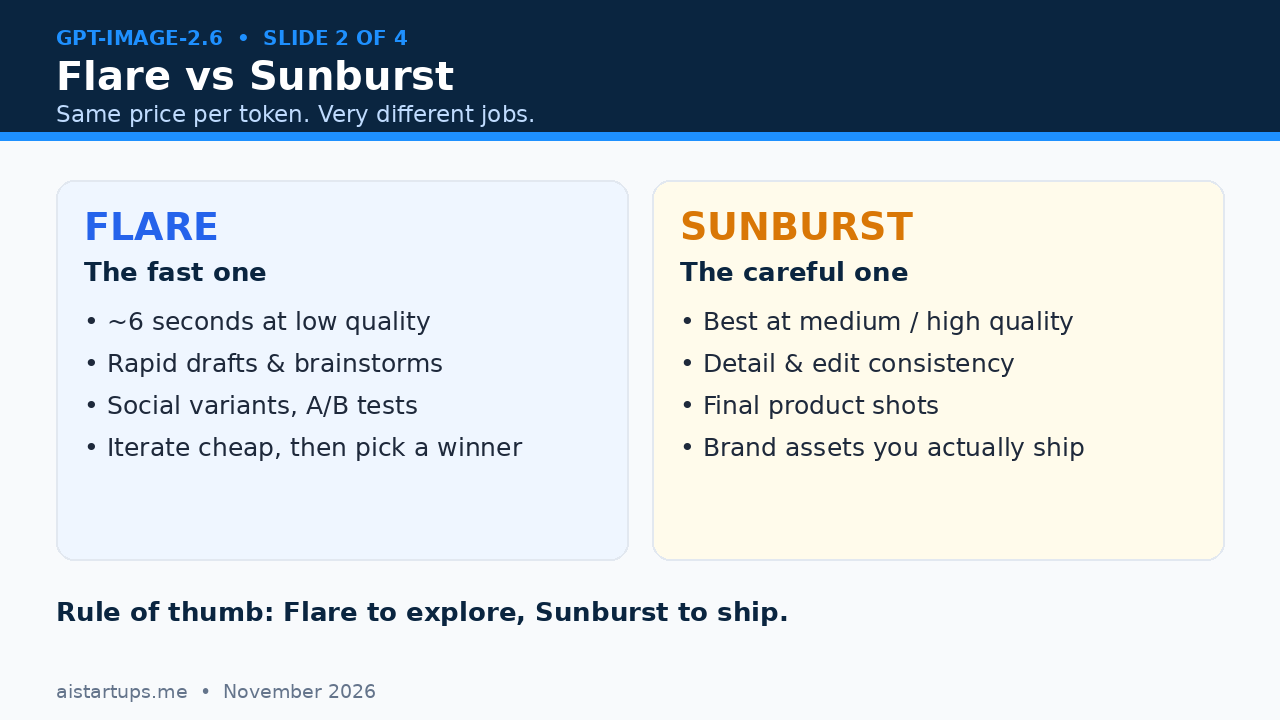
Flare is the fast one. OpenAI says it can turn around an image in as little as 6 seconds at low quality, and it’s built for iteration — the kind of rapid back-and-forth where you generate ten versions of a hero image before lunch. Sunburst is the careful one: better detail and edit consistency at medium and high quality, which is where your final, customer-facing assets should come from.
And here’s a number OpenAI threw out that made me pause: people now generate more than 4 billion images a week across ChatGPT and the API, up from 3 billion a week just eight weeks earlier. That’s OpenAI’s own claim, and there’s no independent audit of it — but even if it’s roughly right, the scale is wild. Image generation isn’t a side feature anymore. It’s one of the main things people do with AI.
The two models share the same token pricing, which sounds simple until you read the fine print. More on that in a minute.
Flare vs Sunburst: which one should you actually use?
This is the decision you’ll make fifty times a week, so let’s make it boring and simple. Flare to explore, Sunburst to ship.
Use Flare when you’re brainstorming. New ad angles, ten background ideas for a product shot, a quick mockup for a landing page section you haven’t committed to yet. It’s fast, and at low quality it’s cheap enough that you can afford to be sloppy with it. The whole point is volume — generate a lot, pick one winner, move on.
Use Sunburst when the image is going in front of a customer. Your storefront hero shot, the product listing image, the pitch deck cover, the brand assets. This is where edit consistency matters — Sunburst holds details steady across edits instead of quietly redesigning your product every time you ask for a small change. That’s the difference between a tool and a toy.
There’s also a new complexity setting — low, medium, or high, defaulting to high — and it’s separate from the existing quality setting. Low complexity is for focused edits where you want the model to touch as little as possible. High complexity is for dense layouts, text-heavy images, and intricate scenes. One honest warning from OpenAI’s own docs: higher complexity can add latency and can introduce unwanted changes. So don’t just crank it to high and hope for the best. Match the setting to the job, the same way you’d pick a lens before a shoot.
The GIF thing is bigger than it sounds
Okay, real talk: the animated GIF feature is the headline for founders, and it’s not close.
In ChatGPT, you can now generate an animated GIF from a text prompt or from a photo you upload, adjust the playback speed, and edit it frame by frame. Think about what that means for a small team. Your product demo, your “how it works” loop, your social ad creative — all of it used to need a motion designer or a screen-recording session and an afternoon in an editor. Now it’s a prompt and a few minutes.
Via the API, GIF output supports 2 to 64 frames at 20 to 2,000 milliseconds per frame, through the generations endpoint only. That’s enough for a short product loop, a loading animation, a before-and-after, or a punchy ad creative. It’s not a replacement for real video — nobody’s cutting a brand film with this — but for the short looping visuals that dominate social feeds and ad placements, it’s genuinely useful.
A couple of honest caveats. First, the GIF rollout in ChatGPT is gradual, so some accounts won’t see it immediately — if you open ChatGPT and there’s no GIF option yet, that’s why, not because you’re doing something wrong. Second, GIFs are available across all ChatGPT tiers including free, which is generous, but OpenAI hasn’t published per-plan GIF limits, so don’t build a workflow that assumes unlimited free GIFs forever. And third — well, mostly it’s just fun to use. I turned a static product shot into a looping GIF in about three minutes the first time I tried it, and the hardest part was deciding on the speed.
Reference images: the quiet feature that changes everything
If GIFs are the flashy headline, saved reference images are the feature that’ll actually save you hours every week.
Here’s the problem every founder knows: you generate a great product image on Monday, and by Wednesday you need the same product in a different setting — a holiday background, a new colorway, a lifestyle shot for Instagram. With older tools, you’d re-upload the photo, re-describe the product, and cross your fingers that the model remembered what your bottle or your shoe or your gadget actually looks like. Half the time it didn’t, and you’d get a slightly different product. Customers notice that. It looks sloppy.
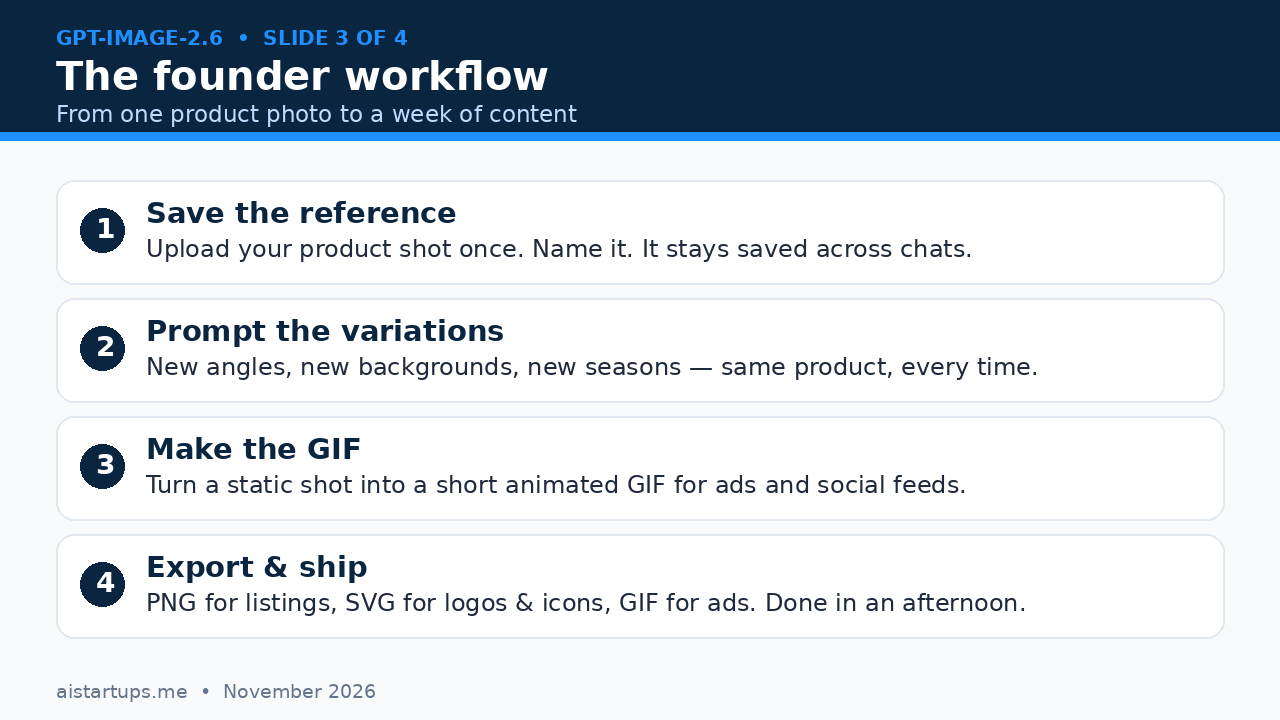
GPT-Image-2.6 lets you save and name a reference image — your product, your logo, your mascot — and reuse it across chats without uploading it again. The model keeps the product consistent while you change everything around it. New angle, new background, new season, same product. That’s the whole game for a startup: brand consistency without a brand team.
How I’d actually use this: save one clean reference of each product, one of your logo, and one of any recurring character or mascot. Then every piece of content you make for the next month starts from those references. Your Instagram grid starts looking like it belongs to one company instead of twelve different ones. Your ad creative stops drifting. And you stop re-uploading the same JPEG forty times a week.
SVG output and markup-guided edits
Two more features that sound minor and aren’t.
SVG output means you can generate icons, diagrams, and UI assets as clean vector files instead of raster images. If you’ve ever tried to use an AI-generated logo in a pitch deck and watched it turn to mush when you scaled it up, you know why this matters. Vectors scale. You can hand an SVG to a developer and they can actually use it — recolor it, resize it, drop it into a site. For a startup that’s building its visual identity on a budget, that’s a real shortcut. And if your website needs more than icons — a full visual refresh, a new landing page, AI features wired into the product itself — that’s the point where a web development studio like AISquadX earns its keep, turning the assets into a site that actually converts.
Markup-guided editing is the other one. Instead of describing an edit in words — “make the top-left corner a bit warmer, no, the other corner, the one with the plant” — you mark the exact region on the image and tell the model what to change there. It works on the 2.5 and 2.6 models. Anyone who’s burned ten generations trying to fix one small detail in an otherwise perfect image will understand immediately why this is a big deal. Precision beats prompting, every time.
The cost math (read this before you scale)
Alright. Here’s the part most launch coverage skipped, and it’s the part that matters most for your budget.
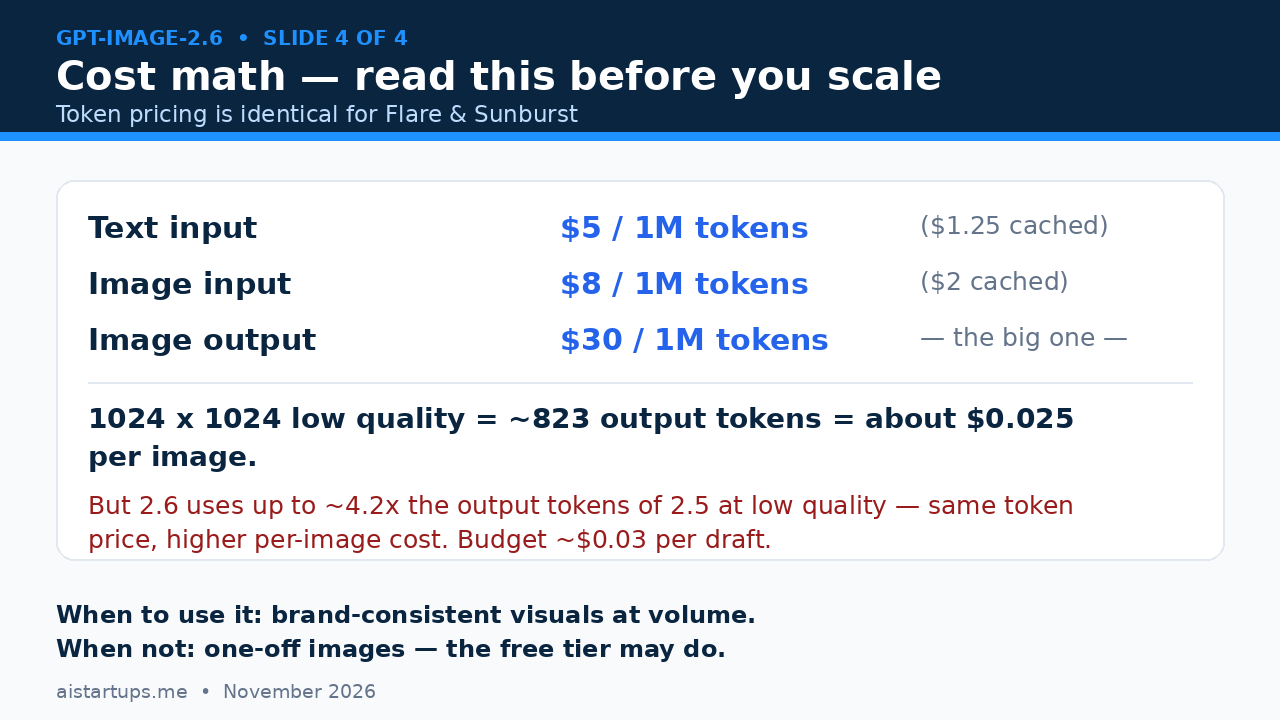
Token pricing is identical for Flare and Sunburst, and identical to 2.5’s per-token rates: $5 per million tokens for text input ($1.25 cached), $8 per million for image input ($2 cached), and $30 per million for image output. That last number is the one that counts, because image output is where nearly all of your cost lives.
OpenAI’s own calculator puts a 1024×1024 image at low quality at roughly 823 output tokens — about $0.025 per image. That sounds cheap. And it is, per image. But here’s the catch, stated plainly because it changes the math: per OpenAI’s own calculator, 2.6 uses up to roughly 4.2 times the output tokens of 2.5 per image at low quality. The 2.5 equivalent was around $0.006 per image. So the same token price does not mean the same per-image cost. You’re paying about four times more per image than you were on 2.5, at low quality, for the newer model.
Does that make 2.6 a bad deal? Not necessarily — you’re getting GIFs, SVGs, reference images, and better consistency. But it does mean you should budget honestly. If your team generates 100 draft images a week, that’s roughly $2.50 a week at low quality, or about $10 a month — trivial. But if you’re generating thousands of variants through the API, or running at medium and high quality where token counts climb, the bill adds up fast. My rule: budget around $0.03 per draft image and $0.10 to $0.15 per final image until OpenAI publishes a proper per-image cost table. And it hasn’t yet — there’s no published per-image price list for 2.6, so anyone quoting you exact per-image prices for every size and quality is guessing.
Also worth knowing: OpenAI says 2.6 is 50% faster than 2.5. That’s their claim, with no independent baseline published, so treat it as a vendor number — directionally encouraging, not a guarantee you’ll feel in your own workflow.
Using it in the API: a quick example
If you’re building image generation into your product — a listing tool, a content app, an ad generator — the API is where 2.6 earns its keep. The generations endpoint now supports GIF output, and the request looks like this:
curl https://api.openai.com/v1/images/generations \ -H "Authorization: Bearer $OPENAI_API_KEY" \ -H "Content-Type: application/json" \ -d '{ "model": "gpt-image-2.6-flare", "prompt": "A looping GIF of a matte-black water bottle rotating slowly on a clean studio background, soft daylight, e-commerce product shot", "size": "1024x1024", "quality": "low", "output_format": "gif", "n": 1 }'Swap in gpt-image-2.6-sunburst when the output is customer-facing, and raise quality to medium or high for final assets. Keep complexity low for small targeted edits and high for dense, text-heavy layouts. And log your token usage from day one — with output tokens running higher than 2.5, the only way to know your real cost per image is to measure it yourself.
GPT-Image-2.6 vs Nano Banana 2.1 vs FLUX 3 Image
You’re not choosing in a vacuum. Two other heavyweights shipped within weeks of 2.6, and both are worth knowing about. I’ve covered both on this site — Google’s Nano Banana 2.1 and BFL’s FLUX 3 Image — so here’s the honest short version.
Nano Banana 2.1, which Google shipped in October 2026, outputs at up to 4K and starts at around $0.0336 per 1K image. Its edge is raw resolution and Google’s ecosystem — if you’re already living in Google’s stack, it’s the natural pick, and 4K output is genuinely useful for print and large-format work. FLUX 3 Image, from Black Forest Labs on October 1, 2026, starts at around $0.048 per 1K image and comes with an open-weights sibling, Klein, which matters if you want to self-host or fine-tune. Its edge is control and openness.
So where does 2.6 win? Native GIFs and SVG output — neither rival does both in one place — plus the saved reference images, which solve the consistency problem more cleanly than anything else I’ve tried. Its gap is cost transparency: Nano Banana and FLUX publish straightforward per-image prices, while OpenAI’s token pricing means your per-image cost depends on settings you can’t fully predict in advance, and 2.6 quietly burns more output tokens per image than its predecessor. If you want predictable per-image pricing, the rivals are easier to budget. If you want GIFs, vectors, and sticky brand consistency inside ChatGPT, 2.6 is the pick.
For a fuller picture of how these tools stack up for marketing work, our roundup of the best AI image generators for marketing teams is worth a read. And if you’re pairing new visuals with a site rebuild, the best AI website builders for startups guide covers the other half of the launch.
A founder workflow that actually works
Enough theory. Here’s the workflow I’d run if I were launching a product this month:
- Monday — save your references. Upload clean shots of each product, your logo, and any mascot. Name them clearly. This is a one-time job that pays off all month.
- Tuesday — brainstorm with Flare. Generate twenty variations at low quality and low complexity. Pick three winners. Don’t fall in love with any of them yet.
- Wednesday — ship with Sunburst. Rebuild the winners at medium or high quality. Use markup-guided edits to fix the small stuff instead of re-rolling the whole image.
- Thursday — make the GIFs. Turn your best static shots into short looping GIFs for ads and social. Test two or three speeds — faster isn’t always better.
- Friday — export and measure. PNGs for listings, SVGs for icons and diagrams, GIFs for ads. Log what each image cost in output tokens so next week’s budget is real, not a guess.
The whole loop takes an afternoon once the references are saved. Compare that to a traditional shoot: booking a photographer, a studio, a stylist, waiting a week for edits. I’m not saying AI replaces all of that — a real photographer still wins for hero brand work — but for the volume of everyday visuals a startup needs, this workflow is hard to beat.
“The best AI image tool for a startup isn’t the one with the prettiest demos. It’s the one that remembers what your product looks like on Tuesday and still remembers on Friday.”
What I’d watch out for
A few things to keep in mind before you go all in:
- The GIF rollout is gradual. If you don’t see GIF options in ChatGPT yet, wait — it’s rolling out account by account, and there’s nothing to fix on your end.
- No published benchmarks. OpenAI hasn’t released benchmark scores for 2.6, so don’t trust any chart claiming it “beats” a rival by a specific margin. There is no official scoreboard yet.
- Cost creep is real. The 4.2x output-token jump at low quality is the headline, but medium and high quality cost more still. Measure your actual spend in week one.
- Reference images aren’t magic. They keep your product consistent, but they won’t fix a bad reference. Start with a clean, well-lit product shot — garbage in, garbage out still applies.
- Free tier limits are unpublished. GIFs work on the free tier, but OpenAI hasn’t said how many you get. Don’t build a business process that depends on free-tier GIFs staying unlimited.
One more thing: the coverage around this launch has been breathless in places, and some of it overstates what’s verified. The MarkTechPost launch breakdown is a solid read for the Flare/Sunburst split, the OmniaKey comparison of 2.6 vs 2.5 digs into the token-cost question, and Techotales’ feature and pricing roundup is useful for the ChatGPT-side features. But when a claim matters — pricing, limits, speed — check it against OpenAI’s own changelog and pricing pages. Vendor claims are vendor claims, even when they’re exciting.
FAQ
What is GPT-Image-2.6?
GPT-Image-2.6 is OpenAI’s image generation and editing model, released November 4, 2026. It comes as two models — Flare for fast iteration and Sunburst for detail and edit consistency — and adds animated GIF generation, saved reference images, SVG output, markup-guided edits, and a new complexity setting. It replaces GPT-Image-2.5, which launched September 8, 2026.
How much does GPT-Image-2.6 cost per image?
There’s no published per-image price list. Pricing is token-based: $5 per million text input tokens, $8 per million image input tokens, and $30 per million image output tokens — the same rates for both Flare and Sunburst. OpenAI’s calculator puts a 1024×1024 low-quality image at about 823 output tokens, roughly $0.025. But 2.6 uses up to about 4.2 times the output tokens of 2.5 per image at low quality, so per-image costs are higher than the previous model despite identical token rates.
Can GPT-Image-2.6 make animated GIFs?
Yes. In ChatGPT you can generate a GIF from a prompt or a photo, adjust the speed, and edit frame by frame. Through the API, GIF output supports 2 to 64 frames at 20 to 2,000 milliseconds per frame via the generations endpoint. The ChatGPT rollout is gradual, so some accounts won’t see the feature immediately.
What are reference images in GPT-Image-2.6?
Reference images are product shots, logos, or mascots you save and name once in ChatGPT, then reuse across chats without re-uploading. The model keeps the referenced subject consistent while you change backgrounds, angles, and settings — which is the key to brand-consistent visuals without re-shooting or re-describing your product every time.
Should startups choose GPT-Image-2.6, Nano Banana 2.1, or FLUX 3 Image?
It depends on the job. Choose GPT-Image-2.6 if you want native GIFs, SVG output, and saved reference images inside ChatGPT. Choose Nano Banana 2.1 (from $0.0336 per 1K image) if you need up to 4K output and live in Google’s ecosystem. Choose FLUX 3 Image (from $0.048 per 1K image) if you want an open-weights option you can self-host or fine-tune. For predictable per-image budgeting, the rivals’ flat pricing is easier; for GIFs and brand consistency, 2.6 leads.
The Bottom Line
GPT-Image-2.6 is the first OpenAI image model I’d actually build a startup workflow around — not because the images are dramatically prettier, but because it solves the unglamorous problems: the same product looking the same every time, GIFs without a motion designer, vectors you can hand to a developer, and edits you can point at instead of describe. Flare for exploring, Sunburst for shipping, reference images saved on day one, and a real budget for the token math.
Just go in with your eyes open on cost. The token rates look identical to 2.5, but the per-image token burn isn’t — and until OpenAI publishes a per-image table, your own usage logs are the only honest price list. Measure week one, then decide how much of your visual pipeline lives here. For most founders, the answer will be: a lot of it. But now you’ll know exactly what “a lot” costs.