Real talk: your marketing team has a content problem, and it’s not what you think.
It’s not that you can’t write copy. It’s that every blog post, every ad, every social carousel needs pictures — and stock photos are expensive, look like stock photos, and take forever to hunt down. I watched a friend’s team spend three hours looking for “diverse startup team laughing around laptop, not cheesy” and end up with the same handshake photo everyone else uses. Painful.
So I spent the last few weeks actually running the gauntlet: generating marketing assets — hero images, ad creatives, social graphics, thumbnails — with every major AI image generator worth mentioning. I checked pricing pages, read the fine print on commercial rights, and compared what each tool is genuinely good at versus what the marketing copy claims it’s good at.
Here’s the thing most roundups won’t tell you: there is no single “best” AI image generator. The right one depends on whether you need photorealistic hero shots, readable text in ad graphics, or vector brand assets. So below, you get ten tools, real prices, honest tradeoffs, and my pick for each use case. If you’re assembling your whole creative stack, our roundup of AI tools for startup founders covers the rest of the toolkit.
My short answer, if you’re in a hurry
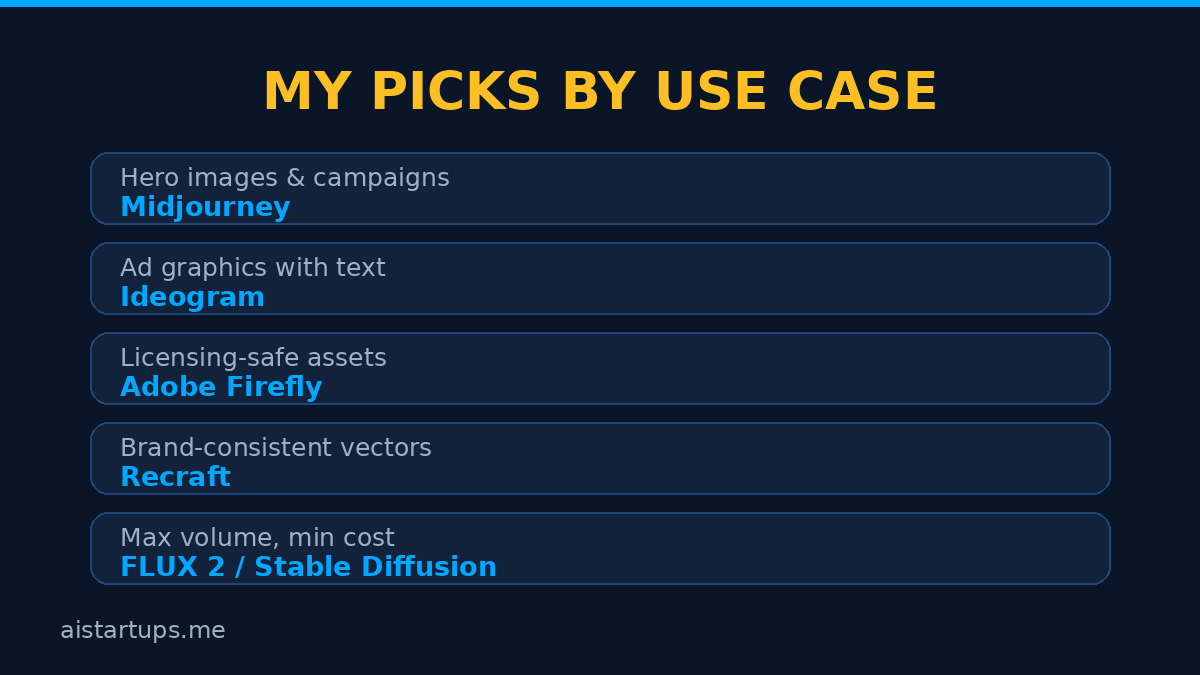
If you only read one paragraph: Midjourney still makes the prettiest images, period. Ideogram is the only one I’d trust with actual words on a poster. Adobe Firefly is the safest pick if lawyers ever look at your assets. And Recraft is the quiet favorite for anything that needs to look like your brand, not a random AI vibe. Most real teams end up running two of these, not one — more on that in the workflow section.


1. Midjourney — still the aesthetic benchmark
Look, Midjourney is the tool every other image generator gets compared to, and there’s a reason. Feed it the same prompt as everything else and its output just looks… more expensive. Richer lighting, better composition, that cinematic quality that makes a blog hero image look like you hired a photographer.
The current model is V8.1, and it’s fast — standard images land in a few seconds now. The web app at midjourney.com works fine; you don’t need to live in Discord anymore (though the community is still there).
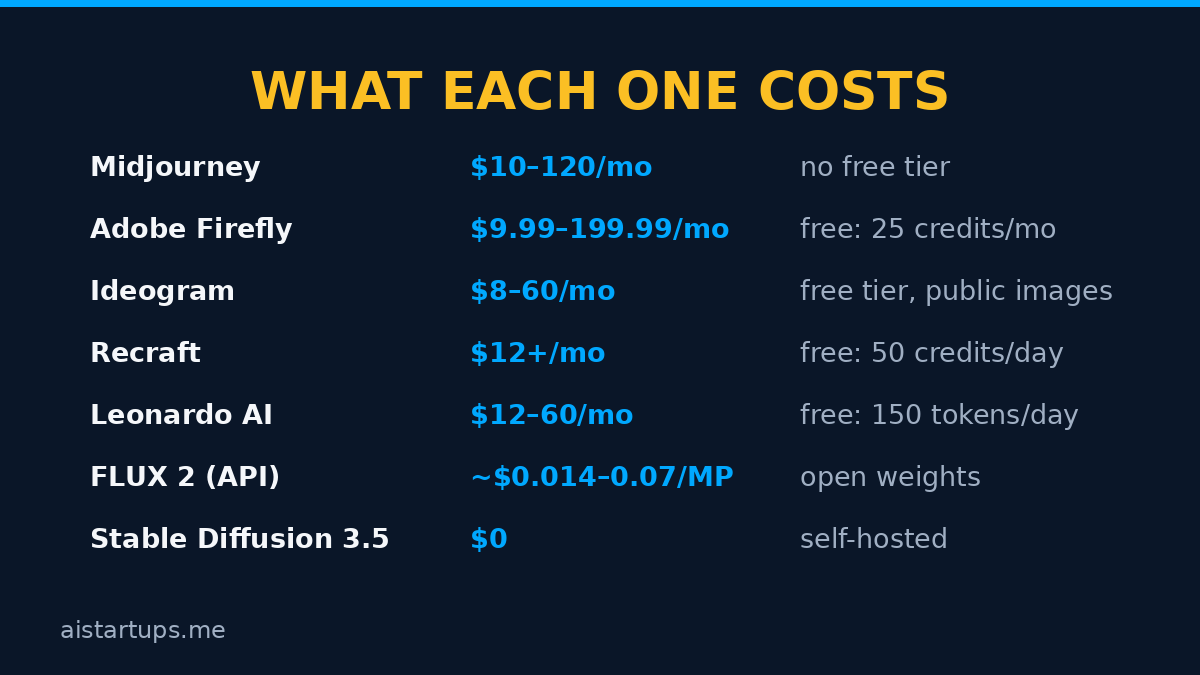
The catch? No free tier — not even a trial. Basic is $10/month, Standard $30/month, Pro $60/month, and Mega $120/month, with 20% off annual billing. And here’s the part that matters for companies: if your business makes over $1M a year in revenue, Midjourney’s terms require you on Pro or Mega. Private “stealth” generations also start at Pro. If you want the full pricing math with GPU hours broken down, this Midjourney pricing breakdown lays it out clearly.
Best for: hero images, brand campaigns, anything where beauty is the whole point. Not great at: readable text on graphics (it still botches words more than you’d like).
2. Adobe Firefly — the safe pick for real businesses
Firefly won’t win a beauty contest against Midjourney, but it wins the argument that actually matters in a company: “Are we allowed to use this?” Adobe trained Firefly on licensed Adobe Stock content and public-domain material, so the output comes without the murky copyright question hanging over it. If your legal team has opinions, this is the tool that keeps them quiet.
The other reason marketing teams love it: it’s inside the tools you already use. Generative Fill in Photoshop, Firefly in Express — the assets flow straight into production instead of living in some separate app.
Pricing is credit-based. There’s a genuinely free tier (25 generative credits a month — enough to test properly), then Standard at $9.99/month (2,000 credits), Pro at $19.99/month (4,000 credits plus Photoshop on web and mobile), Pro Plus at $49.99/month, and Premium at $199.99/month for heavy video work. Most standard image generations cost just 1 credit. This Firefly pricing guide covers all the tiers and the credit math.
Best for: teams already on Creative Cloud, regulated industries, anything client-facing where licensing matters. Not great at: the highest-end artistic quality — Midjourney still takes that crown.
3. Ideogram — the only one I’d trust with words on it
Here’s a scenario: you need a poster, a thumbnail, or an ad with actual text in it. “SALE ENDS FRIDAY.” Most AI image generators will render something like “SALEE ENDS FR1DAY” and you’ll want to throw your laptop. Ideogram gets it right — legible, well-placed text, in the 90–95% accuracy range. For marketing graphics, that’s the whole ballgame.
It also has a generous free tier with no credit card required (the catch: free images are public), plus a “Magic Prompt” feature that rewrites your rough description into a detailed prompt — genuinely useful for non-designers. Paid plans: Basic around $8/month, Plus $20/month (1,000 priority credits, private generations), Pro $60/month (3,500 credits, batch generation, API access). This Ideogram 2026 review digs into the credit math and the text-rendering tests.
Best for: social graphics, ad creatives, thumbnails, posters — anything with readable text. Not great at: pure photorealism; Midjourney and FLUX have it beat on raw image beauty.
4. Recraft — the brand-consistency machine
Recraft is the one most people sleep on, and honestly? For marketing teams, it might be the smartest pick on this list. Two things make it different: it generates native SVG vector files straight from a prompt (logos, icons, illustrations you can actually edit — no tracing), and you can train it on your brand’s visual style so new assets come out on-brand automatically.
Think about what that means for a campaign: 20 ad variations that all look like your company, not 20 pretty pictures in 20 different styles. That’s a workflow feature, not a gimmick.
Free tier gives you 50 daily credits (public images, no commercial rights — fine for testing, not for shipping). Basic is $12/month ($10 annual) with 1,000 credits and commercial rights; Pro starts at $20/month. One warning worth knowing: images made on the free plan are owned by Recraft, so don’t build client work on it. This Recraft design guide walks through the vector workflow and real-world pricing.
Best for: brand assets, logos, icon sets, campaign variations with consistent styling. Not great at: pure photographic realism — it’s a design tool first.
5. Leonardo AI — the multi-model playground
Leonardo is what happens when you can’t decide which model to use, so you get all of them. It’s a whole platform: multiple image models (Phoenix, PhotoReal, KinoXL), an AI canvas for inpainting and editing, custom model training, even short video clips. For a marketing team, the killer feature is training a private model on your product or brand — generate your product in any scene, forever, on demand.
The free tier is real: 150 tokens a day, no card needed. Paid plans run Essential $12/month (8,500 tokens), Premium $30/month (25,000 tokens), Ultimate $60/month (60,000 tokens). Unused paid tokens can even roll into a token bank, which is nicer than the use-it-or-lose-it credits most tools offer. This Leonardo pricing guide breaks down the token math.
Best for: product photography on demand, teams that want one platform for many styles. Not great at: text in images (still unreliable) — pair it with Ideogram for that.
6. GPT Image in ChatGPT — the literal one
Here’s what GPT Image (the model inside ChatGPT) does better than everyone else: it actually follows instructions. Tell it “a red sneaker, side view, white background, the word SPRINT across the shoe” and you get… a red sneaker, side view, white background, with SPRINT across it. Other tools will give you a gorgeous shoe at the wrong angle with gibberish text. There’s a real difference between pretty and accurate.
If you already pay for ChatGPT Plus ($20/month), you already have it. On the API side, generation runs about five cents per image at standard quality — this AI image API price comparison lines up GPT Image 2 against Nano Banana and FLUX.2 so you can see the real per-image economics.
Best for: teams already in the ChatGPT ecosystem, product mockups where accuracy beats artistry, quick edits via conversation. Not great at: high-art aesthetics — Midjourney’s output looks more premium.
7. Nano Banana (Google Gemini) — the editor’s best friend
“Nano Banana” is Google’s image model family inside Gemini, and its superpower isn’t generating from scratch — it’s editing. Upload a photo, ask to relight it, change the background, adjust the mood, and it keeps everything else intact. For marketing teams working with existing product shots, that’s enormous: one product photo becomes ten campaign variants without a reshoot.
Text rendering is strong too — in the same league as Ideogram on shorter strings. Pricing is API-based: Nano Banana 2 Lite runs about $0.034 per 1K image, Nano Banana 2 about $0.067, and Nano Banana Pro about $0.134. The same API price comparison covers the Nano Banana tiers in detail.
Best for: editing existing assets, product photo variations, teams already building on Google’s stack. Not great at: the absolute cutting edge of photorealism — it trades a little quality for speed and editing precision.
8. FLUX 2 — the open-weight powerhouse
FLUX 2 comes from Black Forest Labs, the team behind the original Stable Diffusion. It’s the favorite of people who care about the economics of image generation: API pricing starts at about $0.014 per megapixel (klein tier), with Pro at $0.03 and Max at $0.07. For a team generating thousands of images a month, that difference compounds fast.
The bigger story: open-weight versions exist, so you can self-host. That means no per-image cost at volume, no data leaving your infrastructure, and full control over the model. The tradeoff is you need someone technical to set it up and run it — this is the pick for teams with a dev, not for the intern with a Canva account.
Best for: high-volume generation, teams with technical staff, privacy-sensitive workflows. Not great at: out-of-the-box simplicity — you’ll use it through an API or a platform, not a friendly app.
9. OpenArt — one subscription, many models
OpenArt takes a different approach: instead of one model, you get a playground with dozens — FLUX, Stable Diffusion variants, and others — behind a single subscription. For a marketing team still figuring out what it likes, that’s a cheap way to experiment without signing up for five services.
Pricing: Starter $14/month (4,000 credits), Plus $34/month (12,000 credits, commercial use), Pro $56/month (24,000 credits). It’s the “try everything” plan — great for exploration, less ideal once you know exactly which model you want (at which point, just subscribe to that one directly).
Best for: experimentation, freelancers who serve many clients with different needs. Not great at: being the single best at anything — it’s breadth over depth.
10. Stable Diffusion 3.5 — the free route
And then there’s the nuclear option for the budget-conscious: Stable Diffusion 3.5, free to self-host if your revenue is under $1M. No subscription, no credits, no per-image meter running. Just a GPU and some setup.
Is it as good as Midjourney out of the box? Honestly — no. Not without work. But the ecosystem around it is enormous: thousands of community models, styles, and workflows. With the right fine-tuned model and a bit of know-how, teams produce genuinely excellent marketing assets for essentially the cost of electricity. If you’re a technical founder tallying up every subscription, our breakdown of the cost of starting an AI business shows where self-hosting fits in the bigger budget picture.
Best for: technical teams, maximum volume at zero marginal cost, full privacy. Not great at: anyone who doesn’t want to touch a command line.
The quick comparison
| Tool | Starts at | Free tier | Best for |
|---|---|---|---|
| Midjourney | $10/mo | No | Hero images, campaigns |
| Adobe Firefly | $9.99/mo | Yes (25 credits/mo) | Licensing-safe assets |
| Ideogram | $8/mo | Yes | Text in graphics |
| Recraft | $12/mo | Yes (50 credits/day) | Brand assets, vectors |
| Leonardo AI | $12/mo | Yes (150 tokens/day) | Product shots, variety |
| GPT Image (ChatGPT) | $20/mo (Plus) | Via Plus | Instruction accuracy |
| Nano Banana (Gemini) | ~$0.034/image (API) | Via Gemini app | Editing existing photos |
| FLUX 2 | ~$0.014/MP (API) | Open weights | High volume, self-host |
| OpenArt | $14/mo | Limited | Multi-model experiments |
| Stable Diffusion 3.5 | $0 (self-host) | Yes | Zero marginal cost |

How to actually pick one (5 questions)
Don’t pick from a feature list. Answer these instead — the right tool falls out of the answers:
- Do your graphics have text on them? Posters, thumbnails, ad headlines — go Ideogram or GPT Image. Nothing else is reliable enough.
- Do lawyers ever review your assets? Adobe Firefly, no contest. Commercially-safe training data is its entire pitch.
- Does it need to look like your brand? Recraft with brand-style training, or Leonardo with a custom-trained model. Generic tools produce generic vibes.
- How many images per month — dozens or thousands? Dozens: any subscription works. Thousands: FLUX 2’s API pricing or self-hosted Stable Diffusion will save you real money.
- Who’s operating it? A designer? Midjourney, Firefly, Recraft. A marketer with no design background? Ideogram’s Magic Prompt or ChatGPT’s conversational editing. A developer? FLUX 2 or Stable Diffusion via API.
The workflow that makes these tools worth paying for
The tools are only half the equation. The teams getting real value run a simple pipeline:
- Generate in bulk, not one-offs. Write 3–4 prompt variations per asset and generate them all at once. You’re looking for the best of the batch, not the perfect first try.
- Assign each tool its job. Midjourney for the hero shot, Ideogram for the headline graphic, Nano Banana to edit the product photo. Stop asking one tool to do everything — that’s how you get mediocre everything.
- Human touch at the end, always. AI output goes through a 10-minute pass: fix hands (still the weak spot), check spelling twice, match brand colors. The teams that skip this step are the ones whose ads look “AI-generated” — and not in a good way.
- Keep a prompt library. Every prompt that produced a winner goes in a shared doc with the result attached. Your tenth campaign gets faster because your first nine taught you what works.
- Know what AI images can’t do. They can’t build your website, wire up your integrations, or design your actual brand system. For that, you hire people. Our web development studio AISquadX handles the web dev and AI integration side for teams that want the whole stack done right — the AI image tools just supply the visuals.
If you’re building out the full content engine around these visuals, our lean AI startup marketing playbook covers the distribution side — getting the assets you make in front of your first thousand users. And when you outgrow still images, our guide to the best AI video generators for startups is the natural next step.
“The teams that win with AI images aren’t the ones with the best tool. They’re the ones with the best taste applied consistently — a style guide, a prompt library, and the discipline to reject 90% of what the model produces.”
FAQ
Can I use AI-generated images commercially?
Usually yes, but check the plan. Adobe Firefly is the cleanest option (trained on licensed content). Recraft grants commercial rights on paid plans — but not on the free tier, where Recraft owns the output. Midjourney requires companies over $1M in revenue to be on Pro or Mega. Ideogram’s free images are public. Read the terms for the plan you’re actually on, not the marketing page.
Which AI image generator is best for text in images?
Ideogram, and it’s not close. It’s architected around typography and hits 90–95% accuracy on legible text. Nano Banana and GPT Image are solid runners-up. Midjourney and Leonardo still garble words often enough that you shouldn’t trust them for anything with a headline on it.
Is Midjourney worth $30/month for a marketing team?
If image quality is your bottleneck — yes, and most teams land on the Standard plan for the unlimited Relax-mode generations. But if your main output is ad graphics with text, Ideogram at $20/month will serve you better. And if you need licensing certainty, Firefly at $9.99 is the rational pick. Match the tool to the job, not the hype.
Can AI image generators replace a designer?
No — and that’s the wrong question. They replace the boring parts of a designer’s job: the 40 stock-photo searches, the tenth variation of a banner, the “can you just make this bigger” requests. The designer becomes the art director — choosing, refining, and keeping everything on-brand. Teams that fire the designer and keep the AI get assets that look cheap within a month. Well — mostly.
What’s the cheapest way to generate marketing images with AI?
Free tier of Ideogram or Leonardo for low volume. For real volume: FLUX 2’s API at around $0.014–$0.03 per megapixel, or self-hosted Stable Diffusion 3.5 at zero marginal cost if you have the technical chops. The honest math is that most teams spend $20–60/month total and generate more than they can use — the bottleneck is curation, not generation.
The Bottom Line
Ten tools, one truth: AI image generation is a solved problem, and picking the winner is now a workflow question, not a technology question. If you want the prettiest pictures, get Midjourney. If you need words that spell correctly, get Ideogram. If you need assets your lawyer won’t flag, get Firefly. If you need everything to look like your brand, get Recraft.
And whatever you pick — generate in batches, reject ruthlessly, and keep a human in the loop at the end. The tool doesn’t have taste. You do.