
Here’s a scene I bet you know by heart. It’s 4:45pm on a Friday. Your best developer opens a pull request with 900 lines changed, no description, and the title “fixes”. The only other person who could review it is in a dentist’s chair. So you skim it, you approve it, and you spend the weekend wondering if you just merged a time bomb into production.
That’s the small-team code review problem. It’s not that nobody cares about quality. It’s that there are never enough reviewers, never enough hours, and the PRs keep coming — especially now that half of them are written by AI coding assistants in the first place. The code got faster. The review didn’t.
So I spent the last week doing the boring work for you: I read all seven pricing pages, checked what each tool actually supports, and worked out what a five-person team doing roughly 100 pull requests a month would really pay. No vendor hype, no made-up accuracy scores. Just prices I could verify, features I could confirm, and my honest take on who each tool is actually for.
One thing before we start: none of these tools replaces a human reviewer. They catch the stuff humans miss when they’re tired or rushed — the null pointer three files away, the auth check that got dropped in a refactor, the dependency that quietly changed behavior. The final call is still yours. The point is to make that call faster and better informed.
And if you’re still building the team that will do the reviewing, this pairs well with our guide on hiring your first AI engineer — because the reviewer you hire and the reviewer you install should agree with each other.
Why small teams feel review pain first
Big companies have review pain too, don’t get me wrong. But they have layers — senior engineers, staff engineers, whole platform teams whose job includes saying no. A five-person startup has you, your co-founder, and three developers who are all writing code at the same time. Who reviews whose work? The person who wrote the most similar code last month, probably. Who is also the busiest.
That’s the first reason AI review hits differently at small scale: it’s not a nice-to-have, it’s the second pair of eyes you can’t afford to hire. A tool that reads every PR, every time, without getting tired or holding a grudge, is worth a lot more to a team of five than to a team of five hundred. At five hundred you have process. At five you have vibes and a Slack channel.
The second reason is AI-written code. If your team uses Copilot, Cursor, or any coding agent, a growing share of your PRs started life as a prompt. That code tends to look great. Clean formatting, nice variable names, confident comments. And sometimes it’s confidently wrong in ways that only show up at runtime — a wrong assumption about an API, an edge case the model never considered. Human reviewers skim confident-looking code. That’s exactly when you want a machine checking the machine’s work.
Third, and this one stings: bad reviews cost small teams more. When a bug ships at a big company, there’s an on-call rotation and a post-mortem template. When a bug ships at your startup, it’s you, on a Saturday, explaining to a customer why their data looks wrong. The cost of one escaped bug can be bigger than a whole year of any tool on this list.
How I picked these 7
I didn’t just grab the seven loudest names. I filtered for tools a small team can actually buy and run in an afternoon, with real pricing a founder can check before the trial ends. Every tool here meets four tests:
- It reviews real pull requests on a Git host small teams use — GitHub at minimum — without a sales call or an enterprise contract.
- It publishes its pricing (or at least a clear billing model) so you can do the math before you install it. If the price is a mystery, the tool didn’t make the cut.
- It has a free way in — a free tier, a free trial, or free public-repo coverage — so you can test it on your own code before paying.
- It’s built for review, not bolted on. General coding assistants that happen to comment on PRs are fine, but I wanted tools where review is the job.
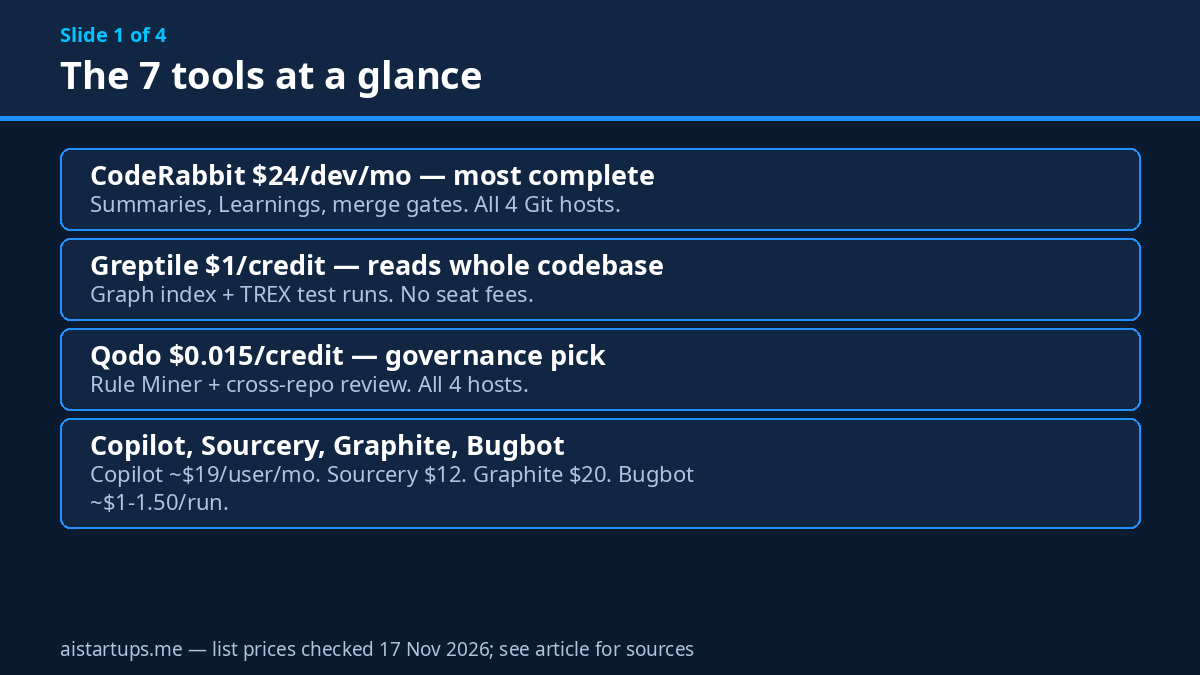
That left seven: CodeRabbit, Greptile, Qodo, GitHub Copilot code review, Sourcery, Graphite Reviewer, and Cursor Bugbot. They overlap a lot — they all read diffs and leave comments — but they charge differently, they support different Git hosts, and they each have one thing they’re clearly best at. That’s what the rest of this article is about.
The 7 tools, compared
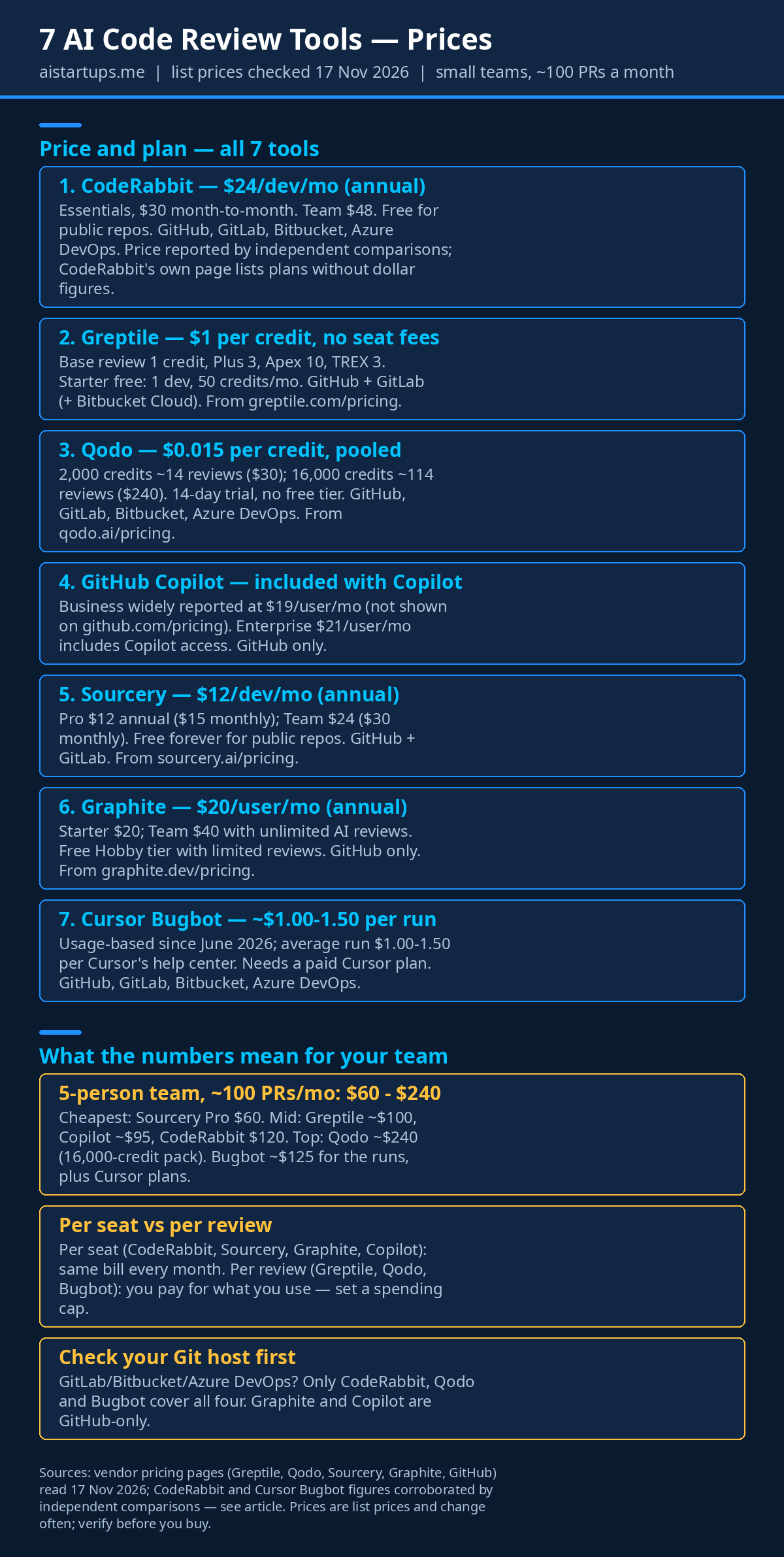
Look, I know comparison tables are the part everyone scrolls to first, so here it is. Prices are list prices as published on each vendor’s pricing page in November 2026, or — where the vendor’s own page doesn’t show a number — the figure independent comparisons agree on, flagged as such. Every price here can change, and vendors in this space reprice often, so treat this as a snapshot and click through before you pay.
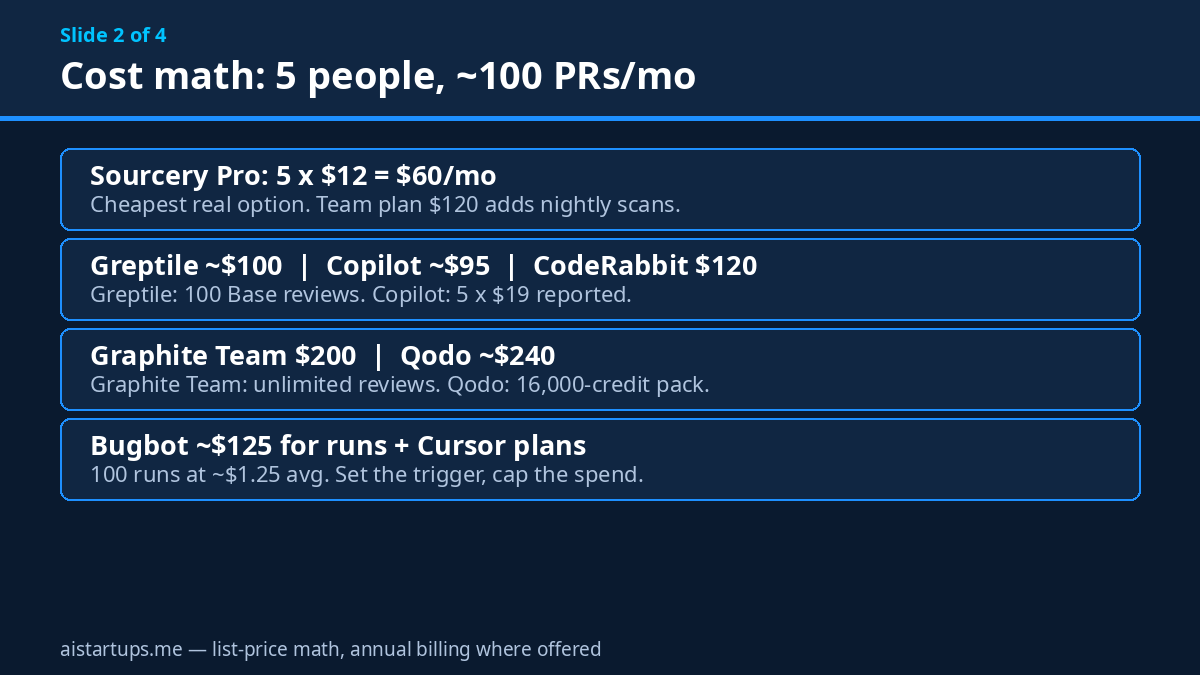
The short version: the cheapest way to cover a five-person team is Sourcery at $60 a month. The most expensive on straight list price is Qodo at roughly $240 a month for 100 reviews. Everything else lands between. But “cheapest” and “best for you” are different questions, and the rest of this article is the long answer.
1. CodeRabbit — the most complete reviewer
CodeRabbit is the one I’d hand to a team that wants the full package and doesn’t want to think about it. You install it, it reviews every PR, and it does a lot more than leave comments: plain-language summaries with walkthroughs and diagrams, a chat you can argue with inside the PR, one-click fixes for the things it flags, and pre-merge checks that can block a merge until your rules are met.
The feature that sets it apart is Learnings. CodeRabbit remembers what your team said in past PRs, issues, and guidelines — and applies it to the next review. So when your tech lead writes “we don’t use that pattern here” once, the tool starts catching it on its own. For a small team, that’s the closest thing to a senior engineer who never forgets. It also runs security review, generates unit tests for PRs, and can flag low-quality AI-generated PRs, which is a nice touch in 2026.
Price: Essentials is $24 per developer per month billed annually ($30 month-to-month), Team is $48 ($60 monthly). I could not find dollar figures on CodeRabbit’s own pricing page when I checked — the page lists the plans and features but the prices come from independent comparisons that agree on $24 — so confirm on the page before you buy. There’s a free tier for public repos.
Platforms: GitHub (including Enterprise Server), GitLab (including self-managed), Bitbucket Cloud and Data Center, and Azure DevOps. That’s the widest Git host coverage on this list, and if your code isn’t on GitHub, that alone may decide it.
Best for: teams that want one tool to do the whole review job — summaries, findings, fixes, security, and merge gates — and teams on GitLab, Bitbucket, or Azure DevOps, where half this list doesn’t even run.
Watch out for: it bills per developer who opens PRs, so the price scales with your team, and the Essentials plan caps you at 5 PR reviews per developer per hour. That’s plenty for most small teams, but if your team opens PRs in bursts, check the cap.
2. Greptile — the one that reads the whole codebase
Most reviewers read the diff. Greptile reads the diff, then goes and reads the rest of your codebase to check whether the diff makes sense in context. It builds a graph of your repo — every function, every class, every dependency — and uses that to catch the cross-file bugs that a diff-only review can’t see. The function that changed in file A breaks an assumption in file C? That’s the kind of thing Greptile is built to spot.
It also scores every PR from 0 to 5, which gives you a quick sense of how worried to be, and it learns from how your team reacts to past reviews. The newer TREX agent goes a step further and actually writes and runs tests for a PR in a sandbox, instead of only reading the code. That’s a real difference: most reviewers guess whether code works, TREX checks.
Price: this is the interesting one. Pro is $1 per credit, with no seat fees at all — credits are shared across the whole org. A Base review costs 1 credit, Plus costs 3, Apex costs 10, and a TREX review costs 3. Starter is free for one developer with 50 credits a month, and qualified non-commercial open-source projects get it free. Pre-Series A startups with 20 or fewer employees and under $2M revenue get 500 free credits a month for six months. All of that is straight from Greptile’s own pricing page, which I verified.
Platforms: GitHub and GitLab, plus Bitbucket Cloud (Data Center needs Enterprise). No Azure DevOps.
Best for: small teams with a tangled codebase — monorepos, services that call each other, code where the bug is never in the file that changed. And teams that hate per-seat pricing: if only two of your five developers open most PRs, you pay for the reviews, not the seats.
Watch out for: credit math. A Base review is cheap, but Apex reviews at 10 credits each add up fast if you turn them on for everything. Set your review depth per repo and watch the burn for the first month.
3. Qodo — the governance pick
Qodo used to be CodiumAI, and if that name rings a bell, the product has grown up a lot since. The pitch here isn’t “we find bugs” — it’s “we make your standards enforceable.” Qodo’s Context Engine indexes your codebase and your PR history, and its Rule Miner watches which review comments your team accepts and turns them into rules. Write a rule once, or let the tool mine it from your own history, and it gets applied to every PR after that.
The other thing Qodo does that nobody else on this list does as well is cross-repo review. If a change in your API repo breaks the web app repo, Qodo can catch it, because it reasons across repositories instead of inside one. For a small team running two or three services, that’s genuinely useful — those cross-service breaks are the ones that slip through every other kind of review.
Price: credit-based, $0.015 per credit, pooled across the team with no per-seat fees and no limits on repos or users. The credit packs on Qodo’s own pricing page are 2,000 credits (about 14 reviews by Qodo’s own estimate), 4,000 credits (about 29 reviews), and 16,000 credits (about 114 reviews). Do the arithmetic and the 2,000-credit pack works out to $30, the 16,000-credit pack to $240. There’s a 14-day free trial with no card required, and no permanent free tier — after the trial you pick a paid plan. Qualified open-source projects can apply for free access. Qodo also maintains PR-Agent, its open-source reviewer, if you want to try the basics for free.
Platforms: GitHub (including Enterprise Server), GitLab (including self-managed), Bitbucket, Azure DevOps, and Gerrit on enterprise setups. SaaS, on-premises, and even air-gapped deployment if you need it.
Best for: teams with standards that live in senior developers’ heads and nowhere else, teams with several repos that break each other, and anyone who needs governance — SSO, audit logs, the ability to bring your own model keys.
Watch out for: it’s the priciest option on straight list price for a team doing 100 reviews a month, and credits expire at the end of each monthly cycle, so you don’t want to buy a pack much bigger than you use. Also, the review quality depends on your history — a brand-new repo with no PR history gives Rule Miner nothing to work with.
4. GitHub Copilot code review — the default choice (if you’re on GitHub)
Here’s the thing about Copilot code review: if your team already lives on GitHub and already pays for Copilot, it’s the easiest yes on this list. There’s nothing to install, nothing new to learn, and the reviewer already knows your repo because it lives inside GitHub. It reviews PRs when you ask it to, or automatically if you turn that on, and it can suggest fixes right in the PR.
The honest question is whether “already there” is enough. Copilot’s reviewer is solid on the obvious stuff — bugs, style, the kind of thing a careful colleague would spot — but it’s a generalist. It doesn’t build a codebase graph like Greptile, it doesn’t mine rules from your history like Qodo, and it doesn’t have CodeRabbit’s merge gates. What it does have is zero friction, and for a small team that’s worth more than people admit. The tool your team actually uses beats the better tool they never open.
Price: code review comes with a Copilot plan, not as a separate add-on. The Business plan is widely reported at $19 per user per month — I couldn’t confirm that figure on GitHub’s own pricing page when I checked, so treat it as reported rather than verified. What GitHub’s pricing page does show is Enterprise at $21 per user per month, with Copilot access included. If your team already pays for Copilot for coding help, the review feature costs you nothing extra, which changes the math completely.
Platforms: GitHub only. Azure DevOps support is in public preview, but GitLab and Bitbucket aren’t options. If your code lives anywhere except GitHub, stop reading this section.
Best for: GitHub-only teams that already use Copilot, teams that want the lowest possible setup cost (about ten minutes, most of it clicking checkboxes), and founders who’d rather spend their tool budget on one thing that does two jobs.
Watch out for: it’s the least specialized reviewer here. If you need deep cross-file analysis or custom rules, you’ll feel the limits. And if you ever move off GitHub, your reviewer doesn’t come with you.
5. Sourcery — the cheapest real option
Sourcery is the one I keep coming back to for teams watching every dollar, because the price is almost suspiciously low for what you get. It reviews every PR, writes summaries with diagrams, suggests one-click fixes, lets you set custom review rules, and — my favorite feature for small teams — it can auto-approve low-risk PRs. That’s the dependency-bump PR, the typo fix, the one-line change that doesn’t need a human at all. Auto-approving the boring 20% of your PRs is worth more than a slightly cleverer review of the interesting 80%.
It also runs security checks on every PR, and the Team plan adds nightly scans of your codebase with a full issues dashboard. The company is SOC 2 Type II compliant and says your code is used only for the review and never to train a model, which matters if your customers ever ask.
Price: Pro is $12 per developer per month billed annually ($15 month-to-month), Team is $24 ($30 monthly). Both figures are straight from Sourcery’s own pricing page, which I verified. Public repos are free forever, and every paid plan starts with a 14-day trial of Team, no card needed.
Platforms: GitHub and GitLab, including self-managed GitLab. No Bitbucket, no Azure DevOps.
Best for: small teams on a tight budget, teams drowning in low-risk PRs they don’t need a human to read, and open-source projects (free forever is hard to argue with).
Watch out for: the platform gap — if you’re on Bitbucket or Azure DevOps, it’s a non-starter. And at this price, the review depth isn’t the deepest on the list. It’s good, not extraordinary. For most small teams, good is enough.
6. Graphite Reviewer — the one for stacked PRs
Graphite started as a tool for stacked pull requests — that workflow where you break a big change into a chain of small PRs that build on each other. If you’ve ever tried to review a 2,000-line PR and wished it were ten 200-line PRs instead, you already understand why stacking matters. Graphite’s reviewer lives inside that workflow, so it reviews each small PR in context instead of choking on the giant one.
The Team plan gives you unlimited AI reviews, unlimited Graphite Chat, AI review customizations (your own rules and automations), and a merge queue that lands PRs in order without the usual “someone merged first and now everything conflicts” dance. The Starter plan is cheaper but caps AI reviews, so read the fine print before you pick it.
One thing worth knowing: Graphite is now part of Cursor — its own pricing page says Cursor Cloud Agents are now in Graphite. That could be good news (tighter integration with the Cursor editor) or a reason to watch the roadmap closely. Either way, the product still operates as its own thing today.
Price: Starter is $20 per user per month billed annually, Team is $40 per user per month billed annually with unlimited AI reviews. Both figures are from Graphite’s own pricing page, which I verified. There’s a free Hobby tier with limited AI reviews for personal projects.
Platforms: GitHub only. Everything on the pricing page talks about GitHub organization repos. If your code is on GitLab, look elsewhere.
Best for: teams that already stack PRs (or want to start), teams that want the review, the stacking, and the merge queue in one tool, and teams that do enough PRs that unlimited reviews matter — the Team plan’s $40 is a bargain if you’re reviewing hundreds of PRs a month.
Watch out for: GitHub-only, and the Starter plan’s “limited” AI reviews aren’t quantified on the pricing page, so ask before you commit. Also, if you don’t stack PRs, you’re paying for a workflow you don’t use — in that case one of the simpler tools fits better.
7. Cursor Bugbot — the precision play (with a billing twist)
Bugbot is different from everything else on this list in two ways. First, the way it reviews: instead of reading your code once, it runs eight parallel analysis passes and then a validator model throws out any finding the passes disagree on. It’s compute traded for precision — fewer false alarms, because a finding has to survive eight readers and a judge. If you’ve ever turned off a review tool because it cried wolf too often, that design should interest you.
Second, the way it charges. Since June 2026, Bugbot bills per run instead of per seat — Cursor announced the switch in May 2026, and existing customers moved over at their first renewal after June 8. Cursor’s own help center puts the average run at $1.00 to $1.50 depending on PR size and complexity, and that figure is corroborated by several independent comparisons that read the same docs. There’s a 14-day free trial, and you can set the effort level — Low, Default, High, or Smart — so a quick review costs less than a deep one. Autofix, where Bugbot sends a Cursor agent to push the fix, bills as agent usage.
One caution: Cursor’s pricing page didn’t show me a per-review rate card when I checked — in fact the page I fetched showed X’s subscription plans, not Cursor’s editor plans, so I couldn’t verify anything about Bugbot pricing from the official page itself. The $1.00–$1.50 figure comes from Cursor’s help center as reported by independent comparisons, not from the pricing page. Keep that in mind, and check the docs before you budget.
Price: roughly $1.00–$1.50 per run on average, on top of a paid Cursor plan (individual plans start at $20 a month per widely reported figures). Teams bill Bugbot from on-demand spend, and you need at least one active paid seat. Every push triggers a run by default, so a PR with seven pushes costs seven runs — set the trigger to review once or on request if your team pushes often.
Platforms: GitHub, GitLab (including self-managed), Bitbucket, and Azure DevOps, per Bugbot’s docs as reported in October 2026 comparisons.
Best for: teams already living in Cursor, teams that have been burned by false positives and want the most careful reviewer, and teams with spiky PR volume — quiet months cost almost nothing, because you pay per run, not per seat.
Watch out for: the billing is the hardest to predict on this list. A busy week with lots of small pushes can surprise you, and the per-run price is an average, not a cap. Set a spending limit and the trigger rules on day one, not after the first invoice.
What a 5-person team actually pays
Enough features. Let’s do the math, because this is where most comparison articles wave their hands and move on. Here’s a five-person team doing about 100 pull requests a month, on annual billing where that’s offered. This is list-price math — no discounts, no negotiations, no free credits — and every number below comes from the prices I verified above.
CodeRabbit Essentials: 5 developers × $24 = $120 a month. Team plan would be 5 × $48 = $240.
Greptile Pro: 100 Base reviews × 1 credit × $1 = $100 a month. If you run Plus reviews (3 credits) on half of them, that’s 50 × 1 + 50 × 3 = 200 credits = $200. And if your team is pre-Series A with 20 or fewer people, the first six months come with 500 free credits a month, which covers this whole workload.
Qodo: the 16,000-credit pack covers about 114 reviews by Qodo’s own estimate, and 16,000 × $0.015 = $240 a month. The smaller 2,000-credit pack is $30 and covers about 14 reviews, so you’d need roughly seven of them for 100 reviews — same ballpark, just messier.
GitHub Copilot code review: 5 × $19 = $95 a month — but remember, the $19 Business figure is widely reported, not verified on GitHub’s pricing page. GitHub’s own page lists Enterprise at $21 per user per month with Copilot included, which would be $105. And if you already pay for Copilot, the review feature adds $0.
Sourcery Pro: 5 × $12 = $60 a month. Team plan: 5 × $24 = $120, and that adds the nightly security scans.
Graphite: Starter is 5 × $20 = $100 a month (limited AI reviews), Team is 5 × $40 = $200 a month with unlimited AI reviews.
Cursor Bugbot: 100 runs × about $1.25 (the middle of Cursor’s $1.00–$1.50 average) = about $125 a month for the reviews themselves, plus whatever you pay for Cursor plans. If your team already uses Cursor, the marginal cost is just the runs. If nobody has Cursor yet, add roughly $20 a month per person for individual plans — call it $225 all-in, and treat that as a rough number, not a quote.
So the honest range is $60 to $240 a month for a five-person team at this volume. That’s $720 to $2,880 a year. Sounds like a lot until you compare it with one escaped production bug, or one senior engineer’s afternoon spent reviewing PRs instead of building. We did a similar exercise for AI spending generally in our guide to cutting your AI API bill — the pattern is the same: measure what you actually use, then buy the plan that matches, not the one with the biggest number on it.
And the cheapest option isn’t always the cheapest. Greptile’s credit model is the best deal in the world if your PRs are small and you review at Base depth — and a nasty surprise if everything runs at Apex. Qodo looks expensive until you realize it covers unlimited users, so the sixth, seventh, and eighth developer cost you nothing extra. The math only works if you model your own team’s behavior, not mine.
How to pick in 4 questions
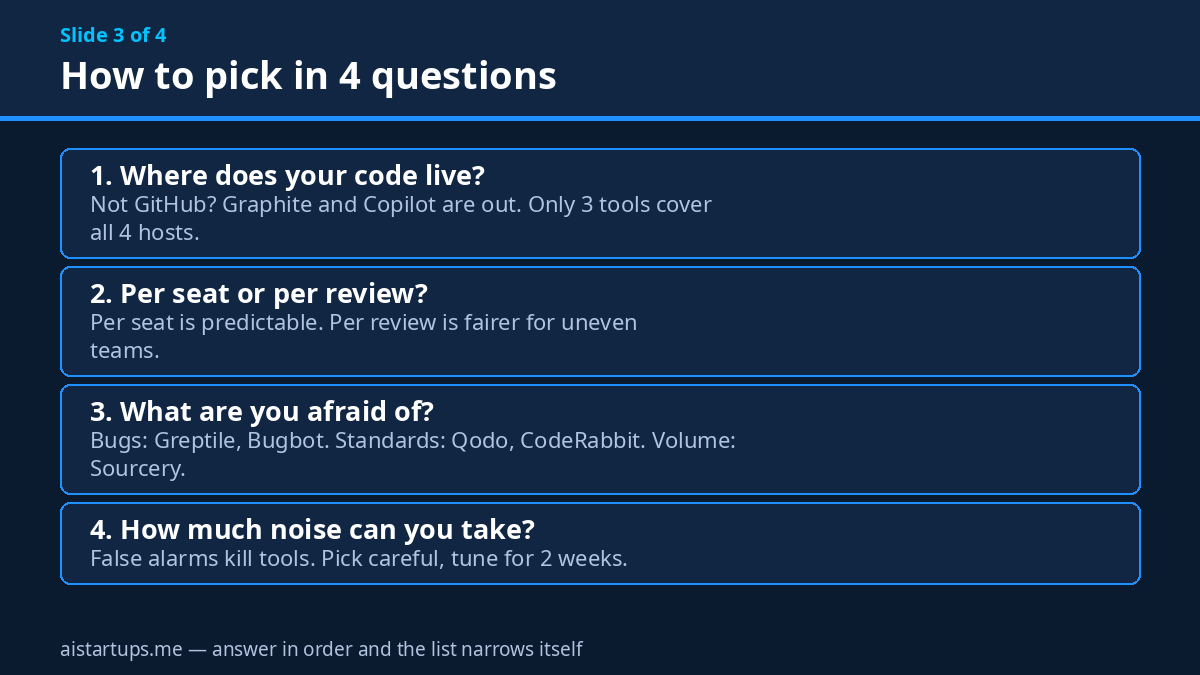
Forget the feature matrices for a minute. Answer these four questions in order and the list narrows itself.
1. Where does your code live? GitHub only? All seven work. GitLab? CodeRabbit, Greptile, Qodo, Sourcery, and Bugbot — Graphite and Copilot are out. Bitbucket or Azure DevOps? CodeRabbit, Qodo, and Bugbot — that’s it. This question alone kills half the list for a lot of teams, which is why it’s first.
2. Do you want to pay per seat or per review? Per seat (CodeRabbit, Sourcery, Graphite, Copilot) is predictable: the bill is the same every month, and a busy week costs nothing extra. Per review (Greptile, Qodo, Bugbot) is fairer for uneven teams — if two developers open 80% of the PRs, you pay for 80% of the reviews. But it needs watching. If your finance person hates surprises, pick per seat. If your team hates paying for seats that never open a PR, pick per review.
3. What are you actually afraid of? Be honest. If it’s bugs slipping through, pick the deepest reviewer — Greptile’s graph, Bugbot’s eight passes. If it’s standards nobody follows, pick Qodo’s rules or CodeRabbit’s Learnings. If it’s the sheer volume of boring PRs, pick Sourcery’s auto-approve. If it’s the giant PR that nobody will review, pick Graphite’s stacking. Different fears, different tools. Most teams buy the tool that solves the fear they don’t have.
4. How much noise can your team take? Every AI reviewer produces false positives sometimes. The question is what your team does about them. If a developer sees three wrong comments and turns the tool off, you need the most careful reviewer you can get, even if it costs more. If your team will tune the rules and give feedback for two weeks, a noisier but cheaper tool gets better fast. This is the question nobody asks in the trial and everybody regrets skipping.
The same logic applies to the rest of your stack, by the way — picking tools by matching them to the actual problem instead of the longest feature list is how we approached our roundup of AI CRM tools for early-stage startups, and it holds up here too.
The honest downsides
I like these tools. I’d also be lying if I said they’re magic. Here’s what actually goes wrong, so you’re not surprised in week three.
First, the noise. Every tool on this list will flag something that isn’t a bug. A reviewer that never cries wolf is a reviewer that never says anything interesting. The fix is tuning — rules, ignore patterns, feedback on wrong comments — and the tools that learn from your feedback (CodeRabbit’s Learnings, Qodo’s Rule Miner, Greptile’s reaction learning) get quieter over time. The tools that don’t need you to do the tuning yourself. Budget an hour a week for the first month.
Second, the rubber stamp. This is the real risk, and it’s human, not technical. Once the team trusts the AI review, they stop reading the code. The AI catches 80% of the issues, the human catches 0% because the human stopped looking, and the 20% the AI misses sails straight into production. The fix is boring: keep a human approval required, rotate reviewers, and treat the AI review as a first pass, never the last word.
Third, context limits. An AI reviewer knows your code, but it doesn’t know your customers, your roadmap, or why you made that weird decision in 2024 that looks wrong and is actually load-bearing. It will flag things that are correct on purpose. That’s not a bug, it’s the boundary of what the tool can know. The best teams teach the tool their context — custom rules, guidelines files, links to the tickets that explain the weird parts.
The best review tool is the one your team doesn’t turn off in week three. Accuracy matters less than trust — and trust comes from tuning, not from the vendor’s marketing page.
Fourth, cost creep on usage billing. Greptile, Qodo, and Bugbot all charge for what you use, which is fair and also the easiest way to get a surprising invoice. Set spending caps where the tool offers them, pick your review depth deliberately, and check the burn weekly for the first month. Per-seat tools don’t have this problem, which is a genuine point in their favor.
And one more, because founders always ask: what about the code leaving your repo? Every tool here processes your code on their servers (unless you pay for self-hosting). Check the data terms, confirm there’s no training on your code, and if your customers have strict requirements, that’s a conversation to have before the trial, not after. Sourcery states it plainly — SOC 2 Type II, no training, no copies kept — and the others publish similar commitments. Read them.
Your week-1 rollout checklist
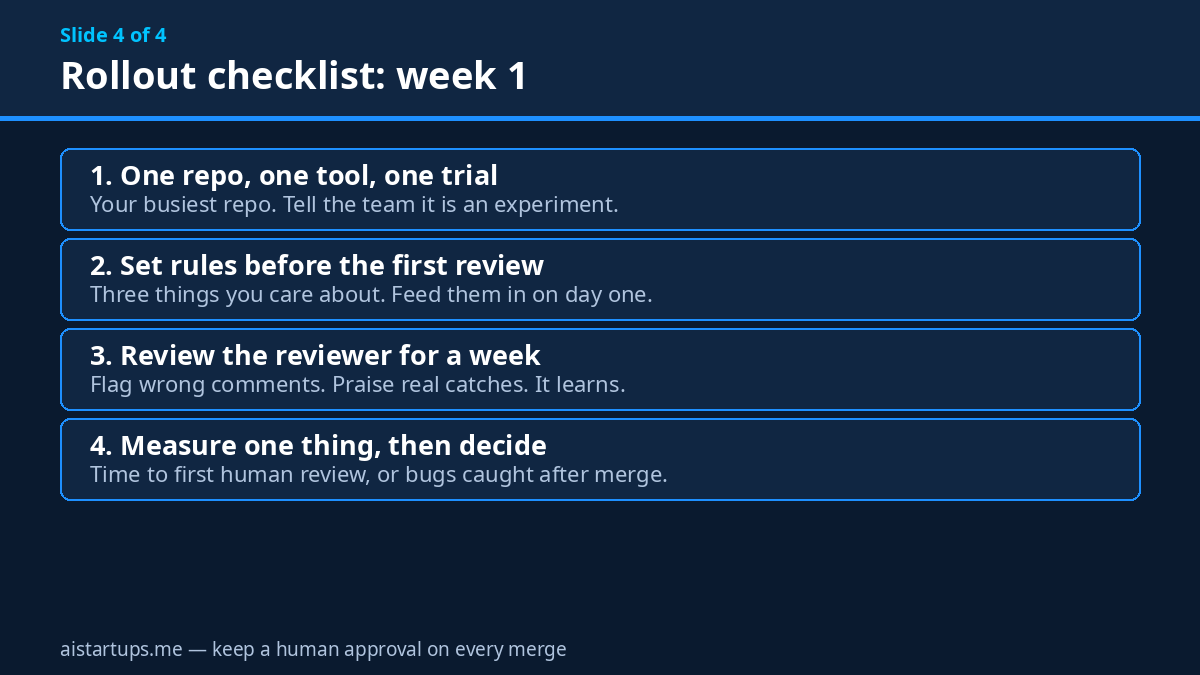
Don’t roll this out to the whole team on day one. That’s how tools get turned off. Here’s the rollout I’d actually run:
- Pick one repo and one tool. Your most active repo, the tool that survived the four questions above. Install it, turn on the trial, and tell the team it’s an experiment, not a policy.
- Set the rules before the first review. Write down the three things you actually care about — the patterns you always flag, the files nobody should touch without a second look, the style rules that matter. Feed them to the tool on day one instead of discovering the gaps in week three.
- Review the reviewer for a week. Every time it flags something wrong, say so in the tool. Every time it catches something real, say that too. This is the tuning that makes month two dramatically better than week one.
- Measure something simple. Time from PR opened to first human review. Number of review comments per PR. Number of bugs caught after merge. Pick one, write down the before number, and check it after a month. If nothing moved, the tool isn’t earning its keep, no matter how clever it is.
- Decide, then roll out. At the end of the trial, make a call: keep it, switch, or drop it. Then roll it out to every repo, set the spending cap, and write the two-paragraph guide for new hires so the tool survives your next onboarding.
And if the real bottleneck isn’t review but shipping — if you need the product built, the site rebuilt, or AI wired into something that already exists — that’s a different kind of help. The team at AISquadX does exactly that kind of build work for startups, and pairing a solid review tool with a team that ships clean code in the first place is a combination that works.
Frequently asked questions
Do AI code review tools replace human reviewers?
No — and any vendor that hints otherwise is selling you something. AI reviewers are fast, tireless, and good at the mechanical stuff: null checks, security patterns, cross-file inconsistencies. They’re bad at judgment calls, business logic, and knowing why a weird-looking decision is correct. The setup that works is AI first pass, human final call. Keep a human approval required on every merge and you’ll get the speed without the rubber stamp.
Which AI code review tool is best for a small team on GitHub?
If you want the most complete tool and don’t mind $24 per developer a month, CodeRabbit. If budget is the main constraint, Sourcery at $12 per developer a month is the cheapest real option. If your team already pays for GitHub Copilot, its built-in code review costs nothing extra and is the easiest yes. And if your codebase is tangled across many files, Greptile’s whole-codebase graph earns its keep fast.
How much should a 5-person team budget for AI code review?
Between $60 and $240 a month on list prices for about 100 pull requests a month — Sourcery at the low end, Qodo at the high end, with CodeRabbit at $120, Greptile around $100, and Copilot around $95 in the middle. Usage-based tools (Greptile, Qodo, Bugbot) vary with how many reviews you run and how deep they go, so model your own PR volume before you commit. Start with a trial and watch the first month’s burn.
Do these tools work with GitLab, Bitbucket, or Azure DevOps?
Some do, some don’t — and this is the fastest way to narrow the list. CodeRabbit and Qodo cover GitHub, GitLab, Bitbucket, and Azure DevOps. Greptile covers GitHub, GitLab, and Bitbucket. Sourcery covers GitHub and GitLab. Bugbot covers all four. Graphite and GitHub Copilot code review are GitHub-only (Copilot has Azure DevOps in public preview). Check your host before you trial anything.
Is my code used to train AI models by these tools?
The vendors on this list say no. Sourcery states it plainly — your code is used only for the review, no copy is kept afterwards, and it’s never used to train a model — and Qodo says the same. CodeRabbit, Greptile, and the others publish similar data commitments, and several offer self-hosted or single-tenant options on enterprise plans if your customers demand it. Read the data terms for the tool you pick before the trial, and turn on privacy mode where it’s offered.
The Bottom Line
Here’s my honest ranking for a typical five-person startup team on GitHub: if you want one tool and you want it to just work, buy CodeRabbit. If money is tight, buy Sourcery — $60 a month is a rounding error next to one escaped bug. If your codebase is a maze, try Greptile’s free Starter tier first and see what the graph catches. If you’re already paying for Copilot, turn on its code review and spend the money somewhere else. And if you’re on GitLab or Bitbucket, your shortlist is CodeRabbit, Qodo, and Bugbot, in that order.
The tool matters less than the habit, though. Install one this week. Tune it for a month. Keep a human on every merge. And if you’re a founder juggling all of this alongside everything else, our roundup of AI note-taking tools for founders might save you a few hours somewhere else in the week — because the goal was never to review code faster, it was to get your time back for the work only you can do.
Your reviewers are tired. Your PRs are getting bigger. Give the team a second pair of eyes that never sleeps — and keep your own eyes on the final merge.