
Here’s a scene I bet you know well. Your team ships a feature your customers have been begging for. Weeks of work. Real engineering. You write up the release notes, hit publish, and then… nothing. No spike in usage. No replies. A week later a customer writes in to support asking when that exact feature is coming.
It shipped. It was announced. Nobody saw it.
Real talk: that’s not a product problem, it’s a writing problem. And it’s one of the cheapest problems an AI startup can fix, because the fix isn’t more engineering. It’s twenty minutes of honest writing, done the same way every single release.
I’ve spent a lot of time staring at changelogs — good ones, bad ones, and the sad majority that read like someone pasted a commit log into a web page and called it a day. The difference between the ones people read and the ones people ignore is almost never the product. It’s the notes. This guide is everything I’ve learned about writing release notes for AI products specifically, because AI products have a few quirks — model updates, accuracy changes, things that get worse before they get better — that make honest, clear release notes even more important than they are for regular software.
Why Most Release Notes Get Ignored
Before we fix anything, it’s worth understanding how bad the baseline is. ProductLift cites a 2024 Pendo study finding that only 8% of SaaS users actively read product updates. Read that again: 92% of the features you ship go unnoticed by the people who would benefit most. That’s not a rounding error, it’s the whole ballgame.
And a 2023 UserGuiding study found that 67% of SaaS companies that maintain a changelog don’t actively promote it. The changelog page itself is the only distribution channel. So most teams do the writing, publish it into a void, and then wonder why adoption is flat.
Here’s the thing, though. Those numbers aren’t a reason to stop writing release notes. They’re a reason to write them better — and to actually put them in front of people. The teams that do both tend to find that release notes punch way above their weight. A note with a clear call to action, for example, drove 22% more first-time feature usage than one without, according to Chameleon’s 2024 Product Adoption Report.
So why do most notes fail? In my experience it comes down to three predictable mistakes:
- They’re written for the team, not the user. “Refactored inference pipeline” means something to your engineers. To a customer it means nothing at all. Your users don’t care what you built. They care what they can now do.
- They live somewhere nobody looks. A changelog page with no link from the app, no email, no in-app nudge. If the only way to find your notes is to already know they exist, you’ve built a library with no door.
- They’re vague when they should be specific. “Improved performance and fixed bugs” is the most common sentence in all of software, and it tells the reader exactly nothing. Improved how much? Fixed which bugs? For whom?
Fix those three and you’re already ahead of most of the market. The rest of this guide is the how.
Release Notes vs. Changelog: What’s the Difference?
People use these two terms like they mean the same thing, and honestly, in most startups they end up blurring together. But the distinction matters, because it tells you what to write and where it goes.
A changelog is the running record. Every change, in order, newest first. It’s the history of the product. The community standard at Keep a Changelog puts it well: a changelog is “a curated, chronologically ordered list of notable changes for each version of a project” — and its first guiding principle is that “changelogs are for humans, not machines.”
Release notes are the curated, user-facing story of a single release. One release, one note, written in plain language, framed around what changed for the customer. If the changelog is the archive, release notes are the announcement.
For a small AI startup, the practical setup is simple: your changelog page holds the full history, and each release gets a note written for customers. One page, two jobs. Don’t overthink the taxonomy — just make sure a real human can land on the page and understand what changed without a computer science degree.
“Changelogs are for humans, not machines.” — Keep a Changelog
That one line is the whole philosophy, by the way. If you ever catch yourself writing a note that only makes sense to someone with access to your codebase, you’ve broken the rule. Rewrite it.
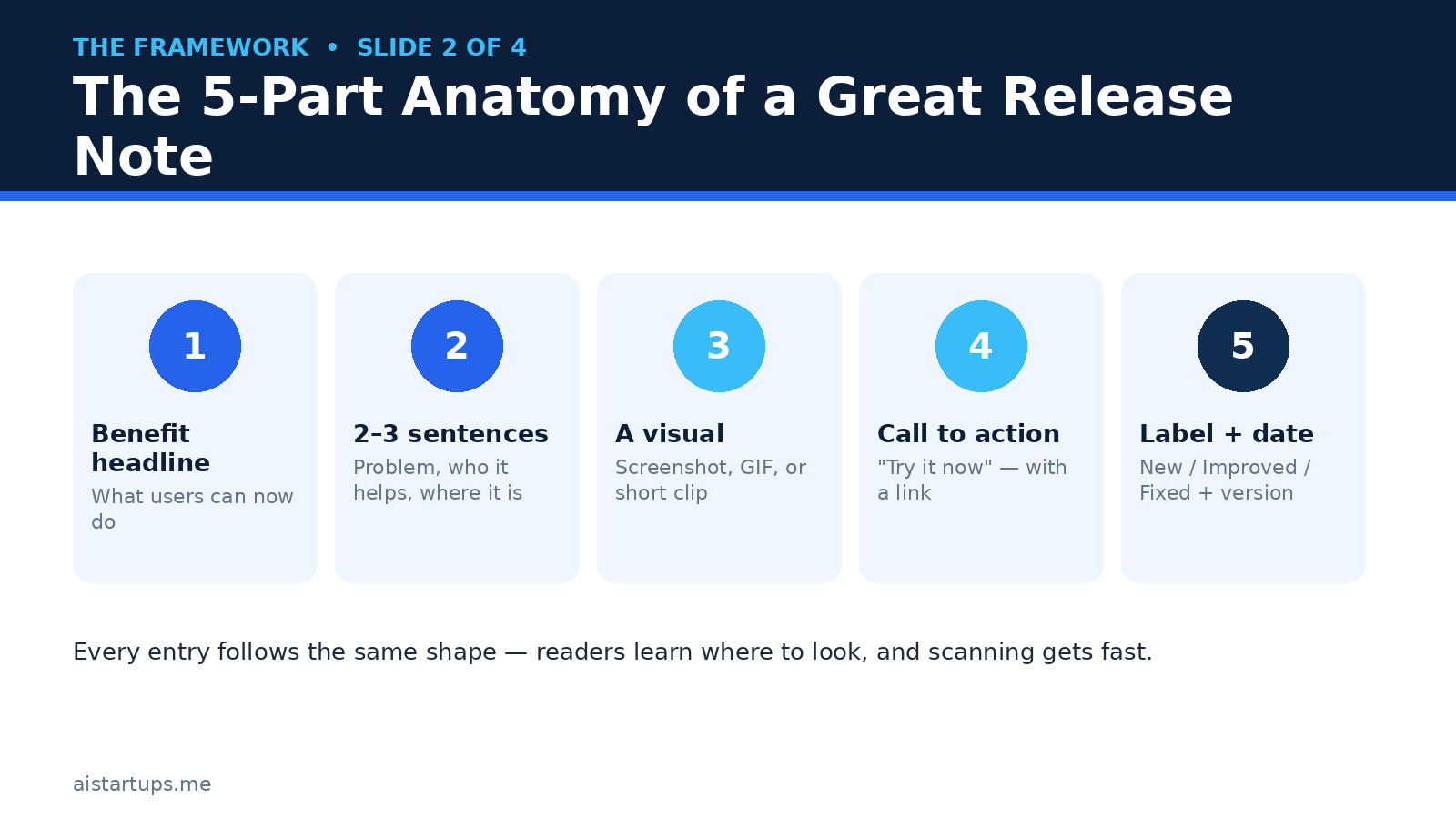
The 5-Part Anatomy of a Great Release Note
Every strong release note follows the same shape, whether it covers one small fix or a whole new model. Learn the shape once and every note after it gets easier — you’re filling in blanks, not staring at an empty page. ProductLift’s guide to release notes lays out a similar four-part structure, and Vershun’s take on the same problem lands in the same place: benefit first, short second, visual third, action last.
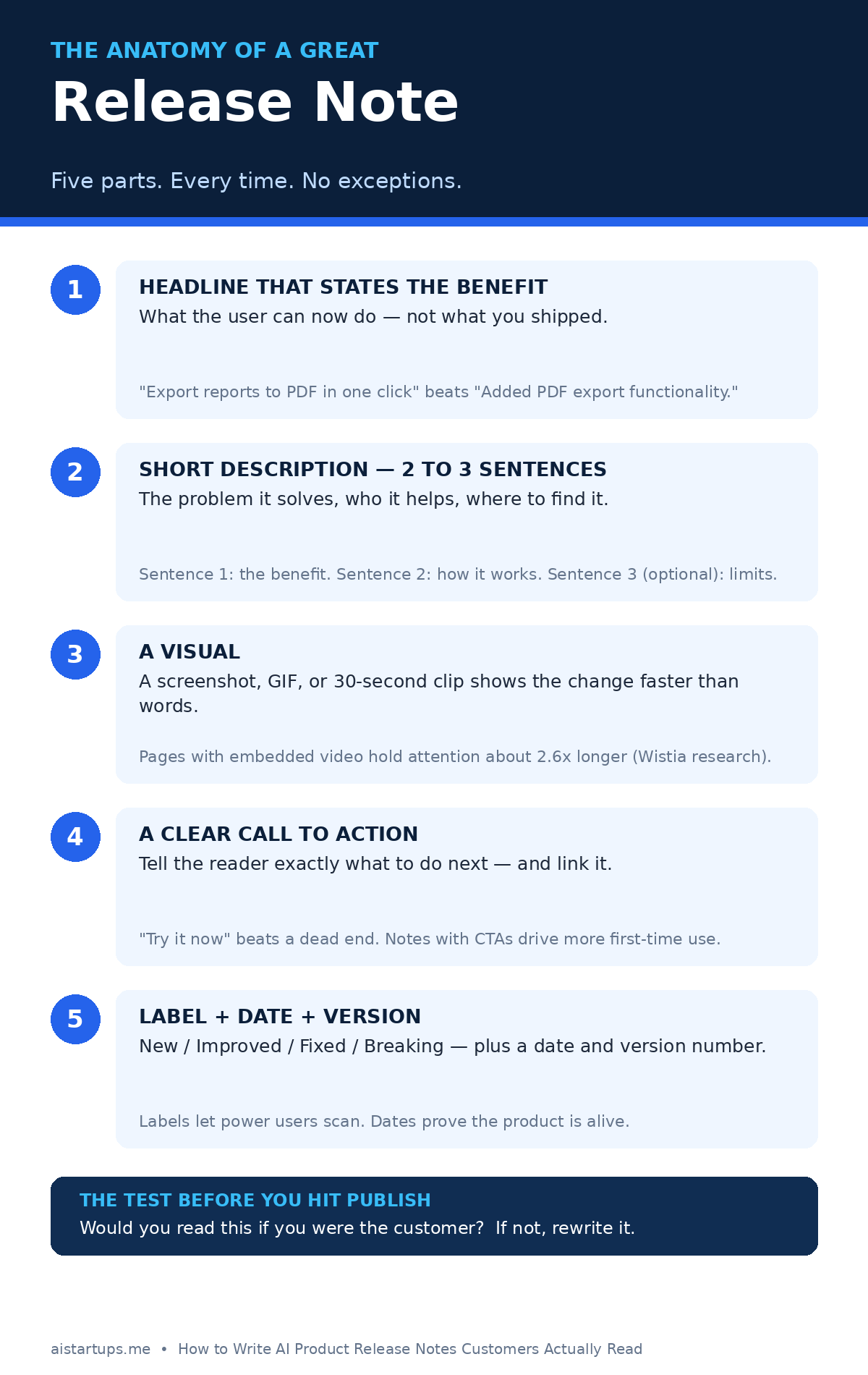
1. A headline that states the benefit
The headline is the only part most people will ever read. So make it count. The pattern is dead simple: what changed + why it matters.
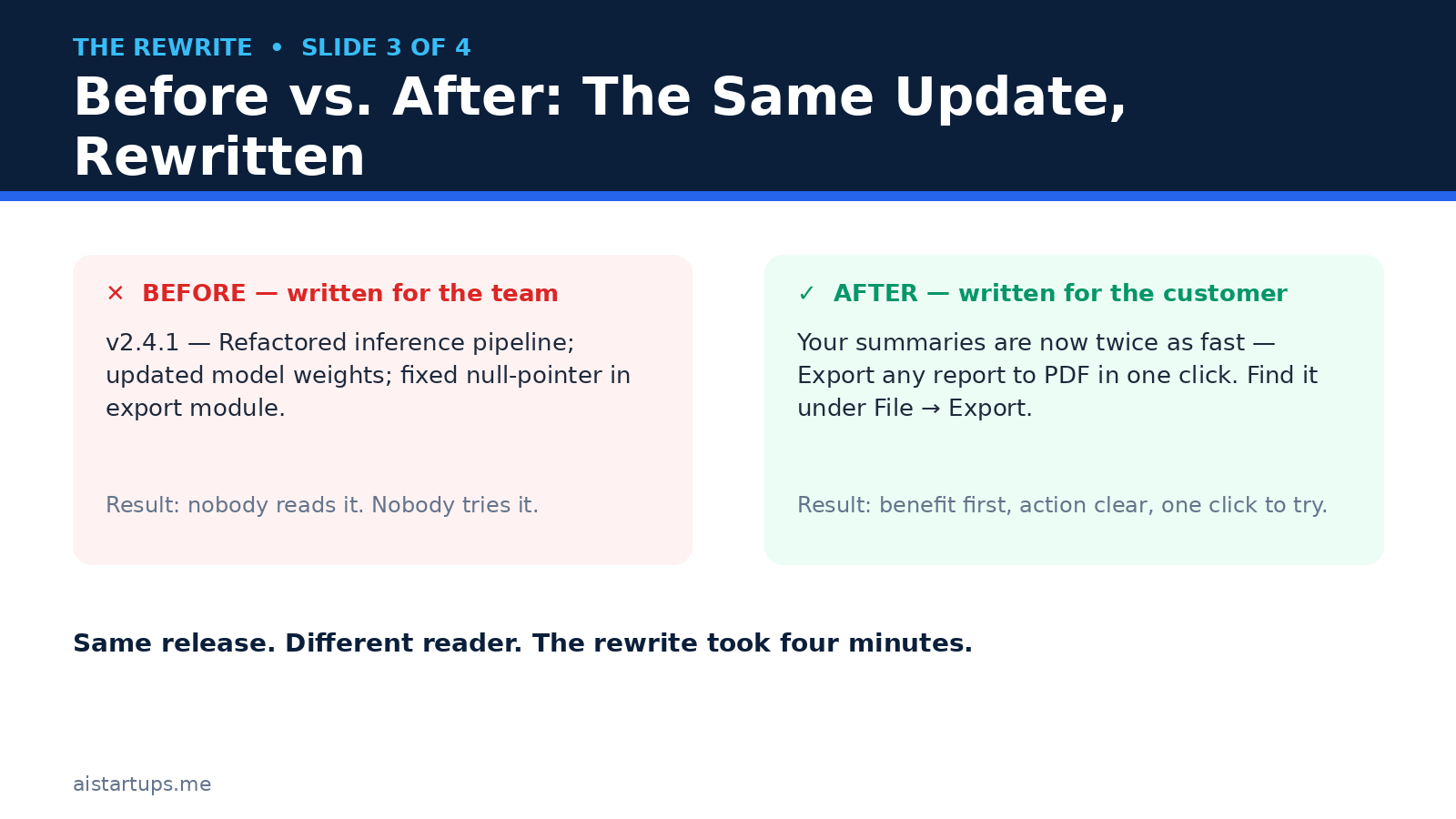
Weak: “Added PDF export functionality.” Strong: “Export any report to PDF in one click.” The first describes the feature. The second describes the user’s new ability. Same release, completely different pull.
A quick test: if your headline could apply to any product in your category, it’s too vague. “Improved AI accuracy” could be anyone. “Your summaries now catch numbers they used to miss” could only be you.
2. A short description — two to three sentences
Expand on the headline. That’s it. Two or three sentences, max. Sentence one: what the user can now do. Sentence two: how it works, or where to find it. Sentence three, only if you need it: an important limit or caveat.
Here’s a real-feeling example for an AI writing tool: “Meeting summaries now include action items automatically. You’ll find them at the bottom of every summary, assigned to the person who said they’d do it. It works in English for now — other languages are coming next quarter.”
Notice what that does. It tells you the benefit, the location, and the limit, in three sentences. No jargon, no architecture, no apology tour.
3. A visual, when it matters
A screenshot or a short GIF is worth a thousand words of release notes — and honestly, that’s underselling it. Wistia’s research found that pages with embedded video hold attention about 2.6 times longer than text-only pages. For a visual change, a picture isn’t decoration, it’s the explanation.
For AI products this matters even more, because so much of what changes is invisible. A new model doesn’t look like anything. So show the output instead: a before-and-after of the same prompt, a side-by-side of the old summary and the new one. Let people see the difference rather than taking your word for it.
Skip the visual for pure bug fixes and backend work. Nobody needs a screenshot of a crash that no longer happens.
4. A clear call to action
Tell the reader what to do next, and link it. “Try it now” with a link beats a dead end every time. Remember that Chameleon number — notes with explicit CTAs drove 22% more first-time feature usage. The CTA is not marketing fluff; it’s the bridge between reading and using.
Match the CTA to the change. New feature? “Try it now.” Changed workflow? “See the updated guide.” Beta? “Join the waitlist” — and if you haven’t built one yet, our guide on how to build a waitlist that converts walks through the whole setup. Breaking change? “Read the migration steps” — and make sure those steps actually exist before you publish.
5. A label, a date, and a version
Every entry needs three boring little facts: a label, a date, and a version number (or just a date, if you ship continuously). The labels most teams use are New, Improved, Fixed, and Breaking — Keep a Changelog’s fuller set is Added, Changed, Deprecated, Removed, Fixed, and Security, which is worth borrowing if you have a technical audience.
Labels let power users scan. Dates prove the product is alive. Prospects absolutely do this, by the way — they open a changelog before they buy, and a page whose newest entry is eight months old reads like a closed shop. Appcues’ roundup of release note examples from real SaaS companies makes the same point: a changelog doubles as a liveness check, and buyers (and their AI assistants) read it before they ever talk to sales.
Writing Release Notes for AI Products Is Different
Okay, so the framework above works for any SaaS product. But AI products have four quirks that change the job, and if you ignore them your notes will either mislead people or read like you’re hiding something. Neither is great for trust.
Model updates are invisible — say what actually changed
When you swap in a new model or retrain the old one, nothing in the interface changes. The button is the same. The screen is the same. The output is different, and your users will notice — in good ways and bad ones.
So be specific about the change in terms a user can feel. Not “upgraded to v2 of our model” but “summaries are now about 30% shorter and keep the numbers your team actually asked about.” If you measured it, say the number. If you didn’t measure it, don’t invent one — say what you observed in testing, plainly.
And here’s the part most AI teams skip: say what got worse, or what changed sideways. Maybe the new model is faster but more literal. Maybe it handles long documents better and short ones about the same. Customers forgive trade-offs. They don’t forgive surprises.
Accuracy changes deserve their own note
If your product’s accuracy, quality, or output style changes in a way users can feel, that deserves its own entry — not a line buried in a bundle of fixes. “We retrained the classifier, so fewer of your support tickets get misrouted to the wrong team” is a real improvement with a real effect on someone’s day. Treat it like one.
This is also where honesty pays off in a way that’s hard to measure but easy to feel. AI products live and die on trust, and trust is built in exactly these moments: when you tell people what changed, including the parts that aren’t a clean win.
Breaking changes need a runway, not a footnote
Sometimes a model change breaks something — a prompt pattern that used to work, an output format a customer built a workflow around, an API response that shifts shape. Stripe is the team everyone points to here: their changelog flags breaking changes prominently, dates every API version, and links each entry to migration docs. The changelog announces; the docs teach.
For your product, the rule is simple. Breaking changes get their own note, their own label, a clear date for when the old behavior goes away, and a link to what to do instead. Never bundle a breaking change into a cheerful “and more!” roundup. And if you can, announce it before it lands — a deprecation note this month, a removal note next month. Keep a Changelog’s guidance is blunt on this point: if you do nothing else, list deprecations, removals, and breaking changes. Everything else is optional by comparison.
Show the output, not the model card
AI founders love model cards, benchmarks, and parameter counts. Customers do not. A benchmark score means nothing to the person deciding whether to trust your tool with their client report.
So when you ship an AI improvement, show a real example. Same input, old output, new output. Three lines each. Let the reader judge. It’s more persuasive than any benchmark, and it has the side benefit of being verifiable — which, in a market full of AI claims nobody can check, is a real differentiator.
Before and After: Rewriting Real-World Notes
Theory is nice, but rewrites are where this clicks. Here are three notes in the style most AI startups actually ship, and what they look like after the five-part treatment.
Example 1 — a new feature.
Before: “Added bulk export functionality to the dashboard.”
After: “Export all your reports at once — Select any number of reports and download them as a single ZIP file from the dashboard. It handles up to 500 reports in one go. Try it now.”
Same feature. The after version tells me what I can do, where it lives, and the limit. The before version tells me a feature exists somewhere, maybe.
Example 2 — a model update.
Before: “Updated to GPT-class model v3.2 with improved reasoning.”
After: “Your research briefs just got sharper — The new model catches contradictions between sources instead of smoothing over them. Try it on a brief with conflicting numbers and you’ll see the difference. No action needed — it’s live for everyone.”
Notice the after version never names the model version. Your customers don’t care, and if they do, the changelog entry can carry the technical detail below the fold. Lead with the human version.
Example 3 — a bug fix.
Before: “Fixed an issue where some users experienced errors.”
After: “Fixed: exports no longer fail on reports over 50 pages — If you hit a blank PDF on long reports last week, that was us. It’s fixed, and your failed exports from the last 7 days have been re-run automatically.”
The after version does something the before version never does: it tells the affected people that it was their problem, that it’s fixed, and that they don’t have to do anything. That’s the whole job of a bug-fix note. Also note the apology is one clause, not a paragraph. Own it, fix it, move on.
The 20-Minute Release Note Workflow
Good release notes feel like a lot of work until you have a system. Then they’re a habit — about twenty minutes per release, if you’re honest about it. Here’s the workflow I’d actually run at a small AI startup.
Step 1: Collect the raw material as you ship (5 minutes, spread out)
Keep a running “Unreleased” section at the top of your changelog — Keep a Changelog recommends exactly this, and it works because it spreads the work across the week. Every time something merges, someone drops one plain-language line into the Unreleased section. Not a commit message. A sentence a customer would understand.
If your team can’t write that sentence, that’s useful information. It usually means the change has no clear user benefit yet, and that’s worth knowing before you ship it.
Step 2: Draft from the customer’s chair (10 minutes)
At release time, sit down with the Unreleased list and ask one question per item: “what can the customer now do that they couldn’t do yesterday?” Write the headline first, then the two or three sentences. If an item has no good answer, it either gets cut or it gets grouped under a fix with its siblings.
A trick that helps: write the note before you ship, not after. Amazon’s “working backwards” habit — writing the press release before building the feature — sounds fancy, but the small version is just this. If the note sounds boring, the feature might be boring too, and it’s better to learn that on a Tuesday afternoon than after launch day.
This is also the moment to check your notes against what customers actually asked for. If you run customer discovery interviews — and you should, regularly — your release notes are where that work pays off publicly. “You asked for X, here it is” is the most powerful sentence in product communication.
Step 3: Add the visual and the link (5 minutes)
Grab the screenshot or record the 30-second clip. Add the CTA link. Check the label and the date. Read the whole thing out loud once — seriously, out loud — and cut anything that sounds like a press release. Then publish, and move on to distribution, which is the part most teams skip.
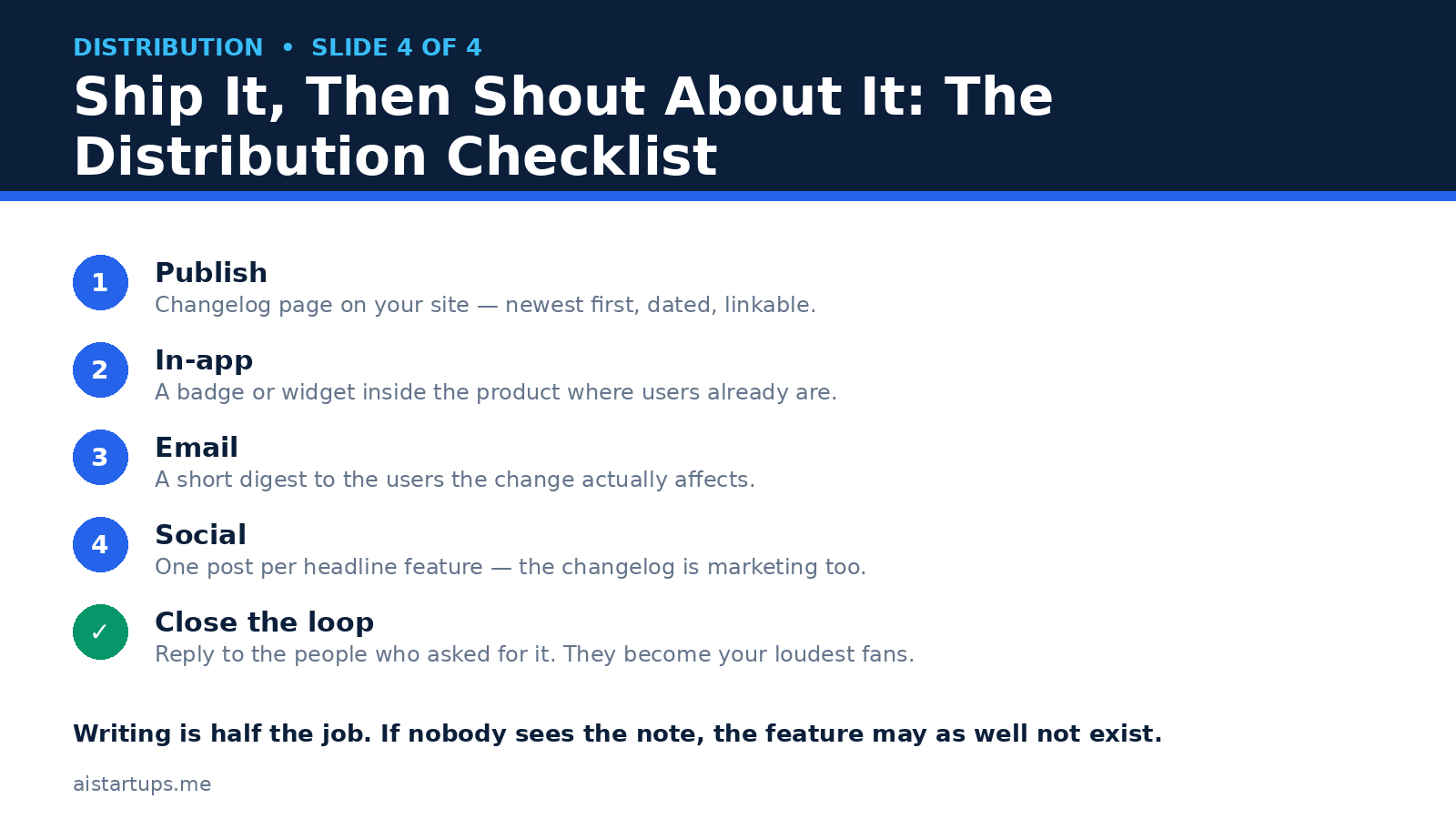
Distribution: Writing Is Half the Job
Here’s the uncomfortable truth from the top of this article: 67% of SaaS companies with a changelog never promote it. Writing a great note and then leaving it on a page nobody visits is like cooking a great dinner and eating it alone in the dark. Technically you did the work. Nobody benefited.
Distribution is where release notes turn into adoption. Five channels, in order of how much they matter for a small AI startup:
1. Inside the product
This is the big one. A small badge or “What’s new” panel inside your app reaches people who are already using the product — which is exactly the audience that matters. Dedicated changelog tools like Beamer exist mostly for this job: an in-app feed with an unread badge, so users see there’s something new without you having to chase them. Beamer’s free plan covers up to 1,000 monthly active users, with paid plans starting at $49 a month billed annually, according to the pricing roundups checked in October 2026 — but check the pricing page before you buy, because these numbers move.
If you don’t have a tool yet, even a simple hand-built “What’s new” page linked from your app’s sidebar works. The format matters less than the placement. Put it where users already are.
2. Email — but only to the people it affects
A short digest to the users the change actually touches beats a blast to your whole list. The new export feature goes to the people who export. The API change goes to the developers. Segmented email respects people’s attention, and respected attention is attention you get to keep.
Keep it short. Headline, two sentences, link to the full note. If your email is longer than the release note itself, something has gone wrong.
3. Social — one post per headline feature
Your changelog is marketing too. One post per headline feature, not one post per release — nobody on social media cares about your bug fixes, but they do care about the feature they asked for last month. Tag it, screenshot it, and link back to the full note. This is also where “you asked, we shipped” posts do their best work.
4. Close the loop with the people who asked
This is the highest-leverage move in the whole guide, and it costs nothing. When you ship a feature someone requested — in a support ticket, a sales call, a community post — go back and tell them. Personally. “Hey, you asked for bulk export in March. It shipped today. Here’s the link.”
That person becomes your loudest fan, because almost no company ever does this. Tools like Canny are built around exactly this loop: feature requests tied to a changelog, so the people who voted get notified when their thing ships. Canny’s paid plans start around $79 a month billed yearly. But honestly, at the early stage, a spreadsheet and a personal email do the same job better.
5. The changelog page itself
And yes, the page matters too. Newest first. Dated entries. Linkable sections so you can send someone straight to the change you mean. Linear’s changelog is the one most teams point to as the model — weekly entries, a short narrative about why the feature exists before what it does, a screenshot or video, then tight lists of fixes and improvements below. You don’t need Linear’s design budget to copy the structure. The structure is free.
One more thing about the page: it needs to exist on a site that looks like a real company. If your changelog lives on a marketing site that still feels half-built, that undermines the trust the notes are supposed to build. If you don’t have the in-house time to build or rework it, a web development studio like AISquadX can get the changelog, the docs, and the landing pages into proper shape while your team stays focused on the product.
Tools: What to Use (and What to Skip)
You do not need a tool to write good release notes. A page on your site and a habit will beat a fancy tool with no habit every time. That said, once the habit exists, tools remove friction — and friction is the thing that kills changelogs. A good comparison of the current options is the 2026 changelog tools roundup from HappySupport, which checked pricing against vendor pages in October 2026.
- Beamer — best if your main problem is getting updates seen inside the product. In-app feed, popups, push. Free up to 1,000 monthly active users; paid from $49 a month billed annually.
- Headway — the quickest setup of the bunch. A changelog live in an afternoon, free plan available, Pro around $29 a month.
- Canny — best if you already run feature voting and want the loop closed: request in, shipped note out, voter notified. Free for a small number of tracked users; Pro from $79 a month billed yearly.
- AnnounceKit — a polished dedicated changelog with widgets and targeting. Changelog plan around $49 a month billed annually.
- LaunchNotes — built for bigger product orgs with structured release communication. Growth plans start around $799 a month billed yearly — overkill for most early startups, worth knowing about for later.
- A page on your own site — free, fully yours, and honestly where most AI startups should start. You can always bolt a widget on later.
Prices change often, so treat the numbers above as a snapshot from late 2026 and check the vendor’s own pricing page before you commit. The point isn’t which tool — it’s that the tool should make the habit easier, not replace it. If a tool’s AI drafting feature writes notes your customers wouldn’t recognize as yours, turn it off. Your voice is the asset.
Mistakes That Kill Good Release Notes
Most of these I’ve done myself, which is how I know they’re real. A quick list to tape next to your keyboard:
- Leading with the version number. “v2.4.1” is not a headline. It’s metadata. Put it next to the date, not in the title.
- Bundling everything into one giant post. One change, one entry. A monthly mega-post with forty items is an archive, not an announcement. Group related fixes, but give the headline feature its own room.
- Burying breaking changes. Covered above, but worth repeating: breaking changes get their own note, their own label, and a runway. Hiding them is how you lose trust in a single afternoon.
- Writing “improved performance and fixed bugs” and stopping there. If that’s all you can say, either the release wasn’t worth a note or you haven’t asked the engineers what actually changed. Go ask.
- Forgetting the “what now.” Every note ends with something the reader can do. Try it, read the guide, join the beta, update your integration. A note with no next step is a dead end.
- Publishing once and never again. A changelog with three entries from last year is worse than no changelog at all — it tells visitors you stopped caring. Small, steady entries beat occasional epics. Even one honest note a week keeps the page alive.
- Hiding pricing and plan changes. If a release changes what a plan includes or what something costs, say so plainly in the note — and link to the pricing details. Customers find out anyway, and finding out from a surprise invoice is the worst version of the story. If you’re rethinking how you charge, our guide on how to price an AI SaaS product is a good place to start.
How Often Should You Publish?
Short answer: as often as you ship something worth mentioning. For most early AI startups that’s once a week or once every two weeks — a small batch of real changes, not a daily drip of trivia.
Don’t publish a note for every deploy. Nobody wants a changelog entry that says “fixed a typo in the settings page” — well, mostly nobody. Your power users might, and that’s what the full changelog history is for. But the announcement, the email, the in-app badge? Save those for things that change what someone can do.
And if you ship continuously, date-based entries work fine — no version numbers needed. What matters is that the newest entry is recent, the entries are dated, and a reader can tell at a glance whether this product is alive. That’s the real test. A changelog is a heartbeat. Keep it beating.
Frequently Asked Questions
How long should a release note be?
Two to three sentences per change, plus a headline. A whole release note covering one feature should fit in a short paragraph. If you’re writing a major release with several headline features, a few hundred words is fine — but each individual entry stays short. Your readers are scanning, not studying. Give them something scannable.
Should AI startups mention model versions in release notes?
Put the technical detail in the changelog entry, not the headline. Most customers don’t care whether you moved from one model version to another — they care what changed in their results. Lead with the effect (“summaries are now shorter and keep the numbers”), and let the version number live in the details below for the technical readers who want it.
What do you do when a new model makes something worse?
Say so, in the note, before your customers discover it themselves. “The new model is faster on long documents, but short summaries may read slightly more formal than before — we’re tuning this” is honest, specific, and it tells people you’re watching. Customers forgive trade-offs. They don’t forgive being kept in the dark, and in AI products the trust cost of a quiet regression is much higher than the cost of admitting it.
Do release notes actually help with marketing?
Yes, in three quiet ways. First, prospects read changelogs before buying — a live, recent changelog signals a product that’s actively improving. Second, every note is a reason to email, post, and re-engage users who went quiet. Third, changelogs are fresh, crawlable content that search engines and AI answer engines increasingly pull from. It’s not a replacement for real marketing — our lean AI startup marketing playbook covers that side properly — but it’s marketing that writes itself from work you’re already doing.
What’s the fastest way to start if we’ve never written release notes?
Start with the next release, not the last ten. Write one note using the five-part shape: benefit headline, two sentences, a screenshot, a call to action, a label and a date. Publish it on a simple page on your site and link it from inside your product. Then do the same for the release after that. After a month you’ll have a habit and a page with a pulse — and that’s a better changelog than most of your competitors have.
The Bottom Line
Look, nobody’s customers are sitting around thinking “I wish this company wrote more release notes.” That’s not the point. The point is that every time you ship something, you have a choice: tell people about it in a way that makes them try it, or let it sink without a trace while your competitors’ changelogs do the talking.
The framework is simple enough to fit on a sticky note. Benefit headline. Two or three sentences. A visual when it matters. A call to action. A label and a date. Then put it where people actually are — in the product, in their inbox, in front of the people who asked for it.
For AI startups the stakes are a little higher than for regular software, because your product changes in ways users can feel but can’t see. Model updates, accuracy shifts, output style changes — all of it invisible unless you say something. Honest notes about those changes are how you build the trust that makes people stick around when the next model update lands.
So here’s my challenge: write the note for your next release before you ship it. If it sounds boring, that’s information. Fix the note, or fix the feature. Either way, your customers win — and they’ll actually know about it this time.