
Real talk: most founders don’t have a research problem. They have a research habit problem. I know, because I’ve been the founder with 47 open tabs, three half-read PDFs, a competitor’s pricing page from 2023, and a gut feeling I’m about to build the wrong thing. The information was all there. I just had no system for turning it into a decision.
That’s what this article is actually about. Not “AI is amazing” — you already know that — but which of these research tools earns a spot in a founder’s week, and which ones just eat a subscription. I spent the last few days reading the actual pricing pages (all eight of them, on November 15, 2026), checking what each tool’s research feature really does, and being honest about where each one falls short. Every price below comes from the vendor’s own site. Where a vendor hides the number or only publishes annual prices, I say so.
Here’s the thing most roundups won’t tell you: these tools don’t do the same job. A literature-review tool and a competitor-intel database aren’t rivals. They’re different instruments. So I picked eight tools that cover the four kinds of research a founder actually does — quick questions, deep reports, reading the academic literature, and checking out competitors — and I’ll tell you which one fits each job. If you only want the short version, skip to the top 3 below. If you want the full picture, keep reading.
One more thing before we start. If you’re still building your general AI toolkit — the chatbots, the note-takers, the everyday helpers — my guide to AI tools for startup founders covers that ground. This article goes one level deeper: it’s about research specifically, the part where a wrong answer costs you a quarter.
How I Picked These 8 (and What I Ignored)
There are dozens of AI research tools now. I narrowed it to eight by asking one question about each: would a startup founder use this at least once a week to make a real decision? If the answer was “only if they have a PhD and a research budget,” it didn’t make the cut. If it was “yes, and it answers a question they’d otherwise spend an afternoon on,” it did.
I also drew a hard line on citations. A research tool that gives you answers without showing its sources is just a chatbot with confidence issues. Every tool on this list either cites its sources by default or works from documents you supply yourself. If it can’t show its work, it’s not in this article. (That rule alone killed half the tools I looked at.)
And look, prices change. Every number here is what the vendor’s own pricing page showed on November 15, 2026, in US dollars. Where a vendor shows annual prices, I give you both the annual and the monthly number, because the gap between them is usually 20 to 40 percent — and that’s not a rounding error, that’s real money over a year.
The Short Version: My Top 3 Picks
If you don’t have time for 4,000 words — fair enough, you’re busy, I get it — here are the three I’d shortlist first:
- One tool for everything, right now: Perplexity Pro. It’s the fastest way from a question to a cited answer, and at $20 a month it’s the cheapest deep-research entry point that actually works.
- Best single subscription if you live in Google: Google AI Pro at $19.99 a month. It buys you Gemini Deep Research and the paid tier of NotebookLM in one payment — two tools on this list for the price of one.
- Best for evidence that holds up: Consensus Pro at $12 a month billed annually. When your claim needs to survive a room full of skeptics — investors, partners, a technical co-founder — peer-reviewed sources are the only ones that do.
Everyone else on the list has a real reason to exist too. ChatGPT Deep Research writes the longest reports. Elicit is the strongest literature-review tool. Claude Research is the pick if you already live in Claude. Crunchbase is the only one that knows who just raised money. Keep reading for the full picture.
Comparison at a Glance
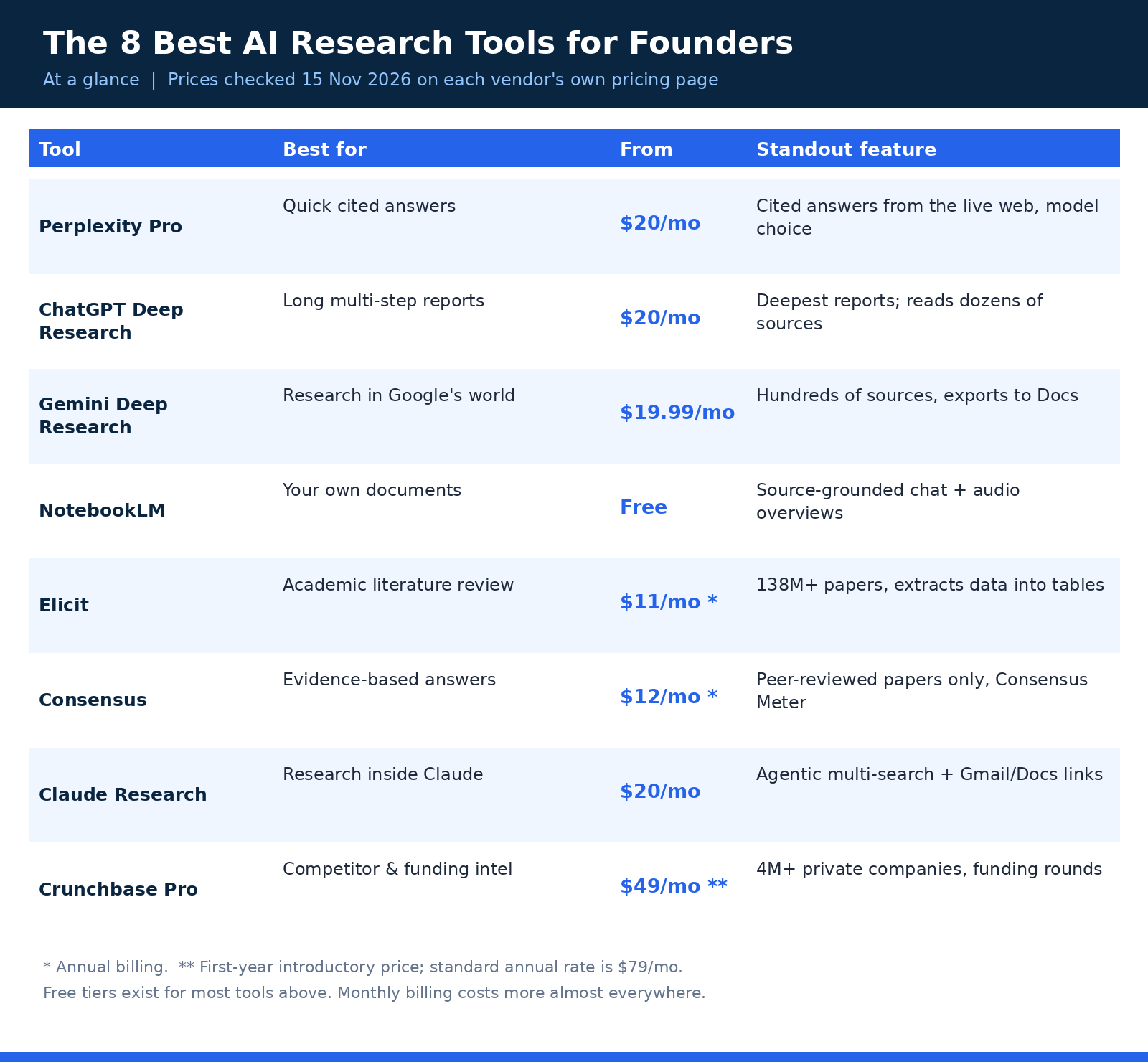
| Tool | Free plan | Paid from | Best for | Standout feature |
|---|---|---|---|---|
| Perplexity Pro | Yes — limited daily use | $20/mo | Quick cited answers | Live-web answers with citations |
| ChatGPT Deep Research | Yes — limited deep research | $20/mo (Plus) | Long multi-step reports | Deepest, most structured reports |
| Gemini Deep Research | Yes — Thinking model | $19.99/mo (AI Pro) | Research in Google’s world | Hundreds of sources, Docs export |
| NotebookLM | Yes — generous limits | Free (Plus from $4.99/mo) | Your own documents | Source-grounded chat, audio overviews |
| Elicit | Yes — Basic, unlimited search | $11/mo (Academic Plus) | Academic literature review | 138M+ papers, data extraction |
| Consensus | Yes — 10 Pro messages/mo | $12/mo (Pro, annual) | Evidence-based answers | Peer-reviewed only, Consensus Meter |
| Claude Research | No — paid plans only | $20/mo (Pro) | Research inside Claude | Agentic multi-search + connectors |
| Crunchbase Pro | Yes — limited account | $49/mo (first-year annual) | Competitor & funding intel | 4M+ private companies, funding data |
All paid prices are the starting tier in US dollars, as listed on each vendor’s pricing page on November 15, 2026. Annual billing is the cheaper figure everywhere except where noted. Monthly billing costs more almost everywhere — usually 20 to 40 percent more.
1. Perplexity Pro — The Fastest Answer You’ll Actually Trust
Perplexity is the tool I open first, most days. Not because it’s the smartest — it isn’t, not for long reports — but because it’s the fastest honest answer on the internet right now. You ask a question, it searches the live web, and it comes back with an answer that has little numbered citations attached to every claim that matters. Click the number, see the source. That’s the whole trick, and it’s a bigger deal than it sounds. Most chatbots will happily invent a statistic and deliver it with total confidence. Perplexity at least shows you where it got the number.
What you’re paying for on Pro is range. The free plan gives you limited daily usage and basic models. Pro adds model selection — you can pick which AI model answers — plus Deep Research for the longer multi-step investigations, 4,000 bonus credits, and access to Perplexity Computer, its agent feature. The pricing page I read lists Deep Research as a Pro feature outright, which matters, because the free tier’s research is capped hard enough that you’ll feel it within a week of real use.
Here’s how I actually use it: quick questions with a shelf life. “What are the current interchange fees for this payment processor?” “Which states just changed their data-privacy rules?” “Who are the three biggest competitors in this niche and what do they charge?” Those are Perplexity questions. It reads the live web, so the answer reflects this month, not the model’s training cutoff. And because every answer is cited, I can forward the good ones to a co-founder without a disclaimer.
Pricing
Free costs $0 with limited daily usage and basic models. Pro is $20 per month, or $17 per month billed annually ($200 a year) — the pricing page shows the $17 annual figure, and the $20 monthly figure is what you pay if you don’t commit to a year. Max is $200 a month ($167 billed annually) with the highest limits and frontier models, which is overkill for almost every founder I know. My advice: start free, and the week you hit the daily cap twice, pay the $20. (Perplexity pricing)
Best for
Daily research questions, fast fact-checks, market sizing on the fly, and any question where the answer changes month to month. It’s also the best tool on this list for a founder who hates waiting — answers arrive in seconds, not the five-to-thirty minutes a deep research agent takes.
Honest downsides
Perplexity’s answers are short by design. Ask it for a 20-page competitive analysis and you’ll get a good summary, not a 20-page report — that’s ChatGPT’s job, below. And the usage limits on Pro aren’t published as fixed numbers anymore, which I don’t love: the company has cut allowances before without changing the price, so treat “higher limits” as a direction, not a promise. Still, for the daily question habit, nothing else on this list is as fast.
2. ChatGPT Deep Research — The Longest Reports, for Better or Worse
ChatGPT Deep Research is the heavyweight. You give it a big, messy question — “map the competitive field for AI meeting tools, with pricing, funding, and positioning” — and it goes away for five to thirty minutes, reads dozens of sources, and comes back with a structured report that looks like a junior analyst wrote it. Sometimes it genuinely feels like one did. Sometimes it feels like a junior analyst who was in a hurry. Both things are true, depending on the question.
The important detail is the quota, and OpenAI is cagey about it now. The pricing page lists Deep Research as “limited” on Free and Go, “expanded” on Plus, and “maximum” on Pro — but it no longer prints a per-plan task count. That’s a real change from a year ago, and it means you can’t buy Plus expecting a specific number of reports a month. What you can say: Plus gets you the full feature, Pro gets you much more of it, and the free tier is a taste, not a workflow.
Where it shines is synthesis at scale. I asked it to compare pricing models across a whole category once, and it came back with a table I would have spent a day building — with sources attached to most rows. Where it stumbles is judgment. It will treat a vendor’s own blog and an independent review as equally trustworthy unless you tell it not to. So my rule: give it a plan before it starts (it asks clarifying questions — answer them, don’t skip them), and always read the sources on the three claims that matter most. The report is a draft. You’re the editor.
Pricing
Free costs $0 with limited deep research. Plus is $20 per month with expanded deep research, advanced reasoning models, and expanded uploads and memory. Pro comes in three tiers — $100, $200, or $500 a month — with maximum deep research, Pro reasoning, longer agent sessions, and monthly API credits. For most founders, Plus is the right tier; Pro only makes sense if you’re running deep research every single day. (ChatGPT pricing)
Best for
Big one-off investigations: entering a new market, mapping a category, writing a strategy doc that needs receipts. If the question takes more than an hour of human research, this is the tool for it.
Honest downsides
The reports are long, and long means more places for a wrong number to hide. I’ve caught it citing a 2024 price as current and blending two competitors’ features into one. And the unpublished quotas are a real annoyance — you only find out your limit when you hit it. If you run deep research weekly, keep Perplexity around for the quick stuff so you’re not burning your best reports on questions a search could answer.
3. Gemini Deep Research — The Google-Native Option (and the Best Bundle)
Gemini Deep Research is Google’s answer to the same problem, and it has one advantage nobody else on this list can copy: it lives inside Google’s world. The reports it writes can pull in your Gmail and Drive, export straight to Google Docs, and the whole thing sits next to the search engine you’re already using. Google’s own page says Deep Research can analyse hundreds of sources in real time and turn them into a comprehensive report in minutes — competitor deep dives, industry overviews, that kind of thing.
Here’s the part that surprised me when I read the plans page: the free tier gets Deep Research too, running on the Thinking model. What the paid plans buy is the higher-quality Pro model, higher limits, and four times the free tier’s usage on Pro. So unlike ChatGPT, where the free tier is a teaser, Gemini’s free tier is genuinely usable for occasional research. The paid tier is for people who do it every week.
The reports themselves are solid — well-structured, heavily sourced, easy to export. Where Gemini lags ChatGPT slightly, in my experience, is the reasoning depth on really tangled questions. Where it wins is the ecosystem: if your startup already runs on Gmail, Docs, and Drive, the research lands where your work already lives, and that friction difference adds up over a month.
Pricing
Free costs $0 and includes Deep Research on the Thinking model. Google AI Pro is $19.99 per month with the higher-quality Pro model, four times the free usage limits, 5 TB of storage, and Gemini inside Gmail and Docs. Google AI Ultra starts at $99.99 a month (five times Pro’s limits) with a $249.99 tier above it — that’s for heavy generative-media users, not researchers, and I’d skip it for this job. Pro also includes the paid tier of NotebookLM, which makes it the best bundle on this list. (Google AI plans)
Best for
Founders already living in Google Workspace, anyone who wants research reports that land directly in Docs, and teams that want two tools (Deep Research plus NotebookLM) for one $19.99 payment.
Honest downsides
The free tier’s daily and concurrent caps are real — run two big reports at once and you’ll feel them. And the model naming is a maze (Gemini 4 Argon, 3.1 Pro, Thinking) that changes every few months, so don’t pick a plan for a model name; pick it for the limits. Also, if your company runs on Microsoft 365 instead of Google, half the ecosystem advantage disappears.
4. NotebookLM — Research From Your Own Stuff (Free, and the Most Underrated Tool Here)
NotebookLM — Google now calls it Gemini Notebook, but everyone still says NotebookLM — is the odd one out on this list, and it might be the most useful. The other seven tools search the public web or the academic literature. NotebookLM searches your stuff. You upload your own documents — investor decks, customer interview transcripts, competitor PDFs, a pile of research papers — and it answers questions using only those sources, with a citation for every claim pointing back to the exact passage it came from.
Why does that matter for a founder? Because the most expensive research mistakes aren’t about the public internet. They’re about forgetting what your own customers already told you. I keep a notebook for every big decision now: the raw material goes in (call notes, survey exports, pricing pages saved as PDFs), and when I need to decide something, I ask the notebook instead of trusting my memory. It doesn’t hallucinate nearly as much as a general chatbot, because it can’t — it’s pinned to your sources, and it says so when the answer isn’t in them.
The other feature worth knowing about is Audio Overviews: it turns your sources into a short podcast-style conversation between two hosts. Sounds like a gimmick. It’s not — I listen to them on walks when I’m trying to absorb a dense set of interview notes, and I retain more than I do staring at a PDF. The free tier gives you 3 audio overviews a day, which is plenty.
Pricing
The Standard tier is free: 100 notebooks per user, 50 sources per notebook, 50 chat queries a day, and 3 audio overviews a day, per Google’s published limits. Plus comes with a Google AI Plus subscription at $4.99 a month and doubles most of those limits (200 notebooks, 100 sources each). The Pro tier comes with Google AI Pro at $19.99 a month (500 notebooks, 300 sources each). You can’t buy NotebookLM on its own — the paid tiers arrive bundled inside a Google AI plan — but the free tier is so generous that most founders won’t need to pay at all. (Google AI plans)
Best for
Customer research, competitive teardowns from your own collected material, due diligence on a pile of documents, and any decision where the evidence is sitting in files you already have. If you’re building a research habit from your meeting notes, pair it with a proper note-taking setup — I wrote about the best AI note-taking tools for founders if your notes are still a mess.
Honest downsides
It’s only as good as what you feed it. Upload junk, get junk back — politely cited junk, but junk. It also won’t search the live web the way Perplexity does, so it’s a complement to a web research tool, not a replacement. And the rename to Gemini Notebook has left the pricing pages and help docs in a confusing half-migrated state, so check the current plan page before you pay for anything.
5. Elicit — The Literature Review Machine
Elicit is the tool for the question that starts with “what does the research actually say?” If your startup touches health, education, climate, finance, or anything where a wrong claim can embarrass you in front of an expert, this is the tool that keeps you honest. It searches across more than 138 million academic papers — that number is on its own pricing page — and it doesn’t just find papers, it reads them: it pulls out methods, results, and data into tables you can compare side by side.
The feature that separates Elicit from a plain academic search is extraction. Ask it “what interventions reduce churn in subscription businesses?” and it will find the relevant studies, then build you a table with columns for sample size, method, and outcome. That’s the kind of work that takes a human researcher days. The paid plans also add a systematic review workflow that can screen 5,000 papers, which is the tool researchers use when they need to prove they didn’t cherry-pick.
Now, the pricing. This is where Elicit trips people up, so read this carefully. The pricing page has two ladders — Academic and Industry — and it opens on Industry by default. On the Academic ladder, Plus is $11 per user a month billed annually, and Pro is $39. On the Industry ladder, there’s no Plus at all, and Pro is $49. If you’re a founder, you’re probably looking at Industry prices unless you’re affiliated with a university — and yes, that means the cheapest paid plan you’ll actually see is $49, not $11. I quote both below because the $11 figure is all over the internet without that context, and it’s misleading if you don’t qualify.
Pricing
Basic is free with unlimited search across 138 million-plus papers, unlimited summaries, and chat with papers. Academic Plus is $11 per user per month billed annually ($132 a year) or $19 month-to-month, and adds exports plus table columns and clinical-trial search. Academic Pro is $39 per user per month billed annually ($468 a year) or $69 monthly, with 5x usage, the systematic review workflow, and API access. Industry Pro is $49 per user per month billed annually ($588 a year) or $75 monthly. The practical takeaway for a founder: budget $49 a month unless you’re academic. (Elicit pricing)
Best for
Health-tech, ed-tech, and science-adjacent startups; founders writing white papers or investor updates that cite real studies; anyone who needs to say “the evidence says” and mean it. Also strong for technical due diligence before you build something that depends on a scientific claim being true.
Honest downsides
The two-ladder pricing is genuinely confusing, and the free plan’s exports are locked behind payment — you can search and read all day, but the moment you want your findings in a spreadsheet, you pay. It’s also overkill if your startup doesn’t touch the academic literature at all; a B2B SaaS founder selling scheduling software doesn’t need systematic reviews. And like every AI summarizer, it can flatten nuance — always read the full paper before you quote a finding that matters.
6. Consensus — “What Does the Evidence Say?” in One Search
Consensus answers a narrower question than Elicit, and it answers it faster: you ask a question in plain English, and it searches peer-reviewed papers only, then gives you a synthesized answer with citations — plus a Consensus Meter that shows how the literature leans. Ask “does remote work reduce productivity?” and it won’t just hand you ten papers. It’ll tell you the balance of the evidence, and which studies say yes, which say no, and which say it’s complicated. For a founder writing a blog post, a pitch deck, or an investor update, that framing is gold.
The pricing changed in 2026, and a lot of roundups still quote the old $8.99 “Premium” tier. That tier is gone. The current ladder is Free, Pro, and Deep. Free gives you basic paper search plus 10 Pro messages and up to 3 Deep reviews a month — enough to try it properly. Pro is $12 a month billed annually and removes the cap on Pro messages, with 15 Deep reviews a month. Deep is $45 a month billed annually for people running literature reviews constantly, with 200 Deep reviews. The jump from $12 to $45 is steep, and honestly, most founders will never need Deep — the 15 reviews on Pro cover a busy month.
One more thing worth knowing: students, faculty, and US healthcare providers can claim up to 40% off, per Consensus’s own help pages. If that applies to you, the math gets even friendlier.
Pricing
Free costs $0 with basic paper search, 10 Pro messages a month, and up to 3 Deep reviews a month. Pro is $12 per month billed annually ($144 a year) or $20 month-to-month, with unlimited Pro messages, 15 Deep reviews a month, every research tool, and 500 API and MCP calls a month. Deep is $45 per month billed annually ($540 a year) or $65 monthly, with 200 Deep reviews and 2,000 API and MCP calls. Consensus says more than 5 million researchers, students, and clinicians use it. (Consensus pricing)
Best for
Quick evidence checks before you publish a claim, founder content that needs real citations, and anyone who wants the “what does the science say” answer without reading forty papers. It’s the cheapest paid tool on this list, and it shows — in a good way.
Honest downsides
Deep reviews are metered on every tier, even Deep — 200 a month is a lot, but it’s still a meter, and heavy users will feel it. The free tier’s 10 Pro messages a month runs out fast if you’re actually using it. And Consensus only searches peer-reviewed literature, so for market questions (pricing, competitors, trends) it’s the wrong tool entirely. Use it for evidence, not for markets.
7. Claude Research — Research Where You Already Think
Claude Research is Anthropic’s agentic research mode, and it’s the newest-feeling tool on this list. Instead of one search and one answer, it runs multiple searches that build on each other — it reads what it finds, decides what to look into next, explores different angles, and then writes up a report with citations. It also pulls in your connected tools: Gmail, Google Docs, and other connectors, so the research can include your own material alongside the public web.
The thing that makes it different from ChatGPT Deep Research is where it lives. If you already do your thinking in Claude — projects, long documents, coding, planning — Research keeps you in the same place. No exporting, no switching apps, no copying a report from one tool into the tool where the actual work happens. Anthropic’s own help docs say Research runs on its Opus model no matter which model you picked, which is why the reports read well. And it shows its work: the report comes with sources, and you can follow the chain back.
The catch is the usage pool. There’s no separate research counter — every run draws from the same usage pool as your chats and Claude Code, with limits that reset on a five-hour rolling window plus weekly caps. Run three big research jobs in an afternoon and you might find your regular Claude chats throttled too. That’s the trade-off of an everything-in-one-place tool: everything shares one meter.
Pricing
Free does not include Research at all — it’s a paid feature. Pro is $20 per month, or $17 per month billed annually ($200 up front), and adds Research, Claude Code, Opus access, and unlimited Projects. Max is $100 a month with five times Pro’s usage, and Ultra is $200 a month with ten times Pro’s weekly usage and no five-hour limit for verified accounts. For research use, Pro is enough to start; Max is for people who live in Claude all day. (Claude pricing)
Best for
Founders who already use Claude daily, teams that want research inside the same tool as their docs and code, and anyone who values the connected sources (your Gmail and Docs) as much as the web search. If you want the full Claude workflow picture, my Claude Sheets, Whiteboards & Meetings founder’s guide covers the rest of the suite.
Honest downsides
No free tier for Research means you can’t try it before paying $20 — and the shared usage pool means a heavy research day eats into your normal Claude use. It’s also the least transparent about limits: Anthropic says limits depend on message length, conversation size, and model choice, which is another way of saying “you’ll find out when you hit it.” And if you don’t already use Claude, there’s no reason to pick this over ChatGPT or Gemini for research alone.
8. Crunchbase Pro — Know Who Just Raised Money (and What Your Competitors Are Doing)
Crunchbase is the only tool on this list that isn’t an AI chatbot, and it’s the only one that answers the question founders ask most often: what are my competitors actually doing? Funding rounds, headcount signals, acquisitions, new product launches, who invested, how much, and when. It’s a database of more than 4 million private companies, and for competitive research there’s nothing else like it at this price. PitchBook does more, but PitchBook costs thousands a year and wants a sales call first. Crunchbase has a price on the page.
The AI layer is newer and worth knowing about: AI Search lets you ask questions in plain English instead of building filter queries, and Pro includes AI-generated company summaries plus base MCP usage, which means you can query Crunchbase data from inside ChatGPT or Claude. That’s a quiet but real shift — the database stops being a website you visit and starts being a source your AI tools can check directly.
Now the pricing warning, because this one bites people. Pro is listed at $49 a month billed annually — but that’s a first-year introductory price, shown against a struck-through $79. After year one, the standard annual rate is $79 a month. Monthly billing is $99 a month. So the honest way to budget is: $49 a month in year one, $79 a month after that, or $99 if you pay monthly. There’s a 7-day free trial, and I’d use it to test the one thing that matters: whether the companies you actually care about have complete profiles. Coverage is deep for funded startups and thin for bootstrapped ones, and that’s the difference between Crunchbase being worth $49 and being a waste of it.
Pricing
A free account exists with limited usage. Pro is $49 per month billed annually in the first year (standard annual rate $79 a month after that), or $99 a month billed monthly, with a 7-day free trial, up to 2,000 export rows a month, and saved lists and alerts. Business starts from $199 a month billed annually and adds team features and CRM integrations. Crunchbase’s pricing page renders dynamically, so confirm the live price at checkout before you commit.
Best for
Competitor tracking, fundraising research (who invested in whom, at what stage, at what valuation), sales prospecting, and market mapping. If your research question starts with “who” or “how much did they raise,” this is the tool.
Honest downsides
The renewal jump from $49 to $79 is the big one — set a calendar reminder for month eleven, or you’ll discover it on your card statement. Data quality varies: funded startups are covered well, bootstrapped and non-US companies less so, and some profiles go stale. And the export cap (2,000 rows a month) means you can’t just dump the whole database. Test it on your actual competitors during the trial before you pay for a year.
The Research Workflow That Actually Works
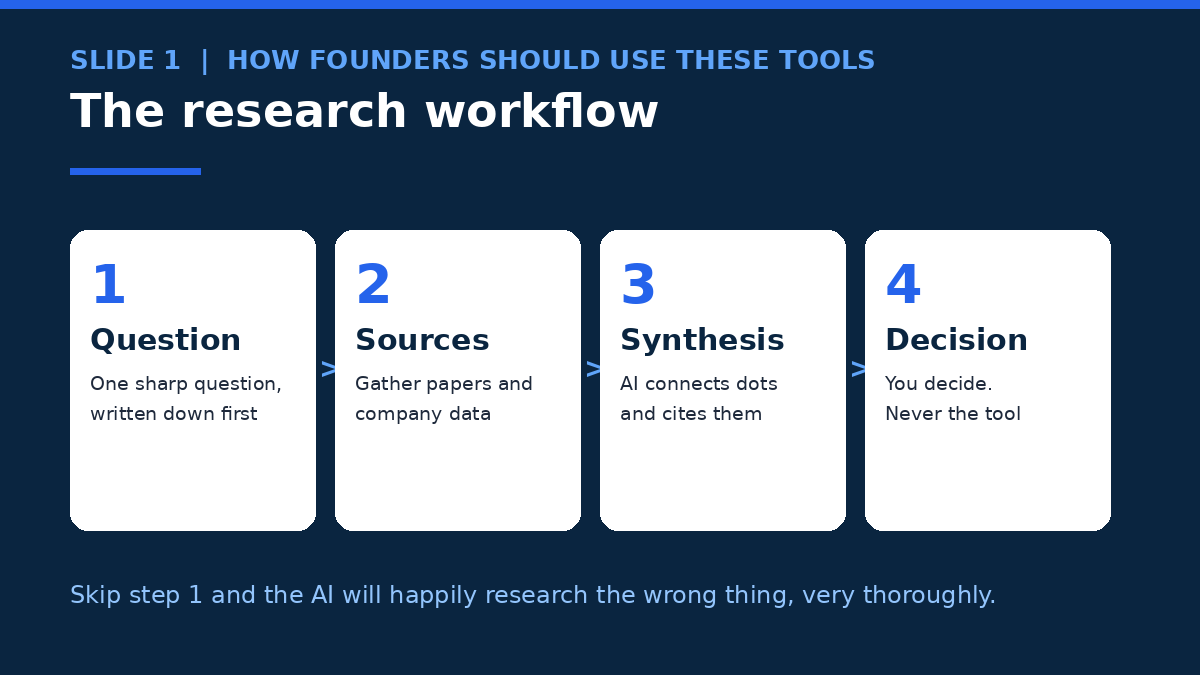
Here’s the uncomfortable truth about this whole article: the tools are the easy part. The workflow is the hard part. I’ve watched founders buy three subscriptions, run a dozen reports, and still make the decision on gut feel — because nobody wrote down the question before starting. So here’s the workflow I actually use, and the one I’d suggest you steal:
- Write the question down first. One sentence. “Should we price at $29 or $49?” beats “research pricing” every time. A sharp question is half the research — the AI can only be as focused as your prompt.
- Start fast, go deep second. Perplexity for the quick check: is this even a real question, or am I missing something obvious? Then one deep research run — ChatGPT, Gemini, or Claude — for the question that survives step one. Don’t start with the 30-minute report. Start with the 30-second answer.
- Check the sources on the three claims that matter. Not all of them — three. The price, the statistic, the competitor move that your decision actually depends on. Click through. If the source doesn’t say what the AI says it says, the whole report is suspect.
- Put it in your own notebook. Drop the report, the key sources, and your own notes into NotebookLM. Next month, when someone asks “why did we decide this?”, you’ll have the answer in one place instead of a dead link in a Slack thread.
- Decide, and write down why. Research that doesn’t end in a decision is procrastination with citations. One paragraph: what we decided, what evidence mattered, what would change our minds. That’s the whole deliverable.
And when the numbers get involved — pricing models, market sizing, unit economics — that’s where a different kind of AI tool earns its keep. My guide to AI data analysis tools for non-technical founders covers the tools that turn a pile of research into a spreadsheet you can actually argue with.
“The best research tool isn’t the one with the most sources. It’s the one that gets you to a decision you can defend — with citations you actually checked — before your competitor makes the same decision without any.”
What AI Research Gets Wrong (and How to Catch It)
Let’s be honest about the failure modes, because every tool on this list has them and the vendors won’t advertise them.
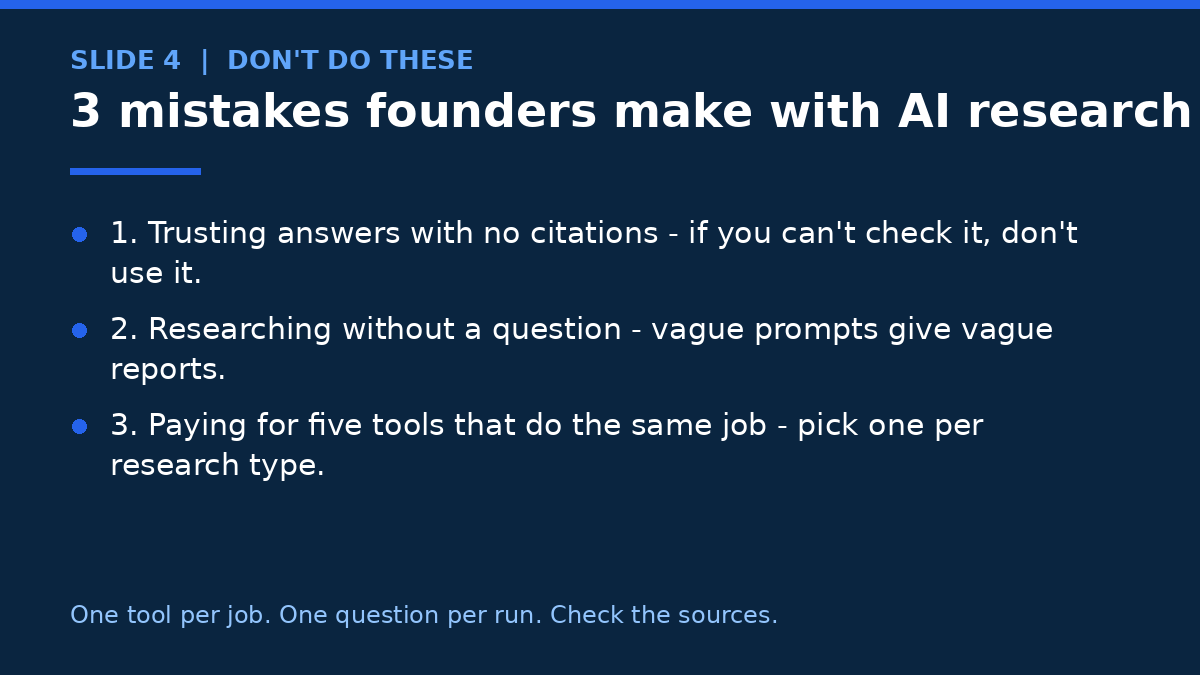
First, hallucinated citations. Deep research tools sometimes cite a real paper with a real link and then describe a finding that isn’t in it. The citation looks perfect. The claim is wrong. That’s worse than no citation at all, because it feels verified. The fix is boring and non-negotiable: click the source on anything that matters.
Second, stale data dressed as fresh. An AI can quote a competitor’s pricing from a page that was updated two years ago and present it as current, because the page still ranks and the model has no reason to doubt it. Perplexity is the least guilty here (it reads the live web), but even it can cite an old page. If a number would change your decision, check the date on the source.
Third, confident synthesis of thin evidence. Ask a deep research tool about a niche market with five real sources, and it will write you a beautiful report that quietly stretches those five sources into twenty paragraphs. The report isn’t lying — it’s padding. The fix is to ask for the source count up front, and to distrust any report that won’t tell you how much it actually found.
Fourth, the echo problem. If you ask three different tools the same question, you’ll often get the same answer — because they’re all reading the same top ten search results. Different tools, same sources. The way around it is to vary the inputs: add your own documents, search the academic literature, check the funding data. That’s exactly why this list has four different kinds of tool in it.
From Research to Something Real
Here’s where most research articles stop, and it’s where the real work starts. Research is only useful if something gets built afterward. If your competitive analysis ends with “we need a new landing page that positions us against X” or “the onboarding flow needs a redesign,” that’s no longer a research problem — it’s a build problem. And that’s the point where a lot of small teams stall, because the gap between a report full of findings and a shipped product is where momentum goes to die.
Sometimes the right move is to hand that gap to someone who closes it for a living. If your research produced a website, a product page, or an AI feature that needs building, a web development studio like AISquadX can take the findings and turn them into the thing — design, development, and AI integration included — while your team gets back to the next question. The research gets you the answer. Someone still has to ship it.
Frequently Asked Questions
What is the best AI research tool for a founder?
For most founders, Perplexity Pro at $20 a month is the best starting point — fast, cited answers to daily questions, with Deep Research included when a question needs more. If you live in Google’s world, Google AI Pro at $19.99 a month is the better deal because it bundles Gemini Deep Research and the paid tier of NotebookLM. And if your claims need to survive expert scrutiny, add Consensus Pro at $12 a month billed annually for peer-reviewed evidence.
Are there any free AI research tools worth using?
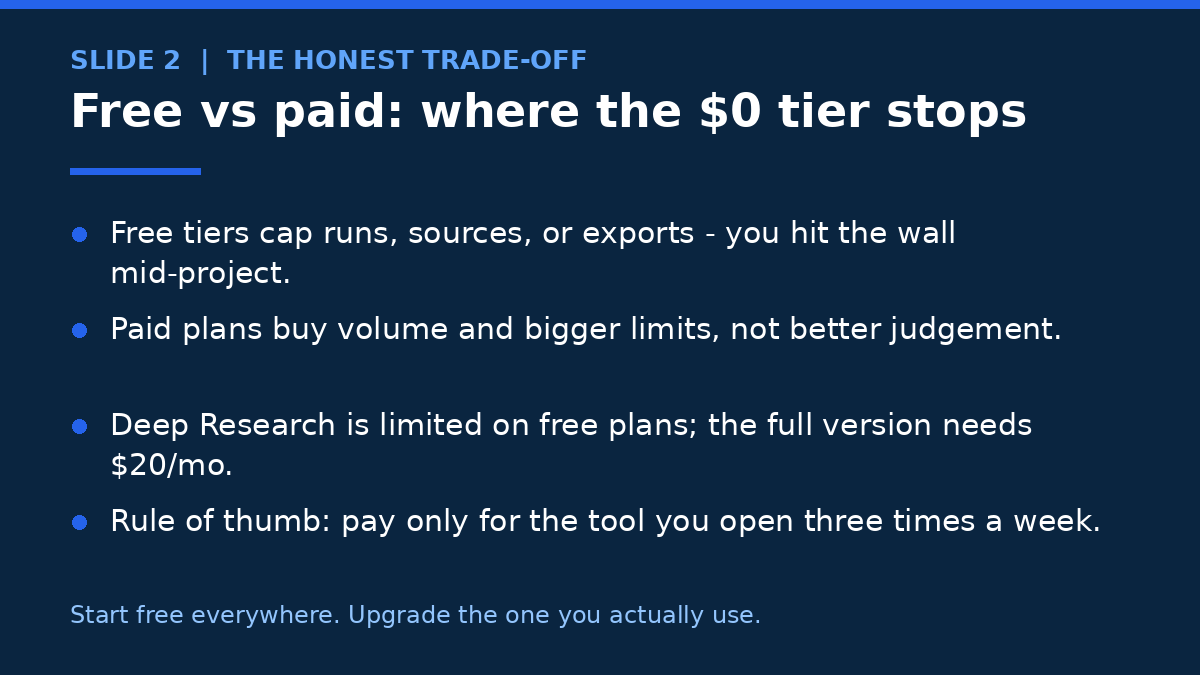
Yes. NotebookLM is free and genuinely generous — 100 notebooks, 50 sources each, and 3 audio overviews a day — and it’s the best free research tool on this list. Gemini Deep Research is free too, on the Thinking model, with real reports. Perplexity, ChatGPT, Elicit, and Consensus all have free tiers as well. The honest limit: free tiers cap runs, sources, or exports, so they work for occasional research, not for a weekly habit.
ChatGPT Deep Research vs Gemini Deep Research — which is better?
ChatGPT writes longer, more structured reports and asks clarifying questions before it starts, which usually makes the result more relevant. Gemini is faster to set up, exports straight to Google Docs, and its free tier is more usable. The deciding factor is your stack: Google Workspace teams should pick Gemini (and get NotebookLM in the same $19.99 subscription), while everyone else gets slightly deeper reports from ChatGPT Plus at $20 a month.
Can AI research tools replace hiring a researcher?
For most early-stage founder questions, yes — these tools do in minutes what used to take a junior analyst days. But they don’t replace judgment. They can’t tell which source is trustworthy, which finding actually matters, or when the evidence is too thin to support a decision. Think of them as a very fast research assistant, not a strategist. The decision is still yours, and the three sources you check yourself are the difference between research and wishful thinking.
How much should a founder budget for AI research tools?
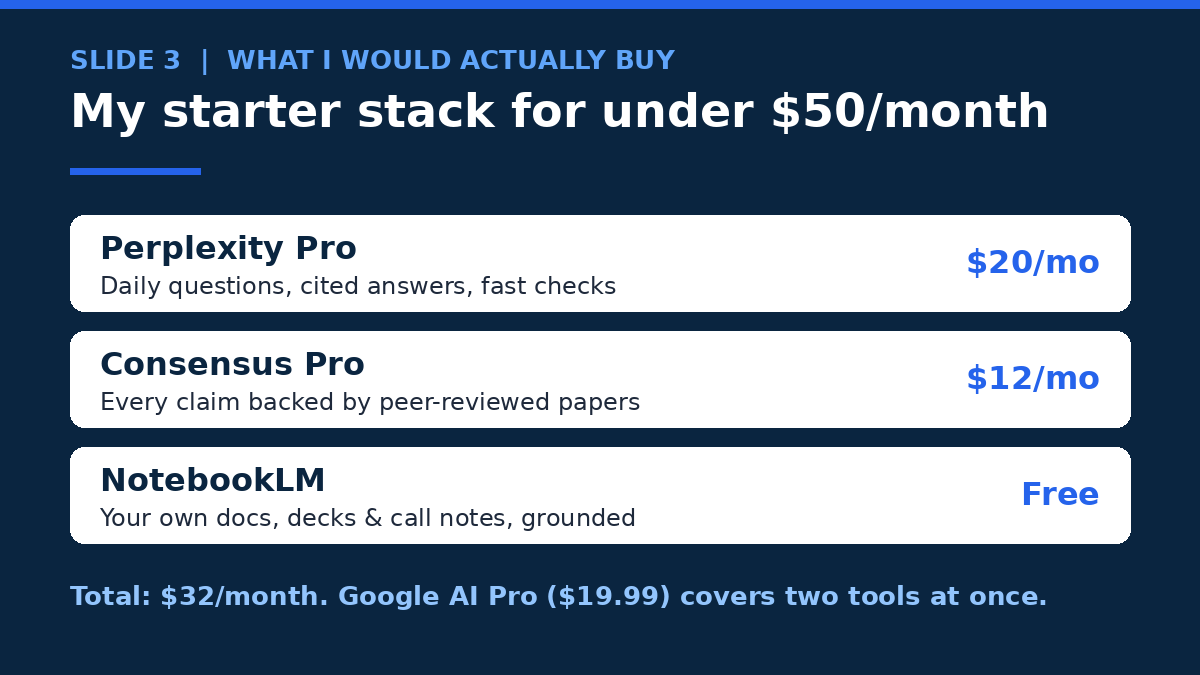
Start at $0 — NotebookLM and the free tiers cover your first month. When one tool becomes a weekly habit, pay for it: $20 a month for Perplexity Pro or ChatGPT Plus is the standard entry point. My starter stack is $32 a month (Perplexity Pro $20 plus Consensus Pro $12, with NotebookLM free), and Google AI Pro at $19.99 covers two tools at once if you’re in Google’s ecosystem. Don’t pay for five tools that do the same job — pick one per research type and stop there.
The Bottom Line
There isn’t one best AI research tool. There’s a best one for each kind of question, and the founders who research well own one tool per job. Perplexity for the quick question. ChatGPT or Gemini for the deep report. NotebookLM for your own documents. Elicit or Consensus when the claim needs evidence. Claude Research if you already live in Claude. Crunchbase when the question is about competitors and money.
My advice? Don’t buy all eight. Start free everywhere, and pay for the one you open three times a week — that’s the tool earning its keep. Run one real research question through it this week, something with actual stakes, and check the sources on the three claims that matter. The tool that still feels trustworthy at that point? That’s your tool. Commit to it, build the habit, and get on with deciding — because the research was never the point. The decision was.