
Real talk: your startup is sitting on answers it can’t read.
Somewhere in your Google Drive there’s a Stripe export with 4,000 rows in it. There’s an ad account burning money on creatives nobody’s properly compared. There’s a churn number you feel in your gut but couldn’t prove with a chart if someone put you on the spot. And every month you tell yourself you’ll “dig into the data this weekend.”
You won’t. Weekends are for sleeping.
Here’s the thing, though — the bottleneck was never your work ethic. It was the skill gap. Data analysis used to mean SQL, Python, pivot tables, and a person whose job title had “analyst” in it. Founders without that background had two options: guess, or wait. Both are expensive.
That gap is basically gone now. The current generation of AI data tools lets you upload a messy CSV, ask a question in plain English, and get back a chart, a table, and an explanation — no code, no formulas, no three-hour YouTube tutorial on VLOOKUP. I’ve spent the last few weeks testing what’s actually out there, checking the real pricing (not the “starting at” fantasy numbers), and figuring out which tools a non-technical founder should actually open on a random Tuesday.
Six made the cut. Let’s get into it.
What “AI data analysis” actually means now
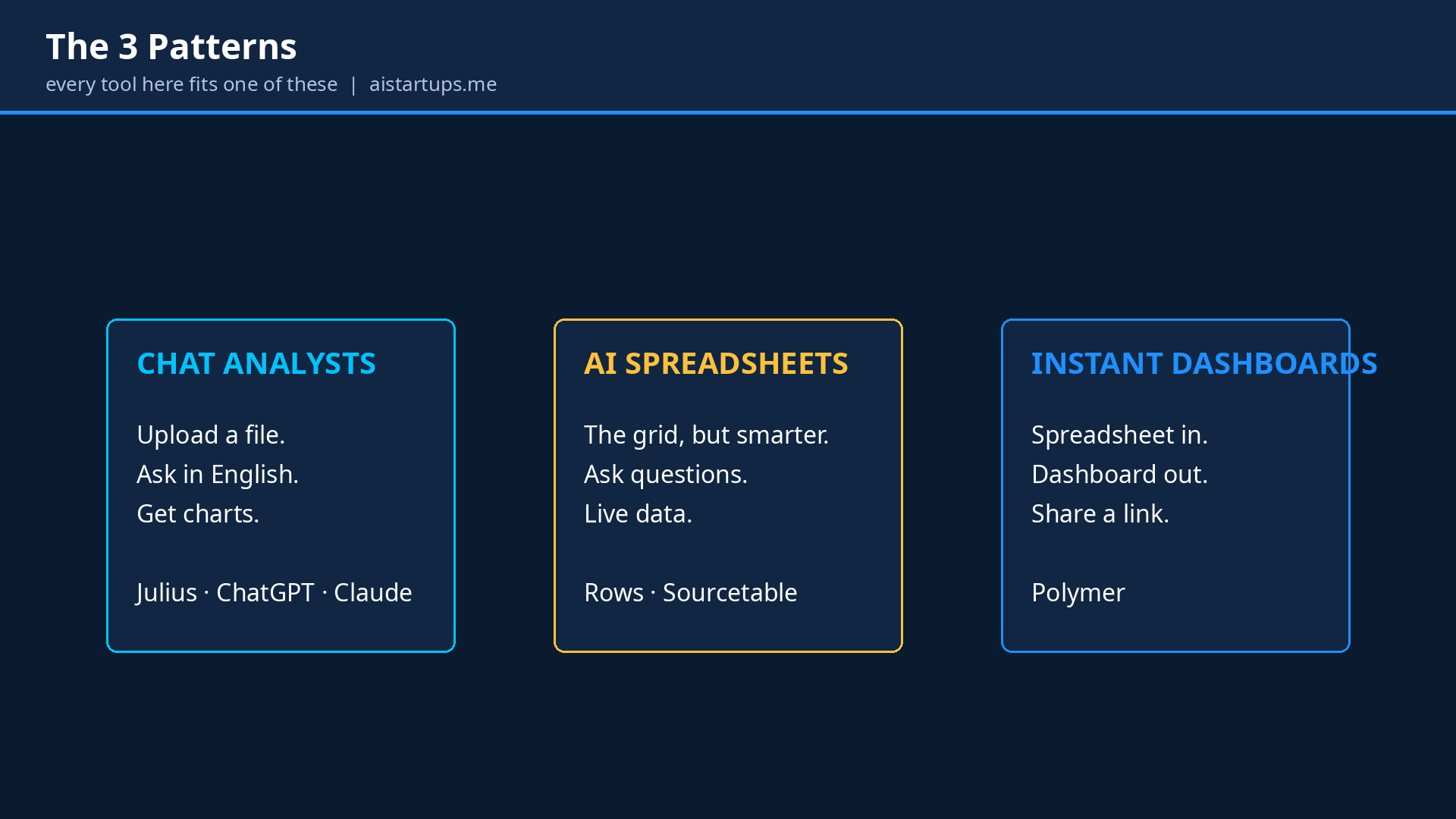
Quick orientation, because the category is a mess of marketing words. Every tool on this list does some version of the same trick: you give it data, you ask in normal human language, it figures out the technical part. But they cluster into three patterns, and knowing which pattern you need saves you from buying the wrong thing.
Chat-with-your-data tools are the simplest. Upload a file, type “which marketing channel has the best ROI by month,” get a chart. The AI writes code behind the scenes and shows you the result. Think of it as texting a really fast junior analyst.
AI spreadsheets look like the grid you already know, but the cells are smarter. You can ask questions in plain English, generate formulas by describing them, and pull live data from your other tools so the sheet updates itself. This is where you live if spreadsheets are already your second home.
Instant dashboards skip the analysis step almost entirely. Upload a spreadsheet, get a searchable, interactive web dashboard you can share with your team or your investors. No chart-building, no formatting hell.
Most founders need exactly one of these. Some need two. Nobody needs all six — this is a shortlist, not a shopping list.
1. Julius AI — the dedicated AI data analyst
If you only try one tool from this list, make it this one. Julius AI (at julius.ai) is the closest thing to hiring a data analyst who works at 3am, never complains, and costs less than your coffee budget.
You upload a CSV, Excel file, PDF, or even connect a database, then just… ask. “Clean this up and show me revenue by cohort.” “Run a correlation between ad spend and signups.” “Forecast next quarter from this.” Julius writes Python or R code, runs it in a sandboxed container, and hands you charts plus the actual statistical results. You can see the code it ran, which matters — it’s the difference between trusting an answer and taking it on faith.
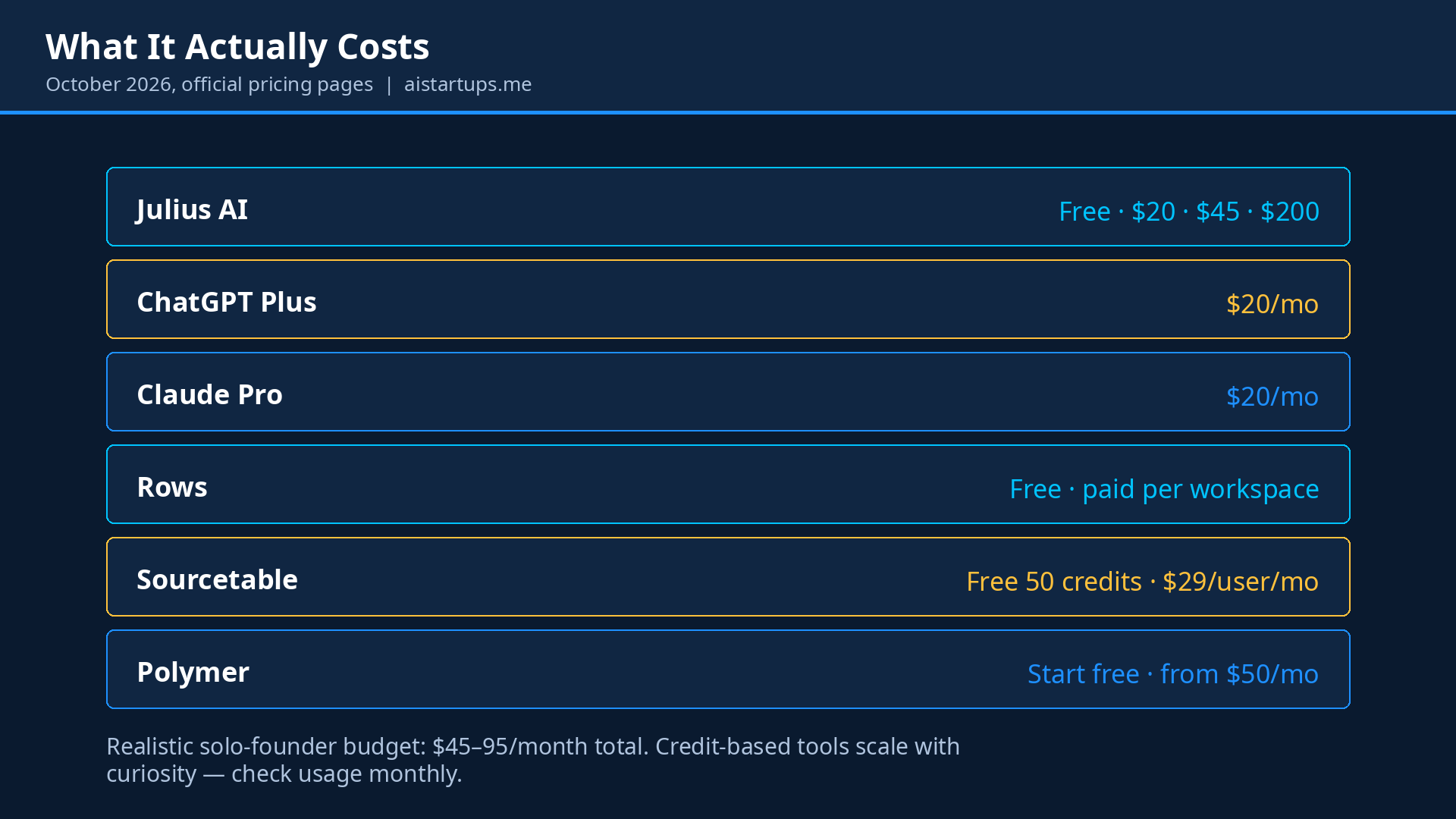
The honest pricing, checked against their current page: there’s a free tier (daily-refresh credits, fine for kicking the tires), Plus at $20/month with 2,000 credits, Pro at $45/month with 5,000 credits and enough compute headroom for serious files, then Max at $200 and Business at $450 for teams with database connectors. Per a detailed 2026 Julius AI pricing breakdown, the credit system replaced the old message-counting model, so a “credit” is roughly one prompt or visualization request.
Where it stumbles: Julius is built for ad-hoc analysis, not monitoring. If you want a dashboard that refreshes itself every morning, this isn’t it — look at Polymer below. And the free tier is genuinely thin; five real questions and you’re done. But as the tool you open when a specific question is bugging you? Nothing beats it for the money.
Best for: founders who keep asking “what does this data actually say?”
Costs: free to try; $20–45/month for real use.
Watch out for: credit-based pricing means heavy months cost more; no live dashboards.
2. ChatGPT — the analyst you’re probably already paying for
Look, I know. Obvious pick. But here’s why it belongs on the list anyway: if you’re already paying $20/month for ChatGPT Plus, you already own a competent data analyst and might not know it.
Upload a spreadsheet and ask it to analyze. Behind the scenes it writes and executes Python — cleaning data, computing statistics, drawing charts you can download. For one-off questions (“summarize this customer survey,” “find the outliers in this expense sheet”), it’s honestly good enough about 80% of the time. The interface is the one you already use ten times a day, so there’s zero learning curve, which counts for more than people admit.
The catches are real, though. Your files go to OpenAI’s servers, so think twice before uploading anything with customer PII or unreleased financials — check your data processing terms if you’re in a regulated space. Big files hit context limits sooner than Julius’s Pro tier handles them. And ChatGPT tends to collapse the code it ran, so verifying how it got an answer takes an extra nudge.
Still: before you buy anything else on this list, spend a week asking ChatGPT your data questions. You might find you don’t need anything else yet. That’s $20 you’re already spending doing double duty.
Best for: quick one-off analyses with zero new subscriptions.
Costs: $20/month for Plus (the free tier can’t do file analysis properly).
Watch out for: data leaves your machine; verify important numbers — AI is confident even when it’s wrong.
3. Claude — the careful one
Claude (Anthropic’s assistant, Pro at $20/month) has an analysis feature that works a lot like ChatGPT’s — upload data, get code-backed answers and charts. So why list both? Because they have different personalities, and personality matters when you’re trusting a machine with your numbers.
In my experience, Claude is the more careful analyst of the two. It tends to explain its reasoning, flag assumptions, and say “here’s what this doesn’t tell you” — the kind of caveats a good human analyst adds. When I asked both tools to look at the same messy dataset, Claude was more likely to point out that the data was too thin to support the conclusion I wanted. That’s annoying in the moment and valuable always.
Its Artifacts feature is genuinely useful here too: analyses open in a side panel you can iterate on, and the charts and write-ups feel presentation-ready with less cleanup. If part of your data work is producing something you’ll show a cofounder or an investor, Claude’s output needs less polishing.
The same privacy caveat applies as with ChatGPT — your data goes to Anthropic’s servers. And like ChatGPT, it’s a generalist: great at answering questions, not a system for live reporting.
Best for: founders who want explanations and caveats, not just charts.
Costs: $20/month for Pro.
Watch out for: generalist, not a dashboarding tool; same data-privacy homework as ChatGPT.
4. Rows — the spreadsheet, rebuilt around AI
Rows (rows.com) asks a fun question: what if you didn’t add AI to the spreadsheet, but rebuilt the spreadsheet around AI instead?
The grid looks familiar, but everything around it is different. There are AI functions built into cells, templates that do real work, and — the part that actually matters — live integrations with tools like Google Analytics, Search Console, ad platforms, and Stripe. Instead of the weekly ritual of exporting CSVs from five tools and pasting them into a workbook, Rows pulls the data in and keeps it refreshed on a schedule.
Think about the weekly marketing report. The old way: export, paste, clean, formula, chart, repeat forever. The Rows way: connect once, let the automations run, open a sheet that’s already current. One recent comparison of AI spreadsheet tools put it well — the real question Rows answers is “why am I still manually moving data into spreadsheets?”
The current pricing, checked on their official page: Free ($0, 5 AI tasks a month), Plus at $8/user/month with 200 AI tasks, and Pro at $79/month base plus $8/user with 1,000 AI tasks. Fair warnings: the interface is genuinely different from Excel and Google Sheets, and reviewers consistently note the onboarding friction for people coming from those tools.
One important caveat, spotted October 2026: Rows’ site currently shows a banner saying “Rows joins Superhuman” with sign-ups paused — the product is in transition, so treat the plans above as potentially legacy and check the current state before building a workflow on it.
Best for: founders whose data lives across five tools and who are tired of copy-paste Mondays.
Costs: free tier; Plus $8/user/month; Pro $79/mo + $8/user.
Watch out for: real learning curve if you’re a Sheets/Excel native; sign-ups paused during the Superhuman transition.
5. Sourcetable — just ask the spreadsheet a question
Sourcetable takes the most literal approach on this list: it’s a spreadsheet you talk to. Natural-language queries, smart formulas, pivots, charts, data cleaning, template generation — all driven by asking in English instead of memorizing syntax.
What I like about it for non-technical founders is the gentleness of the on-ramp. You don’t change tools; you change how you talk to the tool. “Show me top 10 customers by lifetime value” just works. It also has a Python toolkit and SQL editor tucked underneath for the day you hire someone technical — the tool grows with you instead of expiring on you.
Pricing is credit-based and refreshingly legible: a free tier with 50 AI credits a month (enough to actually evaluate it), Pro at $29/user/month with 2,000 credits, and Max at $100/user/month for heavy use. Per a recent hands-on comparison of AI spreadsheet tools, the main thing to know is that everything interesting spends credits — a heavy month means buying more at roughly two cents each. Budget accordingly.
Best for: spreadsheet natives who want AI without learning a new interface.
Costs: free (50 credits/mo); $29/user/month Pro.
Watch out for: credit metering on everything; costs scale with curiosity.
6. Polymer — from spreadsheet to dashboard in about a minute
Polymer (polymersearch.com) is the odd one out, and I mean that as a compliment. You upload a spreadsheet and it builds you a searchable, interactive web dashboard. Automatically. Charts, filters, reports — the whole thing, in minutes, with no setup. Its current positioning is “AI-driven embedded analytics”: dashboards and data visualizations you can build without coding.
This is the tool for the “showing” part of data work. Your cofounder wants to explore the numbers without bothering you. An investor asks for a metrics view. Your marketing lead needs to poke at campaign data without learning pivot tables. Instead of building that dashboard yourself (you won’t) or hiring someone (expensive), you upload the sheet and share a link.
It’s priced from $50/month for Starter ($25/month on yearly billing), stepping up through Pro at $100/month and Teams at $250/month, and every tier lets you start free. The integrations lean marketing-heavy — ad-platform data flows in nicely, which tells you exactly who this was built for. If your startup’s data story is mostly “where is our growth coming from,” Polymer turns that story into something you can click through.
The tradeoff is depth: Polymer is for exploring and presenting, not for statistical heavy lifting. Pair it with Julius for the deep questions and you’ve covered both ends — analysis and presentation.
Best for: turning spreadsheets into shareable dashboards for teams and investors.
Costs: start free; from $50/month ($25/mo yearly).
Watch out for: presentation over depth; marketing-data skewed integrations.
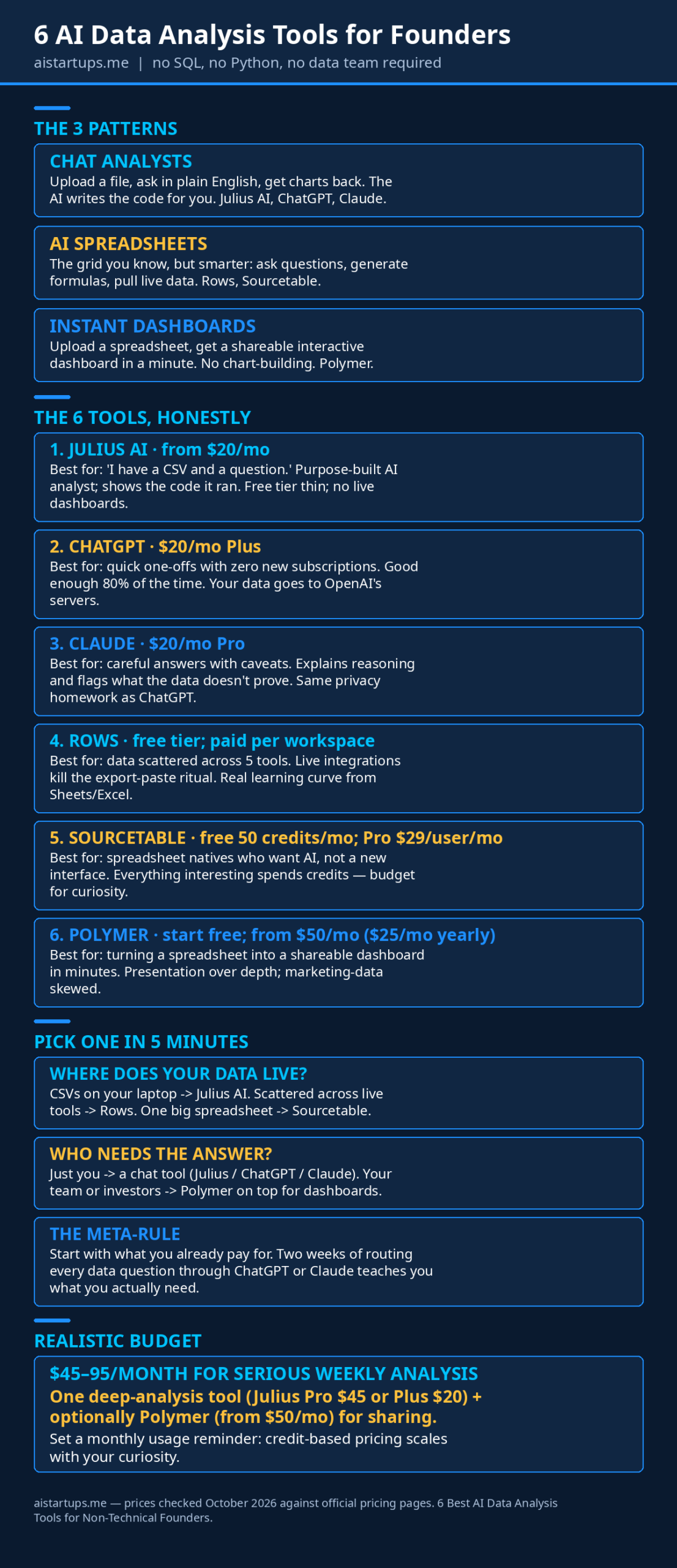
The honest comparison
Enough detail. Here’s the cheat sheet:
- Cheapest way to start: ChatGPT or Claude, if you already pay for one ($20/mo you’re spending anyway). Otherwise Sourcetable’s free 50 credits or Polymer’s free start.
- Best free tier that isn’t a demo: Sourcetable (50 AI credits/month) — enough for a real evaluation.
- Best for “I have a CSV and a question”: Julius AI. Purpose-built, shows its work, handles big files on Pro.
- Best for “my data lives in five tools”: Rows. Kill the export-paste ritual.
- Best for “I need to show this to someone”: Polymer. Spreadsheet in, dashboard out, share the link.
- Best explanations with the answer: Claude. It’ll tell you what the data doesn’t prove, which is rarer than it should be.
How to pick one in five minutes
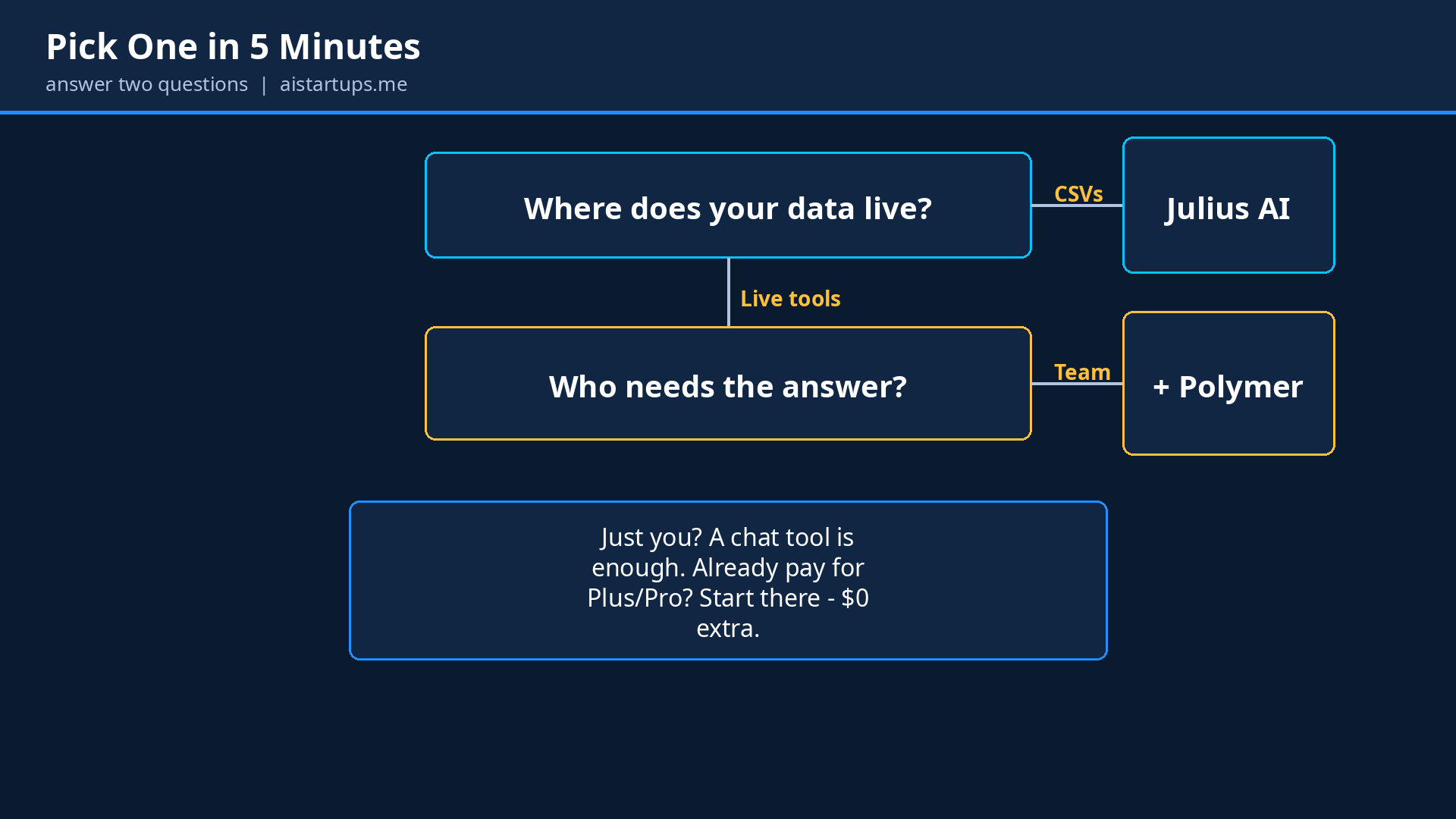
Don’t overthink this. Answer two questions:
- Where does your data live? If it’s CSVs and exports on your laptop → Julius AI. If it’s scattered across live tools (analytics, ads, billing) → Rows. If it’s one big spreadsheet you keep updating → Sourcetable.
- Who needs to see the answer? Just you → a chat tool (Julius, ChatGPT, Claude). Your team or investors → Polymer for the dashboard layer on top.
And the meta-rule: start with what you already pay for. Half of you reading this have ChatGPT Plus or Claude Pro sitting there. Spend two weeks routing every data question through it. You’ll either solve the problem for $0 extra, or you’ll learn exactly which specialized tool you actually need — which is a much better way to buy software than reading listicles. (Yes, including this one.)
If you’re still figuring out what to measure in the first place, our AI market research blueprint walks through turning vague curiosity into answerable questions. And once your analyses start producing regular outputs, our honest automation comparison covers piping those numbers into Slack reports and dashboards without manual work.
“The best data tool is the one you’ll actually open on a random Tuesday. Fancy features don’t matter if the tool feels like homework — pick the one with the lowest friction between having a question and getting an answer.”
A note on cost (because AI bills creep)
One thing nobody tells you: AI data tools have a way of getting expensive quietly. Credit-based pricing (Julius, Sourcetable) means your bill scales with your curiosity, which is exactly when you’re least watching it. Set a monthly reminder to glance at usage. Our guide on cutting your AI API bill by 70% covers the general discipline — caching, batching, and not paying flagship prices for commodity questions — and most of it applies to these tools too.
Realistic budget for a solo founder doing serious weekly analysis: $45–95/month total. That’s one tool for deep analysis (Julius Pro at $45, or Plus at $20) plus optionally Polymer (Starter from $50/mo, or $25/mo billed yearly) for sharing. Compare that against the cost of guessing wrong on a pricing change or an ad budget. It’s not close.
FAQ
Do I need to learn SQL or Python to use these tools?
No — that’s the whole point. Every tool on this list accepts plain-English questions and handles the technical execution itself. Julius, ChatGPT, and Claude write and run the code for you; Rows, Sourcetable, and Polymer abstract it into spreadsheet functions or one-click dashboards. You’ll get further faster if you learn to ask precise questions (“revenue by month, excluding refunds” beats “show me revenue”), but that’s a communication skill, not a coding one.
Is my business data safe with AI analysis tools?
Mostly, with homework. Julius AI is SOC 2 Type II certified, which is a real compliance signal. For any tool, check three things before uploading sensitive data: whether they train on your inputs (opt out if so), their data retention policy, and whether they offer zero-retention or regional processing on paid tiers. As a rule of thumb: aggregated metrics and anonymized exports are fine anywhere; raw customer PII and unreleased financials deserve the paid tier with the strongest data terms — or stay local.
Can these tools replace hiring a data analyst?
For everyday founder questions — campaign performance, cohort trends, survey summaries, pricing experiments — honestly, yes, they cover the large majority of it. Where they don’t replace a human: high-stakes financial modeling, data pipeline engineering, and the judgment call of knowing which question to ask in the first place. Think of these tools as giving you 80% of an analyst at 5% of the cost, and hire the human when the decisions get expensive enough to justify it.
Which of these is actually free?
Nothing good is fully free, but the trials are honest: Sourcetable gives you 50 AI credits a month on its free tier, Polymer lets you start free, Julius has a daily-refresh free tier, and Rows has a limited free plan. ChatGPT and Claude need their $20/month paid tiers for real file analysis. My advice: run your actual data through two free tiers before paying for anything. Ten minutes each, and you’ll know.
What about Excel Copilot or Google Sheets’ built-in AI?
If you already live in Microsoft 365 or Google Workspace, the built-in AI (Copilot in Excel, Gemini in Sheets) is worth trying first — zero new tools, and your data never leaves the ecosystem. The tradeoff is depth: they’re good at formula help and light analysis, but they don’t match Julius for statistical work or Polymer for dashboards. Think of them as the convenient default and this list as the upgrade path when you outgrow it.
The Bottom Line
You don’t have a data problem. You have a data access problem — the answers are in files you already own, behind a skill barrier that doesn’t exist anymore. Pick one tool from this list, upload the spreadsheet you’ve been avoiding, and ask it the question that’s been nagging you. That’s the whole onboarding.
My suggestion for most founders: start with Julius AI’s free tier for the deep questions, keep ChatGPT or Claude (whichever you already pay for) as the daily driver, and add Polymer the first time someone asks you to “send over the numbers” and you realize you have nothing shareable. Total damage: roughly $45–95 a month. The cost of one wrong gut decision is higher. Much higher.
And when your data needs outgrow off-the-shelf tools — customer-facing dashboards, embedded analytics, a real data product inside your app — that’s a build job, not a subscription. If you don’t have engineers in-house, an AI integration studio like AISquadX can take you from spreadsheet chaos to a shipped product without you hiring a team. But that’s chapter two. Chapter one is free: open the CSV.