
I learned the difference between Zapier, Make, and n8n the expensive way. About two years ago I wired up a “simple” lead-nurturing workflow in Zapier: new lead comes in, enrich the data, score it, add it to the CRM, ping Slack, send a welcome email. Six steps. Felt clever. Then the bill showed up, and I realized I had no idea what a “task” actually was.
That bill was my tuition. And honestly? It was worth it, because it taught me the one thing every comparison article buries under feature tables: these three tools don’t compete on features. They compete on how they count your usage — and the counting method decides your bill.
So this isn’t a feature-matrix dump. I’ve run real workflows on all three, watched all three blow up bills in different ways, and here’s the honest founder’s guide to picking one in 2026. Look — if you’re just getting started and want to know what it actually costs to run an AI business, automation pricing is one of the line items founders most often underestimate. Let’s fix that.
The One Thing That Actually Matters: How They Count
Forget the marketing pages. Forget the integration counts. The single most important difference between these tools is the unit they charge you for:
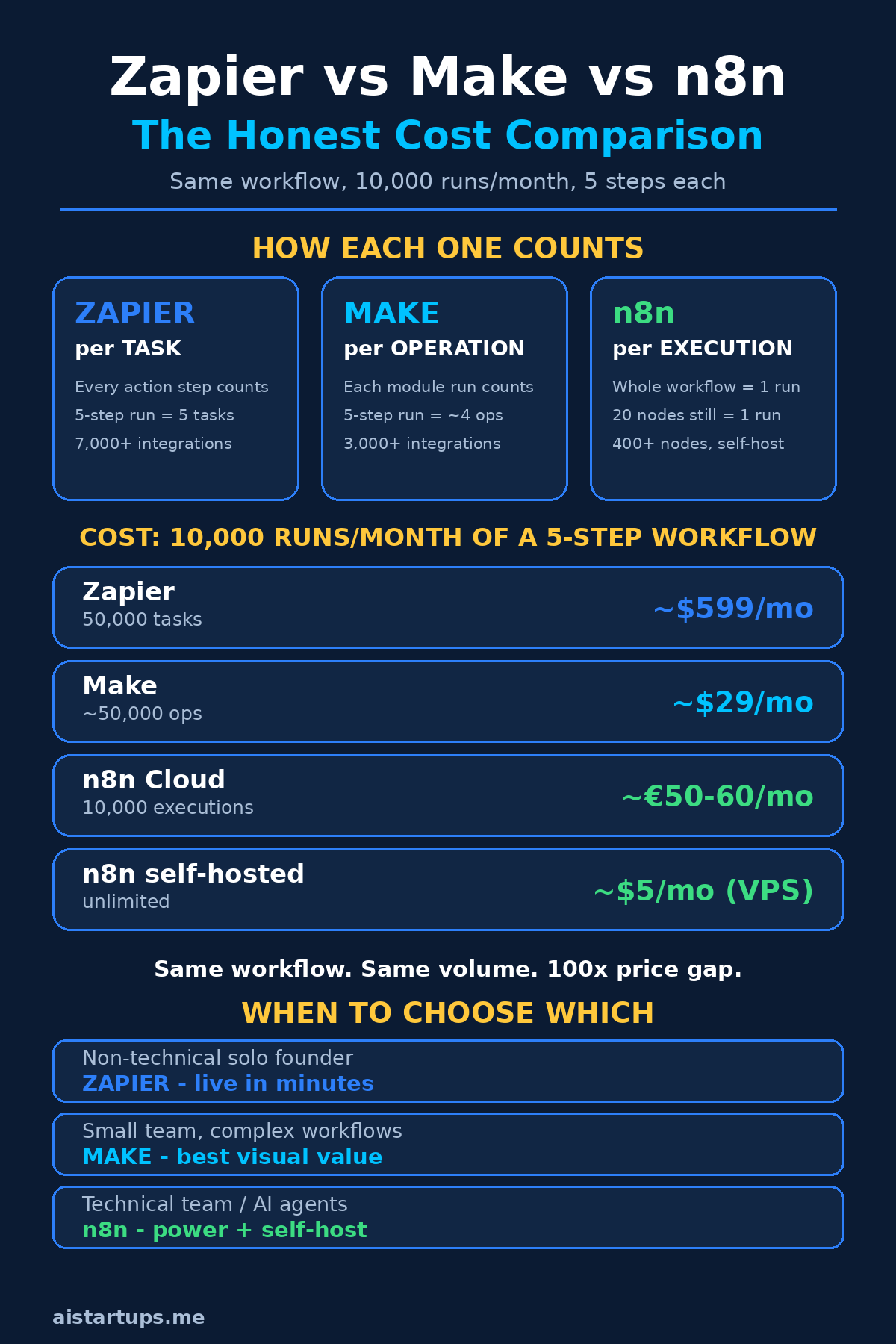
- Zapier charges per task — every single action step in every workflow counts. A 5-step workflow running once = 5 tasks.
- Make charges per operation — each module that executes counts, but triggers and routing logic are cheaper or free. That same 5-step workflow often costs 3–4 ops.
- n8n charges per workflow execution — a 20-node workflow run once = 1 execution. The most generous counting in the business.
See the problem? When every blog post says “Zapier starts at $29.99 and Make starts at $9,” they’re comparing completely different units. It’s like comparing the price of coffee by the cup versus by the bean. You can’t pick a winner until you do the math for your workflows — which we’re going to do below, with real numbers.
Zapier: The One Everyone Starts With (and Outgrows)
Zapier is the Kleenex of automation — the brand name people use for the whole category. And it earned that position. You sign up, connect two apps, and your first “Zap” is running in about four minutes. No tutorials needed. No mental model to learn. It just works.
With 7,000+ integrations, it’s the only tool of the three where you can assume your weird niche app is already supported. Some obscure scheduling tool your client insists on? Probably there. That random CRM from 2014? Probably there too. Make has around 3,000+ integrations and n8n has 400+ native nodes — good, but neither touches Zapier’s catalog.
Pricing is where the honeymoon ends. Zapier’s Starter plan runs ~$29.99/month for 750 tasks, and here’s the trap: a “task” is every action step. My six-step lead workflow? Every lead that entered it burned 6 tasks. At 500 leads a month, that’s 3,000 tasks — blowing past Starter into the $70+ Professional tier for what felt like a trivial automation.
And the hidden-cost traps are real. AI steps can count as multiple tasks per run. Branching logic (Paths) adds steps. Filters add steps. The workflow that looks simple in the editor can quietly eat your monthly quota, and Zapier’s overage billing will happily let it. I’ve seen founders pay $200+/month for automations that would cost under $30 anywhere else. (Sound familiar? This is the same pricing-design blindness I wrote about in how to price an AI SaaS product — per-unit pricing that looks cheap in a demo and punishing in production.)
Zapier is genuinely best for: non-technical solo founders, simple linear workflows (2–3 steps), and teams that need something running today with zero learning curve. Its newer Zapier Agents feature adds AI agent capabilities on top, which is nice — but those agent runs burn through tasks fast, so keep an eye on it.
Make: The Power User’s Favorite
Make (formerly Integromat — yes, the rebrand confused everyone) is what you graduate to when Zapier starts feeling like a toy. Instead of a linear step list, you get a visual canvas where workflows branch, loop, and run in parallel. Routers split one scenario into multiple paths. Iterators chew through arrays. It’s the closest thing to visual programming in this space, and its builder is honestly best-in-class.
The pricing is the headline, though. Plans start around $9–€9/month for 10,000 operations, and operations are counted more generously than Zapier’s tasks: webhook triggers don’t cost anything, and routing/branching logic is cheap. That same lead workflow that cost me a fortune on Zapier? On Make it sips operations. For complex, branching, multi-step automations, Make routinely comes out 60–70% cheaper than Zapier for equivalent volume — a gap independent 2026 comparisons keep confirming.
Real talk: the operations model can confuse people at scale. What counts as an operation isn’t always intuitive — some modules consume more than one, data transfers have their own limits, and you’ll occasionally stare at your usage dashboard wondering where 40,000 ops went. It’s not dishonest, exactly. It’s just… a model you have to learn. Budget a week of actually running workflows before you trust your cost projections.
Make also offers EU and US server options, which matters more than it used to — if you have European customers and care about data residency, that’s a checkbox Zapier makes harder. AI modules are solid: you can drop LLM calls into scenarios without much fuss.
Make is genuinely best for: technical-ish founders and small teams running complex, branching workflows who want visual building without writing code, and anyone whose Zapier bill just made them flinch.
n8n: The One Technical Founders Won’t Shut Up About
Here’s the thing about n8n: its fans are intense. Mention workflow automation in any developer community and someone will appear within minutes to tell you n8n changed their life. There’s a reason — but there’s also a catch, and the fans tend to skip the catch.
First, the reason. n8n’s pricing model is the most generous of the three by a mile: you pay per workflow execution, not per step. A 20-node workflow with branching, code, and AI calls counts as one execution when it runs. Per n8n’s pricing page, cloud plans start around €20/month (annual billing) for 2,500 executions, with a Pro tier around €50–60/month for 10,000 executions. And then there’s the big one: the Community Edition is free to self-host, with unlimited executions — you just pay for the server, typically ~$5/month for a small VPS.
Second, the power. Full JavaScript and Python code nodes, npm packages, Git-friendly workflows, direct database connections, and 70+ AI/LangChain nodes for building actual AI agents — not just “AI steps” bolted onto linear workflows, but real agentic loops with memory, tools, and branching. With 183K+ GitHub stars, it’s one of the most popular automation projects in the world, and it’s the only one of the three you can self-host, which means full data sovereignty: your customer data never leaves your server.
Now the catch, which the fans skip: you maintain it. Self-hosting means you own updates, backups, monitoring, uptime, and the 2 AM “why did the server die” debugging session. The Community Edition runs under n8n’s Sustainable Use License — free for internal business use, but it’s fair-code, not open source, so you can’t resell it as a hosted service. Fine for nearly every startup, but know what you’re signing.
And the learning curve is real. n8n assumes you’re comfortable with APIs, JSON, and occasionally writing code. A non-technical founder opening n8n for the first time will feel like they walked into the wrong classroom. That’s not a flaw — it’s a trade-off. Power costs complexity.
n8n is genuinely best for: technical teams, anyone building AI agents (it’s genuinely the strongest of the three here), companies with data-residency requirements, and cost-conscious startups willing to run a $5 VPS.
The dirty secret of automation pricing: the tool that’s cheapest for a 3-step workflow is almost never the cheapest for a 30-step one. Always price your actual workflows — step count and all — before committing. The demo pricing is never the real pricing.
The Cost Comparison Nobody Shows You
Okay, let’s do the math everyone avoids. Take a realistic startup workflow — say, 5 steps (trigger + enrich + score + CRM + notify) — running 10,000 times a month. Here’s what each platform actually costs (the full pricing breakdowns agree on the shape of this, even when exact plan names shift):
| Platform | How it counts | Units used | Monthly cost |
|---|---|---|---|
| Zapier | Per task (every step) | 50,000 tasks | ~$599 |
| Make | Per operation | ~50,000 ops | ~$29 |
| n8n Cloud | Per execution | 10,000 executions | ~€50–60 (Pro) |
| n8n self-hosted | Unlimited | 10,000 executions | ~$5 (VPS) |
Read that again. $599 versus $29 versus $5. Same workflow, same volume, 100x+ price difference. This isn’t a rounding error — it’s the entire ballgame. Zapier isn’t 20x better; it just counts 20x more aggressively.
Now, fairness check: at tiny volumes the gap shrinks. Running 100 simple workflows a month? Zapier’s free tier (100 tasks) or Make’s free tier (1,000 ops) handles it for $0. The pricing only diverges as you scale — which is exactly when switching costs are highest, because by then your whole operation runs on the thing. (This is why I tell founders to validate the economics before building — including the economics of your tooling.)
Hidden Costs Nobody Mentions
Beyond the headline pricing, each platform has traps that only show up after you’re committed:
- Zapier’s AI step multiplier. AI actions — the Zapier Agents features, LLM calls, content generation — can consume multiple tasks per run. An “agent experiment” that loops through 10 items with an AI step each might burn 30–50 tasks per execution. Your agent experiment just ate your monthly quota by Tuesday.
- Make’s operation ambiguity. Not every module costs one operation, and data transfer limits sit on top of operation counts. Webhook-heavy setups are nearly free (triggers cost nothing), but iterator-heavy scenarios that fan out across thousands of bundles can surprise you. The dashboard helps, but only after the fact.
- n8n’s “free” maintenance tax. Self-hosting costs $5 in server bills and an unpredictable amount in your time. Updates break things. Webhooks need SSL certs. Backups are your problem. If your time is worth $100/hour, one bad debugging afternoon wipes out a year of VPS savings. And on n8n Cloud, the jump from Pro (~€50–60) to Business (~€667) is a 13x cliff that gates SSO and Git — painful if you outgrow Pro.
- Premium app gating. Zapier reserves some integrations for higher tiers. n8n notably does not do this — every integration is available on every plan, which is a genuine differentiator worth weighing.
- Overage ambushes. Zapier bills overages at up to 2.5x your per-task rate on monthly plans. One viral month can triple your bill with no warning if you haven’t set usage alerts. Set them. Today.
The AI Automation Angle (This Is Where It Gets Interesting)
Here’s where 2026 changes the conversation. All three tools now pitch “AI automation,” but they mean very different things — and the cost implications are wild.
Zapier Agents lets you build AI agents in natural language, which is genuinely impressive for non-technical users. But remember the task multiplier: every tool call an agent makes, every loop iteration, every step — tasks, tasks, tasks. Agentic workflows are loop-heavy by nature, which makes them the single most expensive thing you can run on per-step pricing. A support-triage agent handling 1,000 tickets a month could easily burn 20,000+ tasks. Do that math before you build it.
Make’s AI modules slot LLM calls into visual scenarios cleanly, and the per-operation model is kinder to agentic loops than Zapier’s. It’s a solid middle ground: real AI capability without the terrifying bill. But you’re still working within a visual-scenario paradigm — great for structured AI workflows, less natural for free-form agents with memory and tool use.
n8n is the clear winner for AI agents, and it’s not close. Seventy-plus AI and LangChain nodes, memory modules, vector store integrations, sub-workflows as tools, and full code nodes mean you can build production-grade agents — research agents, support triage, content pipelines — that would be either impossible or ruinously expensive on the other two. And because you pay per execution, an agent that makes 15 tool calls in one run still costs you a single execution. For agentic workloads, n8n’s pricing model isn’t just cheaper — it’s the only one that doesn’t punish you for building something sophisticated.
If AI agents are central to your product — and if you’re reading this site, they probably are — this section alone might settle the decision. I covered the broader toolkit in my roundup of AI tools for startup founders, but for automation specifically: agents live happiest on n8n.
“Self-Hosting Is Free” — The Maintenance Reality
Can we talk honestly about self-hosting for a minute? Because “free” does a lot of heavy lifting in n8n discussions.
Yes: the Community Edition costs $0 in licensing, runs unlimited executions, and a VPS costs about $5/month. For a technical founder, setup is genuinely an afternoon — Docker compose, reverse proxy, SSL, done. I’ve done it. It works. It’s kind of magical the first time your workflows run on hardware you control.
But “free” ignores: OS security updates, n8n version upgrades (which occasionally break workflows — test before upgrading production), database backups, monitoring and alerting, SSL renewal, and debugging at inconvenient hours when a webhook silently stops firing and you don’t notice for two days. None of this is hard. All of it is yours.
My honest rule: if you have someone technical on the team who already manages infrastructure, self-hosted n8n is the best deal in automation, full stop. If you don’t — if you’re a solo non-technical founder whose eyes glaze over at “reverse proxy” — the $5 VPS will cost you $500 in stress. Pay for n8n Cloud or Make instead. Your sanity has a price too.
And if you’d rather have someone just wire all of this up for you — the automation, the AI integrations, the whole plumbing — an AI integration studio like AISquadX does exactly that kind of build-out for startups. Sometimes the cheapest automation is the one you don’t have to maintain yourself.
Who Should Pick What: The Verdict
Enough theory. Here’s my honest pick by persona:
Pick Zapier if: you’re a non-technical solo founder who needs it live today
You have no developers, your workflows are simple (2–5 linear steps), and your volume is modest. Zapier’s 7,000+ integrations and zero learning curve are genuinely unmatched for getting started. Just watch your task usage like a hawk, set billing alerts, and plan your migration path before you scale — because you will outgrow it, and migrating 50 Zaps under time pressure is miserable.
Pick Make if: you’re a small team with complex workflows and no dedicated developers
You want visual building, real branching logic, parallel execution, and sane pricing at moderate scale. Make is the sweet spot for most startups: powerful enough for serious automation, cheap enough to not think about, approachable enough for a technical marketer or ops person to own. The ~$9 entry for 10,000 ops is the best value in cloud automation for non-developers.
Pick n8n if: you’re technical, building AI agents, or care about data control
You write code (or have someone who does), you want AI agents with real capabilities, you need data to stay on your own servers, or your workflow volume makes per-step pricing absurd. Self-host if you can maintain it; take n8n Cloud Pro if you can’t. Either way, the per-execution model means your costs stay flat while your automations get more sophisticated — which is exactly the direction every startup moves in.
Frequently Asked Questions
Which automation tool is cheapest for a startup?
At any meaningful volume, n8n self-hosted (~$5/month VPS, unlimited executions) is cheapest, followed by n8n Cloud and Make. Zapier is the most expensive at scale — a 5-step workflow running 10,000 times a month costs roughly $599 on Zapier versus ~$29 on Make, numbers that line up with this hands-on 2026 pricing comparison. At tiny volumes (under a few hundred runs), all three have free tiers, so the gap doesn’t matter yet.
Can I migrate from Zapier to Make or n8n later?
Yes, but there’s no magic import button — you’ll rebuild each workflow by hand. The logic transfers (triggers, actions, conditions are the same concepts), but expect roughly 30–60 minutes per workflow depending on complexity. This is why I recommend planning your migration path before you scale: rebuilding 5 workflows is a weekend project, rebuilding 80 is a quarter-long nightmare.
Which tool is best for building AI agents?
n8n, by a clear margin. Its 70+ AI/LangChain nodes, memory modules, vector store support, and code nodes are built for agentic workflows, and per-execution pricing means an agent making 15 tool calls still costs one execution. Make handles structured AI workflows well; Zapier Agents is easiest for non-technical users but gets expensive fast because every agent step burns tasks.
Is n8n really free?
The Community Edition license is free for self-hosting with unlimited executions — you only pay ~$5/month for a VPS. But “free” doesn’t include your time: you own updates, backups, monitoring, and debugging. n8n’s Sustainable Use License allows free internal business use but isn’t open source — you can’t offer n8n itself as a hosted service to others. n8n Cloud starts around €20/month if you’d rather not self-host.
Do I need a developer to use n8n?
Strictly speaking, no — you can build basic workflows with its visual editor. But n8n assumes comfort with APIs, JSON, and expressions, and its real power (code nodes, custom logic, self-hosting) needs technical skills. Non-technical founders will be productive faster on Zapier or Make. If you’re technical or have a technical cofounder, n8n’s learning curve pays for itself quickly.
The Bottom Line
Here’s my honest summary after running real workloads on all three: Zapier wins on ease, Make wins on value-for-simplicity, and n8n wins on power and scale. Most startups should start on Make (or Zapier if truly non-technical and tiny), and graduate to n8n when workflows get complex, AI agents enter the picture, or the per-step bills start hurting.
The mistake isn’t picking the “wrong” tool — it’s picking without doing the math. Count your steps, estimate your volume, multiply it out for 10x growth, and pick the tool whose pricing model rewards the workflows you’re actually going to build. Your future self, staring at a much bigger bill, will thank you.
And whatever you pick: set usage alerts on day one. Future you says thanks in advance.