
It was a Sunday night, and I was sitting on my kitchen floor with a shoebox full of receipts, a spreadsheet that hadn’t been touched in three weeks, and a growing sense that I’d messed something up. Sound familiar? I’d been so focused on building the product, talking to customers, and trying to keep the lights on that the books had quietly turned into a mess. Every receipt was a little mystery. Every bank charge needed detective work. And tax season was creeping closer, which is the kind of thing you can ignore right up until you really, really can’t.
Here’s the thing nobody tells you when you start a company: the accounting doesn’t care that you’re busy. It piles up anyway. And the longer you leave it, the worse it gets — and the more expensive it gets to fix. I learned that the hard way, and honestly, I don’t want you to.
That’s why I spent the last few weeks digging into AI accounting tools. Not the marketing pages, not the shiny demo videos — the actual pricing pages, the real feature lists, and what each tool’s AI can genuinely do for a small, fast-moving startup. I checked every price in this article on November 16, 2026, against the vendors’ own pricing pages, because accounting software prices move around a lot more than you’d think. (Two of these tools raised prices in the last few weeks alone.)
Real talk: AI won’t do your bookkeeping completely. Not yet, anyway. But the right tool can take the worst of it off your plate — the categorising, the chasing, the “wait, what was this $47 charge?” moments — and leave you with a clean set of books you can actually trust. The wrong tool, on the other hand, can lock you into a price that doubles after three months, or a system your accountant hates, or (worst case) a company that disappears overnight. Yes, that happened. We’ll get to it.
So here’s my honest, hands-on rundown of the eight best AI accounting tools for startups in 2026. I’ll tell you what each one costs, what its AI actually does, who it’s really for, and where it falls short. No fluff. Just the stuff I’d want someone to tell me before I handed over my card details.
How I picked these 8
Before we get into the tools, a quick word on how I chose them — because “best” means nothing without a yardstick, and I don’t want you taking my word for it blindly.
First, real prices, checked in November 2026. I went to each vendor’s pricing page myself and wrote down the numbers. Not the “from” price buried in a footnote, not a price from a review site that hasn’t been updated since 2024 — the actual list price you’d pay today, plus the promo terms, because those promos matter a lot when you’re comparing. A tool that looks cheap at 50% off for three months can be the most expensive one on this list by month four.
Second, AI that actually does work, not AI that just sits on a slide deck. Every accounting tool now claims to have AI. Most of them mean “we auto-suggest a category for this transaction,” which is useful, sure, but it’s table stakes now. I looked for AI that goes further: tools that learn from your corrections, that draft invoices, that flag weird transactions, that reconcile bank feeds without you babysitting them, or that can answer a plain-English question about your cash. If the AI was just a chatbot bolted onto a 2015 product, that counted against it.
Third, startup fit. A tool built for a 200-person company with a finance department is a bad fit for a two-person startup, even if it’s brilliant software. I wanted tools that work when you’re pre-revenue, when you’ve got your first ten customers, and when you’re starting to scale — and I wanted to be honest about which stage each one suits, instead of pretending one tool fits everyone.
And fourth, export and portability. This one matters more than most founders realise, and it’s the lesson I keep coming back to. Your books are yours. If a tool makes it hard to get your data out, or if the company itself is on shaky ground, that’s a real risk. I checked how each tool handles exports, and I flagged the one with a genuinely scary history on this front. You’ll see what I mean when we get to Bench.
One more thing: I left out the giant enterprise systems and the tools that don’t publish clear pricing. If I can’t tell you what it costs, I can’t recommend it to a startup founder watching every dollar. That also ties into the bigger picture of what it actually costs to start an AI business — accounting software is one of those monthly costs that looks small on its own and adds up fast when you stack five or six of them together.
The 8 tools at a glance
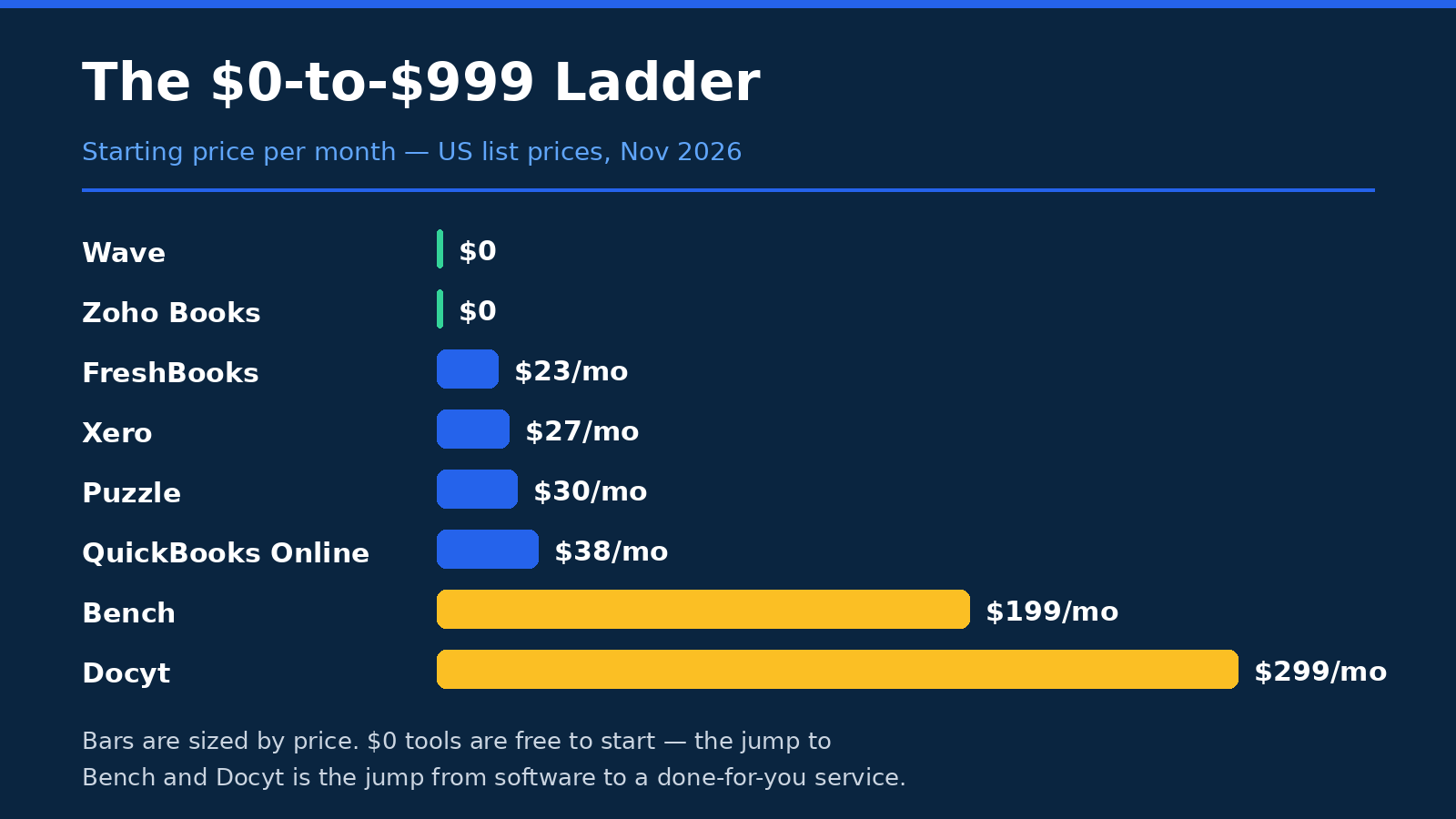
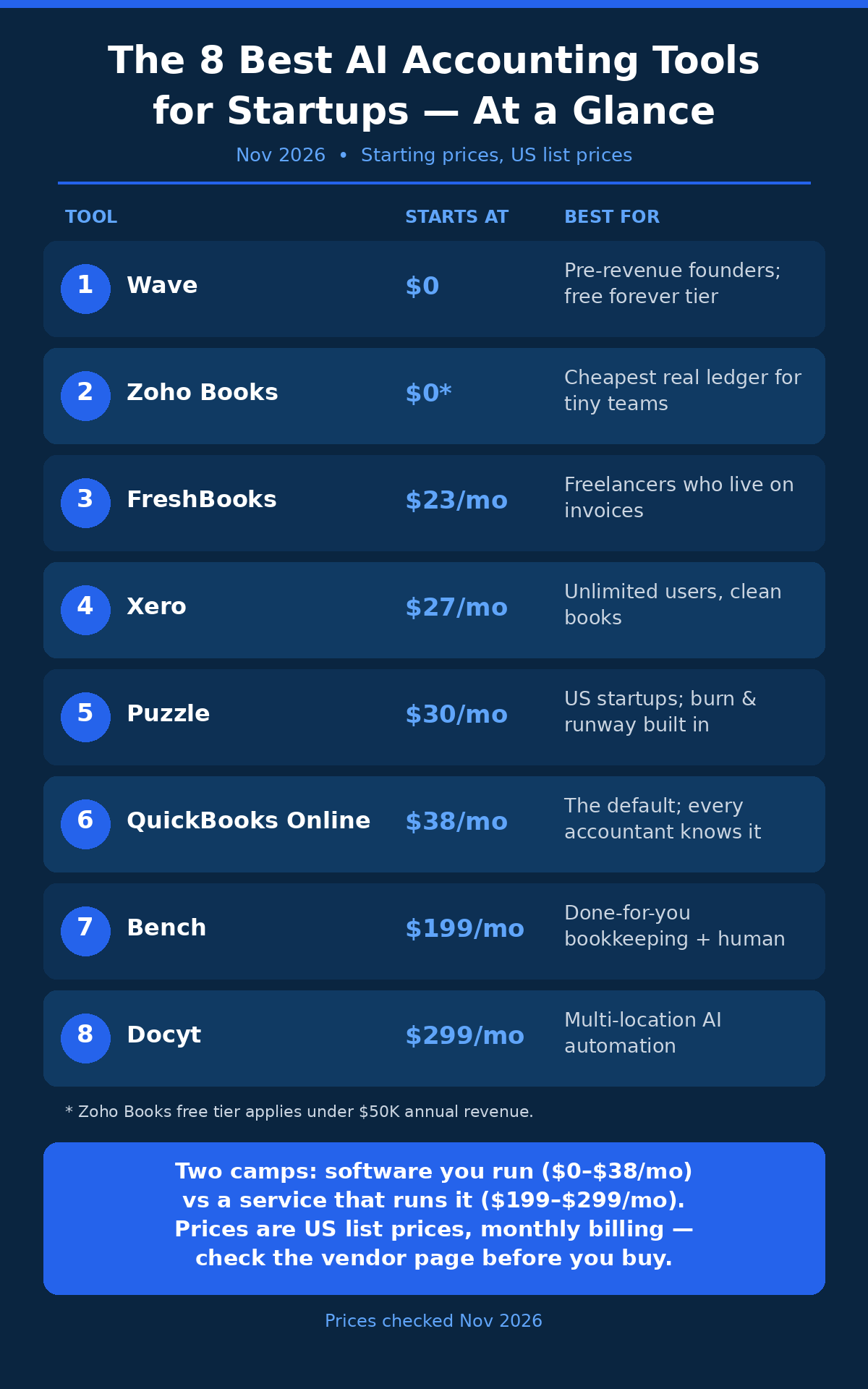
If you’re in a hurry — and let’s be honest, you probably are — here’s the whole list on one screen. Prices are monthly billing unless I say otherwise, and they’re the list prices I verified on November 16, 2026.
| Tool | Starts at | Best for | Watch out for |
|---|---|---|---|
| QuickBooks Online | $0 free plan; paid from $38/mo | Startups that want the standard everyone knows | Top tiers jumped in price in August 2026; payroll costs extra |
| Xero | $27/mo | Teams and startups with an accountant already on Xero | Early plan caps at 20 invoices a month; prices rose October 2026 |
| FreshBooks | $23/mo | Service businesses and freelancers who live on invoices | Client limits on cheaper plans; extra team members cost $11/mo each |
| Wave | $0 Starter plan | Pre-revenue and very early startups on a tight budget | Card payments cost 2.9% + $0.60 per transaction |
| Zoho Books | $0 while revenue is under $50,000/yr | Startups already using Zoho apps | Free plan is limited to 1 user and 1,000 invoices a year |
| Bench | $199/mo | Founders who want a human to do the books for them | It shut down without warning in December 2024; your books live in its own software |
| Puzzle | $30/mo | US startups that want an AI-native ledger and runway tracking | US-only; no payroll built in; prices rose November 2026 |
| Docyt | $299/mo | Multi-location or multi-entity businesses | Each location needs its own subscription, so costs stack fast |
Now let’s go through them one by one. I’ve kept the same shape for each: what it is, who it’s for, what the AI does, what it costs, and the catch. Because there’s always a catch. The trick is picking the catch you can live with.
1. QuickBooks Online
QuickBooks is the default. If you’ve ever talked to an accountant, a bookkeeper, or another founder about accounting software, this is probably the name that came up first — and there’s a reason for that. It’s been around forever, it does just about everything, and almost every accountant in the US already knows how to use it. That matters more than it sounds like it should. When your accountant can open your books without a training session, you save time and money, and you avoid the awkward “can you export that as something I can actually open?” conversation.
Who’s it for? Honestly, most startups. If you want the safe, standard choice — the one your accountant already uses, the one with an integration for everything, the one that won’t surprise you — this is it. It’s especially strong if you’re selling products or services in the US, you need proper invoicing and expense tracking, and you want a tool that can grow with you from your first customer to your fiftieth employee without forcing a painful switch.
The AI side is called Intuit Assist, built on what Intuit calls Intuit Intelligence. In practice, it auto-categorises your expenses, learns from your corrections, and drafts things like invoice reminders. It’s not flashy, and it won’t write your board deck for you, but it does the daily grind well. Connect your bank, and most transactions get sorted into the right bucket without you touching them. The more you correct it, the better it gets — which is how this stuff should work, really.
Now, the pricing. And this is where you need to pay attention, because QuickBooks changed its prices recently. There’s a free plan at $0 — one user, two invoices a month, one bank connection. It’s genuinely free, but it’s very limited, so think of it as a trial with no expiry date rather than a long-term home. Paid plans start with Simple Start at $38 a month for one user, then Essentials at $85 a month for three users, Plus at $140 a month for five users, and Advanced at $340 a month for up to 25 users. All of those are monthly billing prices, and Intuit offers 50% off for the first three months, which softens the landing — but do the maths on month four, not month one.
Here’s the part that caught my eye: the top three tiers all went up on August 1, 2026. Essentials rose from $75 to $85, Plus from $115 to $140, and Advanced from $275 to $340. That’s a real jump, especially on Plus and Advanced, and it tells you something about where Intuit thinks its pricing power is. If you’re budgeting for next year, budget on the new prices, not the old ones you remember from a blog post.
The catch? A few. Payroll is a paid add-on, not included, so if you hire, that’s another bill. The interface can feel busy — there are a lot of menus, a lot of features you’ll never touch, and it can take a while to learn where everything lives. And the price rises are worth watching: if Intuit raised prices twice in recent memory, it can do it again. Still, for most startups, QuickBooks is the benchmark everything else gets measured against. Check the current numbers on the QuickBooks pricing page before you commit, because the promo terms change often.
2. Xero
Xero is QuickBooks’ biggest rival, and the rivalry is friendly in the way that two companies chasing the same customers always are. It’s a New Zealand company that’s huge in the UK, Australia, and New Zealand, and it’s been growing steadily in the US. If QuickBooks is the default, Xero is the challenger that a lot of accountants genuinely prefer — cleaner interface, nicer design, and a reputation for being easier to live with day to day.
Who’s it for? Teams, mostly. And startups whose accountant already works in Xero. Here’s why: every Xero plan includes unlimited users. That sounds like a small detail, but it changes the maths completely if you’ve got a co-founder, a part-time bookkeeper, and an accountant who all need access. On QuickBooks, each extra seat can push you into a pricier tier. On Xero, you just add people. For a growing team, that’s a big deal.
The AI assistant is called JAX. It helps with categorisation, reconciliation, and answering questions about your numbers. It’s solid, not spectacular — it does the core job of keeping your bank feed tidy and your books up to date without much hand-holding. Xero’s real strength, in my experience, is how pleasant it is to use. The dashboard is clear, the bank reconciliation screen is genuinely well designed, and you don’t need a training course to find things. That sounds soft, but when you’re the person doing the books at 10pm on a Sunday, a tool that doesn’t fight you is worth a lot.
Pricing: Early is $27 a month, Growing is $59 a month, and Established is $97 a month. Those prices went up on October 1, 2026, from $25, $55, and $90 — so if you see older prices quoted anywhere, they’re out of date. Xero offers 80% off for the first three months, which works out to $5.40, $11.80, and $19.40 a month for that intro period. That’s a generous trial, but again — plan for the full price, not the teaser.
The catch is the Early plan’s limits. It caps you at 20 invoices and 5 bills a month. That’s fine if you’re just starting out, but the moment you land a few clients and start invoicing regularly, you’ll hit that ceiling fast. And when you do, you’re jumping to Growing at $59. So the real starting price for an active startup is often $59, not $27. Payroll, meanwhile, runs through Gusto at $36 a month plus $6 per person, which is a separate cost to factor in. Still, if your accountant is already on Xero — ask them before you choose anything, seriously — this is a very strong pick. You can verify the current tiers on the Xero pricing page.
3. FreshBooks
FreshBooks is the odd one out in a good way. It started life as invoicing software for freelancers and small service businesses, and you can still feel that in its bones. Everything about it is built around getting paid: send a beautiful invoice, track whether it’s been viewed, nudge the client automatically when it’s late, and accept payment without a lot of faff. If your business is selling your time or your expertise — consulting, design, development, coaching — FreshBooks feels like it was made for you. Because, well, it kind of was.
Who’s it for? Service businesses, freelancers, and small agencies. If you send a handful of invoices a month and you want them to look good and get paid fast, this is your tool. It’s less of a fit if you’re selling physical products at volume, or if you need deep inventory tracking, or if your books are complicated. FreshBooks knows what it is, and it doesn’t pretend to be a full enterprise system. I respect that.
On the AI front, FreshBooks is quieter than the others. It auto-categorises expenses and helps with reconciliation, and its strength is really in the workflow around invoicing — automatic late-payment reminders, recurring invoices, and time tracking that flows straight into a bill. That’s not AI in the flashy sense, but it saves real hours every month, and hours are what you’re actually buying here.
Pricing: Lite is $23 a month and covers 5 billable clients. Plus is $43 a month for up to 50 clients. Premium is $70 a month for unlimited clients. There’s also a Select plan with custom pricing for bigger businesses. Every extra team member costs $11 a month on top, and you get 10% off if you pay annually. One detail worth knowing: double-entry accounting reports — the proper, accountant-grade reports — only start on the Plus plan. On Lite, you’re getting a simpler view, which is fine early on but can become a problem when your accountant asks for the full reports.
The catch? The client limits, mostly. Five billable clients on Lite is not many. If you’re growing, you’ll be on Plus at $43 before long, and then Premium at $70 if you keep growing. And there’s no free plan — there’s a 30-day free trial, which is fair enough, but after that you’re paying. Payroll runs through Gusto at $40 a month plus $6 per person, so factor that in if you hire. If your work is invoice-heavy, though, FreshBooks is genuinely lovely to use, and your clients will notice the difference. See the current plans on the FreshBooks pricing page.
One practical note: if you’re pricing your SaaS product or a service retainer, FreshBooks makes it easy to test different price points, because invoicing is so quick that you can adjust and re-send without it becoming a whole project. Small thing, big difference when you’re iterating.
4. Wave
Wave is the one I recommend most often to founders who are pre-revenue or just starting out, and the reason is simple: the Starter plan is free. Not free-for-three-months free, not free-with-an-asterisk free — actually free, with unlimited invoices, estimates, bills, and bookkeeping records. For a startup that’s still figuring out whether it has a business, that’s hard to beat.
Who’s it for? Early-stage founders on a tight budget, side projects, and anyone who needs proper books without paying for them yet. If you’re not making money yet, paying $38 or $59 a month for accounting software feels wrong — and it is wrong, because that money should be going into the product. Wave lets you keep clean books from day one without spending a cent, which means when you do start making money, you’re not trying to reconstruct six months of transactions from memory. (Ask me how I know that’s a bad idea. Actually, don’t. It still hurts.)
The AI is modest but useful. On the paid Pro plan, you get automatic bank import and auto-categorisation, unlimited receipt capture, and automated late-payment reminders. On the free plan, you do more of the categorising yourself, which is fine when your transaction volume is low. Wave isn’t trying to be the smartest tool on this list — it’s trying to be the most accessible one, and it succeeds.
Pricing: Starter is $0. Pro is $19 a month, or $190 a year if you pay annually — that’s about $15.83 a month, so the annual deal saves you real money. Pro adds the automatic bank import and auto-categorisation, unlimited receipt capture, automated late-payment reminders, and a discounted card rate. Card payments cost 2.9% plus $0.60 per transaction, which is standard-ish but worth knowing if you take a lot of card payments. There’s also Wave Advisors, a bookkeeping service that starts from $149 a month, if you want a human to take over.
The catch? Wave is simpler than QuickBooks or Xero, and that shows as you grow. If you need multi-currency handling, deep reporting, or complex payroll, you’ll outgrow it. And the card processing fee adds up if you take a lot of payments. But as a starting point — honestly, as a starting point for a startup with no revenue yet — it’s the best value on this list, because the value is literally free. Check the details on the Wave pricing page.
5. Zoho Books
Zoho Books is the quiet achiever of this list. It doesn’t get talked about as much as QuickBooks or Xero, but it’s a serious product — and if you’re already using Zoho’s other apps (CRM, Mail, Projects, and the rest), it fits into that world beautifully. Everything talks to everything else, which means less copying numbers between systems and fewer chances for something to go wrong.
Who’s it for? Startups already in the Zoho world, and very small businesses that want a proper accounting tool for free while they’re small. The free plan is genuinely useful here: it’s free while your annual revenue stays under $50,000, and it covers one user plus one accountant, with up to 1,000 invoices a year. That’s a real business, not a demo. If you’re under that revenue line, you can run your whole books on Zoho Books for nothing — and that’s a pretty good deal.
The AI assistant is called Zia, and Zoho added an AI bank-reconciliation agent in February 2026, which is a genuinely useful addition. Zia helps with categorisation, flags unusual transactions, and can surface insights about your cash flow. The bank-reconciliation agent is the one I like most: it matches transactions to your bank feed and learns from your corrections, which is exactly the kind of boring, repetitive work AI should be doing. It’s not the flashiest AI on this list, but it’s practical, and practical wins.
Pricing is per organisation, not per user, which is a nice change from the per-seat pricing you see elsewhere. Standard is $20 a month, or $15 a month billed annually. Professional is $50 a month, or $40 annually. Premium is $70 a month, or $60 annually. Elite is $150 a month, or $120 annually. And Ultimate is $275 a month, or $240 annually. The annual discount is real — roughly 20% to 25% off, depending on the tier — so if you know you’ll be on Zoho for a year, paying annually is worth it.
The catch? The free plan’s limits: one user, 1,000 invoices a year. Once you pass $50,000 in revenue or need a second team member in the books, you’re paying. And while Zoho Books is strong, it’s not as widely known among US accountants as QuickBooks or Xero, so do check with your accountant before you commit — if they have to learn a new system, that’s your time and money too. But if you’re already a Zoho shop, this is a no-brainer. You can see the full tier breakdown on the Zoho Books pricing page.
6. Bench
Bench is different from everything else on this list, and that difference is the whole point. Bench isn’t just software — it’s a done-for-you bookkeeping service. You get a human bookkeeper, backed by AI, who does your books for you. You connect your accounts, you upload your receipts, and a real person sorts it all out, reconciles everything, and hands you clean monthly financials. For a founder who hates bookkeeping (which is most founders, let’s be honest), that sounds like heaven.
Who’s it for? Founders who want the books done, not a tool to do the books with. If you’d rather pay someone else to handle it and spend your time on the product, Bench is built for you. It’s also a good fit if your books are messy and you need someone to clean them up, not just software that will show you the mess in a nicer font. Bench’s AI does the first pass — categorising, matching, flagging — and then a human checks it. That combination is genuinely strong, because AI is fast and humans are careful, and you want both when money is involved.
Pricing: Bookkeeping Light is $199 a month, for businesses at $250,000 a year in revenue or less. Bookkeeping is $399 a month. Bookkeeping plus Tax is $649 a month. You get 20% off if you pay annually, which works out to $1,910 a year for Light, $3,830 for Bookkeeping, and $6,230 for Bookkeeping plus Tax. That’s a lot more than software-only tools, obviously — but you’re not buying software, you’re buying a person plus software, and you need to compare it to hiring a bookkeeper, not to a $27-a-month app.
Now, the catch — and this one is serious, so please read it properly. Bench shut down without warning on December 27, 2024. Just like that. Customers woke up to find their bookkeeping service was gone. It was acquired by Employer.com within days and relaunched in January 2025, and it’s operating now, but that shutdown happened, and it’s part of the story. If you’re trusting a company with your financial records, you need to know how it behaved when things got hard. Bench’s customers had very little warning, and that matters.
There’s a second issue tied to that: your books live in Bench’s own software. That’s fine while everything’s working, but it means export and portability matter even more here than with a regular tool. Before you sign up — with Bench, or with any done-for-you service — ask, in writing, how you get your full books out, in what format, and how long it takes. Don’t take “you can export anytime” as an answer. Get the specifics. Bench is a good service, and the human-plus-AI model works well, but go in with your eyes open. You can see the current plans on the Bench pricing page at bench.co/pricing — I’m naming it here rather than linking it, because I want you to read the fine print yourself before you decide.
A related thought: if you’re thinking about offering bookkeeping help to other startups, there’s real demand for it — see my notes on selling bookkeeping as a service. The Bench story is also a useful lesson for anyone building a service business: your clients’ trust is everything, and one bad week can undo years of it.
“I used to spend every Sunday night doing the books. Now I spend twenty minutes on a Tuesday, and I actually know where the money went. That hour back every week is worth more than the subscription.”
7. Puzzle
Puzzle is the new kid, and it feels like it — in a good way. It’s an AI-native ledger built specifically for US startups, and it shows. Where the older tools bolted AI onto a traditional ledger, Puzzle was built around AI from the start, and the whole product is shaped by that choice. Burn rate and runway are front and centre, not buried in a report you have to go looking for. For a startup founder, that matters: you don’t just need to know what you spent, you need to know how long you can keep going.
Who’s it for? US startups, especially venture-backed or venture-tracked ones, that want modern, AI-first bookkeeping with a clear view of runway. If you’re a Delaware C-corp, you’re raising or planning to raise, and you want your books to be investor-ready without hiring a full-time bookkeeper yet, Puzzle is built for exactly that. It’s also a good fit if you like the idea of chatting with your books — asking “what’s our burn this month?” and getting a straight answer, instead of digging through reports.
The AI Suite is the centrepiece: Chat, Cowork, and Close. Chat lets you ask questions about your finances in plain English. Cowork is the AI working alongside you on categorisation and reconciliation. Close helps you close the books each month — which is the part most founders dread, and the part that usually takes the longest. Puzzle says its AI can auto-categorise up to 98% of transactions. That’s Puzzle’s claim, not mine — treat it as a best-case number, not a promise. In practice, the more standard your transactions are, the closer you’ll get to that number. Weird, one-off transactions will still need a human look, and that’s fine. That’s normal.
Pricing: Starter is $30 a month, or $25 a month billed annually. Core is $72 a month, or $60 annually. Complete is $120 a month, or $100 annually. Scale is $360 a month, or $300 annually. Those prices rose on November 2, 2026 — Core was $60 a month, Complete was $100, and Scale was $300, so the monthly prices have gone up across the board. There’s 50% off for the first three months on Core, Complete, and Scale, which is generous, but — you know the drill by now — budget for the full price.
There’s also an Expert Reviewed service, where a human checks your books, from $171 a month. That’s a smart add-on if you want the AI speed plus a human safety net before you send numbers to investors or the tax authorities.
The catch? Puzzle is US-only, so if you’re outside the US, this isn’t your tool. There’s no payroll built in, so you’ll need a separate payroll provider if you hire. And it’s newer than QuickBooks or Xero, which means fewer accountants know it, and fewer integrations. That’s the trade-off with any young tool: you get the modern experience, but you give up some of the ecosystem. If you’re a US startup that wants runway front and centre, though, it’s a genuinely exciting option. Check the latest numbers on the Puzzle pricing page.
8. Docyt
Docyt is the specialist. Where the other tools on this list are built for a single business, Docyt is built for businesses with multiple locations, multiple entities, or both — think a small chain of cafes, a franchise group, a company with a few subsidiaries, or a startup that’s already operating in more than one place. If that sounds like you, keep reading. If it doesn’t, you can probably skip this one, because Docyt is not trying to be your tool — and it knows it.
Who’s it for? Multi-location and multi-entity businesses that need to consolidate books across sites without losing track of what’s happening at each one. Docyt’s AI Companion helps with categorisation, reconciliation, and pulling together reports across locations. The pitch is that you can see the whole business and each location at the same time, which is genuinely hard to do in a tool built for a single entity. If you’ve ever tried to run three locations on a single-business accounting tool, you know the pain: separate logins, separate books, and a spreadsheet to stitch it all together at month end. Docyt is trying to kill that spreadsheet.
Pricing: Impact is $299 a month, for up to 200 transactions. Advanced is $499 a month, for up to 500 transactions. Advanced Plus is $799 a month, for up to 1,000 transactions. Enterprise is $999 a month and up. There’s a 7-day free trial, which is short — a week isn’t long enough to really test a tool like this, so use that week properly, with real data, and don’t waste it.
The catch is the one that matters most: each business or location needs its own subscription. So if you have three locations, you’re not paying $299 — you’re paying $299 three times. That stacks fast, and it’s the kind of pricing that looks reasonable on the pricing page and painful on the invoice. Make sure you model the total cost for all your locations before you commit, not just the headline price for one.
Docyt is the most expensive tool on this list, and it’s the most specialised. For the right business, it’s worth it — because the alternative is a mess of spreadsheets and a lot of manual consolidation. For everyone else, it’s overkill. Know which camp you’re in, and choose accordingly. I’m naming Docyt here without a pricing link, because its pricing depends so much on your setup that you need to talk to them directly — but the numbers above are the published starting points I verified.
Software you run vs a service that runs it for you
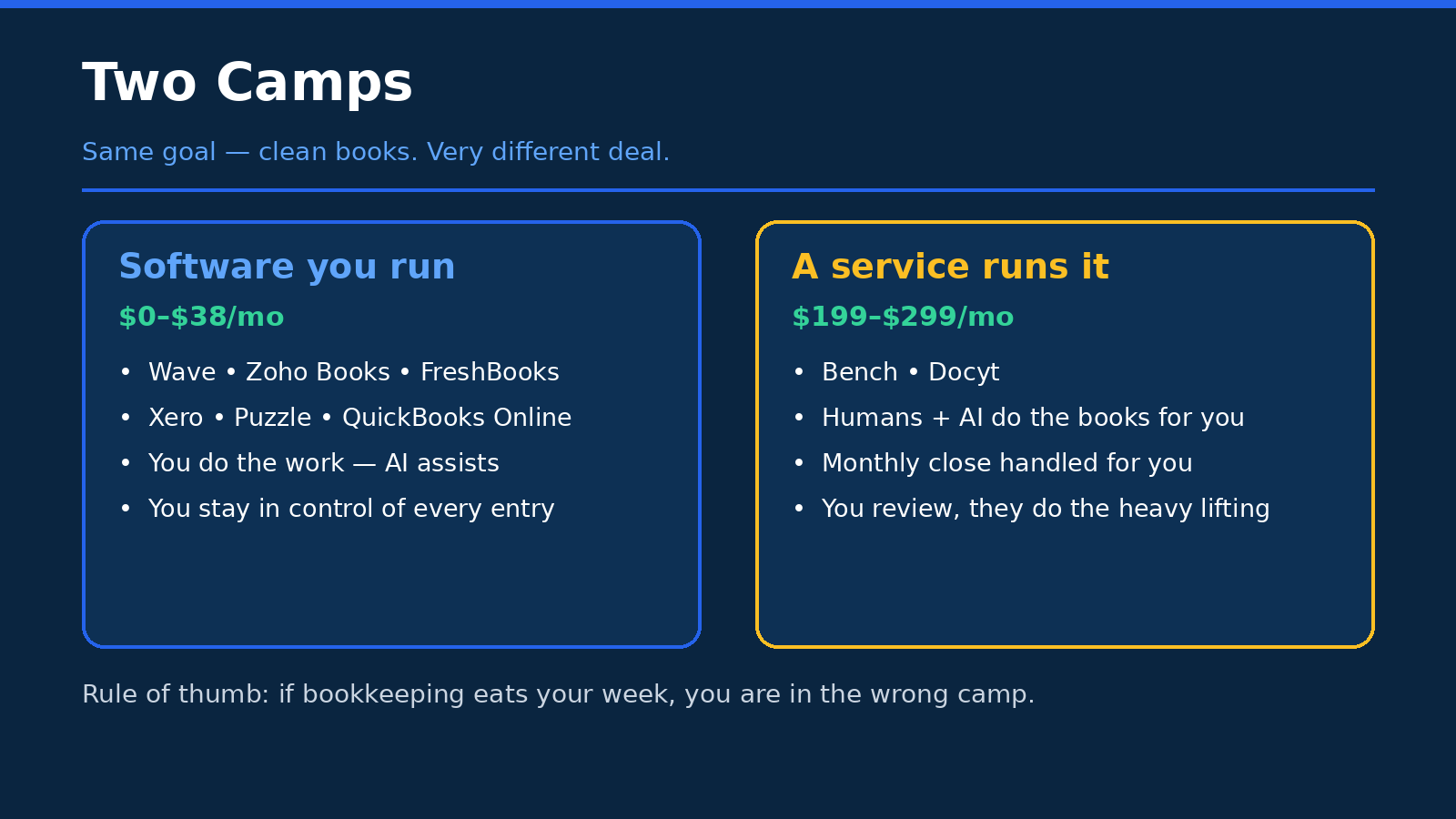
By now you’ve probably noticed that this list splits into two camps, and the split matters more than any single feature comparison.
In the first camp, you’ve got software you run yourself: QuickBooks, Xero, FreshBooks, Wave, Zoho Books, Puzzle, and Docyt. You pay for the tool, you (or someone on your team) do the work, and the AI helps you do it faster. You’re in control. You can see every transaction, change every category, and export your data whenever you want. The downside is that you have to actually do it. Even with good AI, there’s still a weekly habit to build, and if you skip it for a month, you’re back to the shoebox.
In the second camp, you’ve got a service that runs it for you: Bench. You pay more, and a human does the work, with AI helping them. You’re buying time and peace of mind, not software. The downside is cost, and control — you’re trusting someone else with your books, and you need to be comfortable with that, and you need to know how to get your data out if you ever leave.
Neither camp is better. They’re just different answers to a different question: do you want to save money, or save time? Early on, when money is tight and your transaction volume is low, software usually wins. You can do the books yourself in an hour a week, and that hour teaches you a lot about your business. Later, when you’re doing real revenue and your time is worth more than a bookkeeper’s hourly rate, a service starts to make sense. A lot of founders start in the first camp and move to the second — and that’s a perfectly sensible path. Just don’t pay for the service before you need it, and don’t cling to the software after you’ve outgrown it.
Well — mostly. There’s one exception: if you genuinely hate bookkeeping so much that you’ll avoid it entirely, and the books will pile up and turn into a mess, then paying for the service early is cheaper than paying an accountant to clean up a year’s worth of chaos later. Know yourself. Be honest about it. The best tool is the one you’ll actually use.
How to choose in 10 minutes
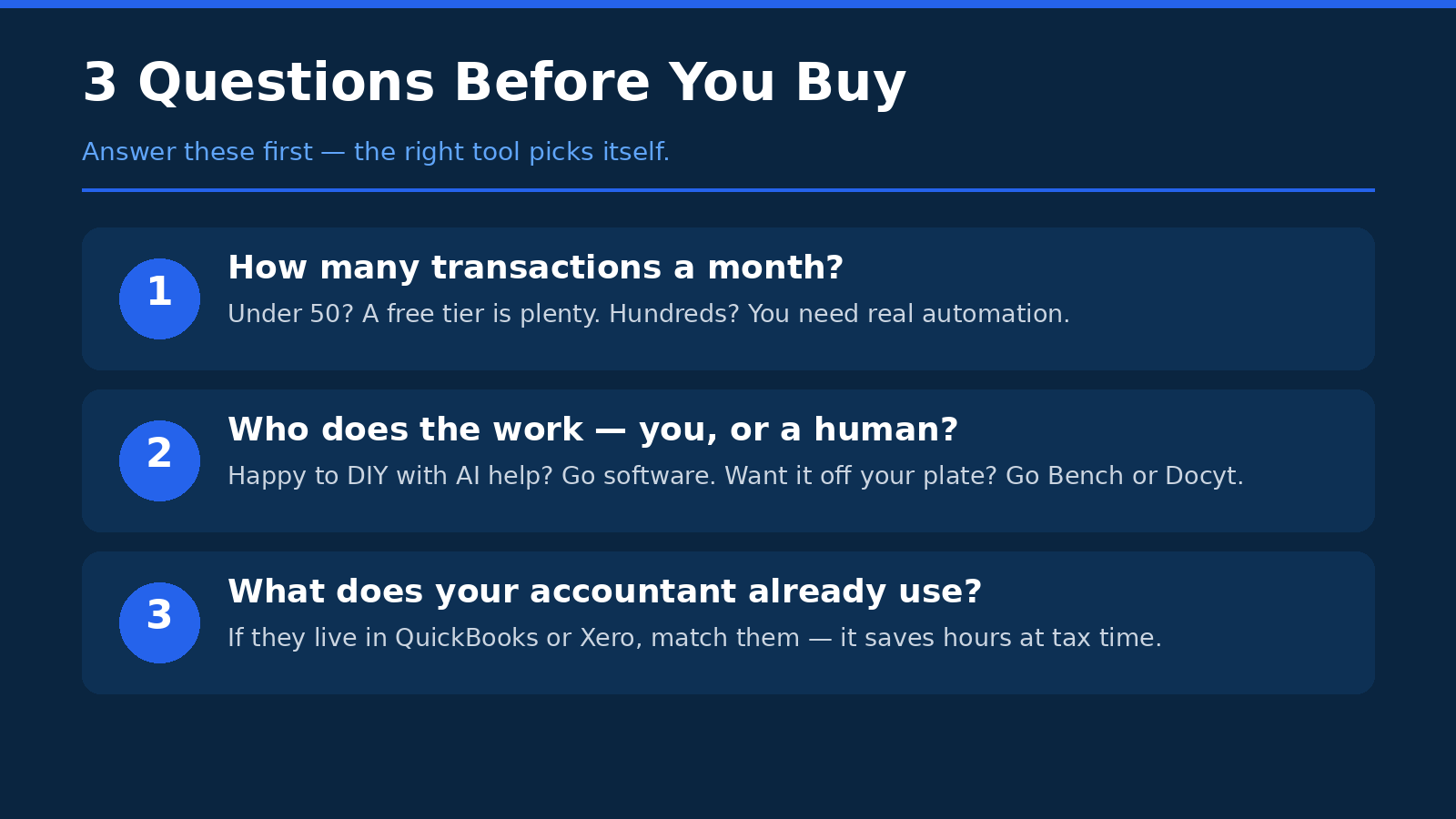
Look, you don’t need a week of research to pick an accounting tool. You need ten minutes and three honest answers. Grab a coffee, answer these, and the right choice will be pretty obvious.
Question 1: How many transactions do you actually have? Not how many you think you’ll have, not how many you hope you’ll have — how many hit your bank account in a typical month right now. If it’s under 50, almost any tool on this list will handle it, and the free plans (Wave, Zoho Books, QuickBooks free) are genuinely worth considering. If it’s 50 to 200, you’re in the sweet spot for QuickBooks Simple Start, Xero Growing, or Puzzle Core. If it’s over 200, or you’re running multiple locations, you need to look at the higher tiers — or at Docyt — because the cheap plans will cap out on you and you’ll be upgrading within weeks. Counting your transactions takes two minutes in your bank app, and it saves you from picking a plan you’ll outgrow before the promo ends.
Question 2: Who does the work? Is it you, at 10pm on a Sunday? Is it a co-founder? A part-time bookkeeper? Or do you want someone else to do it entirely? If it’s you, pick a tool you actually like using — you’ll be living in it, so the interface matters, and Xero and FreshBooks score well here. If it’s a team, check the user limits: Xero gives you unlimited users, QuickBooks charges by tier, and FreshBooks charges $11 per extra team member. Those numbers change the maths a lot. If the answer is “nobody, I want it done for me,” then Bench is the honest answer, and you should price it against hiring a bookkeeper, not against a $27 app.
Question 3: What does your accountant use? This is the question founders skip, and it’s the one that costs them the most. Ask your accountant — or the accountant you plan to hire — what they work in. If they live in QuickBooks, picking Xero means they’ll either charge you more or ask you to switch. If they’re on Xero, same thing in reverse. If you don’t have an accountant yet, pick the standard in your country (QuickBooks in the US, Xero in the UK and Australia) and you’ll be fine. And if you’re building something custom — say, you want your accounting stack wired into a custom dashboard, a storefront, or an internal tool your team uses every day — that’s the point where it’s worth talking to a dev team like AISquadX about getting the pieces connected properly, instead of duct-taping integrations together yourself.
If you’re still torn after those three questions, here’s my shortcut: pre-revenue, start with Wave or Zoho Books free. First customers, go QuickBooks Simple Start or Xero Growing. Scaling with a team, look at Xero Established or Puzzle Complete. And if you’re starting an AI agency or a service business where invoicing is the whole game, give FreshBooks a proper trial first — it might just click.
The traps nobody warns you about
Every tool on this list is a good product. That’s what makes the traps so annoying — they’re not in the product, they’re in the fine print around it. Here are the ones that actually catch founders out.
- Promo prices expire, and the real price is the one that matters. 50% off for three months sounds great. 80% off for three months sounds even better. But you’re going to be using this tool for years, not three months, so do your comparison on the full price. Write down what month four costs for each tool you’re considering, and compare those numbers. That’s the real comparison.
- Price rises are real, and they happen often. QuickBooks raised three tiers in August 2026. Xero raised all three in October 2026. Puzzle raised three tiers in November 2026. That’s three different companies raising prices within four months. Budget with a bit of headroom, and don’t assume today’s price is next year’s price.
- Per-location and per-user billing stacks up fast. Docyt charges per location. FreshBooks charges per extra team member. QuickBooks charges by user tier. A price that looks cheap for one person in one place can double or triple when you add a co-founder and a second location. Model the total cost for your actual team, not the headline price for one user.
- Free plans have limits that bite at the worst moment. Xero Early caps at 20 invoices a month. Zoho Books free caps at 1,000 invoices a year and one user. QuickBooks free allows two invoices a month. Those limits are fine until the month you land three new clients at once — and then you’re upgrading in a hurry, in the middle of a busy week. Know the limits before you hit them.
- Payroll is almost never included. QuickBooks, Xero, FreshBooks, and Puzzle all handle payroll through a partner or an add-on, and it costs extra. If you plan to hire in the next year, get the payroll price now, not when you’re onboarding your first employee.
And then there’s the big one — the trap that isn’t really a trap, it’s a lesson, and it comes from the Bench story.
- Your books need to survive the company that holds them. Bench shut down without warning on December 27, 2024, was acquired by Employer.com within days, and relaunched in January 2025. Its customers got through it, but it was a scary few days, and it could have been worse. Before you trust any tool with your financial records, check three things: can you export your full books, in what format, and how long does it take? Do that check before you sign up, not after something goes wrong. And keep your own backup — a monthly export, saved somewhere you control. It takes five minutes, and it’s the cheapest insurance you’ll ever buy.
- Don’t build your whole business on a tool you can’t leave. If switching costs you weeks of work and a pile of lost data, that’s not a feature, that’s a lock-in. The best tools make it easy to leave, because they’re confident you’ll stay. If a tool makes exporting hard, ask yourself why.
FAQ
What is the cheapest AI accounting tool for a startup?
Wave’s Starter plan and Zoho Books’ free plan both cost $0, and QuickBooks has a free plan too. Wave Starter gives you unlimited invoices, estimates, bills, and bookkeeping records for free, which is hard to beat if you’re pre-revenue. Zoho Books is free while your annual revenue stays under $50,000, with one user and up to 1,000 invoices a year. QuickBooks free is more limited — one user, two invoices a month — so it’s really a trial rather than a home. If you’re willing to pay a little, Puzzle Starter at $30 a month and Xero Early at $27 a month are the cheapest paid plans with real AI features. My honest take: if you have no revenue yet, start free with Wave or Zoho Books. Pay when you have customers to invoice, not before.
QuickBooks or Xero for a startup?
It depends on your team and your accountant, and I know that’s a frustrating answer, so here’s the short version. Pick QuickBooks if you want the US standard, the widest range of integrations, and the tool most American accountants already know — Simple Start at $38 a month is a solid starting point. Pick Xero if you have a team, because every plan includes unlimited users, and the interface is cleaner — Growing at $59 a month is where most active startups land, since Early caps at 20 invoices a month. If your accountant already uses one of them, go with that one. Seriously. The best tool is the one your accountant can open without a training session, and the wrong choice here will cost you more in accountant hours than you’ll ever save on the subscription.
Can AI do my bookkeeping completely?
Not yet — and anyone who tells you otherwise is selling something. What AI does well right now is the repetitive work: categorising transactions, matching bank feeds, drafting invoice reminders, flagging things that look odd, and answering simple questions about your numbers. Puzzle says its AI can auto-categorise up to 98% of transactions, and that’s a best-case claim for standard transactions. The rest — the weird one-off payment, the transaction that could be two different things, the month-end close, the tax decisions — still needs a human. That human can be you, for twenty minutes a week, or a bookkeeper, or a service like Bench. But no tool on this list replaces a human review before you file taxes. Think of AI as a very fast assistant, not a replacement for judgement.
What happens to my books if a tool shuts down?
It depends on the tool, and this is exactly why export matters. With software you run yourself — QuickBooks, Xero, Wave, Zoho Books, Puzzle, FreshBooks, Docyt — your data usually lives in your account, and you can export it, though the format and completeness vary, so check before you commit. With a done-for-you service like Bench, your books live in the company’s own software, which makes export even more important. Bench shut down without warning on December 27, 2024, was acquired by Employer.com within days, and relaunched in January 2025 — its customers got through it, but it was a reminder that no company is guaranteed to be around forever. My rule: export your books monthly, save the file somewhere you control, and make sure you know the export format before you sign up, not after something goes wrong.
When should a startup switch from free to paid accounting software?
Switch when you hit one of three triggers, whichever comes first. First, you hit the free plan’s limits — 20 invoices a month on Xero Early isn’t a paid plan, but the same idea applies: Wave and Zoho Books free plans cap invoices and users, and once you’re bumping against those caps every month, it’s time. Second, you start making real money and you need proper reports — for investors, for a loan, or for tax filing — and the free plan’s reports aren’t enough. Third, the time you’re spending on manual bookkeeping is worth more than the subscription. If you’re spending three hours a week categorising transactions by hand, a $27 or $38 plan that automates most of it pays for itself in the first week. Don’t switch just because a tool looks fancy. Switch because the free plan is costing you time or holding you back.
The Bottom Line
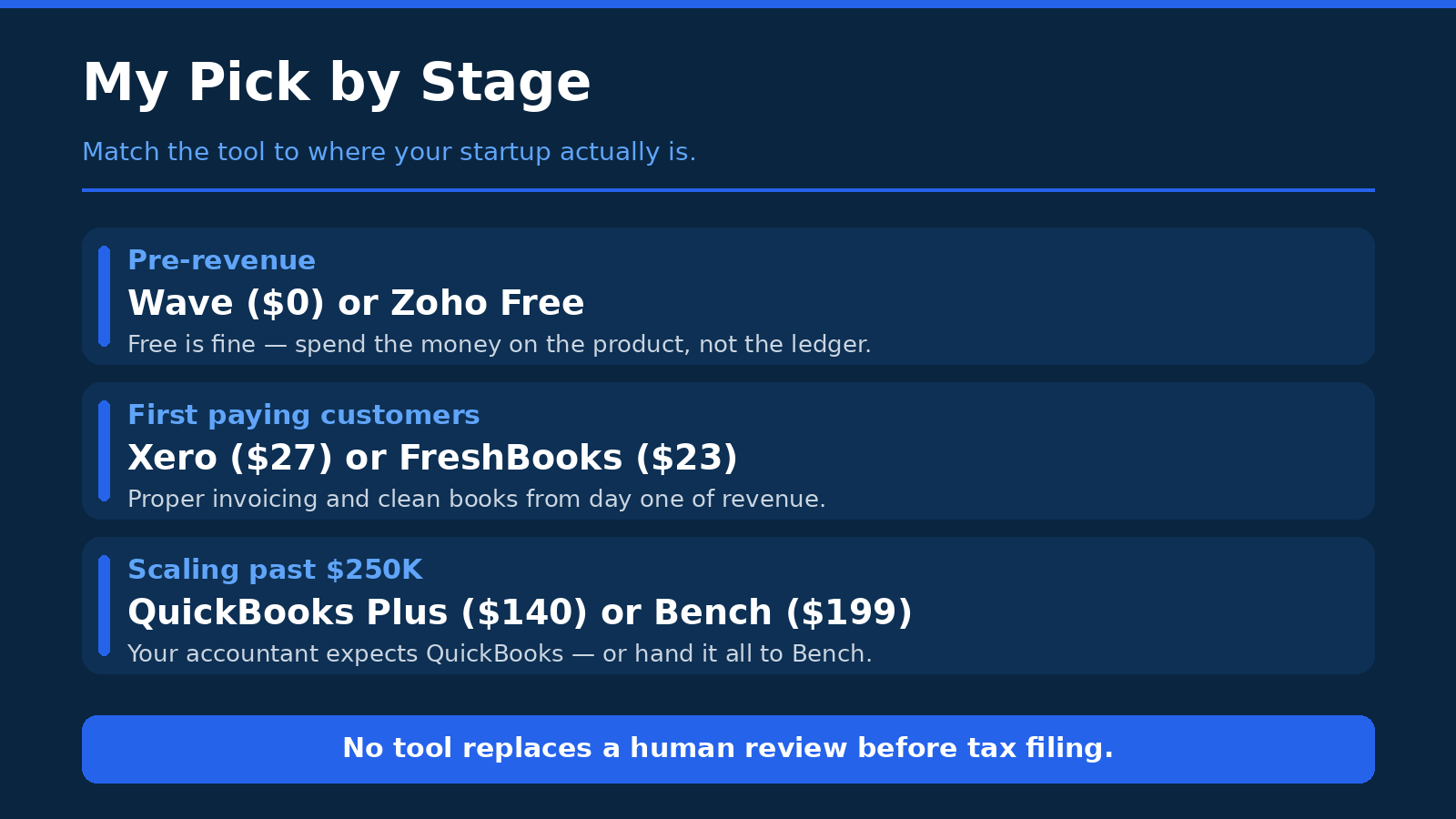
So, which one should you pick? Here’s my honest answer, by stage — because the right tool at one stage is the wrong tool at another, and anyone who gives you a single “best” without asking where you are is guessing.
If you’re pre-revenue, start with Wave Starter or Zoho Books free. Both cost nothing, both keep proper books, and both mean you’ll have clean records from day one instead of a shoebox to sort out later. Don’t pay for accounting software before you have revenue to account for. Spend that money on the product.
If you’ve got your first customers and you’re invoicing regularly, go with QuickBooks Simple Start at $38 a month or Xero Growing at $59 a month. QuickBooks if you want the US standard and the widest integrations; Xero if you’ve got a team and you want unlimited users and a cleaner interface. If you’re a service business that lives on invoices, give FreshBooks Plus at $43 a month a real trial first — it might fit you better than either of them. And if you’re a US startup that wants runway front and centre and likes the idea of an AI-native ledger, Puzzle Core at $72 a month is worth a look, especially with 50% off for the first three months.
If you’re scaling — real revenue, a team, maybe multiple locations — that’s when the choice gets more specific. Xero Established at $97 a month or Puzzle Complete at $120 a month are strong picks for a growing single-entity startup. If you’re multi-location, Docyt is the specialist, but model the per-location cost carefully before you commit. And if you’d rather have a human do the books entirely, Bench at $199 a month for Light is the honest option — just go in knowing the shutdown history, check the export terms in writing, and keep your own monthly backup.
One last thing, and I mean this: no tool on this list replaces a human review before you file your taxes. AI can categorise, reconcile, draft, and flag — and the good tools do that well — but the final check, the one where someone who knows the tax rules looks at your books and says “yes, this is right,” still needs a person. Use the AI to do the heavy lifting, use the tool to keep things tidy, and then get a human to check it before it goes to the tax authorities. That’s not a flaw in these tools. That’s just how accounting works.
Pick one, set it up this week, and connect your bank. Future you — the one who isn’t sitting on the kitchen floor with a shoebox — will be grateful.