Here’s a sentence I didn’t expect to write this week: the most useful AI release for founders in November isn’t a chatbot. It’s a video model.
Google DeepMind announced Gemini Omni 1.2 Flash on November 5, 2026, and it’s generally available right now on the Gemini API and Gemini for business. Fifteen-second clips. Real editing, not just generation. A price cut. And — the part that actually matters for anyone making ads — your product and your people look the same from one frame to the next.
I’ve spent the last day reading the announcement, the docs, and the pricing page so you don’t have to. No hands-on testing claims here — I haven’t run the model myself yet, and I’ll say so plainly wherever it matters. What follows is what Google actually announced, what it costs down to the cent, and how I’d use it if I were running a startup’s marketing this month.
Real talk: most AI video tools are fun for an afternoon and useless by Monday. The question isn’t whether the clips look cool. It’s whether you can make thirty of them, on brand, for less than a freelancer charges for one afternoon. That’s the bar. Let’s see if Omni 1.2 Flash clears it.
What Gemini Omni 1.2 Flash Actually Is
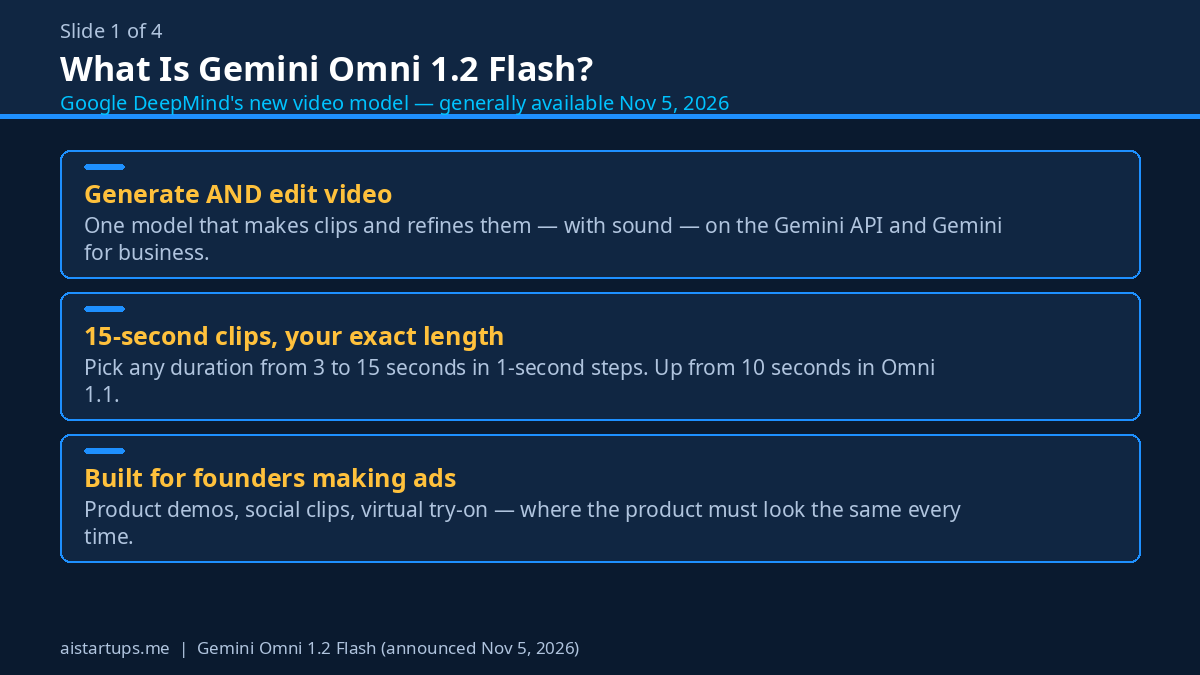
Omni 1.2 Flash is Google’s newest video generation model, and the “Omni” in the name is doing real work. This isn’t just a text-to-video tool. It’s a single model that generates and edits video, with sound, in one place.
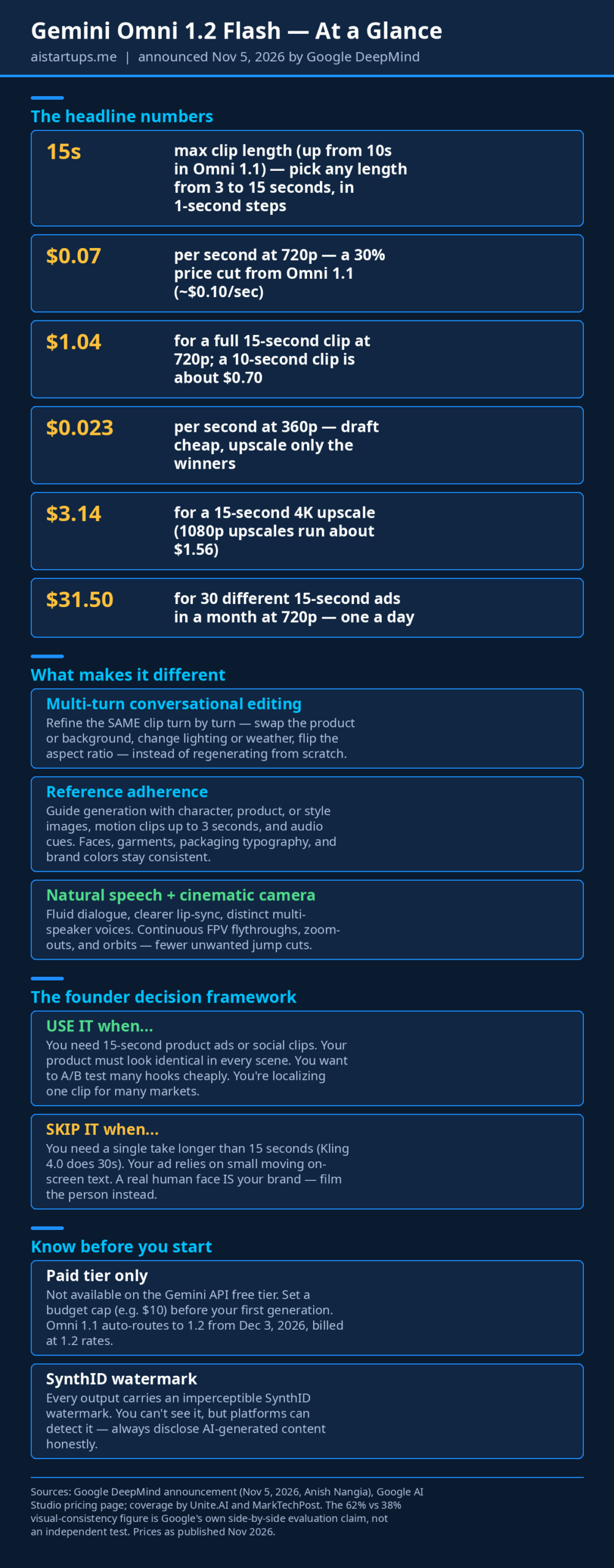
The headline numbers are simple. Clips run from 3 to 15 seconds, in one-second steps — you pick the exact length instead of getting whatever the model feels like giving you. That’s up from 10 seconds in Omni 1.1, which matters more than it sounds. Ten seconds is a teaser. Fifteen seconds is a real ad: hook, product shot, call to action, done.
It also talks. The model generates natural-sounding dialogue with clearer lip-sync, and it can handle multiple speakers as distinct voices — so a two-person demo doesn’t come out sounding like one person arguing with themselves. That works across Flow, Gemini for business, and Google Vids.
And the camera behaves. Google is promising continuous FPV flythroughs, zoom-outs, and orbits with fewer of those random jump cuts that make AI video feel like a slideshow having a panic attack. If you’ve ever watched an AI clip where the camera teleports three times in eight seconds, you know exactly what I’m talking about.
Why founders should care (and why most won’t, yet)
Look, video is the most expensive content a startup makes. A decent 15-second product ad from a freelancer runs $300 to $1,000. An agency will happily charge five times that. So most early-stage founders just… don’t make video. They post static images and hope the algorithm is feeling generous. It usually isn’t.
A model that makes a usable 15-second clip for about a dollar changes that math completely. Not because the clips are perfect — they won’t be — but because at a dollar a pop, you can afford to make twenty bad ones to find three good ones. That’s a workflow freelancers can’t match and agencies won’t sell you.
The catch, and there are a few, comes later in this article. First, the numbers.
The Price Math (Because That’s What You’re Really Asking)
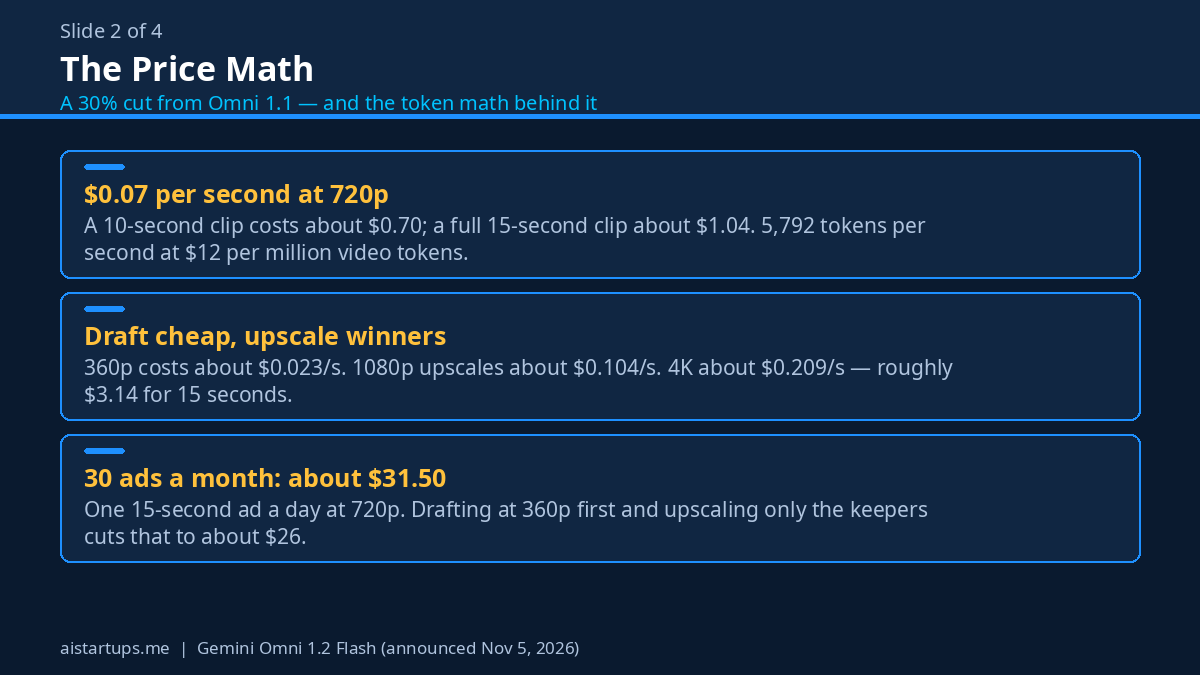
Google cut the price hard. Omni 1.2 Flash costs $0.07 per second for 720p video — about 30% less than Omni 1.1’s roughly $0.10 per second. That’s the flat rate. But the pricing page also shows the token math underneath it, and it’s worth understanding because it explains the other resolutions:
- Input: $1.50 per million tokens (text, image, or video in)
- Output: $9.00 per million text tokens, $12.00 per million video tokens
- 720p video: 5,792 tokens per second — which works out to about $0.07 a second, matching the flat rate
- 360p: about $0.023 per second
- 1080p (upsampled): about $0.104 per second
- 4K (upsampled): about $0.209 per second
So what does one clip actually cost? A 10-second clip at 720p runs about $0.70. A full 15-second clip runs about $1.04. That’s the whole ad — hook, demo, call to action — for roughly the price of a coffee bean. (Okay, a very small coffee. You get the point.)
Here’s the part I like: the workflow Google suggests is to draft cheap and upscale only the winners. Sketch your ideas at 360p, where a 15-second clip costs about $0.35. Fix the details with follow-up edits. Then upscale the two or three keepers to 1080p or 4K. A 15-second 4K upscale runs about $3.14 — still pocket change next to a reshoot.
One warning that matters: Omni 1.2 Flash is paid tier only on the Gemini API. It’s not on the free tier. You’ll need a billed account before you generate a single frame. That’s actually good news in disguise — paid-tier models tend to stay available and stable, while free-tier access gets throttled the moment something goes viral. But don’t go in expecting a free trial spin.
If you’re already on Omni 1.1, heads up: Google says 1.1 will auto-route to 1.2 from December 3, 2026, billed at 1.2 rates. Your old prompts should keep working, and you’ll pay less. Not a bad deal.
Omni 1.2 Flash vs Kling 4.0 vs FLUX 3 Max
Three video models, three different strengths. We covered Kling 4.0 and FLUX 3 Max in earlier guides, so here’s the short version of how they stack up against the new arrival:
| Model | Max clip length | Price per second | Best for |
|---|---|---|---|
| Gemini Omni 1.2 Flash | 15 seconds (3–15s, 1s steps) | $0.07/s at 720p | Ads and product demos where faces, packaging, and brand colors must stay consistent — plus multi-turn editing |
| Kling 4.0 | 30 seconds native | Per-second rates not published | Longer single takes — storytelling and scenes that need more than 15 seconds to breathe |
| FLUX 3 Max | — | $0.0425/s promo until Nov 7, then $0.17/s list | Cheapest experimentation while the promo lasts; pricier than Omni at list rates |
The honest take: if you need a 30-second scene in one unbroken take, Kling 4.0 is still your pick — Omni tops out at 15. If you’re price-shopping this week, FLUX 3 Max’s promo rate is technically cheaper per second until November 7, but it jumps to $0.17 after that, which is more than double Omni’s $0.07. And if your main problem is “my product looks different in every clip,” Omni’s reference adherence is the feature the other two don’t lead with.
For a fuller picture of the whole market, our roundup of the best AI video generators for startups puts these side by side with the rest of the field.
The Two Features That Actually Change Your Workflow
Most model announcements are a list of small improvements. Two things in this one are genuinely different from how video tools worked last month.
1. Multi-turn conversational editing
Here’s how AI video used to work: you wrote a prompt, got a clip, didn’t like the background, and started over from scratch. New prompt, new clip, new random everything. The product looked different, the lighting changed, the whole thing was a fresh roll of the dice.
Omni 1.2 Flash lets you edit the same clip turn by turn, in plain language. Swap the product. Change the background. Switch the lighting from noon to golden hour. Change the weather. Flip the aspect ratio from wide to vertical for Reels. Each edit builds on the last clip instead of regenerating from zero.
Why does this matter for a founder? Because iteration is where the money goes. A real ad isn’t one prompt — it’s a dozen small fixes. “Make the logo bigger.” “The hand looks weird, fix it.” “Now make it rain.” If each fix costs you a full regeneration and a fresh lottery ticket on consistency, you burn your budget on retries. Multi-turn editing turns that into a conversation instead of a slot machine.
This is also where the 15-second length pays off. You can generate a solid base clip, then spend your turns on the details that make it yours, instead of spending them begging the model to keep your product the same color twice.
2. Reference adherence (your product actually looks like your product)
You can guide generation with reference images — character photos, product shots, style images — plus short motion clips up to 3 seconds and even audio cues. The model holds onto faces, garments, packaging typography, and brand colors across the clip.
Google’s own example is a good one: a single photo of a model plus front-and-back shots of three outfits produces a 15-second virtual try-on sequence, with the same person wearing all three outfits. For a fashion or DTC brand, that’s the difference between “cute demo” and “I can actually use this.”
Think about what this opens up for a small brand. One good product photo becomes a whole ad campaign: the same bottle, the same label, the same colors, in a beach scene, a kitchen scene, a gym bag. Before reference adherence, every scene was a new product that sort of resembled yours. Now the product is the anchor and the scene changes around it.
There’s a stat Google cites here — a 62% to 38% visual-consistency win rate for 1.2 over 1.1 in their own side-by-side evaluation. Treat that number with the skepticism it deserves: it’s Google grading Google’s homework, not an independent test. But the direction is plausible, and the reference-image feature is the mechanism that would produce it. I’ll believe the exact number when someone outside Google repeats the test.
Fifteen seconds, seven cents a second, and the same face in every frame. That’s the whole pitch — and for a founder making ads, it’s a good one.
Try It in 10 Minutes
You don’t need a film degree or a production budget. Here’s the fastest honest path from zero to a first clip, based on the docs and the access routes Google lists:
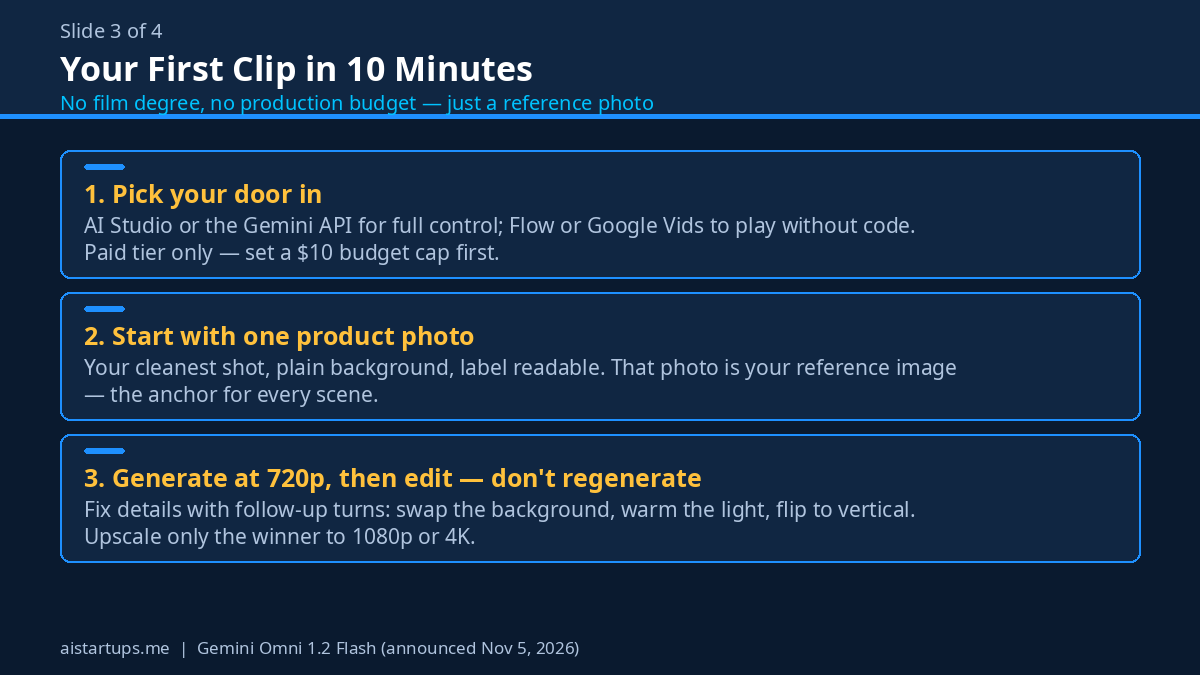
- Pick your door in. The Gemini API and Google AI Studio are the main routes — that’s where the docs and pricing live. If you just want to play without touching code, try Flow or Google Vids first. Google Vids makes 15-second clips at no additional cost with a Google account or Workspace subscription, and the Gemini app is rolling out 15-second video to Google AI Ultra subscribers. Google Ads is another route if you’re already running campaigns there.
- Set up billing. Remember, this is paid tier only. Add a payment method in Google Cloud console or AI Studio before you start, and set a budget cap while you’re there. A $10 cap means the worst case is a $10 lesson, not a surprise bill.
- Start with one product photo. Pick your cleanest shot — plain background, good light, label readable. That’s your reference image. One photo is enough to start.
- Write a prompt like a shot list, not a poem. “A 15-second ad. A matte black water bottle on a wooden gym bench, morning light through a window. Camera slowly orbits left. A hand picks it up at second 10. Clean, minimal, no text on screen.” Specific beats clever.
- Generate at 720p first. It’s the sweet spot — about $1.04 for the full 15 seconds, sharp enough to judge, cheap enough to redo five times.
- Edit, don’t regenerate. Something off? Talk to it. “Change the bench to white marble.” “Make the light warmer.” “Now make a vertical version.” That’s the multi-turn feature earning its keep.
- Upscale only the winner. Got a clip you actually like? Upscale that one to 1080p (about $1.56 for 15 seconds) or 4K (about $3.14). Leave the rejects at 720p where they belong.
Ten minutes, one reference photo, maybe three dollars in generation costs. That’s the whole onboarding. If you can’t get something usable in that window, the tool isn’t the problem — the prompt is. Shorten it, get more specific, and try again.
One more practical note: every clip carries an imperceptible SynthID watermark. You can’t see it, your customers can’t see it, but it’s there — Google can identify AI-generated content, and so can platforms that check for it. That’s a feature, not a bug, for a founder: it keeps you honest with ad platforms that ask whether your content is AI-generated. Answer yes when they ask. It’s not worth an account strike.
What a Real Campaign Costs
Let’s do the math founders actually care about — not one clip, but a month of content.
Say you want 30 different 15-second ads in a month. One a day, every day, each testing a different hook or audience. At 720p, that’s 30 clips × 15 seconds × $0.07 — about $31.50 for the whole month. Thirty ads for the price of a team lunch.
Now be smarter about it. Draft all 30 at 360p first: 30 × 15 × $0.023 = about $10.35. Watch them, kill the 20 weakest, and upscale the 10 survivors to 1080p: 10 × 15 × $0.104 = about $15.60. Total for a tested, polished month of ads: roughly $26 — and you only paid full price for the clips that earned it.
Compare that with the old way. One freelancer-made ad: $300 to $1,000. One agency ad: $1,500 and up. Omni’s monthly output costs less than the revision round on a single agency video. That’s not a small gap. It’s a different business model for content.
And if you’re scaling harder — say, 100 clips a month for serious A/B testing across audiences — you’re looking at about $105 at 720p. Still less than one freelancer ad. At that volume, the bottleneck stops being money and becomes your ability to write 100 distinct prompts. (That’s a good problem. It’s also a prompt-template problem, which is a much cheaper problem to solve.)
For heavier workloads, Google offers Provisioned Throughput — reserved capacity on enterprise-grade Cloud infrastructure — so your generation doesn’t slow down when everyone else is rendering at the same time. Most founders won’t need it in month one. But it’s there when a campaign scales past hobby volume.
Where It Fits — and Where It Doesn’t
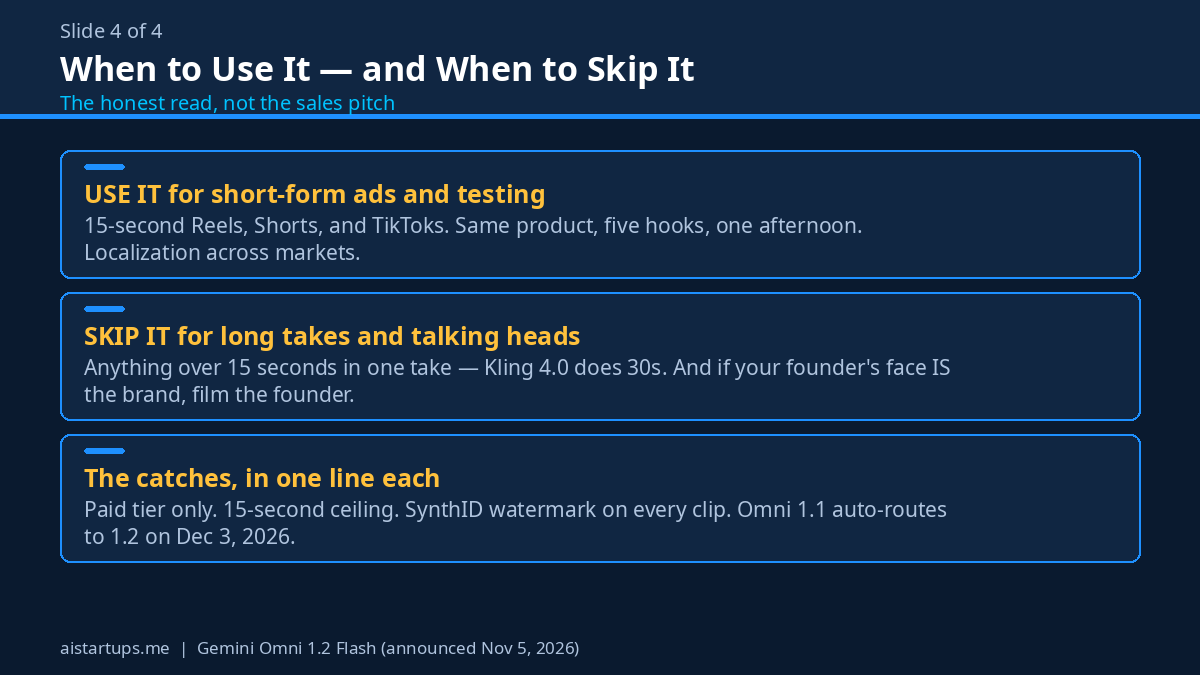
Omni 1.2 Flash is great for some jobs and wrong for others. Here’s my honest read:
Use it for:
- Product ads and social clips. Fifteen seconds is the native length of a Reel, a Short, or a TikTok. This is the tool’s home turf.
- Virtual try-on and product showcases. The reference adherence feature was basically built for fashion, beauty, and DTC brands.
- Rapid A/B testing. Same product, five hooks, five audiences, one afternoon. At a dollar a clip, testing stops being a luxury.
- Localization. Same clip, different language dialogue, different background for a different market. Multi-turn editing makes variants cheap.
- Pitch and landing page video. A short clip above the fold beats a wall of text, and if the video drives traffic to a landing page that still looks like a 2019 template, the clip did its job and the page didn’t — that’s the kind of gap an AI integration studio like AISquadX exists to close, rebuilding the page and wiring the AI tools into the rest of the funnel.
Skip it (for now) for:
- Anything longer than 15 seconds in one take. Long-form storytelling, explainers, and tutorials need stitching or a different model. Kling 4.0’s 30-second native length wins here.
- Precise brand typography in motion. Packaging typography holds up well in stills, but small moving text is still AI video’s weak spot. Keep on-screen text minimal and add it in editing.
- Anything where a real human face carries the brand. The model handles faces well, but if your founder is the face of the company, film your founder. AI you is a gimmick; real you is a brand.
Also worth knowing: our earlier guide to Nano Banana 2.1 covers the image side of this workflow — great reference photos in, great video out. The two tools pair well: stills for the references, Omni for the motion.
The Same Week’s Other Launch (a Quick Contrast)
Google wasn’t the only one shipping on November 5. OpenAI launched GPT-6 Cyber the same day — a model built for exploit research, priced at $20 per million input tokens and $100 per million output tokens, and gated to approved Daybreak Red customers only.
That contrast is the whole story of where AI is splitting in two. One track is frontier capability for vetted security teams at frontier prices. The other is a $0.07-per-second video tool any founder with a credit card can use today. GPT-6 Cyber is not a tool most founders will ever touch, and that’s fine — it’s not for us. Omni 1.2 Flash is. Don’t let the flashier headline distract you from the useful one.
The Catches (Because There Are Always Catches)
No tool is all upside, and this one has a few things to know before you build a workflow around it:
- Paid tier only. Said it before, saying it again — no free tier on the Gemini API. Budget $10 to $30 for your first month of experiments.
- Fifteen seconds is a hard ceiling. If your ad needs 30 seconds, you’re stitching clips or using Kling. Plan for it instead of fighting it.
- Google’s numbers are Google’s numbers. That 62% consistency win rate comes from Google’s own evaluation. Directionally encouraging, independently unverified.
- The Dec 3 migration. If you’re on Omni 1.1, your calls auto-route to 1.2 from December 3, 2026. Cheaper rates, but test your prompts after the switch — model upgrades can shift outputs in small ways.
- Watermarking is permanent. SynthID is baked in. Don’t try to strip it, and don’t pretend AI clips are camera footage. Platforms are checking, and the penalty for getting caught lying is worse than the penalty for being honest.
None of these are deal-breakers. They’re the kind of limits you plan around in an afternoon. The real question is whether the tool earns a permanent spot in your stack, and for most founders making short-form video, I think it does.
FAQ
How much does Gemini Omni 1.2 Flash cost?
$0.07 per second for 720p video — so about $0.70 for a 10-second clip and about $1.04 for a full 15-second clip. Drafting at 360p costs about $0.023 per second, 1080p upscales run about $0.104 per second, and 4K about $0.209 per second. It’s paid tier only on the Gemini API, with no free-tier access.
How long can Gemini Omni 1.2 Flash videos be?
Clips run from 3 to 15 seconds, in one-second increments — you choose the exact length. That’s up from 10 seconds in Omni 1.1. For anything longer, you’ll need to stitch clips together or use a model with longer native generation, like Kling 4.0 at 30 seconds.
Can Omni 1.2 Flash edit existing video, or only generate new clips?
Both. It’s a generation and editing model in one. You can refine the same clip across multiple conversational turns — swap the product or background, change lighting or weather, switch aspect ratio — without regenerating from scratch. You can also guide it with reference images, short motion clips up to 3 seconds, and audio cues.
Where can I use Gemini Omni 1.2 Flash?
It’s generally available on the Gemini API and Gemini for business (Google Cloud), plus Google AI Studio for prototyping, the Google Cloud console, Flow, Google Vids, the Gemini app (rolling out to Google AI Ultra subscribers), and Google Ads. Google Vids makes 15-second clips at no additional cost with a Google account or Workspace subscription.
Is Gemini Omni 1.2 Flash better than Kling 4.0 or FLUX 3 Max?
It depends on the job. Omni wins on price ($0.07/s at 720p) and on keeping faces, products, and brand colors consistent across clips, plus its multi-turn editing. Kling 4.0 wins when you need a 30-second clip in one take. FLUX 3 Max is cheaper per second during its promo ($0.0425/s until Nov 7) but jumps to $0.17/s at list price — more than double Omni’s rate. For most founders making short ads, Omni is the best default starting point.
The Bottom Line
Gemini Omni 1.2 Flash isn’t the most powerful video model ever made, and Google isn’t pretending it is. It’s the most usable one for a founder with a product to sell and a budget to protect: 15 seconds, about a dollar a clip, your product looking like your product, and edits that build instead of starting over.
My advice? Set aside $10 and an hour this week. Generate five clips of your best product. Edit the best one three times. If two of the five are usable, you’ve just found a content channel that costs less than your coffee budget. If none of them are, you’ve spent ten bucks learning that your prompts need work — which is still a cheap lesson.
The founders who win with AI video won’t be the ones with the biggest budgets. They’ll be the ones who test the most ideas the fastest. At seven cents a second, there’s no excuse left not to be one of them. For the full announcement, read Google’s own launch post and the official pricing page — and if you want the wider context, Unite.AI’s coverage and MarkTechPost’s breakdown are both solid.