Google has a habit of naming its image models like they came out of a group chat. First came Nano Banana, then Nano Banana Pro, then Nano Banana 2 — and on October 6, 2026, the newest member of the family arrived: Nano Banana 2.1.
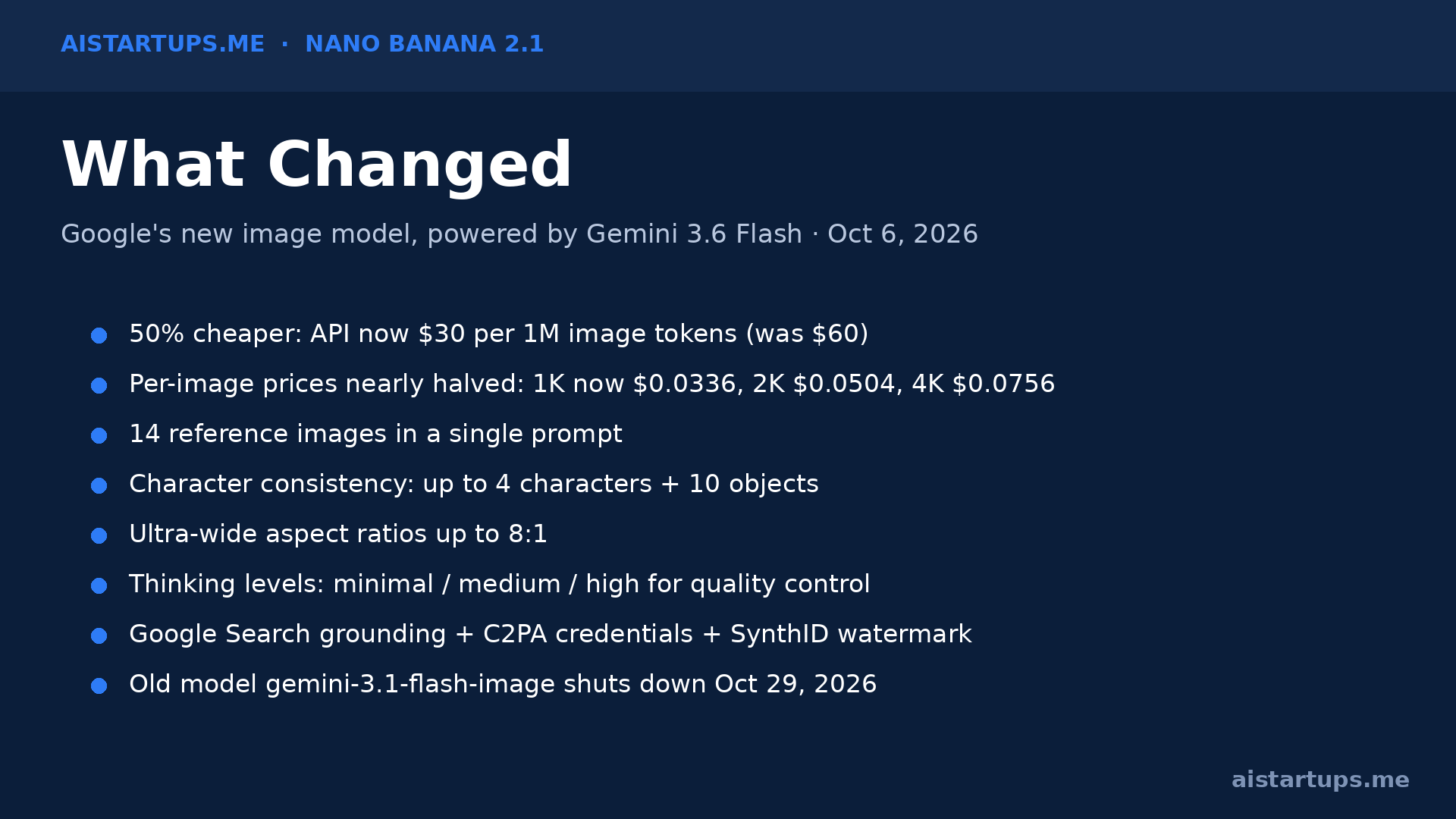
Funny name, serious news. The new model (built on Gemini 3.6 Flash) generates images at up to 4K resolution, keeps characters looking consistent across edits, and — here’s the part that matters for your burn rate — costs roughly half of what Nano Banana 2 charged per image. A 4K image that used to cost about 15 cents now costs about 7.5 cents.
I spent the last day digging through the launch coverage, the pricing tables, and Google’s docs so you don’t have to. Here’s the thing: if your startup generates product mockups, ad creative, social assets, or website imagery with AI, this launch quietly changes the math on what that costs you every month. And if you were holding out on putting AI image generation into your product pipeline, the economics just got a lot more forgiving.
Let’s break down what actually changed, what it costs, and — the part most launch coverage skips — how a startup founder should actually use it.


What Nano Banana 2.1 Actually Is
Strip away the silly name and Nano Banana 2.1 is Google’s newest general-purpose image generation and editing model. Its official model name is gemini-nano-banana-2.1, and it replaces Nano Banana 2 (a.k.a. Gemini 3.1 Flash Image, released February 2026) as Google’s default fast image model.
It sits in the middle of Google’s lineup: faster and cheaper than Nano Banana Pro (which is built on the heavier Gemini 3 Pro Image), but more capable than the old Nano Banana 2. Google’s own framing is that 2.1 is “the more efficient counterpart” to Pro — and in some benchmarks, it actually beats Pro by a wide margin, though in side-by-side image tests Pro still tends to look more natural.
It’s already rolling out across Google’s products: the Gemini app, AI Mode in Google Search, Google AI Studio, Flow, Stitch, Google Ads, and the Gemini Enterprise Platform. If you’re a founder, that last cluster matters most — this isn’t a toy you play with in a chat window. It’s a developer API you can wire into your product, your ad pipeline, or your content engine.
The Pricing: This Is the Real Story
Real talk: the headline here isn’t 4K resolution. It’s the price cut.
Google halved the standard paid-tier API rate to $30 per million image tokens (down from $60). In plain per-image terms, the numbers shake out like this, per Google’s own pricing figures reported at launch:
- Nano Banana 2.1: 1K image = $0.0336 · 2K = $0.0504 · 4K = $0.0756
- Nano Banana 2 (old): 1K = $0.067 · 2K = $0.101 · 4K = $0.151
- Nano Banana Pro: 1K = $0.134 · 2K = $0.134 · 4K = $0.24
Run batch processing jobs and you get another 50% off — bulk 1K generations drop to about $0.0168 per image. That’s 1.7 cents per image for decent-quality AI imagery. Sit with that number for a second.
Why should founders care? Because image generation is one of those AI costs that scales silently. A marketing team generating 500 ad variations a week at 1K resolution was spending ~$33/week on Nano Banana 2. On 2.1 with batch mode, that’s ~$8.40/week. Over a year, that’s a ~$1,300 savings on a line item most founders don’t even track yet — money that goes straight back into your ad spend or your runway.
And if you’ve been following our coverage of Gemini 4 Argon, Google’s frontier text model, the pattern is the same: Google is racing to make its models cheaper faster than anyone else makes them better. For startups, that price race is a gift.

What Actually Got Better (Beyond the Price)
Google says 2.1 improves on its predecessor “across the board.” Marketing language, sure — but the specific claims are worth knowing, because several of them fix the exact pain points that make AI imagery unusable in production:
Character and object consistency
The model can now process up to 14 reference images at once, keeping up to four characters and ten objects consistent. This is the big one for startups. The classic failure mode of AI image tools is that your product looks different in every render — the logo shifts, the mascot’s face morphs, the shoe loses a lace. Fourteen reference images with consistency tracking means you can do iterative design work: upload your product from multiple angles, then ask for it in new scenes without it turning into a different product. For e-commerce brands, this is the difference between a demo and a pipeline.
Better text rendering
AI image models have historically been terrible at text — garbled words on signs, misspelled headlines. Nano Banana 2.1 specifically improved text rendering, and benchmark scores for infographic accuracy jumped dramatically (0.521 on 2.1 vs. 0.179 on the old model). If you generate social graphics or ad creative with headlines baked in, this matters a lot.
4K and ultra-wide panoramas
Output goes from 1K through 2K up to 4K, with aspect ratios out to 8:1 ultra-wide. Panoramic banners, website hero images, cinematic ad frames — formats that most AI image tools still handle awkwardly. Google also fixed tiling artifacts on unusually wide panoramas at 2K and 4K, which was a real artifact problem with the old model.
Search grounding and thinking levels
The model can connect to Google Search to verify real-world details before rendering — ask for “the Eiffel Tower at sunset” and it checks what the Eiffel Tower actually looks like rather than hallucinating it. Developers can also adjust the inference “thinking” level (minimal, medium, high), trading speed for quality. That’s a nice lever: high thinking for hero assets, minimal for bulk variants.
Content credentials
Every image carries Google’s invisible SynthID watermark, and Google is adding C2PA Content Credentials for digital origin tracking. If your brand has a policy on disclosing AI-generated imagery — and honestly, more brands should — this is built-in compliance rather than something you bolt on later.
How to Actually Use It as a Founder
Okay, enough spec sheet. Here’s how this maps to real startup work.
1. Start in the Gemini app, not the API. If you just need images, the Gemini app now runs Nano Banana 2.1 as its image engine. This is your fastest path to testing whether the quality holds up for your use case. Prompt it like you’d brief a designer: describe the scene, the style, the mood. Then iterate conversationally — “make the background darker,” “keep the same product but change the setting.” The multi-turn consistency improvements are where 2.1 earns its keep here.
2. Graduate to Google AI Studio for batch work. When you know what you want, AI Studio is the control room: you can set the resolution (1K for drafts, 4K for finals), adjust aspect ratios, and tune the thinking level. The API needs a paid key — there’s no free tier on the Gemini API for image models — but at ~1.7–3.4 cents per image with batch pricing, the experimentation cost is basically zero.
3. Wire it into your ad pipeline. This is the killer use case. Upload your product shots as reference images, generate 50–100 ad variations across different scenes and aspect ratios, and feed them into your ad platform. At batch prices, a hundred 1K variants costs about $1.68. A hundred. Before this price cut, that kind of volume required either a designer or a much bigger budget.
4. Product mockups and pitch decks. Need a hero image for your landing page or a mockup of your product in a lifestyle setting? The 14-reference-image capacity means you can feed in your actual product photos and get scene variations that keep the product recognizable. That’s something Midjourney-style tools still struggle with — and it’s exactly what e-commerce founders need, which is why this pairs well with tools like Shopify Canvas for AI-built storefronts.
A quick word of caution: one thing Google’s enterprise documentation flags is that generating real people is restricted on certain platform tiers. If your use case involves photorealistic people — testimonials, influencer-style content — test early, because this is the kind of restriction that quietly breaks a workflow.
2.1 vs. 2 vs. Pro: Which Tier Do You Pick?
Google now has three image tiers and the choice isn’t obvious, so here’s the honest breakdown:
Nano Banana 2 Lite (1K only, $0.0336) is the budget option — same 1K price as 2.1, but no 2K/4K. Fine for thumbnails and drafts; skip it if you ever need high-res.
Nano Banana 2.1 is the sweet spot for most startups: 4K output, 14 reference images, thinking-level control, and half the old price. This is your default. The old 2.1’s predecessor, Nano Banana 2 (gemini-3.1-flash-image), is being shut down on October 29, 2026 — so if you’re on the old model, migration isn’t optional, it’s a deadline.
Nano Banana Pro ($0.134–$0.24 per image) is for when quality is the whole point: hero brand imagery, investor decks, premium product shots. Google’s own tests show Pro still looks noticeably more realistic and natural side-by-side. But it’s 4x the price of 2.1 at 1K — so reserve it for the assets that actually justify the premium.
The smart play for most teams: draft and iterate on 2.1 at 1K (3.4 cents), finalize winners at 2K or 4K, and only reach for Pro on the handful of images that carry your brand. That’s the workflow that keeps a marketing image pipeline under $50/month.
Where This Fits in the Bigger Picture
Zoom out for a second, because this launch isn’t happening in isolation.
AI image generation has gotten crowded fast, and cost has become the competitive lever. Google cutting prices in half while improving quality is a deliberate move to pull developers who’ve been sitting on the fence — or running lighter workloads because the economics didn’t justify heavier ones. It’s the same playbook Anthropic and OpenAI are running on the text side, and it’s why we keep writing about AI pricing on this site: the models are converging, and the money is moving to whoever makes the economics work for builders.
For startups specifically, this continues the trend we’ve been tracking in our AI image generator roundup: the tools are good enough for production work now, and the differentiator is no longer “which model is smartest” but “which one fits your workflow and budget.” Nano Banana 2.1’s answer is: fast, cheap, and wired into the Google ecosystem your team probably already uses.
“Cutting prices in half while simultaneously improving performance is a way to pull developers who’ve been sitting on the fence or running lighter workloads because the economics didn’t justify it.”
There’s also a business-model angle here worth naming. If you’re building an AI service for clients — say, selling AI services to local businesses — your margin is the gap between what the model costs you and what the client pays. When your input costs drop 50% overnight, that gap widens without you lifting a finger. The agencies and AI service businesses that track model pricing and re-price (or pocket the difference) are the ones that compound.
And one more practical note: if your startup needs a website or product that actually integrates these models — not just generates images, but builds the image pipeline into your app — that’s exactly the kind of build work a studio like AISquadX handles: web development with AI integration baked in, so you’re not duct-taping APIs together yourself.
FAQ
Is Nano Banana 2.1 free?
Not on the developer side. The Gemini API has no free tier for image models — it’s pay-per-token, which Google converts to per-image figures. In the consumer Gemini app, image generation is available within your existing plan. For builders, budget ~3.4 cents per 1K image, ~7.6 cents per 4K image, with 50% off for batch jobs.
How is Nano Banana 2.1 different from Nano Banana Pro?
2.1 is built on Gemini 3.6 Flash: faster, cheaper, and nearly as good on most benchmarks. Pro (built on Gemini 3 Pro Image) costs about 4x more at 1K resolution but still produces noticeably more realistic images side-by-side. Use 2.1 for volume work, Pro for hero assets.
What happened to Nano Banana 2?
It’s being retired. Google is shutting down gemini-3.1-flash-image on October 29, 2026. If your app or workflow still calls it, migrate to 2.1 now — the new model is cheaper and better, so this is one of those rare forced migrations that actually improves things.
Can I use Nano Banana 2.1 for commercial work?
Yes — it’s available through the Gemini API, Google AI Studio, and Vertex AI for commercial use. Every image carries Google’s SynthID watermark and C2PA content credentials, so AI-generated origin is trackable. Check Google’s terms for your specific tier, especially around generating images of real people.
Which resolution should I generate at?
Draft at 1K (cheapest, fastest), finalize at 2K or 4K only for assets that need the resolution — hero images, print, large-format displays. A 4K image costs about 2.25x a 1K image, so don’t burn 4K on thumbnails. Batch mode halves all of these if you can wait.
The Bottom Line
Nano Banana 2.1 isn’t the kind of launch that gets a keynote. Google quietly shipped it, cut prices in half, and went back to work. But for founders, that’s exactly the kind of launch that matters: your image-generation bill just dropped 50%, the quality went up, the old model has a shutdown date, and the consistency features finally make AI imagery reliable enough for production pipelines.
Here’s my advice, short version: if you generate images with AI, migrate to 2.1 before October 29. Start in the Gemini app to test quality, move to AI Studio or the API when you’re ready for volume, and use batch mode for anything bulk. Draft cheap, finalize at high res, and save Pro for the five images a year that actually carry your brand.
The models keep getting cheaper. The founders who win are the ones who rebuild their cost assumptions every time one does.