Look, I need to be honest with you: most “best AI video generator” lists are garbage. They’re written by people who read three pricing pages, never generated a single clip, and get paid when you click the affiliate link. This isn’t one of those.
Video is eating startup marketing alive. Your landing page converts better with a product demo. Your ads cost less per click with motion creative. Your onboarding actually gets watched when it’s a 60-second explainer instead of a wall of text. The problem was never “should we do video” — it was that real video production costs $5,000+ per finished minute and takes weeks.
AI video generators changed that math completely. For the price of a couple of coffees a month, you can now generate cinematic product shots, talking-head explainers, and scroll-stopping social clips from a text prompt. But here’s the thing nobody tells you: these tools are wildly different from each other. The right one for a brand film will bankrupt you if you use it for daily social content. The cheapest one will embarrass you in front of enterprise clients.
So I spent this week digging through the actual pricing pages, benchmark comparisons, and hands-on reviews of every major AI video tool as of September 2026 — and cross-checked the key claims against primary sources. Twelve tools made the cut. Real prices. Honest quality notes. No affiliate fluff.
How I Picked These 12 (And What I Ignored)
Every tool below had to clear four bars:
- Usable by a startup team today. Real product, real pricing page, works in a browser or API right now — no waitlists, no “request a demo” black holes.
- Verifiable pricing. I checked the pricing pages myself in September 2026. Where prices vary by billing cycle, I say so. Where credit math is deliberately confusing (looking at you, Kling), I call it out.
- Commercial rights on paid plans. If you can’t legally use the output in your ads, it’s a toy, not a tool. Every paid tier here grants commercial use.
- A genuinely different job. I didn’t pad the list with ten identical text-to-video clones. Cinematic generators, avatar tools, and marketing editors all do different work — and startups usually need more than one category.
One quick note before we dive in: pricing in this space moves fast. The numbers below were verified in September 2026, but always glance at the pricing page before you pull out the card. I’ve linked the key sources throughout so you can check.
The Cinematic Generators: Text-to-Video Heavyweights
This is the category most people mean when they say “AI video generator.” You type a prompt (or upload an image), and the model synthesizes a short clip. These are your brand films, product beauty shots, and cinematic social ads.
1. Runway Gen-4.5 — Best All-Round Creator Studio
Runway is the closest thing this space has to a full production suite. Its flagship Gen-4.5 model generates 2–10 second clips at 12 credits per second, and the platform layers on serious production tooling: Aleph for editing existing footage with text prompts (“swap the background, keep the actor”), Act-Two for driving character animation from your own performance, and a timeline-style Studio editor for assembling sequences.
Pricing: Free tier gets you 125 one-time credits (enough to evaluate, not to produce). Paid starts at $15/month ($12 billed annually) for 625 monthly credits. Pro is $28/month with 2,250 credits and custom voice creation. There’s an Unlimited plan at $76/month — but read the fine print, because heavy users have complained about throttling and the credit system still applies to higher-quality outputs.
Honest take: If you’re a founder doing your own creative direction, Runway is the most capable single subscription. The quality gap between it and cheaper rivals has narrowed, though — what you’re really paying for is the workflow (Aleph edits, motion brushes, camera controls), not just raw generation. Skip it if you need clips longer than 16 seconds or native audio; Runway still doesn’t generate dialogue or sound design, which is a real weakness next to Veo. (Sources: SaaSworthy Runway pricing, AI Weekly’s Runway guide)
2. Google Veo 3.1 — Best Photorealism and Native Audio
Veo 3.1 is the quality king right now, and it’s not particularly close. Native dialogue with real lip-sync, spatial audio, sound effects baked into the generation, 8-second base generations (extendable into 60-second sequences) at up to 4K, and prompt adherence that makes other models look like they’re guessing. Google’s “Ingredients to Video” feature (up to 4 reference images) finally gives you workable character consistency across shots.
Pricing: This is where it gets complicated, because Google sells Veo five different ways. Easiest path: Google AI Pro at $19.99/month inside the Gemini app (720p, watermarked). Want 1080p+ and no watermark? That’s Google AI Ultra at $249.99/month — yes, really, a $230 jump mostly for branding features. Developers can use the Gemini API instead: $0.40/second for Standard (720p/1080p), $0.10/sec for Fast, $0.05/sec for Lite. An 8-second 720p clip costs $3.20 on Standard — do the math on a 30-ad campaign before you commit.
Honest take: The output quality is genuinely stunning — talking-head product demos with synced dialogue that would fool most viewers. But the pricing structure is hostile to startups: watermark removal locked behind Ultra, no middle tier, and API costs that scale brutally. My advice: generate drafts on Fast or Lite ($0.80 or $0.40 per 8-second clip), and only render finals on Standard. Also note failed generations can still be billed on the API, which adds 10–20% to real-world costs. (Sources: official Gemini API pricing, Genra’s Veo 3.1 guide)
3. Kling 3.0 — Best Value for Longer Clips
Kling is the quiet workhorse of AI video. While everyone argues about Runway vs. Veo, Kling just keeps shipping the best motion physics per dollar — and it’s the only mainstream tool that can chain clips up to 3 minutes long. Human movement looks natural, which matters enormously for UGC-style ads and demo walkthroughs.
Pricing: The cheapest credible entry in the category at $6.99/month (Standard), with a daily free-credit allowance that actually lets you experiment. The catch: Kling’s credit math is genuinely confusing — different models and resolutions burn credits at different rates, so your “$6.99” can evaporate faster than expected on premium generations.
Honest take: For startups cranking out social content volume, Kling is probably the smartest money in AI video. The free daily credits mean you can storyboard entire campaigns before spending a cent. Downsides: queue times can be slow on lower tiers, and being a China-origin tool (Kuaishou), some enterprise buyers get nervous about data handling — worth knowing if your clients are in regulated industries. (Source: Nesyona’s 2026 comparison)
4. Luma Dream Machine — Best for Fast Creative Iteration
Luma’s Ray models are the speed demons: photorealistic 1080p clips in seconds, with some of the most natural camera work in the business — the virtual cinematography genuinely feels like a human operator, not a slideshow.
Pricing: The Lite plan starts at $9.99/month, and the free tier hands out 30 generations a month — enough to properly evaluate it. Max clip length is 10 seconds per generation.
Honest take: Luma is what you open when you need ten variations of a shot by lunch. It won’t match Veo’s dialogue or Runway’s editing suite, but for storyboarding, concepting, and fast social creative, the speed is the feature. The generous free tier (30 generations a month on some plans) makes it a zero-risk trial.
5. Pika — Best for Quick Social Experiments
Pika is the meme machine: dead simple interface, fast generations, native sound effects, and a community that treats AI video like a creative playground rather than a production pipeline.
Pricing: Standard is $8/month (560 credits); the free tier gives you 80 credits a month. Clips top out at 10 seconds per generation.
Honest take: Real talk: Pika won’t win any photorealism awards, and 10-second clips cap what you can do. But when you need a weird, funny, scroll-stopping clip for TikTok by this afternoon, nothing beats the iteration speed. Think of it as your sketchbook, not your canvas.
6. Hailuo AI (MiniMax) — Best Free Tier, Period
If your budget is literally zero, start here. Hailuo’s free tier is the most generous in the industry — daily credits, no credit card required, fast 6-second 1080p clips.
Pricing: Standard is $9.99/month for 1,000 credits. The free tier’s daily credits (no card required) make it the best zero-cost starting point in the category.
Honest take: The free tier is the whole story here: it’s the best way to learn prompting, previz your concepts, and figure out whether AI video even fits your workflow before spending anything. Paid is cheap too. Quality sits a notch below the top tier and there’s no native audio, but for previz and experimentation it’s unbeatable value.
7. ByteDance Seedance 2.0 — Best for Multi-Shot Sequences
Seedance is ByteDance’s video model (yes, the TikTok people), and version 2.0 does something most rivals can’t: coherent multi-shot sequences at up to 2K resolution, with strong character consistency across shots. Pricing: creator access starts around $9.60/month (via Dreamina Basic) — one of the cheapest entries on this list. API access is per-second, roughly $0.03–0.07/sec at 480p depending on the provider.
Honest take: The multi-shot capability is a genuine differentiator — most tools give you isolated clips and leave the storytelling to you. Seedance thinks in sequences. It’s newer to Western markets so documentation and support are thinner, but if your content needs narrative flow rather than single beauty shots, it’s worth a serious look. (Source: Nesyona’s 2026 comparison)
8. Adobe Firefly Video — Best for Commercial Safety
Here’s the thing nobody talks about until their lawyer calls: most AI video models are trained on scraped internet footage, which means murky rights for commercial use. Adobe Firefly is trained on licensed Adobe Stock content and public domain material, and Adobe backs it with IP indemnification for enterprise customers.
Pricing: Standard is $9.99/month with 2,000 generative credits. Clips run 5 seconds each — short, but the commercial-safety story is the real product here.
Honest take: The output is solid but not chart-topping — you’re trading a little quality for a lot of legal sleep. If you’re an agency producing client work, or a startup in a litigious industry, that trade is worth it. For everyone else, it’s a “nice to have” rather than a reason to choose Firefly first.
The Avatar Tools: Talking Heads Without Cameras
Different job entirely. Instead of generating scenes from prompts, these tools give you a photorealistic AI presenter who delivers your script — perfect for product explainers, onboarding videos, sales outreach, and course content. No filming, no editing timeline, no “umms.”
9. HeyGen — Best Avatar Tool for Marketing Teams
HeyGen is the most versatile avatar platform: 700+ stock avatars, custom avatars from your own footage, voice cloning, and video translation with lip-sync across 175+ languages. The newer Avatar IV generation is genuinely impressive — upload a script, get a presenter that moves and emotes like a real spokesperson.
Pricing: Free plan with 3 watermarked videos a month (no card needed — genuinely useful for evaluation). Creator is $29/month ($24 billed annually) with 15 video credits, 1080p exports, and voice cloning. Pro ($99/month) and Business ($149/month) add 4K, priority rendering, and bigger credit pools for heavy Avatar IV use.
Honest take: If your startup needs a “face” for the brand without hiring a spokesperson, HeyGen is the fastest path. The translation feature alone is worth the price for anyone selling internationally — one recording becomes 175 localized versions. Watch the credit system, though: advanced Avatar IV generations burn “Premium Credits” fast, and the Creator plan’s 200/month can vanish in a week of heavy use. Start free, upgrade when the quality proves itself. (Sources: Fahimai’s HeyGen review, Versely’s avatar app breakdown)
10. Synthesia — Best for Training and Enterprise Explainers
Synthesia is the corporate grown-up of avatar video: 160+ languages, interactive branching videos, SCORM export for LMS platforms, and the compliance posture (SOC 2, SSO) that enterprise buyers require. This is the tool your HR and L&D teams already know.
Pricing: Starts with a free Basic tier (1,200 credits, roughly 10 minutes of video). Starter is $29/month ($18 billed annually), Creator is $89/month ($64 annual) with API access and interactive video. Personal avatars — your actual digital twin — start on Starter.
Honest take: For a startup? Synthesia is overkill unless you’re selling into enterprises that demand its compliance story, or you’re building a course business where SCORM and interactive video matter. For straight marketing explainers, HeyGen gives you more creative flexibility per dollar. But if “we need training videos in 12 languages by Friday” is your reality, nothing else is this turnkey. (Source: Versely’s avatar app breakdown)
The Marketing Editors: Full Videos From a Prompt
The last category skips the “generate a clip” step and goes straight to finished videos: script-to-video with stock footage, captions, music, and voiceover assembled automatically. Less cinematic control, far faster time-to-published.
11. InVideo — Best Script-to-Video for Content Volume
Type a topic, get a complete video: AI-written script, stock footage matched to scenes, AI voiceover, captions, and music. InVideo’s real moat is its 16M+ stock media library — the AI assembles real footage rather than generating everything, which sidesteps the uncanny-valley problem entirely. Pricing: a free tier with limited weekly credits (watermarked exports), then Starter from $20/month per seat, Plus at $60/month ($50/month billed annually), and Max at $150/month ($100/month annually). Credits don’t roll over — size the plan to what you’ll actually burn each month.
Honest take: This is the highest-volume play on the list. If your strategy is “publish 5 videos a week across every platform,” InVideo’s template-and-stock approach will outproduce every cinematic generator here. The trade-off is originality — your videos will look like everyone else’s InVideo videos. Fine for top-of-funnel content; don’t use it for your hero brand film.
12. Descript — Best for Founders Who Talk to Camera
Descript flips the workflow: you record yourself (webcam is fine), then edit the video by editing the transcript — delete a sentence of text and the video cuts itself. Its AI voices can clone you for pickups, Studio Sound removes background noise like magic, and the whole thing exports in 4K. Pricing: free tier (1 hour of transcription a month, 720p exports), Creator at $15/month ($12/month annually — 10 transcription hours, 4K export), Pro at $30/month ($24/month annually — 30 hours, unlimited Overdub and Studio Sound). Most founders land on Creator and never look back.
Honest take: Honestly? For most founders, Descript plus a $50 microphone will outperform every generative tool on this list for talking-head content. Audiences trust a real (if slightly AI-polished) founder more than any avatar. Use the generative tools for b-roll, product shots, and ads — use Descript for the stuff with your face in it.
The mistake isn’t picking the “wrong” AI video tool. It’s picking one tool and expecting it to do every job. The startups winning with video in 2026 run a stack: a cinematic generator for hero creative, an avatar tool for explainers, and an editor like Descript for founder-led content. Total cost? Often under $60/month.
The Price Ladder: What $10, $30, and $120 a Month Actually Buy
Let’s make this concrete. Here’s what your money gets you at three budget tiers:
- ~$10/month (the bootstrap stack): Kling Standard ($6.99) for generated clips + Hailuo’s free tier for previz + Descript’s free tier for editing. You can produce real marketing video at this tier — it just takes more of your time.
- ~$30/month (the serious creator): Runway Standard ($15 annual) or HeyGen Creator ($29) as your anchor, plus free tiers of everything else for experimentation. This is the sweet spot for most startups: one paid workhorse, everything else free.
- ~$120/month (the content machine): Runway Pro ($28) + HeyGen Creator ($29) + InVideo Plus ($60) covers cinematic clips, avatar explainers, and high-volume social output. At this point you’re outproducing agencies that charge $5k/month retainers.
And if you’re already paying for Google AI Pro ($19.99/month) for Gemini anyway, Veo 3.1 access is essentially bundled — check what your existing subscriptions already include before buying anything new. (I wrote more about keeping AI costs under control in our cost of starting an AI business breakdown.)
Which One Should You Actually Pick? A Decision Framework
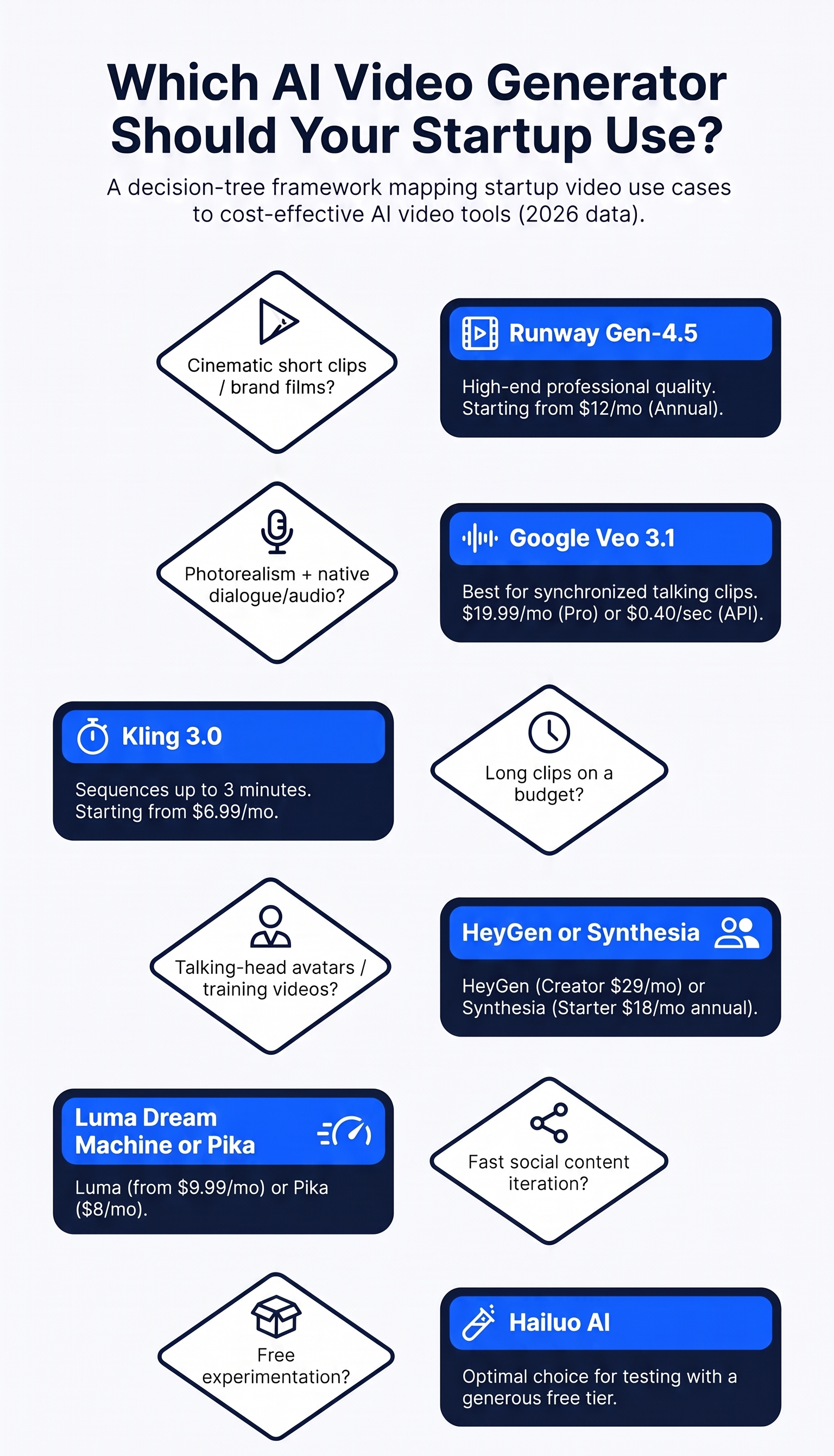
Forget feature matrices. Answer these three questions:
1. What are you making? Cinematic brand creative → Runway or Veo 3.1. Talking-head explainers at scale → HeyGen. Training content for enterprise clients → Synthesia. Daily social volume → Kling, Luma, or InVideo. Founder-led YouTube/TikTok → Descript + your webcam.
2. What’s your real budget — in money AND time? Be honest about the second one. Veo’s per-second API pricing is cheap per clip but punishing at volume; Kling’s $6.99 plan is cheap in dollars but slow queues cost you hours. The “expensive” tool you actually use beats the cheap one you abandon.
3. Who’s watching? Enterprise buyers and investors notice production quality — spring for Veo or Runway for anything they’ll see. TikTok scrollers don’t — Kling and Pika are plenty. Your existing customers watching onboarding? They just want clarity; Descript wins.
5 Mistakes Founders Make With AI Video (I’ve Seen All of Them)
1. Generating when they should be filming. If the video has your face and your voice, record it. AI avatars are for scale, not for your origin story. Audiences can smell the difference, and trust is the whole point.
2. Ignoring the credit math. “Unlimited” plans that throttle, credits that burn 4x faster on premium models, failed generations that still bill — read the pricing fine print like it’s a term sheet. Budget 20% over whatever the plan claims.
3. Publishing without disclosure. AI-generated faces and voices in ads without disclosure is a regulatory time bomb in the EU and increasingly in the US. A simple “created with AI” note costs nothing and keeps you clean. (Our idea validation guide covers the compliance checks worth running before you scale any AI workflow.)
4. No distribution plan. A beautiful AI-generated brand film that lives only on your homepage is a very expensive screensaver. Before you generate anything, know exactly where each video ships: which platform, which format, which CTA.
5. Treating video as separate from the launch. Your video creative, your landing page, and your product need to feel like one thing. If the launch site looks like a 2015 template while your AI ad looks like a Super Bowl spot, the mismatch kills trust. When the site itself needs to match the ambition of the video, that’s exactly the kind of build a web development studio like AISquadX handles — launch-ready sites designed around the content, not the other way around.
FAQ: AI Video Generators for Startups
What’s the cheapest good AI video generator for a startup in 2026?
Kling 3.0 at $6.99/month is the cheapest paid plan I’d actually recommend, with genuinely good motion quality and the longest clips in its class. If your budget is zero, Hailuo AI’s free tier (no credit card required) is the best starting point — you can learn prompting and previz entire campaigns before spending anything.
Can I use AI-generated videos in commercial ads?
Yes — every tool on this list grants commercial rights on paid plans. The nuance is training-data provenance: Adobe Firefly (trained on licensed stock) plus Adobe’s IP indemnification is the safest choice for risk-averse industries. Also check your ad platform’s disclosure rules; Meta and Google increasingly require AI-content labels.
Which AI video tool makes the longest videos?
Kling 3.0 leads the mainstream tools with up to 3-minute chained clips. For true long-form (explainers, courses), avatar tools like HeyGen and Synthesia generate minutes-long presenter videos from a script — a different workflow, but far more practical than chaining dozens of 8-second clips.
Do I still need a human video editor?
For hero brand creative and anything with complex storytelling — yes, at least for assembly and sound design. AI generators produce clips; humans produce videos. Tools like Runway’s Studio editor and Descript are shrinking that gap, but the final 10% of polish is still human work. Budget for it.
Runway vs Veo 3.1 — which should my startup choose?
Choose Veo 3.1 if photorealism and native dialogue/audio are the priority and you’re comfortable with Google’s pricing maze (start on Fast/Lite tiers via API to control costs). Choose Runway if you want an editing workflow around your generations — Aleph’s text-prompt video editing and Act-Two character animation have no real equivalent. Many serious creators end up using both: Veo for hero shots, Runway for everything around them.
The Bottom Line
The AI video generator market in 2026 isn’t a race with one winner — it’s a toolbox, and the founders winning with video are the ones who stopped looking for “the best” and started building a stack. My recommendation for most startups: Kling ($6.99/month) or Runway ($15/month) as your cinematic workhorse, HeyGen ($29/month) when you need a presenter, Descript for everything with your face in it, and Hailuo’s free tier for experimentation. That’s a complete video department for under $60/month.
Start with the free tiers this week. Generate ten clips, publish three, see what your audience actually responds to — then spend money on the tool that made the winners. And if you’re building out the broader toolkit beyond video, our roundup of 19 AI tools every startup founder should use in 2026 is the natural next read.
Pricing verified September 2026. Tools change plans often — glance at the pricing page before subscribing, and never pay annually until the monthly plan has proven itself.