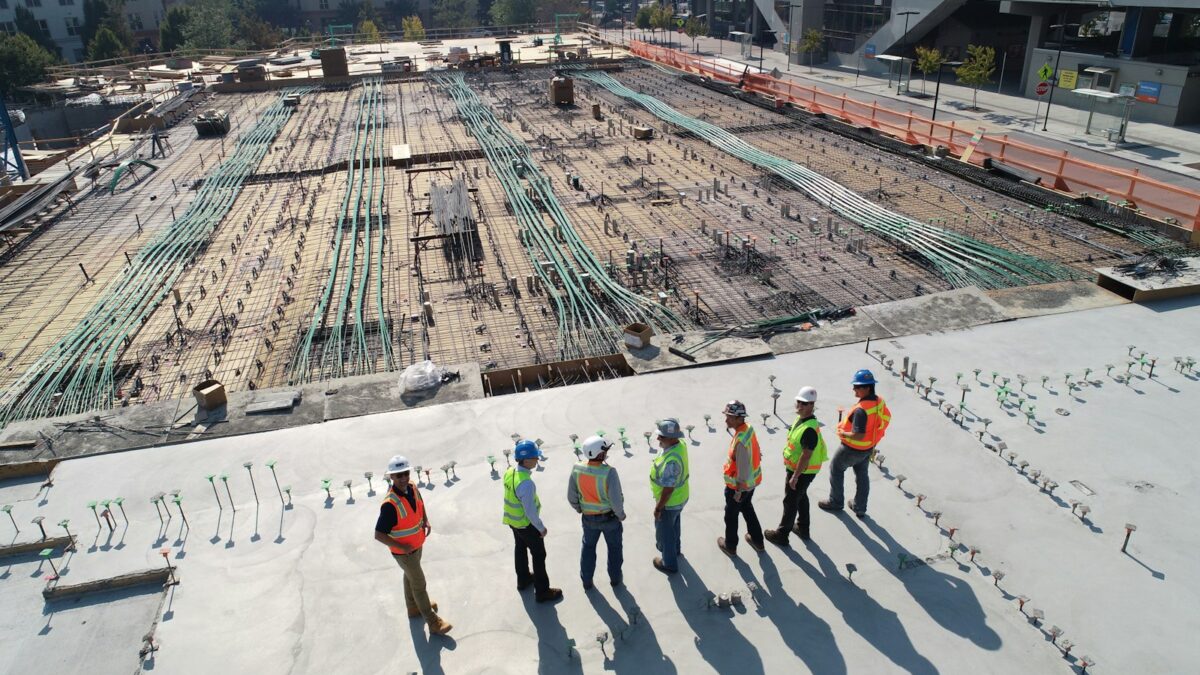
Here’s a confession: for years I ignored construction as a startup market. It felt too dusty, too analog, too far from the laptops-and-APIs world I live in. Then I spent a week talking to people who actually run job sites, and I changed my mind completely. Construction isn’t behind on tech because the problems are small. It’s behind because the problems are hard — and hard problems with real money attached are exactly where a small AI startup can win.
Think about it. An industry that builds everything we live and work in still runs on paper drawings, phone calls, and gut feel. A single mistake on a job site can cost tens of thousands of dollars to fix. Half a million workers are missing. And the people doing the work are, by and large, ready to pay for tools that actually help — they’re just tired of software that was clearly built by someone who has never worn a hard hat.
That’s the opening. Not another chatbot. Not another dashboard nobody opens. Real tools that save hours, catch expensive mistakes, and keep people safe. This article walks through 10 of them — each one a business you could genuinely start, with the pain, the product, who pays, and the honest reality check. No hype. Just the work.
Why Construction, Why Now
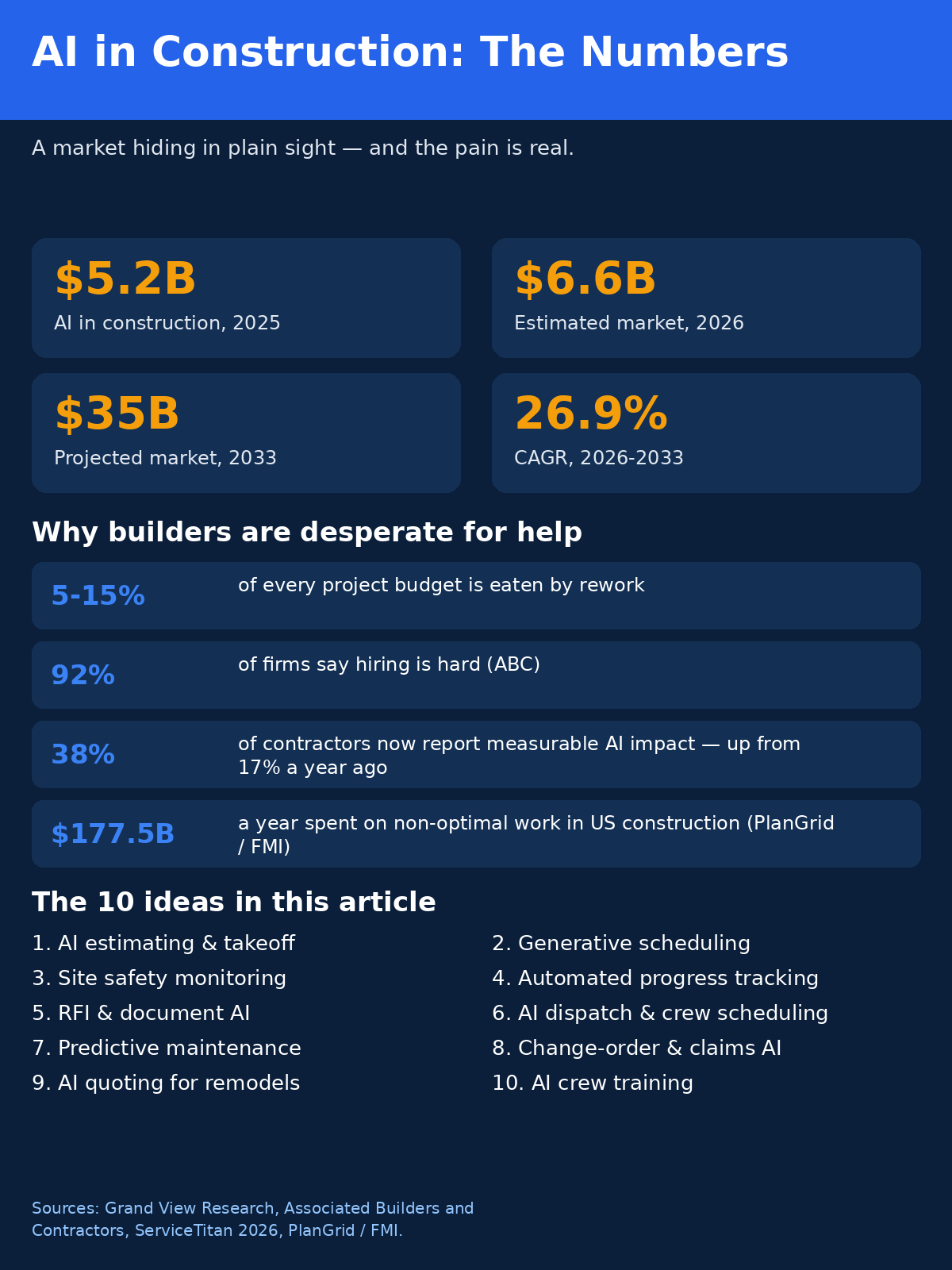
Three things changed at once, and that’s what makes the timing interesting. First, the money got big enough to matter. Grand View Research puts AI in construction at $5.2 billion in 2025, an estimated $6.6 billion in 2026, and a projected $35 billion by 2033 — that’s a 26.9% compound annual growth rate. Grand View’s construction AI figures are forecasts, sure, but the direction is unmistakable: this stopped being a niche a while ago.
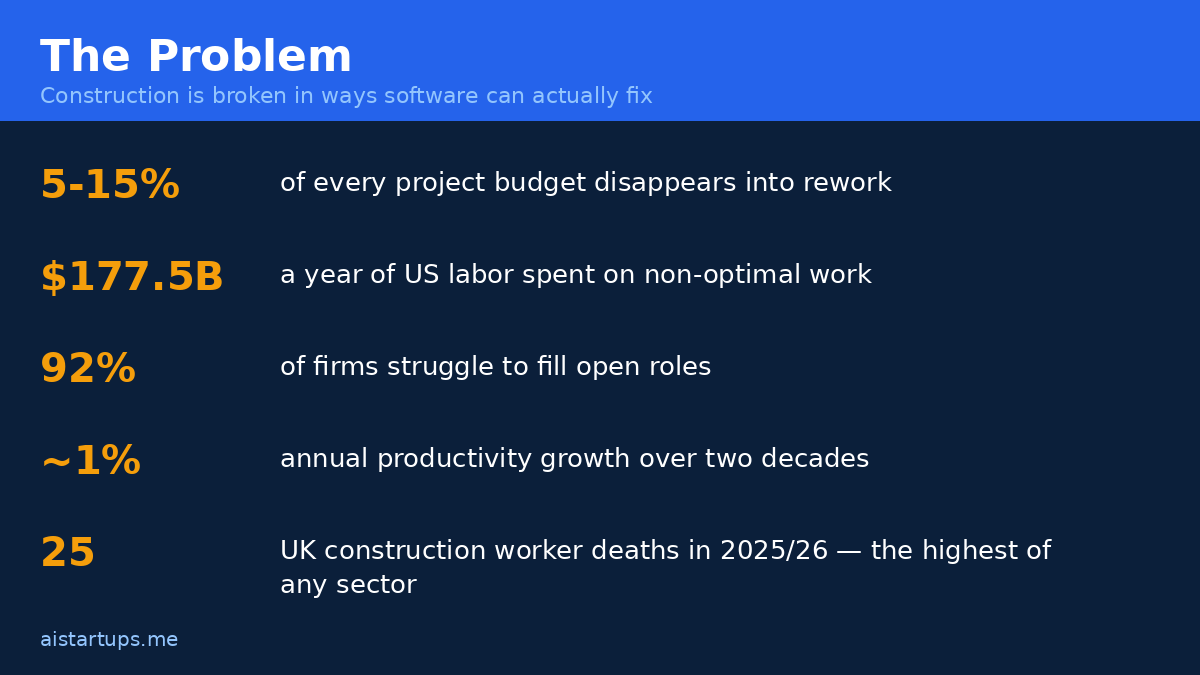
Second, the labor math broke. Associated Builders and Contractors modeling puts the need at around half a million additional workers a year, and 92% of firms report difficulty filling open positions. The Bureau of Labor Statistics projects roughly 650,000 construction openings per year through the mid-2030s. When you can’t hire your way out of a problem, you automate your way out — or you pay the price. Bluebeam’s 2026 piece on the construction labor shortage lays out the same squeeze, and adds a brutal detail: construction productivity has grown only about 1% per year over the past two decades. Every other industry got faster. This one didn’t.
Third, contractors started actually using AI — and admitting it works. A ServiceTitan 2026 survey of more than 1,000 commercial construction leaders found 38% of contractors reporting measurable business impact from AI, up from 17% the year before. That’s not a pilot-project number. That’s a “we bought it and it paid” number. And here’s the thing: 45% of construction organizations still hadn’t implemented AI at all in a 2025 RICS survey, while 56% believe AI can help with the skills shortage. The gap between the believers and the buyers is your market.
Oh, and one more reason. Construction is dangerous in a way most software markets simply aren’t. The UK Health and Safety Executive recorded 25 construction worker deaths in 2025/26 — the highest of any sector — and falls from height account for over half of construction deaths over the last five years. The HSE figures reported by ScaffMag are grim reading. Any tool that genuinely reduces that number isn’t just a product. It’s a story a buyer can tell their board, their insurer, and themselves.
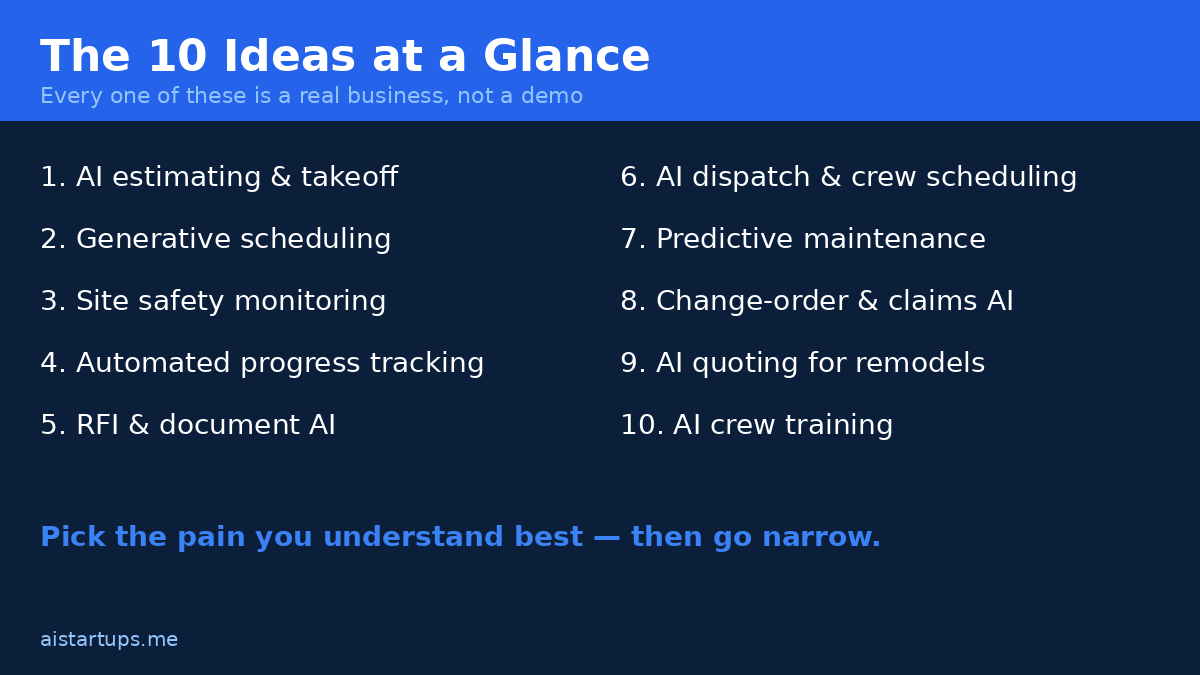
Before we get into the ideas, a quick note on how I picked them. Every idea below had to pass three tests: the pain has to cost real money today (not in theory), the buyer has to be identifiable by name and job title, and a small team could ship a first version in months, not years. If an idea failed any of those, it didn’t make the list. Real talk: most construction AI startups fail because they build for “the industry” instead of for one specific person with one specific headache. Don’t do that.
1. AI Estimating & Takeoff for Small Contractors
The pain
Every construction job starts with a takeoff — counting every beam, pipe, fixture, and square foot off a set of plans, then pricing it. For a small contractor, that means an estimator (or, honestly, the owner, at 10pm, with a highlighter) spending days on a single bid. Miss a line item and you eat the cost. Pad too much and you lose the job. And the plans themselves? Half the time they’re scanned PDFs, hand-marked, or three revisions behind. It’s slow, error-prone, and it decides whether the company makes money before a single shovel hits the dirt.
The product
Upload the plans. The AI reads them — drawings, specs, schedules — and spits out a quantity takeoff and a draft estimate, line by line, with every number traceable back to the drawing it came from. The estimator reviews, adjusts, and sends the bid. The magic isn’t that the AI is perfect. It’s that it turns a three-day job into a three-hour review. Add a simple feedback loop — every correction the estimator makes trains the next estimate — and the product gets stickier with every bid.
Who pays
Small and mid-size general contractors and specialty subs doing $2–50 million a year in revenue. These firms usually have one estimator, maybe two, and they’re drowning. The owner feels the pain personally, which means the sales cycle is short: show them a takeoff done in an afternoon and the checkbook comes out.
How it makes money
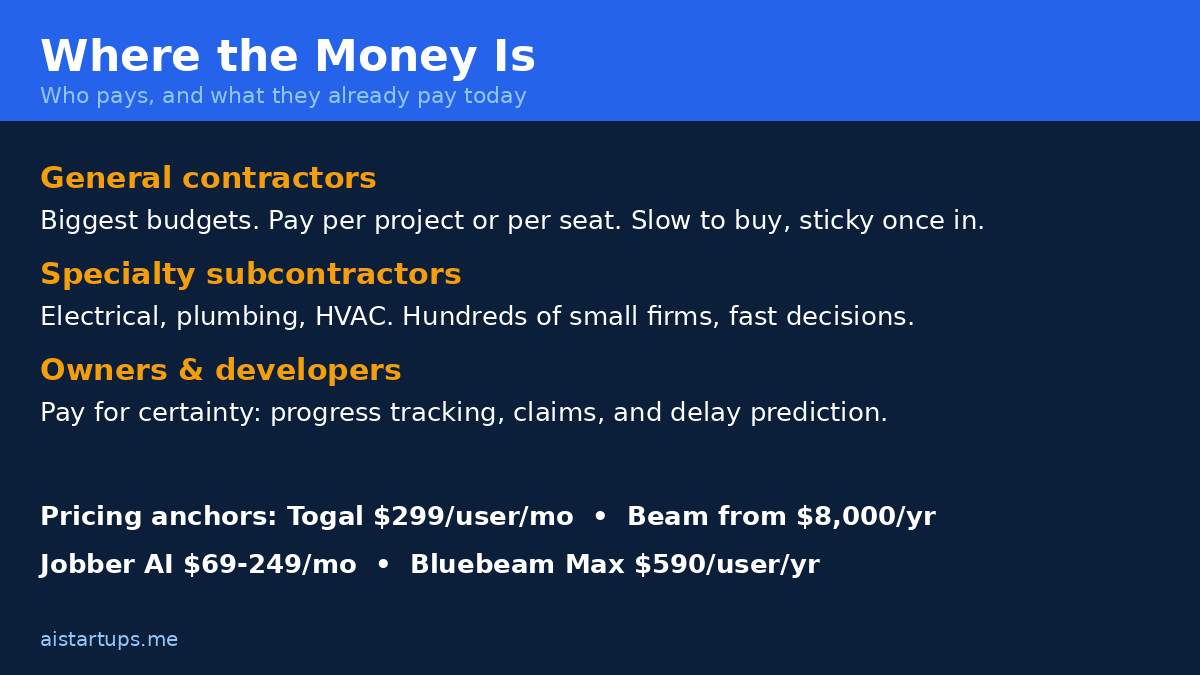
Per-user monthly subscription, priced against the estimator’s salary it augments. Togal.AI, one of the better-known players, charges $299 per user per month and says its takeoffs run 76% faster with 97% accuracy — vendor claims, take them with a grain of salt, but the price point tells you what the market will bear. A small team could undercut that for the sub-$10M contractor segment, or charge per project for firms that bid sporadically. Either way, this is a workflow tool: once it’s inside the bidding process, churn is low.
Reality check
This is the most crowded idea on the list, and the hardest to get right technically. Drawings are messy. Every firm counts things slightly differently. Your first version will get quantities wrong, and an estimator who catches two bad numbers will stop trusting you. You need a human-in-the-loop design from day one and a tolerance for very unglamorous PDF wrangling. But — and this matters — the crowdedness is also proof of demand. Nobody builds five competitors for a market that doesn’t pay.
2. Generative Scheduling & Delay Prediction
The pain
Ask a project manager when a job will finish and you’ll get a confident answer. Ask again in six weeks and you’ll get a different one. Construction schedules are built by hand, in tools that assume everything goes to plan, and then reality — weather, late materials, a sub who ghosts, a design change — shreds them. The PlanGrid/FMI survey found US construction spends about $177.5 billion a year in labor on non-optimal activities, with workers losing around 5.5 hours a week just hunting for project data, 4.7 hours on conflict resolution, and 3.9 hours on mistakes and rework. Shockoe’s breakdown of the cost of construction delays puts the same waste in plain dollars. A schedule that lies to you is worse than no schedule at all.
The product
A scheduling engine that builds the plan from the project’s actual data — drawings, contracts, past project history, weather forecasts, supplier lead times — and then keeps rebuilding it as conditions change. Instead of one static Gantt chart, the PM gets a living schedule with probabilities: this milestone has an 80% chance of landing on time, that one has a 40% chance, and here’s the three things most likely to break it. ALICE Technologies does generative scheduling at the big end of the market, quote-based and typically used on $75 million-plus projects. That leaves the entire middle of the market — the $5–75 million jobs where most construction actually happens — wide open.
Who pays
Mid-size general contractors and project management firms. The buyer is usually a director of operations or a senior PM who’s been burned by a late project and is now allergic to surprises. Owners and developers will also pay, because a credible delay forecast is worth real money when you’re financing a build.
How it makes money
Per-project pricing makes the most sense here — a fee tied to project value, say 0.1–0.3%, or a flat monthly rate per active project. This is enterprise-ish software, so expect longer sales cycles and pilot projects. The flip side: once a GC trusts your schedule on one job, they’ll want it on every job. Land-and-expand is the whole game.
Reality check
Schedules touch everything — procurement, labor, finance — which means integrations are your life now. You need to talk to Procore, MS Project, Primavera, and a dozen other systems, or your product is an island. Also, construction data is famously dirty: if a customer’s historical data is a mess, your predictions will be too, and they’ll blame the model, not their spreadsheets. Start with a narrow slice — say, delay prediction for one trade on one project type — and earn the right to go wider.
3. Computer-Vision Site Safety Monitoring
The pain
We covered the numbers above, but let me say them again because they should sit with you: 25 construction worker deaths in the UK in a single year, the highest of any sector, with falls from height behind more than half of construction deaths over five years. Behind every one of those numbers is a moment where someone wasn’t tied off, wasn’t wearing a hard hat, or walked into a zone they shouldn’t have entered. Site managers can’t be everywhere. Cameras can.
The product
Cameras already on site — or cheap ones you help install — feed a vision model that watches for the stuff that kills people: missing hard hats, missing harnesses at height, workers in exclusion zones, missing guardrails, unsafe scaffolding. When it spots a violation, it alerts the safety manager in real time, with a photo and a location. Not a report at the end of the week. A ping, now. Over time it builds a safety record for the site: which crews, which times of day, which activities produce the most violations. That record is gold for insurers and for clients choosing between contractors.
Who pays
Large general contractors, infrastructure builders, and industrial owners. Safety is also the rare construction purchase where the CFO, the insurer, and the client all push in the same direction. A contractor with a demonstrably better safety record wins more bids and pays less insurance. That’s a pitch that sells itself — if the product works.
How it makes money
Per-site monthly subscription, plus hardware or camera setup fees. Safety budgets are real and already exist; you’re not asking anyone to create a new line item. You can also price on outcomes — reduced incident rates, fewer insurance claims — but keep it simple at first: a flat monthly fee per site, per camera, or per worker monitored.
Reality check
Two hard things here. First, false positives will kill you. If your model cries wolf ten times a day, the safety manager will mute it by Friday. Precision matters more than recall — better to miss a marginal case than to spam the person whose attention you need. Second, cameras on a job site raise real privacy and union questions, and you need to handle them honestly and early. This is also a market where incumbents like Procore are moving fast — Procore AI already ships 18-plus pre-built agents covering things like RFI creation, daily logs, and submittal review, priced on annual construction volume with custom quotes. You won’t out-feature them. You out-focus them: one safety problem, done better than anyone.
4. Reality Capture & Automated Progress Tracking
The pain
Here’s a scene that plays out on nearly every big job: the owner asks “how far along are we, really?” and three different people give three different answers. The schedule says 60%. The site walk says 45%. The invoices say 70%. Somebody’s wrong, and finding out who costs a week of meetings. Progress tracking in construction is still mostly humans walking around with clipboards, taking photos, and writing reports that are out of date before they’re sent.
The product
Use the photos and video already being captured on site — phone cameras, 360 cameras, drones — and turn them into an objective record of what’s actually built. The AI compares what’s in the images against the BIM model or the drawings and reports percent complete, by area and by trade, with photo evidence for every claim. The owner gets a dashboard they can trust. The GC gets disputes resolved with pictures instead of arguments. And the lender gets to release the next draw with confidence instead of sending someone to squint at the site.
Who pays
Owners, developers, and lenders first — they’re the ones with money at risk and the weakest visibility. GCs second, because a tool that proves progress is a tool that gets them paid faster. This is also a natural fit for the big infrastructure and energy projects where progress disputes turn into lawsuits.
How it makes money
Per-project subscription, often with a per-scan or per-drone-flight component. Beam AI, one of the names in this space, starts from around $8,000 a year — that gives you a sense of the floor. Price against the cost of the dispute you’re preventing, not the cost of the software you’re replacing. A single avoided claim pays for years of subscription, and your buyers know it.
Reality check
The tech is genuinely hard — matching site photos to a BIM model in changing light, with half the site covered in scaffolding, is no joke. And the value depends on the customer actually having a decent BIM model, which plenty of mid-size jobs don’t. You may end up doing more services work than you planned: helping customers set up their capture routine, cleaning up their models, training their teams. That’s fine — services revenue is still revenue — but budget for it honestly instead of pretending the product sells itself.
5. RFI, Submittal & Document AI
The pain
If you’ve never worked on a construction project, you have no idea how much of it is paperwork. RFIs — requests for information — fly back and forth by the hundreds. Submittals pile up. Change orders, specs, contracts, daily logs, inspection reports. A big job generates thousands of documents, and someone has to read them, route them, answer them, and file them. That someone is usually a project engineer who went to school to build things and now spends their day as a very expensive mailroom. Slow RFI answers stall work on site. A missed submittal delays a delivery. The paperwork tax is real, and everyone on the project pays it.
The product
An AI layer that sits on top of the project’s documents and does the boring parts: drafting RFI responses from the drawings and specs, checking submittals against the spec automatically, flagging contradictions between documents, and routing everything to the right person with a deadline attached. The human still approves — nobody’s letting an AI sign off on a structural submittal unsupervised, and they shouldn’t — but the first draft, the cross-check, and the chasing are all automated. Procore’s AI agents already cover some of this ground, which tells you the demand is proven. The opening for a startup is depth in one document type, or a price point that works for firms too small for Procore’s volume-based pricing.
Who pays
Mid-size GCs and design-build firms, plus specialty subs drowning in submittals. The buyer is usually a project executive or operations director who can see the hours leaking out of their engineers’ weeks. This is also one of the easiest ideas to pilot: take one project’s RFI log, run it through your tool, and show the time saved in black and white.
How it makes money
Per-user monthly SaaS, or per-project pricing for firms that run a handful of big jobs at a time. This is a classic seat-based model, and the seats are cheap compared to the salaries they augment. If you’re looking for a model that scales smoothly, this is the one — every new project adds seats, and every seat is recurring revenue.
Reality check
Accuracy is everything, and the bar is brutal. A wrong answer in an RFI can cost thousands of dollars and create real liability. Your product needs to show its work — every draft answer linked to the exact document and page it came from — or no engineer will trust it. You also need to be honest about what the AI can’t do: ambiguous specs, conflicting drawings, and judgment calls still belong to humans. Sell it as a very fast junior engineer, not a replacement for one. That’s not just honest, it’s a better pitch.
6. AI Dispatch & Crew Scheduling for Trade Contractors
The pain
Picture a plumbing company with 20 techs, 40 jobs a day, and a dispatcher who’s been doing it from memory and a whiteboard for fifteen years. A job runs long. A tech calls in sick. A customer cancels. A part doesn’t arrive. By 9am the whole day’s plan is fiction, and the dispatcher is on the phone, re-juggling everything, while customers wait and techs drive in circles. Multiply that by every HVAC, electrical, plumbing, and roofing company in the country. The waste is enormous — and it’s all invisible until you add up the fuel, the idle time, and the missed jobs.
The product
An AI dispatcher: feed it the day’s jobs, the techs’ skills and locations, the parts on the trucks, traffic, and job history, and it builds an optimized schedule — then rebuilds it in real time when things change. It texts the techs their next job, tells the customer an honest arrival window, and flags the jobs most likely to run over before they do. The dispatcher stays in charge, but instead of rebuilding the day by hand, they’re approving the AI’s plan and handling the exceptions. That’s the whole pitch: same dispatcher, twice the jobs, half the chaos.
Who pays
Small and mid-size trade contractors — HVAC, plumbing, electrical, roofing, pest control — with 5 to 100 field staff. This is a huge market of small businesses, and they’re reachable: they answer their phones, they go to trade shows, and they talk to each other. One happy customer in a local market can turn into ten.
How it makes money
Per-technician monthly subscription, the classic field-service model. Jobber AI, which serves exactly this segment, charges $69–249 a month for small trade contractors — a price point that tells you both the ceiling and the floor. You can also charge per completed job or per dispatch. Keep the price low enough that a 10-tech shop can say yes without a board meeting, and make the onboarding so simple they can be live in a day.
Reality check
Jobber, ServiceTitan, and Housecall Pro already own a lot of this market, and they all have AI features now. You’re not going to beat them on breadth. Your shot is a wedge: one trade, one workflow they do badly — say, same-day emergency dispatch for HVAC, or multi-crew scheduling for roofing — done so well that customers come to you for it and stay for the rest. Also, be ready for the human factor: dispatchers who’ve run the board for twenty years may not love an AI telling them what to do. Design the product so the dispatcher feels more powerful, not replaced. If you need a hand building the product itself — the app, the website, the integrations — that’s exactly the kind of build a web development studio like AISquadX handles for founders who’d rather sell than code.
7. Equipment & Fleet Predictive Maintenance
The pain
A crane goes down on a Tuesday and the whole job stops. An excavator blows a hydraulic line and the rental replacement takes two days to arrive. Equipment failure in construction isn’t an inconvenience — it’s a schedule killer, and it always happens at the worst possible moment. Most fleets still run on fixed service intervals and the mechanic’s intuition, which means parts get replaced too early (wasted money) or too late (wasted everything). For a mid-size contractor, unplanned downtime on a handful of machines can wipe out the margin on a job.
The product
Sensors and telematics data — engine hours, vibration, temperature, hydraulic pressure, fault codes — fed into a model that predicts which machine is about to fail, what part will go, and how long you have. The fleet manager gets a simple list: service this excavator this week, watch that loader, this crane is fine. Over time the system learns each machine’s quirks and each job site’s conditions. The pitch writes itself: one avoided breakdown pays for a year of the service.
Who pays
Contractors with owned fleets, equipment rental companies, and large infrastructure builders. Rental companies are especially interesting — their whole business is uptime, and a machine that breaks on a customer’s site is a refund and a lost relationship. Fleet managers and equipment directors are the buyers, and they’re used to paying for telematics already.
How it makes money
Per-machine monthly subscription, on top of whatever telematics hardware is already installed. The math is friendly: a contractor with 50 machines at even $20–40 per machine per month is $12,000–24,000 a year, and one prevented crane failure is worth multiples of that. You can also sell to rental fleets as a white-labeled uptime service.
Reality check
Hardware is the hard part. Telematics devices, installation, connectivity on remote sites — this is not a pure software business, and you need to be honest about that. Partnering with an existing telematics provider beats building your own hardware every time. Also, prediction accuracy takes time: you need months of failure data before your model is better than a good mechanic’s gut, so your first customers are effectively paying to train your product. Pick pilot customers who understand that deal and are excited by it, not ones who expect magic on day one.
8. Change-Order & Claims Analysis
The pain
Here’s how construction disputes are born: something changes on a job — the owner wants a different finish, the soil is worse than the survey said, the design has a clash nobody caught. The change ripples through schedule, cost, and scope. Months later, someone’s arguing about who pays for it, and the argument is settled by whoever has the better paper trail. Usually nobody has a good paper trail. Claims and disputes are one of the biggest money leaks in the industry, and they’re almost entirely a documentation problem wearing a legal costume.
The product
An AI that reads the whole project record — contracts, daily logs, photos, emails, change orders, meeting minutes — and builds a defensible timeline of what actually happened, when, and who knew about it. When a change order lands, it drafts the cost and schedule impact from the record. When a claim comes in, it assembles the evidence pack: the photos, the logs, the contract clauses, the notice dates. The lawyer still argues the case, but they’re arguing from a complete file instead of a cardboard box of printouts.
Who pays
Large GCs, owners, and construction law firms. The buyers here are sophisticated and price-insensitive relative to the stakes — a single claim can be worth millions. This is also a product that sells through relationships and reputation, so expect a slow start and a very sticky customer base once you’re in.
How it makes money
Per-project pricing with a high ticket, or a monthly platform fee for firms that run many projects. You could also price per claim analyzed. Honestly, this is the highest-ticket idea on the list relative to team size — a handful of customers can support a small company. That’s attractive if you’d rather have five great customers than five hundred small ones.
Reality check
This is the most legally sensitive idea on the list. Your output will end up in front of lawyers, arbitrators, and possibly judges, which means accuracy and auditability aren’t features — they’re the product. Every claim your AI makes must be traceable to a source document, and you need to be very clear about what the tool does not do: it doesn’t give legal advice, and it doesn’t replace a claims consultant. If that level of rigor sounds exhausting, pick a different idea. If it sounds like a moat, this one’s for you.
9. AI Quoting for Residential Remodels & Home Services
The pain
Homeowners hate getting quotes. Contractors hate giving them. A homeowner fills in a form, waits three days, gets a number that feels made up, and ghosts. The contractor drives out, measures everything by hand, writes up a quote, and never hears back. Both sides waste time, and the jobs go to whoever answers fastest — not whoever does the best work. Meanwhile rework eats 5–15% of total project budgets across the industry, and the Construction Industry Institute puts direct rework at around 5% — a lot of that starts with a bad quote built on guesswork. Miter’s guide to the cost of rework in construction breaks down where that money goes, and bad scoping is right at the top of the list.
The product
A homeowner answers a few questions, uploads photos or a short video walkthrough of their kitchen, bathroom, or roof, and the AI produces an instant ballpark quote — with a range, not a fake precise number — plus a breakdown of what drives the cost. The contractor gets a pre-qualified lead with photos, measurements, and a budget expectation already set. The best versions of this also handle the follow-up: automated reminders, a simple scheduling flow, and a deposit link. The goal isn’t to replace the site visit. It’s to make sure the site visit only happens for jobs that are real.
Who pays
Residential remodelers, roofing companies, and home-services firms — the same trade contractors from idea 6, but on the consumer side. These are small businesses that live or die on lead quality, and they’ll pay for a tool that stops them driving to dead-end quotes. Home-services marketplaces and lead-gen companies are also buyers: better quotes mean better conversion, and conversion is their whole business.
How it makes money
Monthly subscription per contractor, or a per-lead fee. This is a volume market — thousands of small firms, each paying a modest amount — so the model only works if onboarding is near-instant and the product proves itself in the first week. A free tier with a couple of quotes a month, then a paid plan once the contractor sees the leads convert, is the natural shape. If you’re starting from zero and need to move fast, the no-code stack for building an AI MVP we covered earlier can get a first version in front of real remodelers in weeks, not months.
Reality check
Homeowners are price-sensitive and skeptical, and a quote that’s wrong by 30% will do more damage than no quote at all. Your ranges need to be honest and your confidence levels visible — “we’re 80% sure this lands between $18k and $24k” beats a fake-exact “$21,400” every time. You also need local pricing data, because a bathroom in Austin and a bathroom in Boston are different jobs with different numbers. Start in one city, nail the pricing there, then expand. The companies that try to launch nationally on day one drown in pricing data they don’t have.
10. AI Onboarding & Skills Training for Field Crews
The pain
Here’s the quiet crisis behind the labor numbers: it’s not just that firms can’t find workers, it’s that the workers they do find need training, and the people who used to train them are retiring. A new hire on a job site learns by shadowing someone experienced — if that person has time, if they speak the same language, if they remember to cover the safety stuff. Half the time, none of those things are true. The result is slow onboarding, repeated mistakes, and new workers doing dangerous work they haven’t been properly shown how to do.
The product
Short, practical, phone-first training built for the field: two-minute videos, voice-guided walkthroughs, and quick quizzes, all in the worker’s language, all specific to the trade and the task at hand. The AI part is personalization — it figures out what each worker already knows, what they’re struggling with, and what their next job requires, then serves the right module at the right time. A foreman can check, at a glance, who’s certified for what before assigning the day’s work. And because it’s on the worker’s phone, the training happens in the trailer, on the drive, or during downtime — not in a classroom nobody has time to sit in.
Who pays
Mid-size and large contractors with high turnover, plus trade schools and unions. Safety and compliance budgets are real, and training that actually gets completed — with records to prove it — is worth paying for. Staffing agencies that place construction workers are another buyer: a trained, certified worker commands a better rate, and the agency takes a cut of that.
How it makes money
Per-worker monthly subscription, or per-course licensing for trade schools. This is the lowest price point on the list per seat, but the seat counts are the biggest — a single contractor might have hundreds of field staff. You can also sell content packs for specific trades or certifications. The roundup of the best AI tools for construction shows how crowded the general tooling space is getting — training is one of the few corners where a focused newcomer can still stand out.
Reality check
Content is your bottleneck. Generic training content already exists, and it’s mostly terrible — which is both your opportunity and your problem, because you’ll need to create or curate genuinely good, trade-specific material, in multiple languages, before the AI personalization matters at all. Partner with trade schools, unions, or experienced foremen to build the content library. And measure completion honestly: a training product nobody finishes is a compliance liability dressed up as a solution.
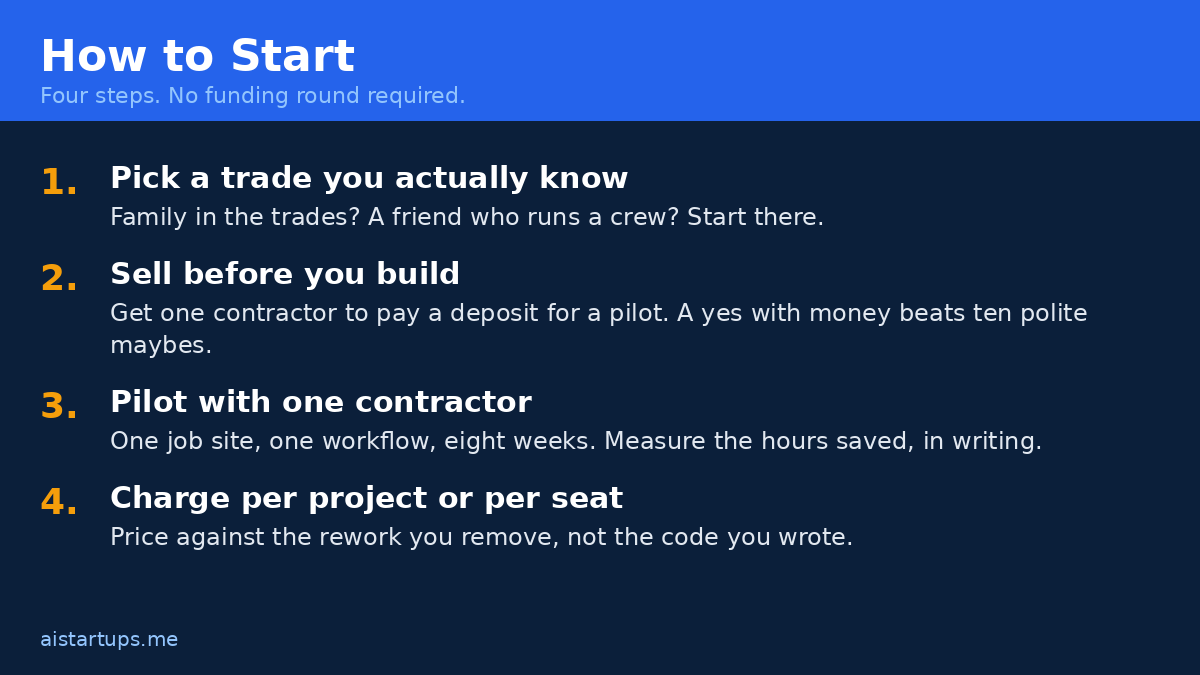
How to Pick Your Idea
Ten ideas, and honestly, nine of them are wrong for you. The right one depends on three things you already know about yourself — you just haven’t said them out loud yet. So let’s do that now.
- What do you actually know? If your dad ran a roofing company, you know roofing. If you spent two years selling software to GCs, you know GCs. The idea you understand beats the idea with the biggest market, every single time.
- Who can you reach in the next 30 days? Not “the industry.” A person. With a name, a phone number, and a problem. If you can’t name five potential pilot customers today, the idea is a fantasy, not a business.
- What can you charge on day one? If the answer is “we’ll figure out pricing later,” stop. The price is part of the product — our guide on how to price an AI SaaS product is a good place to start, because pricing against the rework you remove is a very different number than pricing against your costs.
“Every construction AI startup I’ve seen fail had the same disease: they built a product for ‘construction’ and were shocked when no specific contractor bought it. Pick one trade, one workflow, one buyer — and be boring about it until it works.”
One more thing worth saying: the business model matters as much as the product. Several of these ideas work best as productized services — a fixed-scope, fixed-price offer sold like a product — rather than pure SaaS. That’s the same playbook that works in other verticals: the productized AI services for accounting firms we wrote about earlier follow the identical pattern — narrow scope, clear price, repeatable delivery. A construction version looks like “takeoff in 48 hours for $499” or “one site, one safety audit, one report.” Sell the service, automate the delivery, then turn the automation into the product. And if you’re going the agency route rather than the SaaS route, our playbook for starting an AI agency covers the positioning and pricing that applies here just as well as anywhere else.
Frequently Asked Questions
Is construction really a good market for an AI startup?
Yes — with a caveat. The market is big (an estimated $6.6 billion in 2026, per Grand View Research), the pain is expensive (rework alone eats 5–15% of project budgets), and buyers are warming up fast: 38% of contractors now report measurable impact from AI, up from 17% a year earlier. The caveat is that construction buyers are skeptical for good reason — they’ve been burned by software that didn’t understand their work. You win by going narrow and proving value on one job before you ask for a second.
Do I need construction experience to start one of these businesses?
You need access to construction experience, which isn’t quite the same thing. A co-founder, an advisor, or a pilot customer who lives the problem every day can give you what you don’t have — but you can’t fake it. If you have zero connection to the trades, your first job is to build one: talk to contractors, walk a job site, sit with an estimator for a day. The founders who skip that step build beautiful products nobody buys.
How much does it cost to build a construction AI product?
Less than you think, more than you’d hope. A focused MVP — one workflow, one trade, a handful of pilot users — can be built by a small team in two to four months using existing models and APIs. The expensive part isn’t the AI, it’s the domain work: understanding drawings, handling messy PDFs, integrating with the tools contractors already use. Budget as much for customer discovery and pilot support as for engineering.
What’s the biggest risk in construction AI?
Trust. A wrong takeoff, a missed safety violation, a bad schedule prediction — each one costs your customer real money, and one bad experience can end the relationship. The fix is design, not just accuracy: show your work, keep a human in the loop on anything that costs money or affects safety, and be honest about confidence levels. The startups that survive in this market are the ones contractors trust, and trust is earned one correct answer at a time.
Should I build SaaS or a productized service?
Start with the service, graduate to the software. A productized service — fixed scope, fixed price — gets you paying customers and real workflow data in weeks. Once you’ve delivered the same service twenty times and you can see exactly which steps are automatable, you build the product around that. It’s slower to feel like a “real startup,” and much faster to become a real business.
The Bottom Line
Construction doesn’t need another AI demo. It needs tools that respect the work — the early mornings, the dust, the margins so thin that one bad bid can sink a quarter. The ten ideas above aren’t predictions. They’re openings: real pains, real buyers, real money, each one waiting for someone willing to go narrow and stay honest.
So here’s my challenge to you. Pick one. Just one. Talk to five people who live that pain this week. If they light up, you’ve got something. If they shrug, pick another — you just saved yourself six months. The market is $6.6 billion and growing, half a million workers are missing, and the contractors who’ll pay you are standing on job sites right now, waiting for someone who finally builds for them. Go be that person.