Yesterday, this article couldn’t exist. Kling 4.0 launched today — October 16, 2026 — and I spent the morning reading the actual launch materials so you don’t have to.
Here’s the only question that matters if you’re a founder: can you make a real, watchable ad for your product this week, for less than a freelancer charges for a discovery call?
Honestly? For the first time, the answer might be yes. Without caveats the size of a paragraph.
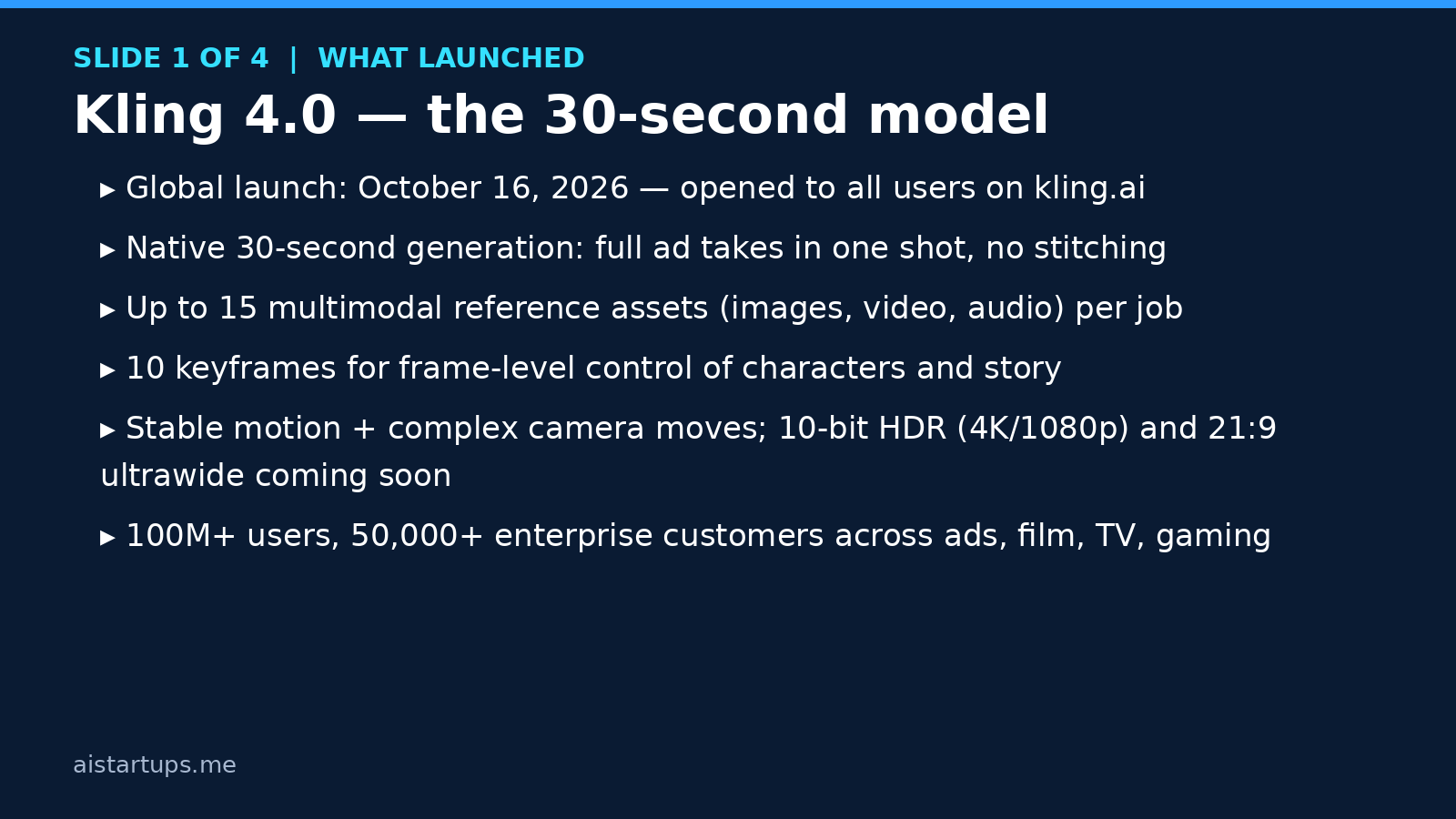
Kling 4.0 is the new video generation model from Kling AI — the video arm of Chinese tech giant Kuaishou — and the pitch is refreshingly concrete: 30-second clips generated natively in a single take, stable motion even with tricky camera moves, and enough control (up to 15 reference assets, 10 keyframes) that your product or character can actually look like itself from shot to shot. The company says it now serves more than 100 million users and 50,000+ enterprise customers across advertising, film, TV, and gaming.
This guide is the practical version. What launched, what it costs down to the credit, and a workflow you can run this weekend to ship your first AI-made ad. No hype — let’s get into it.
What actually launched today
The global launch announcement frames Kling 4.0 around three upgrades, and they’re worth understanding separately because each one solves a different founder headache.
First: native 30-second generation. This is the big one. Previous generations of AI video topped out at short bursts — Kling 3.0, for example, generated 3 to 15 seconds per clip — which meant a 30-second ad was really four or five clips stitched together, with your product subtly changing shape at every cut. (Anyone who’s tried this knows the pain: the coffee mug grows a second handle in shot three.) A native 30-second take means one continuous generation — a complete short ad, a full product walkthrough beat, a founder-style monologue — without the seams.
Second: stable motion and complex camera work. Fast movement and orbiting camera shots have been the classic failure mode of AI video — limbs smear, backgrounds warp, the whole thing falls apart. Kling says 4.0 holds continuity through tracking shots and camera orbits. I haven’t stress-tested this myself yet (it launched today), so treat it as a claim to verify with your own test clips, not gospel. But it’s the right problem to solve.
Third: the control layer, called Omni Reference. You can feed a generation up to 15 reference assets — images, video clips, audio, characters, voice — plus up to 10 keyframes that steer how the scene unfolds beat by beat. Per launch coverage, that breaks down to as many as 10 images, 5 video clips, and 7 subjects in a single job. For a startup, this is the feature that matters most: it means you can hand the model your actual product photos, your logo, your brand colors, even your founder’s face, and get back video where those things stay consistent. Character and product consistency has been the blocker for using AI video in real marketing. This is a direct attack on it.
A few more specs worth knowing: the model accepts long text prompts (up to 8,000 tokens per launch reports), supports native audio generation with lip sync across Chinese, English, Japanese, Korean, Spanish, Portuguese, German, French, and Hindi, and offers dual-channel stereo output. Developers get MCP and command-line access. There’s also a video extension feature that can stretch content toward two minutes — useful for longer product demos.
Now the honest part — what’s not here yet. The 10-bit HDR output at 4K and 1080p, plus the 21:9 ultrawide format, are explicitly “coming soon,” not live. If you’re briefing a client or planning a campaign around 4K deliverables, wait. Ship in 1080p, which is where the model actually operates today.
Why this launch matters more than the last ten
New model launches happen every week. Most of them don’t matter for your business. This one has a signal the others didn’t: ten days before launch, Kling AI debuted at Advertising Week New York — on stage with WPP and Adobe.
Read that again. WPP — the world’s largest advertising holding company — sent its Director of AI Strategy & Innovation (Mathieu Albrand) to share a stage with Kling’s Head of Partnerships for North America (Zheru Liu) and Adobe’s Principal of Corporate Partnerships (Elissa Levine), in a session literally titled “The New Production Engine: Powering Creativity at Scale with Kling AI.” Adobe already ships Kling 3.0 and 3.0 Omni inside Adobe Firefly, and Kling 4.0 is coming to Firefly soon.
Why should you care? Because when the agency world and Adobe treat a model as production infrastructure, it stops being a toy. It means the output is expected to survive client review, broadcast standards conversations, and real campaign budgets. For a founder, that de-risks the “will this look cheap?” question considerably.
And the economics are hard to argue with. A 30-second spot used to mean a shoot day: a videographer, lighting, location, editing — thousands of dollars before you spent a cent on media. Now it means an afternoon, a $37 subscription, and a few dollars of credits. That doesn’t make the videographer obsolete (real talk: for your flagship brand film, still hire the human). But for the other 95% of video a startup needs — ad variants, social cuts, demo loops — the math just flipped.
If you’re weighing Kling against the rest of the field, our roundup of the best AI video generators for startups in 2026 puts it in context alongside Veo, Runway, and the rest.
Where a startup actually uses this
Forget “AI video strategy.” Here are the five concrete jobs Kling 4.0 can do for you this month:
- Paid social ads. UGC-style founder demos, product-in-action shots, before/after sequences. Thirty seconds is exactly the length of a standard social ad.
- Landing page hero videos. A moving product shot above the fold beats a static screenshot every time — and you can regenerate it when the product changes instead of re-shooting.
- Product demos and onboarding clips. Use the extension feature to stretch toward two minutes for a narrated walkthrough.
- Multilingual ad variants. Native lip sync across nine languages means one shoot becomes nine local ads. If you’re selling across borders, this alone might justify the subscription.
- Organic social at volume. Five short cuts a week without a content team. Consistency beats genius on social — and consistency is exactly what automation buys you.
The money: what Kling 4.0 actually costs
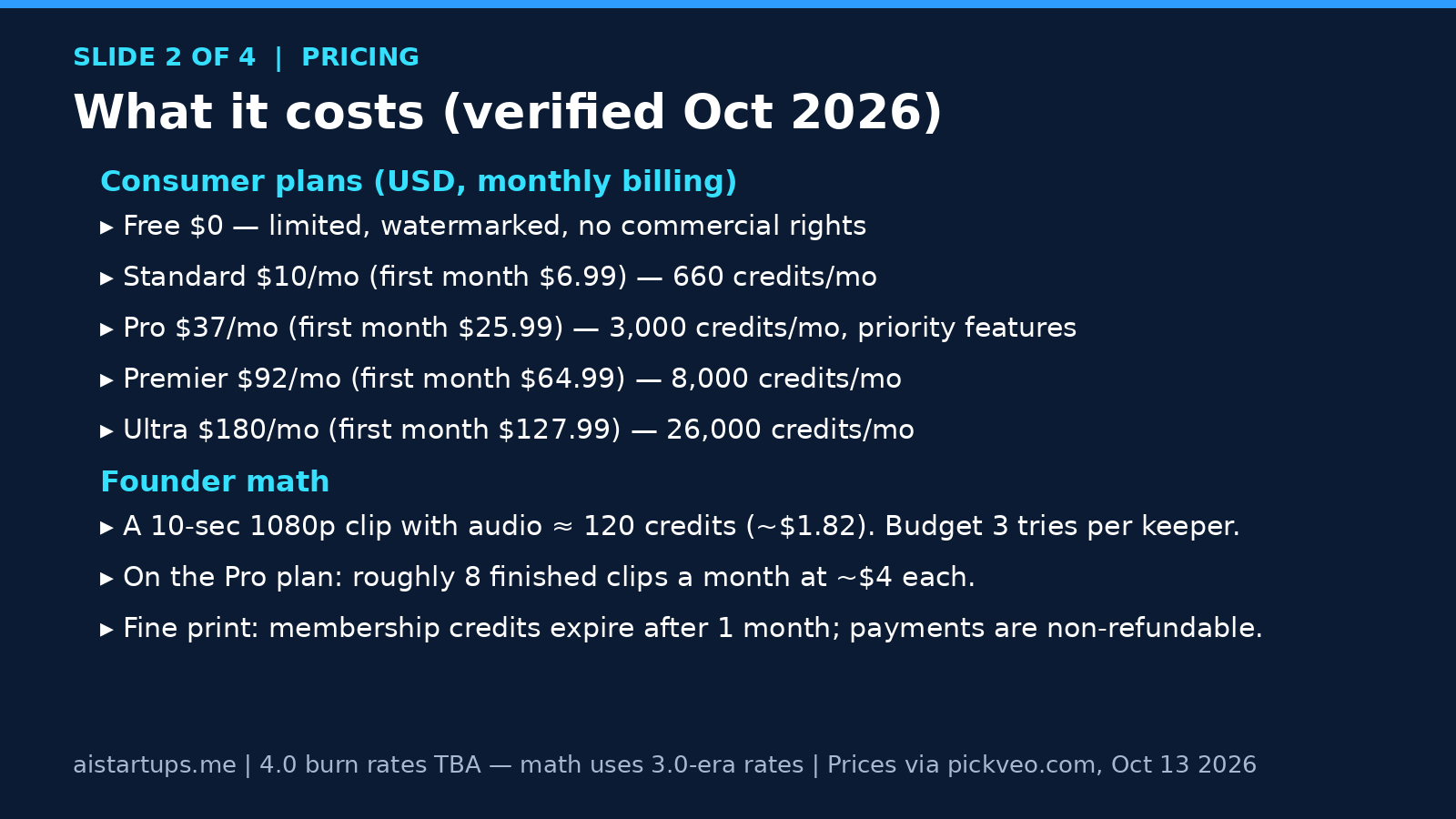
Let’s talk numbers, because this is where most AI tool reviews get vague and useless. Kling doesn’t sell videos — it sells credits, and every generation burns them per second of output. The official payment policy pegs the top-up rate at $1 = 66 credits (about $0.015 per credit). Hold onto that number; we’ll use it in a second.
The plans (verified October 2026)
Pricing below was read from Kling’s official membership page on October 13, 2026, via a detailed pricing review — these are USD, monthly billing, and the first-month promo prices are real but temporary:
- Free — $0. Limited access, one video per generation, no monthly credit allowance, watermarked output. Fine for kicking the tires; not for business use.
- Standard — $10/month (first month $6.99, then $8.80): 660 credits per month.
- Pro — $37/month (first month $25.99, then $32.56): 3,000 credits per month, plus priority access to new features.
- Premier — $92/month (first month $64.99, then $80.96): 8,000 credits per month.
- Ultra — $180/month (first month $127.99, then $159.99): 26,000 credits per month.
Every paid tier includes the things a business actually needs: commercial use rights, watermark removal, 1080p output, upscaling, video extension, fast-track generation, and an unlimited task queue. Note the pattern in the fine print: always budget on the renewal price, not the first-month promo. The Standard plan renewing at $8.80 instead of $6.99 is the classic trap.
What a video actually costs (read this before you subscribe)
Here’s the caveat, stated plainly: Kling has not published 4.0-specific credit burn rates yet. Anyone quoting you exact 4.0 per-second costs today is guessing. What we do have are verified Kling 3.0-era rates — read from Kling’s official model guide in August 2026 and documented by shhots.ai — which are the best reference available until 4.0’s rate card drops:
- 720p without audio: 6 credits/sec · 1080p without audio: 8 credits/sec
- 720p with native audio: 9 credits/sec · 1080p with native audio: 12 credits/sec
- Native 4K: 30 credits/sec
Now the founder math. A 10-second 1080p clip with audio = 120 credits ≈ $1.82 at the top-up rate. On the Standard plan’s 660 monthly credits, that’s about five one-shot attempts. But here’s the thing nobody tells you: you’ll never nail a clip on the first try. Budget three attempts per finished clip and the picture gets honest fast — Standard buys you roughly one finished ad a month, while Pro’s 3,000 credits buy you about eight finished clips at roughly $4 each (using the $32.56 renewal price).
Four dollars for a finished 1080p ad with dialogue. A freelancer charges 50x that for a rough cut. Even if 4.0’s rates land somewhat higher than 3.0’s, the order of magnitude is what matters — and it’s not close.
Two more fine-print items from the official policy, because they bite: membership credits expire one month after distribution (no rollover — use them or lose them), and payments are non-refundable once the service is activated. Every failed generation burns credits with no refund, which is exactly why you iterate on cheap settings first. Auto-renewal is on by default, so set a calendar reminder.
Building with the API instead of the web app? Official Kling 3.0 API pricing started around $0.084 per generated second at 720p without audio (about $0.84 for a 10-second clip), per API pricing analysis — but note that a 4.0 enterprise API is listed as “coming soon,” so programmatic builders should wait for the official 4.0 rate card before architecting around it.
The 5-step founder workflow
Enough specs. Here’s how you’d actually use this, start to finish, in a single weekend. Kling slots into the broader stack of AI tools for startup founders as your video department — but only if you run it like a department, with a process.
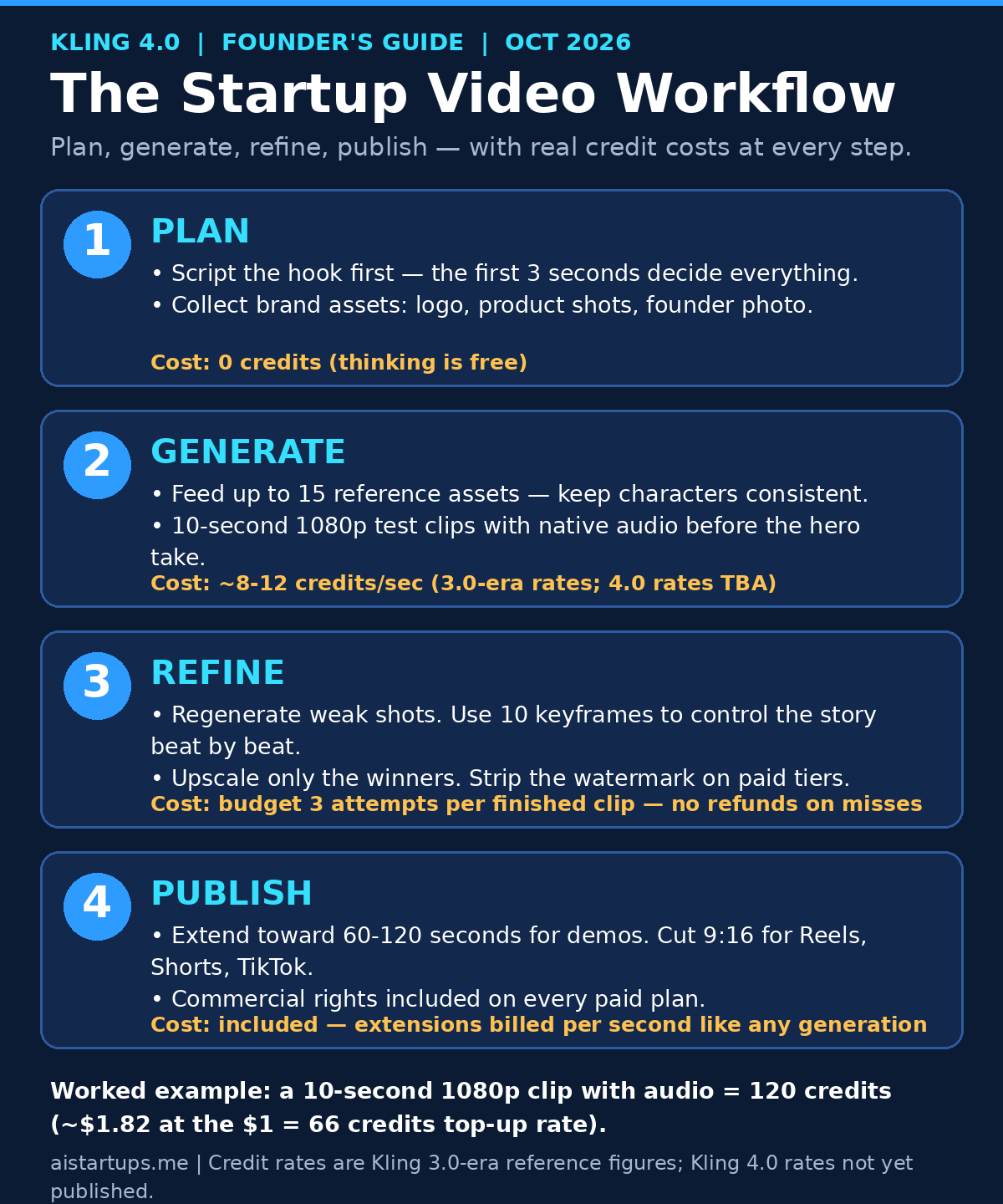
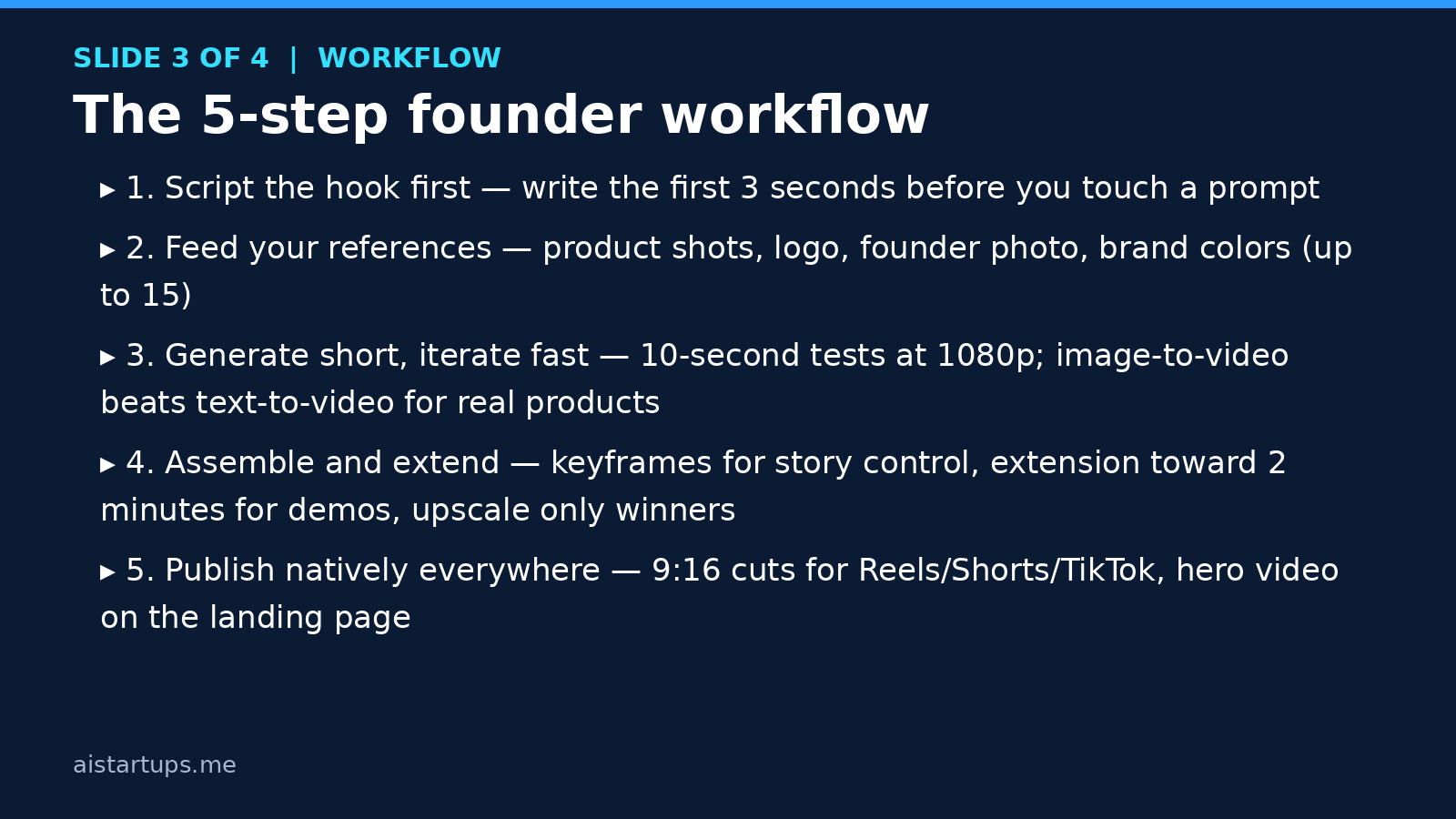
Step 1: Script the hook first, not the prompt
The first three seconds decide whether anyone watches seconds four through thirty. Write those three seconds as copy before you open Kling — what’s on screen, what’s said, why a scroller stops. Most bad AI video isn’t a model problem; it’s a “nobody wrote anything” problem. A one-paragraph script beats a one-sentence prompt every single time.
Step 2: Feed it your references
This is where the 15-asset Omni Reference earns its keep. Upload your actual product photos (not renders, not mockups — real photos), your logo, your brand colors, and if there’s a human in the spot, reference photos of that person. Then use image-to-video rather than text-to-video wherever possible: starting from a real frame of your product means the model isn’t inventing what your product looks like. It’s the single biggest quality lever in the whole workflow, and most people skip it.
Step 3: Generate short, iterate fast
Don’t open with a 30-second hero take. Generate 10-second tests at 1080p with native audio on, check motion quality, check that the product looks right, check the lip sync if there’s dialogue. Each test is ~120 credits — pocket change. Only when a test looks right do you spend the big generation on the full 30-second version. Think of it like proof prints in photography: cheap, fast, disposable, essential.
Step 4: Assemble, extend, upscale
Use the 10 keyframes to control the story beat by beat — this is how you get a beginning, middle, and end instead of 30 seconds of vibes. For longer product demos, use the extension feature to stretch toward two minutes. Upscale only the winners; upscaling a clip you don’t love is just a more expensive clip you don’t love. And do all of this on a paid tier so the watermark is gone — a watermarked ad tells the viewer “we couldn’t afford the $10 plan,” which is not the message.
Step 5: Publish natively, everywhere
Cut 9:16 versions for Reels, Shorts, and TikTok (vertical is where the attention is), keep a 16:9 for YouTube and your site, and put the hero video above the fold on your landing page. Pair the whole push with a lean AI startup marketing playbook mindset: ship, measure, iterate — the fact that each variant costs a few dollars means you can finally afford to test like a big company.
Real talk, though: the video gets the click, but the landing page closes the sale. If your site takes six seconds to load or still looks like a template from 2015, fix that before you spend a dollar on ads — plenty of founders hand the whole site rebuild to a web development studio like AISquadX and keep their own hours on the product.
Your first ten AI videos will be bad. Budget for them the way you budget for ad testing — because that is exactly what they are.
What to make first: the 80/20 starter list
Don’t try to make a brand film on day one. The founders getting value from AI video right now all started with the same tiny portfolio — three formats, one weekend:
- One 15–30 second founder-style ad. You (or an AI presenter) talking to camera, product in hand or on screen, one clear offer, one call to action. This is your paid social workhorse.
- One product demo loop for the landing page. Fifteen seconds, no dialogue needed, product doing the thing it does. Silent loops are cheap to generate and they lift conversion on autopilot.
- Five 9:16 cuts for organic social. Repurpose the ad: different hooks, different first frames, different captions. Volume matters more than perfection here.
That’s it. Seven videos, one weekend, maybe $30 in credits on the Pro plan. Then you look at what performed and double down — which is a better strategy than 99% of startup video efforts I’ve seen, AI or otherwise.
Pro tips and honest pitfalls
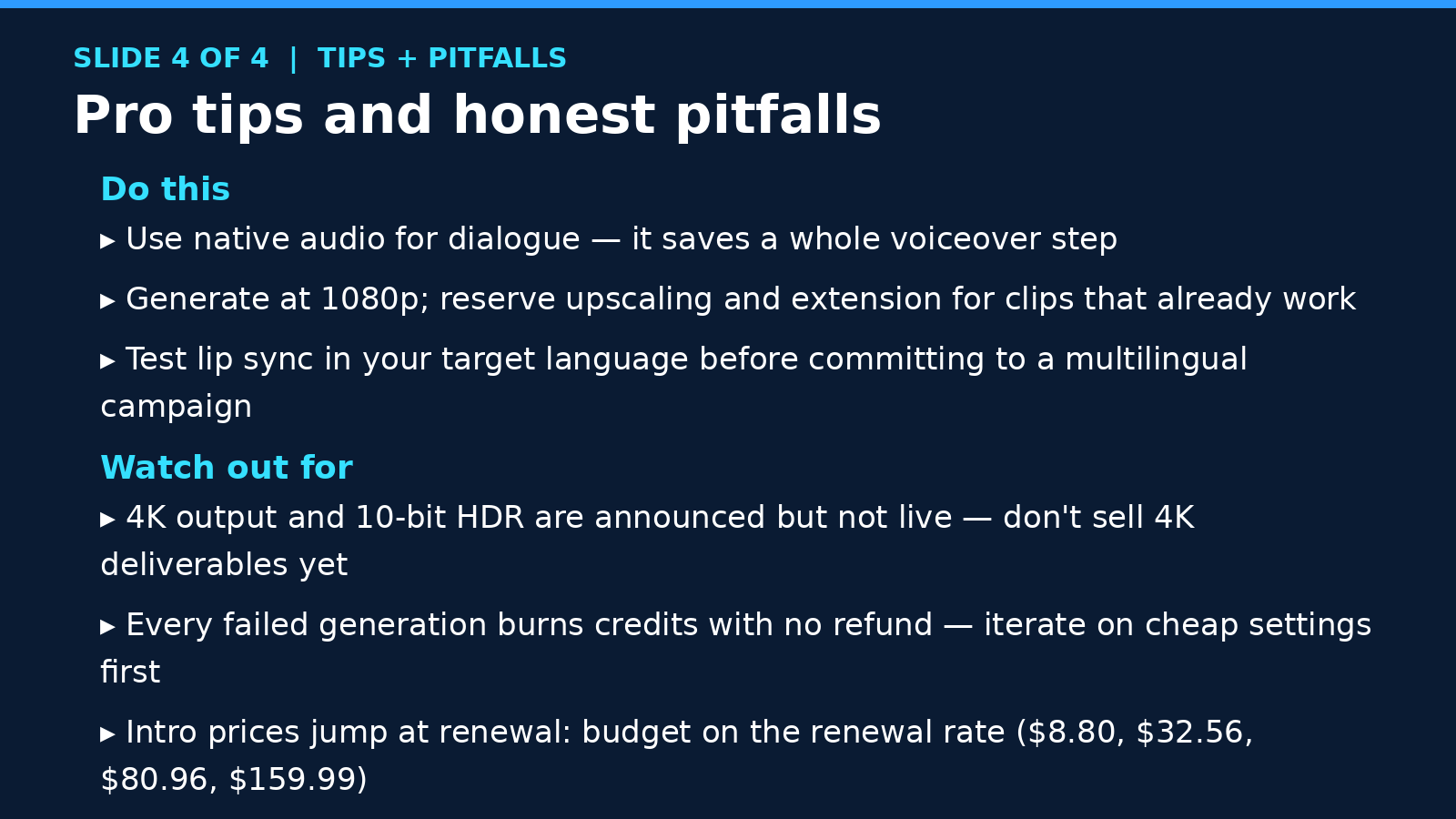
Do this
- Use native audio for dialogue. Generating the voice with the picture saves an entire voiceover step — no recording, no syncing, no timing headaches.
- Generate at 1080p; reserve upscaling for winners. Upscaling and extension cost credits per second. Spend them on clips that already work.
- Test lip sync in your target language first. Nine supported languages is impressive on paper; verify yours looks natural before building a whole multilingual campaign around it.
- Start every product shot from a real photo. Image-to-video with your actual product photo in the reference set. I keep repeating this because it’s the difference between “wow” and “what is that thing.”
Watch out for
- 4K and 10-bit HDR are announced, not live. Don’t sell 4K deliverables to clients or plan a campaign around specs that are still “coming soon.”
- Every miss burns credits, and there’s no refund. This is the real cost of AI video — not the subscription, the retries. Iterate on the cheapest settings that let you judge quality.
- Intro prices jump at renewal. Budget on $8.80 / $32.56 / $80.96 / $159.99, not the first-month promos. Put the renewal date in your calendar.
- The free tier is for testing, not business. Watermarked output and no commercial rights means anything you make there stays in the lab.
- 4.0’s rate card isn’t out yet. All the per-second math in this article uses verified 3.0-era rates as reference. Check Kling’s official pricing page before scaling spend — if 4.0 burns faster, your $4-per-clip math changes.
Kling 4.0 vs the alternatives
Quick honest comparison, since you’re wondering: Google’s Veo 3.1 and Runway remain strong on raw quality, and ByteDance’s Seedance and Hailuo’s MiniMax are real contenders on speed and price. Kling’s edge for startups specifically is the combination of commercial rights from the cheapest paid tier and credit costs that undercut the field — a 10-second 1080p clip with audio for under two dollars in credits is simply hard to beat. Where Kling has historically lagged is polish on complex scenes, which is exactly what 4.0 claims to fix. Our full best AI video generators for startups breakdown has the detailed head-to-head if you’re comparison shopping.
FAQ
Is Kling 4.0 free?
There’s a free tier, but it’s for testing: limited generations, watermarked output, and no commercial rights. If you want to make videos for your business — ads, landing pages, social — you need a paid plan, starting at $10/month ($6.99 for the first month).
Can I legally use Kling videos in paid ads?
Yes — every paid tier includes commercial use rights for generated content, plus watermark removal. That’s actually one of Kling’s best selling points: some competitors gate commercial rights behind higher tiers. Just don’t use the free tier for anything commercial.
How much does one finished video really cost?
Using verified Kling 3.0-era rates as reference (4.0’s rate card isn’t published yet): a 10-second 1080p clip with audio burns about 120 credits, roughly $1.82. Realistically budget three attempts per finished clip, which puts you around $4 per finished ad on the $37/month Pro plan. Compare that to a $500 freelancer invoice and the ROI conversation is short.
Does Kling 4.0 support 4K video?
Not yet. Native 4K output and 10-bit HDR (at both 4K and 1080p), plus a 21:9 ultrawide format, were announced as “coming soon” at launch. Generate in 1080p today and upscale selectively; don’t promise 4K deliverables until the feature actually ships.
Should I use klingai.com or kling.ai?
Use kling.ai — the old klingai.com domain now redirects there. If a tutorial or review still links to the old domain, it hasn’t been updated in a while, which tells you something about how fresh its pricing info is.
The Bottom Line
Kling 4.0 is the first AI video model I’d actually recommend a founder build a campaign on — not because the tech is magic, but because the economics finally work: 30-second native takes, real control over consistency, commercial rights from ten bucks a month, and per-video costs measured in single dollars.
The playbook is simple. Start on Standard this weekend. Script one hook. Feed it your real product photos. Generate short, iterate fast, and ship seven videos before Monday. Your first ten will be bad — budget for that like ad testing, because that’s what it is.
And here’s the part worth saying out loud: the window where “we make our ads with AI” is a novelty advantage is short. In six months, every competitor will be doing this. The founders who win won’t be the ones with the best model — they’ll be the ones who built the habit first. That habit starts this weekend.